The computer is often dead, one or two minutes to recover, and shut down the symptoms of constant power.
System logs are roughly divided into two types of error reporting:
1.
Event ID: 51
Event Type: Warning
Event Source: Disk
Description: An error was detected on device \ device \Harddisk3\DR3 during a paging operation.(An error was detected on device \ device \Harddisk1\D during paging.)
2.
Event ID: 9
Event Type: Error
Event Source: NVGTS
Description:a parity Error was detected on device\ SCSI \nvgts1.(device\ device\ SCSI \nvgts1 did not respond within transmission wait time)
So tangled used for a long time, analysis should be Nvidia SATA Device driver problem, but others NV are no longer new driver, this Bug can not be Fixed.
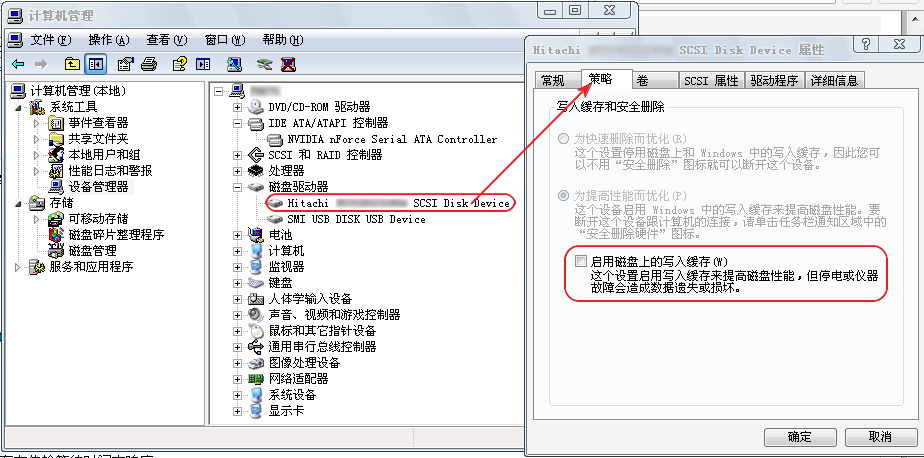
Today I stumbled upon a method that seemed to work: go to the device manager and open the “disk drive” and close the write cache on the disk.
Category Archives: How to Fix
Error: could not install packages due to an environmenterror: [winerror 5] access denied.
Error installing PIP Install Pypiwin32. 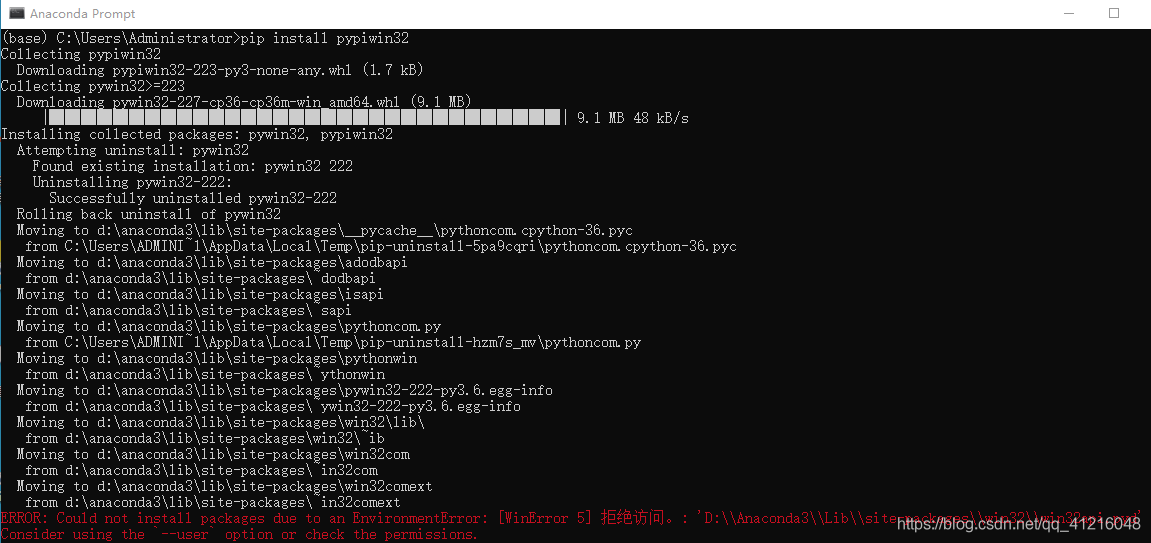
ERROR: Could not install packages due to an EnvironmentError: [WinError 5]. Pyd ‘
Consider using the --user option or check the permissions.
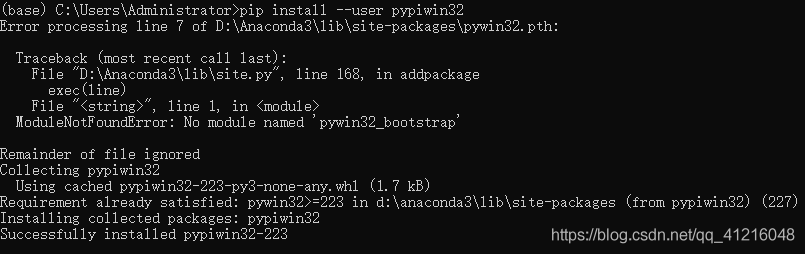
will add –user after install Could not install packages due to an EnvironmentError: [WinError 5], can be solved in this way)
Solution: ora-00205: error in identifying control file, check alert log for more info
Problem: Startup database reports an error, content ORA-00205: Error in identifying control file, check Alert log for more Info
solution:
the first step: look at the journal CD $ORACLE_BASE/diag/RDBMS/zdzrac/zdzrac1/trace; Tail – 200 alert_zdzrac1. The log
note: 200 represents the display of 200 lines
CTL ‘,’/ disk2/ control01.ctl’, ‘/disk3/control03.ctl’,’/disk3/control03.ctl’ scope=spfile; Causes the control file path to change
step 3: find the path of the original control file on another normal node
SQL> select status,name from v$controlfile;
the STATUS of the NAME
——————————————————————————–
+ DATA/zdzrac controlfile/current. 256.947408805
step 4: modify the control file path in the spfilec parameter file to solve the problem
oracle# create pfile = ‘/ u01/app/oracle/product/11.2.0.4/dbhome_1/DBS/init0714 ora’ from spfile = ‘/ u01/app/oracle/product/11.2.0.4/dbhome_1/DBS/spfilezdzrac1 ora’;
oracle# vi/u01/app/oracle/product/11.2.0.4/dbhome_1/DBS/init0714 ora
zdzrac2.__db_cache_size=2801795072
zdzrac1.__db_cache_size=2801795072
zdzrac2.__java_pool_size=16777216
zdzrac1.__java_pool_size=16777216
zdzrac2.__large_pool_size=33554432
zdzrac1.__large_pool_size=33554432
zdzrac1.__oracle_base=’/u01/app/oracle’#ORACLE_BASE set from environment
zdzrac2.__oracle_base=’/u01/app/oracle’#ORACLE_BASE set from environment
zdzrac2.__pga_aggregate_target=838860800
zdzrac1.__pga_aggregate_target=838860800
zdzrac2.__sga_target=3539992576
zdzrac1.__sga_target=3539992576
zdzrac2.__shared_io_pool_size=0
zdzrac1.__shared_io_pool_size=0
zdzrac2.__shared_pool_size=654311424
zdzrac1.__shared_pool_size=654311424
zdzrac2.__streams_pool_size=0
zdzrac1.__streams_pool_size=0
*.audit_file_dest=’/u01/app/oracle/admin/zdzrac/adump’
*.audit_trail=’db’
*.cluster_database=true
*. Compatible = ‘11.2.0.4.0’
*. Control_files = ‘+ DATA/zdzrac controlfile/current 256.947408805’// change control file path
*.db_block_size=8192
*.db_create_file_dest=’+DATA’
*.db_domain=”
“/ u01/app/oracle/product/11.2.0.4/dbhome_1/DBS/init0714 ora” 44 l, 1489 c
step 5: restart the database using the pfile file
startup pfile = ‘/ u01/app/oracle/product/11.2.0.4/dbhome_1/DBS/init0711 ora’;
step 6: create the spfile file with the modified pfile
SQL> The create spfile from pfile = ‘/ u01/app/oracle/product/11.2.0.4/dbhome_1/DBS/init0714 ora’ ‘;
step 7: close the database and start the database
SQL> shutdown immediate
SQL> startup
Swift Error fatal error: unexpectedly found nil while unwrapping an Optional value
Fatal error: Unpacking an empty Optional value.
Wrapping: Use an exclamation point after Optional. Such as “value!”
Error code:
Wrapping: Use an exclamation point after Optional. Such as “value!”
Error code:
let testString =”lalala”
Let a = testString. ToInt ();
Println (” \ (a! “)
You cannot unpackage an empty Optional, otherwise a runtime error will be reported. Therefore, it should be determined whether it is null before unpacking Optional.
Correct writing:
let testString =”lalala”
Let a = testString. ToInt ();
If (a! = nil) {
Println (” \ (a! “)
}
Under the “return-d” mode, the number of “return / return” is 1
When installing the software with apt-get, something like
install-info: No dir file specified; Try — help for more information. DPKG: error handling gettext (– configure) : subprocess post-installation script returns error number 1. In handling it, an error occurs:
findutils
E: sub-process /usr/bin/ DPKG returns an error code (1)
Sudo mv /var/lib/ DPKG/inf.bak // now rename info folder
sudo mkdir /var/lib/ DPKG /info // and create a new info folder
sudo apt-get update
// don’t explain it
apt-get-f install XXX
sudo mv /var/lib/ DPKG /info/* /var/lib/ DPKG /info.bak
// after the previous step will generate some files under the new info folder, Now all these files will be moved to the info. Bak folder
sudo rm-rf /var/lib/ DPKG /info/delete their newly created info folder
sudo mv /var/lib/ DPKG /info/bak /var/lib/ DPKG /info/change the previous info folder back to the name
until this problem is solved successfully
In general, the above method will solve the problem

LaTeX Error: File `.def’ not found. [\usepackage]
LaTeX Error: File ‘. Def ‘not found. [\usepackage]

has this problem because I have both Ctex and latex installed in my computer, so there are conflicts. Uninstall Ctex.
Linux-mysql8.0 password reset problem – error 1396 (HY000): Operation alter user failed for ‘root’ @’localhost ‘
Step 1: open my.cnf configuration file and add skip-gran-tables


. CNF cannot be found, so you can edit a

by yourself in /etc. Step 2: restart mysql

step 3: after login, leave the password empty and modify it. Otherwise, an error will be reported
Update User Set Authentication_string = ‘” Where user=’ root ‘;
ALTER USER ‘root’ @’ localhost ‘IDENTIFIED WITH mysql_native_password BY’ password ‘;
ALTER USER ‘root’ @’ localhost ‘IDENTIFIED WITH mysql_native_password BY’ password ‘
Samba mount error (115): operation now in progress refer to the mount.cifs (8) manual page (e.g. ma
If you look at this error, you really can’t see any mistake: it says that the operation is in progress. Please refer to the user manual for details.
1. First determine if Samba is working
2. Whether ports 139 and 445 of the server are open
3, and then ping the IP address, found that the ping does not work, the original is my IP wrong
1. First determine if Samba is working
2. Whether ports 139 and 445 of the server are open
3, and then ping the IP address, found that the ping does not work, the original is my IP wrong
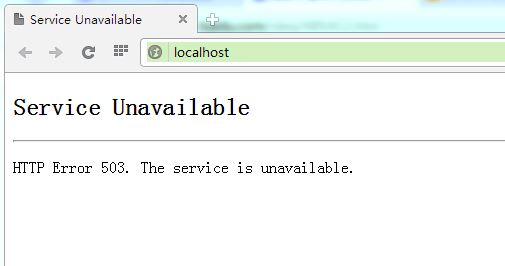
WIN7 + IIS7 Service Unavailable HTTP Error 503. The service is unavailable.
Open IIS on Windows 7 for website publishing.
However, after OPENING IIS, The default website cannot be opened, showing The Service Unavailable HTTP Error 503. The Service is Unavailable.
Open IIS and discover that the application pool has stopped. After startup, browse again, or not, the application pool will always stop itself.
When you open the Windows log, you can see the error message
Windows cannot find the local configuration file and is using a temporary configuration file to let you log in. Changes made to this configuration file are lost when you log out.
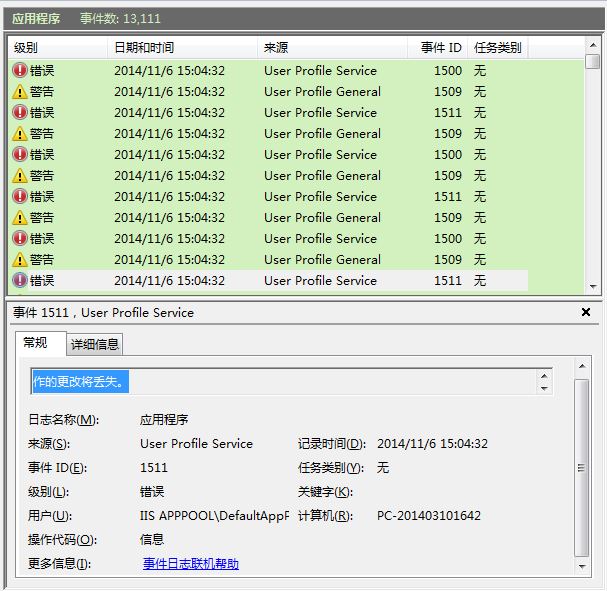
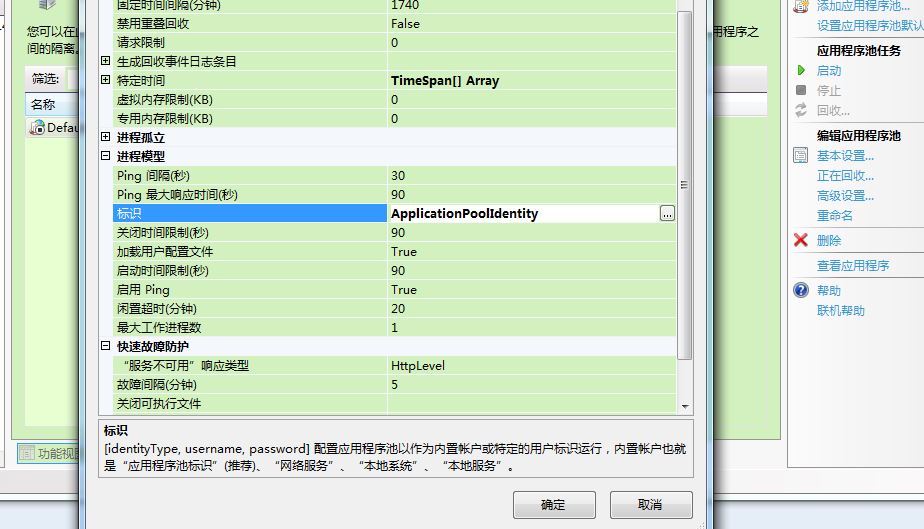
Baidu of, combine the plan that netizen provides next, change the setting of program pool.
IIS- Application pool – Advanced Settings – Process Model – identity. Change the built-in account to NetworkService
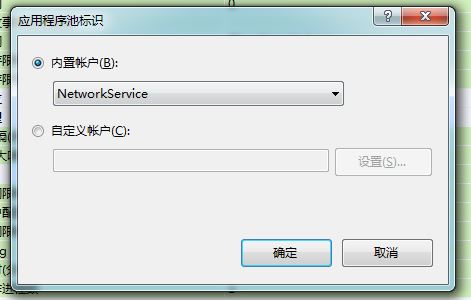
Ok, done.
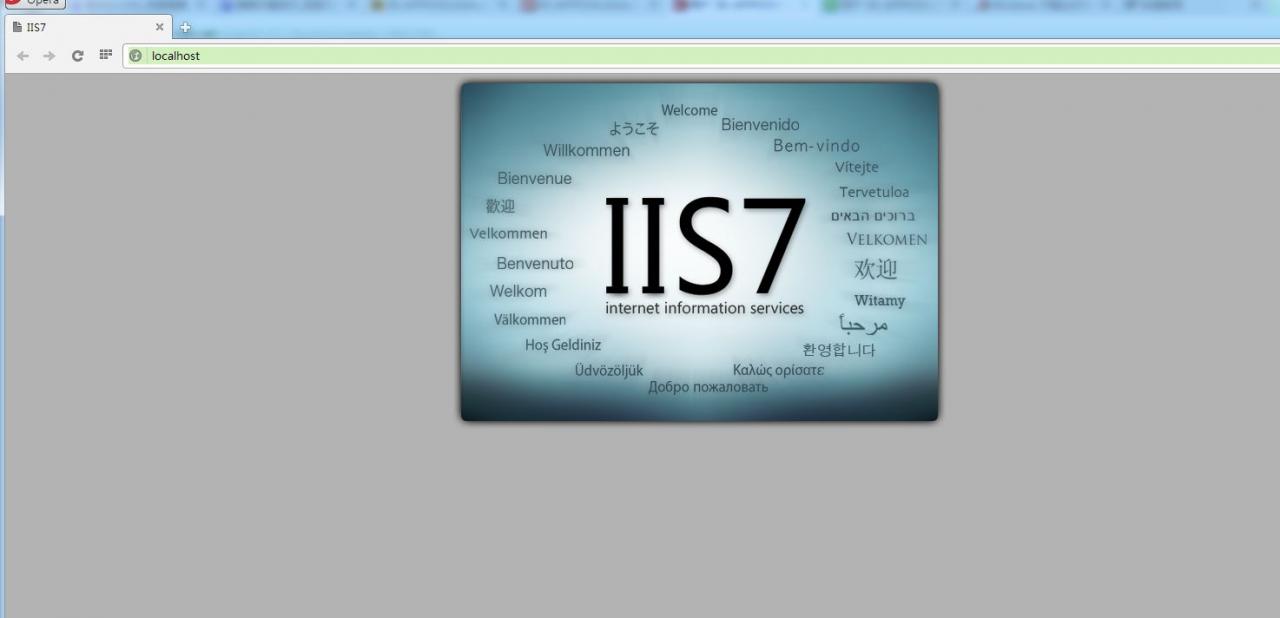
Launch the application pool, browse the web page, and successfully see the IIS default page.
Used to apache, Nginx, now to toss iis really tired, always inexplicable problems. Ah…
Server system: Window Server 2008 R2
Here is my problem:
HTTP Error 503. The service is unavailable.”
Later found that the application pool opened, inexplicably stopped!!
Solutions:
Select the application pool used – & GT; Advanced Settings, find the “Identity” property in the “Process Model” bar, click the pop-up window, select “NetworkService” in the “Built-in Accounts”, ok, restart the application pool, restart the website.
Reference: http://blog.csdn.net/vivian8725118/article/details/18661683
However, after OPENING IIS, The default website cannot be opened, showing The Service Unavailable HTTP Error 503. The Service is Unavailable.
Open IIS and discover that the application pool has stopped. After startup, browse again, or not, the application pool will always stop itself.
When you open the Windows log, you can see the error message
Windows cannot find the local configuration file and is using a temporary configuration file to let you log in. Changes made to this configuration file are lost when you log out.
Baidu of, combine the plan that netizen provides next, change the setting of program pool.
IIS- Application pool – Advanced Settings – Process Model – identity. Change the built-in account to NetworkService
Ok, done.
Launch the application pool, browse the web page, and successfully see the IIS default page.
Used to apache, Nginx, now to toss iis really tired, always inexplicable problems. Ah…
Server system: Window Server 2008 R2
Here is my problem:
HTTP Error 503. The service is unavailable.”
Later found that the application pool opened, inexplicably stopped!!
Solutions:
Select the application pool used – & GT; Advanced Settings, find the “Identity” property in the “Process Model” bar, click the pop-up window, select “NetworkService” in the “Built-in Accounts”, ok, restart the application pool, restart the website.
Reference: http://blog.csdn.net/vivian8725118/article/details/18661683
Solutions to the failure of R language loading rjava
library(rJava)
Error: when ‘rJava’ is calculated in loadNamespace(), onLoad failed.
call: inDL (x, as the logical (local), as the logical (now),…).
error: unable to load Shared object ‘f:/Program Files/R/R – 3.1.2/library/rJava/libs/x64/rJava DLL’ :
LoadLibrary failure: %1 is not a valid Win32 application.
Error: when ‘rJava’ is calculated in loadNamespace(), onLoad failed.
call: inDL (x, as the logical (local), as the logical (now),…).
error: unable to load Shared object ‘f:/Program Files/R/R – 3.1.2/library/rJava/libs/x64/rJava DLL’ :
LoadLibrary failure: %1 is not a valid Win32 application.
Error: failed to load ‘rJava’ package or namespace,
The reason for the above error is that your JAVA version is 32-bit and your R is 64-bit, so download the 64-bit version of the JRE and change the environment variable JAVA_HOME to the position of the 64-bit JRE
The JRE can be downloaded in the website: http://www.java.com/en/download/manual.jsp
Fatal error in GC getthreadcontext failed bug exception.
Fatal Error in GC GetThreadContext Failed
PC – unity5.3.4 c# exe Windows
Don’t talk nonsense. A variety of online answers are antivirus software off. But requirements do not allow others to be closed.
You can only start with code.
Discovery: Open a thread. This thread while doesn’t sleep. Or sleep too little. This thread is missing the time cache.
All longer sleep times. Done!
PC – unity5.3.4 c# exe Windows
Don’t talk nonsense. A variety of online answers are antivirus software off. But requirements do not allow others to be closed.
You can only start with code.
Discovery: Open a thread. This thread while doesn’t sleep. Or sleep too little. This thread is missing the time cache.
All longer sleep times. Done!
Chrome failed to access MSDN home page. The specified CGI application encoded an error and the server terminated the
In late August and early September, pages accessing MSDN with Chrome returned The specified CGI Application error and The server process. The problem. But THERE’s nothing wrong with IE. At the beginning, I did not find the reason, so I was unable to browse MSDN with my beloved Chrome. You can only open a separate IE dedicated view. Don’t be so awkward.
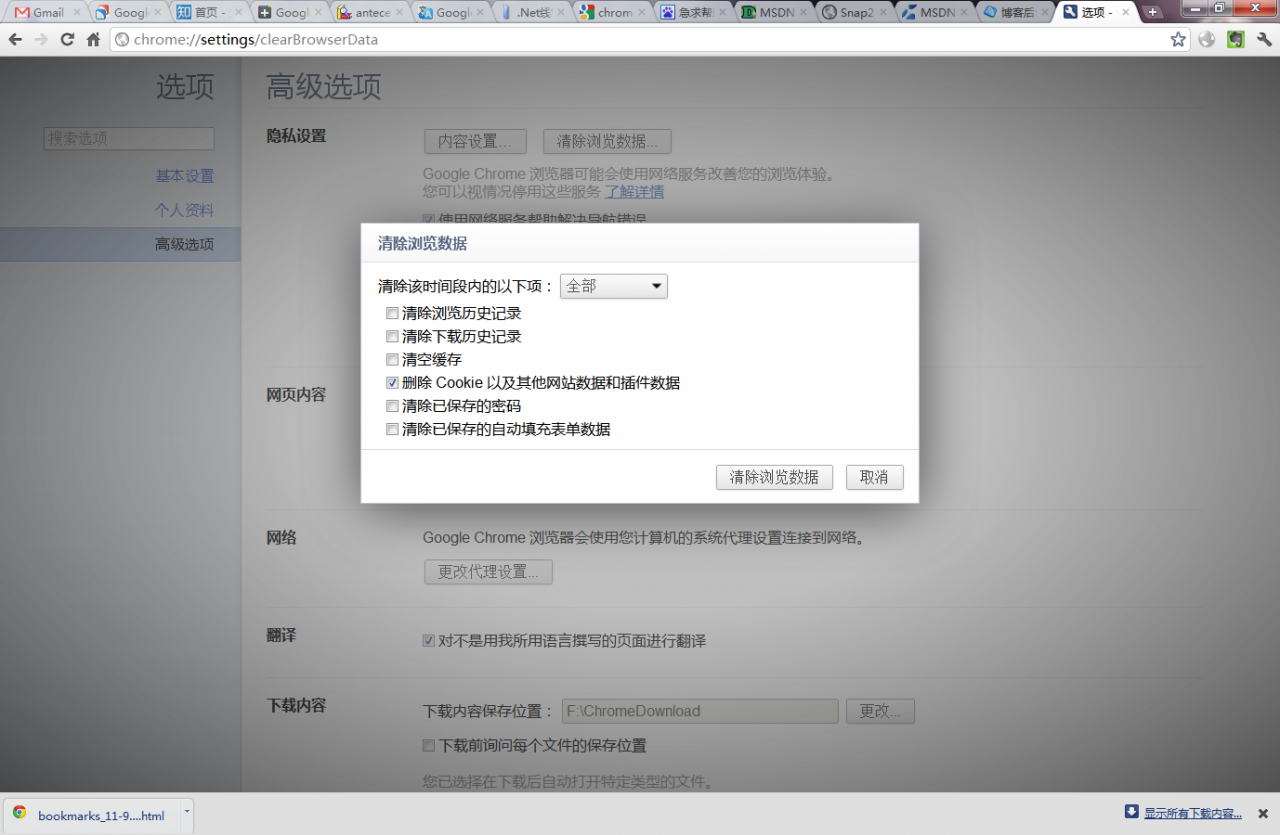
Today, I saw a netizen wrote that his FF also had a problem. The solution was to empty the Cookie, so I tried it, and the problem was solved. But how to cause the root of the problem is not clear, if which net friend clear also hope to teach me.
Reproduced in: https://www.cnblogs.com/huting/archive/2011/09/10/2172991.html