Category Archives: How to Fix

[Python] notimplemented and notimplemented error

NotImplemented is a non-exception object, and NotImplementedError is an exception object.

>>> NotImplemented
NotImplemented
>>> NotImplementedError
<type 'exceptions.NotImplementedError'>


>>> type(NotImplemented)
<type 'NotImplementedType'>
>>> type(NotImplementedError)
<type 'type'>

TypeError is obtained if NotImplemented is thrown, because it is not an exception. Throwing a NotImplementedError will normally catch the exception.

>>> raise NotImplemented

Traceback (most recent call last):
  File "<pyshell#10>", line 1, in <module>
    raise NotImplemented
TypeError: exceptions must be old-style classes or derived from BaseException, not NotImplementedType


>>> raise NotImplementedError

Traceback (most recent call last):
  File "<pyshell#11>", line 1, in <module>
    raise NotImplementedError
NotImplementedError

Why is there a NotImplemented and a NotImplementedError?
Sorting a list in Python often USES a comparison operation such as ___ ().
Sometimes Python’s internal algorithms choose another way to determine the comparison result, or simply choose a default result. If an exception is thrown, the sorting operation will be broken. Therefore, it will not be thrown if NotImplemented is used, thus Python can try other methods.
The NotImplemented object sends a signal to the runtime environment to tell it that if the current operation fails, it should check out other feasible methods. For example, in the expression a == b, if a. ___, eq__(b) returns NotImplemented, Python will try B. ___ (a). If the call to the method of B/eq__ can return True or False, the expression is successful. If b.__eq__(a) also fails, Python continues to try other methods, such as using! = to compare.

ref:http://www.cnblogs.com/ifantastic/p/3682268.html
Jdk11, using JavaFX in eclipse

Eclipse Version: 2018-12 (4.10.0)
JDK Version 11.0.2
Windows 64
First of all, the official documentation for JavaFX,
, is very detailed, and this article does not follow it exactly.
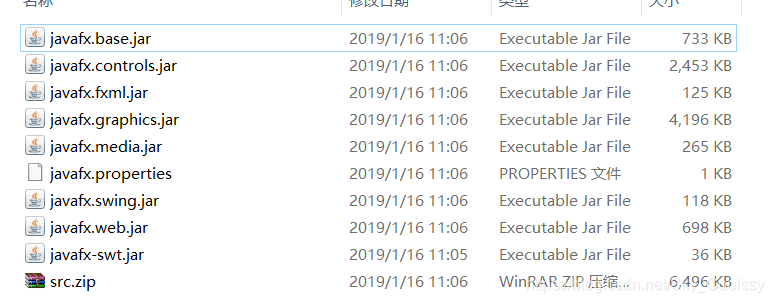
Download an appropriate JavaFX runtime Download an appropriate JavaFX runtime extract to folder (location not fixed but remember path), for example:
D:\openjfx-11.0.2_windows-x64_bin-sdk\javafx-sdk-11.0.2"
2. Ecliplse has been downloaded by default and Java11.0.2 development environment has been configured. Note that since Java11, the JDK and javaFX have been separated (there is no jre package for javaFX in the JDK after exporting the jre folder from the command line), so you don’t have to download a e(fx)clipse plug-in to use, you have to download and add it manually.
3. Create a User Library according to the official document. Include the jre under lib in the JavaFX runtime file downloaded before
Eclipse -> Window -> Preferences -> Java -> Build Path -> User Libraries -> New
next name is arbitrary, you can find the added FX lib in the Library when creating the project
4. Create a Java project, need three files, (someone else’s Github project link), and import a custom Library path.
5. The following problem occurs in the runtime. The solution mentioned in the official document is to add VM parameters
run-& gt; Run Configurations... select Main. Java is the Main class also click the Arguments TAB you can see the Arguments of the VM option, add the following parameters
- the module - the path "/ path/to \ \ lib" deployment headaches - SDK - 11 - add - modules deployment headaches. Controls, deployment headaches. FXML
Here, the path, to 11 \ lib \ deployment headaches - SDK - parameter is the path of the openjfx before download file decompression, such as
- the module - path "D: \ eclipse \ openjfx - 11.0.2 _windows x64_bin - SDK \ deployment headaches - SDK - 11.0.2 \ lib" - add - modules deployment headaches. Controls, deployment headaches. FXML
The successful running
The import Javafx cannot be resolved
JavaFX Runtime Components are missing, and are required to run this application
Problem 3. Error: The Main class Application.main cannot be initialized
As for the first problem, it is probably due to the
problem caused by running javaFX in the way of installing plug-ins when Java11 JDK and javaFX are separated at the beginning. If there is a problem with the import of Library package, check the path or go directly into the path to see if all of these jre files exist.

[reprint] method to solve error 16 in illustrator CS6

http://www.pc0359.cn/article/jiaocheng/67976.html
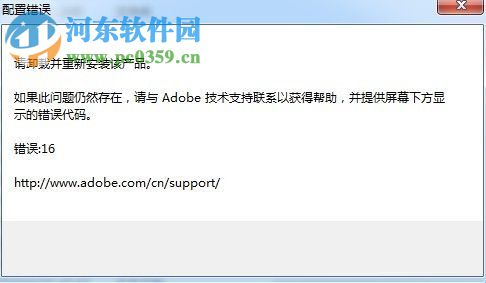
Adobe Illustrator CS6 is a graphics processing software owned by Adobe. It is fundamentally different from Photoshop. Photoshop can be used to beautify images, while AI can be used to beautify vector graphics, which is often called illustration beautification! Generally, works produced by this software will be applied to posters or illustrations. From a business perspective, users of this software need more professional knowledge than users of PS. Many users have been prompted with the error code: 16 after installing the software, as shown in the figure below.

Methods and steps:
Illustrator CS6 64-bit simplified Chinese version size: 1.75gb

version: 2017 free
environment: WinXP, Win7, Win8, Win10, WinAll
Enter the download
Because xiaobian used to test the computer did not install AI software, so is to use PS instead, because they set the way is the same!
1, you open all the programs in the lower left menu bar, in the Adobe folder will be able to find the AI software!

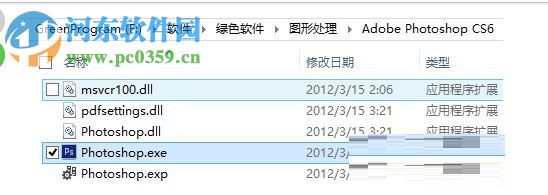
2, in addition to the above methods can also be found in the folder we install the software to find the main program!

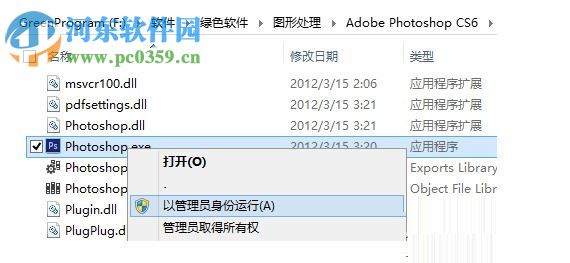
3. Then right-click the icon with the right mouse button! Select the option to run as administrator!

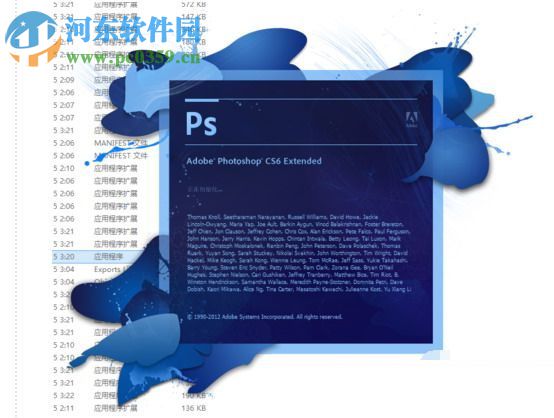
4, after the selection can start the normal operation of the software!

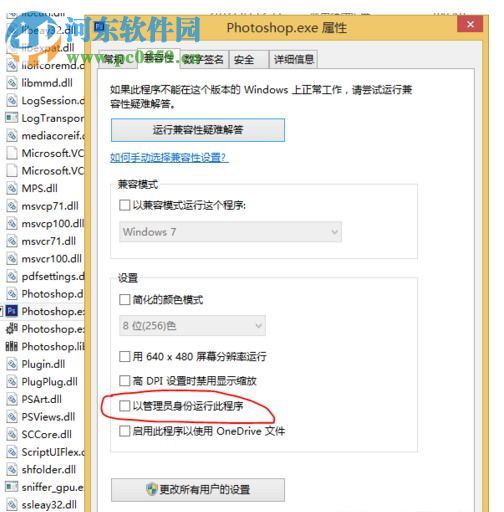
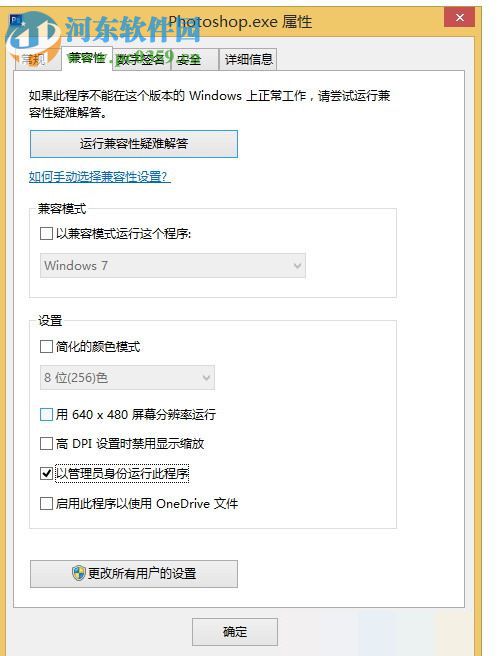
5, but the above operation has a disadvantage, that is, every run must be this operation! To avoid this step we can set up a permanent “run as administrator”. Right-click the software icon and select the “Properties” option in the pop-up box!

6. After entering the property setting interface, set the TAB to “Compatibility”, and then check the “Run as administrator” at the bottom! Finally, click “Apply” – “OK” button in turn to save Settings!

7. After completing the above steps, you can double-click to run the software directly!
Above is the small make up an error when processing run Adobe Illustrator CS6 for 16 method, in fact, the general configuration software to appear or situation that is not running, because we haven’t enough to set permissions, the best way is directly set to run an administrator, set no accident won’t show the error!

Solution of sidebyside error 59 / 32

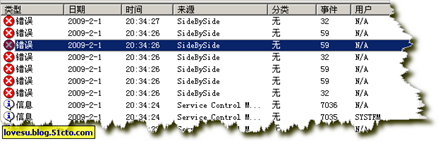
looking at the event viewer, I found several of the same system errors every morning starting from February 1 (see figure) :


description:
event ID: 32
cannot be found affiliated assembly Microsoft. Vc80.mfcloc, the last error was that the reference assembly was not installed on the system.
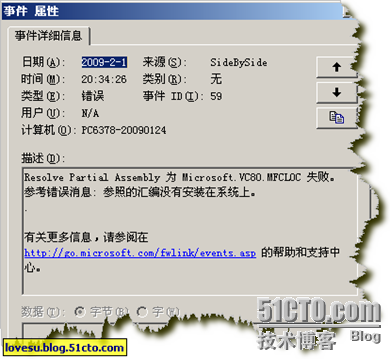
event ID: 59
Resolve Partial Assembly is Microsoft. Vc80. MFCLOC failed. Reference error message: The reference assembly is not installed on the system.
event ID: 59
Generate Activation Context C: windowswinsxsx86_microsoft.vc80. mfc_1fc8b3b9a1e18e3b_8.50727.42 _x-ww_dec6ddd2mfc80u. Refer to error message: Operation completed successfully.
above is the description, on the Internet to look up relevant information, explain the poor, after the discovery of a good site,

http://www.eventid.net/display.asp?eventid=59& eventno=4228& source=SideBySide& phase=1

solution:
download vcredist_x86 installation, download address:

http://www.microsoft.com/downloads/details.aspx?displaylang=zh-cn& FamilyID=32BC1BEE-A3F9-4C13-9C99-220B62A191EE
, after restart, the system log is normal, no error found.

postscript:
this error does not seem to affect the use of the operating system and software, found before the error, the computer performance is very good, all kinds of programs normal. When I checked the system log, I felt uncomfortable seeing the Red Cross, which immediately aroused my curiosity.

Reproduced in: https://blog.51cto.com/myhat/128176

How to Fix errors in Chinese input of latex

Chinese and English are mixed in WinEdt:

\documentclass[UTF8]{ctexart}
\begin{document}
中文中文English
\end{document}

The following two problems have occurred with PDFTeXify:

! Package inputenc Error: Keyboard character used is undefined
(inputenc)                in inputencoding `utf8'.

and

! Package CJK Error: Invalid character code.

Solution: [WinEdt]-& GT; [Document]-> [Document Settings]-> The Format to utf-8

Error 403 Forbidden when using WGet or curl

This error occurred because the server rejected the request using wget or curl. In order to prevent crawlers from consuming the server resources, the server selectively screened the request headers according to your request. Therefore, the Agent user-agent of wget and curl needs to be modified for camouflage.
 
I. Modify user-Agent of WGET
1. Temporarily change THE UA of WGET
Before wget, add the parameter -u , which means to set User Agent

wget www.google.com -U "Mozilla/5.0 (Windows NT 10.0; Win64; x64) AppleWebKit/537.36 (KHTML, like Gecko) Chrome/72.0.3626.121 Safari/537.36"

What is User Agent and how to get it, please refer to the following blog. Of course, you can also use the above one directly.
What is the UserAgent and how to view the UserAgent using the browser
 
2. Permanently change THE UA of Wget
Modify the configuration file /etc/wgetrc to add the following line:

header = User-Agent: Mozilla/5.0 (Windows NT 10.0; Win64; x64) AppleWebKit/537.36 (KHTML, like Gecko) Chrome/72.0.3626.121 Safari/537.36

The above configuration will take effect for all users. If you only want the current user to take effect, you can add the above line to ~/.wgetrc. If this file is not available, you can create it manually.
 
2. Modify the user-Agent of curl
1. Temporary change to Curl’s UA
Use the following parameters:

curl https://www.google.com --user-agent "Mozilla/5.0 (Windows NT 10.0; Win64; x64) AppleWebKit/537.36 (KHTML, like Gecko) Chrome/72.0.3626.121 Safari/537.36"

 
2. Permanently change Curl’s UA
Modify the profile ~/.curlrc to add the following line:

–user-agent=Mozilla/5.0 (Windows NT 10.0; Win64; x64) AppleWebKit/537.36 (KHTML, like Gecko) Chrome/72.0.3626.121 Safari/537.36

 
Reference:
1, https://www.linpx.com/p/on-an-interesting-play-wget-use.html
2, https://chaifeng.com/_curl_wget_user-agent/

Arithmetical overflow error converting expression to data type datetime

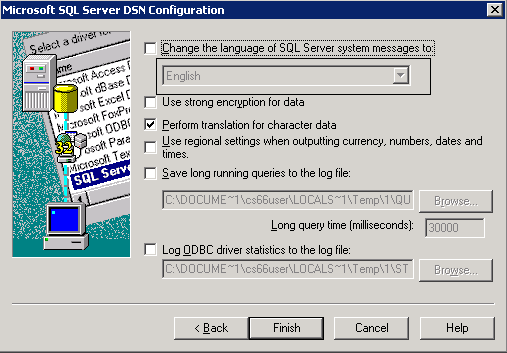
After changing the Sql Server database language, our ContentServer cannot edit the newly created file when using DA. The exception arithmetic overflow error converting to data type datetime cannot be solved by changing the database language again. Today, I found that the ODBC connection configuration has also been changed. So replace it back

If any of the above occurs, see if the language is consistent with the database language.

Reproduced in: https://www.cnblogs.com/yangqianming/archive/2011/07/15/2107445.html

json.decoder.JSONDecodeError: Expecting value: line 1 column 1 (char 0)

This is usually an error caused by the incorrect JSON format. Check your JSON, for example, if it is written in single quotes

{
{
“key1″:”value1”,
“key2″:”value2”

}

>

>

>

>
>

>
 
Although easy to explain, but it does solve the problem of my
— — — — — — — — — — — — — — — — — — — — —
the author: benben0729
source: CSDN:
the original https://blog.csdn.net/benben0729/article/details/80880247
copyright statement: this article original articles for bloggers, reproduced please attach link to blog!

How to Fix stack overflow error

A Cause of StackOverflowError and its solution


An error code

Stacktraces
org.apache.jasper.JasperException: javax.servlet.ServletException: java.lang.StackOverflowError

    org.apache.jasper.servlet.JspServletWrapper.handleJspException(JspServletWrapper.java:505)
    org.apache.jasper.servlet.JspServletWrapper.service(JspServletWrapper.java:417)
    org.apache.jasper.servlet.JspServlet.serviceJspFile(JspServlet.java:320)
    org.apache.jasper.servlet.JspServlet.service(JspServlet.java:266)
    javax.servlet.http.HttpServlet.service(HttpServlet.java:803)
    org.apache.catalina.core.ApplicationFilterChain.internalDoFilter(ApplicationFilterChain.java:290)
Omit the remainder

JsonConfigUtil removes dead loop tool class download address struts2+Hibernate+Spring project
Cause analysis,

StackOverflowError is the meaning of stack overflow
. When I encountered this problem myself, almost all the reasons I found were caused by recursion or endless loop. My own project was caused by writing the toString method in the entity class. A concrete analysis

    // One of the entity classes
    public class Hobby implements java.io.Serializable {
        // Fields
        private Integer hobbyId;
        private String hobbyName;
        private Set<Nurse> nurses = new HashSet<Nurse>();
    }
    // Another one of the entity classes
    public class Nurse implements java.io.Serializable {
        // Fields
        private Integer id;
        private Dept dept;
        private String name;
        private Integer age;
        private String content;
        private String datea;
        private Set<Hobby> hobbies = new HashSet<Hobby>();
    }

It can be seen that each entity class has a set set of the other. If tostring method is used to output Hobby of one of the entity classes, its corresponding set
collection will also output, so will another entity class in it, and then there is also Hobby set collection in Nurse. So you’re stuck in an infinite loop of infinite output

One of the solutions

Delete the toString method in the entity class, and an error will be reported.

 @Override
    public String toString() {
            return "omit";
    }

Solution number two

Set the set collection to null
, Nurse Nurse = new Nurse(); set the set collection to null
, Nurse Nurse = new Nurse();
nurse.setNurses(null);

Solution 3 (also the most commonly used)

Use JsonConfigUtil to remove the dead-loop tool class

     JsonConfig config = JsonConfigUtil.getConfig();
     JSONArray.fromObject(list, config);

Put the object or collection you want to convert to json into the first parameter,
set the object created by the utility class to the second parameter
to complete the automatic disconnection. Get rid of dead cycles

CCS compiler reported an error: error ා 10234-d: unresolved symbols remain

When I just contacted the CCS compiler and created a new test project, the following error occurred:
error #10234-D: unresolved symbols remain
If some of the system’s declared function calls fail.
Solutions:
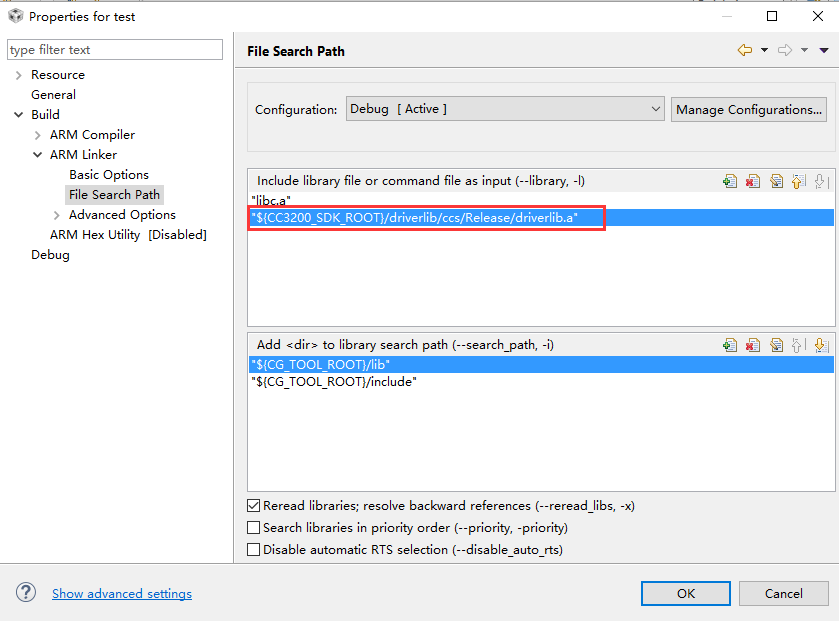
Right click engineering -& GT; Properties-> Build-> ARM Linker-> File Search Path, add driverlib.a link:
“${CC3200_SDK_ROOT}/driverlib/CCS/Release/driverlib.”