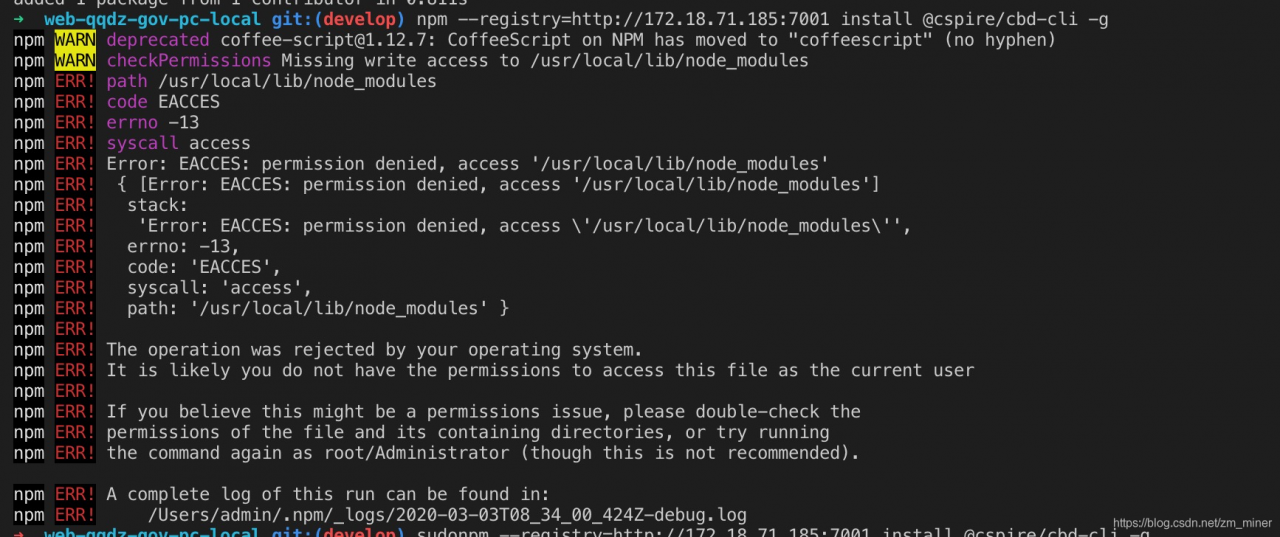
➜ web-qqdz-gov-pc-local git:(develop) npm –registry=http://172.18.71.185:7001 install @cspire/cbd-cli -g
npm WARN deprecated [email protected]: CoffeeScript on NPM has moved to “coffeescript” (no hyphen)
npm WARN checkPermissions Missing write access to /usr/local/lib/node_modules
npm ERR! path /usr/local/lib/node_modules
npm ERR! code EACCES
npm ERR! errno -13
npm ERR! syscall access
npm ERR! Error: EACCES: permission denied, access ‘/usr/local/lib/node_modules’
npm ERR! { [Error: EACCES: permission denied, access ‘/usr/local/lib/node_modules’]
npm ERR! stack:
npm ERR! ‘Error: EACCES: permission denied, access ‘/usr/local/lib/node_modules’’,
npm ERR! errno: -13,
npm ERR! code: ‘EACCES’,
npm ERR! syscall: ‘access’,
npm ERR! path: ‘/usr/local/lib/node_modules’ }
npm ERR!
npm ERR! The operation was rejected by your operating system.
npm ERR! It is likely you do not have the permissions to access this file as the current user
npm ERR!
npm ERR! If you believe this might be a permissions issue, please double-check the
npm ERR! permissions of the file and its containing directories, or try running
npm ERR! the command again as root/Administrator (though this is not recommended).
Enter at the terminal npm –registry=http://172.18.71.185:7001 install @cspire/cbd-cli -g prompted this error when
npm ERR! Error: EACCES: permission denied, access ‘/usr/local/lib/node_modules’
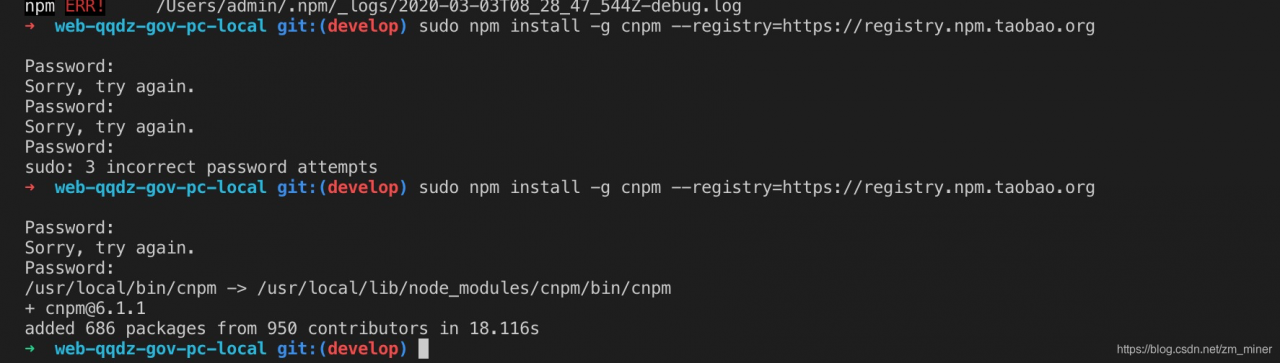
Reason: no administrator privileges when executing command line commands
Solution: Just add sudo in front of the command. Then enter the administrator password of your computer and you're done!
Category Archives: How to Fix
Txt import MySQL: error 1062 (23000): duplicate entry ‘0’ for key ‘primary’
Existing problems:
When importing TXT file into Mysql database, ERROR 1062(23000) always appears: Duplicate entry ‘0’ for key ‘PRIMARY’ ERROR, but TXT file does not have a data with ID (PRIMARY key) of 0.

Reason for error:
This is still not clear, because I have no record of ID=0, so I don’t know why the duplicate ID is 0. At first, I thought it was the data encoding that caused the data chaos, but later I found that even the same encoding could not solve the problem.
Solutions:
Setting the primary key (ID) to AI (Auto Incremental) is sufficient. Setup has been completed and import has been successful
Note:
I thought that if I set the primary key to AI, the primary key column would be 1, 2, 3… , because the primary key in TXT file is discontinuous, but I found that this understanding is wrong, after insertion, the primary key still maintains its discontinuity.
When importing TXT file into Mysql database, ERROR 1062(23000) always appears: Duplicate entry ‘0’ for key ‘PRIMARY’ ERROR, but TXT file does not have a data with ID (PRIMARY key) of 0.
Reason for error:
This is still not clear, because I have no record of ID=0, so I don’t know why the duplicate ID is 0. At first, I thought it was the data encoding that caused the data chaos, but later I found that even the same encoding could not solve the problem.
Solutions:
Setting the primary key (ID) to AI (Auto Incremental) is sufficient. Setup has been completed and import has been successful
Note:
I thought that if I set the primary key to AI, the primary key column would be 1, 2, 3… , because the primary key in TXT file is discontinuous, but I found that this understanding is wrong, after insertion, the primary key still maintains its discontinuity.
Version problem of SQL Server
Recently, SQL Server 2005 has been installed on the computer. It works normally on this computer. Everything is OK.
When connected to the server operation Database, however, you Unspecified error when creating the table:
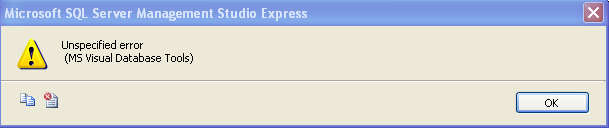
The details of the error are as follows:
===================================


Unspecified error
 (MS Visual Database Tools)


------------------------------
Program Location:


   at Microsoft.VisualStudio.DataTools.Interop.IDTTableDesignerFactory.NewTable(Object dsRef, Object pServiceProvider)
   at Microsoft.SqlServer.Management.UI.VSIntegration.Editors.TableDesignerNode.CreateDesigner(IDTDocToolFactoryProvider factoryProvider, IVsDataConnection dataConnection)
   at Microsoft.SqlServer.Management.UI.VSIntegration.Editors.VsDataDesignerNode.CreateDesigner()
   at Microsoft.SqlServer.Management.UI.VSIntegration.Editors.VsDataDesignerNode.Open()
   at Microsoft.SqlServer.Management.UI.VSIntegration.Editors.VirtualProject.Microsoft.SqlServer.Management.UI.VSIntegration.Editors.ISqlVirtualProject.CreateDesigner(Urn origUrn, DocumentType editorType, DocumentOptions aeOptions, IManagedConnection con)
   at Microsoft.SqlServer.Management.UI.VSIntegration.Editors.ISqlVirtualProject.CreateDesigner(Urn origUrn, DocumentType editorType, DocumentOptions aeOptions, IManagedConnection con)
   at Microsoft.SqlServer.Management.UI.VSIntegration.Editors.ScriptFactory.CreateDesigner(DocumentType editorType, DocumentOptions aeOptions, Urn parentUrn, IManagedConnection mc)
   at Microsoft.SqlServer.Management.UI.VSIntegration.Editors.VsDocumentMenuItem.CreateDesignerWindow(IManagedConnection mc, DocumentOptions options)
=========================================
checked on the Internet, the original problem was between SQL Server versions: SQL Server 2005 Management Studio could not operate SQL Server 2008, so this error occurred.
The solution is to replace 2005 with 2008.
Fatal error: Call to a member function bind_param() on a non-object in
Fatal error: Call to a member function bind_param() on a non-object in. Fatal error: Call to a member function bind_param() on a non-object in
1. Error code: $STMT =$this-> mysqli-> prepare($query); // Preprocessed statements
2. Check the code, there is a place that could go wrong: $query, find the SQL statement
$query = “update product set name =?,price=?,description=?where productId=?” ;
Take a closer look at the statement, oh, suddenly, ok?There is no space between where, smart you see it?
Solution: SQL statement error, view SQL statement. Keywords, table names, column names…
Reproduced in: https://www.cnblogs.com/Theladyflower/p/3245893.html
Error c2061: syntax error: identifier ‘this_ FILE’
…
…
…
… error C2061: syntax error : identifier ‘THIS_FILE’
… /new(35) : error C2091: function returns function
… /new(35) : error C2809: ‘operator new’ has no formal parameters
… /new(36) : error C2061: syntax error : identifier ‘THIS_FILE’
… /new(37) : error C2091: function returns function
very strange, yesterday this class has been tested, no problem, look up the Internet, finally found the problem.
Solutions:
#ifdef _DEBUG
#define new DEBUG_NEW
#undef THIS_FILE
static char THIS_FILE[] = __FILE__!
#endif
#include “selectserver. h”
search, found these errors were related to the STL header file and VC6 generated in the CPP file, the STL header file is the following lines:
#pragma warning (disable:4786)
#include < list>
using namespace std;
The lines of code generated by VC6 in the CPP file are the following:
#ifdef _DEBUG
#define new DEBUG_NEW
#undef THIS_FILE
static char THIS_FILE[] = __FILE__;
#endif
STL header file to be written in the VC6 generated in the CPP file a few lines of code, remember! My “selectServer.h” file contains the STL header, so when you include” selectServer.h “in any other CPP file, be sure to include the #include” selectServer.h” in front of the lines of code that VC6 generates! So let’s change it to the following so that it compiles.
#include “SelectServer.h”
#ifdef _DEBUG
#define new DEBUG_NEW
#undef THIS_FILE
static char THIS_FILE[] = __FILE__;
#endif
Conclusion in
#ifdef _DEBUG
#define new DEBUG_NEW
#undef THIS_FILE
static char THIS_FILE[] = __FILE__;
#endif
Do not write #include after the introduction file error-prone move #include statements to the front of the paragraph
WNetAddConnection2 – error 1219
All the way back to 1219, looking for the reason for a long time: the code login with a user name, the interface with another login user name, resulting in the conflict! (At present, may be win10 and Win7 different, Win10 login is the default login user name, win7 login native name/login user name. Causes WNetAddConnection2, mistaking it for two users, to return 1219.
Solution: 1. One with server IP, one with server name… Not tested, should be available.
2 control panel -& GT; User account -& GT; Manage Windows credentials which have the login username and password; cmd-> Net use view user (clear: NET use * /del); We need to get rid of both.
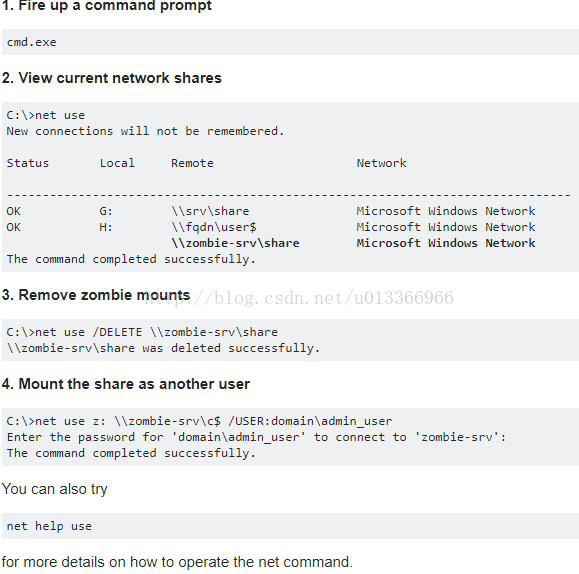
Original: https://serverfault.com/questions/57877/system-error-1219-has-occurred
After the go pointer is declared and assigned, a panic: runtime error: invalid memory address or nil pointer reference appears
pointer basics
package main

import "fmt"

func main() {
	var p *int
	p = new(int)
	*p = 1
	fmt.Println(p, &p, *p)
}

Output
0xc04204a080  0xc042068018  1
Go * represents the value stored in the pointer address, & is the address to take a value. For the pointer, it’s important to understand that the pointer stores the address of a value, but the pointer itself also needs the address to store
As above p is a pointer whose value is memory address 0xc04204a080</code b> and p memory address 0xc042068018 memory address 0xc04204a080 memory address 0 11
The
error instance
In golang if we define a pointer and assign it to it like a normal variable, such as the code below
package main

import "fmt"
func main() {
	var i *int
	*i = 1
    fmt.Println(i, &i, *i)
}
Would have reported such an error
panic: runtime error: invalid memory address or nil pointer dereference
[signal 0xc0000005 code=0x1 addr=0x0 pc=0x498025]
The reason for this error is that go when you initialize the pointer it gives the pointer I and it gives the pointer nil, but I is the address of * I , 0 nil1 the system doesn’t give the address of 2 * I 3, So there’s definitely an error in assigning * I and it’s very easy to solve this problem, you can just create a block of memory to allocate to an assignment object before you assign to a pointer
package main

import "fmt"
func main() {
	var i *int
	i = new(int)
	*i = 1
	fmt.Println(i, &i, *i)
}
Ubuntu can’t open Gnome terminal and display the error message exited status 8
I’ve been playing around with some environments for my virtual machine lately, and since I don’t have much experience, I’m just following the path of the server. However, once the virtual machine is restarted later, something goes wrong. The GNOME terminal cannot be opened. Start gnOMe-Terminal using Xterm.
Error constructing proxy for org.gnome.Terminal:/org/gnome/Terminal/Factory0: Error calling StartServiceByName for org.gnome.Terminal: GDBus.Error:org.freedesktop.DBus.Error.Spawn.ChildExited: Process org.gnome.Terminal exited with status 8
Error constructing proxy for org.gnome.Terminal:/org/gnome/Terminal/Factory0: Error calling StartServiceByName for org.gnome.Terminal: GDBus.Error:org.freedesktop.DBus.Error.Spawn.ChildExited: Process org.gnome.Terminal exited with status 8
The next time I look it up, it’s a coding problem. Just use the command sudo DPkg-reconfigure locales to add the code you want.
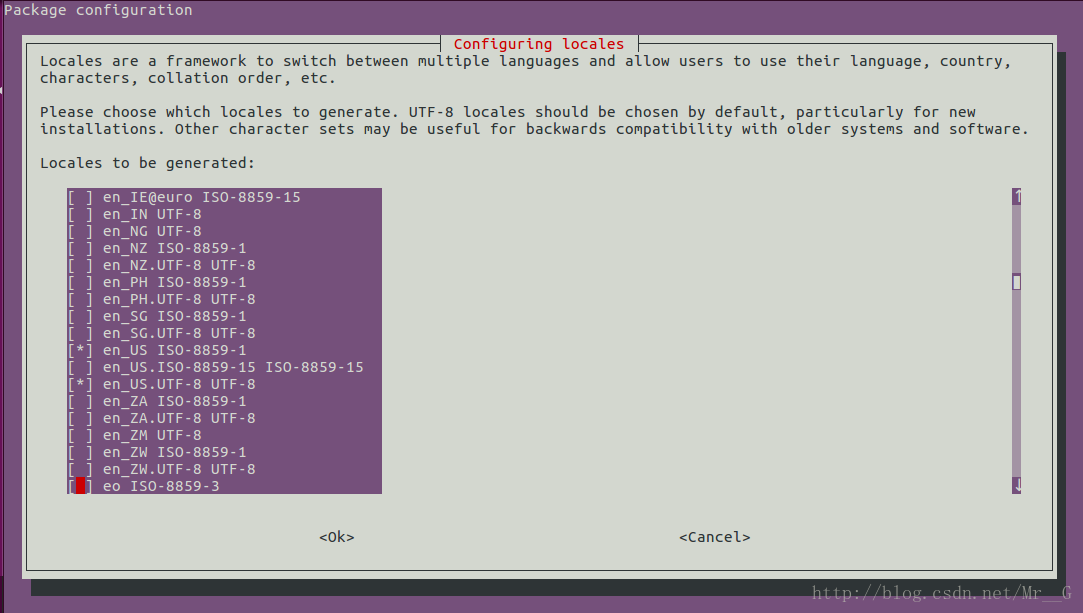
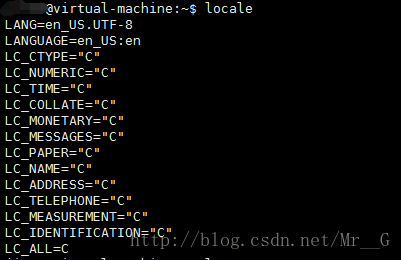
You think that’s the end of it?If you didn’t solve it, it should be the same problem I encountered. I accidentally found that when I configured the environment for my virtual machine, I actually configured another statement: export LC_ALL=C. In this way, no matter how I configured my code, I could not open the terminal in any way.
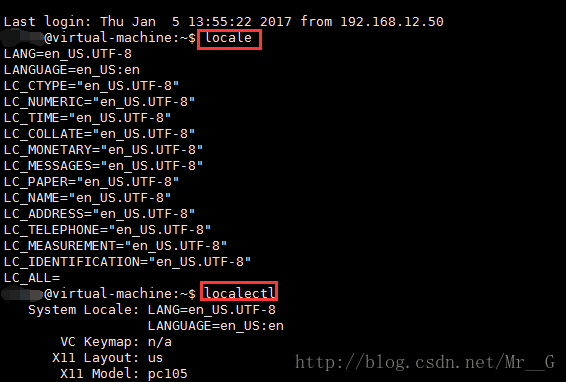
I finally get rid of that, and the locale in the terminal, works! 
Differences between Java stack overflow ror and outofmemoryerror
1, StackOverflow: Whenever a Java program starts a new thread, the Java virtual machine allocates a stack for it, and the Java stack keeps the thread running in frames. When a thread calls a method, the JVM presses a new stack frame onto the thread’s stack, and the stack frame exists as long as the method has not returned.
if the method has too many layers of nested calls (such as recursive calls), as the number of frames in the Java stack increases, the total size of all stack frames in the stack of this thread will eventually be greater than the value set by -xss, resulting in a StackOverflowError overflow exception. When the Java program starts a new thread, there is not enough space to allocate the Java stack for the thread. The size of a thread’s Java stack is determined by the -XSS setting. The JVM throws an OutOfMemoryError exception. The Java heap is used to store instances of objects. When it is necessary to allocate memory for instances of objects, and the heap occupation has reached the maximum set value (via -Xmx), OutOfMemoryError will be thrown. The method area is used to store information about Java classes, such as class names, access modifiers, constant pools, field descriptions, method descriptions, and so on. As the class loader loads the class file into memory, the JVM extracts the class information and places it in the method area.
when the class information needs to be stored and the method area has reached its maximum memory footprint (via -xx :MaxPermSize); An OutOfMemoryError exception will be thrown for tests in this case, the basic idea being that the runtime generates a large number of classes to fill the method area until it overflows. You need to manipulate the bytecode runtime directly with the help of CGLib to generate a large number of dynamic classes.
If you open the store in iTunes, you will be prompted to solve the 310 error
When iTunes opens the Store, it prompts 310 for error resolution
Have seen this kind of circumstance on oneself computer before, this computer is so again today, check up just know, it is the problem that IE agent sets originally.
Because I sometimes use IP proxies and things like that.
See the Internet is IE agent set things, go to IE in a look, it is really. Speechless.
Problem solving of runas 740 error
In the AD domain, the runas command is often used to make small scripts.
With WIN10, it’s easy to report 740 errors.
This is because win10 is enabled by default to use administrators to approve all administrators to run
With this enabled, runas is not entitled, meaning that promotion can only be done using the local built-in administrator.
So just close it off
With WIN10, it’s easy to report 740 errors.
This is because win10 is enabled by default to use administrators to approve all administrators to run
With this enabled, runas is not entitled, meaning that promotion can only be done using the local built-in administrator.
So just close it off
Easy solution atibtmon.exe Runtime error problem
Some AMD graphics laptops appear when they boot up
![]()
Just follow the steps below.
Control panel -& GT; Power option -& GT; Change the schedule Settings (in the select power plan, see which one you are using. For example, if you use “balance”, click “change schedule” and “save”, click “change schedule”.
-> Change the advanced power Settings -& GT; ATI graphics capability Settings (pull down until you find it at the end) -& GT; ATI Powerplay Settings -& GT; Use battery: Select optimize performance. Hit ok and you’re done.
Just follow the steps below.
Control panel -& GT; Power option -& GT; Change the schedule Settings (in the select power plan, see which one you are using. For example, if you use “balance”, click “change schedule” and “save”, click “change schedule”.
-> Change the advanced power Settings -& GT; ATI graphics capability Settings (pull down until you find it at the end) -& GT; ATI Powerplay Settings -& GT; Use battery: Select optimize performance. Hit ok and you’re done.