Category Archives: How to Fix

MySQL – ERROR 1146 (42S02): Table ‘mysql.user’ doesn’t exist

When we were testing the service and restarting it, we failed and reported an error of “Table ‘mysqlm. user’ doesn’t exist”. This user Table was created before, and it saved the data of users and permissions of the whole database. How could it not exist?
The database login is still normal, indicating that the user is still available, but the query is executed after entering
SELECT * FROM mysql. The user;
ERROR 1146 (42S02): Table ‘mysql.user’ doesn’t exist
Do something!!
When I checked the status of the cluster, I found that it was not normal. The USER table of 3 Mqsql in the cluster was gone, and only Master node was left working alone. Although the other two were RUNNING, they were working independently from the cluster, which was so strange…
Looking for a circle on the Internet, there are some good ways to try;
1 stop service
2 data directory mysql folder rename
3 execute mysql_install_db regenerate authorization table
4 start service
So since the Master can’t move, so I’m going to try slave first, execute mysql_install_DB
The user table is generated, but just like when it was installed, there is no data. The login password has to be reconfigured. In this way, if you join the cluster, there will be some problems.
I had to consult my database-savvy colleagues, and at their suggestion, COPY a user table from somewhere else, and then re-add the user information to the database user table according to the various existing services (fortunately, most of the services in this cluster were applications under test). When you rejoin the cluster, it’s back to normal…
Also, although the user data for the service is not in the table copied, when I restart the service and recreate the user to create the table, It tells me that the user already exists. DROP USER ‘username ‘@’ %’ first; And then “flush privileges”; Refresh permission operation; Recreate the user again, and that’s fine. Does MySQL have a cache of places to store this information??
But why does the mysql.user table disappear?I didn’t see any drop table operation through the MySQL log. It’s so strange… Can only restore the service first, the problem first record and then slowly check…
Mac Windows partition merge and delete

Before using The MAC bootcamp installed win10 system, used for a period of time, Win10 inexplicable into the card, also do not want to explore why, I plan to re-install the Win10 system.
Itself lz is a MAC, a small white, think in MAC disk tools directly wipe win10 partition, erase and then enter the bootcamp prompted “startup disk cannot be partition or back to a single partition”, that’s just scared (should not erase the Windows partition directly, it should be removed in the bootcamp Windows), online access to the data, to combine erase win10 partition to MAC partition to partition, installation win10, behind will points several ways to analyze:
Situation 1: There is no Recovery HD partition in the computer
1. Open the terminal, type Diskutil List, and find the disk number corresponding to your Windows partition, such as disk0s3.
2. Format the partition as HFS+ format: Diskutil Erasme HFS+ Blank disk0s3, Blank renames the partition for you after formatting
3. Consolidate the newly formatted DISk0s3 partition to MAC (disk0s2) : diskutil mergePartitions to HFS+ MAC disk0s2 disk0S3. Note: The merged partition is in the back
Situation 2: The Recovery HD partition is in the computer
1. Open the terminal and type Diskutil List to find the respective disk Numbers of your Recovery HD partition and Windows partition, such as disk0S3 (Recovery HD disk number) and DISk0S4 (Windows disk number).
2. Format the two partitions as HFS+ format: Diskutil Erasme HFS+ Blank disk0s3, Diskutil Erasme HFS+ Blank1 Disk0s4, Blank reformatting the partition name for you
3. Merge the newly formatted PARTITIONS (DISk0s3 and DISk0s4) into the MAC (disk0s2) partition in turn: diskutil mergePartitions (PARTITIONS) HFS+ MAC disk0s2 disk0s3 and Diskutil Merges3). Note: The merged partition is in the back
The mergepartition merging command must be continuous. For example, your Recovery HD partition is disk0s3, MAC partition is disk0s2 and WIN partition is disk0S4. You can’t combine WIN partition to MAC partition, so you must format the Recovery HD to an IMAGE (this should be the system toolkit). When you click the option at startup, you will see a disk named “Recovery HD-10.11.XX” or a disk named “Recovery -10.11.XX”, which contains system tools such as Time Machine, INSTALLATION OS X, disk tools, terminal, etc.), and then merge them one by one.
Situation 3: The Windows partition that was just erased could not be merged into the MAC partition
1. After wiping out the Win10 partition and The Win10 Recovery, merge the two Win10 related partitions and then merge the MAC partition into the wrong one:
You cannot merge disks into an APFS Physical Store
Instead, you can delete the partitions following the APFS Physical Store by
using “diskutil eraseVolume free n ” for all such partitions, and
then by growing the corresponding APFS Container by its APFS Physical Store
to fill the gap by using “diskutil apfs resizeContainer disk0s2 0”
You can’t merge win10 partition to MAC partition, but you can delete this Win10 partition by diskutil Erasme free n disk0S3 and then passively add the Win10 partition you just deleted to MAC partition by fill the gap with MAC partition. Diskutil Apfs resizeContainer disk0s2 0
Situation 4: LZ is too impulsive to format the MAC partition
It’s not really necessary. If you don’t format the MAC, the above solution is enough. The following is a backup for those who need to do more. You can use the Time Machine to back up your hard drive, preferably one and a half times as much space as your MAC system already USES, and the backup disk needs to be formatted into a MAC specific format to be backed up, and the data on the backup disk needs to be exported. Backup complete will restart some option in the Recovery of HD into the disk tools to MAC partitions are formatted, and then make into the erroneous zone, Recovery HD is a MAC and Windows partition in the middle of the partition, I have no way to combine the three partitions (feeling into an infinite loop, Recovery HD into the terminal cannot be deleted Recovery HD partitions, prompt the Error erasing disk Error number (69888, 0), oneself cannot be deleted, Can only delete) from the outside, also found a homemade Recovery HD U disk, startup disk method, finally found the command + R also can enter and Recovery HD interface (before actually thought they were a thing, actually Recovery HD and command + R is not a thing, no contact), in the command + R can erase Recovery HD partitions, and then to merge several partitions, Then you restored the MAC, reinstalled Win10 using Bootcamp, and everything was back to normal.
Originally very simple things, give me a chance for two minutes to solve the problem of the merger of the partition for three days, I use online solutions are given to solve the small problem, and online comments is in accordance with the article is to solve the problem, I how all won’t work here, the last is their patchwork coupled with a little luck to realize partition processing mode in the MAC, also related to lz easily reshipment system, formatted partition, if you encounter problems or rational analysis, simple to solve it, don’t get a lane, to the extent that is difficult to pick up, laborious. But on the other hand, I’ve made a lot of progress in this way, and I’m not afraid of any problems in the future

Some problems in using arrays

/*
* array note some issues
*/
#include < iostream>
using namespace std;
Int main()
{
const int ArraySize = 5;
// initializes the elements in the array, and the uninitialized elements are by default filled with the value 0, representing the NULL character (NULL or \0)
int arr[ArraySize] = {10,3,5};

// array name, which represents the starting address of the first element (direct array name is recommended)
cout < < “arr = ” < < arr < < endl;
// array is a collection, take the address of the array name, get is the first address of the collection represented by the array (generally not recommended to use the address of the array name)
cout < < “& arr = ” < < & arr < < endl;

{
/* array name itself is not a variable, so it does not occupy storage space, nor can it be used to store data; ,
, which simply represents a data, as a value, it represents the address of the first data element in the array. */
// for example, the following is wrong!!
/* compile times wrong: assigning to an array from the an, initializer list */
// arr = {10,16,8};
// therefore, arrays cannot be assigned, only array elements can be initialized or assigned.
}
// if an array is defined and not initialized, its output will be garbage instead of having no value
/*cout < < “No array initialization, garbage data output!” < < endl;
for(int I = 0; i ! = ArraySize; I++)
cout & lt; < arr[i] < < “‘;
cout & lt; < endl;

// input data, assign values to data elements in arr array
/* even if the number of input data elements is greater than the length of the array, cin will only extract required data from the input buffer according to the length of the array
, while the remaining data will be left in the input buffer for use next time */
//cout < < “The input data are:”;
//for(int I = 0; i ! = ArraySize; I++)
// cin & gt; > arr[i];

// below are three different ways to output the address of each array element in memory
/*cout < < “Method 1:” < < endl;
for(int I = 0; i ! = ArraySize; I++)
cout & lt; < “& arr[” << i << “] = ” < < & arr[i] < < endl;
cout & lt; < “Method two:” < < endl;
for(int I = 0; i ! = ArraySize; I++)
cout & lt; < “[arr+” << i << “] = ” < < arr+i < < endl;
cout & lt; < “Method 3:” < < endl;
for(int I = 0,*p = arr; p ! = (arr+ArraySize) & & i ! = ArraySize; I++ p++)
cout & lt; < “p -[” << i << “]= ” < < p < < endl; */

/* the following four methods of outputting elements in an array have no errors;
the compiler changes the brackets in the array at compile time :(both sides are equivalent to each other)
arr[I] < => * (arr + I)
* (arr + I) & lt; => * (I + arr)
* (I + arr) & lt; => I (arr)
arr [I] < => I [arr]
I is the offset, indicating the number of elements of the offset first element */
/*for(int I = 0; i ! = ArraySize; I++)
cout & lt; < arr[i] < < “‘;
cout & lt; < endl;
For (int I = 0; i ! = ArraySize; I++)
cout & lt; < *(arr+i) < < “‘;
cout & lt; < endl;
For (int I = 0; i ! = ArraySize; I++)
cout & lt; < i[arr] < < “‘;
cout & lt; < endl;

for(int* p = arr; p ! = (arr+ArraySize); P++)
cout & lt; < *p < < “‘;
cout & lt; < endl; * /

cout <
cout < < “The consequences of a cross-border visit!” < < endl;
int iNum = 123,iLen = 90;
int array[7] = {10,3,6,8,5,9,7};
for(int I = -2);
for(int I = -2);
for(int I = -2); i ! = 9; I++)
cout & lt; < array[i] < < “‘;
cout & lt; < endl;

cout & lt; < iNum < < “—” < < iLen < < endl;
// Out-of-bounds storage of data can result in the value of other variables, and may even cause the program to crash (which didn’t happen, which is weird!!).
for(int I = -2; i ! = 7. I++)
cin & gt; > array[i];
for(int I = 0; i ! = 7. I++)
cout & lt; < array[i] < < “‘;
cout & lt; < endl;
cout & lt; < iNum < < “—” < < iLen < < endl;
return 0;
}

530 user cannot log in. Problem connecting to FTP server

After the 2008 server builds FTP, connect FTP with FlashFxp and prompt 530 User cannot log in.
But no matter how hard I tried to confirm it, the account password was definitely correct.
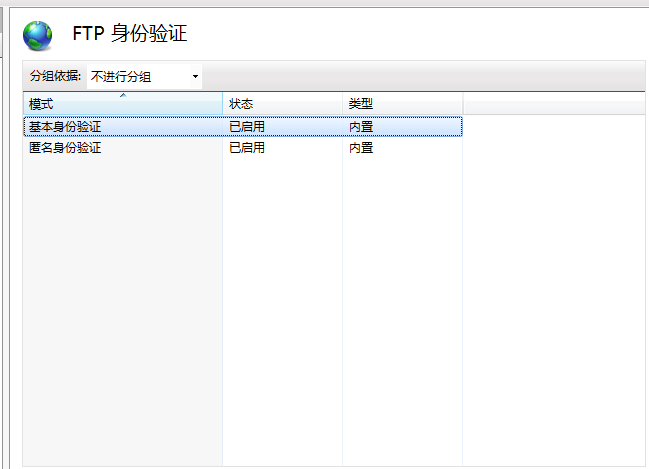
After looking up information on the Internet, I found that it was a problem of FTP authentication. The FTP authentication of IIS manager enabled both basic and anonymous authentication, and then it was very hot

Solution to the error code of 0x80040154 in COM / ole call

1. The background
In the project development, in order to make C# call the original C++ developed OLE interface program, the following method was adopted to establish C++CLI project as an intermediate DLL, with the following advantages:
(1) on the one hand, he can better use C++ to access OLE API functions, and the original C++ development of OLE programs better combination;
(2) on the other hand, C# can easily reference C++CLI DLL, so that the implementation of C# code on the old version of OLE program calls quickly;
(3) low coupling, easy to test, about the correctness of OLE interface and C++CLI, you can independently set up a test project to test.

Therefore, C# projects utilize the invocation relationship of C++ OLE as follows:
C # = = & gt; > > C + + the CLR = = & gt; > > C + +, OLE

Problem 2.
In the real project, the OLE program is developed by another TEAM, we just call it. But during the testing process, the call to OLE interface in the latest test environment failed. Debug finds that the C++CLI failed to initialize the specified OLE program when calling the OLE interface with the error code 0x80040154, which means the following:

OLE error code 0x80040154. Class is not registered.

The main online solution is to call the RegSVR32 command to register your program. The purpose of registration is to establish the mapping relationship between ProgramID and CLSID in the registry. In my understanding, ProgramID is equivalent to our name. When we use the API to call the COM/OLE interface, we pass a plain string called ProgramID, and the API internally operates on the CLSID based on the mapping stored in the registry. There is a subkey in the registry with CLSID as key and its name is LocalService32. The corresponding key value of this key stores the local full path of the final OLE program. Finally, it is found that this key value in our test environment is wrong and does not point to the real OLE program path, thus causing failure in the initialization of OLE program. Given the wrong program path, the loader must fail.

3. Solutions

Modify the CLSID stored in the OLE program full path.

Error domain = nsurlerrordomain code = – 1001 “request timeout occurred in swift alamofire get request. ” UserInfo={NSUnderlyingErro

ErrorDomain =NSURLErrorDomain Code=-1001 “request timeout.” UserInfo={NSUnderlyingError=0x1c0a48310 {Error Domain=kCFErrorDomainCFNetwork Code=-1001 “(null)” UserInfo={_kCFStreamErrorCodeKey=-2102, _kCFStreamErrorDomainKey=4}}
For this reason, I have checked for a long time. There are many posts setting timeout on the Internet. However, this GET request returns this error without timeout. Here is an introduction to encoding usage scenarios
JSONEncoding. Default is placed in HttpBody, such as post requests
2. URLEncoding. Default is concatenated address in GET, such as GET request
3. URLEncoding(destination:. MethodDependent) is a custom URLEncoding. If the value of methodDependent is in GET, HEAD, and DELETE, it will be concatenated. The other methods are in the httpBody.
4. URLEncoding(destination:.httpbody) is placed in httpBody
So I replaced the previous JSONEncoding. Default with URLEncoding. Default
Alamofire.request(url, method: .get, parameters: nil, encoding:JSONEncoding.default, headers: [“Content-Type”:”application/json”]).responseJSON { (response) in
}
Alamofire.request(url, method: .get, parameters: nil, encoding:URLEncoding.default, headers: [“Content-Type”:”application/json”]).responseJSON { (response) in
}


Typeerror: ‘module’ object is not callable

This error means that the module is called as a function, but it itself cannot be called.
The problem arises because of the import mechanism.
There are two ways to import modules into Python: Import Module and From Module Import. The difference is that the former requires the module name to be used, while the latter does not.
Try again using the following import mode, with high probability, the problem will be solved.

from module import *

reference

    on the road, WWBhuzhenwei Sprite Fsky

.
.
2019-03-19 12:57:15 written in Shanghai

Solve the problem of non system disk or disk error, replace and strike any key when ready

Non-system disk or disk error, replace and Strike any key when ready. Not system disk or disk error such as check the original hard disk everything is normal under the circumstances. That is: the system installation process is not started at all. Another way to put it: Your installation disk did not boot the installation process.
to fix this problem you must go into the BIOS to set the boot order of the disk. If that doesn’t work you have to write down the boot partition table again with DISKGEN and that’s fine.

Solution to 800b0001 failure of Windows Update

This article source: http://blog.csdn.net/chaijunkun/article/details/8621232, reproduced please indicate. As I am not regular will sort out the relevant blog, the corresponding content will be improved. It is therefore highly recommended to view this article in its original source.
Microsoft recently released Internet Explorer 10 for Windows 7 SP1. Although the Internet Explorer browser has been despair, the weird style, “different” JS, do not know how many front-end staff brought extra working hours. But now that it’s out, I want to install it. As a result, there were problems with the installation. Share solutions.

Let me start with my environment: Windows 7 64 bit flagship SP1. I made important patches before and kept updating by some steward. But when I installed IE 10, I found the following prompts:

Well, as a follow-up, I found Windows Update. Then try to get the update. The result is the following 800B0001 failure:

I searched the Internet for a whole day but didn’t find a complete solution. The solution was found in a foreign article:
http://pcrepairhub.com/windows-update-error-800b0001/
Translate the key steps:
1. Re-register DLL:
The start menu opens a command prompt by entering CMD in the search box (or by opening the “Run” tool directly in Win+R). It is best to run the environment as an administrator. Execute the following commands one at a time:
REGSVR32 SOFTPUB.DLL (for XP, Vista and Win7)

REGSVR32 mssip32. DLL (for XP, Vista and Win7)

REGSVR32 WINTRUST. Vista and Win7)

REGSVR32 initpki. DLL (for XP and Vista only)
2. Reinitialize the download folder:
Create a batch file, and the script reads as follows:
net stop wuauserv
net stop CryptSvc
ren %windir%\system32\catroot2 catroot2.old
ren %windir%\SoftwareDistribution sold.old
net start CryptSvc
net start wuauserv
pause
It also needs to be run as an administrator.
My system was up and running after the above two steps:

In the meantime, IE10 will be installed smoothly:

If that doesn’t work, try the System Update Ready Tool:
The relevant introduction and download address are:
http://windows.microsoft.com/zh-cn/windows7/What-is-the-System-Update-Readiness-Tool