Category Archives: How to Fix

MySQL error code ‘1064’ troubleshooting process

Afternoon self-test code, stuck on this update for an hour and a half, greatly reduced the development productivity, send out the screening process, good soldiers will not fall into the same trap. First, type out the exception stack.

2016-03-28 17:23:38.420 main DEBUG [org.springframework.beans.factory.support.DefaultListableBeanFactory:463] - Finished creating instance of bean 'Sybase'
2016-03-28 17:23:38.420 main  INFO [org.springframework.jdbc.support.SQLErrorCodesFactory:126] - SQLErrorCodes loaded: [DB2, Derby, H2, HSQL, Informix, MS-SQL, MySQL, Oracle, PostgreSQL, Sybase]
2016-03-28 17:23:38.420 main DEBUG [org.springframework.jdbc.support.SQLErrorCodesFactory:199] - Looking up default SQLErrorCodes for DataSource [com.jd.im.data.dataresource.JdDataSourceDbcp@14021a9]
2016-03-28 17:23:38.423 main DEBUG [org.springframework.jdbc.support.SQLErrorCodesFactory:217] - Database product name cached for DataSource [com.jd.im.data.dataresource.JdDataSourceDbcp@14021a9]: name is 'MySQL'
2016-03-28 17:23:38.423 main DEBUG [org.springframework.jdbc.support.SQLErrorCodesFactory:175] - SQL error codes for 'MySQL' found
2016-03-28 17:23:38.423 main DEBUG [org.springframework.jdbc.support.SQLErrorCodeSQLExceptionTranslator:399] - Translating SQLException with SQL state '42000', error code '1064', message [  
--- The error occurred while applying a parameter map.  
--- Check the mall.org.updateById-InlineParameterMap.  
--- Check the statement (update failed).  
--- Cause: com.mysql.jdbc.exceptions.jdbc4.MySQLSyntaxErrorException: You have an error in your SQL syntax; check the manual that corresponds to your MySQL server version for the right syntax to use near 'WHERE id = 12' at line 1]; SQL was [] for task [SqlMapClient operation]
2016-03-28 17:23:38.424 main ERROR [com.jd.dd.mall.service.waiter.impl.OrgService‫Impl:97] - IM data access exception
com.jd.im.data.exception.IMDataAccessException: IM data access exception
	at com.jd.im.data.dataresource.IMSqlMapClientTemplateForMultDs.handleUserException(IMSqlMapClientTemplateForMultDs.java:280)
	at com.jd.im.data.dataresource.IMSqlMapClientTemplateForMultDs.update(IMSqlMapClientTemplateForMultDs.java:160)
	at com.jd.dd.mall.service.waiter.impl.OrgService‫Impl.updateById(OrgService‫Impl.java:106)
	at com.jd.dd.mall.service.waiter.impl.OrgService‫Impl.add(OrgService‫Impl.java:92)
	at com.jd.dd.mall.web.controller.waiter.OrgManageController.addOrg(OrgManageController.java:85)
	at sun.reflect.NativeMethodAccessorImpl.invoke0(Native Method)
	at sun.reflect.NativeMethodAccessorImpl.invoke(NativeMethodAccessorImpl.java:39)
	at sun.reflect.DelegatingMethodAccessorImpl.invoke(DelegatingMethodAccessorImpl.java:25)
	at java.lang.reflect.Method.invoke(Method.java:597)
	at org.springframework.web.method.support.InvocableHandlerMethod.invoke(InvocableHandlerMethod.java:219)
	at org.springframework.web.method.support.InvocableHandlerMethod.invokeForRequest(InvocableHandlerMethod.java:132)
	at org.springframework.web.servlet.mvc.method.annotation.ServletInvocableHandlerMethod.invokeAndHandle(ServletInvocableHandlerMethod.java:104)
	at org.springframework.web.servlet.mvc.method.annotation.RequestMappingHandlerAdapter.invokeHandleMethod(RequestMappingHandlerAdapter.java:746)
	at org.springframework.web.servlet.mvc.method.annotation.RequestMappingHandlerAdapter.handleInternal(RequestMappingHandlerAdapter.java:687)
	at org.springframework.web.servlet.mvc.method.AbstractHandlerMethodAdapter.handle(AbstractHandlerMethodAdapter.java:80)
	at org.springframework.web.servlet.DispatcherServlet.doDispatch(DispatcherServlet.java:925)
	at org.springframework.web.servlet.DispatcherServlet.doService(DispatcherServlet.java:856)
	at org.springframework.web.servlet.FrameworkServlet.processRequest(FrameworkServlet.java:915)
	at org.springframework.web.servlet.FrameworkServlet.doPost(FrameworkServlet.java:822)
	at javax.servlet.http.HttpServlet.service(HttpServlet.java:727)
	at org.springframework.web.servlet.FrameworkServlet.service(FrameworkServlet.java:796)
	at org.springframework.test.web.servlet.TestDispatcherServlet.service(TestDispatcherServlet.java:66)
	at javax.servlet.http.HttpServlet.service(HttpServlet.java:820)
	at org.springframework.mock.web.MockFilterChain$ServletFilterProxy.doFilter(MockFilterChain.java:168)
	at org.springframework.mock.web.MockFilterChain.doFilter(MockFilterChain.java:136)
	at org.springframework.test.web.servlet.MockMvc.perform(MockMvc.java:134)
	at com.jd.service.waiter.OrgControllerTest.add(OrgControllerTest.java:53)
	at sun.reflect.NativeMethodAccessorImpl.invoke0(Native Method)
	at sun.reflect.NativeMethodAccessorImpl.invoke(NativeMethodAccessorImpl.java:39)
	at sun.reflect.DelegatingMethodAccessorImpl.invoke(DelegatingMethodAccessorImpl.java:25)
	at java.lang.reflect.Method.invoke(Method.java:597)
	at org.junit.runners.model.FrameworkMethod$1.runReflectiveCall(FrameworkMethod.java:44)
	at org.junit.internal.runners.model.ReflectiveCallable.run(ReflectiveCallable.java:15)
	at org.junit.runners.model.FrameworkMethod.invokeExplosively(FrameworkMethod.java:41)
	at org.junit.internal.runners.statements.InvokeMethod.evaluate(InvokeMethod.java:20)
	at org.junit.internal.runners.statements.RunBefores.evaluate(RunBefores.java:28)
	at org.springframework.test.context.junit4.statements.RunBeforeTestMethodCallbacks.evaluate(RunBeforeTestMethodCallbacks.java:74)
	at org.springframework.test.context.junit4.statements.RunAfterTestMethodCallbacks.evaluate(RunAfterTestMethodCallbacks.java:83)
	at org.springframework.test.context.junit4.statements.SpringRepeat.evaluate(SpringRepeat.java:72)
	at org.springframework.test.context.junit4.SpringJUnit4ClassRunner.runChild(SpringJUnit4ClassRunner.java:231)
	at org.springframework.test.context.junit4.SpringJUnit4ClassRunner.runChild(SpringJUnit4ClassRunner.java:88)
	at org.junit.runners.ParentRunner$3.run(ParentRunner.java:193)
	at org.junit.runners.ParentRunner$1.schedule(ParentRunner.java:52)
	at org.junit.runners.ParentRunner.runChildren(ParentRunner.java:191)
	at org.junit.runners.ParentRunner.access$000(ParentRunner.java:42)
	at org.junit.runners.ParentRunner$2.evaluate(ParentRunner.java:184)
	at org.springframework.test.context.junit4.statements.RunBeforeTestClassCallbacks.evaluate(RunBeforeTestClassCallbacks.java:61)
	at org.springframework.test.context.junit4.statements.RunAfterTestClassCallbacks.evaluate(RunAfterTestClassCallbacks.java:71)
	at org.junit.runners.ParentRunner.run(ParentRunner.java:236)
	at org.springframework.test.context.junit4.SpringJUnit4ClassRunner.run(SpringJUnit4ClassRunner.java:174)
	at org.eclipse.jdt.internal.junit4.runner.JUnit4TestReference.run(JUnit4TestReference.java:50)
	at org.eclipse.jdt.internal.junit.runner.TestExecution.run(TestExecution.java:38)
	at org.eclipse.jdt.internal.junit.runner.RemoteTestRunner.runTests(RemoteTestRunner.java:459)
	at org.eclipse.jdt.internal.junit.runner.RemoteTestRunner.runTests(RemoteTestRunner.java:675)
	at org.eclipse.jdt.internal.junit.runner.RemoteTestRunner.run(RemoteTestRunner.java:382)
	at org.eclipse.jdt.internal.junit.runner.RemoteTestRunner.main(RemoteTestRunner.java:192)
Caused by: org.springframework.jdbc.BadSqlGrammarException: SqlMapClient operation; bad SQL grammar []; nested exception is com.ibatis.common.jdbc.exception.NestedSQLException:   
--- The error occurred while applying a parameter map.  
--- Check the mall.org.updateById-InlineParameterMap.  
--- Check the statement (update failed).  
--- Cause: com.mysql.jdbc.exceptions.jdbc4.MySQLSyntaxErrorException: You have an error in your SQL syntax; check the manual that corresponds to your MySQL server version for the right syntax to use near 'WHERE id = 12' at line 1
	at org.springframework.jdbc.support.SQLErrorCodeSQLExceptionTranslator.doTranslate(SQLErrorCodeSQLExceptionTranslator.java:233)
	at org.springframework.jdbc.support.AbstractFallbackSQLExceptionTranslator.translate(AbstractFallbackSQLExceptionTranslator.java:72)
	at org.springframework.orm.ibatis.SqlMapClientTemplate.execute(SqlMapClientTemplate.java:206)
	at org.springframework.orm.ibatis.SqlMapClientTemplate.update(SqlMapClientTemplate.java:381)
	at com.jd.im.data.dataresource.IMSqlMapClientTemplateForMultDs.update(IMSqlMapClientTemplateForMultDs.java:134)
	... 54 more
Caused by: com.ibatis.common.jdbc.exception.NestedSQLException:   
--- The error occurred while applying a parameter map.  
--- Check the mall.org.updateById-InlineParameterMap.  
--- Check the statement (update failed).  
--- Cause: com.mysql.jdbc.exceptions.jdbc4.MySQLSyntaxErrorException: You have an error in your SQL syntax; check the manual that corresponds to your MySQL server version for the right syntax to use near 'WHERE id = 12' at line 1
	at com.ibatis.sqlmap.engine.mapping.statement.MappedStatement.executeUpdate(MappedStatement.java:107)
	at com.ibatis.sqlmap.engine.impl.SqlMapExecutorDelegate.update(SqlMapExecutorDelegate.java:457)
	at com.ibatis.sqlmap.engine.impl.SqlMapSessionImpl.update(SqlMapSessionImpl.java:90)
	at org.springframework.orm.ibatis.SqlMapClientTemplate$9.doInSqlMapClient(SqlMapClientTemplate.java:383)
	at org.springframework.orm.ibatis.SqlMapClientTemplate$9.doInSqlMapClient(SqlMapClientTemplate.java:381)
	at org.springframework.orm.ibatis.SqlMapClientTemplate.execute(SqlMapClientTemplate.java:203)
	... 56 more

and my Ibatis SQL

<update id="updateById"  parameterClass="Org">
		UPDATE org
		SET	name = #name:VARCHAR#,
			<isNotNull property="tree_level">tree_level = #tree_level#, </isNotNull>
			<isNotNull property="yn">yn = #yn#, </isNotNull>
			<isNotNull property="route">route = #route:VARCHAR#, </isNotNull>
			`version` = `version` + 1,
			<isNotNull property="editor">editor = #editor:VARCHAR#  </isNotNull>
			
		WHERE id = #id#
	</update>

like this stack does not clearly indicate the cause of SQL problems, troubleshooting problems must be according to the error code to check. Baidu checked the 1064 error code. The column name of the table overlaps with the Mysql keyword. OK, I took this SQL close to the mysql client query interface and found that the name field changed to the color of the keyword. I thought I found the problem, so I put back quotes around the name. Run the unit test again and report an error of 1064.

There is no way out, only ibATIS executed SQL typing out, put into mysql client to see. OK, log4J plus log, the execution of IBATIS SQL typing out. Run the unit test again and the SQL doesn’t come out.
There is a feeling of frustration that should not be called indolent every day!
You have no choice but to look at SQL with your eyes. If the Editor field is null, then there are extra commas before the WHERE. Adjust the SQL.

	<update id="updateById"  parameterClass="Org">
		UPDATE org
		SET id = #id# ,
			<isNotNull property="name">`name` = #name:VARCHAR#, </isNotNull>
			<isNotNull property="tree_level">tree_level = #tree_level#, </isNotNull>
			<isNotNull property="yn">yn = #yn#, </isNotNull>
			<isNotNull property="route">route = #route:VARCHAR#, </isNotNull>
			<isNotNull property="editor">editor = #editor:VARCHAR# , </isNotNull>
			`version` = `version` + 1
		WHERE id = #id#
	</update>

Then run the unit test and the SQL executes successfully. Just log can not type out SQL, this time to type out. Where have you been when I need you?Mysql’s error code is not reliable at all! The SQL syntax is obviously wrong, but the code of 1064 is quoted.

Remove the back quotes from the Name and Version fields and the SQL will still execute normally. Fun!
Error: (2, ‘RegOpenKeyEx’, error resolution

Read the key values in the registry in Python as follows:

#coding:utf-8

import win32api, win32con
import os
key = win32api.RegOpenKeyEx(win32con.HKEY_CLASSES_ROOT, 'CLSID\\{01249E9F-88FF-45d5-82DB-A1BEE06E123C}\\Shell\Open\\Command', 0,  win32con.KEY_READ)
keyValue = win32api.RegQueryValue(key, '')


print keyValue

 
Then run it with the following error:

Traceback (most recent call last):
  File "D:\users\Desktop\yunpanAuto.py", line 8, in <module>
    key = win32api.RegOpenKeyEx(win32con.HKEY_CLASSES_ROOT, 'CLSID\\{01249E9F-88FF-45d5-82DB-A1BEE06E123C}\\Shell\Open\\Command', 0,  win32con.KEY_READ)
error: (2, 'RegOpenKeyEx', '\xcf\xb5\xcd\xb3\xd5\xd2\xb2\xbb\xb5\xbd\xd6\xb8\xb6\xa8\xb5\xc4\xce\xc4\xbc\xfe\xa1\xa3')

 
This depends on my own problem, because my Window system is 64-bit and Python is 32-bit, so I need to add another parameter:

key = win32api.RegOpenKeyEx(win32con.HKEY_CLASSES_ROOT, 'CLSID\\{01249E9F-88FF-45d5-82DB-A1BEE06E123C}\\Shell\Open\\Command', 0,  win32con.KEY_READ | win32con.KEY_WOW64_64KEY)

Just change the statement after the key above.
 

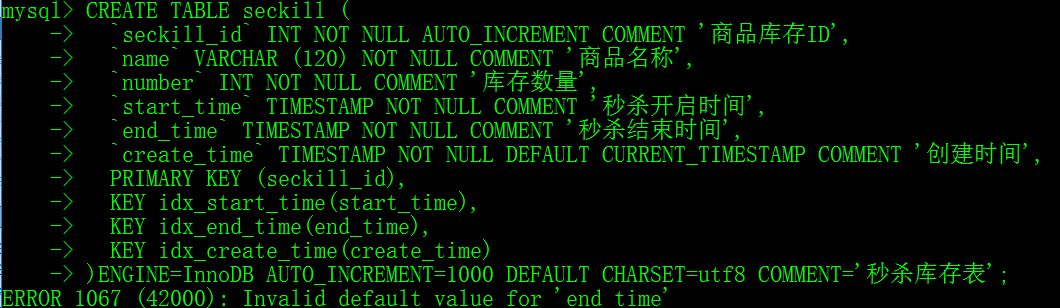
MySQL:ERROR 1067 (42000): Invalid default value for ‘end_time’

1. Wrong screenshot

2. Error analysis
The first TIMESTAMP column in the table (if not declared NULL or if the DEFAULT or ON UPDATE clause is displayed) automatically assigns the DEFAULT CURRENT_TIMESTAMP and ON UPDATE CURRENT_TIMESTAMP properties
The TIMESTAMP column after the first (if it is not declared NULL or the DEFAULT clause is displayed) automatically allocates DEFAULT ‘0000-00-00 00:00:00’ (zero TIMESTAMP), which does not satisfy the NO_ZERO_DATE in SQL_mode and gives an error.
Note: THERE are two types of SQL_mode, one is null value, the other is strict mode, and many default Settings will be given. Strict mode is used by default after MySQL5.7.
NO_ZERO_DATE: If this value is set, the MySQL database does not allow insertion of a zero date, which throws an error rather than a warning.
3. Solutions
First, execute select @@sql_mode, copy the value of the query and delete the NO_ZERO_DATE, then execute set SQL_mode = ‘modified value’.
This method takes effect only in the current session
Select @@glob.sql_mode, copy the value of the query and delete the NO_ZERO_DATE, then execute set global SQL_mode = ‘modified value’.
This method takes effect in the current service and expires after the MySQL service is re-run
Sql_mode = ONLY_FULL_GROUP_BY,STRICT_TRANS_TABLES,NO_ZERO_IN_DATE,ERROR_FOR_DIVISION_BY_ZERO,NO_AUTO_CREATE_USER,NO_ENGINE_SUBSTITUTION,
Then restart mysql.
This method is permanent

Error 13 when grub starts: solving the problem of invalid or unsupported executable

I’m using BT3 these days, and as for the USE of IT, we all know that I used GRUb4DOS as my desktop computer to launch recently. In recent days, I want to use my laptop to run BT3, but according to the general setting, GRUB shows Error 13: Invalid or unsupported Invalid on startup.
Looking around, it’s almost certain that the vmlinuz and BT3 cores don’t match, but it’s not clear why the same Settings worked on desktop computers.
The solution is as follows
After recompiling the kernel, restarting the system resulted in a GRUB boot error
Grub Error 13: Invalid or unsupported Invalid format
Error clause xp and FC co-existed when kernel/vmlinuzz-2.6.15 ro root= /dev/volgroup00 /LogVol00 RHGB quiet
installation. Restart the system again, enter xp, and search for the solution to Error 13.
use the rescue disk to enter the fc, check the Settings in /etc/grub.conf file, and check the filename in the Settings. It matches the file on your hard drive.
USES Google again to view the explanation of the vmlinuz file. On linuxidc.com, see
. Vmlinuz is the executable Linux kernel. It is located at /boot/vmlinuz and has two ways to build it. First, the kernel is created by “make zImage” when compiling, and then by:
“Cp/usr/SRC/Linux – 2.4/arch/i386/Linux/boot/zImage/boot/called”. ZImage is suitable for small kernels and exists for backward compatibility. The second is the kernel compile time through the command make bzImage created, then through: “cp/usr/SRC/Linux – 2.4/arch/i386/Linux/boot/bzImage/boot/called”.
Because vmlinuz is before compiling the kernel, the original system does not match the system after compiling the kernel, so it cannot be started
. Restart to enter grub, press e to modify, change vmlinuz-version to bzImage, press b to start Linux
to enter Linux. Go to/boot/ and delete the old vmlinuz, then rename the bzImage to vmlinuz-version
and everything will work fine.

appendix: Conf generated by anaconda
#
# Note that you do not have to rerun grub after making changes to this file
# NOTICE: you have a /boot partition. This means that
# all kernel and initrd paths are relative to /boot/, Eg.
# root (hd0, 8)
# kernel/called – version ro root =/dev/VolGroup00 LogVol00
# initrd /initrd-version. Img
#boot=/dev/sda
default=1
timeout=5
splashimage=(hd0,8)/grub/splash. Xpg.gz
hiddenmenu
title Fedora Core (2.6.15_FC5)
root (hd0,8)
kernel/vmlinuuz-2.6.15 ro root= /dev/volgroup00 /LogVol00 RHGB quiet
initrd /initrd-2.6.15. Img
title Other
rootnoverify (hd0,0)
chainloader +1

Solve a bug harvest of DB2 (sqlcode = – 805, sqlstate = 51002, error message = DB2 SQL error: sqlcode = – 805, sqlstate = 5100

The red word is the key.

I Recently encountered a DB2 bug,

Fatal error found. SQLCode=-805, SQLState=51002, error message=DB2 SQL Error: SQLCODE=-805, SQLSTATE=51002, SQLERRMC=NULLID.SYSLH203 0X5359534C564C3031

Later, I asked my colleagues for help, which was solved in this post

https://www-304.ibm.com/support/docview.wss?uid=swg21496734

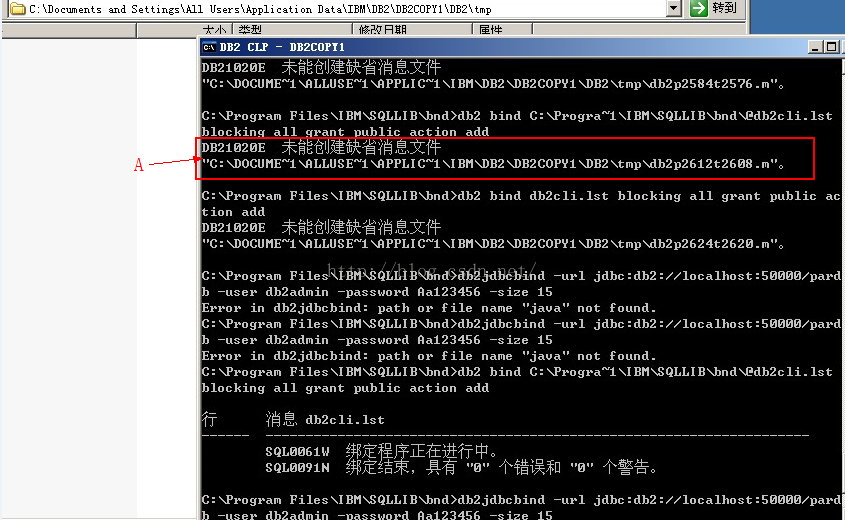
2. When using the bind command, if prompt A appears in the figure, A complete folder needs to be established in the path shown, and the figure is the missing TMP folder. My colleague helped me solve this problem. He knew it was lack of folder when he looked at the log, but I could not. This is experience.

Solution to MySQL Error 1130 problem

Local Error 1130 problem solution
When connecting to mysql database, ERROR 1130 (HY000) occurs: the Host ‘XXXX’ is not allowed to connect to this mysql Server. Local localhost will not work either. If you reinstall mysql database, you will be afraid that the original database cannot be restored.
Appear this kind of problem may be caused by illegal power off and remove the root user, mysql database user without root, in the table if localhost is also unable to log in, you need to. In my ini finally add skip – grant – tables, so you don’t need a password login, after landing in the following SQL statement to create the root user (I am using version 5.1, different versions can be different SQL statements)

INSERT INTO `user` VALUES ('localhost', 'root', 'your password', 'Y', 'Y', 'Y', 'Y', 'Y', 'Y', 'Y', 'Y', 'Y', 'Y', 'Y', 'Y', 'Y', 'Y', 'Y', 'Y', 'Y', 'Y', 'Y', 'Y', 'Y', 'Y', 'Y', 'Y', 'Y', 'Y', 'Y', 'Y', '', '', '', '', '0', '0', '0', '0');

After success, delete ski-grant-tables in my.ini, and you can now log in using the root password locally.
Remember in the database installed mysql, do not illegally shut down, forced power off, otherwise this problem will occur.
If Error 1130 appears locally, then the remote connection must also appear. If the local connection problem is solved, the remote connection problem may not be solved.
Error 1130 appears in the remote connection
There are two ways to solve this problem
1. Table modification
Maybe your account doesn’t allow you to log in remotely, only at localhost. At this time, as long as the computer at localhost, after logging into mysql, change the “host” item in the “User” table in the “mysql” database, and change the name from “localhost” to “%”.

mysql -u root -pvmware
mysql>use mysql;
mysql>update user set host = '%' where user = 'root';
mysql>flush privileges;
mysql>select host, user from user

2. Authorization law
For example, if you want myUser to use MyPassword to connect to a mysql server from any host.

GRANT ALL PRIVILEGES ON *.* TO 'myuser'@'%' IDENTIFIED BY 'mypassword' WITH GRANT OPTION;

If you want to allow user MyUser to connect to the mysql server from a host with IP of 192.168.1.3, use myPassword as the password

GRANT ALL PRIVILEGES ON *.* TO 'myuser'@'192.168.1.3' IDENTIFIED BY 'mypassword' WITH GRANT OPTION;

Supplement: Reinstalling mysql database is not a successful solution
Sometimes you have to reinstall the mysql database, but the installation is always unsuccessful due to the impact of the previous installation of mysql files. You can completely remove the mysql legacy files in the following two steps
1. Full text search MySQL and delete by looking up registry Regedit.
2. Delete MySQL data, generally in the MySQL directory under C: \ProgramData (it is recommended to backup this folder before deleting, so as to restore the data in the future).

Error 711: Cannot load Remote Access Service Connection Manager.

When you try to create a new network Connection, you may receive the following Error message:
Error 711: Cannot load Remote Access Service Connection Manager.
The Routing and Remote Access service terminated with service-specific error 711 (0x2C7)
Incoming Connections depend on the Routing and Remote Access service which was unable to start.For more information, check the system event log.
The first method:
 
Please take a look at your following services:
Service name: EventLog Display name: Windows Event Log Boot type: Auto
Service Name :TapiSrv Display name: Telephony Startup Type: Manual
Secure Socket Tunneling Protocol Service Startup Type: Manual
Service name :Netman Display name: Network Connections Startup Type: Manual
Service Name: NSI Display name: Network Store Inte*** CE Service Startup Type: Automatic
Service name :RasMan Display name: Remote Access Connection Manager Startup Type: Manual

error :711 friends, I think your service Settings should be on the first service I listed
First service description: This service manages events and event logs. It supports logging events, querying events, subscribing to events, archiving event logs, and managing event metadata. It displays events in BOTH XML and plain text formats. Stopping the service may compromise the security and reliability of the system.
Disabling the first Service will cause the SstpSvc to display the name: Secure Socket Tunneling Protocol Service which stops automatically after startup
And the service name :RasMan shows the name: Remote Access Connection Manager and the service needs to rely on it,


the second method:

this problem is easy to solve! At the command line run as administrator. Type Netsh WinSock Reset Enter and restart


the third method:

find C:/Windows/System32/LogFiles/WMI this folder, as long as this folder administrator title and then restart! Use rubik’s cube in the system Settings right menu management inside the new “access to administrator rights” function, and then you can click the right mouse button on the folder above, the administrator to obtain the ownership can be solved.
 

the fourth way :(this method did not try, it must work, but do not want to shut down every time to execute, feel like trying to steal the bell.

see by the members asked — — — — — — — the C:/Windows/System32/LogFiles/WMI right to this folder.
after restart, can be normal broadband connection. Then restart is such a problem, had to go to get the administrator rights of that file again, so after the restart can be on
The old restart is really very annoying, tell you a soil method, although soil, but it is really convenient, do not have to always take permission, restart. It’s the same thing, just write a script and have it run automatically when it’s turned off. Method is as follows:
1, to save the code below. Bat format (name myself to marry a good, I set it to 711. The bat) where is not easy to remove, code for @ ECHO OFF
takeown/f “C:/Windows/System32/LogFiles/WMI” y/r/d & amp; & icacls “C:/Windows/System32/LogFiles/WMI” /grant administrators:F /t
Encourage people to do it themselves, to enrich their food and clothing. The lazy ones or the ones that won’t save can be downloaded for a few bucks and the attachments below are already written

2, click “start” and “run”, in the run command box input “gpedit.msc”, open the group policy window pane on the left side of the console tree, in turn, a “computer configuration” “Windows Settings” “script startup/shutdown” node as shown in figure, double-click the details pane on the right side of the “shutdown” project, in the “shutdown properties” dialog box, click on the “add” button, will 711. Add bat for the new computer shutdown scripts set up complete, exit the group policy window, restart the computer
 
 
Fifth:
After the completion of the installation of Windows7, found that the dial-up connection can not be set up, either 711 error, 1068 dependent service can not start, or 691 error, and so on, it can be said that the error messages are varied!
There is no way, had to install back to WindowsXP, and then search the Internet for reasons, only to find that there are many friends appear the same error, after the search and analysis of the online information, as well as download ready to use the software, again installed back to Windows7.
Try to use the information on the Internet to solve the problem, make late at night, found still wrong, unable to restart to see first, no sleep, ready to install WindowsXp again the next day, a restart, surprise, to be able to connect to the Internet, web pages can be opened normally, success!
It’s two o ‘clock in the night. I’m going to bed

through several hours of groping, successfully dial-up Internet!
now put possible solutions, write out to share, may not be able to solve all the friends of the problem, but can try!
1,
install Windows7, then open control panel open network and Internet open view network status and tasks, select set up new connection or network, according to your network type set up the connection, set up the same method as WindowsXp.
 

“computer — management — services and applications — services”, go to the “Remote Access Connection Manager”, and check whether the “boot type” is “automatic”, if not, change to “automatic”. Similarly, find “Internet Connection Sharing (ICS)” and set it to “Auto.” Download ratio
Three,

find “c:/Windows/system32/logfiles” this folder and open.
Select and right-click the “WMI” folder. Select Get Administrator Privileges.

restart the computer!

5,
click on the lower right corner “”,

click the “broadband connection” and “” buttons. Icon “” becomes” “, OK!
open the network and share center, use the netcom broadband conversion tool to convert the user name, copy and paste, enter the password is ok. It’s ok to change the computer name. Right – click computer. Click properties. Click on advanced System Settings. Click computer name again. Click Change. Reset the top computer name in English or letters. Restart your computer. Log in and reconnect.


above five (except for the fourth) can not completely solve the “711 problem”, not necessarily which restart after the error.

here to do a survey, after all, recently there are many friends with this problem, everyone say
Because of what reason does oneself appear this problem?Is this the new system?Or after changing something?)
Is there a radical solution??(except for reinstall and system restore)
Hope to be able to solve this problem thoroughly through this post for the friends who are worried about this problem!

Solution of dynazip unzip error pop up in MindManager

Just installed MindManager popup DynaZip Unzip Error Error, how point can not point off, crash! Some ways to find it online are:
1. Delete the invalid shortcut for MindManager under Drive C. I tried it and found that all the shortcuts for MindManager under Drive C were valid
2, templates folder out of the question, see the post at http://blog.sina.com.cn/s/blog_4380e10b0101eaiv.html
I didn’t follow the method in Method 2, but I found inspiration in this post. For mindManager11, the solution is as follows:
1. Find the templates file in the MindManager installation directory. My path is: D:\Program Files (x86)\Mindjet\MindManager 11\sys\ENU\pro-templates. Rar
2. Direct decompression
Problem solved!

Reproduced in: https://www.cnblogs.com/weiweiting/p/5093948.html

Why fan error appears in ThinkPad Lenovo IBM notebook

The original web site: http://pcweixiu.baike.com/article-11345.html

fan fan error error – as the name suggests is the machinery, in accordance with the general standard fault handler, the problem of processing method is to directly replace the fan and the joint of the heat sink can solve the black screen problem of fan error is not into the system. The main cause of the failure is due to the outlet, without dust easily into the cooling system and even when use, because all the machine only one internal fan to their necks to the work of all the heat caused by internal dust accumulated too much make a cooling fan fan increase lubrication part of the internal friction. Due to the increased resistance and limited instantaneous current at startup, the motor supply power is insufficient, and the machine detects that the fan is not started, so an error is reported. Replace CPU cooling fan is simple and direct approach, produce the IBM series machine appear fan another root cause of the error is on the motherboard temperature control chip, a temperature control chip is refers to the high and low in the temperature of the CPU card to control the fan running, if temperature control chip out of the question, also can appear on black screen fan error is not into the system, of course, in reality the moment you can also press the esc key to skip to into the system, but this case fan but how high is your CPU temperature, fan don’t return, because you skipped the self-inspection process of IBM, So the proposal had better be to appear this problem, change fan or graphics card chip directly, must not be penny wise and pound foolish, and burned CPU… Hehe…


IBM fan

solution:
first explain that this method needs a certain hands-on ability, it is suggested that friends who do not have enough experience in disassembly do not try it easily. In case of emergency, I can tell you that a simple temporary solution is to blow a deep breath into the heat sink (the position mentioned above), which should be ready to start.
this was due to the design models of laptop is very pay attention to the light, so the heat in the form of large heat sink and fan, the radiator covers the CPU and graphics boards (P series with long tube fan), and in addition to cool the CPU fan is directly to the heat from the air duct, so fan became the absolute core of the cooling system. The machine must be taken apart for the dust to be thoroughly cleared. There are many specific disassembly methods on the Internet. Simply put, remove all the screws marked 1, 2, 3 and 4 on the back, and then remove the keyboard and palm rest successively from the front. (The keyboard and palm have a wire to take off each, be careful not to break, if your palm rest is TrackOnly type, you may not have the palm take off that wire).
CPU radiator fin on a total of three or screw, because there is glue on the graphics card part of the radiator so can not directly take off, it is best to use a word screwdriver gently sled. When you take it off, you can see that there is a lot of dust under the fan. Clean it up first. On the surface, the fan is fixed between two radiators, which appear to be attached by rivets so are difficult to remove. In fact, it is not a rivet, just a very common clip, with a word screwdriver or a thin blade slightly with some force can be pry open (must choose a little bit of toughness, the blade in the moment folded is very dangerous). When the fan is removed, it is connected to the motor, and because a stick runs directly through the coil of the motor in order to reduce the volume, the fan page can be removed with a pinch. The following work needless to say, see the see can not see but also will deposit ash in the place is clean, it is best to fan on the shaft of some lubricating oil. And then put it back in order. That should be the end of it. Note: After cleaning and installation, please apply thermal conductive silicone grease, otherwise the machine will crash or shut down suddenly after long use.
(It is suggested that friends who like smoking should not smoke when using the computer, otherwise your CPU cooling fan will be broken soon, and the root cause of the failure is that the fan has been charged by the smoking machine.)

AVD prompt Error:Could not Parse error string solution

Error:Could not parse Error String solution
Solution to the cause of the problem

The problem
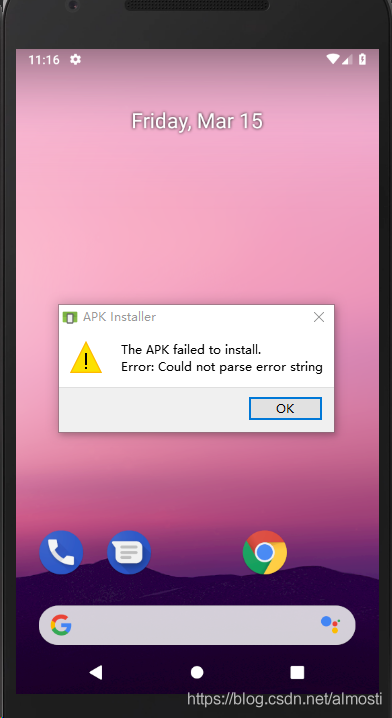
Today, when installing APK into AVD, I found the virtual machine prompts installation failed:
The APK failed to install.
Error: Could not parse error string
The reason for this error is also unclear. At first, I thought it was just the installation package, but it didn’t work after three or four installation packages. I checked the API version and SDK version and found no problem, and it was running normally on the real machine.

The reasons causing
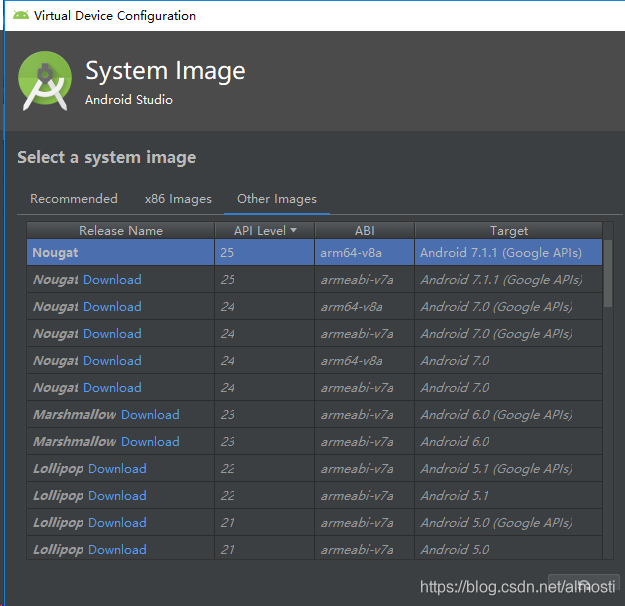
To get the best speed out of AVD, AS often recommends using the same CPU architecture AS your PC when installing AVD, which defaults to x86 architecture, while APK USES ARM architecture, which creates incompatibility.
When installing in a terminal, use the following command:
adb install path_to_your_app/name_of_your_app.apk
You may see the following error:
adb: failed to install name_of_your_app.apk: Failure [INSTALL_FAILED_NO_MATCHING_ABIS: failed to extract native libraries
The solution
1. Apk can be installed by installing an ARM-based AVD in AS (but the virtual machine is very, very card).

2. If you are compiling the program, you can change the program to x86 in the option, which can also run in the virtual machine.