Category Archives: How to Fix

How to Use the object of ES6 to clear the object value

Use the ES6 Object to clear the Object value
ES6 Object using incidentally paste JS if clearing the Object value method

In front in the process of compiling, Vue, for example, a page is bounced, bounced in assignment objects, so when we close the popup window after the assignment, the object has not been reset or empty, when open again, bounced objects in the content still exists, according to the normal js method, we will put the value of the object a reduction, this is very troublesome, of course, also may be alone to write a function, but the emergence of ES6 makes the process easier.

ES6 Object is used

# Initializing objects
let param = {
	id: '',
	name: '',
	age: 0,
	isManager: false,
	updateTime: new Date()
}
# Assign a value to an object, not shown here (on-page action).
# Use the Object.keys() function to initialize the object to its original state
```javascript
Object.keys(param).forEach(key => (
	switch (typeof param[key]) {
		case 'string':
			param[key] = '';
		case 'boolean':
			param[key] = false;
		case 'date':
			param[key] = new Date();
		case 'number':
			param[key] = 0;			
	}
))
# Use the above method when special types require special handling.
Object.keys(param).forEach(key => param[key] = '')

By the way, paste js if clearing theobject value method

# Assigned Objects
let param = {
	id: '1',
	name: '2',
	age: 3,
	isManager: true,
	updateTime: new Date()
}
# Start Emptying
for (let key in param) {
	param[key] = ''
}
# The logic of the specific initialization type is the same as that of ES6 above, so I won't repeat it.
TypeError: Cannot read property ‘username‘ of undefined

TypeError: Cannot read property ‘username’ of undefined
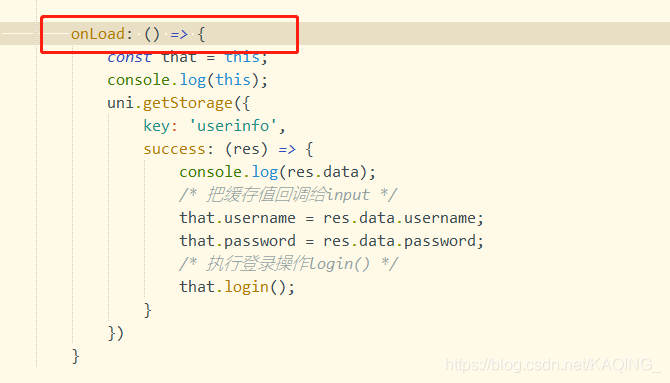
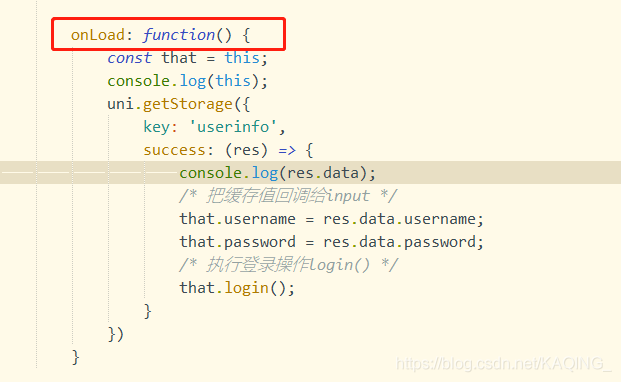
Recently, onLoad() was used in the uni-App development project of Android app. During the life cycle, the value of Username needed to be changed, but TypeError: TypeError: Cannot read property ‘username’ of undefined was frequently reported


causes this to always point to undefined, which may be because the arrow function is strictly limited to the point of this, or change back later, it is ok;

Could not publish server configuration for Tomcat v8.5 server at localhost

Could not publish Server Configuration for Tomcat V8.5 Server at localhost. The solution
Problem analysis
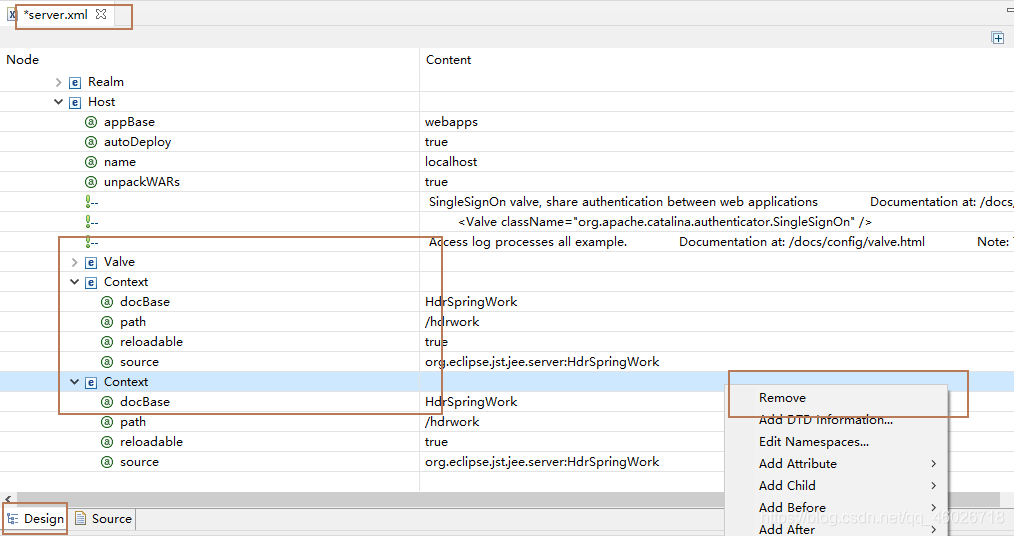
Possible exception: Multiple duplicate project names are stored in the Context tag in the server.xml file in the Servers file
The solution
Find the Servers file in Eclipse. Find the folder with the name of the server used to start the project in it, and under its directory find the server.xml file
At this time found that the document is very lengthy, small white shows that look dizzy..
Find the Design view at the bottom, click on the Design view to change the view, find the small arrow to the left of Servers, click on the small arrow to see the subdirectory of Servers, and keep looking for the small arrow until you find the Context.

You can clearly see the duplicate item name in the Context, right-click on it and select Remove to remove the redundant Context save (Ctrl+S or click save in the upper left corner, the * on the file label will disappear).
We’re done. Go and restart the project.

An error 1064 is reported when pymysql accesses the image

An error has been reported while accessing images in the mysql database using Pymysql. The code is as follows
Error message: (1064, “You have an error in your SQL syntax; check the manual that corresponds to your MySQL server version for the right syntax to use near ‘\xff\xd8\xff\xe0\x00\x10JFIF\x00\x01\x01\x00\x00\x01\x00\x01\x00\x00\xff\xdb\x00′ at line 1”)
I found a lot of methods on the Internet, but I couldn’t solve the problem. Later, I tried again and again and finally solved it
Note that the size of the binary BLOB in mysql is smaller than the size of the binary BLOB when designing a table, change the binary data to mediumBLOB
The code is as follows:
import pymysql
from datetime import datetime
To create the database, first connect to the mysql database
Conn = Pymysql.connect (host=’127.0.0.1′, user=’root’, Database =’ smart_apartment_DB ‘,
password=’160507pcsd’, charset=’utf8′)
Create a cursor
cursor = conn.cursor()
The # ExCute () function can execute simple SQL statements
f = open(file=’./img/imageOne.jpg’, mode=’rb’)
dataimg = f.read()
f.close()
nowtime = datetime.now().strftime(“%Y-%m-%d, %H:%M:%S”)
argdata = pymysql.Binary(dataimg)
sqlone = “insert into img_pack(imgtime,imgdata) values(‘%s’,’%s’)” % (
nowtime, argdata)
try:
cursor.execute(sqlone)
conn.commit()
except Exception as e:
conn.rollback()
Print (” Error message: “, e)
Close the cursor first
cursor.close()
Close the database connection again
conn.close()
 
After many attempts, the problem was found
sqlone = “insert into img_pack(imgtime,imgdata) values(‘%s’,’%s’)” % (
Remove the ‘%s’ single quotation mark from nowtime, argdata and change to
sqlone = “insert into img_pack(imgtime,imgdata) values(%s,%s)”
Cursor. Execute (SQlone) changed to CURSOR. Execute (SQlone, (nowtime, argdata))
You can store images in a binary stream like mysql
The correct code is as follows
import pymysql
from datetime import datetime
 
To create the database, first connect to the mysql database
Conn = Pymysql.connect (host=’127.0.0.1′, user=’root’, Database =’ smart_apartment_DB ‘,
password=’160507pcsd’, charset=’utf8′)
Create a cursor
cursor = conn.cursor()
The # ExCute () function can execute simple SQL statements
 
f = open(file=’./img/imageOne.jpg’, mode=’rb’)
dataimg = f.read()
f.close()
nowtime = datetime.now().strftime(“%Y-%m-%d, %H:%M:%S”)
argdata = pymysql.Binary(dataimg)
 
sqlone = “insert into img_pack(imgtime,imgdata) values(%s,%s)”
 
try:
cursor.execute(sqlone, (
nowtime, argdata)
)
conn.commit()
except Exception as e:
conn.rollback()
Print (” Error message: “, e)
 
 
Close the cursor first
cursor.close()
Close the database connection again
conn.close()

Waiting for another pilot command to release the startup lock

During normal development, Android Studio connected to the emulator and did not show it
If Waiting for another flutter Command to release the startup lock..    
Two solutions;

    switch network (the first one is not ok, the second one is not ok) into the SDK directory of flutter, then find bin/cache/lockfile file, delete it, then run the doctor of flutter, and then connect to the simulator.

The mistake will be solved

CMake Error at CMakeLists.txt:5 (PROJECT): The CMAKE_C_COMPILER: cl is not a full path

Error info:
– Building for NMake Makefiles
— The C compiler identification is unknown
— The CXX compiler identification is unknown
CMake Error at CMakeLists. txt:5 (PROJECT):
The CMAKE_C_COMPILER:
cl
is not a full path and was not found in the PATH.
To use the NMake generator with Visual C++, c make must be run from a shell that can use the compiler cl from the command line.   This environment is unable to invoke the cl compiler.   To fix this problem, run CMake from the
Visual Studio Command Prompt (vcvarsall.bat).
Tell CMake where to find the compiler by setting either the environment
variable “CC” or the CMake cache entry CMAKE_C_COMPILER to the full path to
the compiler, or to the compiler name if it is in the PATH.

CMake Error at CMakeLists. txt:5 (PROJECT):
The CMAKE_CXX_COMPILER:
cl
is not a full path and was not found in the PATH.
To use the NMake generator with Visual C++, c make must be run from a shell that can use the compiler cl from the command line.   This environment is unable to invoke the cl compiler.   To fix this problem, run c make from the
Visual Studio Command Prompt (vcvarsall.bat).
Tell CMake where to find the compiler by setting either the environment
variable “CXX” or the CMake cache entry CMAKE_CXX_COMPILER to the full path
to the compiler, or to the compiler name if it is in the PATH.

— Configuring incomplete, errors occurred!
See also “E:/gc/c_test1/build/CMakeFiles/CMakeOutput.log”.
See also “E:/gc/c_test1/build/CMakeFiles/CMakeError.log”.

How to Fix
1.Don’t use make.. Use  these  commands:

cmake -G "MSYS Makefiles" ..

2. If the first one doesn’t work, set the path:

$ export CC=/c/MinGW/bin/gcc.exe
$ export CXX=/c/MinGW/bin/g++.exe
$ cmake -G "MinGW Makefiles" ..
-- The CXX compiler identification is GNU 4.8.1        
...
$ mingw32-make

The second:

$ cmake -DCMAKE_C_COMPILER=/c/MinGW/bin/gcc.exe -DCMAKE_CXX_COMPILER=/c/MinGW/bin/g++.exe ..

If not, please refer to the following link:
https://www.e-learn.cn/content/wangluowenzhang/22835
https://stackoverflow.com/questions/29746950/cmake-cannot-find-compiler

C language write() function analysis: write failed bad address

When running the following test program on the ARM development board, “Write Failed Bad address” would appear probabilistic:

/* Write test */
#include<stdio.h>
#include<unistd.h>
#include<sys/types.h>
#include<sys/stat.h>
#include<fcntl.h>

int main(int argc,char* argv[]){
 int i = 0;
 int w_rw = 0;
 int fd = -1;
 int bw = -1;
 int nob = 0;
 char* file_name = "testfile";
 char buff[30] = "Testing";

 w_rw = 1;       // 1 - write , 2 - rewrite
 nob = 1024;  // No of bytes to write

 for(i = 0; i < w_rw; i++){
        if((fd = open(file_name,O_CREAT | O_RDWR))< 0){
                perror("Open failed!");
                return -1;
        }

        printf("fd:%d",fd);
        if((bw = write(fd,buff,nob)) < 0){
                perror("Write failed!");
                return -1;
        }
        printf("\n Bytes written : %d \n",bw);
 }

 return 0;
}

write() function man manual. The description of this function is as follows:

Function definition: ssize_t write (int fd, const void * buf, size_t count); 
Function Description: write() writes a count of bytes from the memory specified by buf to the file specified by fd.
Return Value: If write() succeeds, it returns the actual number of bytes written (len). When an error occurs, it returns -1, and the error code is stored in errno.

Here the byte written from the buf file fd file is determined by the count, not the actual allocated memory of the buf file. Thus, there is a case for accessing invalid addresses (Bad address</code b>) : if the value of count is greater than the actual allocated memory size of buf, the write() function may attempt to access invalid addresses beyond the actual memory space of buf.
The problem with the above test code is that buf is small, only 30 bytes, and write() is trying to write 1024 bytes, which will probabilistically access the invalid address. This problem can be solved by simply modifying the following code:

        if((bw = write(fd,buff,sizeof(buf))) < 0){
                perror("Write failed!");
                return -1;
        }

Maven Compilation error jdwp on getting class status, jvmtierror = JVMTI_ERROR_WRONG_PHASE(112)

Today, running the maven compiled project gave errors
JDWP exit error JVMTI_ERROR_WRONG_PHASE(112): on getting class status [../../../src/share/back/util. c:1265]
JDWP exit error JVMTI_ERROR_INVALID_ENVIRONMENT(116): Can’t allocate jvmti memory [../../../src/share/back/util. c:1779]
FATAL ERROR in native method: JDWP on getting class status, jvmtiError=JVMTI_ERROR_WRONG_PHASE(112)
FATAL ERROR in native method: JDWP Can’t allocate jvmti memory, jvmtiError=JVMTI_ERROR_INVALID_ENVIRONMENT(116)

The Internet says to set up maven to use local jdk, specifically open settings.xml and add jdk under the tag.

<profile>  
    <id>jdk17</id>  
    <activation>  
        <activeByDefault>true</activeByDefault>  
        <jdk>1.7</jdk>  
    </activation>  
    <properties>  
        <maven.compiler.source>1.7</maven.compiler.source>  
        <maven.compiler.target>1.7</maven.compiler.target>  
        <maven.compiler.compilerVersion>1.7</maven.compiler.compilerVersion>  
    </properties>   
</profile>  

But it’s strange that I didn’t change the configuration of the project, but I reported this mistake today. It’s amazing.

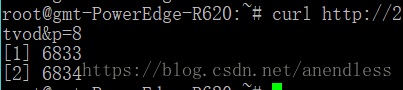
Curl returns empty reply from server. Due to the processing of special characters, curl cannot be accessed and the browser can access it.

Use the browser for normal access.
When using curl access, either appear
Return Empty Reply from Server or display

Through a number of experiments and Windows under the curl comparison, found that the access path has & AMP; Character, resulting in truncation.
When you add double quotes, you can access it normally
Both curl “http://x.x.x.x:8080/wserver?r=x& s=x& ./”

Socket error 10053

socket error- Software caused connection abort. Error code : 10053

Action.c(16): Error : socket0 – Software caused connection abort. Error code : 10053.

This error is caused by socket communication process, which is usually like this :
normal C/S communication process is:
Server Listen;

Client Connect;

Server Accept;

Client Send;

Server Recv;

Client Close;

Server Close

If the Client side does not actively close the connection and directly exits, the Server side thread will cause an error of 10053 (this error usually does not affect much), and if the Server first actively closes the connection in the communication process, the Client side will also cause an error of 10053
When the network is down, it usually means that the Client thinks the Server is down and yells 10053

Keil5 compiler error: runtime error R6002 – floating point support not loaded

Wanted to use JTAG emulator + Keil5 try online debugging and download the program using a USB serial port until (download), found an error, then compile time corresponding download file cannot be found. Axf (similar to unable to generate a HEX file downloaded to the board on the inside), then check along while information on the Internet, find below the compile error: the runtime error R6002 – floating point support not the loaded; Then began to look up information on the Internet and a variety of methods to solve.

Error 1051 (42s02): unknown table ‘…’

The reason Why I reported this error is that the storage engine used MyISAM before, but changed to InnoDB later
But I can’t delete the table because the storage engine mode used for the table before is still MyISAM, so I can’t delete it.
1 species,
Modify the storage engine of the table:
The second,
1. Delete the file of the corresponding table. Make sure the table is useless before deleting.
2. Find the location of the corresponding library in the system, such as: /var/lib/mysql/ library name