The File class operates on files and directories
CreateNewFile create file
Mkdir mkdirs create file
Exists to determine whether a file or folder exists
Length gets the file length
LastModified Time
GetName gets the name of the file or folder
GetPath relative path
Absolute path of getAbsoultPath
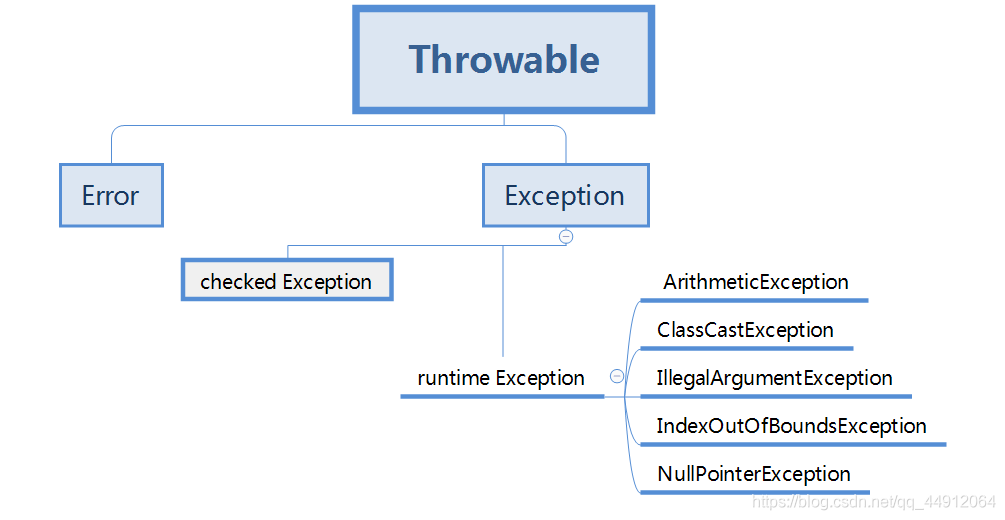
Runtime Exception
ArithmeticmeticException
Abnormal ArrayIndexOutOfBoundsException array index of crossing the line
NullPointerException NullPointerException
Type cast exception ClassCastException
Illegal parameter exception IllegalArgumentException
Index overbounds Exception IndexOfBoundsException
Checked Exceptions are non-runtime exceptions
I/O exception IOException
Category Archives: How to Fix
@Value gets the configuration file value and returns null
The @value gets the configuration file Value returns NULL
In custom parameters parser implementation HandlerMethodArgumentResolver subclasses, access to @ the Value label Value is null.
Example:
In custom parameters parser implementation HandlerMethodArgumentResolver subclasses, access to @ the Value label Value is null.
Example:
@Configuration
public class ArgumentResolverConfig extends WebMvcConfigurerAdapter {


    @Override
    public void addArgumentResolvers(List<HandlerMethodArgumentResolver> argumentResolvers)
    {
        argumentResolvers.add(new UserArgumentResolver());
    }

}
Direct new UserArgumentResolver(), not managed by the Spring container, so use @value to get an invalid Value in the UserArgumentResolver
Revised:
@Configuration
public class ArgumentResolverConfig extends WebMvcConfigurerAdapter {

    @Bean
    public UserArgumentResolver getUserArgumentResolver(){
        return new UserArgumentResolver();
    }

    @Override
    public void addArgumentResolvers(List<HandlerMethodArgumentResolver> argumentResolvers) {
        argumentResolvers.add(getUserArgumentResolver());
    }
}
The @bean annotation is given to the Spring container-managed Bean, at which point @Value gets the configuration file Value.
tf.one_ How to use hot ()
Tensorflow study notes
tf.one_hot
This paper only serves as a personal learning record, please refer to tensorFlow Chinese official website TF Chinese official website
Call format
tf.one_hot(indices, depth, on_value=None, off_value=None, axis=None, dtype=None, name=None)
Parameters that
Indices: Tensors of an index.
· depth: a scalar quantity defined in one_hot dimension
· on_value: a set of indices[j] = I (default: 1)
· off_value: a set of indices[j]! = I (default: 0)
· axis: axis to be filled (default: -1, a new innermost axis)
· dtype: the data type of the output tensor.
· name: the name of the operation (optional).
The output
A one_hot tensor
A possible mistake
- TypeError
whether on_value or off_value does not match dtype. TypeError
whether on_value and off_value do not match each other
prompt
- indices location value is on_value, while the other location is off_value. The on_value and OFF_value data types must match. If dType has a value, they must take the same value as the type displayed by DTYPE.
if on_value has no value, the default value is 1, and the output is dtype.
if off_value has no value, the default value is 0, and the output is dtype.
if the indices have N dimensions, the output is N+1. If the indices are scalars, the output is a vector with a length of depth. If the indices are tensor with features, the output will be:

. If the indices are indices with batch size [batch, features], the output will be:
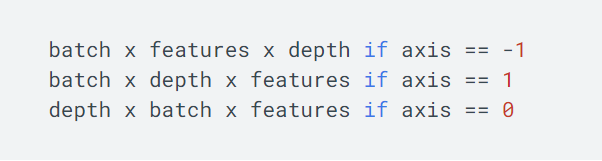
. If the indices are RaggedTensor, the axis must be positive and form an axis which is hard to form. The output is equivalent to the output of one_hot applied with a value of an irregular shape, and a new irregular shape is generated from the result.
if dtype has no value, it will try to assume that the data type is on_value or off_value if one or both pass. If on_value, off_value, dtype have no value, dtpye will default to be tf.float32.
** note: if output of non-numeric types (such as tf.string, tf.bool, etc), on_value, off_value all need to have a value.
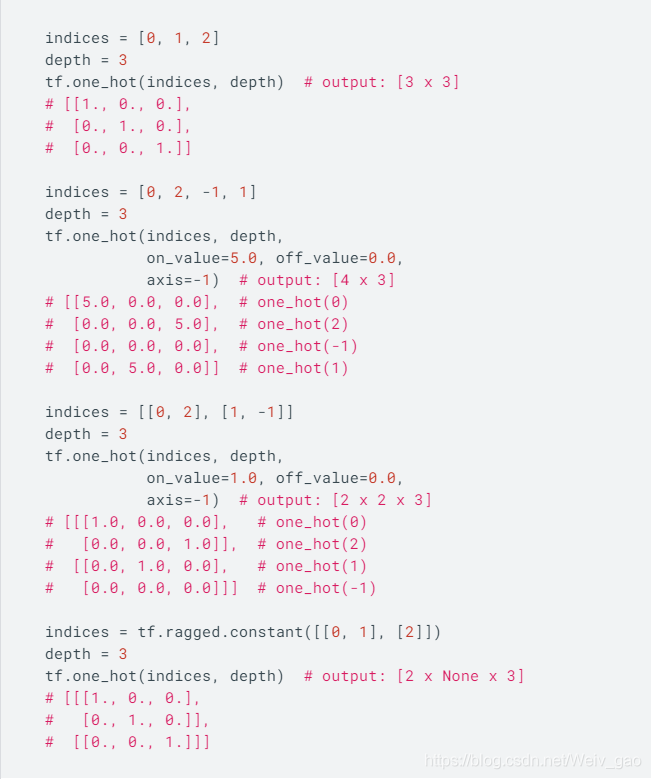
example
Meven report error java.lang.NoSuchMethodError : com.google.common . base.Preconditions.checkArgument
java.lang.NoSuchMethodError: com.google.common.base.Preconditions.checkArgument
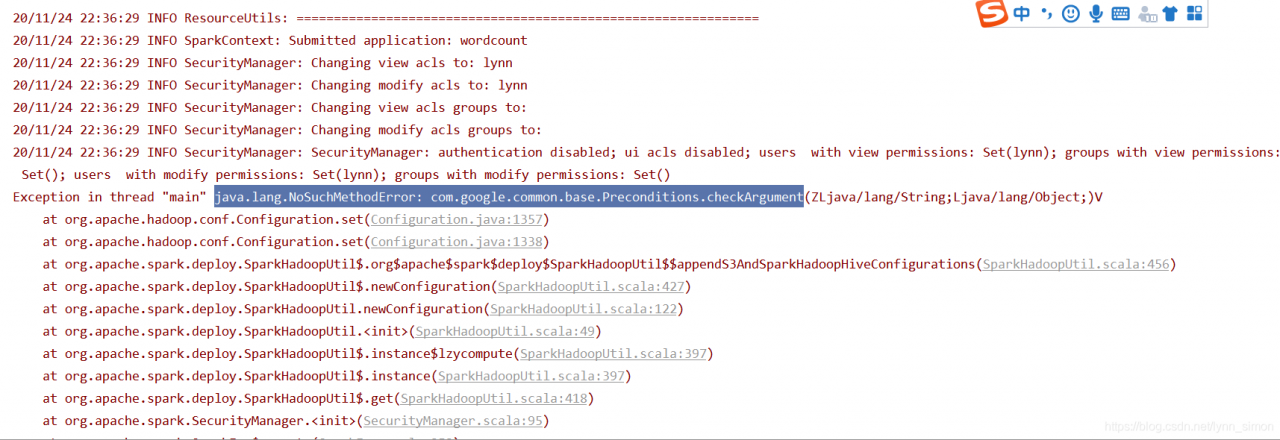 this error is that jar jar dependency conflicts need to remove duplicate dependencies
step 1: locate the jar where the class is located
IDEA quick search CTRL +c double click shift
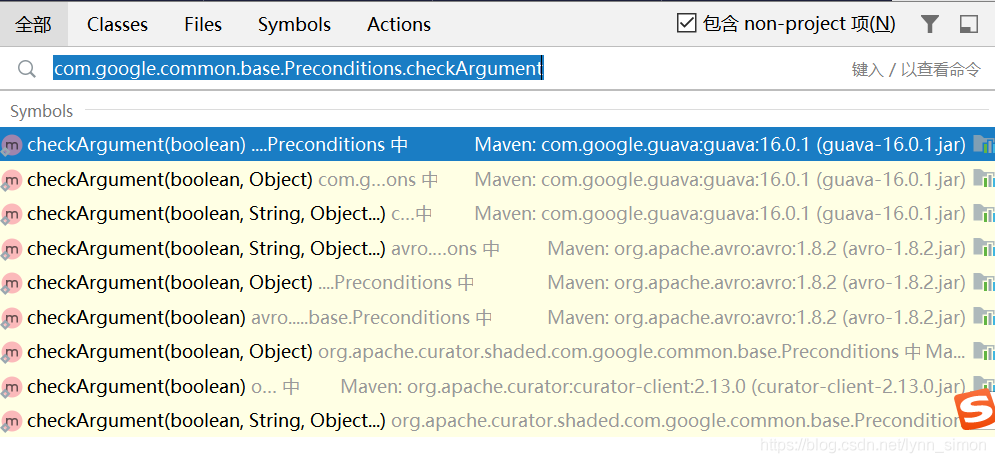 locate the version to be deleted
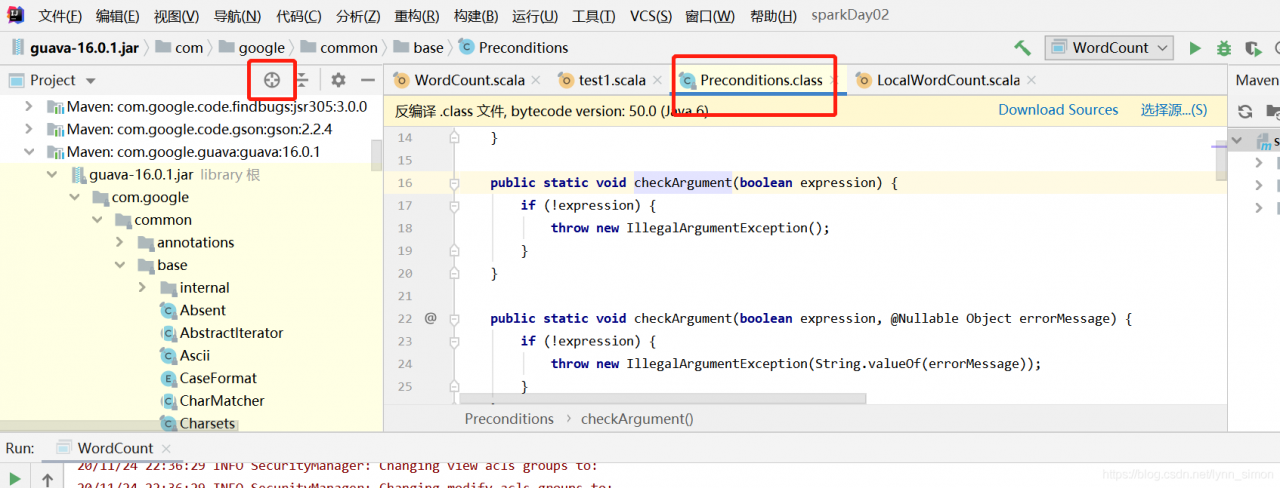 locate the jar location of the specific class
then add the remove operation
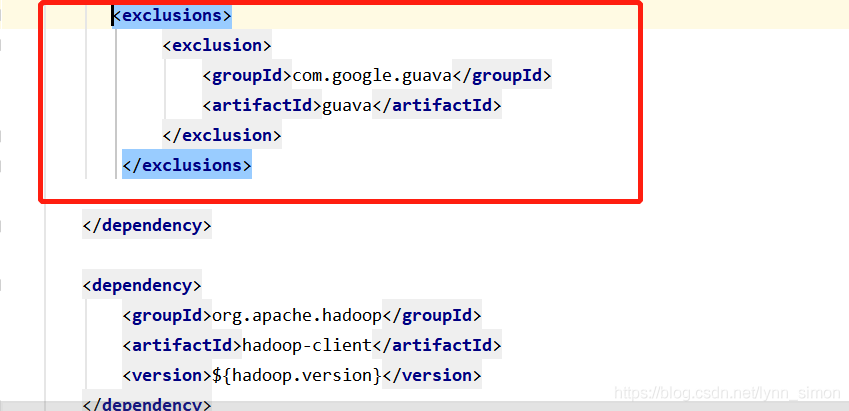 in the pom file
Error in installing RVM on MacOS raw.githubusercontent.com:443 Connection failure resolution
I thought a ladder could solve the problem, but I was naive and wrote down the solution
1. Look up the connection failure domain current IP [https://site.ip138.com/raw.Githubusercontent.com/]
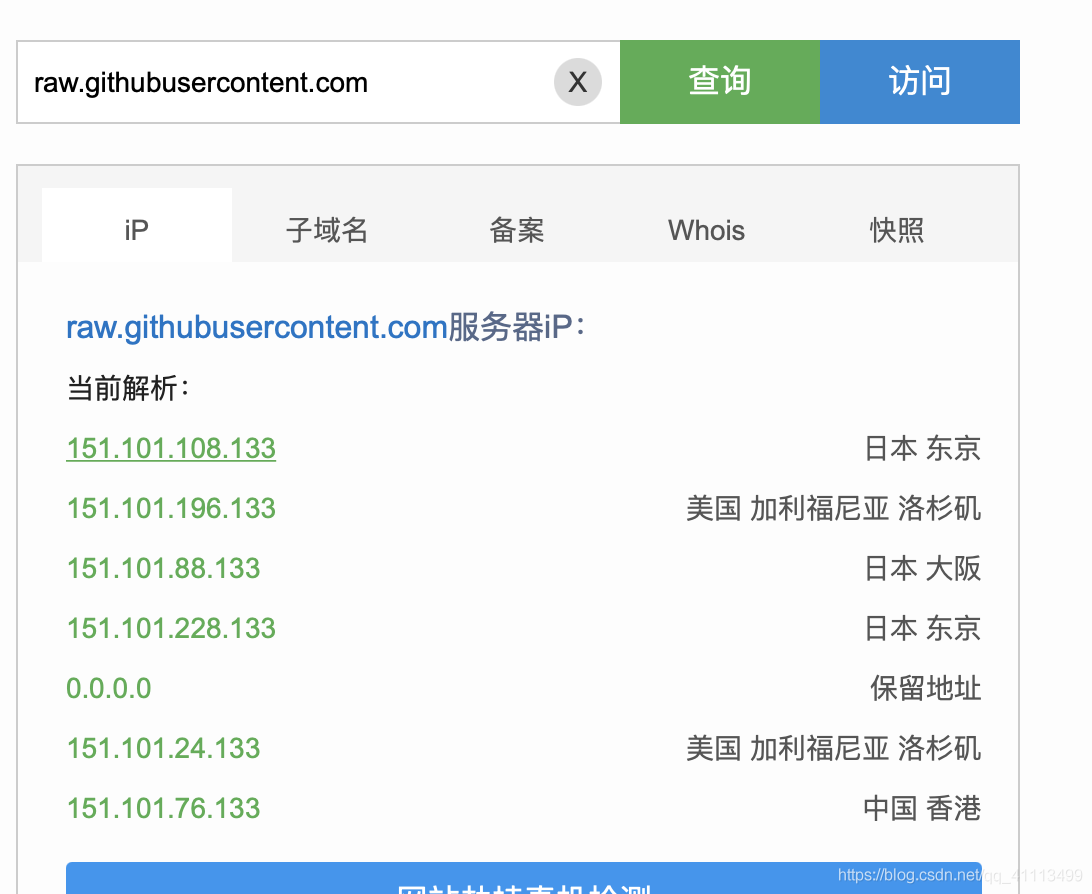
2. Terminal input sudo vi/etc/hosts and a corresponding IP connection failure domain configuration is added to the file, I add the Chinese Hong Kong
151.101.76.133 raw.githubusercontent.com
save after exit
3. Reexecute the install RVM command and it will be successful
How to use JavaScript in HTML
Statement: All of my blogs are personal notes, used as personal knowledge index, so there are logic problems in the narrative, the span is large, I hope to understand. Share out for everyone to learn to read, if there is a mistake hope to point out, thank you!
< script> Tag properties:
Async: Optional, indicating that the script should be downloaded immediately but should not interfere with other operations on the page
Defer: Optional, which means that the script can be deferred until the document is fully parsed and displayed, and is valid only for external scripts
SRC: Optional, representing the external file that contains the code to execute
Type: Required, representing the content type of the scripting language in which the code is written, typically text/javascript
Use external JavaScript files
In the use of & lt; script> When embedding external JavaScript code, do not appear anywhere in the code. /script>
If you want to pass < script> Element to contain an external JavaScript file, then SRC is required. SRC points to a link to an external JavaScript file, either relative or absolute
The processing of the page also stops temporarily when downloading and parsing external JavaScript files
& LT with SRC attribute; script> JavaScript code should no longer be included between tags, and even if it was, it would be ignored
External JavaScript files carry a.js extension that can be ignored, but the server must return the correct MIME type
Label location
Placed in & lt; body> At the end of the
Because: The browser processes the HTML code sequentially, if placed at the beginning will cause the browser to first download and process the JavaScript external files, thus causing the web page to be placed in the < head> And add defer= “defer”
<script type="text/javascript" defer="defer" src="xxx.js"></script>
The because: Defer property causes the script to be deferred until the entire page has been loaded, called the defer script, which is best left with only one placed at < head> In, and add Async
<script type="text/javascript" async src="xxx.js"></script>
The because: Async attribute instructs the browser to download the script file immediately, but it should not prevent other actions on the page marked async from ensuring that the script is executed in the order in which it is recommended to place the script at < body> The end of the method
Solve the problem of showing unregistered (unknown custom element) when importing components into Ant Design Pro
why
Ant – Design – Pro home page
When using the Ant-Design-Pro management framework directly, the project introduces some commonly used components on demand by default, so it will be wrong to use some rarely used components directly.
default on on demand components
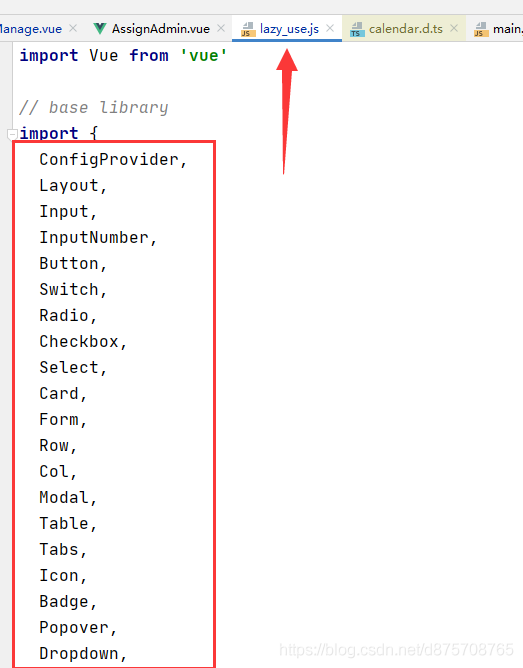
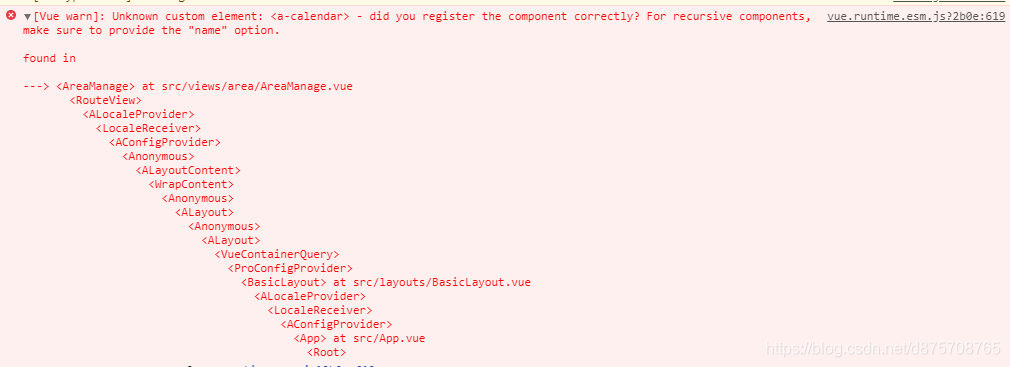
error when introducing Calendar Calendar
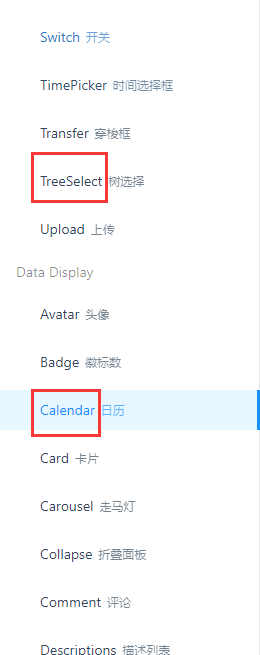
The solution
Introduce the component you want into the lazy_use.js file. The component name is basically the English letter before the component library.
lazy_use.js file path
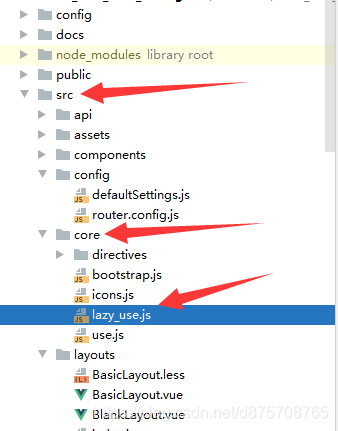
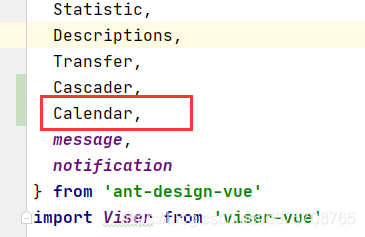
The introduction of
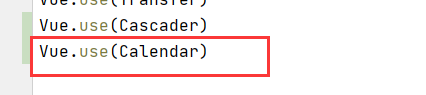
To pilot in this component, then register in the Vue(CTRL + data left to see if you can jump over)
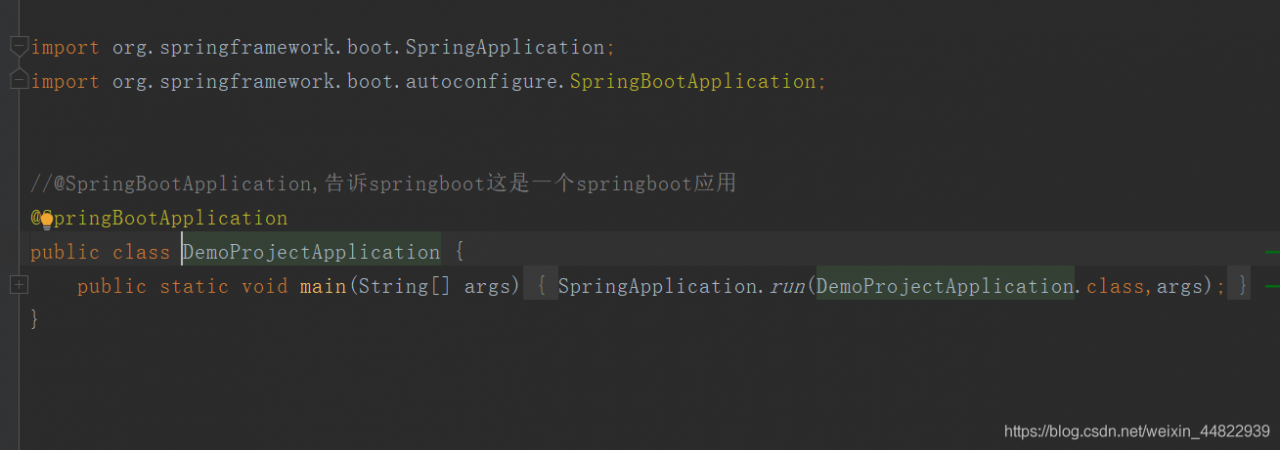
Common forms of springboot2. X boot class location
1 when the startup class and controller are in the same class, add the annotation @controller in the class
2 when the startup class and controller are separated, the startup class should be placed in the root directory of the project, add the annotation @springbootapplication in the startup class,
2 when the startup class and controller are separated, the startup class should be placed in the root directory of the project, and add the annotation @componentscan in the startup class, And configure the package name to be scanned (basePackages=)
the second option is generally recommended
The project structure
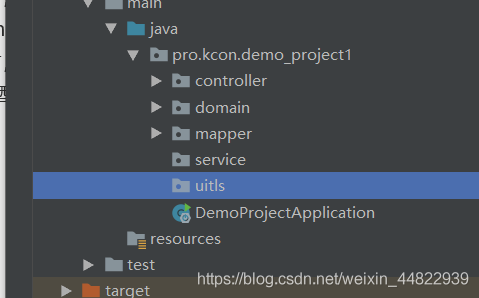
startup class DemoProjectApplication
Spring MVC – enable static resource access
1. The configuration
<mvc:resources mapping="/js/**" location="/js/"/>
Mapping: represents all files under js directory
location: represents the specific file path of a static resource
2. If SpringMVC can’t find the static resource, then tomcat should find the static resource
<mvc:default-servlet-handler/>
Solution to Apple Wireless Mouse, keyboard or touchpad can not be recognized by MAC
How to solve the problem that apple’s wireless mouse, keyboard, or trackpad cannot be recognized by the Mac?Macw small series to solve the Apple wireless mouse, keyboard or trackpad can not be recognized by the Mac, I hope to help you!
The device is not recognized by the Mac
If your mouse, keyboard, or trackpad is not recognized by the Mac, follow these steps
Make sure the wireless mouse, keyboard, or trackpad is turned on and there is a slide switch at the bottom of both The Magic mouse and The Magic Mouse 2. Please slide this switch to turn on the device. On the wonderful control mouse, the green LED indicator light will be briefly on. On Miaocontrol mouse 2, the lower part of the switch will be green. Miaoke keyboard, Miaoke keyboard with numeric keypad and Miaoke Pad 2 all have a sliding switch on the back edge. Please slide this switch to turn on the device (it will be green). Early Models of Apple’s wireless keyboard had a power button on the right. Press this button and a green LED indicator light (located next to the button) will appear on the top of the device. When these devices are enabled, they will appear as connected in the Bluetooth section of System Preferences and in the Bluetooth menu of the menu bar. If the device does not appear in either location, make sure it has been charged or replaced, and that it has been paired with the Mac.
Make sure the device is set up to work with the Mac
Mio Keyboard, Mio Keyboard with numeric keypad, Mio Pad 2, and early Apple wireless models work with the Mac.
Make sure the Bluetooth is on
Use Mac laptop’s built-in trackpad or USB mouse to select apple () menu & gt; System Preferences. Then select Bluetooth and make sure it is enabled.
Make sure the device is charged
Miaoke keyboard, Miaoke keyboard with numeric keypad and Miaoke Pad 2 are all equipped with built-in rechargeable batteries. You can connect these devices to a Mac, or use a lightning to USB cable to connect to a USB power adapter to charge them. To achieve the fastest battery charging performance, be sure to turn the device on after connecting the lightning to USB cable. To check the battery life of these devices, click the Bluetooth icon in the Mac menu bar and select the device by name. If the battery of any device is low, please charge the device. If the device is not displayed, make sure to turn on the device as listed above.
Close and restart the device
If your Mac still doesn’t recognize the Apple wireless mouse, keyboard, or trackpad after following these tips, try turning off the wireless device, waiting for a moment, and then restarting it.
NPM run build failed to package err! Missing script: build
A vUE project packaging error occurred
PS D:\****\*****> npm run build
npm ERR! missing script: build

npm ERR! A complete log of this run can be found in:
npm ERR!     C:\Users\***\AppData\Roaming\npm-cache\_logs\2020-11-25T02_01_03_914Z-debug.log
“Build :prod” : “Ue -cli- Service build” under the scripts in package. Json
"scripts": {
    "dev": "vue-cli-service serve",
    "build:prod": "vue-cli-service build",
    "build:stage": "vue-cli-service build --mode staging",
    "preview": "node build/index.js --preview",
    "lint": "eslint --ext .js,.vue src",
    "test:unit": "jest --clearCache && vue-cli-service test:unit",
    "test:ci": "npm run lint && npm run test:unit",
    "svgo": "svgo -f src/icons/svg --config=src/icons/svgo.yml",
    "new": "plop"
  },
SO you can’t use NPM run build to package
instead
npm run build:prod --report
In echarts label.formatter Non effectiveness
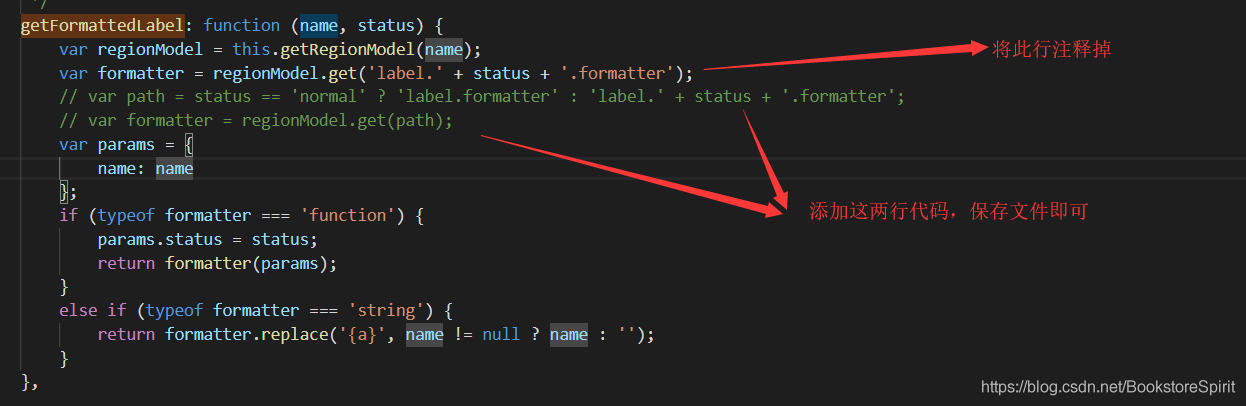
In echarts development process, while using the map, if you use the geo, and want to set the map text content and style, we can use the geo. Label. Normal. The formatter to customize these functions, but sometimes can appear the formatter is not effective, then modify the source code to solve the problem.
1, open every js file
2. GetFormattedLabel ‘
3. Find this location:
will be in the figure above, the source of the original line of code to comment, and then add two lines of code, to complete the
code as followsvar path = status == 'normal' ?'label.formatter' : 'label.' + status + >'.formatter'; var formatter = regionModel.get(path);