Category Archives: How to Fix

【Hackerrank】Reverse a doubly linked list

You’re given the pointer to the head node of a doubly linked list. Reverse the order of the nodes in the list. The head node might be NULL to indicate that the list is empty.
Input Format
You have to complete the Node* Reverse(Node* head) method which takes one argument – the head of the doubly linked list. You should NOT read any input from stdin/console.
Output Format
Change the next and prev pointers of all the nodes so that the direction of the list is reversed. Then return the head node of the reversed list. Do NOT print anything to stdout/console.
Sample Input
NULL
NULL <– 2 <–> 4 <–> 6 –> NULL
Sample Output

NULL
NULL <-- 6 <--> 4 <--> 2 --> NULL

Explanation
1. Empty list, so nothing to do.
2. 2,4,6 become 6,4,2 o reversing in the given doubly linked list.

#include<iostream>
#include<cstdio>
#include<cstdlib>
#include<cmath>
using namespace std;
struct Node
{
	int data;
	Node* next;
	Node* prev;
};/*
   Reverse a doubly linked list, input list may also be empty
   Node is defined as
   struct Node
   {
     int data;
     Node *next;
     Node *prev
   }
*/
Node* Reverse(Node* head)
{
    // Complete this function
    // Do not write the main method. 
    if(head == NULL || head->next == NULL)
        return head;
    Node *p = head;
    Node *q = head->next;
    if(q->next == NULL)
    {
        q->next = p;
        q->prev = NULL;
        p->next = NULL;
        p->prev = q;
        return q;
    }
    while(q->next != NULL)
    {
        if(p == head)
            p->next = NULL;
        Node *_next = q->next;
        q->next = p;
        p->prev = q;
        p = q;
        q = _next;
    }
    q->next = p;
    p->prev = q;
    q->prev = NULL;
    return q;
}Node* Insert(Node *head, int data)
{
	Node *temp = new Node();
	temp->data = data; temp->prev = NULL; temp->next = NULL;
	if(head == NULL) return temp;
	head->prev = temp;
	temp->next = head;
	return temp;
}
void Print(Node *head) {
	if(head == NULL) return;
	while(head->next != NULL){ cout<<head->data<<" "; head = head->next;}
	cout<<head->data<<" ";
	while(head->prev != NULL) { cout<<head->data<<" "; head = head->prev; }
	cout<<head->data<<"\n";
}
int main()
{
	int t; cin>>t;
	Node *head = NULL;
	while(t--) {
	   int n; cin>>n;
           head = NULL;
	   for(int i = 0;i<n;i++) {
		   int x; cin>>x;
		   head = Insert(head,x);
	   }
	   head = Reverse(head);
	   Print(head);
	}
}

source, ~/.bashrc, ~/.bash_ Profile details

The source command is used to execute a script, so:

For example, in a script you export $KKK=111, if you use./ a.shh to execute the script, after execution, you run echo $KKK and find no value. If you use source to execute, and then echo, you will find KKK=111. Because calling./ a.shh to execute the shell is run in a subshell, so after execution, the structure does not reflect in the parent shell, but the source is different, it is executed in this shell, so you can see the result

when you first login to Linux, first start /etc/profile, then start one of the ~/.bash_profile, ~/.bash_login, or ~/.profile files in the user directory.
The order of execution is: ~/.bash_profile, ~/.bash_login, ~/.profile.
If the ~/.bash_profile exists, the ~/.bashrc file is also typically executed.

if [-f ~/.bashrc];
if [-f ~/.bashrc]; Then
.. /bashrc
fi

~/.bashrc, generally there will be the following code:
if [-f /etc/bashrc]; Then
. /etc/bashrc
fi

so ~/.bashrc will call /etc/bashrc file. Finally, the ~/.bash_logout file is also executed when the shell exits.

execution order: /etc/profile-& gt; (~/.bash_profile | ~/.bash_login | ~/.profile) -> ~/.bashrc -> /etc/bashrc ->

(1) /etc/profile: this file sets the environment information for each user of the system and executes when the user logs in for the first time. And collect shell Settings from the configuration file in the /etc/profit.d directory.

(2) /etc/bashrc: execute this file for every bash shell user. When the bash shell is opened, the file is read (that is, bashrc is executed every time a new terminal is opened).

(3) ~/.bash_profile: each user can use this file to enter shell information dedicated to their own use. When the user logs in, this file is only executed once. By default, some environment variables are set to execute the user’s.bashrC file.

(4) ~/.bashrc: this file contains bash information dedicated to your bash shell, which is read when you log in and every time you open a new shell.

(5) ~/.bash_logout: this file is executed every time the system exits (bash shell). In addition, variables set in /etc/profile (global) can be applied to any user, while variables set in ~/.bashrc (local) can only inherit from variables in /etc/profile, they are “father and son” relationship.

(6) ~/.bash_profile: interactive, login into bash running ~/.bashrc: interactive, non-login into bash running usually the Settings are about the same, so usually the former calls the latter.

The use of various environment variables such as /etc/profile and /etc/environment Settings files
1) First add export LANG=zh_CN to /etc/profile, log out of the system and log in again. The login prompt shows English.
2) First delete export LANG=zh_CN in /etc/profile, add LNAG=zh_CN to /etc/environment, log out of the system and log in again. The login prompt shows Chinese.

user environment is always created by executing /etc/profile before reading /etc/environment. Why is this different?Instead of executing /etc/environment first and /etc/profile later?
this is because: /etc/environment is the environment for setting the whole system, while /etc/profile is the environment for setting all users, the former is irrelevant to the logon user, while the latter is relevant to the logon user.

system application execution environment with users can be independent, but related to the system environment is, so when you log in, you can see, such as date, time, information display format and LANG is related to the system environment, the default LANG = en_US, LANG = zh_CN if the system environment, the message is in Chinese, or in English.

for the user’s shell initialization is to execute /etc/profile first, then read the file /etc/environment; For the whole system, /etc/environment is executed first. Is that correct?
logon order should be
/etc/enviroment –> /etc/profile –> $HOME/.profile –> $HOME/. Env (if present)
/etc/profile is the environment variable for all users
/etc/enviroment is the environment variable for the system

login system the order that the shell reads should be
/etc/profile-& gt; /etc/enviroment –> $HOME/.profile –> $HOME/.env
the reason should be the difference between the user environment and the system environment. If the same variable has different values in the user environment (/etc/profile) and the system environment (/etc/environment), then the user environment should be used as the criterion.

The use of MAC Desktop tiktok Goose pet goose

GooseDesktop is a fun desktop pet app that allows users to see a goose running around the screen.
douyin table pet goose Mac version how to use
Double click the application
to open it again to display the Settings window
. In the Settings window, you can either:
to change Settings
to exit the Desktop Goose (type killall “Desktop Goose” and press enter) or click the Settings “Quit Desktop Goose”
to open the Memes and Notes folder

Douyin Table pet goose Mac version technical description

module stored in ~/Library/Containers/net. Namedfork. Desktop chicago-brewed Goose/Data/Library/Application Support/Desktop chicago-brewed Goose/Memes.
is filled with built-in modules on the first run, but you can put more memes (GIF, PNG, JPG, and so on) in it.

note the Notes stored in ~/Library/Containers/net. Namedfork. Desktop chicago-brewed Goose/Data/Library/Application Support/Desktop chicago-brewed Goose/Notes /.
is populated with built-in comments the first time it runs, but you can put more comments here (as a TXT file).
Settings
to open the Settings window, double-click the icon again after the application runs.
can also change the Settings of the terminal using the default command. Here are the Settings and their default values:
CanAttackAtRandom: NOMinWanderingTimeSeconds: 20 maxwanderingtimeseconds: 40 firstwandertimeseconds: 20 framerate: 60 soundvolume: 1 – (use values between 0 and 1) UseCustomColors: NOGooseWhite: #ffffffGooseOrange: #ffa500GooseOutline: #d3d3d3GooseEye: #000000GooseMud: #8b4513
For example, to frame rate down to 30:
defaults write net. Namedfork. DesktopGoose FrameRate 30
let goose red:
defaults write.net. Namedfork. DesktopGoose GooseWhite “# ff0000”
defaults write net. Namedfork. DesktopGoose UseCustomColors – bool YES
quieted goose:
defaults write.net. Namedfork. DesktopGoose SoundVolume 0
changes will take effect immediately, without having to restart the Desktop chicago-brewed Goose.
application scripting
desktop goose for Mac can script with AppleScript. Drag the application to the script editor to see what is supported.
some examples you can do:
tell app “Desktop Goose” to collect meme “Meme4.png”
tell app “Desktop Goose” to collect meme “https://i.redd.it/4bamd6lnso241.jpg”
tell app “Desktop Goose” to wander
tell app “Desktop Goose” to nab mouse
tell app “Desktop Goose” to collect note “Honk from AppleScript” title “HoNK”

How to Find the Standard Deviation in Minitab

Standard deviation, represented by the Greek Letter sigma σ, is a measure of dispersement in statistics. It shows you how spread out your data set it. In a normal distribution, the bulk (64.2%) of a data set is within one standard deviation from the mean and almost all the data will fall within three standard deviations of the mean.  Calculating a standard deviation by hand involves the use of an ugly-looking formula, but you can calculate a standard deviation in Minitab in a couple of mouse clicks.
Sample question: Find the standard deviation in Minitab for the following data: 102, 104, 105, 110, 112, 116, 124, 124, 125, 240, 245, 254, 258, 259, 265, 265, 278, 289, 298, 311, 321, 321, 324, 354
Step 1: Type your data into a single column in a Minitab worksheet.
Step 2: Click “Stat”, then click “Basic Statistics,” then click “Descriptive Statistics.”

Step 3: Click the variables you want to find the standard deviation for and then click “Select” to move the variable names to the right window.
Step 4: Click the “Statistics” button.
Step 5: Check the “Standard deviation” box and then click “OK” twice. The standard deviation will be displayed in a new window.

Port 4200 is already in use.Use ‘-port’ to specify a different port error Reasons

Port 4200 is already in use. Use ‘-port’ to specify a different port error Reasons
An existing application(not angular) in your system using the port number 4200. This is a very rare scenario. In this case, you need to change the port number of angular application as mentioned below.
You already ran ng serve and to exit the application you typed Control Z (Ctrl+Z), And then you typed ng serve then you will get port 4200 is already in use_ error. In this case, you need to kill the previous process
To close or terminate the angular instance always use Control+C (Ctrl+c)
And ng serve uses default port number 4200 to run the angular application. And our application URL will be http://localhost:4200. To avoid this error we need to change the port number to other port which is free.
According to RFC 793 port numbers is a 16-bit unassigned integer. The minimum value is 0 and the maximum value is 65535.
And, within this range, ports 0 – 1023 are reserved for specific purposes(mostly).
To change the port number for our angular application use the below command
ng serve –port 4201
Now type ng serve
Our angular application will be running on http://localhost:4201
To kill already existing angular process use the below commands
Fix Port 4200 is already in use. Use ‘-port’ to specify a different port error in Mac & Linux
To fix port 4200 is already in use error in In Mac & Linux OS (Ubuntu etc) use the following commands
sudo kill $(sudo lsof -t -i:4200) Or
sudo kill sudo lsof -t -i:4200 Or
sudo lsof -t -i tcp:4200 | xargs kill -9
Fix Port 4200 is already in use. Use ‘-port’ to specify a different port error in Window
In Window operating system open command prompt. Use the following command to fix port 4200 is already in use error.
netstat -a -n -o | findStr “4200”`
Take the process id and kill the process using the following command
taskkill -f /pid 11128

How to open an app from an unidentified developer

How to open an app from an unidentified developer
You can run apps that you’ve downloaded directly from the internet that aren’t registered with Apple. You just have to give the OK.

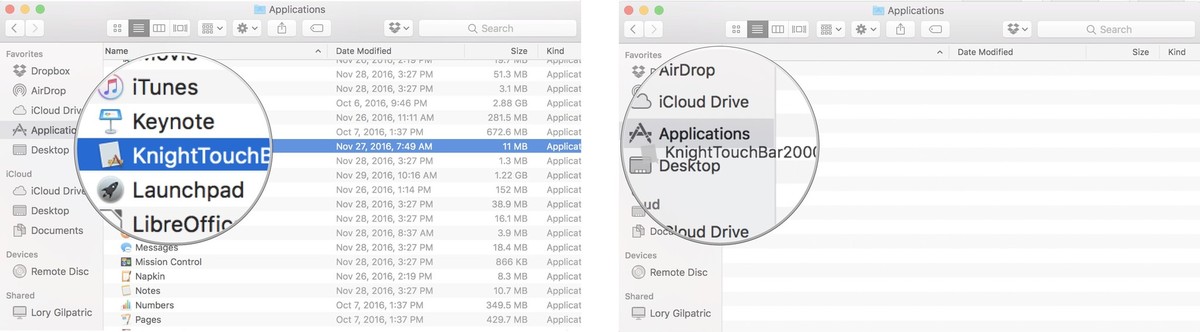
    After downloading an app from an unidentified developer, drag it to the Applicationsfolder. Select the app and right or control-click.   Click on Open. Click on Open again to confirm you want to complete the action.
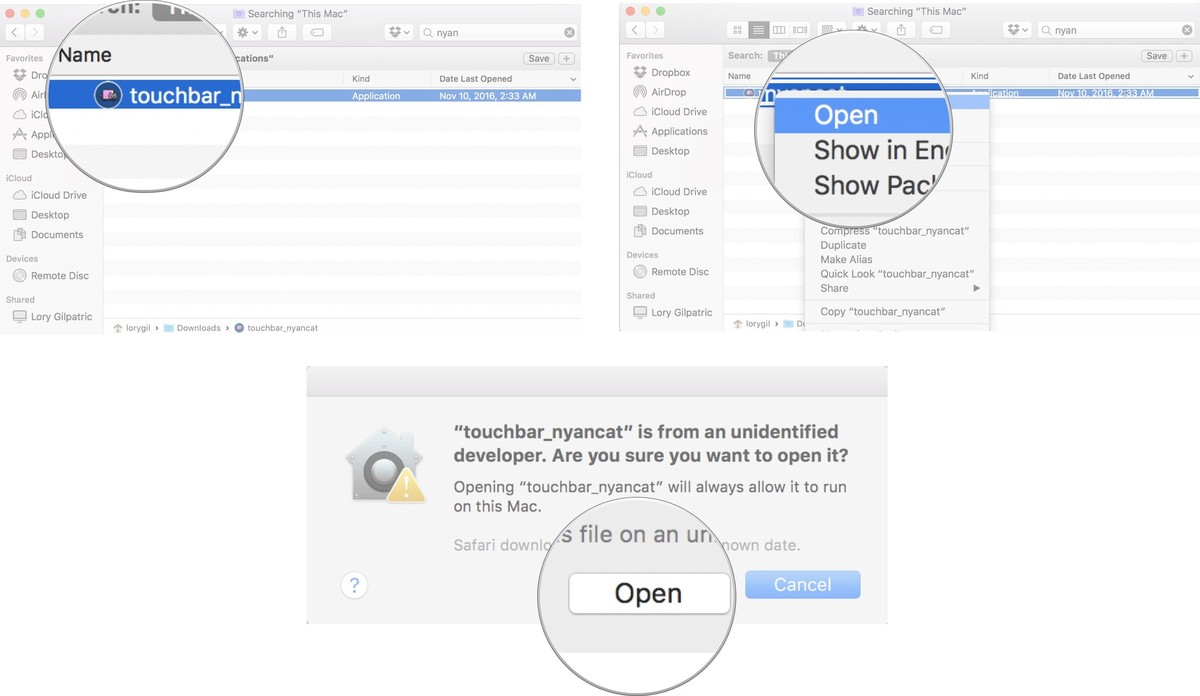
Opening an app from unidentified developer with a right or control-click overrides Gatekeeper for that specific app. From now on, you’ll always be able to open it without having to go through the process again.
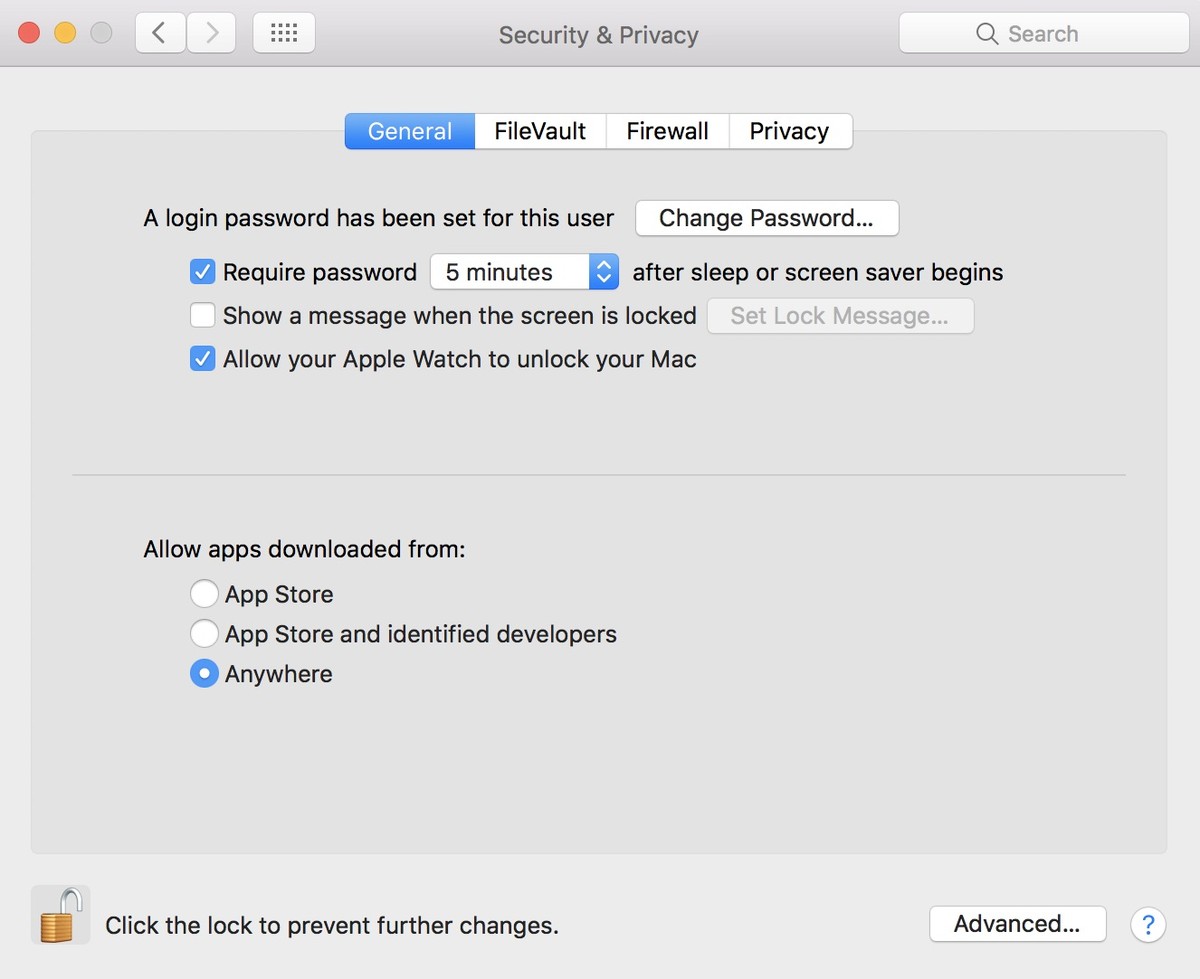
How to reinstate the Anywhere setting in Gatekeeper
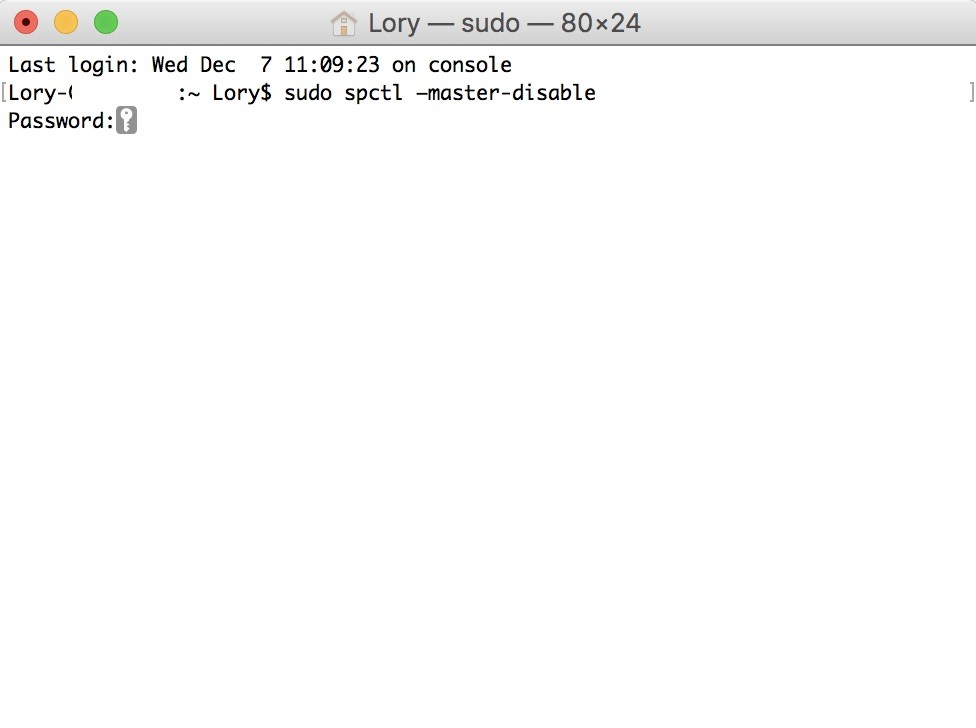
If the thought of having to right or control-click to open apps from unidentified developers seems arduous and tiresome, you can turn back time with Gatekeeper and bring back the ability to open apps from anywhere. All it takes is a bit of coding in Terminal.

    Close System Preferences on your Mac. Open Terminal. Type the following command: sudo spctl –master-disable Hit enter on your keyboard. Enter your administrator password. Hit enter on your keyboard.

Gatekeeper’s “Anywhere” setting will now be restored. It will also be selected by default. You can confirm the changes by opening System Preferences and selecting Security & Privacy.

If you ever want to enable the macOS Sierra Gatekeeper settings again, type sudo spctl –master-enable into Terminal.

Weblogic heapdump configuration

The previous week, Weblogic in the production environment went down twice in a row and had to go back to log analysis on Sunday.
However, because the memory parameters are not configured with GC parameters, the HeapDump file before the crash was not generated. So you still need to configure the GC parameters to find the root of the problem next time.
 
Configuration memory parameters method, didn’t find in Weblogic console where you can configure the memory parameters, the method of directly only directly in bea/user_projects/domains/domain/bin/setDomainEnv. Sh on increase
“+ PrintGCDetails – – XX: XX: + PrintGCTimeStamps – XX: XX: + HeapDumpOnOutOfMemoryError – + HeapDumpOnCtrlBreak Xloggc: $$. Gc. Log”
 
The configuration is as follows:

 
GC – XX: + PrintGCDetails: used to track system details;
– Xloggc: $$. Gc. Log: will the gc event every time the record to a file.
-XX:+PrintGCTimeStamps: can be mixed with -XX:+ printGC-XX :+PrintGCDetails :11.851: [GC 98328K-& GT;93620K(130112K), 0.0082960 secs]
– XX: + HeapDumpOnOutOfMemoryError: the JVM when abnormal OOM to Dump the memory image file
– XX: + HeapDumpOnCtrlBreak: said can kill 3 & lt; pid> Generate DUMP files as needed
 
But pay attention to:
Oracle JVM version 6.0 removes the -xx :+HeapDumpOnCtrlBreak parameter. If you need to generate DUMP files, use the Jmap command. The command line format is as follows:
Jmap – dump: the format = b, the file = managed1_heapdump. Hprof & lt; pid>
Managed1_heapdump.hprof represents the name of the generated DUMP file and PID represents the Java process number.
 
 
# # # # # # # # # # # # # # # # # # # # # # # # # # # # # # # # # # # # # # # # # # # # # # # # # # # # # # # # # # # # # # # # # # # # # # # # # # # # # # #
 
The resulting.hprof file USES the HeapAnalyzer tool, an analysis tool for HeapDump, a memory text image of the IBM JDK.

How to Configure Inter VLAN Routing on Layer 3 Switches?

With the development of technology, no matter how far you are away from families, you can communicate with them at any time in any places. The same is true to the optic communication, regardless of the physical locations of two hosts or the different VLANs they belong to, they can exchange with each other by inter VLAN routing. Then what is inter VLAN routing and how to configure inter VLAN routing on layer 3 switches?
What Is Inter VLAN Routing?
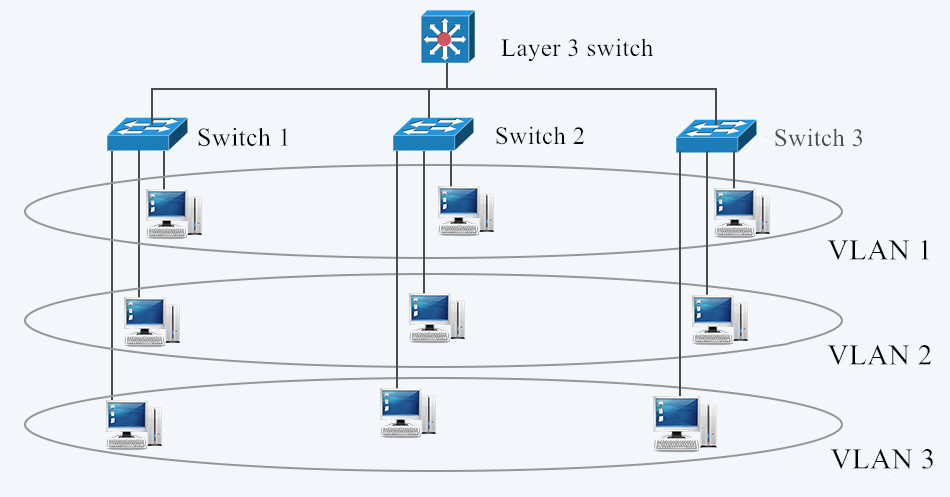
In figure 1, three computers connected to a gigabit Ethernet switch form a LAN (local area network) within a limited area. However, they cannot communicate with hosts in another LAN, because there is no connection between these Ethernet switches. Then there comes the VLAN which provides us with logical separation or segmentation of our networks to facilitate communication among hosts in different LANs. However, each VLAN is a unique broadcast domain, so computers on separate VLANs are unable to communicate with each other by default. There is a way to solve the problem, and that’s what we are going to shed light on—inter VLAN routing.
Fig. 1 LAN and VLAN in Networking
The process of forwarding network traffic from one VLAN to another VLAN using routing is known as inter-VLAN routing. One of the ways to carry out inter-VLAN routing is by connecting a router to the switch infrastructure. When using a router to facilitate inter-VLAN routing, the router interfaces can be connected to separate VLANs. Devices on those VLANs communicate with each other via the router. Apart from that, a more convenient way is introduced—configure inter VLAN routing on layer 3 switches. Layer 3 switching is more scalable than a router which only provides a limited number of available ports.
How to Configure Inter VLAN Routing on Layer 3 Switches?
To enable a layer 3 switch to perform routing functions, the switch must have IP routing enabled.  10gb Ethernet switch and 40gb Ethernet switch are recommended for working as layer 3 switch.

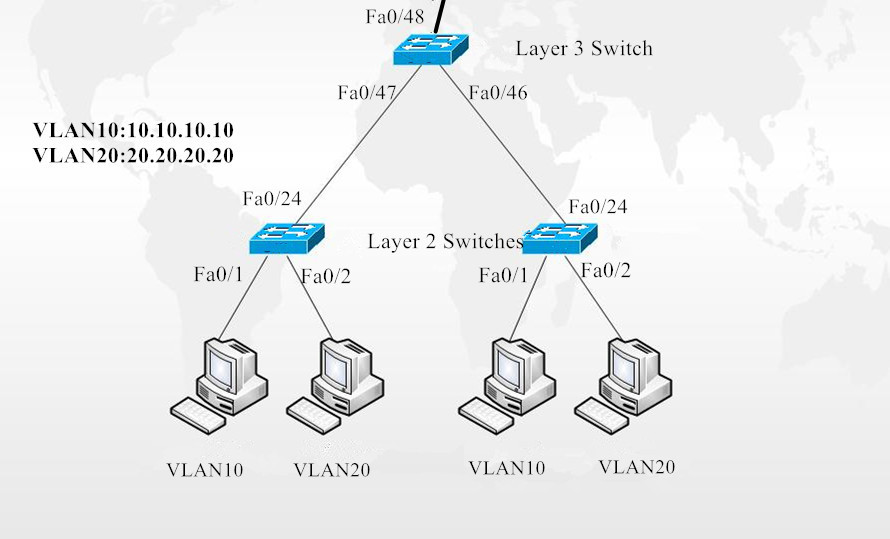
Fig.2 Inter VLAN Routing on Layer 3 Switches
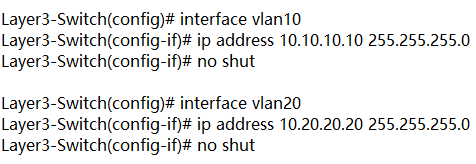
In figure 2, layer 3 switch is configured with IP address 10.0.0.1. VLAN10 and VLAN20, with IP address 10.10.10.10 and IP address 10.20.20.20 respectively are configured on layer 2 switches. These two IP addresses will be the default gateway addresses for hosts belonging to VLAN10 and VLAN20 on the layer 2 switches respectively. Also, all interfaces connecting the three switches must be configured as trunk ports to allow VLAN10 and VLAN20 tagged frames to pass between switches. Traffic between VLAN10 and VLAN20 will be routed by the layer 3 switch after configuring inter VLAN routing. These steps can be achieved by VLAN configuration command below.
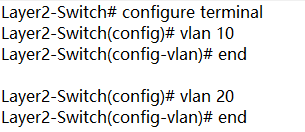
Create VLANs 10 and 20 in the switch database

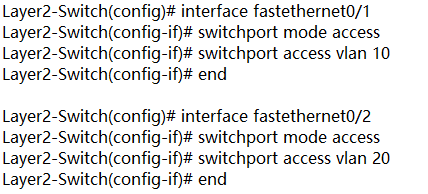
Assign port Fe0/1 in VLAN 10 and port Fe0/2 in VLAN 20

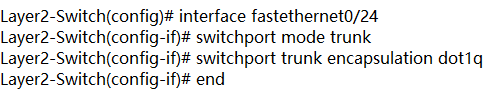
Create trunk port Fe0/24

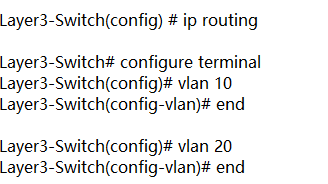
Enable layer 3 routing and create VLANs 10 and 20 in the switch database

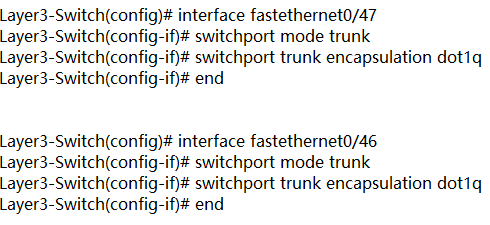
Create trunk ports Fe0/47 Fe0/46

Configure Switch VLAN Interfaces (SVI) to acts as a virtual layer 3 interface on the layer 3 switch

Conclusion
VLAN is created to enable the communication among hosts in different LANs. Inter VLAN routing is developed to realize the exchange among hosts in different VLANs. Inter VLAN routing on layer 3 switch without a router is also approachable with the development of technology. For more configuration about network switches, please refer to our website www.fs.com.

Uninstall Ad-Aware Antivirus with WindowsUninstaller.Org Removal Tips

How to completely uninstall Ad-Aware Antivirus?If you are interested in absolute computer security from viruses and much more, you won’t get it wrong with Ad-Aware Antivirus Antivirus. Offering rock-solid security, basic usability, and effective using resources, it is a good solution. However, periodically it must always be uninstalled. Still, it isn’t easy to entirely uninstall Ad-Aware Antivirus.
You cannot depend on Windows built-in Add/Removal for just a clean Ad-Aware Antivirus removal or in addition, you can not eradicate Ad-Aware Antivirus by adding the newer Ad-Aware Antivirus version after which it uninstall it. The main basis for this is that only at that antivirus installation time there is no Ad-Aware Antivirus uninstall power installed. So how could you remove that?Even you think you’ve gotten rid on this antivirus, actually, many Ad-Aware Antivirus similar files and registry items remain hidden inside the nooks and corners of your respective registry and hard drives.
On the other hand, now you can depend on a good automate removal tool to completely uninstall Ad-Aware Antivirus with seconds. A good removal tool contains the features below:
It can fully uninstall programs which can not be removed by House windows built-in (Add/Remove) applet. It fully removes empty or corrupted registry entries. It forcibly uninstalls corrupted or hidden programs. It is quite a bit simpler and faster to work with than the (Add/Remove) Software programs functionality in Windows’ Manage Panel. It restores registry data.
There is in reality a fantastic removing software that will help people entirely uninstall Ad-Aware Antivirus together with fantastic achievements in addition to ensure that every one of the now-defunct Registry items in addition to similar data are generally removed on auto-pilot with a several keys to press. Apart from that computer software, it can also fully eliminate some other applications like Authentium, Norton, Craze Minuscule antivirus, Internet explorer, or Microsoft company Business office, in addition to similar applications.

Eclipse package explorer related problems and Solutions

Problems and Solutions:
Use case description: Right click on a project in the Package Explorer, select “Open in New Window”, close the previous Eclipse window, and close the new one
Problem: After opening Eclipse, the Package Explorer will always be in the project of open in new Window
Solutions: This solution personal feel very feasible, but may have a better way, my way is, direct delete/eclipse working directory workspace \. Metadata \. Plugins \ org. The eclipse UI. The workbench folder workbench. The XML file, then, the eclipse before some of the relevant Settings window will disappear, but this does not trouble, and this method can make the eclipse open load something small and open eclipse will fairly quickly
The
Problem and Solution ii:
Use case description: As mentioned in question 1 above, the project that opened in the new window was either deleted in Explorer or changed its name
Problem: The Package Explorer will always be empty
Solution: can be as a method to solve above problem, but there is a better, open the workbench. XML, find the input factoryID = “org. Eclipse. UI. Internal. Model. ResourceFactory”, change can be put behind the path values, the said the root directory “/”

Nexus 5x unlock bootloader + root

The self-use test machine suddenly failed root, the network looked for a lot of tutorials, finally found a reliable tutorial, hereby record, some mobile phones may also be applicable
Kingroot has always been used for root, but this time suddenly prompted me “Need root please unlock first”
Let’s start by unlocking:
note:

Unlocking the bootloader for the first time will erase all your data.

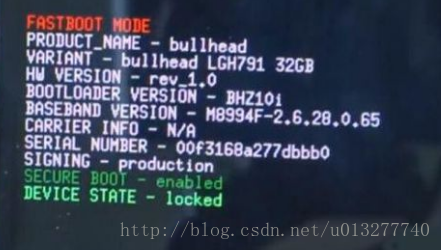
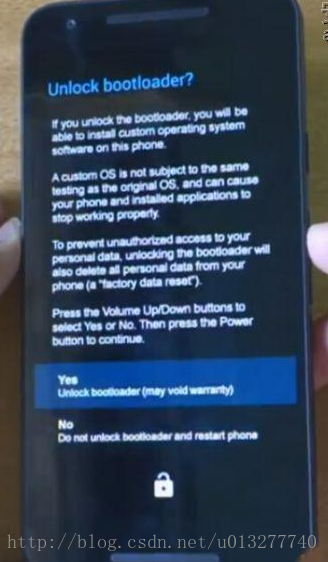
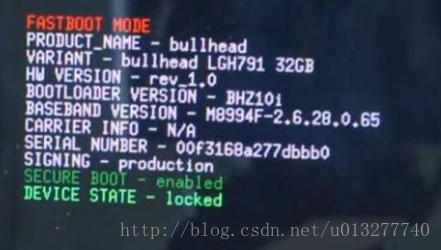
Take a look at what it looks like ununlocked:

The unlocking steps are as follows:
1. Open the phone Settings – about the phone – click the version number 7 times to open the “Developer Options”
2. Back to the previous step, developer options – turn on USB debugging and turn on “Enable OEM Unlock”
3. Turn off your phone
4. Press and hold the power key & AMP; Volume down key, enter fastboot(Bootloader interface)
5. Connect the phone with usB-A data cable
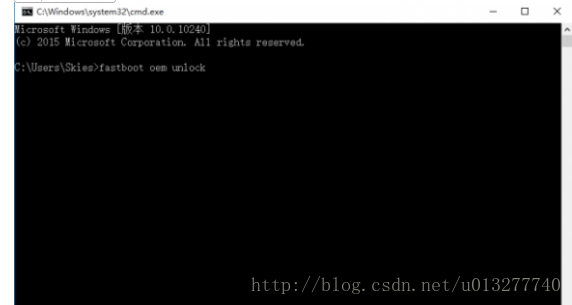
6. Open DOS window and enter: Enter fastboot OEM unlock
If DOS prompts “not an internal or external command”, then you need to configure the environment variable
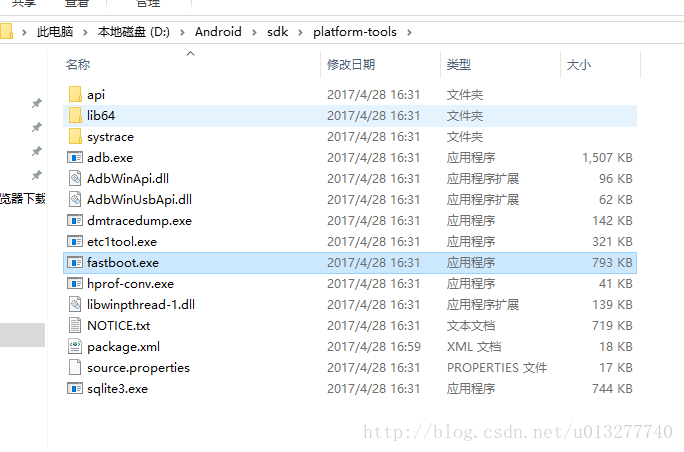
, find the path to your SDK, and add the path of platform-tools to the path
: D:\Android\ SDK \platform-tools

Because we are using the fastboot.exe execution file


Then use the volume key to select “Yes” and press the “power” button to confirm. After success, it will be displayed as follows :(the red sentence at the bottom)


At this point, it has been unlocked. After unlocking, the opening machine has this prompt, which belongs to normal:

After the completion of unlocking the root operation will be performed, the use of kingroot, 360Root and other software was unsuccessful.
root download
Unlock the original
http://tieba.baidu.com/p/4232343051

Removing stop words —— Python Data Science CookBook

In text processing, we are interested in words or phrases that will help us differentiate the given text from the other text in the corpus. Let’s call these words or phrases as 
key 
phrases. Every text mining application needs a way to find out the key phrases. An information retrieval application needs key phrases for the easy retrieval and ranking of search results. A text classification system needs key phrases as its features that are to be fed to a classifier. This is where stop words come into the picture. “
Sometimes, some extremely common words which would appear to be of little value in helping select documents matching a user need are excluded from the vocabulary entirely. These words are called 
stop words. ” Introduction to Information Retrieval By Christopher D. Manning, Prabhakar Raghavan, and Hinrich Schütze.

Tip Remember that stop word removal is contextual and based on the application. If you are working on a sentiment analysis application on mobile or chat room text, emoticons are highly useful. You don’t remove them as they form a very good feature set for the downstream machine learning application. Typically, in a document, the frequency of stop words is very high. However, there may be other words in your corpus that may have a very high frequency. Based on your context, you can add them to your stop word list.

The Python NLTK library provides us with a default stop word corpus that we can leverage, as follows:

>>> from nltk.corpus import stopwords
>>> stopwords.words('english')
[u'i', u'me', u'my', u'myself', u'we', u'our', u'ours', u'ourselves',
u'you', u'your', u'yours', u'yourself', u'yourselves', u'he', u'him',
u'his', u'himself', u'she', u'her', u'hers', u'herself', u'it', u'its',
u'itself', u'they', u'them', u'their', u'theirs', u'themselves', u'what',
u'which', u'who', u'whom', u'this', u'that', u'these', u'those', u'am',
u'is', u'are', u'was', u'were', u'be', u'been', u'being', u'have', u'has',
u'had', u'having', u'do', u'does', u'did', u'doing', u'a', u'an', u'the',
u'and', u'but', u'if', u'or', u'because', u'as', u'until', u'while', u'of',
u'at', u'by', u'for', u'with', u'about', u'against', u'between', u'into',
u'through', u'during', u'before', u'after', u'above', u'below', u'to',
u'from', u'up', u'down', u'in', u'out', u'on', u'off', u'over', u'under',
u'again', u'further', u'then', u'once', u'here', u'there', u'when',
u'where', u'why', u'how', u'all', u'any', u'both', u'each', u'few',
u'more', u'most', u'other', u'some', u'such', u'no', u'nor', u'not',
u'only', u'own', u'same', u'so', u'than', u'too', u'very', u's', u't',
u'can', u'will', u'just', u'don', u'should', u'now']

example:

#!/usr/bin/env python2
# -*- coding: utf-8 -*-
"""
@author: snaildove
"""
# Load libraries
from nltk.corpus import stopwords
from nltk.tokenize import word_tokenize
import string
text = "Text mining, also referred to as text data mining, roughly equivalent to text analytics,refers to the process of deriving high-quality information from text. Highquality information is typically derived through the devising of patterns and trends through means such as statistical pattern learning. Text mining usually involves the process of structuring the input text (usually parsing, along with the addition of some derived linguistic features and the removal of others, and subsequent insertion into a database), deriving patterns within the structured data, and finally evaluation and interpretation of the output. 'High quality' in text mining usually refers to some combination of relevance, novelty, and interestingness.Typical text mining tasks include text categorization, text clustering, concept/entity extraction, production of granular taxonomies, sentiment analysis, document summarization, and entity relation modeling (i.e., learning relations between named entities).Text analysis involves information retrieval, lexical analysis to study word frequency distributions, pattern recognition, tagging/annotation,information extraction, data mining techniques including link and association analysis, visualization, and predictive analytics. The overarching goal is,essentially, to turn text into data for analysis, via application of natural language processing (NLP) and analytical methods.A typical application is to scan a set of documents written in a natural language and either model the document set for predictive classification purposes or populate a database or search index with the information extracted."
#Let’s now demonstrate the stop words removal process:
#we will tokenize the input text into words using the word_tokenize function. The words is now a list of all the words tokenized from the input.
words = word_tokenize(text)
# 2.Let us get the list of stopwords from nltk stopwords english corpus.
stop_words = stopwords.words('english')
print "Number of words = %d"%(len(words))
# 3. Filter out the stop words.
words = [w for w in words if w not in stop_words]
print "Number of words,without stop words = %d"%(len(words))
#Here, we will run another list comprehension in order to remove punctuations from our words.
words = [w for w in words if w not in string.punctuation]
print "Number of words,without stop words and punctuations = %d"%(len(words))

output :

Number of words = 257
Number of words,without stop words = 193
Number of words,without stop words and punctuations = 155

Tip Remember that
stop word removal is contextual and based on the application. If you are working on a sentiment analysis application on mobile or chat room text, emoticons are highly useful. You don’t remove them as they form a very good feature set for the downstream machine learning application. Typically, in a document, the frequency of stop words is very high. However, there may be other words in your corpus that may have a very high frequency. Based on your context, you can add them to your stop word list.