Category Archives: How to Fix

Implementation of Python switch / case statements

It struck me as odd that, unlike languages such as Java, C\C++, Switch /case statements are not available in Python. We can implement the switch/ Case statement in several ways.
Use the if… Elif… Elif… Else to realize the switch/case
You can use if… Elif… elif.. An else sequence instead of a switch/case statement is the easiest way to think about it. However, with more branches and frequent modifications, this alternative is not easy to debug and maintain.
Use a dictionary to implement switch/ Case
A dictionary can be used to implement switch/ Case in a way that is easy to maintain and reduces the amount of code. The following is a switch/ Case implementation using a dictionary simulation:


def num_to_string(num):
    numbers = {
        0 : "zero",
        1 : "one",
        2 : "two",
        3 : "three"
    }

    return numbers.get(num, None)

if __name__ == "__main__":
    print num_to_string(2)
    print num_to_string(5)

The execution results are as follows:

two
None

The Python dictionary can also include functions or Lambda expressions, as follows:

def success(msg):
    print msg

def debug(msg):
    print msg

def error(msg):
    print msg

def warning(msg):
    print msg

def other(msg):
    print msg

def notify_result(num, msg):
    numbers = {
        0 : success,
        1 : debug,
        2 : warning,
        3 : error
    }

    method = numbers.get(num, other)
    if method:
        method(msg)

if __name__ == "__main__":
    notify_result(0, "success")
    notify_result(1, "debug")
    notify_result(2, "warning")
    notify_result(3, "error")
    notify_result(4, "other")

The execution results are as follows:

success
debug
warning
error
other

The above example shows that the Switch /case statement can be fully implemented with a Python dictionary, and is flexible enough. is especially handy at run time to add or remove a switch/case option from a dictionary.
Switch/Case can be implemented in a class using scheduling methods
If you are not sure which method to use in a class, you can use a scheduling method at run time to determine. The code is as follows:

class switch_case(object):

    def case_to_function(self, case):
        fun_name = "case_fun_" + str(case)
        method = getattr(self, fun_name, self.case_fun_other)
        return method

    def case_fun_1(self, msg):
        print msg

    def case_fun_2(self, msg):
        print msg

    def case_fun_other(self, msg):
        print msg


if __name__ == "__main__":
    cls = switch_case()
    cls.case_to_function(1)("case_fun_1")
    cls.case_to_function(2)("case_fun_2")
    cls.case_to_function(3)("case_fun_other")

The execution results are as follows:

case_fun_1
case_fun_2
case_fun_other

conclusion
Personally, using a dictionary to implement the switch/case is the most flexible, but it is also difficult to understand.

Location and optimization of server IO high problem

This share is mainly about the possible guesses, positioning and solutions to performance-related problems that we often encounter in interviews. During the interview, I found that many students did not have a clear idea
The purpose and objectives of this course
• Common causes of high SERVER IO
• Methods of locating common problems
 
= = to a common cause of high IO the server = = = = = = = = = = = = = = = = = = = = = = = = = = = = = = = = = = = = = = = = = = = = = = = = = = = = = = = = = = = = = = = = = = = = = = = = =
Summary: Disks are usually the slowest subsystem of a computer and the most prone to performance bottlenecks because disks are the farthest from the CPU and CPU access to disks involves mechanical operations such as shaft rotation, track seeking, and so on.
If the occupancy of IO is too high, the following considerations can be made:
1) First consider writing too much log content (or heavy traffic)
1) Whether the content printed in the log is reasonable
Front-end application server. Avoid frequent local logging or abnormal logging
2) Whether the log level is reasonable
3] Consider asynchronous log writing (generally can solve CPU sawtooth fluctuation). In order to reduce disk IO operation, log writing is like memory partition; However, the log volume is so large that it is easy to fill the memory, and then consider compressing the log.
2) Full disk (phenomenon during pressure measurement: TPS decreases and response time increases)
1】 To find the disk full of large files, reasonable deletion, it is best to have a regular cleaning script, can be cleaned regularly
2】 To expand the disk space disk capacity
3] If it is difficult to clean, read and write on the main hard disk, and the basic data is moved to the mounted hard disk regularly.  
3) The number of database connections is over limited, resulting in too much sleep and too many sleep tasks:
1】 Every time the program connected to the database, remember to close the database.
2) Or, in the mysql configuration file, set the mysql timeout wait_timout, which defaults to eight hours and is set to a lower level
4) The database IO is too high and the amount of query is large, so it can be read/write separation (increase the read library) or library branch operation to reduce disk pressure, and some buffer parameters can be adjusted to reduce the IO write frequency
5) High disk IO is caused by reading and writing files
1】 Raid can be used to reduce stress
6) Insufficient performance of the disk itself
1) Consider replacing a new disk (one with strong performance)
Common positioning problem = = = = = = = = = = = = = = = = = = = = = = = = = = = = = = = = = = = = = = = = = = = = = = = = = = = = = = = = = = = = = = = = = = = =
The Linux system has a performance problem, and we can generally use the commands top, iostat, iotop, free, vmstat, and so on to see the initial location problem.
Today we’re going to talk about iostat and IOtop, the general steps for locating a problem:
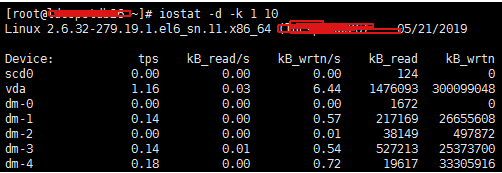
Iostat is a command that gives us a wealth of IO status data. We usually start with iostat to see if there is a performance bottleneck
Step-2 use IOTOP to find IO high process
1. Common usage of Iostat:
Iostat -D-K 1 10 # to view TPS and throughput information
Parameter -d indicates that the device (disk) is in use;
-k Some columns that use blocks force Kilobytes to use units;
1, 10 means that the data display is refreshed once every 1 second, showing a total of 10 times

Iostat -d-x-k 1 10 # View device utilization (%util), response time (await)
We can get more statistics using the -x parameter.
note: generally %util is greater than 70%, and the I/O pressure is relatively high, indicating that there are too many I/O requests generated, the I/O system is full load, and there may be a bottleneck on the disk. The disk may have a bottleneck.

Iostat can also be used to get partial CPU state values:
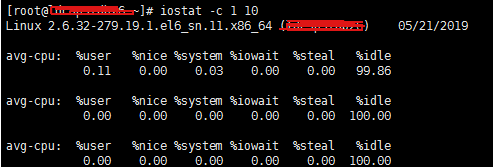
Iostat -c 1 10 # to see the CPU status
Note that IDLE has a higher pressure when it is less than 70% IO, and there is more wait for the general reading speed.

2. We can basically determine whether there is a bottleneck of IO through the common command of iostat above, and then we can use the iotop command to catch the culprit process. Here, it is relatively simple to directly enter the command and execute it (generally, Java process is caught, mySQld is caught, more problems are more)

Several ways for Ubuntu to open command line terminal window

1. Shortcut key
CTRL + Alt + T the current directory is /home/< The user name & gt;
2. Right mouse button
In the terminal window, execute the following command:
sudo apt-get install local-open-terminal
sudo reboot
after restarting, right-click in the directory where you want to open terminal and select open in Termainal
3. Open multiple terminals in the same window
When you have opened a terminal window, you want to open another terminal in the current window, so that it is easier to switch back and forth. Use the shortcut Key CTRL + Shift + T, the current directory of the new window opened is the current directory of the previous port, Alt+ 123 can open the corresponding first, second, and third Windows
4. Search for Terminal application
Click the search icon in the upper left corner or press the WIN key on the keyboard to display the search application window and type Terminal
5. After launching Terminal by other means, right click Terminal in the task bar
Select New Termial to open a New Terminal window, Lock to Launcher to Lock Terminal to the task bar, and then you can directly open the Terminal window in the task bar.

Random forest algorithm learning

Random forest algorithm learning
When I was doing Kaggle recently, I found that the random forest algorithm had a very good effect on classification problems. In most cases, the effect was far better than that of SVM, log regression, KNN and other algorithms. So I want to think about how this algorithm works.
To learn random forest, we first briefly introduce the integrated learning method and decision tree algorithm. The following is only a brief introduction of these two methods (see Chapter 5 and Chapter 8 of statistical learning Methods for specific learning recommendations).


Bagging and Boosting concepts and differences
This part is mainly to study the: http://www.cnblogs.com/liuwu265/p/4690486.html
Random forest belongs to Bagging algorithm in Ensemble Learning. In ensemble learning, the algorithms are mainly divided into Bagging algorithm and Boosting algorithm. Let’s first look at the characteristics and differences between the two approaches.
Bagging (Bagging)
The algorithm process of Bagging is as follows:

    randomly draw n training samples from the original sample set using the Bootstraping method, conduct a total of k rounds of drawing, and obtain k training sets. (K training sets are independent of each other, and elements can be repeated.) For k training sets, we train k models (these models can be determined according to specific problems, such as decision tree, KNN, etc.) for classification problems: classification results are generated by voting; For the regression problem, the mean value of the predicted results of k models is taken as the final prediction result. (all models are equally important)

Boosting, Boosting
Boosting algorithm process is as follows:

    establishes weight wi for each sample in the training set, indicating the attention paid to each sample. When the probability of a sample being misclassified is high, it is necessary to increase the weight of the sample. Each iteration is a weak classifier during the iteration process. We need some kind of strategy to combine them as the final model. (For example, AdaBoost gives each weak classifier a weight and combines them linearly as the final classifier. The weaker classifier with smaller error has larger weight)

Bagging, Boosting the main difference

    sample selection: Bagging adopts Bootstrap randomly put back sampling; But Boosting the training set of each round is unchanged, changing only the weight of each sample. Sample weight: Bagging uses uniform sampling with equal weight for each sample. Boosting adjust the sample weight according to the error rate, the greater the error rate, the greater the sample weight. Prediction function: Bagging all prediction functions have equal weight; Boosting the prediction function with lower error has greater weight. Parallel computing: Bagging each prediction function can be generated in parallel; Boosting each prediction function must be generated iteratively in sequence.

The following is the new algorithm obtained by combining the decision tree with these algorithm frameworks:
1) Bagging + decision tree = random forest
2) AdaBoost + decision tree = lifting tree
3) Gradient Boosting + decision tree = GBDT


The decision tree
Common decision tree algorithms include ID3, C4.5 and CART. The model building ideas of the three algorithms are very similar, but different indexes are adopted. The process of building the decision tree model is roughly as follows:
ID3, Generation of C4.5 decision tree
Input: training set D, feature set A, threshold EPS output: decision tree T
If

    D in all samples belong to the same kind of Ck, it is single node tree T, the class Ck as A symbol of the class of the nodes, T if returns A null set, namely no characteristics as the basis, it is single node tree T, and D in implementing cases the largest class Ck as A symbol of the class of the node, return T otherwise, calculating the feature of D information gain in A (ID3)/information gain ratio (C4.5), choose the greatest feature of the information gain if Ag Ag information gain (than) is less than the threshold value of eps, is T for single node tree, and will be the biggest in implementing occuring D class Ck as A symbol of the class of the node, Otherwise, D is divided into several non-empty subsets Di according to the feature Ag, and the class with the largest number of real cases in Di is taken as the marker to construct the child node, and the tree T is formed by the node and its child nodes. T is returned to the ith child node, with Di as the training set and a-{Ag} as the feature set. Recursively, 1~5 is called to obtain the subtree Ti, and Ti

is returned
Generation of CART decision tree
Here is a brief introduction to the differences between CART and ID3 and C4.5.

    CART tree is a binary tree, while ID3 and C4.5 can be multi-partite trees. When generating subtrees, CART selects one feature and one value as the segmentation point. The basis for generating two subtrees is gini index, and the feature with the minimum gini index and the segmentation point are selected to generate subtrees

Pruning of a decision tree
The pruning of decision tree is mainly to prevent overfitting, but the process is not described in detail.
The main idea is to trace back upward from the leaf node and try to prune a node to compare the loss function value of the decision tree before and after pruning. Finally, we can get the global optimal pruning scheme through dynamic programming (tree DP, acMER should know).


Random Forests
Random forest is an important integrated learning method based on Bagging, which can be used for classification, regression and other problems.
Random forests have many advantages:
Has a very high accuracy the introduction of randomness, it is not easy to make random forests after fitting of the randomness of introduction, makes the random forest has a good ability to resist noise can deal with high dimension data, and don’t have to do feature selection can not only deal with discrete data, also can deal with continuous data, data set without standardized training speed, can be variable importance easy parallelization
Disadvantages of random forest:
When the number of decision trees in the random forest is large, the space and time required for training will be large. The random forest model has a lot of problems to explain. It is a black box model
Similar to Bagging process described above, the construction process of random forest is roughly as follows:

    from the original training focus Bootstraping method is used to back the sampling random select m sample, sampling conducted n_tree time, generate n_tree a training set for n_tree a training set, we respectively training n_tree a decision tree model for a single decision tree model, assuming that the number of training sample characteristics of n, so every time divided according to the information gain/information gain ratio/gini index, choose the best characteristics of split each tree has been divided like this, until all the training sample in the node belong to the same class. In the process of decision tree splitting, the random forest is composed of multiple decision trees generated without pruning. For the classification problem, the final classification result is decided by voting according to multiple tree classifiers. For regression problems, the mean of predicted values of multiple trees determines the final prediction result

Three ways of single line and multi line comment in Python

Method 1:
One-line comments: Shift + # (enter at the top of the code and comment unselected code)
Multi-line comment: Enter Shift +# at the beginning of each line as if it were a single line
Method 2:
Single-line and multi-line: Ctr+/ (if the code you want to comment is selected)
Method 3:
Type “” or “”” “”” “”, and insert the code to be commented in the middle

Resttemplate Chinese garbled problem – available

RestTemplate Chinese garbled code problem
Source code to see the cause of Chinese code solution

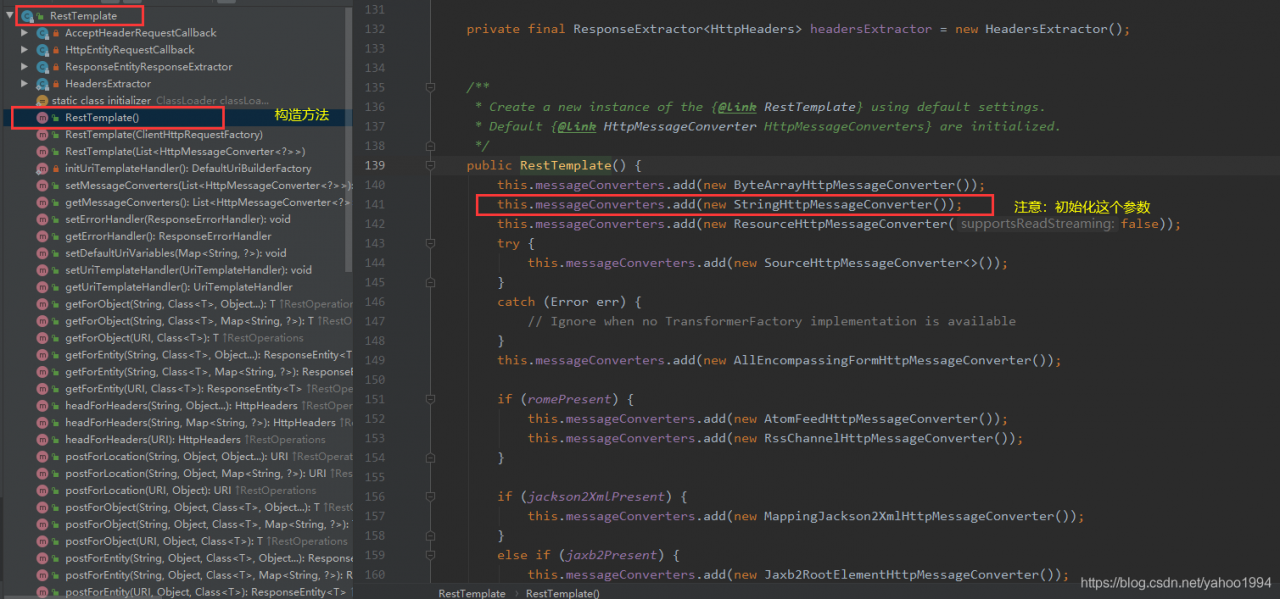
Causes the RestTemplate to receive parameters in the request response body with scrambled Chinese characters.
Source code to see the Reason for Chinese scrambled code


to take a closer look at the initialization parameter in the figure above, the default value of this parameter is as shown in the figure below.

you should know the cause of this problem and the solution. [after the RestTemplate is initialized, we will assign and modify it to the utf-8 code we need]
The solution
The SpringBoot project takes the following approach

@Configuration
public class RestTemplateConfig {
    @Bean
    public RestTemplate restTemplate(){
        RestTemplate restTemplate = new RestTemplate(factory);
        restTemplate.getMessageConverters().set(1, new StringHttpMessageConverter(StandardCharsets.UTF_8));
        return restTemplate;
    }
  }

Modify the default file location of the Jupiter notebook

Modify the default file location for Jupyter notebook
After installing Anaconda and Jupyter Notebook, open the Jupyter notebook will find that there are some folders displayed, but the exact location is not clear. To facilitate future file editing and saving, you need to modify the default file location of the Jupyter Notebook.
The detailed modification steps verified by practical operation are as follows:
1. Generate configuration files through the Anaconda Prompt command window: find and open the Anaconda Prompt in the start menu, type the following command, and then execute:
— generation-config.
2, open the configuration file generated in the previous step, it is generally in the following position: C:\Users\admin. Jupyter \jupyter \jupyter_notebook_config.py.
this file path is the default path for jupyter.
3, in the start menu to find jupyter notebook, and the previously generated configuration files with jupyter open, there are two ways to open:
(1) can be opened by dragging the configuration file to the notebook window;
(2) click on the Upload in the upper right corner of the notebook window, then find the configuration file and open it using the path described above.
Notebook_dir = ‘”
before the change: # c.notebookapp.notebook_dir =’
before the change: # c.notebookapp.notebook_dir = ‘
after the change: remove the # prefix and enter the default location in the single quotation marks, such as: c.notebookapp.notebook_dir =’ E:/Python_notebook ‘. Note: \ cannot be used in the Python file path, but /.
5, click save under file in the menu above the notebook window to save the changes, and use this saved file to overwrite the originally generated configuration file under C disk (this is very important, be sure to overwrite, otherwise the changes will not take effect), that is, to overwrite the configuration file at the following location:
C:\Users\admin.jupyter\ notebook_config.py.
6. From the Start menu, find Jupyter Notebook, right mouse button & GT; > Property & gt; > Shortcut & GT; > Target, delete the end “%USERPROFILE%/” in the box after the target.
After the above modification, finally finished. After restarting the Jupyter Notebook, the default file location has been changed to the desired location, which is: E:\Python_notebook.

Password retrieval of Android keystore

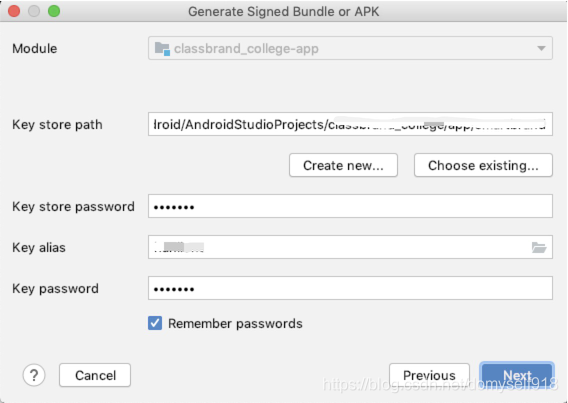
As for the basic situation, I always remember the password when packing. However, my colleague asked me to pack the password when he was on a business trip, but I forgot it. Embarrassed…

Tried to use the usual password is wrong, there is no way, a variety of baidu Google, or found the answer in the omnipresent Stack Overflow.
(Note: this method is only suitable if you have successfully packaged it locally, because only then will your history store your password from the time you packed it.)
In the Project view, go to the.Gradle folder, find the version of Gradle in which the program is currently running, my version is 4.6, and there will be a taskHistory folder with a file called TaskHistory.bin, open this folder, display it in TEXT style, and you will see a lot of Mars TEXT.
Click Command+F to search. The search keyword is keyAlias. Add your keyAlias. In this way, you can find the password you stored when you packaged it.
 

JMeter installation and configuration environment variables

Jmeter’s installation and configuration environment variable
note: first check the JDK version (java-version). For version 1.8.0 and above, you need to configure jmeter3.3 and above
1. Unzip the JMeter file
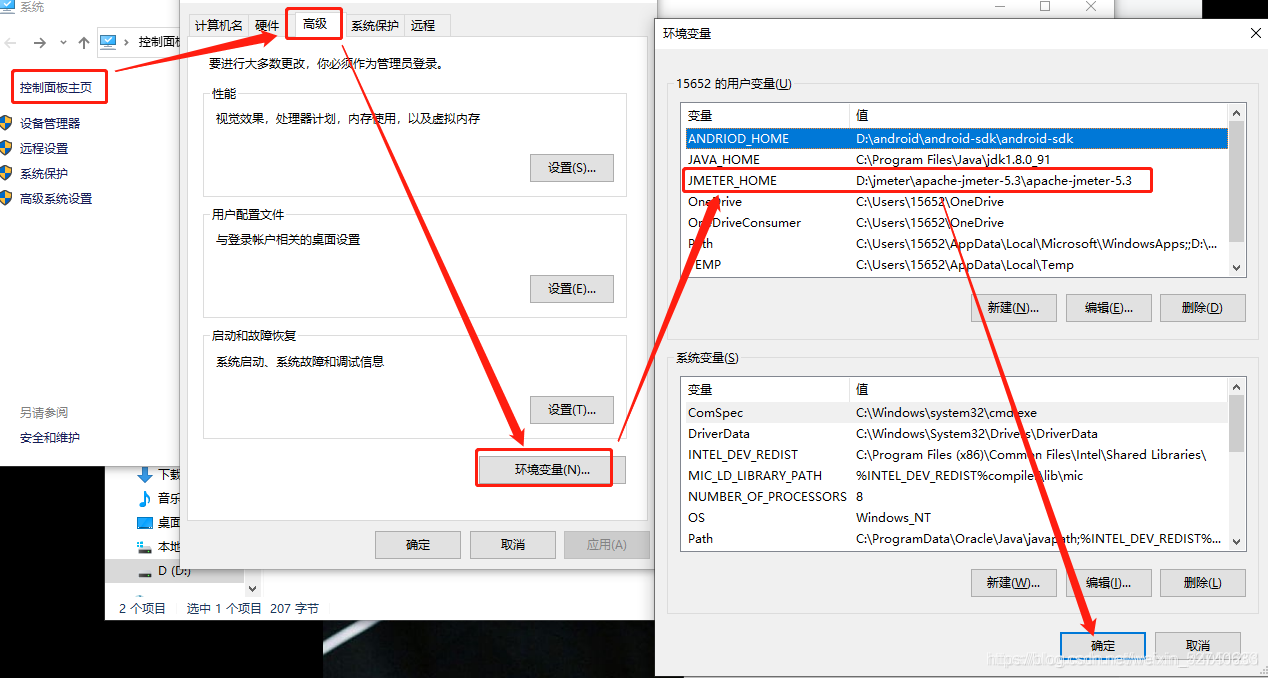
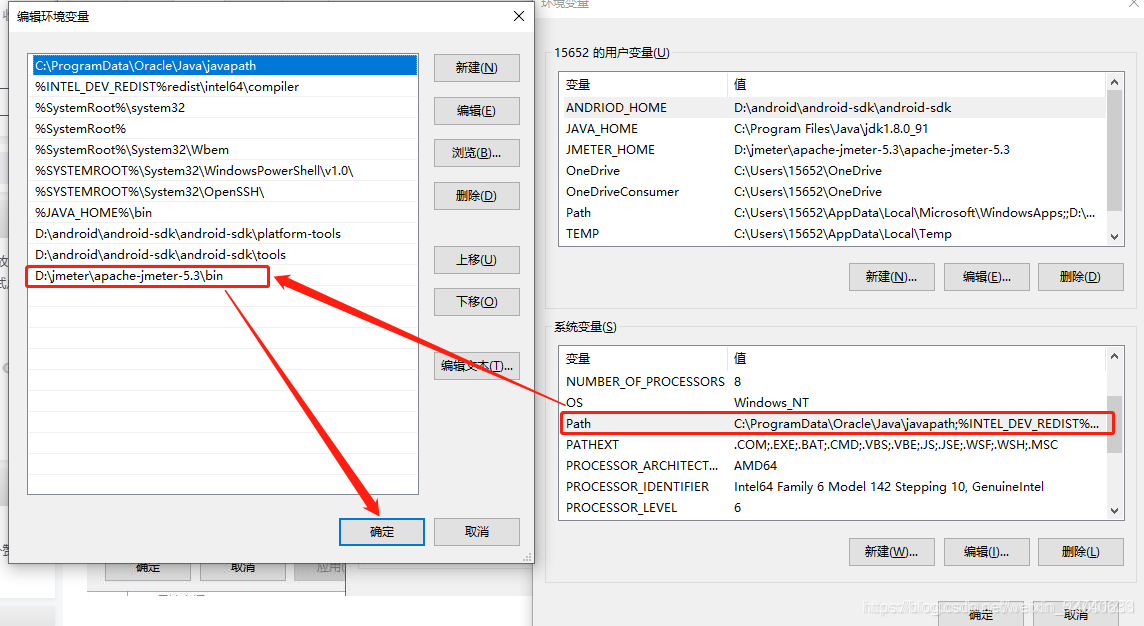
2. Configure environment variables
JMETER_HOME
D: \ jmeter \ apache – jmeter – 5.3 \ apache – jmeter – 5.3

Path edit
D:\jmeter\apache-jmeter-5.3\apache-jmeter-5.3\bin

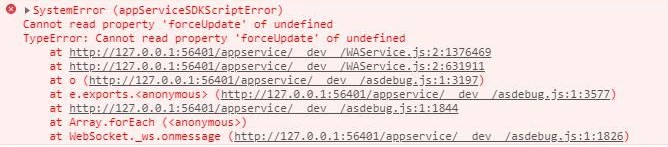
Error reported by wechat applet: cannot read property ‘forceupdate’ of undefined

Cannot read property ‘forceUpdate’ of undefined
Cannot read property ‘forceUpdate’ of undefined**
below error is to use HBuilder X run WeChat small program sometimes error, although this error does not affect the development function, but look very boring, especially for me this kind of a bit obsessivepeople

this error has two solutions
1. Use test number when creating projects with WeChat development tool to avoid this error. Note: If you need to develop authorization login and payment functions in your development project, you need the AppID to test these functions, and the test number does not support these functions. In this case, the second method can be used
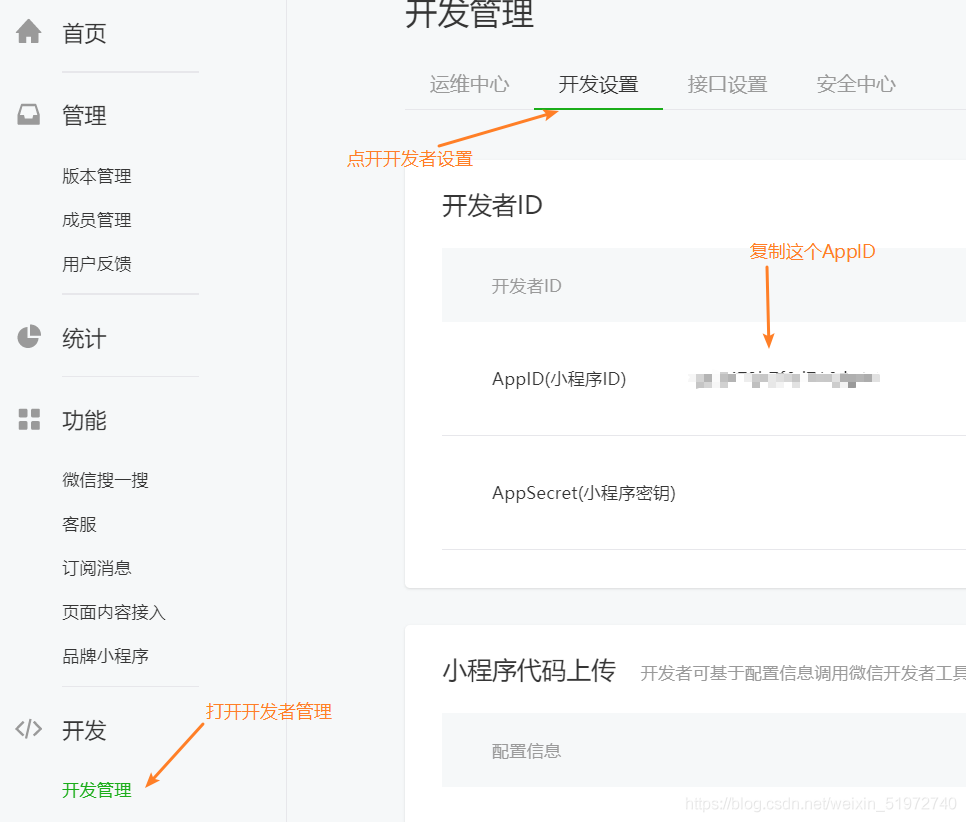
2. Go to WeChat small program to register an account, registration will be OK in a few minutes, after the success of the AppID. How do I get it?

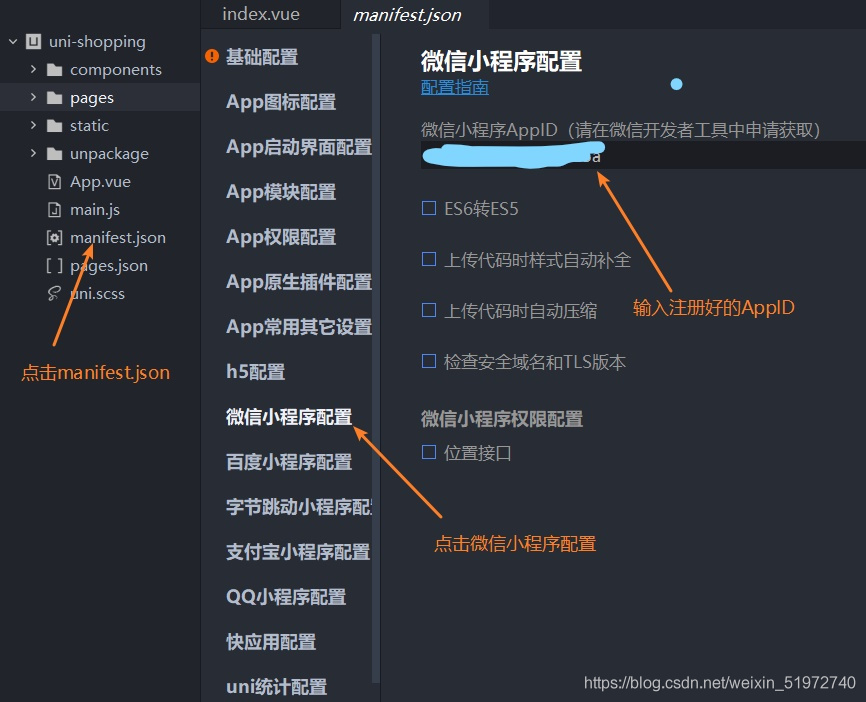
Then use the AppID
in HBuilder X
Above is my share and solution for this error report. If there is anything wrong, please correct it

Beef combined with Metasploit under Kali

Kali under the BEeF joint Metasploit

Metasploit is sort of a great tool to use or something like that…
A few days ago when I was playing KALI, I saw my friends to join BEeF and Metasploit, so I could use Metasploit in the BEeF! This article is useful:
kali install beef and join Metasploit
Do not turn off Metasploit when you are running beef.
2, Metasploit load MSGRPC ServerHost= X.X.X.X Pass=abc123 here, this abc123 when the default password, if entered other will also have problems connected