Category Archives: How to Fix

The difference between single equal sign and double equal sign EQ in shell script

The single and double equal signs are arithmetic operators. “-eq” is a relational operator
Single and double equals
Equivalence in the conditional expression “[]” can be used to compare strings to strings or to compare integers to integers.
In the arithmetic expression “(())”, the single equal sign is the assignment arithmetic operator, and the double equal sign is the equality arithmetic operator.
“-eq”
The equality operator ‘-eq’ cannot be used in the arithmetic expression ‘(())’. It can only be used for equality comparisons of integer Integers.

Linux Tomcat accessing files on the server

 
It took a long time for the IT novice to figure IT out, especially the first one, which he tried unsuccessfully for a long time, was to restart the Tomcat server
 
The first method is to modify the server.xml file in the conf directory
In & lt; Host> I’m going to add in the tag

< Context path=”/upload2″ reloadable=”true” docBase=”/test/t2″/>
Path is the path you type in the browser and DocBase is the actual path to your server folder
After the change, you need to cut back to the bin directory and restart Tomcat:
To shut down Tomcat./shutdown. Sh
Open the Tomcat./startup. Sh
 
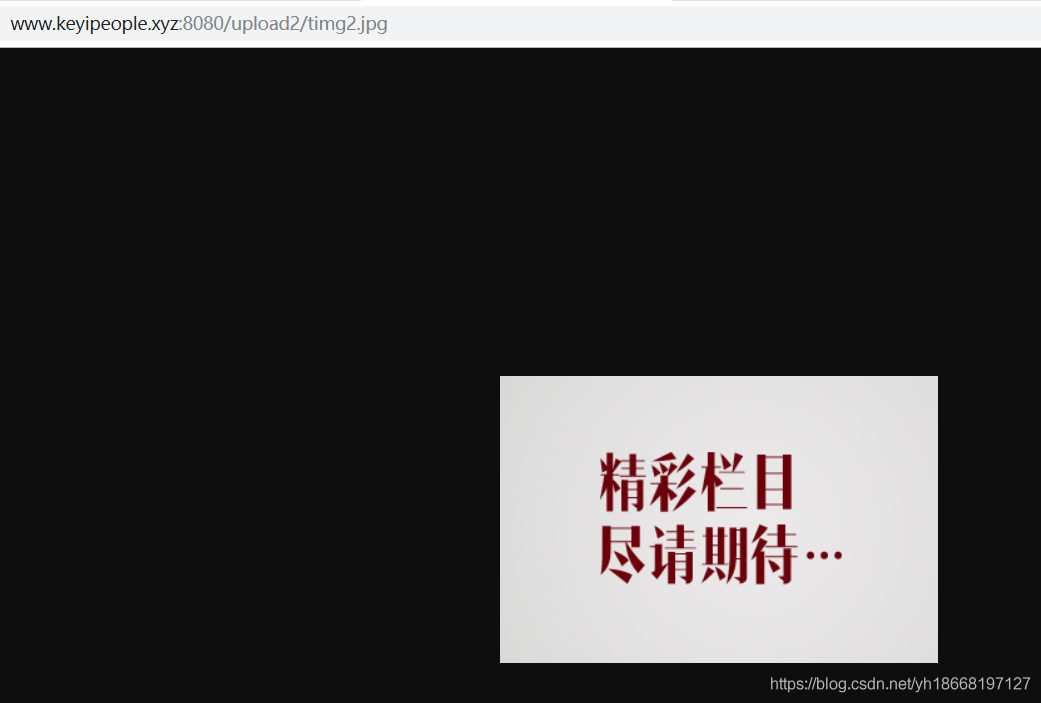
FTP then forwards an image to the server’s /test/t2/ directory
In the browser through the URL access, preceded by the server public network IP or domain name

 
The second method: create a new configuration file in conf/Catalina/localhost (recommended)
In the/usr/local/tomcat/conf/Catalina/localhost (if the directory does not exist, create) to create a file ` upload. XML ‘
& lt; ?The XML version = “1.0” encoding = “utf-8”?>
< Context path=”/upload” reloadable=”true” docBase=”/home/admin”/>

br> N>
The fil>e and path values must be the same
This approach does not require a restart of the Tomcat server

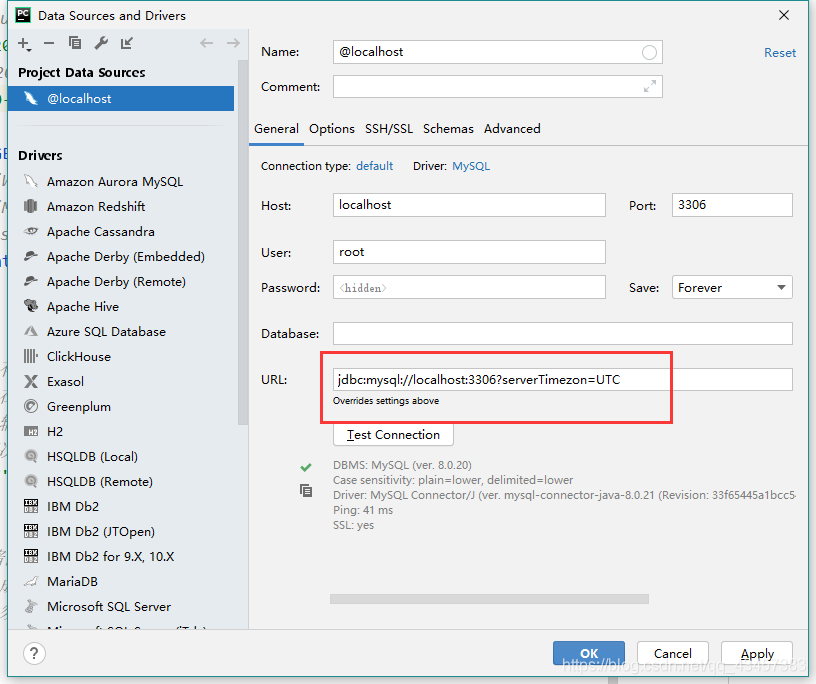
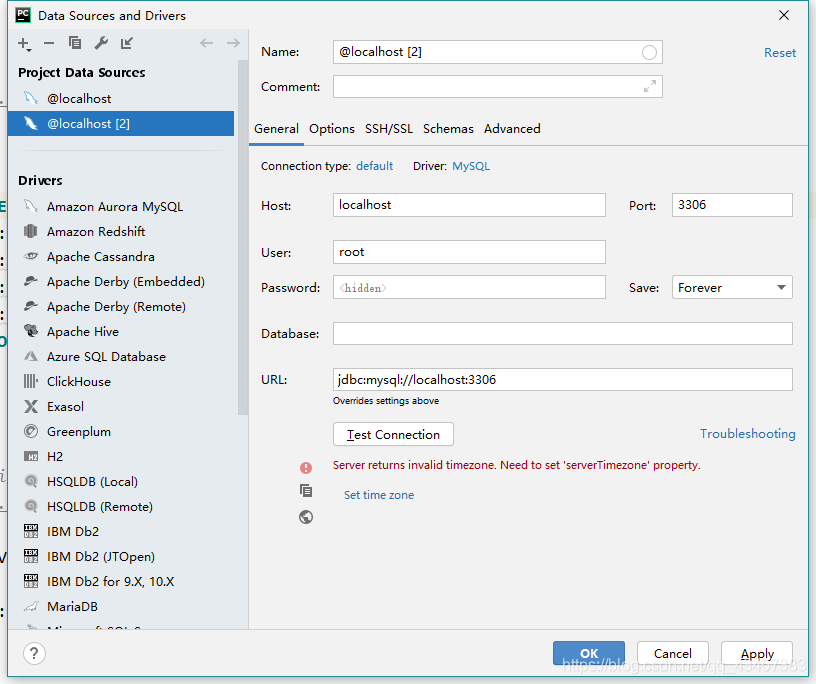
Top35: pychar reports an error when connecting to MySQL server returns invalid timezone. Need to set ‘servertimezone’ property

Top35: Server returns invalid timezone. Need to set ‘ServerTimezone’ property.
Error content error cause solution

Content of the error

Error reason

Server returns invalid timezone. Need to set ‘ServerTimezone’ property.
The server returning an invalid time zone needs to set the ‘ServerTimeZone’ property.
reasons: MySQL driver jar package the default time zone was UTC
the UTC is the representative of a global standard time, but we use time is Beijing time zone that is east eight area, UTC eight hours ahead.
The solution
Joining together?ServerTimeZon =UTC

Win7 system build PHP + MySQL + Apache environment + deploy ECSHOP project

Installation environment background: Win7 x64 bit system, build PHP+MySQL+Apache environment, to achieve ECSHOP project development.
>
>
>
>
>
>
>
> Tip: The VC ++14 runtime is required to run php.exe
2. Download and install MySQL with user name ‘root’; The root password. I won’t go into too much here;
3, Download apache_http_server_2.4.12_jisuxia, unzip it, run httpd.exe will report an error; Change the conf/httpd.conf file;
Note the following points (do not carry Spaces in the middle of the installation file directory) :
${SRVROOT} ${SRVROOT} ${SRVROOT} ${SRVROOT} ${SRVROOT} ${SRVROOT} ${SRVROOT “D: /…”
3.2 Set the path (absolute path), such as LoadModule actions_module D:/ HTTPD /modules/mod_actions.so
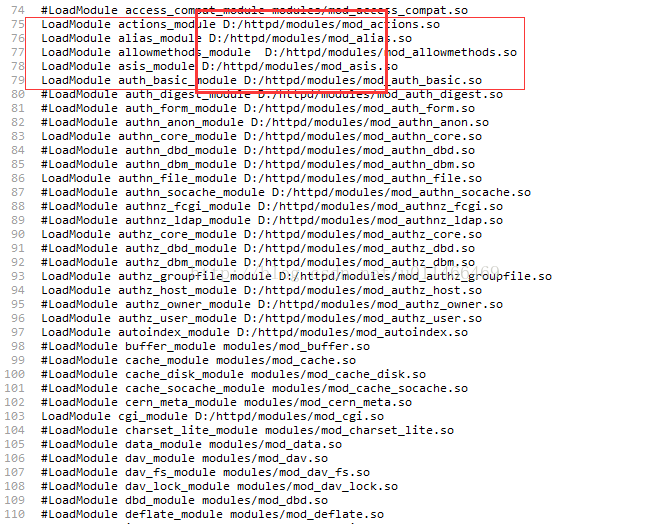
${SRVROOT} ${SRVROOT} ${SRVROOT} ${SRVROOT}
4. The above steps have prepared the environment for compiling PHP files, but Apache and PHP have not been fully configured correctly. Next, we need to configure the configuration files on both sides.
PHPIniDir = PHPIniDir; PHPIniDir = PHPIniDir; PHPIniDir = PHPIniDir; PHPIniDir = PHPIniDir; PHPIniDir = PHPIniDir; PHPIniDir = PHPIniDir; PHPIniDir = PHPIniDir; #BEGIN PHP INSTALLER edits-remove ONLY ON UNINSTALL #php_flag display_errors ON #php_value error_reporting 2039 #END PHP INSTALLER EDITS – REMOVE ONLY ON UNINSTALL
4.2 Copy the php.ini-development file in the PHP installation directory and rename it to php.ini and edit and set it
extension_dir < Absolute path>; = “D:/php7/ext” and date.timezone = PRC; Just remove the comments in the following figure; php_mysql.dll
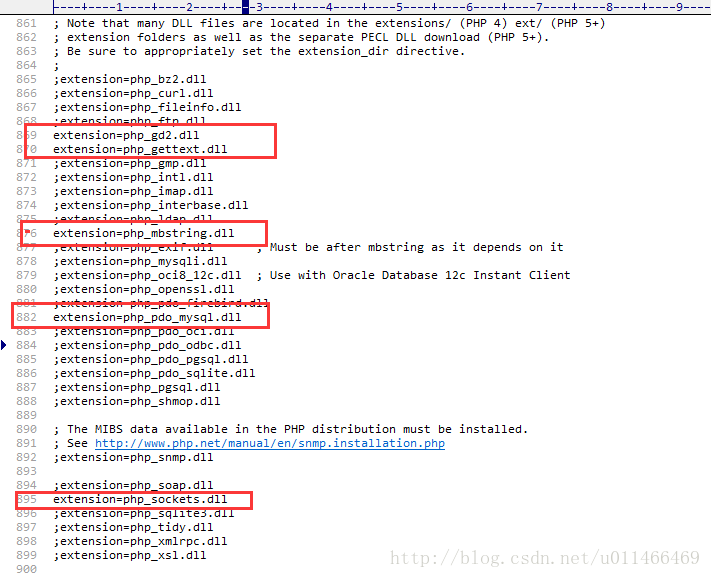
5, OK, the above PHP + MySQL + Apache environment has been set up. Next download the ecshop source package; Unzip only the Upload section;
The HTTPD startup service will open the project file htdocs by default. Place the uncompressed upload into the htdocs directory and change its name to ecshop.
6, CMD command window to add HTTPD. Exe services to the services list, CD to the apache/bin directory: first HTTPD. Exe -k install
7, http://localhost:80/ecshop/index.php to install deployment ecshop projects; Sc delete service name < Delete services>;
Return cls_image::gd_version(); return cls_image::gd_version(); return cls_image::gd_version(); Non-static gd_version(), in which the :: operation requires a static method; Find a solution online: Replace this piece of content; I didn’t succeed! Declare a static method with gd_version() in the cls_image file; Lib_installer $jpeg_enabled = ($gd_info[‘JPG Support’]) $jpeg_enabled = ($gd_info[‘JPEG Support’];
9, the above questions, on the Internet to find answers are not successful!
Strict Standards: Non-static method cls_image::gd_version() should not be called statically in E:\web\shopex\includes\lib_base.php on line 346
This error occurs with PHP versions above 5.3.
On line 346, we find that the gd_version() method does not declare static static, so it fails:
return cls_image::gd_version();
To:
$p = new cls_image();
return $p-> gd_version();
Directory permissions to detect a red can not be written ECSHOP project directory permissions are not enough CHMOD-R 777 ECSHOP
 
10. Download XAMPP software and integrate PHP + Tomcat + Apache + MySQL; One key installation, ECSHOP no error!
http://localhost:80/ecshop/index.php installation is complete! Database MySQL + administrator XUP2012 + commodity category + close message verification code;
http://localhost/ecshop/admin login background management
11, Integrated MySQL + Tomcat, want to copy all the original installed software to the corresponding MySQL + Tomcat directory of XAMPP;
Note Tomcat’s environment variables and change the path; C: ProgramData\MySQL\MySQL Server 5.5\ Data C: ProgramData\MySQL\ Server 5.5\ Data
C: ProgramData\MySQL\MySQL Server 5.5\ Data = C: ProgramData\MySQL\MySQL Server 5.5\ Data = C: ProgramData\MySQL\ Server 5.5\ Data
 
CLS_TEMPLAR.php (CLS_TEMPLAR.php) : error caused by CLS_TEMPLAR.php (CLS_TEMPLAR.php) : error caused by CLS_TEMPLAR.php
Deprecated: preg_replace(): The /e modifier is Deprecated, use preg_replace_callback instead…. Return preg_replace_callback(“/{([^\}\{\n]*)}/”, function($r) {return $this->; select($r[1]); }, $surce Strict Standards: Only variables should be passed by reference in D:\ XAMPP… 7C0D8828A2FA23C669A5614F73F3AE8A
Someone is doing something abnormal

If you need to log in to another Linux host, you may not be able to log in to another Linux host. If you need to log in to another Linux host, you may not be able to log in to another Linux host.
@ @ @ @ @ @ @ @ @ @ @ @ @ @ @ @ @ @ @ @ @ @ @ @ @ @ @ @ @ @ @ @ @ @ @ @ @ @ @ @ @ @ @ @ @ @ @ @ @ @ @ @ @ @ @ @ @
WARNING: REMOTE HOST IDENTIFICATION HAS CHANGED!
@ @ @ @ @ @ @ @ @ @ @ @ @ @ @ @ @ @ @ @ @ @ @ @ @ @ @ @ @ @ @ @ @ @ @ @ @ @ @ @ @ @ @ @ @ @ @ @ @ @ @ @ @ @ @ @ @
IT IS POSSIBLE THAT SOMEONE IS DOING SOMETHING NASTY! Someone could be eavesdropping on you right now (man-in-the-middle attack)! It is also possible that the RSA host key has just been changed.The fingerprint for the RSA key sent by the remote host is36:68:a6:e6:43:34:6b:82:d7:f4:df:1f:c2:e7:37:cc.Please contact your system Administrator.Add correct host key in /u/xlian008/.ssh/known_hosts to get rid of this message.Offending Key in /u/xlian008/.ssh/known_hosts:2RSA host key for 135.1.35.130 has changed and you have requested strict checking.Host key verification failed.
Strange, so I studied it. SSH records the public keys of every computer you visit in ~/.ssh/known_hosts. OpenSSH checks the public key the next time you access the same computer. If the public key is different, OpenSSH will warn you to protect you from attacks like DNS Hijack. The case I listed above, that’s the case.
Because there are multiple Linux systems on a single host, they will be switched frequently. If these systems use the same IP, SSH information will be recorded in the local ~/.ssh/known_hsots file after logging in. If SSH is used to access this host after switching the system, there will be a conflict warning, and the contents in known_hsots need to be deleted manually.
There are two solutions:

    to manually delete and modify known_hsots; Change the configuration file “~/.ssh/config”, add these two lines, and restart the server.
    StrictHostKeyChecking no
    UserKnownHostsFile /dev/null

The advantages and disadvantages:

    needs to manually delete the contents of the file each time, some automated scripts cannot run (failed when SSH login), but the security is high; Known_hsots access is ignored when SSH logs in, but the security is low;

Linux view current date and time

View and modify the Linux time zone

    view the current time zone command: “date – R” modify Settings Linux server time zone method

    A command: “tzselect”
    Method B is limited to RedHat Linux and CentOS
    command: “TimeConfig”
    Dpkg-reconfigure TzData for Debian
    : “dpkg-reconfigure”

      Copy the corresponding time zone file and replace the system time zone file; Or create the link file
      cp /usr/share/zoneinfo/

      The main

      when

      area

      /

      The main time zones /

      Primary time zone/secondary time zone /etc/localtime

    For example, use Asia/Shanghai (+8) when setting China time zone.
    cp /usr/share/zoneinfo/Asia/Shanghai /etc/localtime
    Second, the time to view and modify Linux
    The

      command to check the time and date “the date”
      2. Set a time and date
      for example, to set the system date into a command on November 3, 2009
      Command: “date-s 11/03/2009”
      Set the system time to 5:55:55 p.m
      Command: “Date -s 17:55:55”

        to write the current date and time into the BIOS, to avoid failure after restart
        command: “hwclock – w
        Note:
        date
        You can see the current date and time directly without adding arguments
        Cal
        can be viewed directly without parameter
        Reproduced in: https://www.cnblogs.com/Ivan-j2ee/p/3192875.html

Design and implementation of music website based on Java

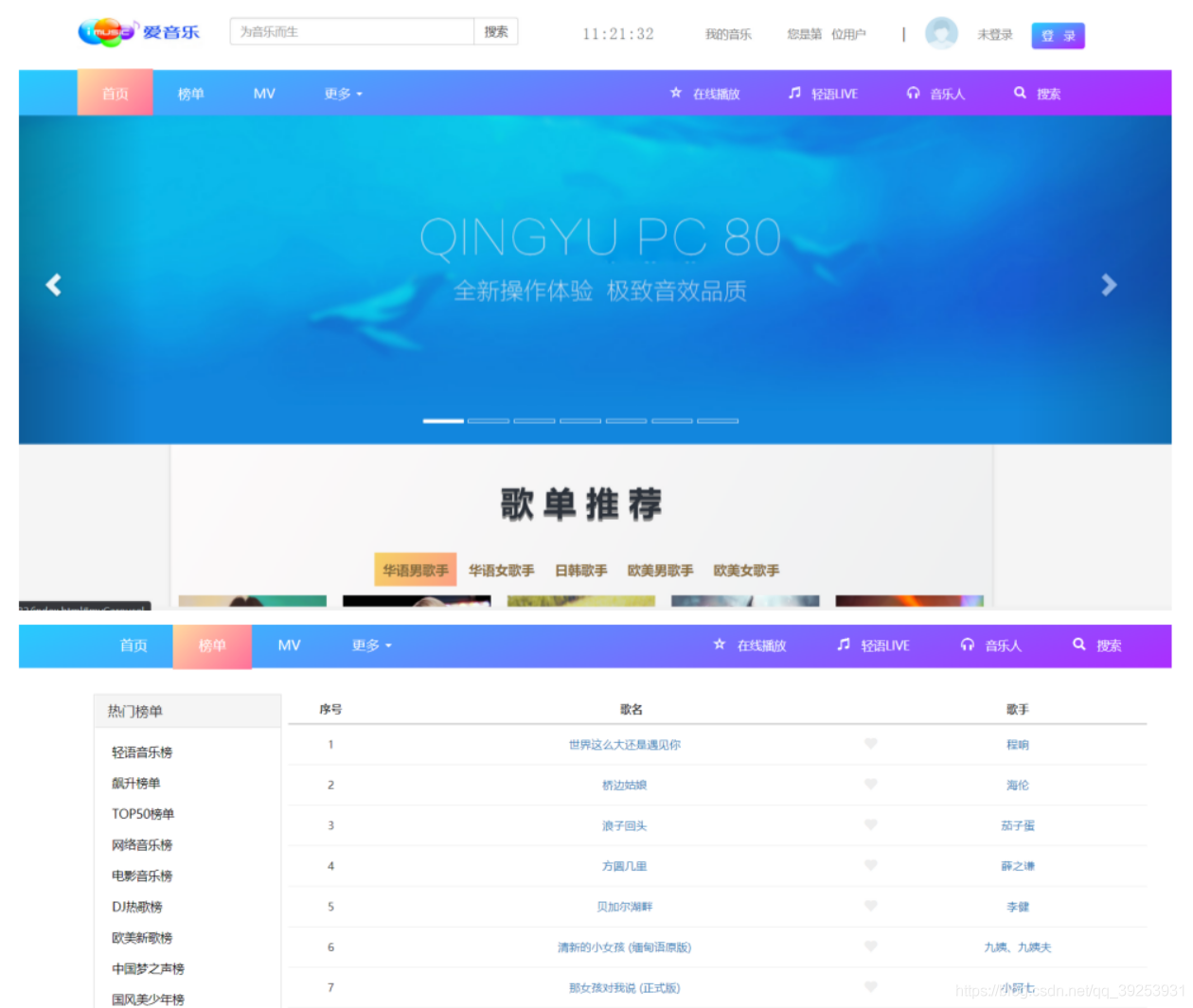
The graduation design adopts the current popular framework Spring Boot, thus simplifying the operation of environment construction. For students who just finished learning Spring Boot framework, the current system has a certain reference value. Cool page, suitable for young friends.
The main functions include list ranking, online playing, etc., but some of the functions have not been implemented. Students who are interested in this can write relevant codes by themselves, which will help improve their technical level.
The source code

http://www.byamd.xyz/dljd.html

Mutual conversion between date and localdatetime

Sometimes you want to change the time of localDateTime, but Calendar can only change the information of date. You need to convert date to localDateTime or change localDateTime to date.

//date->localDateTime
Instant.ofEpochMilli(date.getTime()).atZone(ZoneId.systemDefault()).toLocalDateTime()
//localDateTime->date
Date.from(localDateTime.atZone(ZoneId.systemDefault()).toInstant());

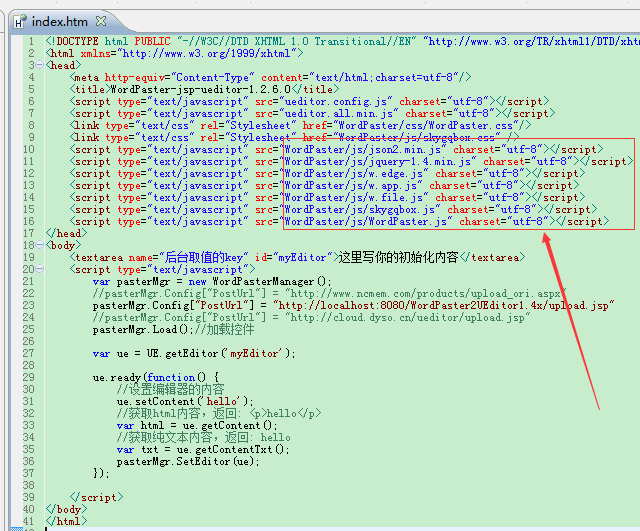
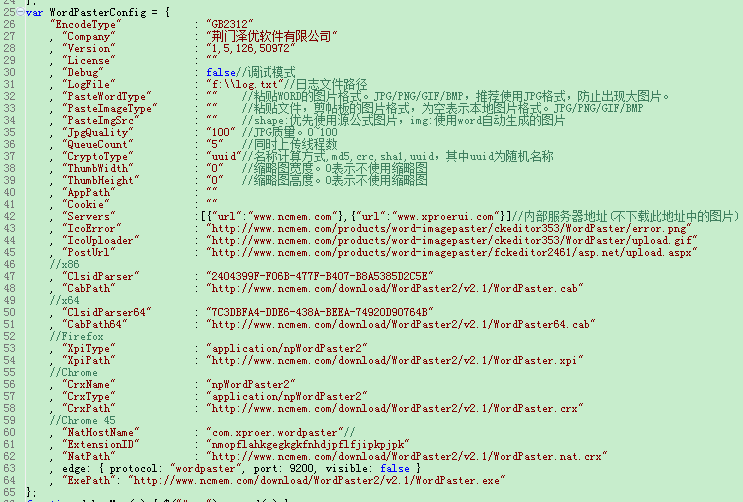
Ueditor paste word image and upload image file automatically

Tinymce is a very good rich text editor, you can go to the website to download. https://www.tiny.cloud
Here is the source code of PowerPaste, a paid plug-in on its official website, but it does not affect the use of functionality.

umeditor+粘贴word图片


Take Vue as an example:
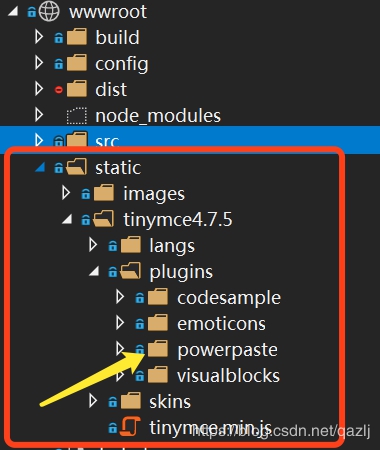
Install Tinymce under static directory instead of NPM.
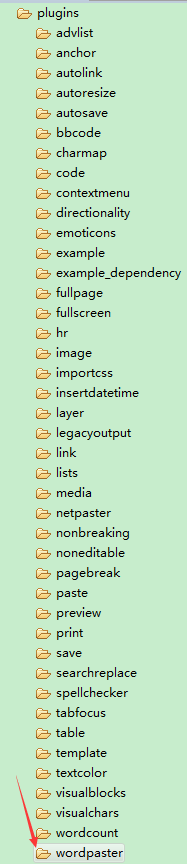
PowerPaste is put in the \static\tinymce\plugins directory


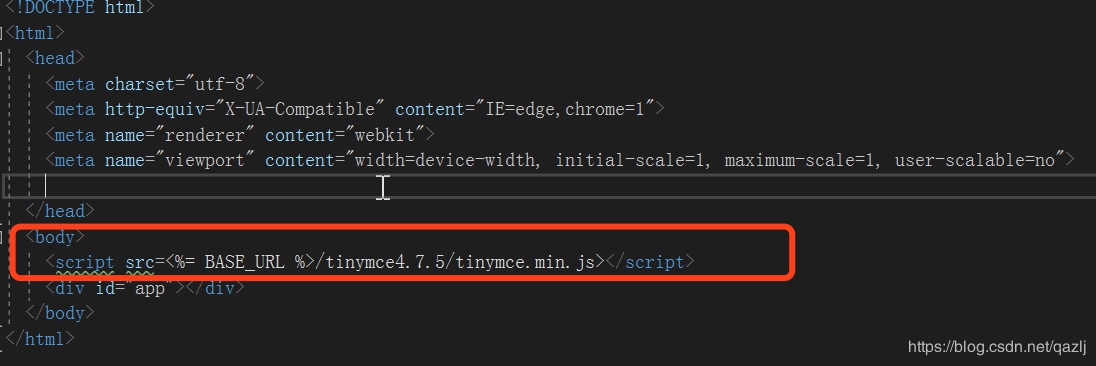
Introducing tinymce.min.js in index.html.


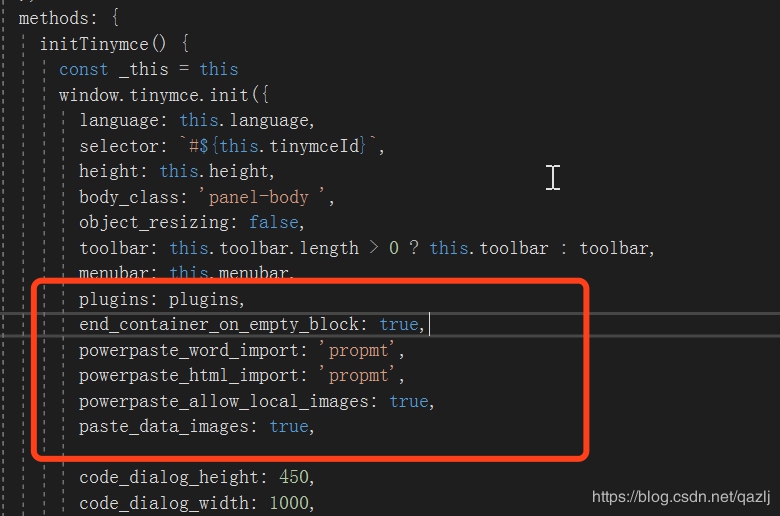
Code parameter configuration is shown in the figure below:


Replace paste in plugins with powerpaste and you’re done.
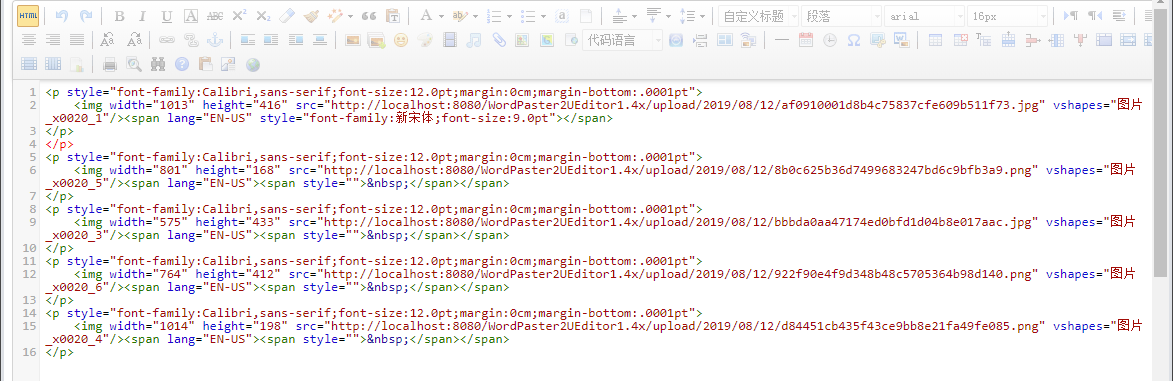
The final effect, can automatically batch upload all the images in Word

After the picture is uploaded, the image address in the editor is changed to the image address of the server.

The problem of master-slave database synchronization stop caused by MySQL deleting data

Mysql master database deletes data from the database if not synchronized to delete the data before the synchronization action stops below for the solution
The first step is to stop slave synchronization service.
Step 2: Skip the current error
set global sql_slave_skip_counter=10; (Increase the value if the data is deleted)
Step 3: Start Slave;

How to solve the problem of no sound after Apple Mac recovers from sleep?

Has anyone come across this problem before?The MacBook Pro lifts the lid and returns from sleep, leaving the headphones and speakers silent and rebooting the Mac. Macz shows you a way to get sound without rebooting your computer.
steps
This is a Bug in Mac OS X, where the coreaudio daemon, “CoreAudiod,” has a problem.
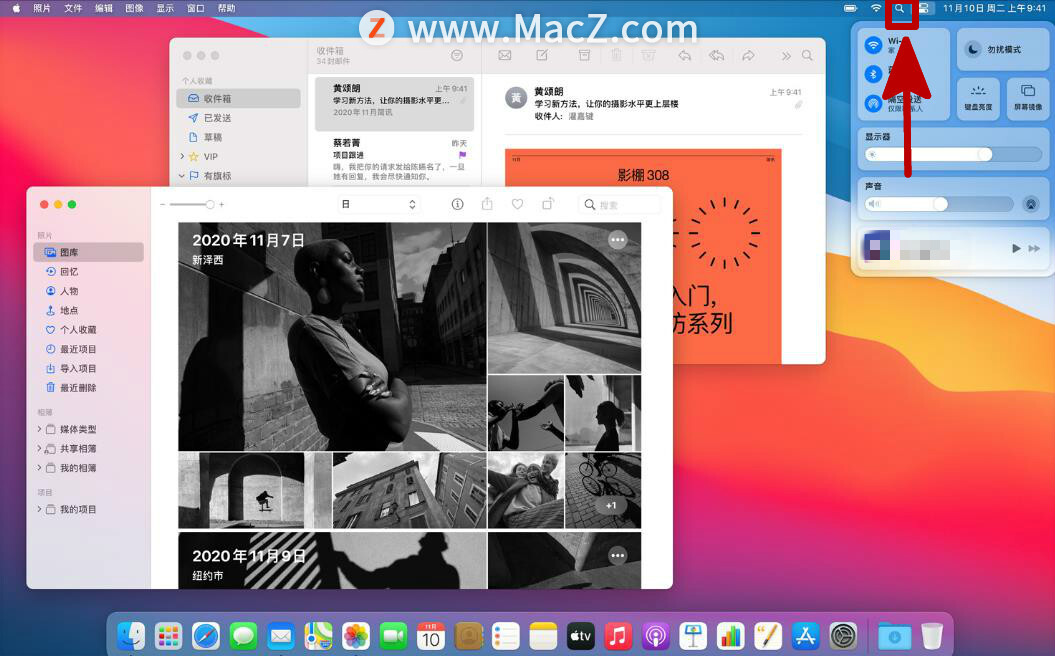
1. If you can’t find “Terminal”, click on the magnifying glass icon in the upper right corner of the Mac screen and search.
2. Enter the SUDO killall coreaudiod command at the terminal and enter the password.
3. Just enter your password to log in to the computer. There is no * on the screen, it doesn’t matter.