Category Archives: How to Fix

How to view the version of MySQL database

How do I check the MySQL database version
A,
One sentence summary:
SQL> select version();
Command line: mysql-v or mysql-version
 
 
MySQL> check the MySQL database version
From or reference: three ways to view the MySQL database version of
https://www.cnblogs.com/kzwrcom/p/6014544.html
1. Use the -v parameter
The first thing that comes to mind is certainly a parameter command to look for the version number, with an argument of -v (capital letters) or –version
Usage:
D:\xampp\mysql\bin> mysql -V
or
D:\xampp\mysql\bin> mysql –version
 
2. Use??parameter
This actually has three similar parameters
–help
-i (capital I)
-?
All three are parameters for viewing help information
Usage:
D:\xampp\mysql\bin> mysql -?
or
D:\xampp\mysql\bin> mysql –help
or
D:\xampp\mysql\bin> mysql -I
 
3, SQL statement to query version information
select version();
There are also other ways to indirectly view MySQL database version information, such as using status; But these three methods are the most convenient and direct.
 
Reproduced in: https://www.cnblogs.com/Renyi-Fan/p/11064960.html

@Detailed description and code demonstration of qualifier

note: this annotation is @qualifier.

The article directories
What does @Qualifier mean?1. @autowired infuses resources from the Spring container, but if it is an interface and there are two implementation classes inside the interface, if we need to use the methods of the interface, the system will not identify which implementation class we are using to implement it
conclusion


What does @Qualifier mean?
The modifier self-understanding is a supplement to @autowired, why do I think it is a supplement?Since we all know that the annotation follows @autowired, For the sake of understanding, I will consider it as a supplement. The keynote will be set here, and then we will see what kind of supplement it is.
Ii. Specific instructions
1.@Autowired is an injection of resources from the Spring container, but if it is an interface with two implementation classes in it, the system will not recognize which implementation class we are using if we need to use the methods of the interface
code as follows (example) :

    @Autowired
//    @Qualifier("PersonSeriverImpl2")
    private PersonSeriver personSeriver;
    public void eats() {
     personSeriver.eat();
    }

Look @ the Qualifier (” PersonSeriverImpl2 “)
the
I am comments yet my PersonSeriver has two implementation class, then I now run the program will offer the following wrong
under Caused by: org. Springframework. Beans. Factory. NoUniqueBeanDefinitionException: No qualifying bean of type ‘com. Itheima. Seriver. PersonSeriver’ available: expected single matching bean but found 2: personSeriverImpl, personSeriverImpl2
translation probably mean:
caused by the following reasons: Org. Springframework. Beans. Factory. NoUniqueBeanDefinitionException: no type is’ com. Itheima. Seriver. PersonSeriver qualified Bean: ‘expectations with a single match Bean, but found the 2: personSeriverImpl, personSeriverImpl2
that is to say, now into two resources, with which the resources to achieve it?The error is then reported, which is when our @Qualifier is needed to resolve the problem

    go to your implementation class and add the name @service (” PersonSeriverImpl2 “) and get the annotation off the @qualifier (” PersonSeriverImpl2 “), which is the interface method that your method needs to call
    well, we’ll run our program again and it’s OK

conclusion
here is a one-sentence summary of the @qualifier annotation :
needs to inject service in Controller so how does my server have two implementation classes to distinguish between the two impls, we need to apply the @qualifier annotation, which provides a way to resolve this conflict

Forsage fossage system development (build case)

Smart contracts are a new technology that can only be achieved through blockchain. Ordinary, standard contracts cover the terms of an agreement between the parties and are often enforced by law; The smart contract is digital, stored in the blockchain, and uses encrypted code to enforce the protocol.
In other words, smart contracts are just software programs that, like all programs, perform exactly as the programmer intended. An intelligent contract is like a programming application: “When it appears, execute it.”
MLM encryption scheme, which allows users to earn Ethereum currency by the following 2 matrix recommendation structures. Herbage is based on intelligent contract decentralized ecosystem thus developing PUNK_2558. Make technology Settings fully available and automated so that they can be smooth and secure.
Gifting project with binary matrix structure is adopted in the program. There are 2 matrix types X3 matrix and X4 matrix you can choose to ride a bike with anyone. To start using any matrix loop, you must pay 0.05ETH fee (joining fee) and then start referrals through your referral link.
The matrix sizes used in the circulator are 3×1 and 2×2. The 3 by 1 matrix is essentially simple, you just need to fill in three positions. The 2 by 2 matrix starts at two positions in the first layer and then expands to four positions in the second layer. Positions are filled through direct and indirect recruitment of Forsage members. Once all the positions in the matrix are filled, the cyclic commission is activated. The positions coming out of the matrix will also be entered as new matrices of the same size.
uint8 public constant LAST_LEVEL = 12;

mapping(address => User) public users;
mapping(uint => address) public idToAddress;
mapping(uint => address) public userIds;
mapping(address => uint) public balances; 

uint public lastUserId = 2;
address public owner;

mapping(uint8 => uint) public levelPrice;

event Registration(address indexed user, address indexed referrer, uint indexed userId, uint referrerId);
event Reinvest(address indexed user, address indexed currentReferrer, address indexed caller, uint8 matrix, uint8 level);
event Upgrade(address indexed user, address indexed referrer, uint8 matrix, uint8 level);
event NewUserPlace(address indexed user, address indexed referrer, uint8 matrix, uint8 level, uint8 place);
event MissedEthReceive(address indexed receiver, address indexed from, uint8 matrix, uint8 level);
event SentExtraEthDividends(address indexed from, address indexed receiver, uint8 matrix, uint8 level);


constructor(address ownerAddress) public {
    levelPrice[1] = 0.025 ether;
    for (uint8 i = 2; i <= LAST_LEVEL; i++) {
        levelPrice[i] = levelPrice[i-1] * 2;
    }
    
    owner = ownerAddress;
    
    User memory user = User({
        id: 1,
        referrer: address(0),
        partnersCount: uint(0)
    });
    
    users[ownerAddress] = user;
    idToAddress[1] = ownerAddress;
    
    for (uint8 i = 1; i <= LAST_LEVEL; i++) {
        users[ownerAddress].activeX3Levels[i] = true;
        users[ownerAddress].activeX6Levels[i] = true;
    }

Idea Maven project uses package to package and report error (package does not exist)

Scene: I pass File -> Project Structure -> Modules and Libraries have added an external Jar that runs normally in the project, but the following error occurred when packaging with Maven’s package

Solution: Configure the Jar to a pom.xml file and you can package it properly
Steps:
1. Open the Terminal execution (Terminal window at the bottom of the IDEA interface)

mvn install:install-file -DgroupId=com.external -DartifactId=http-sdk -Dversion=1.2.6-SNAPSHOT -Dpackaging=jar -Dfile=C:\Users\Administrator\Desktop\BOOT-INF\lib\http.jar 

2. Add the following dependencies to the pom.xml file

<dependency>
    <groupId>com.souche</groupId>
    <artifactId>msgcenter-sdk</artifactId>
    <version>1.2.6-SNAPSHOT</version>
</dependency>

The -dgrouPID corresponds to the groupid-dartifactid in the POM and the artifactitid-Dversion corresponds to the version-dpackaging import package which is a TYPE of JAR and that’s the jar-DFile where you put the JAR that you downloaded from the POM

Once you run the command, you can see the corresponding JAR in the local Maven repository


And then re-execute
Compile and package MVN Clean Package (install)
Or choose the right side of the IDEA interface, select the Maven status bar and click package packaging


The required configuration in the POM.xml file

<build>
    <plugins>
        <plugin>
            <groupId>org.springframework.boot</groupId>
            <artifactId>spring-boot-maven-plugin</artifactId>
        </plugin>
    </plugins>
</build>


Node configuration environment variable and global installation of webapck

1. Installation of node in the underlying environment
Node website: https://nodejs.org
NPM doesn’t need to be installed by itself; Node comes with NPM
Enter Node-v and NPM-V in CMD to see the versions of Node and NPM
2. Configure node’s environment variables
If you install node using the default installation address, you do not need to configure the environment variable
. If you change the default address when installing node, you will need to configure the environment variable
My installation address is the NodeJS file on disk F
“F:\nodejs\node_global”
NPM config set “F:\nodejs\node_global”
NPM config set cache “F:\nodejs\node_cache”

“F:\nodejs\node_cache”
Next, configure the environment variable
and create a new variable in the system variable
variable name: NODE_PATH
variable value: F:\nodejs\node_global\node_modules create a new variable in the path of the system variable enter
%NODE_PATH% open path in the user variable create a new variable F:\nodejs\node_global
if there are other variable statements in the path related to node or NPM, especially under C, If new files are generated in the node_cache and node_global folders, then the node environment is configured successfully

3. Install global WebPack
The NPM install webpack-g statement we just used to test node’s environment variables is the global installation statement for webpack, so we have already installed the global webpack
. Since I reported almost every error I could when installing webpack, just in case, let’s install it again!
Then we install
in CMD to execute NPM install — global webpack using the installation statement provided on wabpack’s official website
Since it is installed in NPM, so the installation speed is a little slow, the left ellipsis is the progress bar, we try to install in a good network environment, otherwise it will get stuck to your despair
Once installed, execute Webpack-V in CMD if the version number appears to indicate a successful installation.

Uninstall Windows computer software, so that the uninstall is clean

When we uninstalled the computer, although we uninstalled the software, but we found that after the completion of the uninstall, there are still a lot of garbage in the computer, such as registry information, residual configuration information.
A lot of people uninstall software just by opening . > Control panel & GT; > Application & gt; > Uninstall , do you think this will clean the uninstall?In fact, this uninstall method may still save a lot of junk content, even for the rogue software does not work.
So how do we uninstall software in the right position?
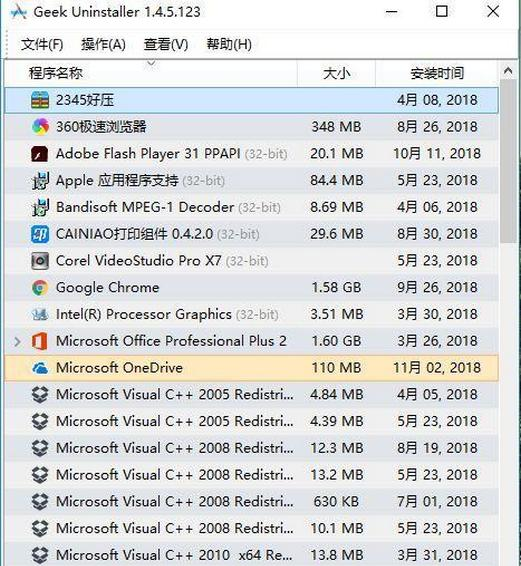
Here’s a cleaner Uninstaller tool: Geek Uninstaller
This software is very small, only a few meters in size, and the installation-free version is also very convenient to use.

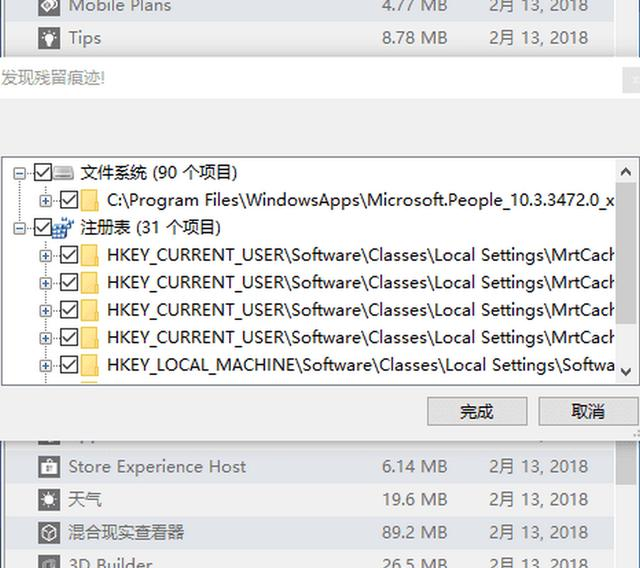
After we open Geek Uninstaller, we find the software we want to uninstall, then right-click on it to uninstall the corresponding software in the computer, unlike normal Uninstaller tools, after uninstall the software will also retrieve the remaining folders and registry on the computer.

This software handles support for uninstalling normal installation software, as well as support for uninstalling Win10 software.
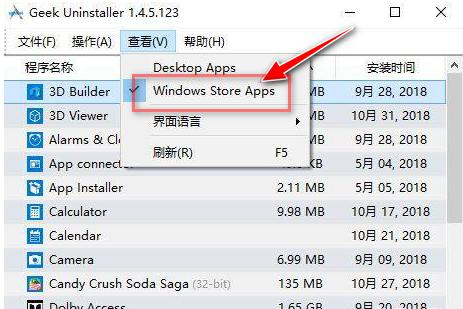
Select the App Store in view, and then you can see the software downloaded from the app Store and uninstall accordingly.

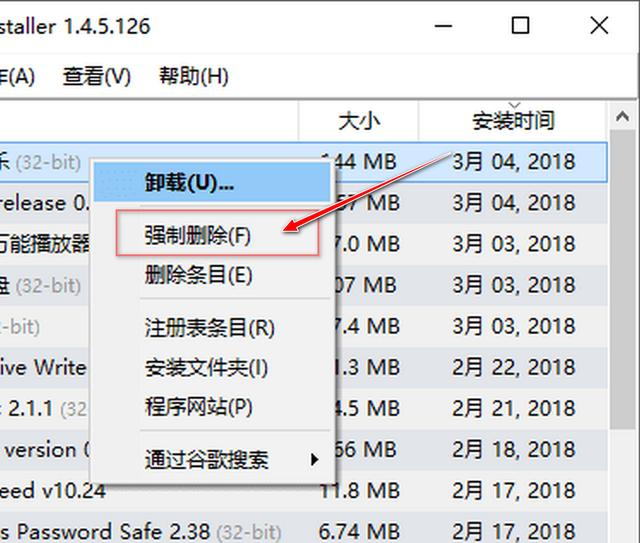
Forced delete: for some special uninstall can not be completed normally, you can use the forced delete function, directly delete the corresponding folder and retrieve the registry residual files, is also very easy to use, but for most software, use the above method can be very good uninstall.

The picture is from Jane’s Book App

How to delete the residual software files on the computer?

The computer is slower and slower, the system disk space is smaller and smaller, the garbage is more and more… This is how many people in the process of using computers have encountered the unsolved problem.
But ordinary users don’t even know what a software uninstall, not just delete the desktop and start menu shortcuts to go, even the control panel or software used to own uninstaller after unloading, also will still remain a lot of files and registry, because such unloading won’t delete directly relevant registry keys and the following software file directory.
The following directories are not found in the software installation directory. They contain a lot of junk files, such as caches, logs, error reports, etc., some of which can be several gigabytes or even tens of GIGABYtes. If you don’t have enough space, clean them up.
C:\Users\Administrator\AppData
C:\ProgramData
*:\Program Files (x86) or *:\Program Files
Therefore, the best way to uninstall a piece of software completely is to remove all the files, directories, and registries it generates. Of course, it is very troublesome to find one by one. For lazy people, they really don’t want to do it, not to mention there will be omissions…
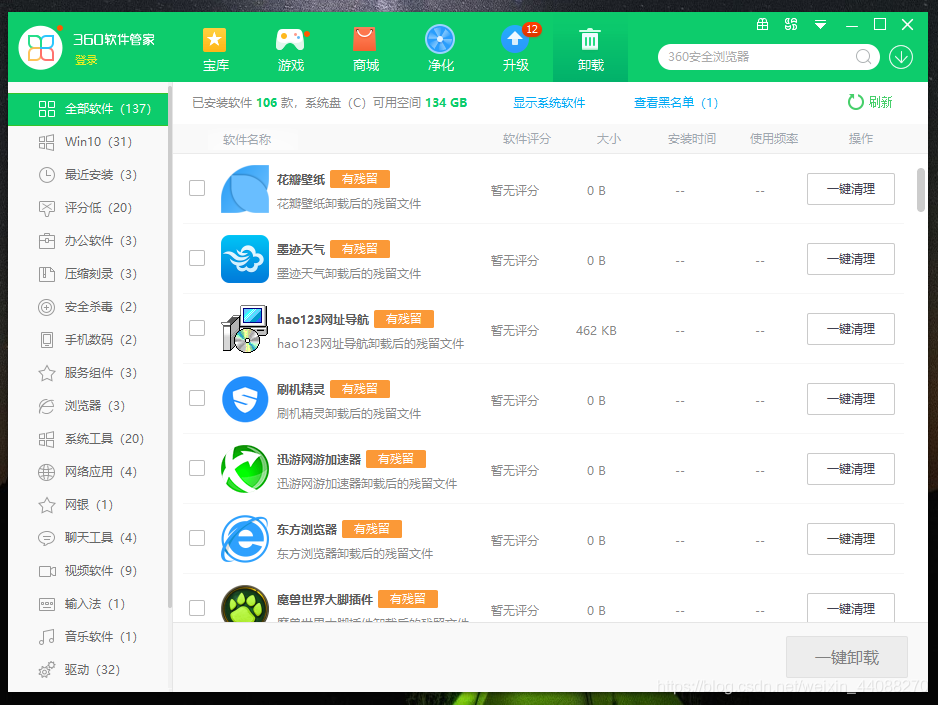
After a long while, it is easy to find a good cleaning tool for you. After trying so many tools, I think 360 Security Guards stand out from the rest for three reasons. Let me share with you:
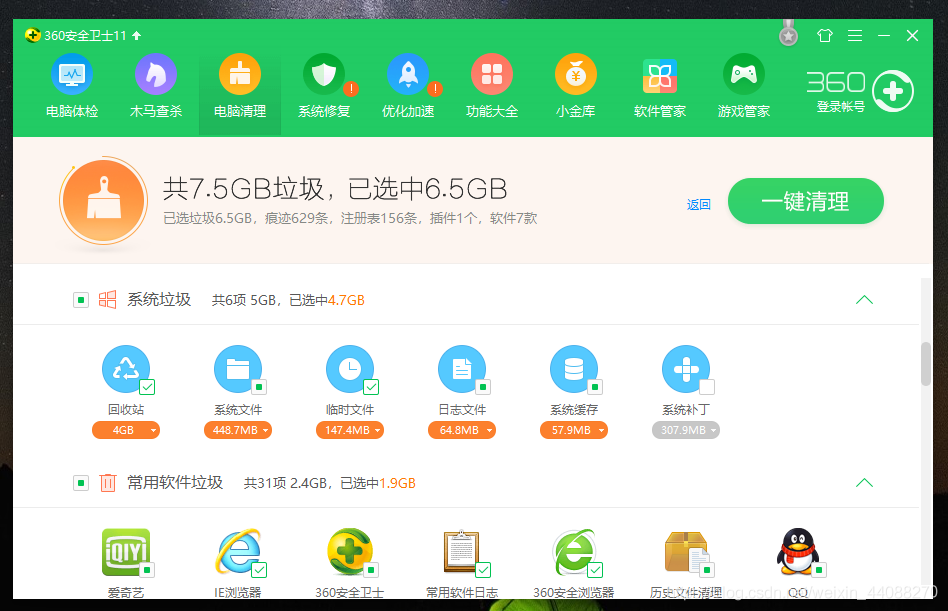
1. For software that does not need to be uninstalled, the computer cleaning function can often clean the useless files (cache, log, etc.) generated by the software to make room;

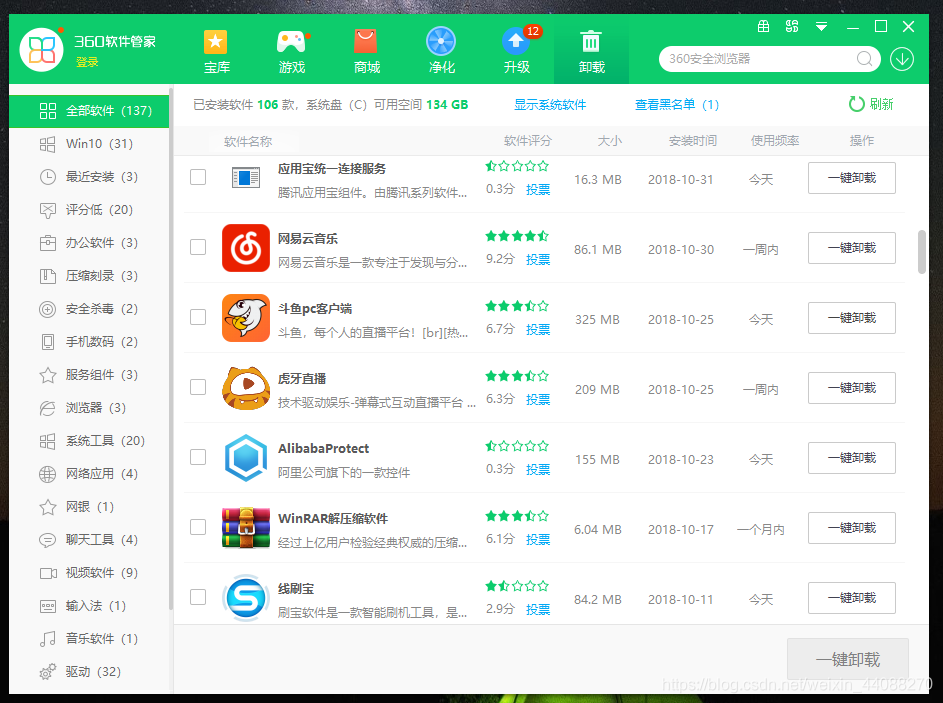
2, need to uninstall the software, you can directly use 360 software housekeeper, not only can completely uninstall the software no longer needed, but also can detect the silent bundle installed on the rogue software, a key to complete uninstall;

3, the software has been uninstalled, if the control panel or the original uninstall program was uninstalled, the remaining files can be scanned out with a key, let the computer recover clean.


Warm tip: if I ask you to clean up your computer by hand, I’m sure most of you are too lazy to move. When necessary, you can use third-party tools to save your worry and speed, or very awesome.


How to uninstall the software for apple / Mac? What if the software can’t be unloaded?

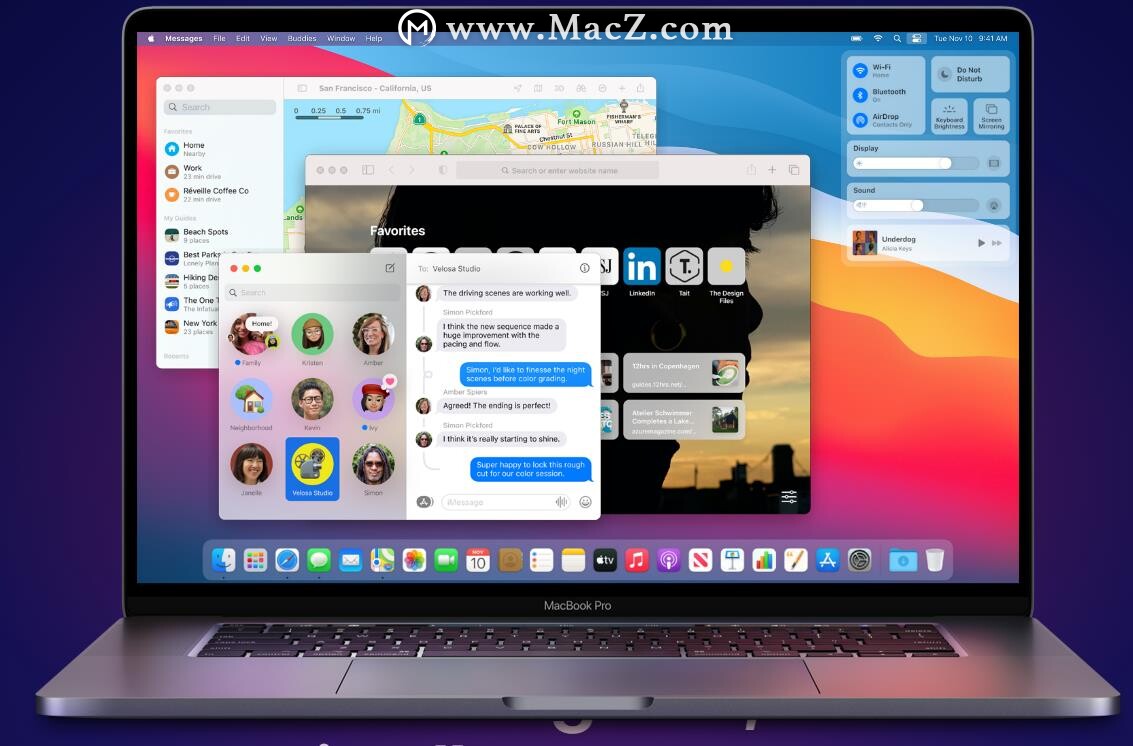
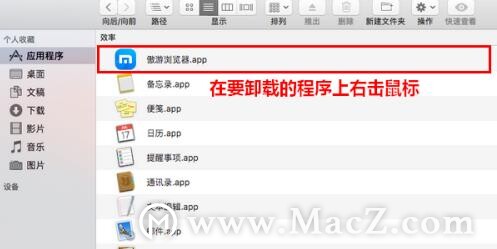
For those of you who are used to Windows, the first time you use an Apple /Mac, you may find it hard to get used to it. To uninstall a program on a Windows PC is as easy as going into the “Uninstall or change programs” section, but there is no way to find the option to uninstall the program on a MAC computer. So how exactly does apple uninstall software?Macz series to help you solve.

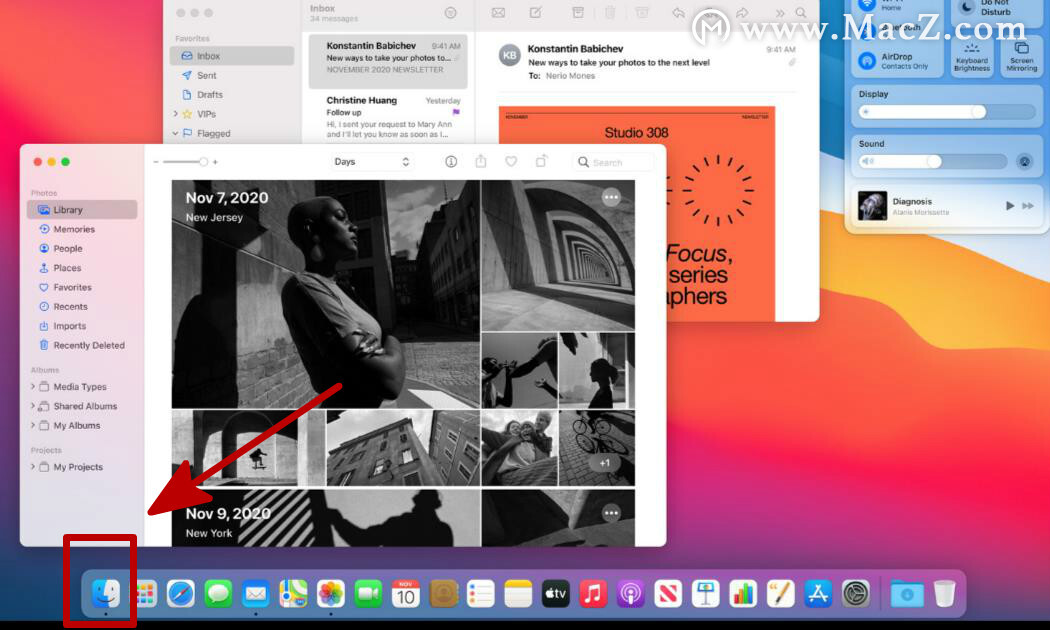
Click the left-most icon in the Dock bar at the bottom of the screen to browse the files in the system.

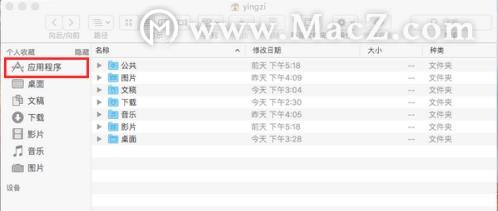
After opening, click the “Application” in my personal collection on the left side of the main interface.

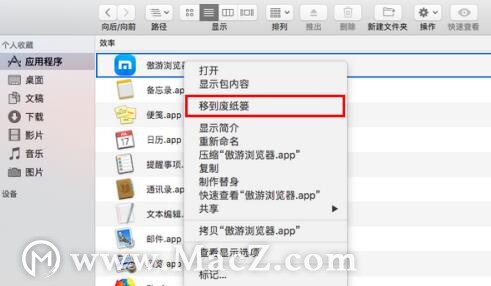
Three, in the application to find the software you want to uninstall, right – click on the top.

In the popup menu, click “Move to wastebasket”.

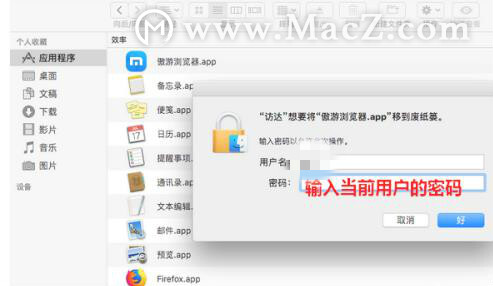
A dialog box will pop up asking you to enter the current user’s password.

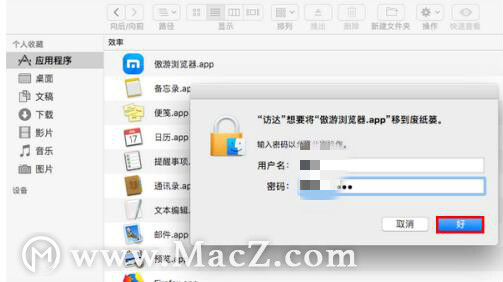
After the password is entered, click “OK”.

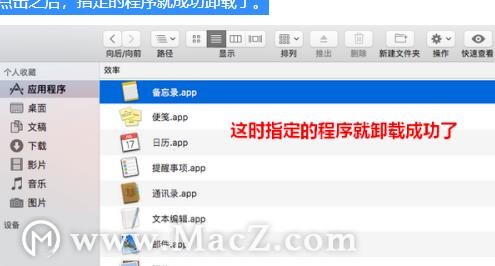
Seven, after clicking, the specified program is uninstalled successfully.

Note: You can’t uninstall the software built into the MAC.

How to delete software completely on MAC

After uninstalling WebStorm installed on MAC through CleanMyMac and reinstalling it, it is annoying to find that some of the configured Settings and plug-ins are still in place.
The original software configuration file is not put together with the package file, record
To see the Libraty option, open any Finder, click Go in the toolbar at the top of the screen, display a drop-down menu, and press the Option key on your keyboard. In the repository folder, look for the WebStorm folder contained in the following directory and delete it.
Configuration

~/Library/Preferences/

Caches

~/Library/Caches/

Plugins

~/Library/Application Support/

Logs

~/Library/Logs/

Python installation tutorial

Python Installation Tutorial
I. The blogger speaks for himself
With the rapid development of artificial intelligence, Python language is becoming more and more popular among people. The blogger taught himself a while ago, but this time he consolidated it again and shared the pits I met with with you. To help you learn less detours.
Hope to be helpful to you, welcome to leave a comment and ask questions.
At the bottom of the PS article is my python3.7 package download link, which you can download yourself.
 
Ii. Installation environment
The installation environment of this tutorial is: Win7 or Win10 system
Python version: Python 3.7.
As for the installation of Linux and other python versions, you can refer to them.
 
Three, installation steps
1. Python3.7 will be downloaded from the official website
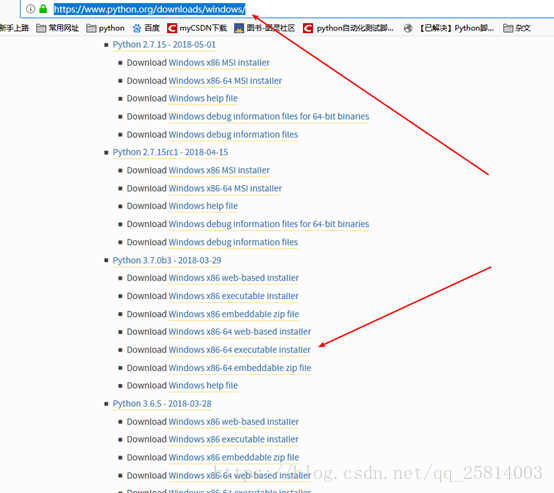
1. To download the Python version on the official website of Python, you need to download the corresponding version (check whether you are a 32-bit operating system or a 64-bit operating system in the computer-Property). I am 64-bit, so I download the corresponding installation package (as shown in the figure below: Windows x86-64 Executable Installer).
The official website download address is as follows:
https://www.python.org/downloads/windows/

 
Notes:
If you typed https://www.python.org, you’ll have to look for the option on the page. It’s better to just type in the details.
Python can also download a ZIP version (Windowsx86-64 Embeddable Zip file), but sometimes many DLL files are lost after downloading, and it is difficult to fix these problems. Therefore, it is recommended to download the Windows X86-64 Executable installer.
2. Python3.7 installation tutorial
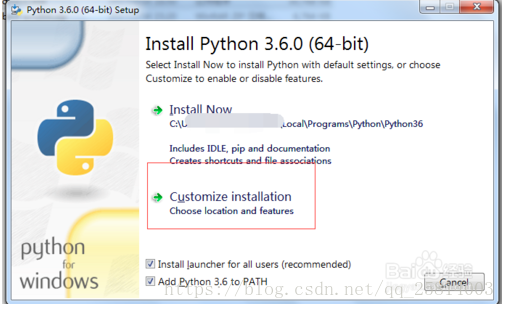
1) Double-click the downloaded EXE program to enter the installation interface after downloading.
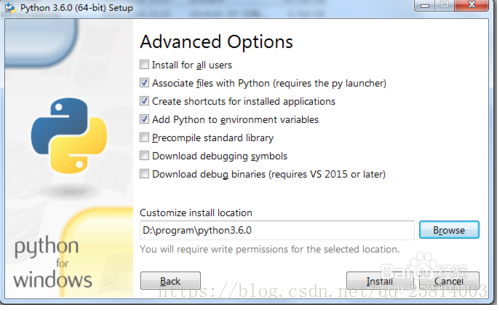
The installation interface can choose the default installation, also can customize the installation, I prefer the custom installation, default installation path is relatively deep, custom installation define their own shallow directory, easy to find the following.

 
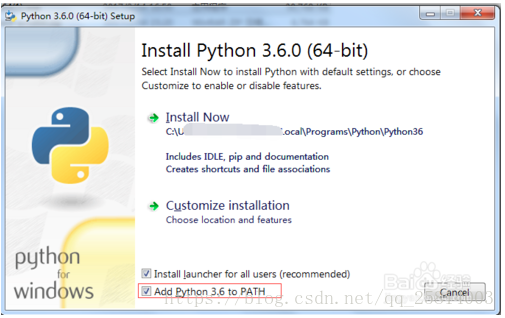
2) When choosing the path to install, you can check “Add Python 3.6 toPATH” at the bottom. This will Add user variables directly by default, and you don’t need to Add them later

3) After the selection, proceed to the next step. All default choices are ok. If necessary, the path of installation and storage can be directly updated in the next step.

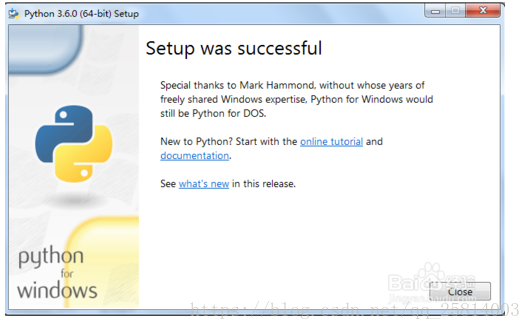
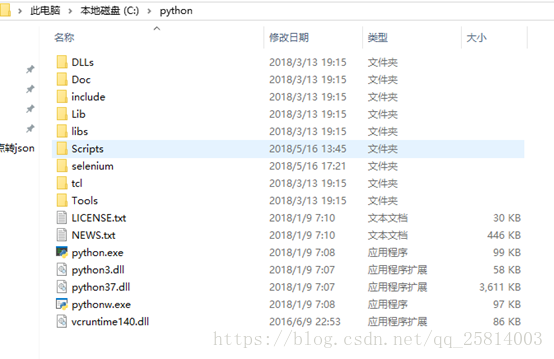
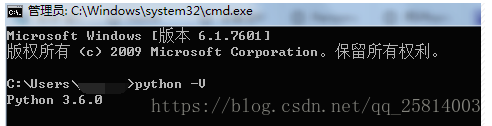
4) If the next step continues, the installation will be prompted. You can also see the relevant information in Figure 2 below in the installation directory. Execute Python-V (capital V oh) in CMD at the same time to see the successfully installed version.
At this point, Python is successfully installed and ready to use.

5) The schematic diagram after installation is as follows


3. IDLE use
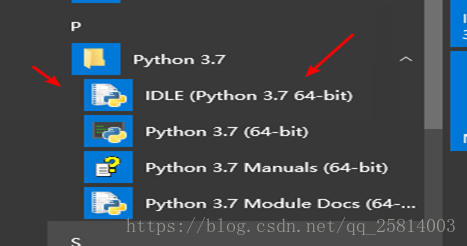
After the installation is completed, we find Python IDLE in the start menu and double-click to run it, and then we can debug our Python code in our IDLE.

 
Remark:
The above mentioned is the process of Python IDLE installation and debugging in Windows platform. Usually, The Linux system, such as Ubuntu and CentOS, has installed Python programs with the system by default. In Linux system, IDLE is called Python interpreter, and it starts from the terminal emulator by typing the command “Python”. Everything in Python starts with this IDLE editor, and after getting started, you can choose more of your favorite Python editors, such as Wing IDE, the professional Python editor.
 
Iv. Summary of matters needing attention
1: Go to www.python.org to download. (My computer is a Windows system, so the 3.7 version I downloaded is Download Windows X86-64 Executable Installer)
2: Run directly after downloading and customize installation. (Remember to check Add Python 3.7to PATH)
3: Enter python-V test in the Python directory after installation
4: After success, search for IDLE in the start menu. Just double-click to run it (IDLE comes with the Python download and is the INTEGRATED development environment for Python)
 
5. Download address
I have uploaded the Python package, and you can download it directly, either from the official website or from my link address.
download:
https://download.csdn.net/download/qq_25814003/10464931
 

How to download Google Chrome offline installation package from the official website

Google Chrome is already the default browser for many people, but for “you know what” reasons, the online installation has been largely unsuccessful, and its own automatic updates are mostly still being loaded, so we go to some download stations to download the package, but I’ve been told many times that the ones that come back are usually 32-bit.

Since I’m using a 64-bit version of Windows 7, and I’m sure many of you will feel the same way, the 64-bit OS seems to work more smoothly together than the 32-bit OS, so we’re looking for the latest version of Google Chrome offline installer for 64-bit.

1, open the Chrome browser home page: http://www.google.cn/chrome
2, the url address bar is this: http://www.google.cn/chrome/browser/desktop/index.html
3, at the end of the website add:?standalone=1& Platform = Win64. Click the enter button to open the 64-bit download page. Click the “Download Chrome” button to get the Google Chrome 64-bit offline installation package
Explain the added parameters,?Standalone =1 refers to the offline installation package and Platform =win64 refers to the 64-bit version of Windows.
What if you just add “?Standalone =1. It is a standalone class that can be used to download the 32-bit Chrome offline package. Replace “Win” with “MAC” and you can download the MAC version.