Category Archives: How to Fix

OpenGL step pit record

OpenGL pit record
The 3D model is loaded with OpenGL RBO texture cache

3D model loading
When working with 3D models, we often create an FBO first, and the FBO is associated with Texture and RBO. The first time we rendered it, we rendered it directly to the FBO associated texture, then went through the other texture filters and displayed it again.
There are a couple of caveats here.
Rendering must be associated with an RBO. Turn Depth Test on before rendering off-screen and always turn it off after rendering off-screen. Do another render operation, otherwise render black screen texture will appear.

OpenGL RBO
Sometimes when OpenGL uses the depth buffer, the rendering effect disappears completely, and that’s probably because the depth buffer has been turned off.
The name of the
GLDepthMask – Enables or disables write depth buffers
C specification
void glDepthMask( GLboolean flag);
parameter
flag
Specifies whether the enabled depth buffer can be written. If flag is GL_FALSE, the depth buffer write is disabled. Otherwise, it can be enabled. The initial state is to enable deep buffer writes.
describe
GLDepthMask specifies whether the enabled depth buffer can be written. If flag is GL_FALSE, the depth buffer write is disabled. Otherwise, it can be enabled. The initial state is to enable deep buffer writes.
Related Gets
GL_DEPTH_WRITEMASK glGet parameters
See also
GLColorMask, GLDepthFunc, GLDepThrangef, GLStencilMask
copyright
https://www.khronos.org/registry/OpenGL-Refpages/es2.0/xhtml/glDepthMask.xml
https://blog.csdn.net/flycatdeng
Texture cache
To create a texture cache, you must specify the size of memory for the texture.

public static int createTextureObject(int textureTarget, int width, int height) {
        int[] textures = new int[1];
        GLES20.glGenTextures(1, textures, 0);
        GlUtil.checkGlError("glGenTextures");

        int texId = textures[0];
        GLES20.glBindTexture(textureTarget, texId);
        GlUtil.checkGlError("glBindTexture " + texId);

        GLES20.glTexParameterf(textureTarget, GLES20.GL_TEXTURE_MIN_FILTER, GLES20.GL_LINEAR);
        GLES20.glTexParameterf(textureTarget, GLES20.GL_TEXTURE_MAG_FILTER, GLES20.GL_LINEAR);
        GLES20.glTexParameteri(textureTarget, GLES20.GL_TEXTURE_WRAP_S, GLES20.GL_CLAMP_TO_EDGE);
        GLES20.glTexParameteri(textureTarget, GLES20.GL_TEXTURE_WRAP_T, GLES20.GL_CLAMP_TO_EDGE);
        GlUtil.checkGlError("glTexParameter");
        GLES20.glTexImage2D(GLES20.GL_TEXTURE_2D, 0, GLES20.GL_RGBA, width, height, 0, GLES20.GL_RGBA, GLES20.GL_UNSIGNED_BYTE, null);
        return texId;
    }

Big hole in using OpenGL on Mac OS

Be free and at leisure started to research OpenGL, went to buy the Little Red Book 8 edition, the content of the book is based on Windows, and Mac can use the version is very low, OpenGL is up to 4.1, GLSL is 1.2 for me.
When we ran the first demo, we had a problem. The book used a FreeGLUT (a third-party library that can be used across platforms), and a FreeGLUT library on the Mac would not be able to compile the shader, so there were two ways to solve it
1: Use your own #include <; GLUT/GLUT.h> Instead of, and in glutInitDisplayMode (GLUT_RGBA | GLUT_3_2_CORE_PROFILE); Adds the specified version to 2. Use another third-party library, GLFW, to set the version number, which can be cross-platform

[learning opengl 22 step by step] – OpenGL importing 3D models with assimp Library

Tutorial 22
OpenGL imports 3D models using the ASSIMP library

Original: http://ogldev.atspace.co.uk/www/tutorial22/tutorial22.html
CSDN full version column: http://blog.csdn.net/column/details/13062.html


background
Through the previous learning we have achieved a lot of good results, but we are not good at creating complex models, you can imagine through the code to define every vertex position and other properties of the object is not feasible. A box, pyramid or simple surface mapping is fine, but what about a three-dimensional face?In fact, in games, in some commercial game applications, the mesh of the model is created by artists using modeling software such as Blender,Maya,3ds Max, etc. These software provide powerful tools to help artists create complex models. After the model is created, it is saved into a file. 3D model files are available in many formats, such as OBJ format. The 3D model file contains the entire geometry definition of the model, which can then be imported into the game engine (if the game engine can, of course)

076_ OpenGL graphics program development practice

OpenGL Graphic Program Development Practice
Delphi tutorial series books (076) “OpenGL graphics program development practice” (state) finishing Email: [email protected]
Download Address:
Pdf
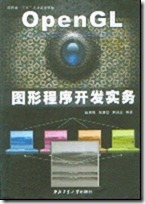
Xie Danrui Publishing House: Northwestern Polytechnical University Press ISBN: 7561219393 Available Date: 2006-9-6 Published Date: August 2005 Open Book: 16 Page Number: 293 Edition: 1-1
Content abstract
As a kind of graphics industry standard, OpenGL is widely used in practical work and occupies a very important position. This book USES the Delphi programming environment about OpenGL function principle, mainly introduced the development of computer graphics and development present situation, the related theory of OpenGL and OpenGL characteristics and working principle, the basic knowledge of OpenGL and advanced application techniques, the last instance system and how to using the OpenGL technology, integrated complex three-dimensional realistic graphics. This book is well-structured, informative, innovative and practical. It can be used as a reference for undergraduate students, graduate students, scientific researchers and graphic and image developers.
preface
Visualization of scientific computation, computer animation and virtual reality are three hot research directions in the field of computer graphics in recent years. Their technical core is the rendering of three-dimensional realistic graphics. At present, 3D realistic graphics technology has been successfully and widely used in military, aerospace, aviation, medicine, geological exploration, 3D games and industrial CAD design and other fields, so that people can directly operate the physical information in the 3D graphics world, and directly communicate with the computer. This technology has unified the power of man and machine in an intuitive and natural way, and this revolutionary change will undoubtedly greatly improve the quality and efficiency of people’s work. Therefore, it is of great theoretical and practical significance to actively promote the research of computer graphics. OpenGL is the abbreviation of Open Graphics Library, which is a set of high performance Graphics processing system developed by SGI company. It is the software interface of Graphics hardware, meaning the Open Graphics Library. With OpenGL, programmers can create interactive applications to achieve realistic three-dimensional graphics and images, which can be used in many fields that require a high degree of simulation of the real world. Due to its openness and high reusability, it has now become an industry standard. OpenGL is designed to be independent of hardware, independent from the window system, running a variety of operating systems can be used on a variety of computers, and can work in the network environment in the client/server mode, is a professional graphics processing, scientific computing and other high-end application areas of the standard graphics library. OpenGL as a graphics industry standard, almost all the visual application development tools support OpenGL integration, such as Delphi, VC++, VB, JAVA and so on. However, the current introduction of OpenGL principle of the reference resources are almost based on C or VC++, which is familiar with the Delphi programming environment for the majority of developers, is undoubtedly a pity. As we all know, Delphi with its simple and easy to use visual development environment, high efficiency compiler, powerful PASCAL language in the field of visual development tools occupies a very important position. Based on the above factors, this book uses the Delphi programming environment to tell the principle of OpenGL function. The book consists of 16 chapters. Chapter 1 briefly introduces the development of computer graphics and the development of graphics and images. Chapter 2 and Chapter 3 introduce the Delphi programming foundation and object-oriented theory; Chapter 4 introduces the basic situation of OpenGL graphics library, OpenGL characteristics and working principle; Chapter 5 introduces the foundation of entity modeling and describes the basic drawing commands of OpenGL, including the description of point entity, line entity and surface entity. Chapter 6 introduces the theory of view transformation in OpenGL, including model transformation, view transformation, projection transformation, view-area transformation and matrix stack operation. Chapters 7 and 8 cover colors and lighting in OpenGL; Chapters 9 to 13 introduce the advanced application techniques of OpenGL, including blending, anti-aliasing, fog, display lists, bitmaps, fonts, texture mapping, frame caching, and animation. Chapter 14 introduces the evaluation program and the principle of nonuniform rational B-splines. Chapter 15 explains how interactive OpenGL works, including selection mechanisms and feedback mechanisms. As a conclusion, Chapter 16 systematically describes how to comprehensively use OpenGL technology to draw complex 3D realistic graphics through several examples. This book is well-structured and informative. Much of the source code provided in the book is compiled under the Delphi 7.0 environment. This book can not only be used as a college undergraduate, graduate study of computer graphics course, but also for research institutes of researchers, computer graphics and image developers have a high reference value. Xue Huifeng, Wu Huixin and Xie Danrui participated in the compilation of the book. In addition, Xia Xiaoye, Gao Xiong, Xu Rongyue and Bai Linfei also participated in the compilation. Due to the limited level, there are omissions and mistakes in the book, please readers friends criticism and correction. Author April 2005
directory
The first chapter graphics and image development status
1.1 The booming development of computer graphics
1.2 OpenGL leads the trend of graphic image development
1.3 Selection of development tools
The second chapter is Delphi language foundation
2.1 Delphi Integrated Development Environment
2.2 Basic concepts of Delphi language
2.3 Data types
2.4 Variables and Constants
2.5 Operators and expressions
2.6 Statements
2.7 Process and Function
Chapter 3 Object-Oriented Programming
3.1 Classes and Objects
3.2 Class declarations
Members of the 3.3 class
3.4 Three features of OOP
3.5 Class Operators
3.6 Objects
3.7 Exception Handling
Chapter 4 is an overview of OpenGL
4.1 History of OpenGL
4.2 Basic features of OpenGL
4.3 Architecture of OpenGL
4.4 OpenGL workflow
4.5 OpenGL function library
4.6 Basic graphics functions of OpenGL
4.7 Future and prospect of OpenGL
The fifth chapter is the foundation of entity modeling
5.1 Preparation before drawing
5.2 OpenGL data types and function forms
5.3 Description of basic geometric primitives
5.4 Using glBegin() and glEnd()
5.5 Normal vector
5.6 Draw basic primitive instances
Chapter 6 View transformation
6.1 Mathematical basis of graph transformation
6.2 From 3D Space to 2D Plane
6.3 View transformation and model transformation
6.4 Projection transformation
6.5 Visual area transformation
6.6 Additional cut plane
6.7 View transform instance
Chapter 7 Colors in OpenGL
7.1 Color perception
7.2 Colors in the computer
7.3 RGBA mode and color index mode
7.4 Specify the shadow model
7.5 Examples of color usage
Chapter 8 Light
8.1 Real World and OpenGL Lighting
8.2 Illumination Sphere Case Analysis
8.3 Create Light Source..
8.4 Select the lighting model
8.5 Define material properties
8.6 Illumination math calculation
8.7 Lighting in color index mode
Chapter 9 Mixing, anti-aliasing, fog
9.1 Mixing
9.2 Anti-aliasing
9.3 the fog
Chapter 10 shows the list
10.1 The basic concept of displaying lists
10.2 Show the creation and execution of lists
10.3 Show nested use of lists
10.4 Management of display lists
10.5 Multiple operations to display lists
10.6 Use display lists to change encapsulation mode
Chapter 11 Bitmaps, Characters, and Images
11.1 Bitmap
11.2 Characters
11.3 Images
Chapter 12 Texture Mapping
12.1 Basic steps for texture mapping
12.2 Specify the texture
12.3 Texture Control
12.4 Texture coordinates
Chapter 13 Frame Caching and Animation
13.1 frame cache
13.2 pixel segment testing and operation
13.3 Accumulate the cache
13.4 Dual cache animation
Chapter 14 Evaluation Procedures and Nonuniform Rational B-Splines
14.1 Evaluation procedure
14.2 NURBS curves and surfaces
Chapter 15 Selection and Feedback
15.1 Selection
15.2 Feedback
Chapter 16 OpenCL advanced application skills
16.1 Flames dancing
16.2 Three-dimensional trees
16.3 Texture Synthesis Application
References…
OpenGL basic graphics programming – OpenGL and 3D graphics world

We live in a three-dimensional world full of three-dimensional objects. In order for a computer to reproduce these objects accurately, we must be able to depict these objects in three-dimensional space. We live in a world full of information, and the ability to understand and use this information as quickly as possible will have a direct impact on the success or failure of our career, so we need to express this information in the most direct form.

In recent years, the development of computer graphics has enabled the formation of 3D presentation technology. These 3D presentation technologies enable us to reproduce objects in the 3D world and express complex information with 3D shapes. This technology is visualization (
Visualization) technology. Visualization technology enables people to operate information with shapes directly in the world of three-dimensional graphics and communicate with computers directly. This kind of technology has unified the power of man and machine in an intuitive and natural way, and this revolutionary change will undoubtedly greatly improve people’s work efficiency. Visualization technology gives people a simulation, three-dimensional and real-time interaction ability, so that people can use previously unimaginable means in the three-dimensional graphic world to obtain information or play their creative thinking. The mechanical engineer can be liberated from the two-dimensional plan directly into the three-dimensional world, so that he can quickly get the three-dimensional model of the mechanical parts he has designed. A doctor can analyze a patient’s lesions from a three-dimensional scan. Military commanders can direct realistic 3D planes, warships and tanks to advance to targets and analyze the effect of combat plans in the face of battlefield terrain generated by 3D graphics technology.

Even more amazing is the development of virtual reality technology, which allows people to enter a three-dimensional, multimedia virtual world, people can visit ancient castles, can roam vast space. All these depend on the development of computer graphics and computer visualization technology. People’s research on computer visualization technology has gone through a long process, and many visualization tools have been formed, among which the GL 3D graphics library launched by SGI has outstanding performance, easy to use and powerful functions. The 3D application software developed by GL is quite popular with many professional and technical personnel, and these 3D application software have been involved in the fields of architecture, product design, medicine, earth science, fluid mechanics and so on. With the continue development of computer technology, GL has been further developed into OpenGL, OpenGL has been considered a high-performance graphics and interactive visual processing standards, currently including ATT company UNIX software lab, DEC, SUN, IBM, HP, Microsoft, SGI company and several in the computer market of leading large companies have adopted the standard OpenGL graphics.

it is worth mentioning that because Microsoft company provide OpenGL graphics standard in Windows NT, OpenGL will be widely used in computer, especially the OpenGL 3 d graphics accelerator card and computer graphics workstations, people can be implemented on microcomputer 3 d graphics applications, such as CAD design, simulation, 3 d games and so on, so as to have a better chance, make it easier to use OpenGL and application software to build their own 3 d graphics in the world.

1.2. OpenGL provides an intuitive 3D graphics development environment

OpenGL is actually a graphics and hardware interface. It includes 120 graphical functions that developers can use to create 3D models and 3D real-time interactions. Unlike other graphical programming interfaces, OpenGL provides very clear graphics functions, so novice programmers can take advantage of OpenGL’s graphics processing power and a color palette of 16.7 million colors to quickly design three-dimensional graphics and three-dimensional interactive software.

OpenGL’s powerful graphics functions do not require developers to write 3D object model data in a fixed data format, so developers can not only use their own data directly, but also can use other data sources in different formats. This flexibility greatly saves developers time and improves software development efficiency.

for a long time, the technical personnel engaged in the development of 3 d graphics have to write in their own applications matrix transformation, the external device access and other functions, such as the modulation is not very close relations with their own software development target function of bother, and OpenGL is to provide an intuitive programming environment, it provides a series of function is greatly simplify the 3 d graphics program. Such as:

> OpenGL provides a series of 3D graphics units for developers to call.
OpenGL provides a series of graph transformation functions. OpenGL provides a series of external device access functions, so that developers can easily access the mouse, keyboard, space ball, data gloves, such as this intuitive 3D graphics development environment reflects the OpenGL technical advantages, which is also the reason why many 3D graphics developers are keen on OpenGL.

In the early days of the development of computer, people began to engage in the development of computer graphics. Until the computer hardware and software and computer graphics highly developed in the 1990s, people found that complex data in the form of visual representation is the most easy to understand, so the rapid development of three-dimensional graphics, so a variety of three-dimensional graphics tool software package has been launched, such as Phigs, Pex, RenderMan. Some of these 3D graphics tool packages focus on ease of use, others on rendering effects or connection to application software, but none of them can match OpenGL in interactive 3D graphics modeling capabilities, external device management, and programming ease.
OpenGL after further development of GL, achieve 2D and 3D advanced graphics technology, in performance is extremely superior, it includes modeling, transformation, light processing, color processing, animation and more advanced capabilities, such as texture mapping, object motion blur, etc.. These capabilities of OpenGL provide excellent software tools for achieving realistic 3D renderings and building interactive 3D landscapes. OpenGL is independent of each other in terms of hardware, window and operating system.
Many computer companies have integrated OpenGL into a variety of Windows and operating systems, which operating systems include UNIX, Windows NT, DOS, etc. Window systems have X Windows, Windows, etc. In order to realize a fully functional graphics processing system, a system structure related to OpenGL is designed as follows: the bottom layer is the graphics hardware, the second layer is the operating system, the third layer is the window system, the fourth layer is OpenGL, the fifth layer is the application software. OpenGL is network transparent, allowing both local and remote drawing in a client-server architecture. So in the network system, OpenGL in the X window, Windows or other window system can appear as a separate graphics window.
OpenGL as a superior performance graphics application design interface (API) and suitable for a wide range of computing environments, from personal computers to workstations and supercomputers, OpenGL can achieve high performance of three-dimensional graphics functions. As many leading computer companies in the computer industry have adopted OpenGL as a 3D graphical application design interface, OpenGL applications have a wide range of portability. Therefore, OpenGL has become the current 3D graphics development standards, is engaged in 3D graphics development of technical personnel must master the development tools.

[181124] VC + + use OpenGL to draw 3D graphics example source code

Download the source code
In VC++6.0 using OpenGL drawing 3D graphics example source code, source code is more complex, it can draw 3D three-dimensional renderings, cuboids, cubes, etc., its function is similar to a simple 3D drawing tools, there are other functions, you can download a compilation to explore what it is!
Source download address: click to download
Alternate download address: click download

VC + + OpenGL is used as the development platform to design the program, which can generate any pixel on the screen, and use the pixel to draw the basic graphics

#include < GL/glut.h>
#include< Windows.h>
void init (void)
{
glClearColor (1.0, 1.0, 1.0, 0.0);
glMatrixMode (GL_PROJECTION); //
gluOrtho2D (-5.0, 5.0, 5.0, 5.0); X:-5.0~5.0, Y:-5.0~5.0
{
begin (GL_POLYGON);
glBegin (GL_POLYGON);
glVertex2f (0.0f,-2.5f); //
glVertex2f (0.0f,-2.5f);
glVertex2f (1.0f,0.0f);
glVertex2f (1.0f,0.0f); //
glVertex2f (0.0f, 2.5f);
glVertex2f (-1.0f,0.0f);
glEnd ();
}
Void myDisplay(void)
{
Clear (GL_COLOR_BUFFER_BIT);// to empty
GlLoadIdentity (); // Set the current matrix to the identity matrix
glRotatef(45,0.0,0.0,1.0);
glTranslatRef (0.0,2.5,0.0);
glColor3f (0.0, 1.0, 0.0);
drawDiamond ();
GlLoadIdentity (); // Set the current matrix to the identity matrix
glRotatef(135,0.0,0.0,1.0);
glTranslatRef (0.0,2.5,0.0);
glColor3f (0.0, 1.0, 0.0);
drawDiamond ();
GlLoadIdentity (); // Set the current matrix to the identity matrix
glRotatef(-45,0.0,0.0,1.0);
glTranslatRef (0.0,2.5,0.0);
glColor3f (0.0, 1.0, 0.0);
drawDiamond ();
GlLoadIdentity (); // Set the current matrix to the identity matrix
glRotatef(-135,0.0,0.0,1.0);
glTranslatRef (0.0,2.5,0.0);
glColor3f (0.0, 1.0, 0.0);
drawDiamond ();

glLoadIdentity (); // Set the current matrix to the identity matrix
glColor3f(1.0,0.0,0.0);
glTranslatef (0.0, 2.5, 0.0);
drawDiamond ();
GlLoadIdentity (); // Set the current matrix to the identity matrix
glColor3f(1.0,0.0,0.0);
glRotatef (90, 0.0, 1.0);
glTranslatef (0.0, 2.5, 0.0);
drawDiamond ();
GlLoadIdentity (); // Set the current matrix to the identity matrix
glColor3f(1.0,0.0,0.0);
glRotatef (- 90, 0.0, 1.0);
glTranslatef (0.0, 2.5, 0.0);
drawDiamond ();
GlLoadIdentity (); // Set the current matrix to the identity matrix
glColor3f(1.0,0.0,0.0);
glTranslatef (0.0, 2.5, 0.0);
drawDiamond ();
glFlush ();
}
Int main (int argc, char *argv[])
{
utinit (& argc, argv);
glutInitDisplayMode (GLUT_SINGLE | GLUT_RGB);
glutInitWindowPosition (0, 0);
glutInitWindowSize (600, 600);
glutCreateWindow (” Hello Opengl!” );
init ();
glutDisplayFunc (& amp; myDisplay);
glutMainLoop ();
return 0;

}

Action RPG demo source code (VC + OpenGL)

This demo was written last year, the program and source code was put in the VR forum (http://www.vrforum.cn) “OpenGL technology discussion area” in the top post, but for a long time the server deleted it, there are a lot of comrades to me code, so I now send the code for everyone to download.
It mainly demonstrates the call of MD2 file, the practice of character shadow, how to convert screen coordinates into 3D scene coordinates, and the control of characters.
is using old technology, hehe!
Press F1 to view help at run time.


Source code download:
arpg.part1.rar
arpg.part2.rar

The corresponding solutions to the problems of various external symbols that cannot be resolved

When using a VS2008 debugger, it is common to have problems with external symbols that cannot be resolved. There are many possible reasons. Here are some of the things I have learned over the past year.
For reference only.
 
Consider possible reasons:
[0] can’t parse may be because the.lib file is not correct, such as a 64 – bit compiler configuration, the results using the 32-bit lib package.
[1] is only to write a class declaration, but I haven’t write the implementation class, causing a call cannot resolve
[2] declaration and definition is not regulated, cause inconsistent links, cannot resolve
[3] is not in the project properties page of the linker command line options to join the corresponding class package.
[4] in the c + + contains, to join the corresponding class package repository directory path
[5] file directory to be tested in test engineering of measured classes may need to include the CPP definition file
[6] ICE interface test, cannot resolve may be because the file is not being measured include relevant CPP file, in addition, in TestSuite_ProjectRun. H file needs to contain IProjectRun. H header file, and the relevant header files (for example).
[7]import related contents cannot be resolved, the solution is to add the corresponding dynamic library in the linker dependencies
[8] The following error is usually caused by the fact that the dynamic library does not have a package. __imp
ProjectRun. Obj: error LNK2019: cannot resolve __imp__StartHistoryLocalModule external symbols, the symbol in the function “protected: virtual int __thiscall HiRTDB: : CProjectRun: : DoStart (void)” (?DoStart@CProjectRun @hirtdb @@maehxz)
[9] ERROR LNK2001: __imp___CrtDbgReportW
project properties, C/C++, code generation, runtime library select MDD,
[9] cannot resolve the external symbol “__declspec (dllimport) public: int __thiscall HiRTDB: : CTagTree: : GetObjectA (int, struct HiRTDB: : SBaseReadProps const & amp; ,struct HiRTDB::SBaseReadValues &) ” (__imp_?Public: int __thiscall hirtDB :: cStringImpl ::Get(int,struct hirtDB :: sStringReadprops const & ,struct HiRTDB::SStringReadValues &) “(?Get @cStringImpl @hirtdb @@qaehhabusStringReadProps @2 @aausStringReadValues @2@@Z
The reason may be that there are extra options in the project configuration file, please refer to the configuration options of other modules, do not have extra configuration.

[kimol Jun’s boring little invention] – using Python to write paper downloader (graphical interface)

[Kimol’s Boring Gizz] — Writing Theses in Python (Graphical Interface)
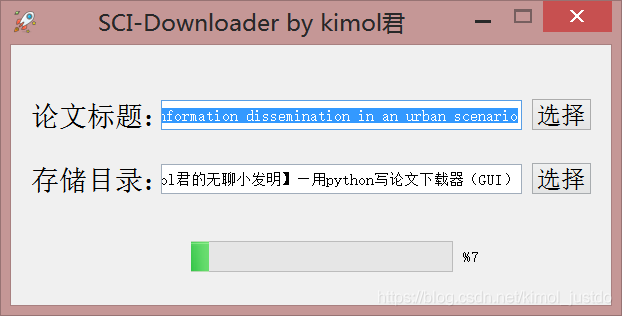
1. Function function 2. Callback function 3. Thread generation function 4. Effect display
Write in the last

preface

Micro cool wind slightly raises a night to night, night, month light into my study ~
when I open the folder to review the past, near many seemingly messy code. As I was sitting there, an idea suddenly occurred to me: “Life is already very boring, it would be better to be boring again.”
so, I decided to open a project, then call the kimol jun boring gizmos .
wonderful... Ah ~ ~ ~

In the process of scientific research and learning, we inevitably need to query the relevant literature, and presumably many partners know the SCI-HUB, which is a great tool, it can help us search the relevant papers and download the original. It can be said that the Sci-Hub has benefited a lot of researchers, and it is also a "pleasure" to use.
The analysis process and the corresponding function code were described in the previous article. I found some problems according to the feedback of my friends. After all, the form of the command box is not so "smooth".

font> (>)
(PS)

(PS)

(PS)

(PS) This is written by Kimol in his crazy squeeze time, so the interface is relatively simple, I hope you can understand it more
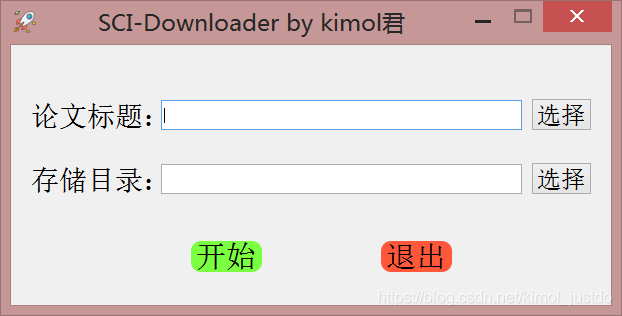
I. Instructions for use

:
:
:
:
:
:
:
:
:
:
:
:

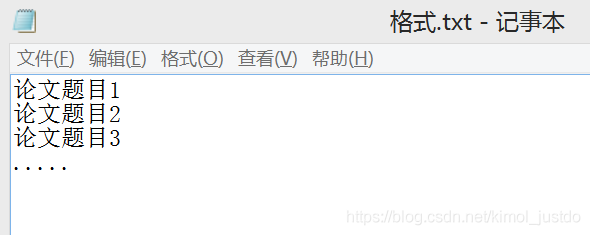
    Single Paper Download: Enter the title, DOI or PMID number of the paper in the title bar, and then select the directory of the paper storage. Click Start! Bulk download: select a.txt text in the title of the paper, which contains each paper to be downloaded in the following format:

    en, emmm...
    >
    >
    >
    >
    >
    >
    >
    >
    >

Second, code analysis
This graphical interface development is based on PyQT5, the specific layout of the interface here is not much introduction, mainly to the function of the realization of the description:
The idea is simple. Since we already have a function for the paper download, we just need to define a Button and bind it to the download function.
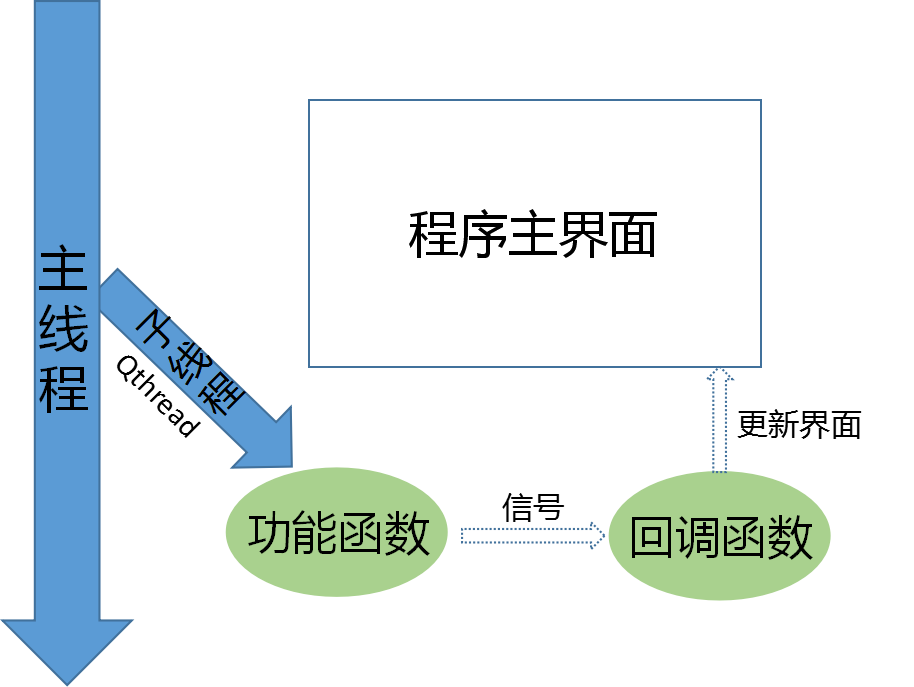
What's that?Not at all difficult. However, if you try it, the interface is stuttering. This is because it takes a long time to download the function, and if it is executed directly in the main thread, it will conflict with the main program that maintains the interface, resulting in a lag.

br>

Do you want to get fired? Let’s take a look at the programmer’s resignation tips

Dream eraser, a funny Internet advanced nerd.

The article directories
Write in front 1. Proficient in using rm command 2. Write in reading and writing database operation 3. Do not write comments, do not encapsulate code 4. Forcibly merge code on git 5. No technical resignation tips (thumb up over 200, send to get your boss quit tips O(∩_∩)O

Writing in the front
As the saying goes, write less code, leave less.
Travel the Internet recently, found some tips to leave the job, after reading, the heart was deeply moved
But after careful tasting, found that we programmers are not applicable.
Such as:

    leadership clip dishes you turn the table, we programmers generally not leadership at a table; Leaders open the door you get on the car, our programmers are sitting on duty, generally not on a business trip, business trip generally also leadership drive; Leader K song you cut song, oh ~ KTV singing, I generally hide in the corner; The leader toasts you not to drink,…… ; Leaders listen to your self-drawn,…… ; Leaders drink water you brake,… .

They are clever schemes, but they are not easy for us programmers to learn. Then I learned the following six tips.
“Career Tips”

    > When the Leader says “I’ve been working hard”, you will reply “Don’t be idle and get me a glass of water”, showing your recognition of the Leader’s care. Leader WeChat calls you, you reply “?” “Or” Yes?, simple and efficient. When the Leader asks you why the progress is so slow, you will reply, “Come if you can”, to show your affirmation of his working ability. You are working, and the Leader pretends to be in front of you. Straight back, “Are you teaching me to do something?” “, through humorous language, rhetorical question sentence pattern, play a role in relieving embarrassment. The Leader assigns you a JIRA task and you reply, “That’s it?” , indicates that the requirements are simple and the work can be fully competent. When the Leader asks you to go to the office, you reply, “Don’t you have legs?” “In recognition of his long legs. The Leader sends you a bunch of tasks and says “oh” first. Say more, the job is the same job, just give a response. A coworker asks you, “I notice you’re not doing anything lately?” “, you directly reply “mind your shit”, indicating that the Leader has a clear division of labor and praises the perfect system of the company.

Well, the general skills have been learned, the next formal entry programmer resignation skills reveal secrets.
1. Proficient in using RM command
What is the rm command?Knowledge is not particularly difficult, if you want to learn, can be in the test environment to try rm - rf/ or rm - rf/* command.
Note that after running this command, it is best to copy the file a few times after executing it
There's probably nothing the gods can do to keep you from getting fired
If this exit tip doesn't satisfy you, try it in a production environment
Challenge yourself. Give you the authority of the administrator and you will dominate the company
However, after learning this skill, in addition to being able to receive a resignation medal
Maybe you'll get a tip for going to jail
Here buy one get one free for everyone, how much is a gift eraser.

2. Reading and writing database operations are written in the for loop
This exit tip is even more powerful, and it's hard to find out without a Code Review
Read and write database operations, written in the for loop
What subquery, association query, left join, right join, all without
You look up one table, then iterate over the results, and then look up another table
Just be direct
What about multi-table queries?One table, one level loop.
The database link is opened and closed at each level of the loop
select *lect *

Think of the technical director's helpless face when the server's memory and CPU exploded while reading tens of thousands of data
Is not very cool ~
This is a great exit tip. I hope you enjoy it
What?Sounds like you're complaining, don't you think it's enough?it doesn't matter
In the attached to you a, to delete the delete , don't write the where condition, see.

3. Never write comments, never encapsulate code
Don't listen to the technical director, write notes, write documentation, he is to slow down your development efficiency
Then how do we aim at this kind of unreasonable request, and analyze from it to leave a skill
Do the opposite
Never write a comment, let alone a development document, is wasting your valuable time
And the name of the variable, the name of the function, just a, b, c, e, f, g
In addition to simplicity, it comes with encryption
That way you can devote your limited time to development
After all, when you write code, only you and God know what logic is. Maybe in a couple of days, only God knows what logic is.
Second, do not encapsulate the code, from the top to the bottom of the written, program execution, is the most efficient
One function writes a day, one function writes a file
A file to write tens of thousands of lines of code
Then at the end of the code file, write neatly 20 curly braces, that sense of accomplishment must be huge
Don't know what curly braces are?Here's a reference case

					}
				}
			}
		}
	}
}


4. Git forces merging of code
The tips above can't satisfy you, so you'll love this one, and it's a technical flow
After Git commits the code, what?Have a conflict?
Who dares to modify the same file with me
Forced to merge him
masteranch
branch
I'm sure I won't get a resignation letter once or twice
Need to repeat the operation N times, will be able to welcome the resignation notice
What?N times, still can't get the resignation achievement
After merging someone else's branch, make fun of the guy being merged
Make him feel inferior, and then get angry
Let him beat you, then the technical director, must think you are being bullied, and give you a parting award
This is a resignation achievement on its own merits

5. Quietly modify database fields without warning, or change the interface to return data
The trick is to slay the dragon, and when the testing process is found to be faulty, the opportunity arises
Quietly fix one of your own bugs, while silently triggering another
For example, you can modify a field in a table in the database
Then release a patch pack in the name of a system update BUG
The online environment may suddenly crash because it is difficult to see because of the database fields being modified
The more times the system crashes, the better off you'll be
You can also modify the interface data format for the mobile phone, adjust the name of the parameter
In short, fix bugs carefully and write code carefully
Don't let the technical director get the slightest hint that you want to leave
Quietly, he got his resignation letter

666. No skills to quit tips (thumb up over 200, send to your boss quit tips O(∩_∩)O)
What?The above technical level is too high, you technical dishes, can't learn?
No problem, Eraser has carefully prepared you with three easy-to-follow, no-tech quitting tips
There's no barrier to getting started with these skills, so just list the titles

    anonymously teased the company, inadvertently revealed their ID for the meeting screen projection, set automatic QQ reminder, let friends crazy teasing the boss, open the large screen oncoming mode when the technical director demonstrates the project, quietly connected to the projector with Bluetooth, you know the follow-up...

For more tips, please share the comments section

reading


    100 cases Python crawler tutorial, fantastic crawler tutorial, subscribe now Python crawler small class, wonderful 9 speak


    Today is the 100th day of continuous writing 610
    If you have ideas or techniques you'd like to share, feel free to leave them in the comments section.


    If you want to build a close relationship with the blogger, follow the blogger, or follow the public account non-undergraduate programmer to see how a non-undergraduate programmer grows.
    blogger ID: eam eraser ,>e you thumb up, comment, favorites

Problems and solutions in learning opengl

1. After opening the back and cutting, the visible face will not be displayed?

When initializing the vertex coordinates, the three coordinates of the triangle are defined in clockwise order and must be counterclockwise; Where x heads to the right, y heads up, and z heads forward.