Category Archives: How to Fix

PCL Programming Notes — assertion ` PX! = 0 ‘failed

Reference: http://blog.csdn.net/mnonm_mnonm_mnonm/article/details/8706659

Error: boost: : from… Assertion `px ! = 0′ failed.
Reason: The smart pointer is uninitialized.
Processing: Initialize.
Such as

PointCloudT::Ptr cloud;

The compiler can pass, but the program will report the above error when run, after the following initialization, the error disappeared.

PointCloudT::Ptr cloud=boost::make_shared <PointCloudT> ();

Pcl-1.8.1-vs2017-win64 Baidu cloud download and installation

The git in the photo website can download all versions of PLC:https://github.com/PointCloudLibrary/pcl/releases
But domestic downloads often break.
I am using PCL1.8.1 _VS2017_win64 version, now installed record share connection: link: https://pan.baidu.com/s/1gREl9tDmX-sKGMB6sKxfFA extracted code: GXDG
Installation reference photo blog, http://gyshgx868.github.io/2018/03/06/PointCloud/pcl-install/, feel more complicated than the opencv.

PCL environment configuration (pcl1.8.1, vs2017, win10)

 
PCL environments have been configured several times on different devices, but they are always older versions. The installation has been manually compiled (the method used in this article), as well as CMAKE compiled. After comparison, although the CMAKE way save a lot of steps, but need to install Qt, will take up a lot of space, the method steps in this article is simple and clear, for the general PCL user should be no difficulty.
Pre-installed: VS2017
Underload: PCL 1.8.1-Allinone-MSVC2017-Win64.exe, PCL 1.8.1-PDB-MSVC2017-Win64.zip
STEP1:
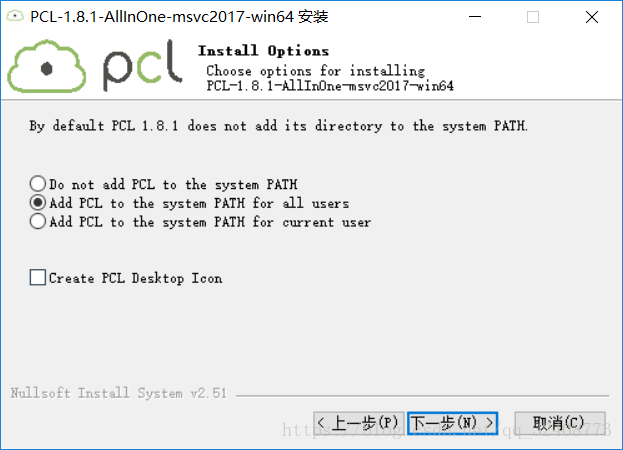
Run pCL-1.8.1-allinone-msvc2017-win64.exe directly
Select For All User


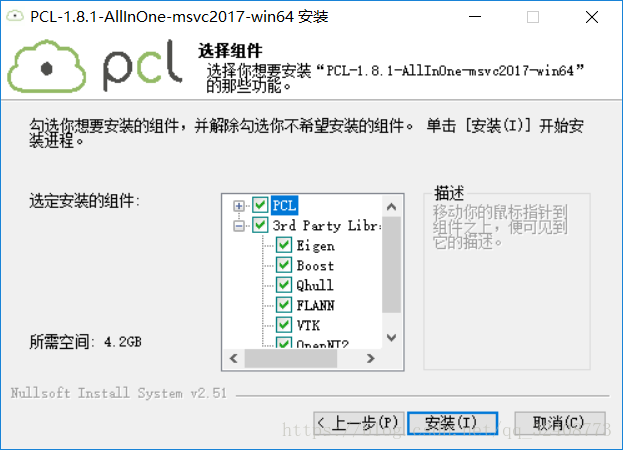
Then start the installation.
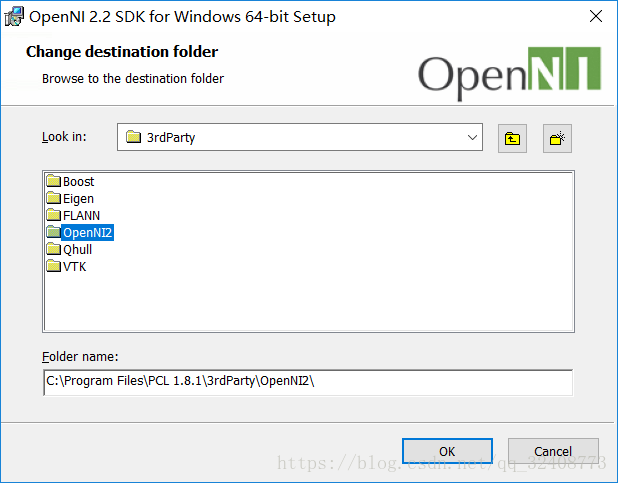
OpenNI address selected below, continue installation.

STEP2:
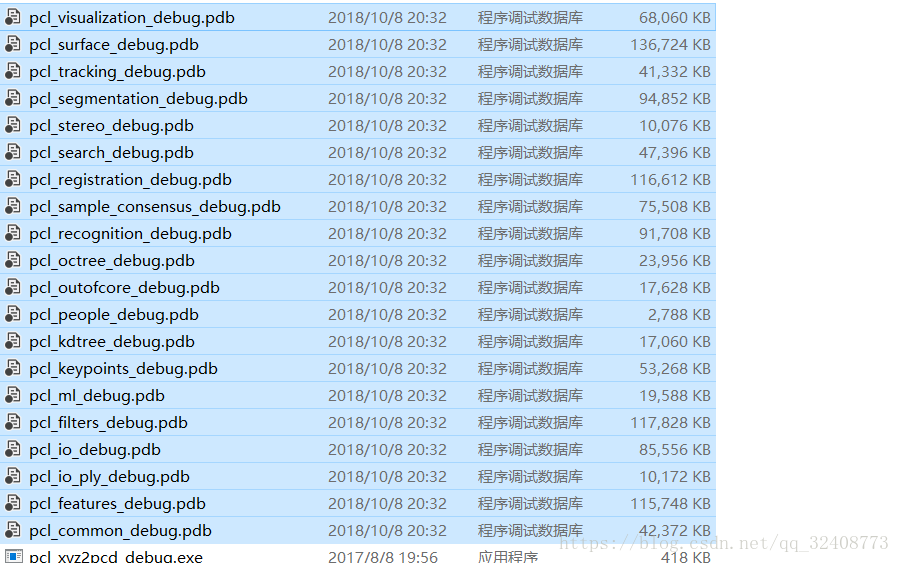
Unzip PCL-1.8.1-PDB-MSVC2017-Win64 and copy the PDB file to the bin folder under the installation path:

STEP3:
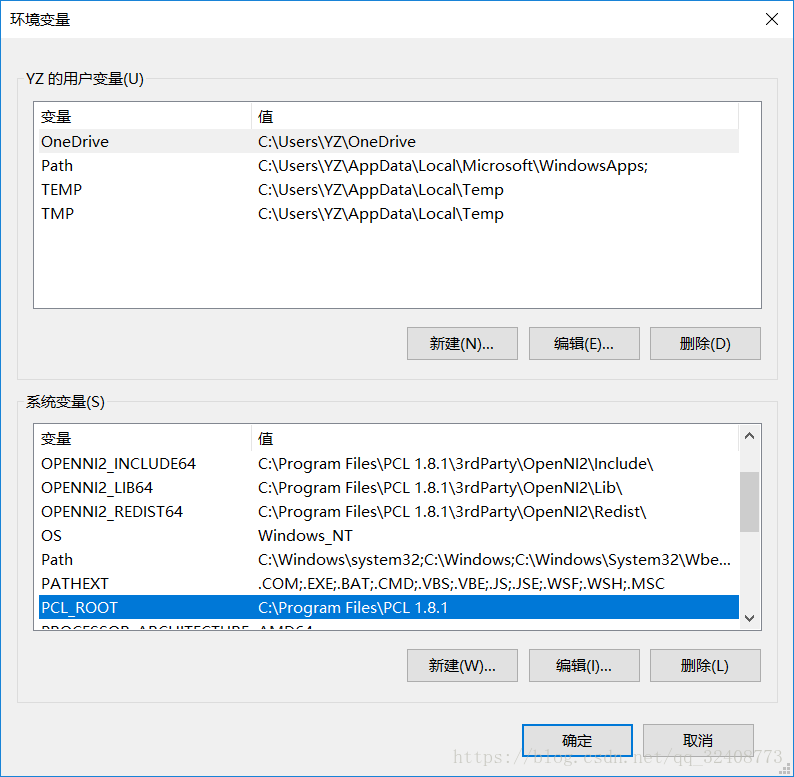
Set to see that PCL, OPENNI have been added to the system environment variables,

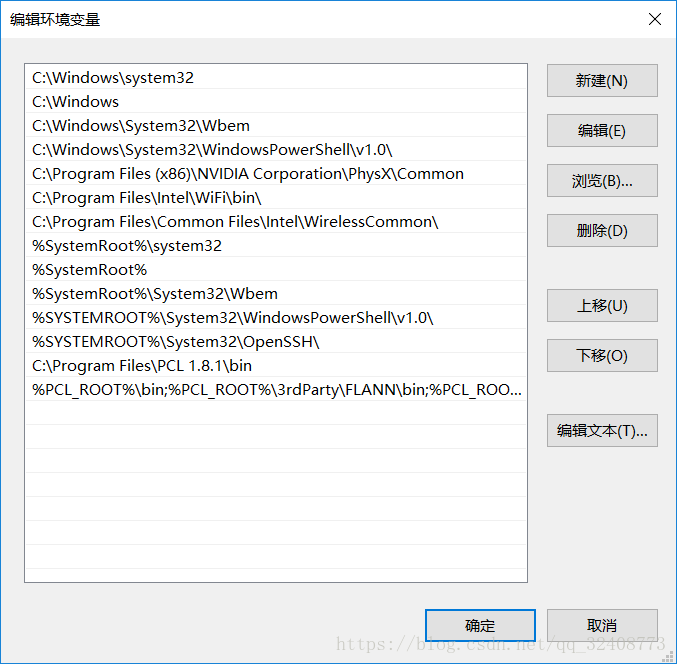
Add FLANN, VTK, and other paths to your PATH:
%PCL_ROOT%\bin; %PCL_ROOT%\3rdParty\FLANN\bin; %PCL_ROOT%\3rdParty\VTK\bin; %PCL_ROOT%\Qhull\bin; PCL_ROOT % % \ 3 rdparty \ OpenNI2 \ Tools

STEP4:
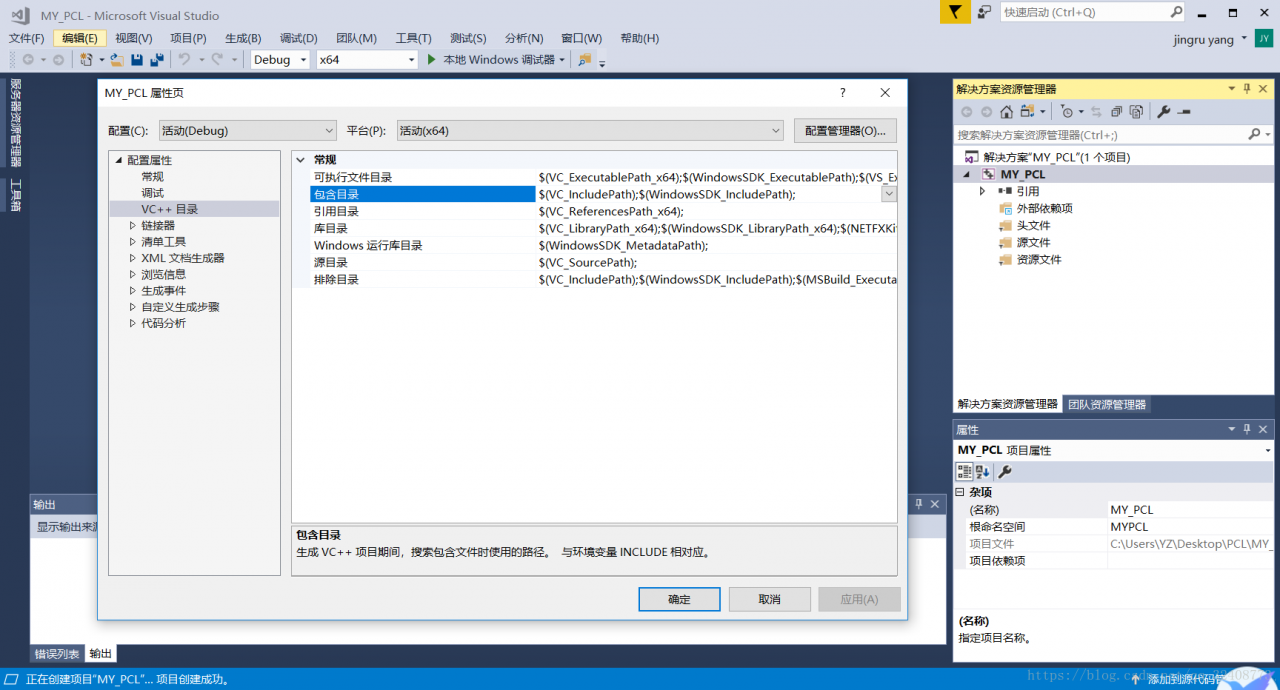
Open VS and create a new project, select Debug/Release mode, right-click the project in Solution Manager, and select VC++ Properties ->; Include the directory.

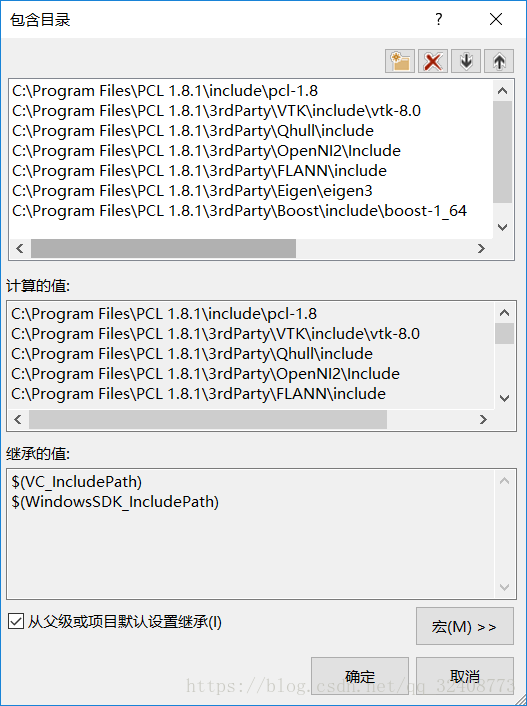
Add include directory:

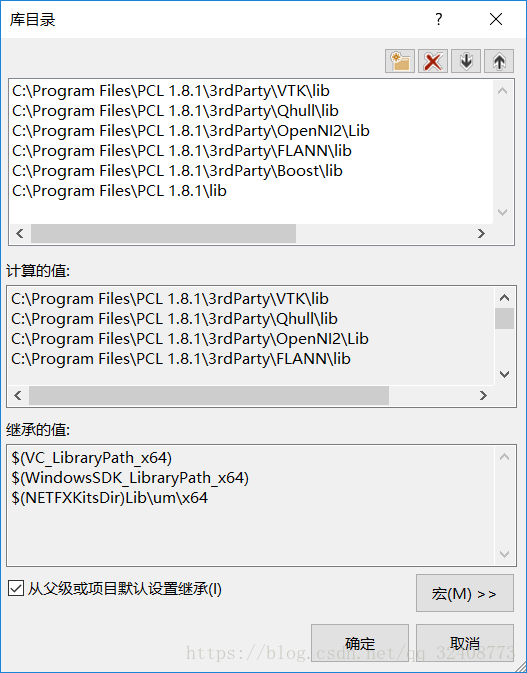
Add the library directory in the same way:

Click the linker ->; Input – & gt; Additional dependencies, Debug version copy:

vtknetcdf_c++_gd.lib;pcl_common_debug.lib;pcl_features_debug.lib;pcl_filters_debug.lib;pcl_io_ply_debug.lib;pcl_io_debug.lib;pcl_kdtree_debug.lib;pcl_keypoints_debug.lib;pcl_ml_debug.lib;pcl_octree_debug.lib;pcl_outofcore_debug.lib;pcl_people_debug.lib;pcl_recognition_debug.lib;pcl_registration_debug.lib;pcl_sample_consensus_debug.lib;pcl_search_debug.lib;pcl_segmentation_debug.lib;pcl_stereo_debug.lib;pcl_surface_debug.lib;pcl_tracking_debug.lib;pcl_visualization_debug.lib;libboost_atomic-vc141-mt-gd-1_64.lib;libboost_bzip2-vc141-mt-gd-1_64.lib;libboost_chrono-vc141-mt-gd-1_64.lib;libboost_container-vc141-mt-gd-1_64.lib;libboost_context-vc141-mt-gd-1_64.lib;libboost_coroutine-vc141-mt-gd-1_64.lib;libboost_date_time-vc141-mt-gd-1_64.lib;libboost_exception-vc141-mt-gd-1_64.lib;libboost_fiber-vc141-mt-gd-1_64.lib;libboost_filesystem-vc141-mt-gd-1_64.lib;libboost_graph-vc141-mt-gd-1_64.lib;libboost_graph_parallel-vc141-mt-gd-1_64.lib;libboost_iostreams-vc141-mt-gd-1_64.lib;libboost_locale-vc141-mt-gd-1_64.lib;libboost_log-vc141-mt-gd-1_64.lib;libboost_log_setup-vc141-mt-gd-1_64.lib;libboost_math_c99-vc141-mt-gd-1_64.lib;libboost_math_c99f-vc141-mt-gd-1_64.lib;libboost_math_c99l-vc141-mt-gd-1_64.lib;libboost_math_tr1-vc141-mt-gd-1_64.lib;libboost_math_tr1f-vc141-mt-gd-1_64.lib;libboost_math_tr1l-vc141-mt-gd-1_64.lib;libboost_mpi-vc141-mt-gd-1_64.lib;libboost_numpy3-vc141-mt-gd-1_64.lib;libboost_numpy-vc141-mt-gd-1_64.lib;libboost_prg_exec_monitor-vc141-mt-gd-1_64.lib;libboost_program_options-vc141-mt-gd-1_64.lib;libboost_python3-vc141-mt-gd-1_64.lib;libboost_python-vc141-mt-gd-1_64.lib;libboost_random-vc141-mt-gd-1_64.lib;libboost_regex-vc141-mt-gd-1_64.lib;libboost_serialization-vc141-mt-gd-1_64.lib;libboost_signals-vc141-mt-gd-1_64.lib;libboost_system-vc141-mt-gd-1_64.lib;libboost_test_exec_monitor-vc141-mt-gd-1_64.lib;libboost_thread-vc141-mt-gd-1_64.lib;libboost_timer-vc141-mt-gd-1_64.lib;libboost_type_erasure-vc141-mt-gd-1_64.lib;libboost_unit_test_framework-vc141-mt-gd-1_64.lib;libboost_wave-vc141-mt-gd-1_64.lib;libboost_wserialization-vc141-mt-gd-1_64.lib;libboost_zlib-vc141-mt-gd-1_64.lib;flann-gd.lib;flann_cpp-gd.lib;flann_cpp_s-gd.lib;flann_s-gd.lib;qhull_d.lib;qhullcpp_d.lib;qhullstatic_d.lib;qhullstatic_r_d.lib;qhull_p_d.lib;qhull_r_d.lib;vtkalglib-8.0-gd.lib;vtkChartsCore-8.0-gd.lib;vtkCommonColor-8.0-gd.lib;vtkCommonComputationalGeometry-8.0-gd.lib;vtkCommonCore-8.0-gd.lib;vtkCommonDataModel-8.0-gd.lib;vtkCommonExecutionModel-8.0-gd.lib;vtkCommonMath-8.0-gd.lib;vtkCommonMisc-8.0-gd.lib;vtkCommonSystem-8.0-gd.lib;vtkCommonTransforms-8.0-gd.lib;vtkDICOMParser-8.0-gd.lib;vtkDomainsChemistry-8.0-gd.lib;vtkexoIIc-8.0-gd.lib;vtkexpat-8.0-gd.lib;vtkFiltersAMR-8.0-gd.lib;vtkFiltersCore-8.0-gd.lib;vtkFiltersExtraction-8.0-gd.lib;vtkFiltersFlowPaths-8.0-gd.lib;vtkFiltersGeneral-8.0-gd.lib;vtkFiltersGeneric-8.0-gd.lib;vtkFiltersGeometry-8.0-gd.lib;vtkFiltersHybrid-8.0-gd.lib;vtkFiltersHyperTree-8.0-gd.lib;vtkFiltersImaging-8.0-gd.lib;vtkFiltersModeling-8.0-gd.lib;vtkFiltersParallel-8.0-gd.lib;vtkFiltersParallelImaging-8.0-gd.lib;vtkFiltersPoints-8.0-gd.lib;vtkFiltersProgrammable-8.0-gd.lib;vtkFiltersSelection-8.0-gd.lib;vtkFiltersSMP-8.0-gd.lib;vtkFiltersSources-8.0-gd.lib;vtkFiltersStatistics-8.0-gd.lib;vtkFiltersTexture-8.0-gd.lib;vtkFiltersTopology-8.0-gd.lib;vtkFiltersVerdict-8.0-gd.lib;vtkfreetype-8.0-gd.lib;vtkGeovisCore-8.0-gd.lib;vtkgl2ps-8.0-gd.lib;vtkhdf5-8.0-gd.lib;vtkhdf5_hl-8.0-gd.lib;vtkImagingColor-8.0-gd.lib;vtkImagingCore-8.0-gd.lib;vtkImagingFourier-8.0-gd.lib;vtkImagingGeneral-8.0-gd.lib;vtkImagingHybrid-8.0-gd.lib;vtkImagingMath-8.0-gd.lib;vtkImagingMorphological-8.0-gd.lib;vtkImagingSources-8.0-gd.lib;vtkImagingStatistics-8.0-gd.lib;vtkImagingStencil-8.0-gd.lib;vtkInfovisCore-8.0-gd.lib;vtkInfovisLayout-8.0-gd.lib;vtkInteractionImage-8.0-gd.lib;vtkInteractionStyle-8.0-gd.lib;vtkInteractionWidgets-8.0-gd.lib;vtkIOAMR-8.0-gd.lib;vtkIOCore-8.0-gd.lib;vtkIOEnSight-8.0-gd.lib;vtkIOExodus-8.0-gd.lib;vtkIOExport-8.0-gd.lib;vtkIOExportOpenGL-8.0-gd.lib;vtkIOGeometry-8.0-gd.lib;vtkIOImage-8.0-gd.lib;vtkIOImport-8.0-gd.lib;vtkIOInfovis-8.0-gd.lib;vtkIOLegacy-8.0-gd.lib;vtkIOLSDyna-8.0-gd.lib;vtkIOMINC-8.0-gd.lib;vtkIOMovie-8.0-gd.lib;vtkIONetCDF-8.0-gd.lib;vtkIOParallel-8.0-gd.lib;vtkIOParallelXML-8.0-gd.lib;vtkIOPLY-8.0-gd.lib;vtkIOSQL-8.0-gd.lib;vtkIOTecplotTable-8.0-gd.lib;vtkIOVideo-8.0-gd.lib;vtkIOXML-8.0-gd.lib;vtkIOXMLParser-8.0-gd.lib;vtkjpeg-8.0-gd.lib;vtkjsoncpp-8.0-gd.lib;vtklibharu-8.0-gd.lib;vtklibxml2-8.0-gd.lib;vtklz4-8.0-gd.lib;vtkmetaio-8.0-gd.lib;vtkNetCDF-8.0-gd.lib;vtkoggtheora-8.0-gd.lib;vtkParallelCore-8.0-gd.lib;vtkpng-8.0-gd.lib;vtkproj4-8.0-gd.lib;vtkRenderingAnnotation-8.0-gd.lib;vtkRenderingContext2D-8.0-gd.lib;vtkRenderingContextOpenGL-8.0-gd.lib;vtkRenderingCore-8.0-gd.lib;vtkRenderingFreeType-8.0-gd.lib;vtkRenderingGL2PS-8.0-gd.lib;vtkRenderingImage-8.0-gd.lib;vtkRenderingLabel-8.0-gd.lib;vtkRenderingLIC-8.0-gd.lib;vtkRenderingLOD-8.0-gd.lib;vtkRenderingOpenGL-8.0-gd.lib;vtkRenderingVolume-8.0-gd.lib;vtkRenderingVolumeOpenGL-8.0-gd.lib;vtksqlite-8.0-gd.lib;vtksys-8.0-gd.lib;vtktiff-8.0-gd.lib;vtkverdict-8.0-gd.lib;vtkViewsContext2D-8.0-gd.lib;vtkViewsCore-8.0-gd.lib;vtkViewsInfovis-8.0-gd.lib;vtkzlib-8.0-gd.lib;
opengl32.lib

Release version copy

pcl_common_release.lib;pcl_features_release.lib;pcl_filters_release.lib;pcl_io_ply_release.lib;pcl_io_r.lease.lib;pcl_kdtree_release.lib;pcl_keypoints_release.lib;pcl_ml_release.lib;pcl_octree_release.lib;pcl_outofcore_release.lib;pcl_people_release.lib;pcl_recognition_release.lib;pcl_registration_release.lib;pcl_sample_consensus_release.lib;pcl_search_release.lib;pcl_segmentation_release.lib;pcl_stereo_release.lib;pcl_surface_release.lib;pcl_tracking_release.lib;pcl_visualization_release.lib;pcl_common_release.lib;pcl_features_release.lib;pcl_filters_release.lib;pcl_io_ply_release.lib;pcl_io_release.lib;pcl_kdtree_release.lib;pcl_keypoints_release.lib;pcl_ml_release.lib;pcl_octree_release.lib;pcl_outofcore_release.lib;pcl_people_release.lib;pcl_recognition_release.lib;pcl_registration_release.lib;pcl_sample_consensus_release.lib;pcl_search_release.lib;pcl_segmentation_release.lib;pcl_stereo_release.lib;pcl_surface_release.lib;pcl_tracking_release.lib;pcl_visualization_release.lib;libboost_atomic-vc141-mt-1_64.lib;libboost_bzip2-vc141-mt-1_64.lib;libboost_chrono-vc141-mt-1_64.lib;libboost_container-vc141-mt-1_64.lib;libboost_context-vc141-mt-1_64.lib;libboost_coroutine-vc141-mt-1_64.lib;libboost_date_time-vc141-mt-1_64.lib;libboost_exception-vc141-mt-1_64.lib;libboost_fiber-vc141-mt-1_64.lib;libboost_filesystem-vc141-mt-1_64.lib;libboost_graph-vc141-mt-1_64.lib;libboost_graph_parallel-vc141-mt-1_64.lib;libboost_iostreams-vc141-mt-1_64.lib;libboost_locale-vc141-mt-1_64.lib;libboost_log-vc141-mt-1_64.lib;libboost_log_setup-vc141-mt-1_64.lib;libboost_math_c99-vc141-mt-1_64.lib;libboost_math_c99f-vc141-mt-1_64.lib;libboost_math_c99l-vc141-mt-1_64.lib;libboost_math_tr1-vc141-mt-1_64.lib;libboost_math_tr1f-vc141-mt-1_64.lib;libboost_math_tr1l-vc141-mt-1_64.lib;libboost_mpi-vc141-mt-1_64.lib;libboost_numpy-vc141-mt-1_64.lib;libboost_numpy3-vc141-mt-1_64.lib;libboost_prg_exec_monitor-vc141-mt-1_64.lib;libboost_program_options-vc141-mt-1_64.lib;libboost_python-vc141-mt-1_64.lib;libboost_python3-vc141-mt-1_64.lib;libboost_random-vc141-mt-1_64.lib;libboost_regex-vc141-mt-1_64.lib;libboost_serialization-vc141-mt-1_64.lib;libboost_signals-vc141-mt-1_64.lib;libboost_system-vc141-mt-1_64.lib;libboost_test_exec_monitor-vc141-mt-1_64.lib;libboost_thread-vc141-mt-1_64.lib;libboost_timer-vc141-mt-1_64.lib;libboost_type_erasure-vc141-mt-1_64.lib;libboost_unit_test_framework-vc141-mt-1_64.lib;libboost_wave-vc141-mt-1_64.lib;libboost_wserialization-vc141-mt-1_64.lib;libboost_zlib-vc141-mt-1_64.lib;libboost_atomic-vc141-mt-1_64.lib;libboost_bzip2-vc141-mt-1_64.lib;libboost_chrono-vc141-mt-1_64.lib;libboost_container-vc141-mt-1_64.lib;libboost_context-vc141-mt-1_64.lib;libboost_coroutine-vc141-mt-1_64.lib;libboost_date_time-vc141-mt-1_64.lib;libboost_exception-vc141-mt-1_64.lib;libboost_fiber-vc141-mt-1_64.lib;libboost_filesystem-vc141-mt-1_64.lib;libboost_graph-vc141-mt-1_64.lib;libboost_graph_parallel-vc141-mt-1_64.lib;libboost_iostreams-vc141-mt-1_64.lib;libboost_locale-vc141-mt-1_64.lib;libboost_log-vc141-mt-1_64.lib;libboost_log_setup-vc141-mt-1_64.lib;libboost_math_c99-vc141-mt-1_64.lib;libboost_math_c99f-vc141-mt-1_64.lib;libboost_math_c99l-vc141-mt-1_64.lib;libboost_math_tr1-vc141-mt-1_64.lib;libboost_math_tr1f-vc141-mt-1_64.lib;libboost_math_tr1l-vc141-mt-1_64.lib;libboost_mpi-vc141-mt-1_64.lib;libboost_numpy-vc141-mt-1_64.lib;libboost_numpy3-vc141-mt-1_64.lib;libboost_prg_exec_monitor-vc141-mt-1_64.lib;libboost_program_options-vc141-mt-1_64.lib;libboost_python-vc141-mt-1_64.lib;libboost_python3-vc141-mt-1_64.lib;libboost_random-vc141-mt-1_64.lib;libboost_regex-vc141-mt-1_64.lib;libboost_serialization-vc141-mt-1_64.lib;libboost_signals-vc141-mt-1_64.lib;libboost_system-vc141-mt-1_64.lib;libboost_test_exec_monitor-vc141-mt-1_64.lib;libboost_thread-vc141-mt-1_64.lib;libboost_timer-vc141-mt-1_64.lib;libboost_type_erasure-vc141-mt-1_64.lib;libboost_unit_test_framework-vc141-mt-1_64.lib;libboost_wave-vc141-mt-1_64.lib;libboost_wserialization-vc141-mt-1_64.lib;libboost_zlib-vc141-mt-1_64.lib;OpenNI2.lib;vtkalglib-8.0.lib;vtkChartsCore-8.0.lib;vtkCommonColor-8.0.lib;vtkCommonComputationalGeometry-8.0.lib;vtkCommonCore-8.0.lib;vtkCommonDataModel-8.0.lib;vtkCommonExecutionModel-8.0.lib;vtkCommonMath-8.0.lib;vtkCommonMisc-8.0.lib;vtkCommonSystem-8.0.lib;vtkCommonTransforms-8.0.lib;vtkDICOMParser-8.0.lib;vtkDomainsChemistry-8.0.lib;vtkexoIIc-8.0.lib;vtkexpat-8.0.lib;vtkFiltersAMR-8.0.lib;vtkFiltersCore-8.0.lib;vtkFiltersExtraction-8.0.lib;vtkFiltersFlowPaths-8.0.lib;vtkFiltersGeneral-8.0.lib;vtkFiltersGeneric-8.0.lib;vtkFiltersGeometry-8.0.lib;vtkFiltersHybrid-8.0.lib;vtkFiltersHyperTree-8.0.lib;vtkFiltersImaging-8.0.lib;vtkFiltersModeling-8.0.lib;vtkFiltersParallel-8.0.lib;vtkFiltersParallelImaging-8.0.lib;vtkFiltersPoints-8.0.lib;vtkFiltersProgrammable-8.0.lib;vtkFiltersSelection-8.0.lib;vtkFiltersSMP-8.0.lib;vtkFiltersSources-8.0.lib;vtkFiltersStatistics-8.0.lib;vtkFiltersTexture-8.0.lib;vtkFiltersTopology-8.0.lib;vtkFiltersVerdict-8.0.lib;vtkfreetype-8.0.lib;vtkGeovisCore-8.0.lib;vtkgl2ps-8.0.lib;vtkhdf5-8.0.lib;vtkhdf5_hl-8.0.lib;vtkImagingColor-8.0.lib;vtkImagingCore-8.0.lib;vtkImagingFourier-8.0.lib;vtkImagingGeneral-8.0.lib;vtkImagingHybrid-8.0.lib;vtkImagingMath-8.0.lib;vtkImagingMorphological-8.0.lib;vtkImagingSources-8.0.lib;vtkImagingStatistics-8.0.lib;vtkImagingStencil-8.0.lib;vtkInfovisCore-8.0.lib;vtkInfovisLayout-8.0.lib;vtkInteractionImage-8.0.lib;vtkInteractionStyle-8.0.lib;vtkInteractionWidgets-8.0.lib;vtkIOAMR-8.0.lib;vtkIOCore-8.0.lib;vtkIOEnSight-8.0.lib;vtkIOExodus-8.0.lib;vtkIOExport-8.0.lib;vtkIOExportOpenGL-8.0.lib;vtkIOGeometry-8.0.lib;vtkIOImage-8.0.lib;vtkIOImport-8.0.lib;vtkIOInfovis-8.0.lib;vtkIOLegacy-8.0.lib;vtkIOLSDyna-8.0.lib;vtkIOMINC-8.0.lib;vtkIOMovie-8.0.lib;vtkIONetCDF-8.0.lib;vtkIOParallel-8.0.lib;vtkIOParallelXML-8.0.lib;vtkIOPLY-8.0.lib;vtkIOSQL-8.0.lib;vtkIOTecplotTable-8.0.lib;vtkIOVideo-8.0.lib;vtkIOXML-8.0.lib;vtkIOXMLParser-8.0.lib;vtkjpeg-8.0.lib;vtkjsoncpp-8.0.lib;vtklibharu-8.0.lib;vtklibxml2-8.0.lib;vtklz4-8.0.lib;vtkmetaio-8.0.lib;vtkNetCDF-8.0.lib;vtknetcdf_c++.lib;vtkoggtheora-8.0.lib;vtkParallelCore-8.0.lib;vtkpng-8.0.lib;vtkproj4-8.0.lib;vtkRenderingAnnotation-8.0.lib;vtkRenderingContext2D-8.0.lib;vtkRenderingContextOpenGL-8.0.lib;vtkRenderingCore-8.0.lib;vtkRenderingFreeType-8.0.lib;vtkRenderingGL2PS-8.0.lib;vtkRenderingImage-8.0.lib;vtkRenderingLabel-8.0.lib;vtkRenderingLIC-8.0.lib;vtkRenderingLOD-8.0.lib;vtkRenderingOpenGL-8.0.lib;vtkRenderingVolume-8.0.lib;vtkRenderingVolumeOpenGL-8.0.lib;vtksqlite-8.0.lib;vtksys-8.0.lib;vtktiff-8.0.lib;vtkverdict-8.0.lib;vtkViewsContext2D-8.0.lib;vtkViewsCore-8.0.lib;vtkViewsInfovis-8.0.lib;vtkzlib-8.0.lib;vtkalglib-8.0.lib;vtkChartsCore-8.0.lib;vtkCommonColor-8.0.lib;vtkCommonComputationalGeometry-8.0.lib;vtkCommonCore-8.0.lib;vtkCommonDataModel-8.0.lib;vtkCommonExecutionModel-8.0.lib;vtkCommonMath-8.0.lib;vtkCommonSystem-8.0.lib;vtkCommonTransforms-8.0.lib;vtkDICOMParser-8.0.lib;vtkDomainsChemistry-8.0.lib;vtkexoIIc-8.0.lib;vtkexpat-8.0.lib;vtkFiltersAMR-8.0.lib;vtkFiltersCore-8.0.lib;vtkFiltersExtraction-8.0.lib;vtkFiltersFlowPaths-8.0.lib;vtkFiltersGeneral-8.0.lib;vtkFiltersGeneric-8.0.lib;vtkFiltersGeometry-8.0.lib;vtkFiltersHybrid-8.0.lib;vtkFiltersHyperTree-8.0.lib;vtkFiltersImaging-8.0.lib;vtkFiltersModeling-8.0.lib;vtkFiltersParallel-8.0.lib;vtkFiltersParallelImaging-8.0.lib;vtkFiltersPoints-8.0.lib;vtkFiltersProgrammable-8.0.lib;vtkFiltersSelection-8.0.lib;vtkFiltersSMP-8.0.lib;vtkFiltersSources-8.0.lib;vtkFiltersStatistics-8.0.lib;vtkFiltersTexture-8.0.lib;vtkFiltersTopology-8.0.lib;vtkFiltersVerdict-8.0.lib;vtkfreetype-8.0.lib;vtkGeovisCore-8.0.lib;vtkgl2ps-8.0.lib;vtkhdf5-8.0.lib;vtkhdf5_hl-8.0.lib;vtkImagingColor-8.0.lib;vtkImagingCore-8.0.lib;vtkImagingFourier-8.0.lib;vtkImagingGeneral-8.0.lib;vtkImagingHybrid-8.0.lib;vtkImagingMath-8.0.lib;vtkImagingMorphological-8.0.lib;vtkImagingSources-8.0.lib;vtkImagingStatistics-8.0.lib;vtkImagingStencil-8.0.lib;vtkInfovisCore-8.0.lib;vtkInfovisLayout-8.0.lib;vtkInteractionImage-8.0.lib;vtkInteractionStyle-8.0.lib;vtkInteractionWidgets-8.0.lib;vtkIOAMR-8.0.lib;vtkIOCore-8.0.lib;vtkIOEnSight-8.0.lib;vtkIOExodus-8.0.lib;vtkIOExport-8.0.lib;vtkIOExportOpenGL-8.0.lib;vtkIOGeometry-8.0.lib;vtkIOImage-8.0.lib;vtkIOImport-8.0.lib;vtkIOInfovis-8.0.lib;vtkIOLegacy-8.0.lib;vtkIOLSDyna-8.0.lib;vtkIOMINC-8.0.lib;vtkIOMovie-8.0.lib;vtkIONetCDF-8.0.lib;vtkIOParallel-8.0.lib;vtkIOParallelXML-8.0.lib;vtkIOPLY-8.0.lib;vtkIOSQL-8.0.lib;vtkIOTecplotTable-8.0.lib;vtkIOVideo-8.0.lib;vtkIOXML-8.0.lib;vtkIOXMLParser-8.0.lib;vtkjpeg-8.0.lib;vtkjsoncpp-8.0.lib;vtklibharu-8.0.lib;vtklibxml2-8.0.lib;vtklz4-8.0.lib;vtkmetaio-8.0.lib;vtkNetCDF-8.0.lib;vtknetcdf_c++.lib;vtkoggtheora-8.0.lib;vtkParallelCore-8.0.lib;vtkpng-8.0.lib;vtkproj4-8.0.lib;vtkRenderingAnnotation-8.0.lib;vtkRenderingContext2D-8.0.lib;vtkRenderingContextOpenGL-8.0.lib;vtkRenderingCore-8.0.lib;vtkRenderingFreeType-8.0.lib;vtkRenderingGL2PS-8.0.lib;vtkRenderingImage-8.0.lib;vtkRenderingLabel-8.0.lib;vtkRenderingLIC-8.0.lib;vtkRenderingLOD-8.0.lib;vtkRenderingOpenGL-8.0.lib;vtkRenderingVolume-8.0.lib;vtkRenderingVolumeOpenGL-8.0.lib;vtksqlite-8.0.lib;vtksys-8.0.lib;vtktiff-8.0.lib;vtkverdict-8.0.lib;vtkViewsContext2D-8.0.lib;vtkViewsCore-8.0.lib;vtkViewsInfovis-8.0.lib;vtkzlib-8.0.lib;qhull_p.lib;qhull_r.lib;qhull.lib;qhullcpp.lib;qhullstatic.lib;qhullstatic_r.lib;flann.lib;flann_cpp.lib;flann_cpp_s.lib;flann_s.lib;flann.lib;flann_cpp.lib;flann_cpp_s.lib;flann_s.lib; 

STEP5:
Test whether the point cloud reading and display program can execute smoothly, that is, complete the installation under the DEBUG version. Then follow the same basic steps to install the Release version, that is, to complete the installation and compilation of the PCL environment.

VTK beginner 1, configuration of pro file

1. Pro file configuration

TEMPLATE = app
CONFIG += console
CONFIG -= app_bundle
CONFIG += qt
QT += core gui
greaterThan(QT_MAJOR_VERSION, 4): QT += widgets
SOURCES += main.cpp

include(deployment.pri)
qtcAddDeployment()

win32:CONFIG(release, debug|release){
INCLUDEPATH += D:/Qt/VTK6.3.0/MinGW/release/include/vtk-6.3
DEPENDPATH += D:/Qt//VTK6.3.0/MinGW/release/include/vtk-6.3
LIBS += -LD:/Qt/VTK6.3.0/MinGW/release/lib\
libvtkInteractionImage-6.3 \
libvtkRenderingCore-6.3 \
libvtkRenderingOpenGL-6.3 \
libvtkInteractionStyle-6.3 \
libvtkalglib-6.3\
libvtkCommonCore-6.3 \
libvtkCommonDataModel-6.3\
libvtkCommonExecutionModel-6.3\
libvtkCommonSystem-6.3\
libvtkIOCore-6.3\
libvtkIOImage-6.3 \
libvtkIOLegacy-6.3\
libvtkViewsQt-6.3\
libvtkFiltersSources-6.3\
libvtkGUISupportQt-6.3\
libvtkGUISupportQtOpenGL-6.3\
libvtkRenderingQt-6.3\
libvtkFiltersCore-6.3\
libvtkCommonMisc-6.3\
libvtkfreetype-6.3\
libvtkRenderingFreeType-6.3\
libvtkFiltersModeling-6.3\
libvtkInteractionWidgets-6.3\
libvtkRenderingAnnotation-6.3\
libvtkRenderingLOD-6.3\
libvtkIOXML-6.3\
libvtkFiltersGeometry-6.3
}


else:win32:CONFIG(debug, debug|release){
INCLUDEPATH += D:/Qt/VTK6.3.0/MinGW/Debug/include/vtk-6.3
DEPENDPATH += D:/Qt//VTK6.3.0/MinGW/Debug/include/vtk-6.3
LIBS += -LD:/Qt/VTK6.3.0/MinGW/debug/lib\
libvtkInteractionImage-6.3d \
libvtkRenderingCore-6.3d \
libvtkRenderingOpenGL-6.3d \
libvtkInteractionStyle-6.3d \
libvtkalglib-6.3d\
libvtkCommonCore-6.3d \
libvtkCommonDataModel-6.3d\
libvtkCommonExecutionModel-6.3d\
libvtkCommonSystem-6.3d\
libvtkIOCore-6.3d\
libvtkIOImage-6.3d \
libvtkIOLegacy-6.3d\
libvtkViewsQt-6.3d\
libvtkFiltersSources-6.3d\
libvtkGUISupportQt-6.3d\
libvtkFiltersCore-6.3d\
libvtkCommonMisc-6.3d\
libvtkfreetype-6.3d\
libvtkRenderingFreeType-6.3d\
libvtkFiltersModeling-6.3d\
libvtkInteractionWidgets-6.3d\
libvtkRenderingAnnotation-6.3d\
libvtkRenderingLOD-6.3d\
libvtkIOXML-6.3d\
libvtkFiltersGeometry-6.3d
}


HEADERS += \
    animateactors.h


Reproduced in: https://www.cnblogs.com/phoenixdsg/p/6117375.html

VTK series: installation and introduction of VTK

Due to the need to do some three-dimensional things, learn some D3D, this thing is too low-level, what function should be realized by their own, then found the VTK toolkit, in the industry response is good, and there is a.NET version, so I decided to try.
I use VS2008, there are a lot of tutorials on the Internet, according to the tutorial to do, to the end of the toolbox are VTK controls, full of joy thought that can be successful, drag a control up a debug results prompt that the specified module can not be found. I can follow the tutorial but still make mistakes is a little puzzled. The net searched for a long time, still did not solve, want to despair. I saw a friend’s QQ in the Visualization Lab forum, added him, he is very nice, asked questions immediately back to me, the key is to help me to solve the problem. In the heart that thank ah, I can not say. The main problem is to put all the downloaded DLLs under the program’s “dubug” and it will work fine. There is a problem with the VTK control that is pulled from the Toolbox. The first time it is displayed, the form will not load when the project is closed and the second time it is opened. This problem is not solved.
After several days of hard work, I finally saw a HelloWord program. Everything is difficult at the beginning, so I can only take it slowly.
Here are a few good links, a good tutorial to get started with VTK.
http://ooplab.org/post/624.html VTK installation tutorial, which also have a step to c:/VTK file to add to the system environment variables.
http://www.cadcaecam.com/Forum/viewthread.php?tid=14832& extra=& page=1
C3P forum, but only wrote a small part of it.
http://hi.baidu.com/ophir/blog/category/%D7%CA%D4%B4%CF%C2%D4%D8%C7%F8 is good too.
Thanks to the articles written by these authors, it is really a great help for beginners.

Visual studio 2013 compiles vtk7.1.0

1. Download the VTK

Source, Data, and Documentation can be downloaded from the VTK website:
VTK Download

There are two ways to install VTK: binary install and source code install. Binary install can download VTK. Exe to install VTK directly, and development can be carried out directly in TCL. Source code install needs to download CMake to configure/generate, development can use C++, Java,Python, TCL and other any way, so this article download source to compile.

Unzip the Source to D:\ vtk-7.1.0.

To install CMake, see:
CMake

2. Run CMake to configure VTK

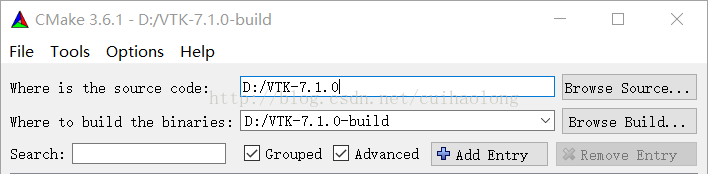
Run CMake and configure the source code path and target path:


Select Visual Studio 12 2013 Win64 as the Current Generator, click Configure, and the red scan results will appear. Check the options according to your own needs and explain some of the options:

CMAKE_INSTALL_PREFIX is the default installation path and the place where the INSTALL project is generated. You can select D:/ vtk-7.1.0-build /.

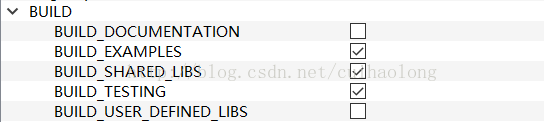
Build recommends checking the following box:


Don’t worry about the contents under the Install option; the default value is fine.

If you want to use Python, you need to check VTK_WRAP_PYHTON and configure the appropriate path under the Python option. Otherwise, you will get a CMake Could NOT find PythonLibs error.


INCLUDE_DIR is included after Configure again.

If Qt environment variable QTDIR is configured in the system, and %QTDIR%/bin is added in PATH, then Qt partial options will be the default.

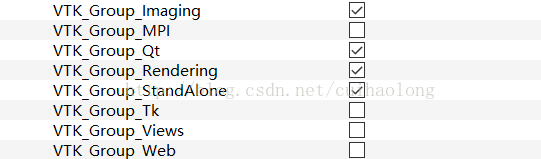
Check VTK_Group as needed:


Reset Configure, then Generate.

3. Generate VTK

Open vtk.sln under D:\ vtkv7-build, right-click ALL_BUILD and select regenerate. This step takes a long time.

There will be some link errors after the first generation, such as not open.. \.. The vtkviewsinfovispython27d-7.1. lib file under \lib\Debug may be generated in order, so it can be regenerated to reduce some errors.

After the build is successful, find the Install project, right-click and select For Project Only ->; Only INSTALL is generated, and the include directory is generated under the CMAKE_INSTALL_PREFIX setting, which contains the header files required by the VTK.

4. Error resolution
4.1 vtkWrappingPythonCore project cannot open file “python27.lib”

Locate the project and add the additional link library D:\S\D\python-install\libs in the properties

4.2 The vtkimagingcameron project cannot open the file ‘.. \.. \ lib \ Debug \ vtkCommonDataModelPython27D – 7.1. Lib”

Find the project associated with VTKCommonDataModel and look at the properties ->; The linker – & gt; Advanced import libraries in the part, is the output.lib file, after the project is to generate the view, vtkCommonDataModelPython output for vtkCommonDataModelPython. Lib, and the output of the vtkCommonDataModelPythonD project vtkCommonDataModelPython27D – 7.1 lib, so can’t open the file Python27D – 7.1. Lib errors, Build the corresponding Pythond project, and add the Python \libs directory to the additional libraries for that project.

Note: Since it is too cumbersome to add Python, and the project does not need Python, so Python is cancelled and recompiled, and the VTK used subsequently does not add Python.

5. Run the Examples
5.1 CMake compilation

Run CMake, source code position select the source code, for example: D:/VTK – 7.1.0/Examples/Tutorial/Step1/Cxx, build the binaries choose project files are generated, for example: D:/VTKCode/Step1.

VTK_DIR = D:\ vtk-7.1.0-build; CMAKE_INSTALL_PREFIX = INSTALL. Vcxproj; C :\ vtk-7.1.0-build; CMAKE_INSTALL_PREFIX = INSTALL. Vtk-7.1.0-build; CMAKE_INSTALL_PREFIX = INSTALL.

After compilation, go to the project file directory and find Step1.sln. After opening it, select Cone as the startup project for generation. After successful generation, it can be run.

5.2 New project compilation

Start the VS2013, create a new empty project, will be D:/VTK – 7.1.0/Examples/Tutorial/Step1/Cxx/Cone. Cxx is copied to the new project directory, Cone is added in the new project. The Cxx to the source file.

To configure the properties of the project, in the VC++ directory, the include directory adds the generated include file, for example: D:\ vtk-7.1.0-build \include\vtk-7.1, and the library directory adds the lib file, for example: D:\ vtk-7.1.0-build \lib.

The additional dependencies of the linker are filled into all.lib files in the lib directory, as shown below:

kernel32.lib
user32.lib
gdi32.lib
winspool.lib
shell32.lib
ole32.lib
oleaut32.lib
uuid.lib
comdlg32.lib
advapi32.lib
comctl32.lib
vfw32.lib
ws2_32.lib
wsock32.lib
opengl32.lib
vtkalglib-7.1.lib
vtkChartsCore-7.1.lib
vtkCommonColor-7.1.lib
vtkCommonComputationalGeometry-7.1.lib
vtkCommonCore-7.1.lib
vtkCommonDataModel-7.1.lib
vtkCommonExecutionModel-7.1.lib
vtkCommonMath-7.1.lib
vtkCommonMisc-7.1.lib
vtkCommonSystem-7.1.lib
vtkCommonTransforms-7.1.lib
vtkDICOMParser-7.1.lib
vtkDomainsChemistry-7.1.lib
vtkDomainsChemistryOpenGL2-7.1.lib
vtkexoIIc-7.1.lib
vtkexpat-7.1.lib
vtkFiltersAMR-7.1.lib
vtkFiltersCore-7.1.lib
vtkFiltersExtraction-7.1.lib
vtkFiltersFlowPaths-7.1.lib
vtkFiltersGeneral-7.1.lib
vtkFiltersGeneric-7.1.lib
vtkFiltersGeometry-7.1.lib
vtkFiltersHybrid-7.1.lib
vtkFiltersHyperTree-7.1.lib
vtkFiltersImaging-7.1.lib
vtkFiltersModeling-7.1.lib
vtkFiltersParallel-7.1.lib
vtkFiltersParallelImaging-7.1.lib
vtkFiltersPoints-7.1.lib
vtkFiltersProgrammable-7.1.lib
vtkFiltersSelection-7.1.lib
vtkFiltersSMP-7.1.lib
vtkFiltersSources-7.1.lib
vtkFiltersStatistics-7.1.lib
vtkFiltersTexture-7.1.lib
vtkFiltersVerdict-7.1.lib
vtkfreetype-7.1.lib
vtkGeovisCore-7.1.lib
vtkgl2ps-7.1.lib
vtkglew-7.1.lib
vtkGUISupportQt-7.1.lib
vtkGUISupportQtSQL-7.1.lib
vtkhdf5_hl-7.1.lib
vtkhdf5-7.1.lib
vtkImagingColor-7.1.lib
vtkImagingCore-7.1.lib
vtkImagingFourier-7.1.lib
vtkImagingGeneral-7.1.lib
vtkImagingHybrid-7.1.lib
vtkImagingMath-7.1.lib
vtkImagingMorphological-7.1.lib
vtkImagingSources-7.1.lib
vtkImagingStatistics-7.1.lib
vtkImagingStencil-7.1.lib
vtkInfovisCore-7.1.lib
vtkInfovisLayout-7.1.lib
vtkInteractionImage-7.1.lib
vtkInteractionStyle-7.1.lib
vtkInteractionWidgets-7.1.lib
vtkIOAMR-7.1.lib
vtkIOCore-7.1.lib
vtkIOEnSight-7.1.lib
vtkIOExodus-7.1.lib
vtkIOExport-7.1.lib
vtkIOGeometry-7.1.lib
vtkIOImage-7.1.lib
vtkIOImport-7.1.lib
vtkIOInfovis-7.1.lib
vtkIOLegacy-7.1.lib
vtkIOLSDyna-7.1.lib
vtkIOMINC-7.1.lib
vtkIOMovie-7.1.lib
vtkIONetCDF-7.1.lib
vtkIOParallel-7.1.lib
vtkIOParallelXML-7.1.lib
vtkIOPLY-7.1.lib
vtkIOSQL-7.1.lib
vtkIOTecplotTable-7.1.lib
vtkIOVideo-7.1.lib
vtkIOXML-7.1.lib
vtkIOXMLParser-7.1.lib
vtkjpeg-7.1.lib
vtkjsoncpp-7.1.lib
vtklibxml2-7.1.lib
vtkLocalExample-7.1.lib
vtkmetaio-7.1.lib
vtkNetCDF_cxx-7.1.lib
vtkNetCDF-7.1.lib
vtkoggtheora-7.1.lib
vtkParallelCore-7.1.lib
vtkpng-7.1.lib
vtkproj4-7.1_d.lib
vtkRenderingAnnotation-7.1.lib
vtkRenderingContext2D-7.1.lib
vtkRenderingContextOpenGL2-7.1.lib
vtkRenderingCore-7.1.lib
vtkRenderingFreeType-7.1.lib
vtkRenderingGL2PSOpenGL2-7.1.lib
vtkRenderingImage-7.1.lib
vtkRenderingLabel-7.1.lib
vtkRenderingLOD-7.1.lib
vtkRenderingOpenGL2-7.1.lib
vtkRenderingQt-7.1.lib
vtkRenderingVolume-7.1.lib
vtkRenderingVolumeOpenGL2-7.1.lib
vtksqlite-7.1.lib
vtksys-7.1.lib
vtkTestingGenericBridge-7.1.lib
vtkTestingIOSQL-7.1.lib
vtkTestingRendering-7.1.lib
vtktiff-7.1.lib
vtkverdict-7.1.lib
vtkViewsContext2D-7.1.lib
vtkViewsCore-7.1.lib
vtkViewsInfovis-7.1.lib
vtkViewsQt-7.1.lib
vtkzlib-7.1.lib

Note that this configuration does not copy the.dll file to C:\ windows\ System32 or C:\ windows\ SysWOW64, if it is Win7 need to copy, the native system is Win10, only added in the Path of VTK. DLL file directory.

Since the native system is a 64-bit system, VTK. SLN is compiled with Debug X64 selected, so the new project should be built successfully by changing the active solution platform to X64 in the configuration manager.

Error: No Override found for ‘VTKPolydataMapper ‘. CMAKE is not used for configuration, so you need to add the following code at the beginning of the source code:

#include <vtkAutoInit.h>
VTK_MODULE_INIT(vtkRenderingOpenGL2);
VTK_MODULE_INIT(vtkInteractionStyle);

This method is applicable to VTK7.0 and above, other versions can refer to the following information:

VTK/VTK 6 Migration/Factories now require defines

VTK/Build System Migration

6. References

Getting Started with VTK (Configuration + FAQ)

VTK installation in VS2010 (including Python) and the first example

Detailed installation guide for VTK and ITK

ITK + VTK + QT on Window 7 64bit and Visual Studio 2010 Pro 32bit project

VTK + QT + vs compilation and installation configuration

VTK
The VTK, (Visualization Toolkit) is an open source, free software system for 3D computer graphics, image processing, and visualization. VTK is designed and implemented on the basis of object-oriented principles, its kernel is built in C++, contains about 250,000 lines of code, more than 2000 classes, but also contains several conversion interface, so you can also use VTK freely through Java, Tcl/Tk and Python various languages. VTK will be scientific experimental data such as architecture, meteorology, medicine, biology or aerospace, on the body, surface, light source and so on realistic rendering, so as to help people understand those who take the complex and often large scale digital presentation of scientific concepts or results.
purpose
The purpose of this article is to build an application development environment for VTK+ Qt +VS.
Qt version: 5.7.0
VTK version: 7.1.1
VS Version: 2013 (VC12)
Precondition: Cmake are installed in your environment, QT5.7.0 and VS2013 already configured installation, installation configuration is very simple, if there is something wrong with the configuration can refer to http://blog.csdn.net/goodtomsheng/article/details/45719205
VTK compilation and installation
1. Download VTK7.1.1http://www.vtk.org/download/, at present the website is the latest version VTK8.0.1, conservative estimates I chose VTK7.1.1 version, the download file VTK – 7.1.1. Zip, VTKData – 7.1.1. Zip.
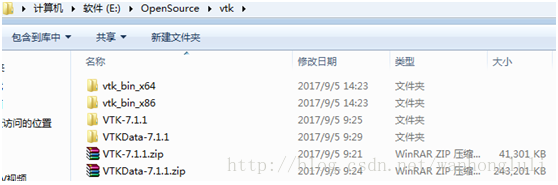
2. Create a directory named VTK (name whatever), unzip ctk-7.1.1.zip, vtkdata-7.1.1.zip into VTK directory, and create a vtk_bin_x64 directory to store the generated VTK project after CMake, the directory structure after unzip is shown in the figure.


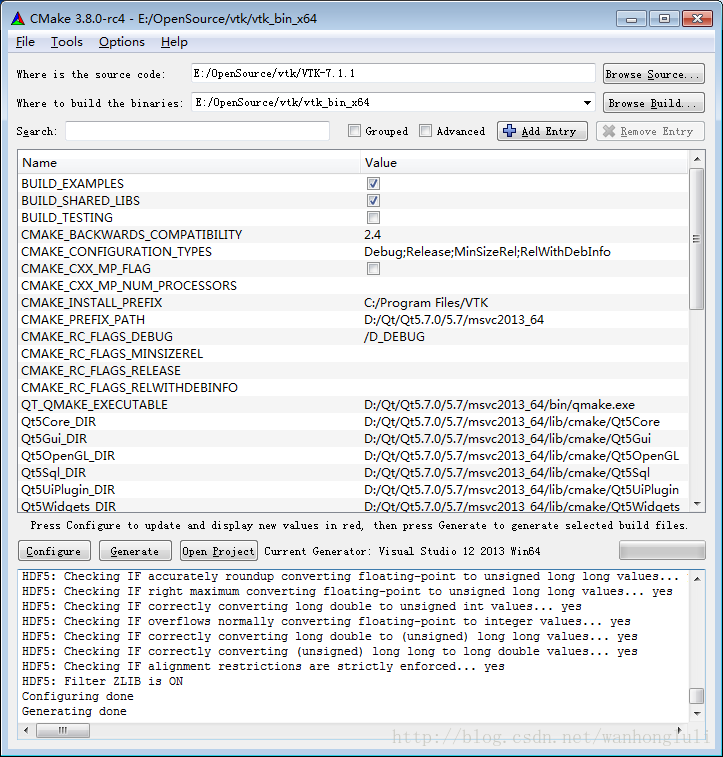
3. Open cmak-gui, select vtk-7.1.1 from Where is thesource code and vtk_bin_x64 from Where to build the binaries. Click Configure, select Visual Studio12 2013 in the pop-up dialog, and click Finish. After the Configue configuration is complete, there are several macros that need to be configured:
BUILD_SHARED_LIBS – Indicates whether to build a shared library or a static library. Default is the state selected for compilation. We want to build the shared library, so leave the default state.
BUILD_EXAMPLES – Indicates compilation of sample projects, selected here for easy learning.
CMAKE_INSTALL_PREFIX — After the VTK compilation is complete, the installation directory, bin, lib, include, etc., will be copied to its specified directory. The default installation directory for x64 compilation is “C:/ProgramFiles /VTK”, but the real macro is set by VTK7.1.1. INSTALL_BIN_DIR, INSTALL_INC_DIR, INSTALL_LIB_DIR, INSTALL_MAN_DIR, INSTALL_PKGCONFIG_DIR. If you are not an administrator, it will fail to install in the default directory because of permissions issues.
VTK_Group_Qt — Qt supported, not supported by default, we want to support Qt integrated development, so check this item. Also check the module_vtkguisupportQt and module_vtkguisupportQtopengl macros to support Qt.
VTK_QT_VERSION – QT version, I used to QT5 set to 5, so this option is not after the Configure, it doesn’t matter, such as the back after clicking the Generate reports QT version failed, after this time you can find this option and set to Generate was no problem.
VTK_DATA_STORE — VTK data storage location, is the previous from the VTK official website down the VTKData-7.1.1.zip, specified to decompress two layers under the directory, I here is “E:\OpenSource\ VTK \VTKData-7.1.1\VTK-7.1.1\.ExternalData”.
Module_vtkguisupportMFC – Specifies the library that will be generated to integrate with the MFC framework. I don’t need it here, so leave it unchecked.
Click Add Entry, Add CacheEntry, CMAKE_PREFIX_PATH, and set the Value to your Qt installation directory, “D:\Qt\Qt5.7.0\5.7\ MSVC2013_64”.
Click Generate when all of the above options are set. This will fail once due to the version of Qt, and it will be OK to regenerate after VTK_QT_VERSION is set correctly. After the CMAKE work is done, the interface is shown below, where the CMAKE work is finished.


4. After Generate is completed, click OpenProject to open the configured VS2013 project. Click the menu to generate ->; Batch build, select ALL_BUILD to build Debug and Release versions. After the build is complete, click on the color when the build ->; Batch build, select Install to build Debug, this will Debug version lib, bin, inlcude and other copies to the “C:/Program Files /VTK” directory set above.
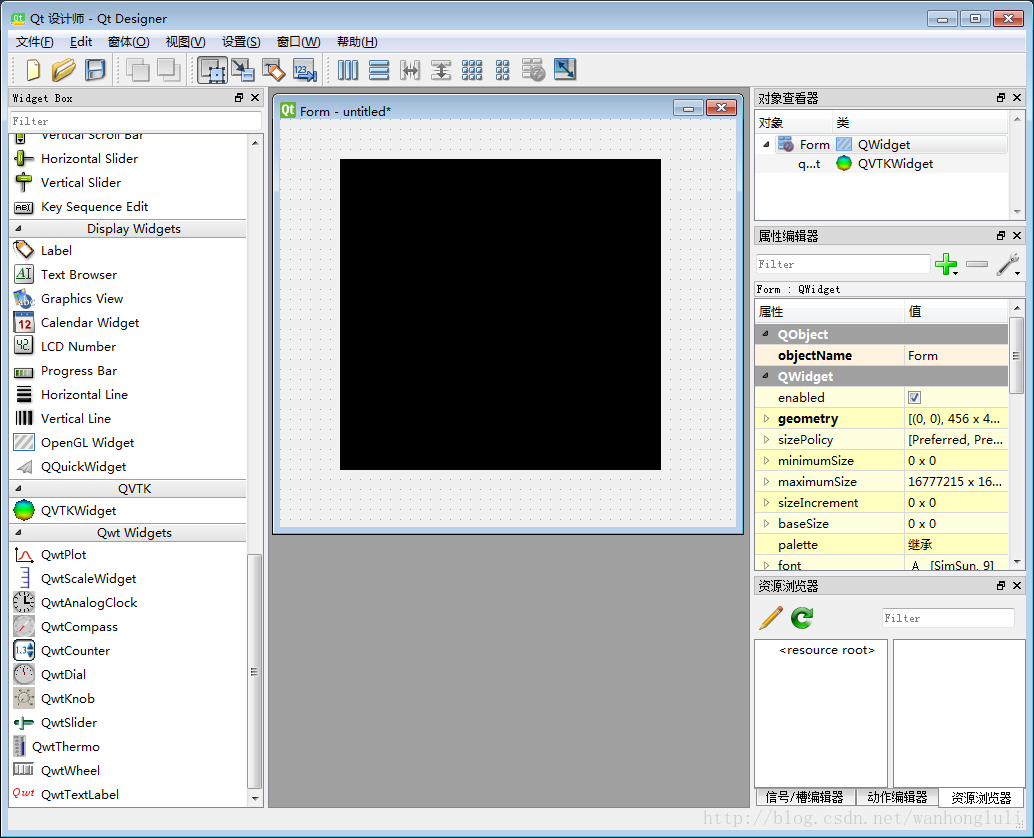
5. Combine with Qt Designer, Copy the qvtkwidgetPlugin.dll and the qvtkwidgetPlugin.lib and the qvtkwidgetPlugin.exp from the bin path generated by the Release to the plugins\designer (my path is D: QT \ qt\ Qt5.7.0\5.7\msvc2013_64\) Plugins \ Designer), do not use the Debug version to compile the generated file, Qt Designer will not read it. After setup, open QTDesigner and you will see QVTKWidget, as shown in the figure below.


6. VS project configuration (the official documentation of VTK recommends using CMAKE to manage the project, here will introduce some special attention to not using CMAKE to manage the project)
A) Create a new VS project (either a Qt project or a C++ project)
C:\Program Files\VTK\ Include \ VTK-7.1 \ C:\Program Files\VTK\lib \ C:\Program Files\VTK\lib \ A good way to do this is to open a project under “Examples” and copy it directly from the project configuration input library.
C) at that time if you send the sample program code copy of the Cone to the current engineering (Cone code given below), compiled by anything, while on a running program can not run normally or hang up directly after the operation, debugging to follow up after found vtkPolyDataMapper: : New () returns NULL, and the same code Examples of instances of engineering Cone can run normally and display effect. After analyzing the Cone project, we found that it had a number of preconditioning instructions, and one of the key preconditioning instructions was:
VtkRenderingCore_INCLUDE = “E:/OpenSource/VTK/vtk_bin_x64 CMakeFiles/vtkRenderingCore_AUTOINIT_vtkInteractionStyle_vtkRenderingOpenGL2. H”.
Vtkrenderingcore_autoinit_vtkinteractionstyle_vtkrenderingopengl2.h copy to vtkinteractionstyle_vtkrenderingopengl2.h indluce directory, and then add the preprocessor to your own VS project:
vtkRenderingCore_INCLUDE=”vtkRenderingCore_AUTOINIT_vtkInteractionStyle_vtkRenderingOpenGL2.h”
To see what the preprocessor does, open the.h file and see that it defines only one macro:
# define vtkRenderingCore_AUTOINIT2 (vtkInteractionStyle vtkRenderingOpenGL2), is actually the initialization VTK module, according to the official specification, can define this macro before all include files:
# define vtkRenderingCore_AUTOINIT2 (vtkInteractionStyle vtkRenderingOpenGL2), which can solve the problem. Or, as follows, at the very beginning of the code, before all the header files are included.
#include “vtkAutoInit.h”
VTK_MODULE_INIT(vtkRenderingOpenGL2); // VTK was built withvtkRenderingOpenGL2
VTK_MODULE_INIT(vtkInteractionStyle);
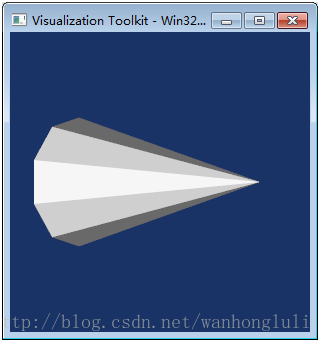
Either of the above methods can solve the problem. More detailed explanation can refer to http://www.vtk.org/Wiki/VTK/VTK_6_Migration/Factories_now_require_defines. The results of the Cone project are shown below. The window closes automatically after the Cone is rotated for a few seconds.
Compiled libraries address: https://pan.baidu.com/s/1pLMChzP wfd6


#include "vtkConeSource.h"
#include "vtkPolyDataMapper.h"
#include "vtkRenderWindow.h"
#include "vtkCamera.h"
#include "vtkActor.h"
#include "vtkRenderer.h"
int main()
{
  // Next we create an instance of vtkConeSource and set some of its
  // properties. The instance of vtkConeSource "cone" is part of a
  // visualization pipeline (it is a source process object); it produces data
  // (output type is vtkPolyData) which other filters may process.
  vtkConeSource *cone = vtkConeSource::New();
  cone->SetHeight( 3.0 );
  cone->SetRadius( 1.0 );
  cone->SetResolution( 10 );
  // In this example we terminate the pipeline with a mapper process object.
  // (Intermediate filters such as vtkShrinkPolyData could be inserted in
  // between the source and the mapper.)  We create an instance of
  // vtkPolyDataMapper to map the polygonal data into graphics primitives. We
  // connect the output of the cone souece to the input of this mapper.
  vtkPolyDataMapper *coneMapper = vtkPolyDataMapper::New();
  coneMapper->SetInputConnection( cone->GetOutputPort() );
  // Create an actor to represent the cone. The actor orchestrates rendering
  // of the mapper's graphics primitives. An actor also refers to properties
  // via a vtkProperty instance, and includes an internal transformation
  // matrix. We set this actor's mapper to be coneMapper which we created
  // above.
  vtkActor *coneActor = vtkActor::New();
  coneActor->SetMapper( coneMapper );
   // Create the Renderer and assign actors to it. A renderer is like a
  // viewport. It is part or all of a window on the screen and it is
  // responsible for drawing the actors it has.  We also set the background
  // color here.
  vtkRenderer *ren1= vtkRenderer::New();
  ren1->AddActor( coneActor );
  ren1->SetBackground( 0.1, 0.2, 0.4 );
  // Finally we create the render window which will show up on the screen.
  // We put our renderer into the render window using AddRenderer. We also
  // set the size to be 300 pixels by 300.
  vtkRenderWindow *renWin = vtkRenderWindow::New();
  renWin->AddRenderer( ren1 );
  renWin->SetSize( 300, 300 );
  // Now we loop over 360 degrees and render the cone each time.
  int i;
  for (i = 0; i < 360; ++i)
  {
    // render the image
    renWin->Render();
    // rotate the active camera by one degree
    ren1->GetActiveCamera()->Azimuth( 1 );
  }

  //
  // Free up any objects we created. All instances in VTK are deleted by
  // using the Delete() method.
  //
  cone->Delete();
  coneMapper->Delete();
  coneActor->Delete();
  ren1->Delete();
  renWin->Delete();

  return 0;
}


VTK basic learning

1, vtkPolyDataMapper: : SetInputConnection () : VTK visual line of the input data interface, the corresponding output data visualization pipeline interface for GetOutPort (); Versions prior to VTK5.0 use setInput () and getOutput () as input and output interfaces. However, after the 7.1 version, it seems that this is not possible. There is no SetInput for the Mapper directly.

2. VTKMarchingCubes requires the input to be VTKImageData. If the input is VTKPolyData, the program will report an error

3, the use of VTKContourFilter can achieve contour extraction.
http://lzchenheng.blog.163.com/blog/static/8383353620108130751672/
4. Sometimes it is necessary to judge the coordinates of the intersection of a straight line and a specific object, which can be achieved with the help of VTKModifiedBSPTree. See Resources for details
http://www.vtk.org/Wiki/VTK/Examples/Cxx/DataStructures/ModifiedBSPTree_IntersectWithLine
5, the measurement of the curve, can be approximate to the length of the broken line measurement; You can also use spline curve fitting and then calculate the length of the spline curve.
According to the description in reference [1], a polyline is composed of many straight line segments, and the length of a polyline can be obtained by adding up the length of each segment.

[1]http://vtk.1045678.n5.nabble.com/get-length-of-vtkpolyline-td1228133.html
[2]http://vtk.1045678.n5.nabble.com/how-to-compute-the-length-of-spline-td5729305.html#a5729341
6. Summary of VTK 3D reconstruction
http://blog.csdn.net/q1302182594/article/details/45892995

Pcl1.9 + vs2017 + win10 installation instructions and MFC adaptation

At the time of this writing, the latest version of PCL is 1.9.1, and the address is here. But from all the indications on GitHub, 1.10 should be coming soon.
This article is done on the installation of PCL, and it is very detailed, so there is no need to repeat it.
The reason for this post is to explain that if you are using “AllInOne”, please do not select 1.9.1!!
Otherwise, when compiling release x64, it will report an error (x86 has not tried it, it will probably be enough). After a few hours of investigation, I saw someone mention this problem on GitHub, but the owner said that it is not recommended to use “AllInOne”, instead, use CMake, and then there is no such thing. After a long struggle, the guy decided to give up and use CMAKE to solve the problem.
After using Debug version n for a long time, I finally want to fix this problem today, so I want to try 1.9.0 instead of CMake, and then the problem will be solved…
 
Also, in some cases, PCL may need to be used with MFC, and its configuration is basically the same as if it were used on the console. However, there are a few issues that need to be noted, otherwise it will not compile.
1. Turn off SDL check: C/C++-> SDL check – & gt; No (/ SDL -)
2. Properties – & gt; Advanced – & gt; Use of MFC ->; Use MFC in a shared DLL, otherwise the following error will occur

3. VTKATOMIC. H with “::” before three “detail”

Problems encountered in PCL configuration environment

Error C1083 cannot open include file: “Eigen/StdVector” : No such file or directory
The library directory
should be D:\Program Files\PCL 1.9.1\3rdParty\Eigen\eigen3\Eigen
\ Program Files\PCL 1.9.1\3rdParty\Eigen\eigen3\Eigen
:\Program Files\PCL 1.9.1\3rdParty\Eigen\ Eigen
Error C1083 cannot open include file: “vtksmartPointer. H” : No such file or directory
D:\Program Files\PCL 1.9.1\ 3RDParty \VTK\include\vtk-8.1
and check whether the environment variable type PCL_ROOT exists and is C:\Program Files\PCL 1.6.0
Can’t find openni2. DLL
After configuring the property sheet, you also need to configure the DLL. There are four ways to configure a DLL. The first way is to copy the DLL to System32, the second way is to copy the DLL to the compiled program file, and the third way is to add the path of the DLL to the system. This article chooses the fourth way, which is directly configured to the project. The specific methods are as follows:
In Solution Explorer, right-click on Properties and select Debug to set the value of the environment variable. The rules are as follows:
PATH=; $(PATH)
Add all PCL and third party library DLL paths after the equal sign with the English “;” Add a $(PATH) at the end. For example,
PATH = KaTeX parse error: Expected ‘EOF’ got ‘\ bin at the position 11: (PCL_ROOT) b \ ̲ ̲ ̲ ̲ I n; (PCL_ROOT)\3rdParty\FLANN\bin; KaTeX parse error: Expected ‘EOF’ got ‘\ 3 at the position 11: (PCL_ROOT) \ ̲ ̲ 3 rdParty \ VTK \ bin… (PCL_ROOT)\Qhull\bin; KaTeX parse error: Expected ‘EOF’ got ‘\ 3 at the position 11: (PCL_ROOT) \ ̲ ̲ 3 rdParty \ OpenNI2… (PATH)

Configuration problem of pcl1.9.1 under Windows 10 vs2017 (solved)

Windows 10 VS2017 PCL1.9.1 configuration issue resolved
The first time to use the PCL library, encountered many problems. Write down some problems here so that other friends who have the same problem can solve them.
configuration
I won’t talk about the basic configuration, you can refer to this blog. I think that’s pretty detailed.
especially recommend a property sheet, then I don’t need in the configuration.
The problem
I ran into several problems after following this blog configuration.
The parameters of the E2512 functional test macro must be simple descriptors
VS2017 at compile time errors E2512 functional test macro parameter must be a simple identifier

this error can be ignored, actually does not affect your code generation, just IntelliSense errors.

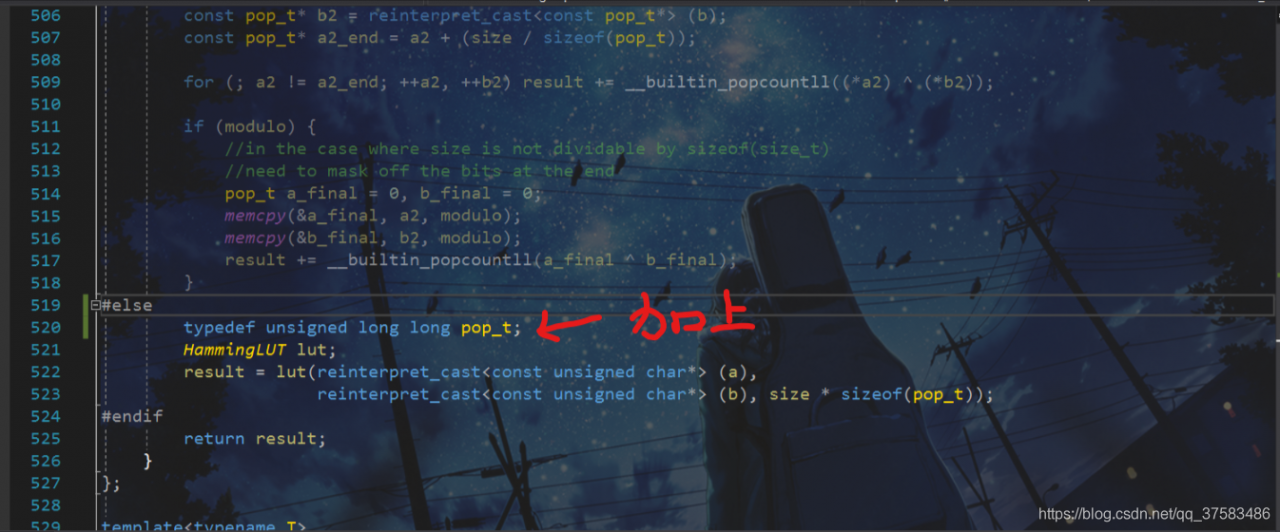
Problem with pop_t not finding identifier
I searched this issue for a long time and finally found a solution on GitHub’s Issue.

oblem in PCL third party library Flann kind, dish.h file. #ifpop_t is used in #elsebut is not specified, so we add this sentence (which was originally defined in #if).