Category Archives: How to Fix

The Linux terminal appears bash: setup.bash : no such file or directory, and. Bashrc file

Earlier in the Linux open a terminal, he always appear bash:/opt/ros/indig/setup. Bash: No to the file or directory. This problem is related to the bash that needs to be loaded every time the terminal is opened.

/etc/bashrc: This file sets up environment information for each user of the system and is executed when the user first logs in and collects shell Settings from the configuration file in the /etc/profile.d directory. This file is read when the bash shell is opened.
~/.bash_profile: Each user can use this file to enter specific shell information for his or her own use, and this file is executed only once when the user logs in! By default, it sets some environment variables and executes the user’s.bashrc file.
~/.bashrc: This file contains bash information specific to your bash shell, which is read when you log in and every time you open a new shell.
/.bash_logout: This file is executed every time you exit the system (exit the bash shell)
I turn to open the file, the last in ~ /. Bashrc found the last line of this file: the source/opt/ros/indig/setup. Bash the bash file does not exist in the file system, so I deleted it. After that, it works fine when you start the terminal again.
P.S. We can get through

echo "source /opt/ros/indigo/setup.bash" >> ~/.bashrc

Command to add a path to the.bashrc file.

Then through

source ~/.bashrc

Order to put it into effect.
Linux has no way to solve bash. / that file or directory

Running./ XXX in Ubuntu 64-bit will pop up saying there is no such file or directory, but ls will see this file again, which is very strange.
In fact, the reason is very simple, because he does not have the 32-bit runtime ia32-libs, just install it.
apt-get install ia32-libs
It is possible that XXX is referenced by another package, but the following package replaces it: lib32ncurses5 lib32z1
The method of zero:
sudo apt-get install g++-multilib
Method one:
http://pkgs.org/download/ia32-libs
download mint 17 deb software installation for the center line depends on what the solution automatically
Method 2:
Sudo DPKG –add-architecture i386
sudo apt-get update
do apt-get dist-upgrade
This step is used to install Wine, which may occur if the computer does not have Wine installed (in fact, it will prompt you to install it if it does not).
Method 3:
Apt-get-f install: apt-get-f install
Method 4:
See the solution for ubuntukylin.com WUY069
 
1. Switch to root
Sudo -i
2. Enter the APT source list
CD/etc/apt/sources. List. D
3. Add source for Ubuntu 13.04, since IA32-libs is deactivated in subsequent versions of 13.10
Echo “deb http://archive.ubuntu.com/ubuntu/ raring main restricted universe multiverse” & gt; ia32-libs-raring.list
 
4. Update the source and install IA32-LIBS
Apt to get the update
Apt to get the install ia32 libs
 
5. Restore the source
The rm ia32 libs – raring. List
Apt to get the update

Solve the problem of “bash. / don’t have that file or directory” in Ubuntu 64 bit

When you first run the./XXX file in Ubuntu 64-bit, you might say that bash doesn’t have that file or directory, but it does;
The reason is that there is no 32-bit runtime;

Solution:

$sudo apt-get install ia32-libs

If it says no packages are available, then install the alternative:

$sudo apt-get install libc6:i386 libgcc1:i386 gcc-4.6-base:i386 libstdc++5:i386 libstdc++6:i386

>

bash: /opt/ros/kinetic/ setup.bash : there is no file or directory

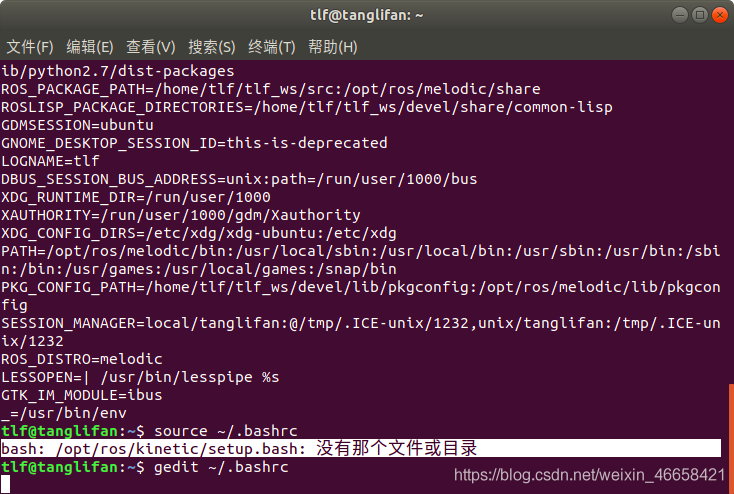
I installed ROS Melodic version, but I used the installation tutorial of “Kinetic” version. As a result, I forgot to change “Kinetic” into “Melodic” in the tutorial by using the echo command when adding environment variables at one step, so the following phenomena occurred:

An error occurred when I source ~/.bashrc
Bash:/opt/ros/kinetic/setup. Bash: no files or directories

After looking, I use the command
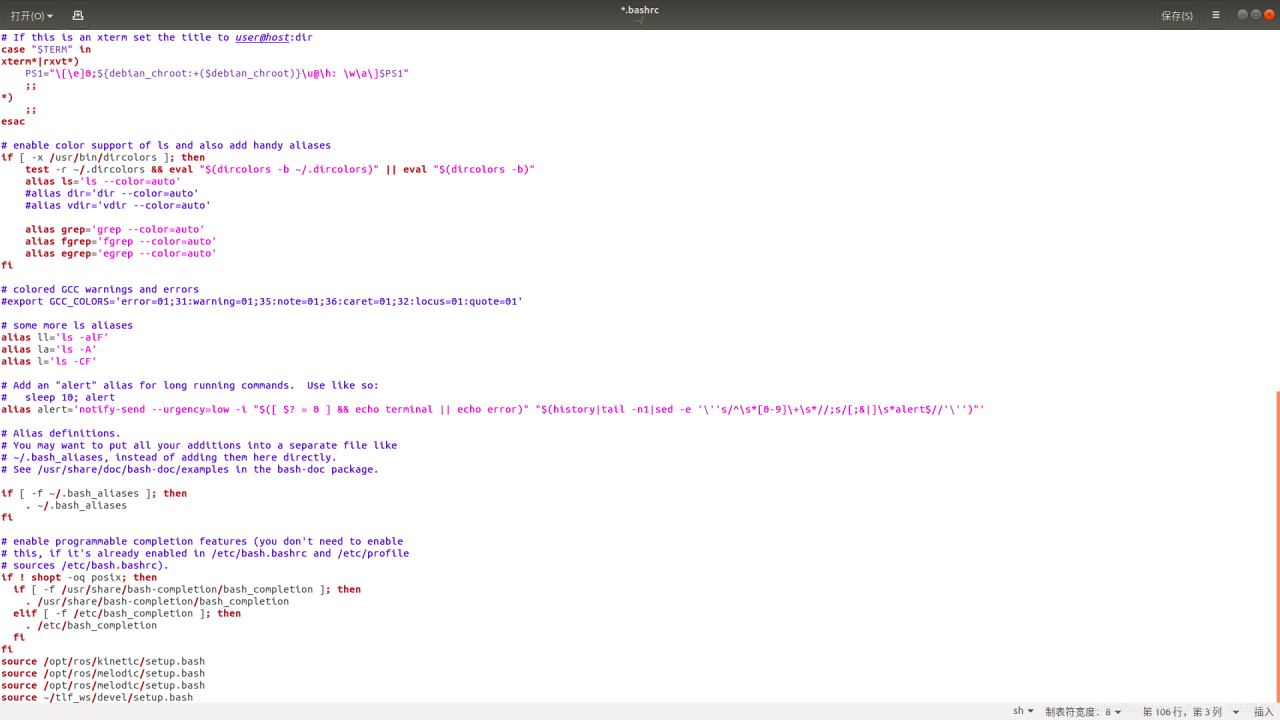
tlf@tanglifan:~$ gedit ~/.bashrc

At the bottom of a add error source: the source/opt/ros/kinetic/setup. Bash
Delete it and save it. It’s back to normal.

Idea installation vue.js After plug-in, new has no Vue component

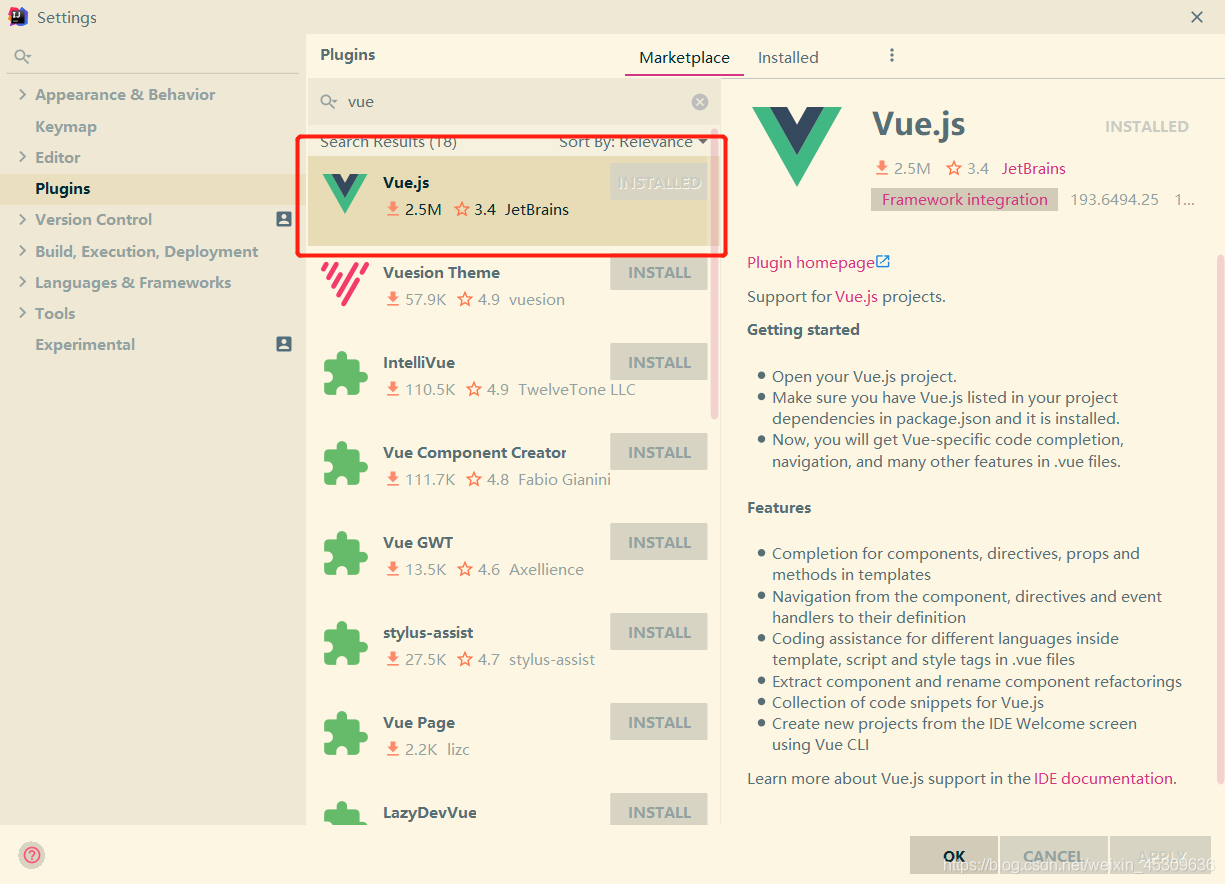
New does not have a Vue Component after installing the Vue.js plugin
First to install the vue related plug-in vue. Js

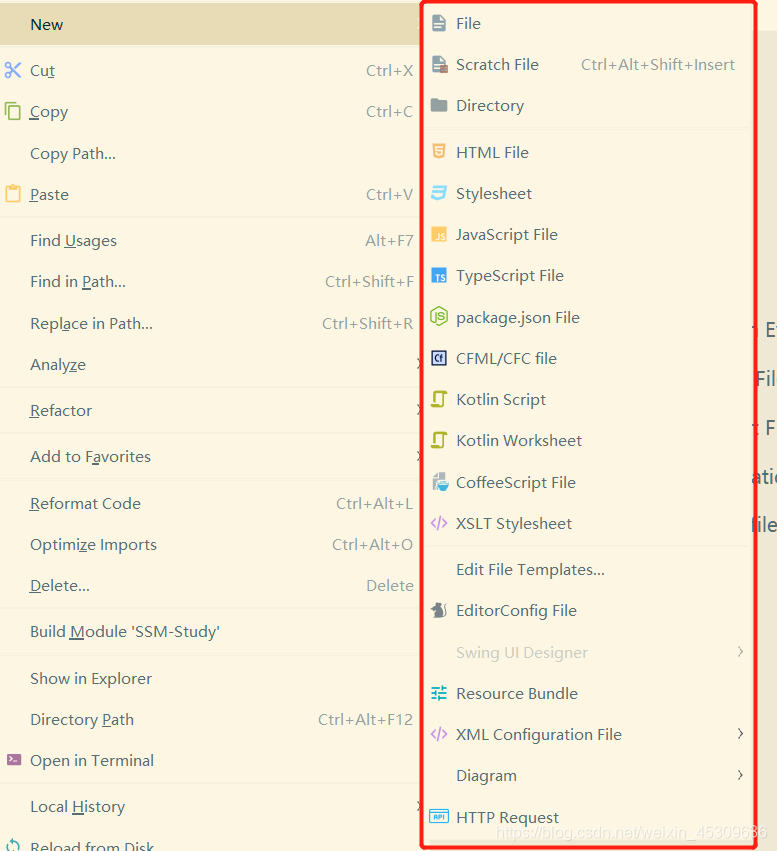
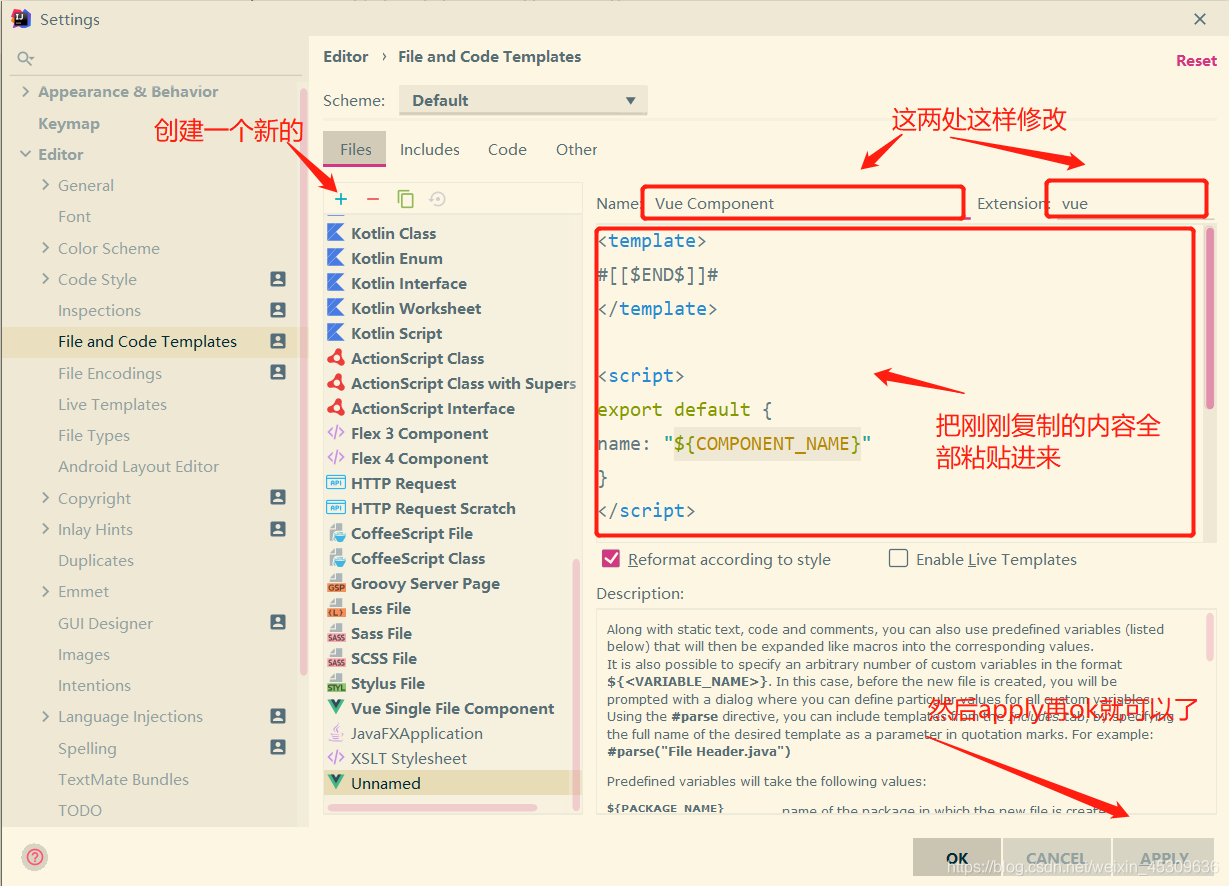
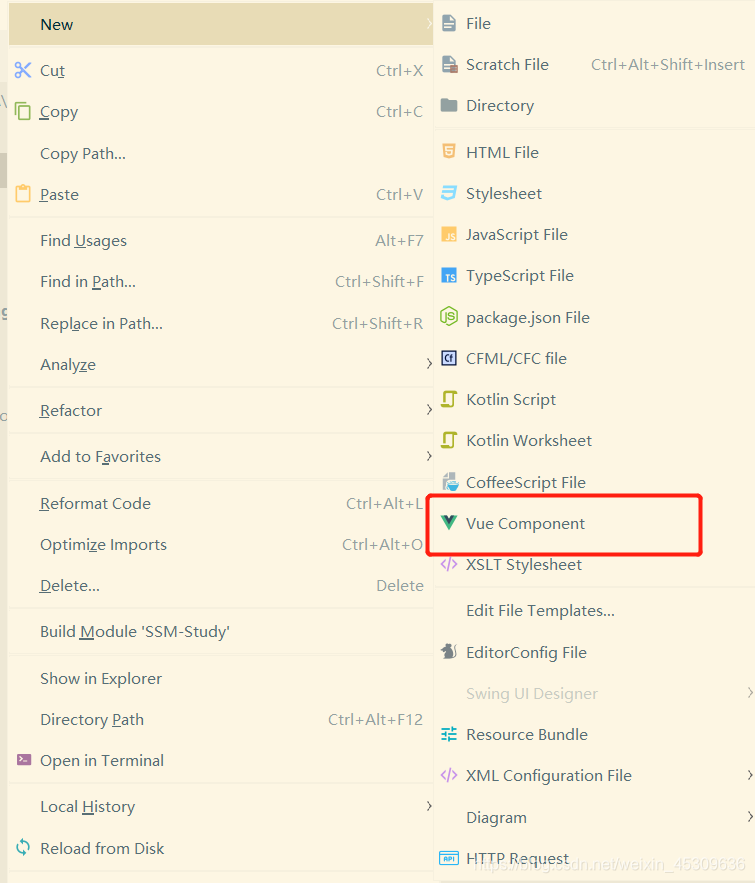
a lot of people in after installing the vue plug-in, right-click the new found no vue component this option. As follows:

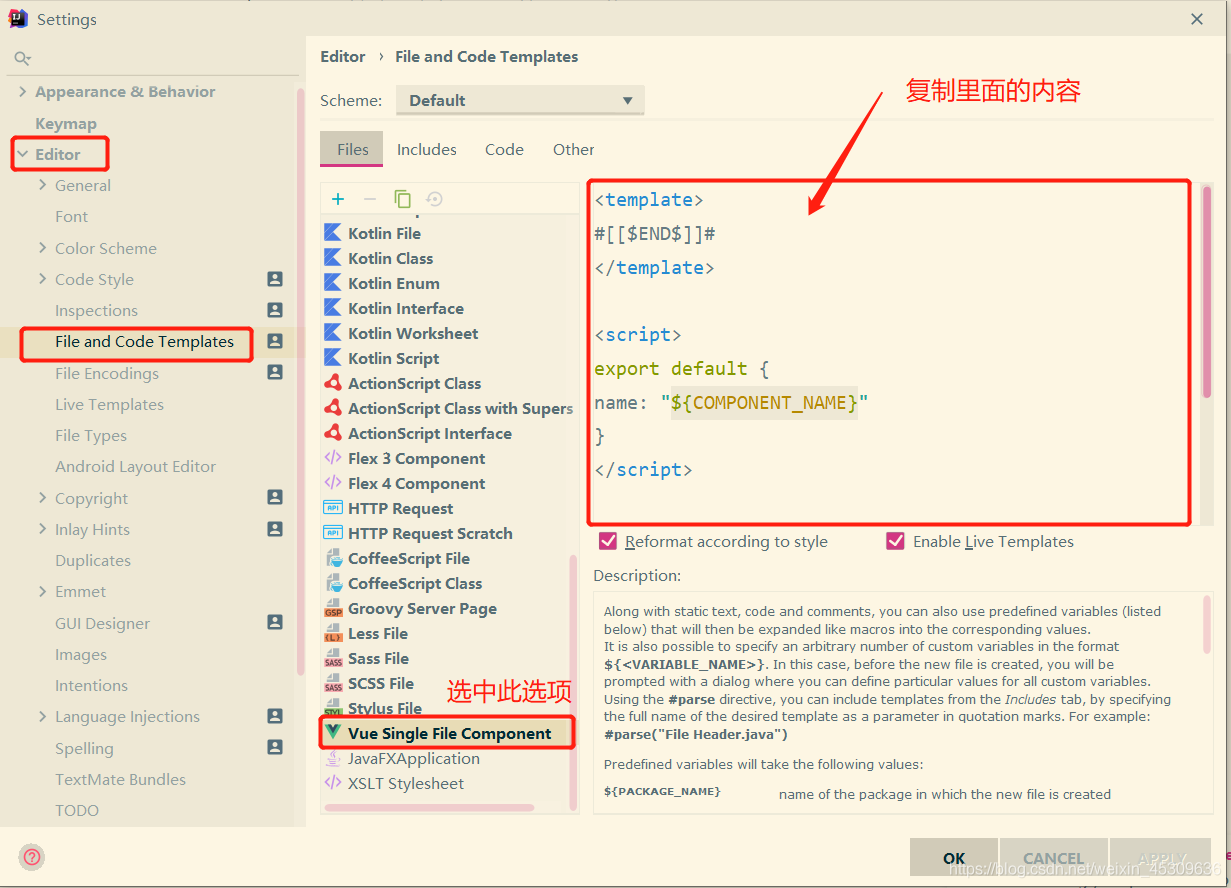
Solution:
Settings> Editor> File and Code Templates
after completing the above steps

,

right click new again at this time, found that option in the Vue Component

The reason and solution of Android intent value not updated

When the Activity’s launch mode is singleTask or singleInstance. If an intent is used to pass a value, then the problem may arise that the intent’s value cannot be updated. That is, the value received for each Intent is the value received for the first time. Because the intent has not been updated. To update, you need to do two things.
1. Add a sentence to the sender Activity

PendingIntent pendingIntent = PendingIntent.getActivity(context,0,intent,PendingIntent.FLAG_UPDATE_CURRENT);  

2. The receiving Activity, plus a function, calls the method setIntent

protected void onNewIntent(Intent intent) {
  Log.i(TAG,"onNewIntent()");
  super.onNewIntent(intent);
  setIntent(intent);
  int value = getIntent().getIntExtra("value_key", 0);
  Log.i(TAG,"value = "+value);
}

Reproduced in: https://www.cnblogs.com/davesuen/p/3703436.html

Android android.intent.category Purpose and use of. Launcher

The Android Android. Intent. The category. The purpose and use of the LAUNCHER
Sometimes we just create a new Android project in Eclipse, run it, and then we have an APK on the phone with the logo; We seldom consider no icon apk, however, this is to say the android. Intent. The category. The LAUNCHER.
1: we see first with android. The intent. The category. The effect of the project after the operation the LAUNCHER
1.1: project name as

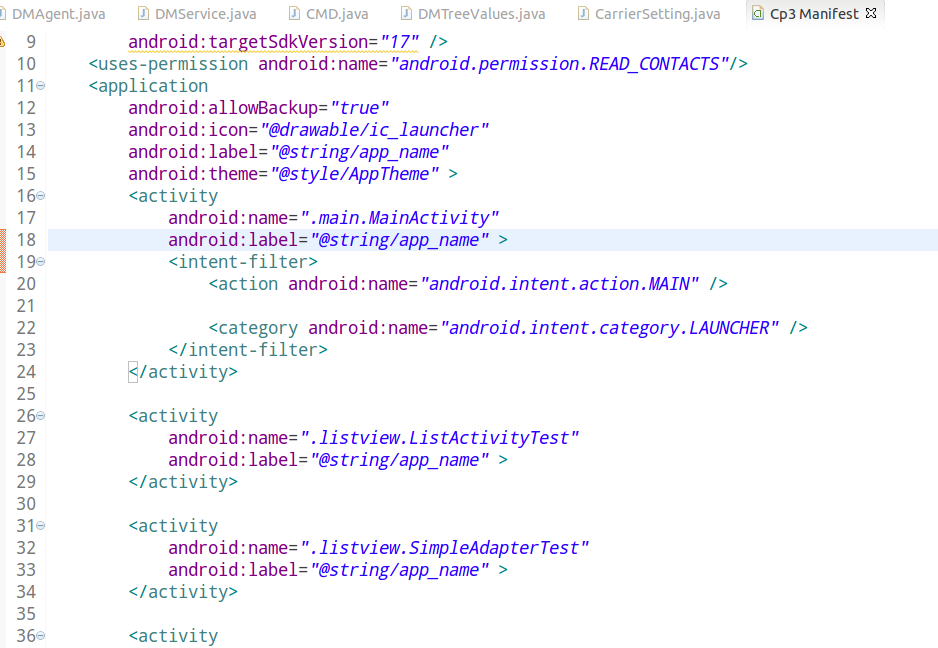
1.2: the manifest. XML is as follows: (note contains android. The intent. The category. The LAUNCHER)

1.3: After running the effect, you can see the screen shot of the phone (you can see there is a launcher (CP3))

2: we can’t see with android. Intent. The category. The effect of the project after the operation the LAUNCHER
2.1: project name as

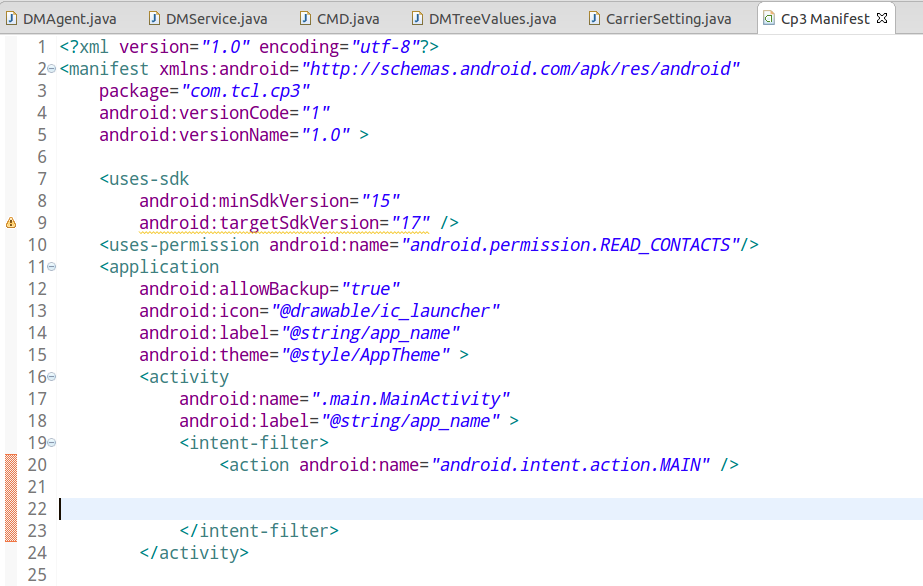
2.2: the manifest. XML is as follows: (note that there is no android. The intent. The category. The LAUNCHER)

2.3: after the operation, you can see on the screen without any effect
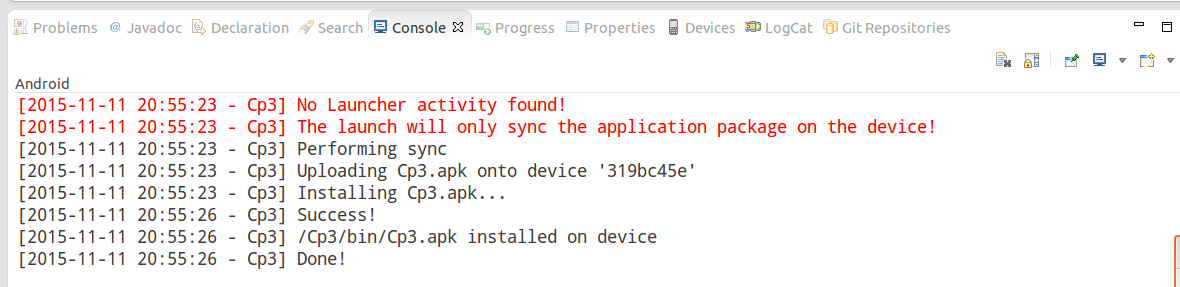
2.4 console display as follows:

indeed installed.
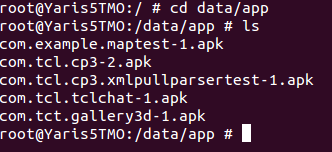
2.5: this time we enter the verify directory:

You can see that it contains com.tcl.cp3-2.apk.
1 and 2 contrast can be found in the android. Intent. The category. The role of the LAUNCHER.

Android can’t transfer value when using extras, bundle and intent

Working environment (bold blue for special attention)
1, System environment: Win7 Ultimate SP1, Android Studio 3.2
Oddly enough, today when a Bundle is used to pass values between activities, it is not possible to get the value passed in. Look at the pass-value code:

 Bundle bundle = new Bundle();
 bundle.putInt(EXAM_CENTER_TYPE, EXAM_CENTER_1);
 toActivity(ExamTypeActivity.class, bundle);

protected void toActivity(Class<?> clazz, Bundle bundle) {
        Intent intent = new Intent();
        intent.setClass(this, clazz);
        if (bundle != null) {
            intent.putExtras(bundle);
        }
        startActivity(intent);
    }

Value code:

    protected Bundle getExtra() {
        Intent intent = getIntent();
        if (intent != null) {
            return getIntent().getExtras();
        } else {
            return null;
        }

    }

    protected String getExtraString(String key) {
        Bundle bundle = getExtra();
        if (bundle != null) {
            return bundle.getString(key);
        } else {
            return "";
        }
    }
    

    protected int getExtraInt(String key) {
      String extra = getExtraString(key);
      return NumberUtils.getInt(extra);
    }

GetExtraaint (EXAM_CENTER_TYPE) cannot get a value. The reason is that the data type passed to PUT must be the same as that of GET. If you put is a string, get is a string. The getExtraint function can be changed to the following function:

  protected int getExtraInt(String key) {
        Bundle bundle = getExtra();
        if (bundle != null) {
            return bundle.getInt(key);
        } else {
            return 0;
        }
    }


The problem that the content extra data in the notification cannot be updated

Recently younger brother when writing a find out about the background data processing service within the PendingIntent NotificationManager to send the Notification of the Intent of the Extra data cannot update, unable to get even, after tests found that the same ID Notification first Intent can only be stored data, even if use the NotificationManager. Cancel also of no help.
Found after examined the related API, use the PendingIntent. GetActivity (mContext, 0, mActivity, 0); After the Notification is opened, the target Activity cannot retrieve any additional data from getIntent(). Set the flag of the getActivity function to either pendingintent.flag_update_current or pendingintent.flag_cancel_current according to the API.
Also put a PendingIntent, getActivity function can be used in several flag value meaning:

0:

Default value, if the described PendingIntent already exists, then keep it without change.

FLAG_CANCEL_CURRENT:

For use with a Flag with the getActivity (Context, int, Intent, int) , getBroadcast (Context, int, Intent, int) , and getService (Context, int, Intent, int) : if the described PendingIntent already exists, the current one is canceled before generating a new one. You can use this to retrieve a new PendingIntent when you are only changing the extra data in the Intent; By canceling the previous pending intent, this ensures that only entities given the new data will be able to launch it. If this assurance is not an issue, consider FLAT_Update_current

Constant Value: 268435456 (0 x10000000)

FLAG_NO_CREATE:

For use with a Flag with the getActivity (Context, int, Intent, int) , getBroadcast (Context, int, Intent, int) , and getService (Context, int, Intent, int) : if the described PendingIntent does not already exist, then simply return null instead of creating it.

Constant Value: 536870912 (0 x20000000)

FLAG_ONE_SHOT:

For use with a Flag with the getActivity (Context, int, Intent, int) , getBroadcast (Context, int, Intent, int) , and getService (Context, int, Intent, int) : This PendingIntent can only be used once. If set, after send()

FLAG_UPDATE_CURRENT:

For use with a Flag with the getActivity (Context, int, Intent, int) , getBroadcast (Context, int, Intent, int) , and getService (Context, int, Intent, int) : if the described PendingIntent already exists, then keep it but its replace its extra data with what is in this new Intent. This can be used if you are creating intents where only the extras change, and don't care that any entities that received your previous PendingIntent will be able to launch it with your new extras even if they are not explicitly given to it.

Constant Value: 134217728 (0 x08000000)