Category Archives: How to Fix

Error: Make: pdflakex: command not found

When using the Doxygen tool, make reports the following errors:

adams@ubuntu:~/latex$ make
rm -f *.ps *.dvi *.aux *.toc *.idx *.ind *.ilg *.log *.out *.brf *.blg *.bbl refman.pdf
pdflatex refman
make: pdflatex: Command not found
make: *** [Makefile:8: refman.pdf] Error 127
adams@ubuntu:~/latex$ 

solution:

sudo apt install doxygen-latex

details:

The following additional packages will be installed:
  cm-super-minimal dvisvgm fonts-lato fonts-lmodern fonts-texgyre javascript-common libapache-pom-java libclass-data-inheritable-perl libclass-method-modifiers-perl libclass-xsaccessor-perl
  libcommons-logging-java libcommons-parent-java libemail-date-format-perl libexception-class-perl libfile-homedir-perl libfile-which-perl libfontbox-java libipc-shareable-perl libjs-jquery
  liblog-dispatch-perl liblog-log4perl-perl libmail-sendmail-perl libmime-charset-perl libmime-lite-perl libmime-types-perl libparams-validationcompiler-perl libpdfbox-java libptexenc1
  libreadonly-perl libref-util-perl libref-util-xs-perl librole-tiny-perl libruby2.7 libsombok3 libspecio-perl libsub-quote-perl libsys-hostname-long-perl libtcl8.6 libteckit0 libtexlua53
  libtexluajit2 libtk8.6 libunicode-linebreak-perl libxstring-perl libzzip-0-13 lmodern preview-latex-style ps2eps rake ruby ruby-minitest ruby-net-telnet ruby-power-assert ruby-test-unit
  ruby-xmlrpc ruby2.7 rubygems-integration t1utils tcl tcl8.6 tex-common tex-gyre texlive-base texlive-binaries texlive-extra-utils texlive-font-utils texlive-fonts-recommended texlive-latex-base
  texlive-latex-extra texlive-latex-recommended texlive-pictures texlive-plain-generic tipa tk tk8.6
Suggested packages:
  apache2 | lighttpd | httpd libavalon-framework-java libcommons-logging-java-doc libexcalibur-logkit-java liblog4j1.2-java libdbd-csv-perl liblog-dispatch-filerotate-perl librrds-perl
  libxml-dom-perl libencode-hanextra-perl libpod2-base-perl default-mta | mail-transport-agent libmojolicious-perl libtest-fatal-perl ri ruby-dev bundler tcl-tclreadline debhelper perl-tk xzdec
  chktex dvidvi dvipng fragmaster lacheck latexdiff latexmk purifyeps xindy lcdf-typetools psutils texlive-fonts-recommended-doc texlive-latex-base-doc icc-profiles libspreadsheet-parseexcel-perl
  texlive-latex-extra-doc texlive-latex-recommended-doc texlive-luatex texlive-pstricks dot2tex prerex ruby-tcltk | libtcltk-ruby texlive-pictures-doc vprerex default-jre-headless
The following NEW packages will be installed:
  cm-super-minimal doxygen-latex dvisvgm fonts-lato fonts-lmodern fonts-texgyre javascript-common libapache-pom-java libclass-data-inheritable-perl libclass-method-modifiers-perl
  libclass-xsaccessor-perl libcommons-logging-java libcommons-parent-java libemail-date-format-perl libexception-class-perl libfile-homedir-perl libfile-which-perl libfontbox-java
  libipc-shareable-perl libjs-jquery liblog-dispatch-perl liblog-log4perl-perl libmail-sendmail-perl libmime-charset-perl libmime-lite-perl libmime-types-perl libparams-validationcompiler-perl
  libpdfbox-java libptexenc1 libreadonly-perl libref-util-perl libref-util-xs-perl librole-tiny-perl libruby2.7 libsombok3 libspecio-perl libsub-quote-perl libsys-hostname-long-perl libtcl8.6
  libteckit0 libtexlua53 libtexluajit2 libtk8.6 libunicode-linebreak-perl libxstring-perl libzzip-0-13 lmodern preview-latex-style ps2eps rake ruby ruby-minitest ruby-net-telnet ruby-power-assert
  ruby-test-unit ruby-xmlrpc ruby2.7 rubygems-integration t1utils tcl tcl8.6 tex-common tex-gyre texlive-base texlive-binaries texlive-extra-utils texlive-font-utils texlive-fonts-recommended
  texlive-latex-base texlive-latex-extra texlive-latex-recommended texlive-pictures texlive-plain-generic tipa tk tk8.6
0 upgraded, 76 newly installed, 0 to remove and 0 not upgraded.
Need to get 194 MB of archives.
After this operation, 530 MB of additional disk space will be used.
Do you want to continue? [Y/n] y
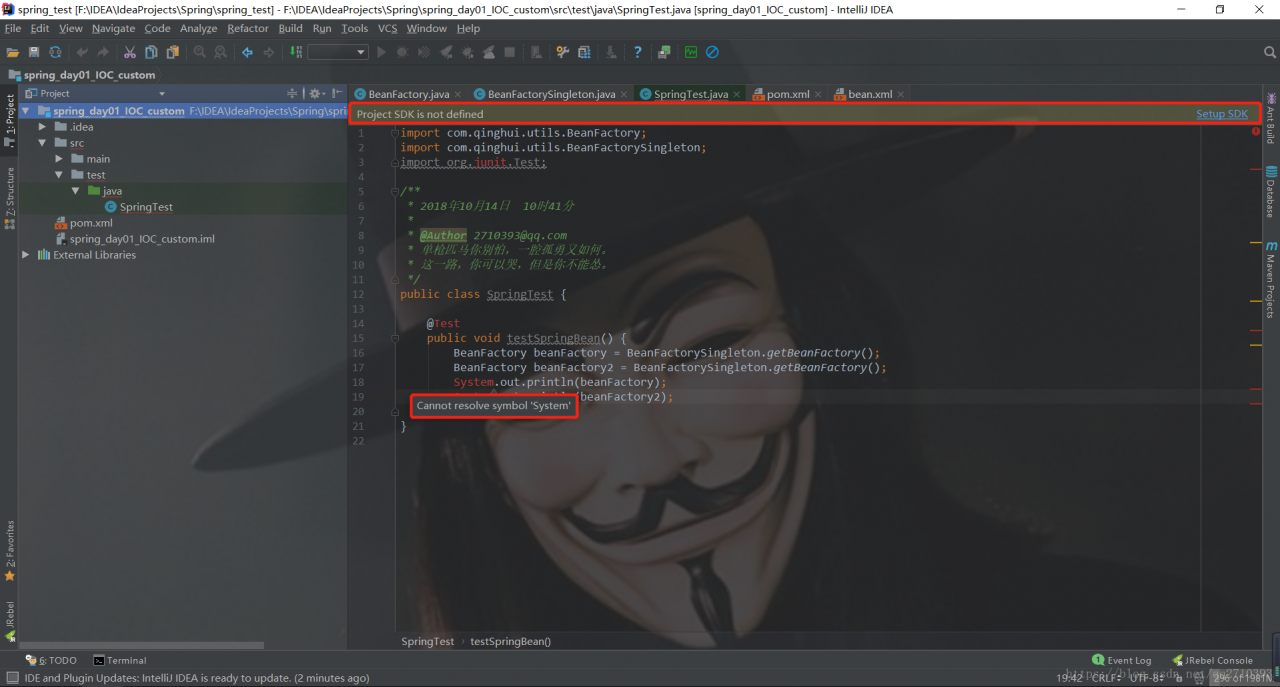
[project SDK is not defined] error resolution

Error analysis:

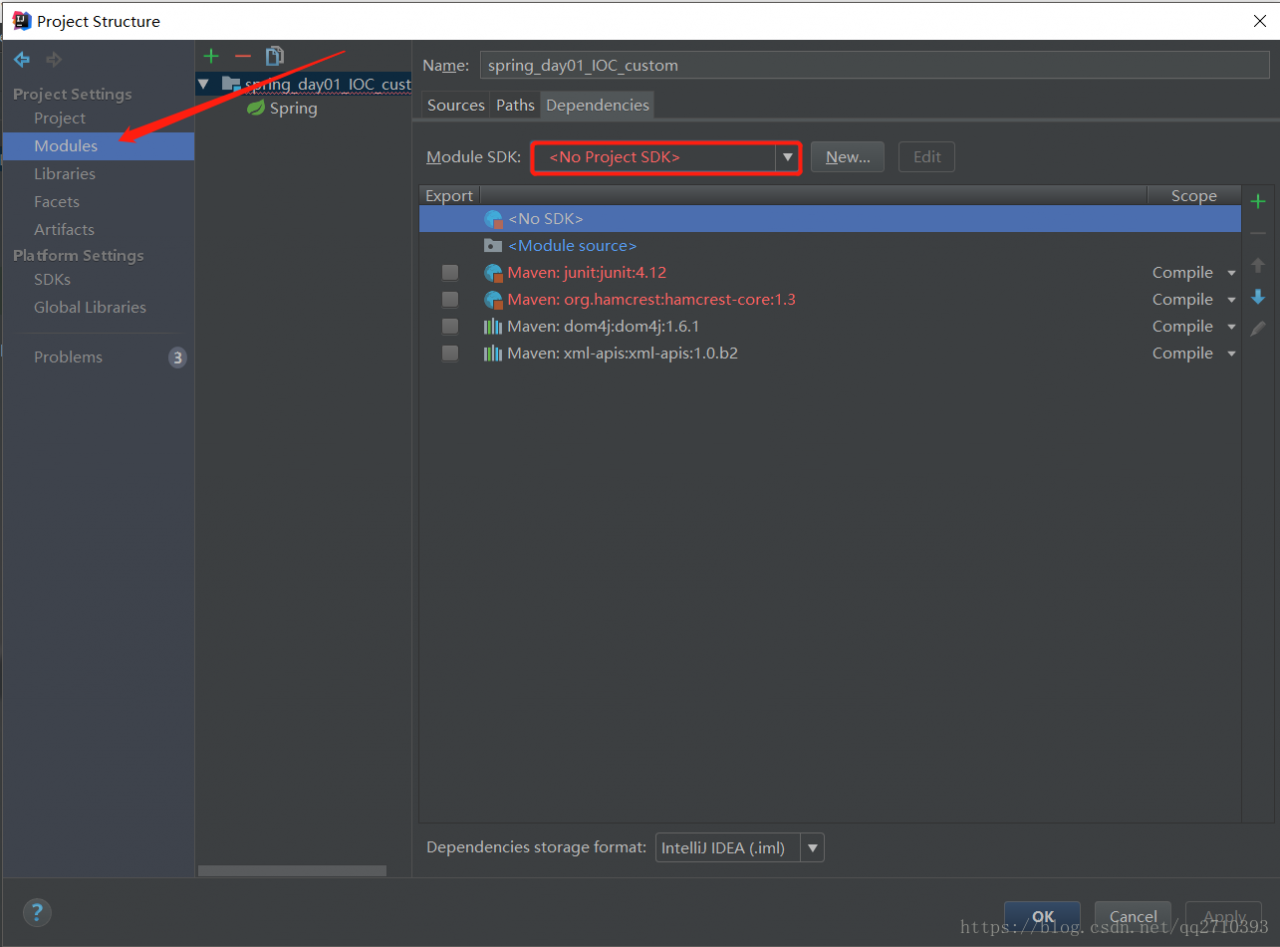
First of all, read the reason for the error. The error message shows that the project SDK is not defined. It prompts me to install the SDK. Some novice friends are a little confused at this time. They only know that JDK is a java development kit. So what is the SDK? I have never used it before. How can I prompt me to install it at this time. At this time, don’t worry, guys. In fact, SDK refers to the software development kit (abbreviation: SDK, full name of foreign language: software development kit). It is generally a collection of development tools used by some software engineers to build application software for specific software packages, software frameworks, hardware platforms, operating systems, etc. here, SDK refers to our JDK, that is to say, this The project could not find the dependent JDK. At this time, we go to check the project environment configuration and find the following situation:

Sure enough, there is a problem with the JDK environment configuration, and then the problem is solved by choosing our JDK environment path.

Some file crashing failed, see logs for details

Reference: Android studio error Error:Some file crunching failed, see logs for details

Project error reporting:

Error:Some file crunching failed, see logs for details


Error:Execution failed for task ':app:mergeDebugResources'.
> Error: Some file crunching failed, see logs for details

reason:

This is a problem with the 9-patch image resource file

resolvent:

1. Modify the 9-patch image:

Click gradle console in the lower right corner to view the detailed log of gradle, such as my project:

Executing tasks: [:app:generateDebugSources, :app:generateDebugAndroidTestSources, :app:mockableAndroidJar, :app:prepareDebugUnitTestDependencies]

Configuration on demand is an incubating feature.
NDK is missing a "platforms" directory.
If you are using NDK, verify the ndk.dir is set to a valid NDK directory.  It is currently set to D:\Users\Android\sdk\ndk-bundle.
If you are not using NDK, unset the NDK variable from ANDROID_NDK_HOME or local.properties to remove this warning.

useNewCruncher has been deprecated. It will be removed in a future version of the gradle plugin. New cruncher is now always enabled.
Incremental java compilation is an incubating feature.
:app:preBuild UP-TO-DATE
:app:preDebugBuild UP-TO-DATE
:app:checkDebugManifest
:app:preReleaseBuild UP-TO-DATE
:app:prepareComAndroidSupportAnimatedVectorDrawable2531Library
:app:prepareComAndroidSupportAppcompatV72531Library
:app:prepareComAndroidSupportConstraintConstraintLayout102Library
:app:prepareComAndroidSupportSupportCompat2531Library
:app:prepareComAndroidSupportSupportCoreUi2531Library
:app:prepareComAndroidSupportSupportCoreUtils2531Library
:app:prepareComAndroidSupportSupportFragment2531Library
:app:prepareComAndroidSupportSupportMediaCompat2531Library
:app:prepareComAndroidSupportSupportV42531Library
:app:prepareComAndroidSupportSupportVectorDrawable2531Library
:app:prepareDebugDependencies
:app:compileDebugAidl UP-TO-DATE
:app:compileDebugRenderscript UP-TO-DATE
:app:generateDebugBuildConfig UP-TO-DATE
:app:generateDebugResValues UP-TO-DATE
:app:generateDebugResources UP-TO-DATE
:app:mergeDebugResources

AAPT err(Facade for 1520024021): 
ERROR: 9-patch image \\?\D:\Users\Administrator\AndroidStudioProjects\Njb\app\src\main\res\drawable-xhdpi\iv_log_et_bg.9.png malformed.
AAPT err(Facade for 147729603): 
ERROR: 9-patch image \\?\D:\Users\Administrator\AndroidStudioProjects\Njb\app\src\main\res\drawable-xhdpi\commentlist.9.png malformed.
AAPT err(Facade for 1423460849): 
ERROR: 9-patch image \\?\D:\Users\Administrator\AndroidStudioProjects\Njb\app\src\main\res\drawable-mdpi\navbar.9.png malformed.
AAPT err(Facade for 1520024021):        Frame pixels must be either solid or transparent (not intermediate alphas).
AAPT err(Facade for 1423460849):        Must have one-pixel frame that is either transparent or white.
AAPT err(Facade for 147729603):        Frame pixels must be either solid or transparent (not intermediate alphas).
AAPT err(Facade for 1520024021):        Found at pixel #1 along bottom edge.
AAPT err(Facade for 147729603):        Found at pixel #565 along top edge.
AAPT err(Facade for 147729603): 
ERROR: 9-patch image \\?\D:\Users\Administrator\AndroidStudioProjects\Njb\app\src\main\res\drawable-xhdpi\supply_demand_add.9.png malformed.
AAPT err(Facade for 147729603):        Frame pixels must be either solid or transparent (not intermediate alphas).
AAPT err(Facade for 147729603):        Found at pixel #70 along top edge.

Error: Some file crunching failed, see logs for details
:app:mergeDebugResources FAILED

FAILURE: Build failed with an exception.

* What went wrong:
Execution failed for task ':app:mergeDebugResources'.
> Error: Some file crunching failed, see logs for details

* Try:
Run with --stacktrace option to get the stack trace. Run with --info or --debug option to get more log output.

BUILD FAILED

Total time: 23.603 secs

First look at the English meaning:

Malformed: malformed

Facade: surface

Frame pixels must be either solid or transparent (not intermediate alpha).
frame pixels must be solid or transparent

Must have one pixel frame that is either transparent or white.
must have a transparent or white pixel frame.

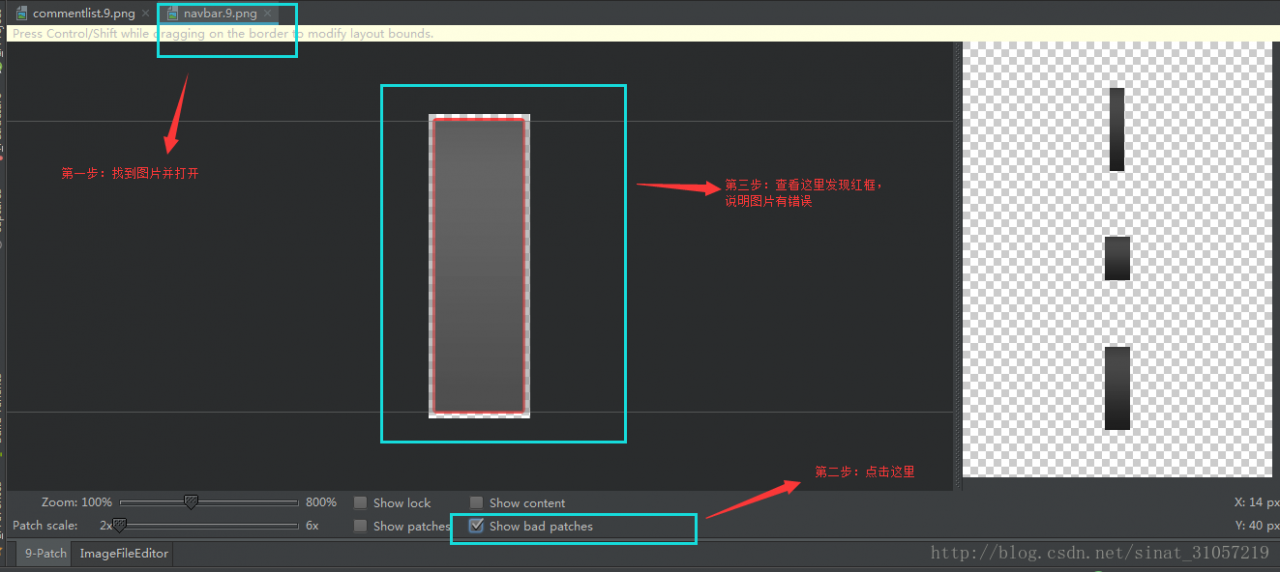
In the above error log, we know which 9-patch images are problematic, and then find them one by one. The operation is as follows:

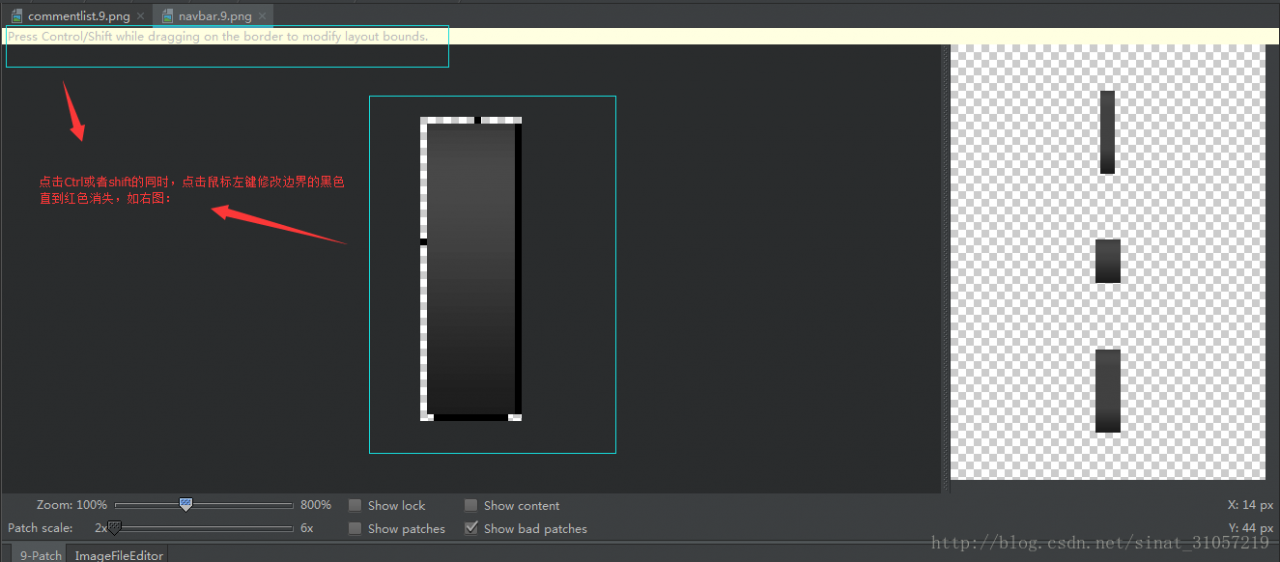
Hold down Ctrl or shift, click the left mouse button, and adjust the black part on the boundary pixel until we need the area and do not report an error.

After the completion of sync, clean it.

2. Add 9-patch ignore:

If there are any problems, please click build.gradle Add Android studio and ignore the check of 9-patch

    aaptOptions {
        cruncherEnabled = false
        useNewCruncher = false
    }

As follows:

apply plugin: 'com.android.application'

android {
    compileSdkVersion 25
    buildToolsVersion '25.0.3'

    aaptOptions {
        cruncherEnabled = false
        useNewCruncher = false
    }

    packagingOptions {
        exclude 'META-INF/LICENSE'
        exclude 'META-INF/DEPENDENCIES'
        exclude 'META-INF/ASL2.0'
    }

    defaultConfig {
        applicationId "com.example.administrator.njb"
        minSdkVersion 15
        targetSdkVersion 22
        versionCode 1
        versionName "1.0"
        testInstrumentationRunner "android.support.test.runner.AndroidJUnitRunner"
    }
    buildTypes {
        release {
            minifyEnabled false
            proguardFiles getDefaultProguardFile('proguard-android.txt'), 'proguard-rules.pro'
        }
    }
}

dependencies {
    compile fileTree(include: ['*.jar'], dir: 'libs')
    androidTestCompile('com.android.support.test.espresso:espresso-core:2.2.2', {
        exclude group: 'com.android.support', module: 'support-annotations'
    })
    compile 'com.android.support:appcompat-v7:25.3.1'
    compile 'com.android.support.constraint:constraint-layout:1.0.2'
    testCompile 'junit:junit:4.12'
}

Tensorflow tf.train.exponential_ Decay function (exponential decay method)

one

In tensorflow, exponential decay method is provided to solve the problem of setting learning rate.

adopt tf.train.exponential_ The decay function realizes the exponential decay learning rate.

Steps: 1. First, use a larger learning rate (purpose: to get a better solution quickly);

Secondly, the learning rate is gradually reduced by iteration;

Code implementation:

[html]

view plain

copy

    decayed_ learning_ rate=learining_ rate*decay_ rate^(global_ step/decay_ steps)  

Among them, decayed_ learning_ Rate is the learning rate used in each round of optimization;

           learning_ Rate is the preset initial learning rate;

           decay_ Rate is the attenuation coefficient;

           decay_ Steps is the decay rate.

and tf.train.exponential_ For the decay function, you can use the stair case (the default value is false; when it is true, the global_ step/decay_ Steps) are converted to integers, and different attenuation methods are selected.

Code example:

[html]

view plain

copy

    global_ step =  tf.Variable (0)    learning_ rate =  tf.train.exponential_ decay(0.1, global_ Step, 100, 0.96, stair case = true) # generating learning rate # learning_ step =  tf.train.GradientDescentOptimizer (learning_ rate).minimize(….., global_ step=global_ Step) # use exponential decay learning rate

learning_ Rate: 0.1; stair case = true; then multiply by 0.96 after every 100 rounds of training

Generally, the setting of initial learning rate, attenuation coefficient and attenuation speed is subjective (i.e. empirical setting), while the decreasing speed of loss function is not necessarily related to the loss after iteration,

So the effect of neural network can’t be compared by the falling speed of loss function in previous rounds.

two

tf.train.exponential_ decay(learning_ rate, global_ , decay_ steps, decay_ rate, staircase=True/False)

For example:

[python]

view plain

copy

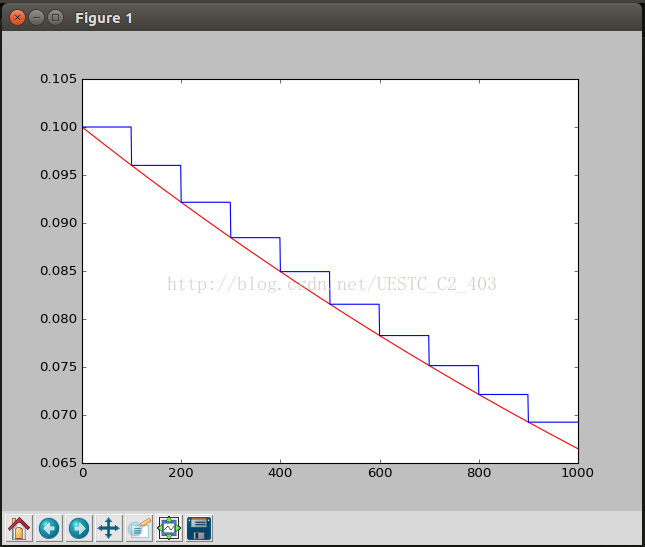
    import tensorflow as tf;  import numpy as np;  import  matplotlib.pyplot  as plt;    learning_ rate = 0.1  decay_ rate = 0.96  global_ steps = 1000  decay_ steps = 100    global_  =  tf.Variable ( tf.constant (0))  c =  tf.train.exponential_ decay(learning_ rate, global_ , decay_ steps, decay_ rate, staircase=True)  d =  tf.train.exponential_ decay(learning_ rate, global_ , decay_ steps, decay_ rate, staircase=False)    T_ C = []  F_ D = []    with  tf.Session () as sess:      for i in range(global_ steps):          T_ c =  sess.run (c,feed_ dict={global_ : i})          T_ C.append(T_ c)          F_ d =  sess.run (d,feed_ dict={global_ : i})          F_ D.append(F_ d)       plt.figure (1)   plt.plot (range(global_ steps), F_ D, ‘r-‘)   plt.plot (range(global_ steps), T_ C, ‘b-‘)         plt.show ()  

Analysis:

The initial learning rate is 0.1, and the total number of iterations is 1000. If stair case = true, it means every decade_ Steps calculates the change of learning rate and updates the original learning rate. If it is false, it means that each step updates the learning rate. Red means false and green means true.

results:

UIStackView before iOS 9.0

A friend encountered a problem today " uistackview before IOS 9.0 "

This is because uistackview cannot be used under IOS 9. The solution is stack flow

Check inProject Targets-> Deployment info -> Deployment Target.If it’s not 9.0 change it to 9.0. 

You need to change the deployment target of your application’s target to iOS 9. Otherwise the app supports down to whatever OS that your deployment target is set to. 

Not solved?? Check out for other reason??? Check this:

If your Deployment target is already set to 9.0 and you still get this error then try then check your project File inspector-> Project Document -> Project Format and check if its Xcode-6.3-compatible or not.If its not then set it to Xcode-6.3-compatible.

The other reason is may be you accidentally add UIStackView and thats why you encounter the problem. UIStackView supports 9.0 and later and your deployment target doesn’t allow that. So just check if you accidentally add UIStackView and if you added and you don’t want it than just remove it.

2. To use uistackview under IOS, someone has mined this method.

Why can I use uistackview under IOS 9 through fdstackview

error C4996: ‘scanf‘: This function or variable may be unsafe.Visual Studio Series compilers report errors using scanf function

When vs2017 writes C code, it appears:
error c4996: ‘scanf’: this function or variable may be unsafe. Consider using scanf_ s instead. To disable deprecation, use _ CRT_ SECURE_ NO_ Error in warnings. See online help for details.

Solution: add # define at the top of the. Cpp file_ CRT_ SECURE_ NO_ WARNINGS 10 。

UE4 Package Failed

UE4 package failed, and the last prompt is “error unknown cook failure”

What’s the reason? Look up the error from the beginning of the log. The suspicious errors found at the beginning are as follows:

MainFrameActions: Packaging (Windows (64-bit)): UE4Editor-Cmd: [2016.05.27-13.42.02:613][  0] LogCook:Display : Cooking /Engine/Functions/Engine_ MaterialFunctions02/Texturing/ScreenAlignedPixelToPixelUVs -> E:/work/Viba/trunk/UnrealEngine-4.10/ShooterGame/Saved/Cooked/WindowsNoEditor/Engine/Content/Functions/Engine_ MaterialFunctions02/Texturing/ScreenAl ignedPixelToPixelUVs.uasset
MainFrameActions: Packaging (Windows (64-bit)): UE4Editor-Cmd: [2016.05.27-13.42.02:615][  0]LogSa vePackage:Display : Finished SavePackage E:/work/Viba/trunk/UnrealEngine-4.10/ShooterGame/Saved/Cooked/WindowsNoEditor/Engine/Content/Functions/Engine_ MaterialFunctions02/Texturing/ScreenAl ignedPixelToPixelUVs.uasset
MainFrameActions: Packaging (Windows (64-bit)): UE4Editor-Cmd: [2016.05.27-13.42.02:616][  0] LogLinker:Warning : Unable to load package (../../../ShooterGame/Content/RestrictedAssets/PhysicalMaterials/PhysMat_ Metal.uasset ) PackageVersion 493, MaxExpected 482 : LicenseePackageVersion 0, MaxExpected 0.
MainFrameActions: Packaging (Windows (64-bit)): UE4Editor-Cmd: [2016.05.27-13.42.02:616][  0]Co okResults:Warning : Warning Package /Game/RestrictedAssets/PhysicalMaterials/PhysMat_ Metal supposed to be fully loaded but isn’t. RF_ WasLoaded is not set
MainFrameActions: Packaging (Windows (64-bit)): UE4Editor-Cmd: [2016.05.27-13.42.02:617][  0] LogCook:Warning : Package /Game/RestrictedAssets/PhysicalMaterials/PhysMat_ Metal supposed to be fully loaded but isn’t. RF_ WasLoaded is not set
MainFrameActions: Packaging (Windows (64-bit)): UE4Editor-Cmd: [2016.05.27-13.42.02:617][  0] LogCook:Display : Cooking /Game/RestrictedAssets/PhysicalMaterials/PhysMat_ Metal -> E:/work/Viba/trunk/UnrealEngine-4.10/ShooterGame/Saved/Cooked/WindowsNoEditor/ShooterGame/Content/RestrictedAssets/PhysicalMaterials/PhysMat_ Metal.uasset
Packagi ngResults:Warning : Warning Warning Package /Game/RestrictedAssets/PhysicalMaterials/PhysMat_ Metal supposed to be fully loaded but isn’t. RF_ WasLoaded is not set
MainFrameActions: Packaging (Windows (64-bit)): UE4Editor-Cmd: [2016.05.27-13.42.02:617][  0]L ogWindows:Error : Windows GetLastError: operation completed successfully. (0)
MainFrameActions: Packaging (Windows (64-bit)): UE4Editor-Cmd: [2016.05.27-13.45.13:425][  0]LogOut putDevice:Error : 
MainFrameActions: Packaging (Windows (64-bit)): UE4Editor-Cmd: begin: stack for UAT
MainFrameActions: Packaging (Windows (64-bit)): UE4Editor-Cmd: [2016.05.27-13.45.13:425][  0]L ogWindows:Error : === Critical error: ===
MainFrameActions: Packaging (Windows (64-bit)): UE4Editor-Cmd: 
MainFrameActions: Packaging (Windows (64-bit)): UE4Editor-Cmd: Fatal error!
MainFrameActions: Packaging (Windows (64-bit)): UE4Editor-Cmd: 
MainFrameActions: Packaging (Windows (64-bit)): UE4Editor-Cmd: KERNELBASE.dll
MainFrameActions: Packaging (Windows (64-bit)): UE4Editor-Cmd: 
MainFrameActions: Packaging (Windows (64-bit)): UE4Editor-Cmd: UE4Editor- Core.dll !FOutputDeviceWindowsError::Serialize() [e:\work\viba\trunk\unrealengine-4.

The fatal error in the red letter doesn’t explain the specific reason. Continue to look up and see that “the operation is completed successfully”. Don’t be confused by this. Continue to look up and find that one is just packing output, but packing it to the file physmat_ Metal stops, continues the file, and finds that the file can’t be seen in the editor, but exists in the folder. The original file has been covered by an error. Just restore it to the previous version.


In some cases, one of the above knowledge may be the problem of cook, such as the following example:

MainFrameActions: ´ò°ü (Windows (64λ)): UE4Editor-Cmd: [2016.11.25-07.42.11:776][  0]LogOut putDevice:Error : 
MainFrameActions: ´ò°ü (Windows (64λ)): UE4Editor-Cmd: begin: stack for UAT
MainFrameActions: ´ò°ü (Windows (64λ)): UE4Editor-Cmd: [2016.11.25-07.42.11:776][  0]L ogWindows:Error : === Critical error: ===
MainFrameActions: ´ò°ü (Windows (64λ)): UE4Editor-Cmd: 
MainFrameActions: ´ò°ü (Windows (64λ)): UE4Editor-Cmd: Fatal error!
MainFrameActions: ´ò°ü (Windows (64λ)): UE4Editor-Cmd: 
MainFrameActions: ´ò°ü (Windows (64λ)): UE4Editor-Cmd: [2016.11.25-07.42.11:777][  0]LogOut putDevice:Error : 
MainFrameActions: ´ò°ü (Windows (64λ)): UE4Editor-Cmd: end: stack for UAT
MainFrameActions: ´ò°ü (Windows (64λ)): UE4Editor-Cmd: [2016.11.25-07.42.13:768][  0]L ogShaders:Display : Finished batch of 10 jobs in 3.173s, TShadowDepthVSForGSVertexShadowDepth_ OutputDepthfalse Instructions = 100, TShadowDepthVSVertexShadowDepth_ OutputDepthfalse Instructions = 100, TShadowDepthVSForGSVertexShadowDepth_ PerspectiveCorrectfalse Instructions = 9
8, TShadowDepthVSVertexShadowDepth_ PerspectiveCorrectfalse Instructions = 98, FOnePassPointShadowProjectionGS Instructions = 64, FHitProxyPS Instructions = 72, FHitProxyVS Instructions = 93, TLightMapDensityPSFNoLightMapPolicy Instructions = 98, TLightMapDensityVSFNoLightMapPolicy Instructions = 93, FDepthOnlyPS Instructions = 72
MainFrameActions: ´ò°ü (Windows (64λ)): UE4Editor-Cmd: [2016.11.25-07.42.13:769][  0]L ogShaders:Display : Finished batch of 10 jobs in 2.885s, DepthNoPixelPipeline, FVertexDensityPS Instructions = 87, FVertexDensityGS Instructions = 55, FVertexDensityVS Instructions = 66, FVelocityPS Instructions
MainFrameActions: ´ò°ü (Windows (64λ)):  = 78, FVelocityVS Instructions = 103, TShadowDepthPSPixelShadowDepth_ OnePassPointLightfalse Instructions = 67, TShadowDepthPSPixelShadowDepth_ PerspectiveCorrectfalse Instructions = 68, TShadowDepthPSPixelShadowDepth_ NonPerspectiveCorrectfalse Instructions = 67, TShadowDepthVSForGSVertexShadowDepth_ OnePassPointLightfalse
 Instructions = 65
MainFrameActions: ´ò°ü (Windows (64λ)): CommandUtils.Run : Run: Took 719.6181598s to run UE4Editor- Cmd.exe , ExitCode=3
MainFrameActions: ´ò°ü (Windows (64λ)): Project.Cook : Cook failed. Deleting cooked data.
MainFrameActions: ´ò°ü (Windows (64λ)): Program.Main : ERROR: AutomationTool terminated with exception: AutomationTool.AutomationException : Cook failed. —> AutomationTool.AutomationException : BUILD FAILED: Failed while running Cook for E:\Work\FPS\UnrealEngine-VXGI-4.12\ShooterGame\ShooterGame.
MainFrameActions: ´ò°ü (Windows (64λ)): uproject; see log E:\Work\FPS\UnrealEngine-VXGI-4.12\Engine\Programs\AutomationTool\Saved\Logs\Cook-2016.11.25-15.44.05.txt
MainFrameActions: ´ò°ü (Windows (64λ)):    ÔÚ AutomationTool.CommandUtils.RunCommandlet (FileReference ProjectName, String UE4Exe, String Commandlet, String Parameters) λÖà E:\Work\FPS\UnrealEngine-VXGI-4.12\Engine\Source\Programs\AutomationTool\AutomationUtils\ CommandletUtils.cs :ÐкŠ359
MainFrameActions: ´ò°ü (Windows (64λ)):    ÔÚ Project.Cook (ProjectParams Params) λÖà e:\Work\FPS\UnrealEngine-VXGI-4.12\Engine\Source\Programs\AutomationTool\Scripts\ CookCommand.Automation.cs :ÐкŠ24
MainFrameActions: ´ò°ü (Windows (64λ)):    — ÄÚ²¿Òì³£¶ÑÕ»¸ú×ٵĽáβ —
MainFrameActions: ´ò°ü (Windows (64λ)):    ÔÚ Project.Cook (ProjectParams Params) λÖà e:\Work\FPS\UnrealEngine-VXGI-4.12\Engine\Source\Programs\AutomationTool\Scripts\ CookCommand.Automation.cs :ÐкŠ262
MainFrameActions: ´ò°ü (Windows (64λ)):    ÔÚ BuildCookRun.DoBuildCookRun (ProjectParams Params) λÖà e:\Work\FPS\UnrealEngine-VXGI-4.12\Engine\Source\Programs\AutomationTool\Scripts\ BuildCookRun.Automation.cs :ÐкŠ212
MainFrameActions: ´ò°ü (Windows (64λ)):    ÔÚ AutomationTool.BuildCommand.Execute () λÖà E:\Work\FPS\UnrealEngine-VXGI-4.12\Engine\Source\Programs\AutomationTool\AutomationUtils\ BuildCommand.cs :ÐкŠ28
MainFrameActions: ´ò°ü (Windows (64λ)):    ÔÚ AutomationTool.Automation.Execute (List`1 CommandsToExecute, CaselessDictionary`1 Commands) λÖà E:\Work\FPS\UnrealEngine-VXGI-4.12\Engine\Source\Programs\AutomationTool\AutomationUtils\ Automation.cs :ÐкŠ538
MainFrameActions: ´ò°ü (Windows (64λ)):    ÔÚ AutomationTool.Automation.Process (String[] CommandLine) λÖà E:\Work\FPS\UnrealEngine-VXGI-4.12\Engine\Source\Programs\AutomationTool\AutomationUtils\ Automation.cs :ÐкŠ509
MainFrameActions: ´ò°ü (Windows (64λ)):    ÔÚ AutomationTool.Program.MainProc (Object Param) λÖà E:\Work\FPS\UnrealEngine-VXGI-4.12\Engine\Source\Programs\AutomationTool\ Program.cs :ÐкŠ131
MainFrameActions: ´ò°ü (Windows (64λ)):    ÔÚ AutomationTool.InternalUtils.RunSingleInstance (Func`2 Main, Object Param) λÖà E:\Work\FPS\UnrealEngine-VXGI-4.12\Engine\Source\Programs\AutomationTool\AutomationUtils\ Utils.cs :ÐкŠ704
MainFrameActions: ´ò°ü (Windows (64λ)):    ÔÚ AutomationTool.Program.Main () λÖà E:\Work\FPS\UnrealEngine-VXGI-4.12\Engine\Source\Programs\AutomationTool\ Program.cs :ÐкŠ54
MainFrameActions: ´ò°ü (Windows (64λ)): Program.Main : AutomationTool exiting with ExitCode=25 (Error_ UnknownCookFailure)
MainFrameActions: ´ò°ü (Windows (64λ)): Domain_ ProcessExit
MainFrameActions: ´ò°ü (Windows (64λ)): AutomationToolLauncher exiting with ExitCode=25
MainFrameActions: ´ò°ü (Windows (64λ)): copying UAT log files…
MainFrameActions: ´ò°ü (Windows (64λ)): BUILD FAILED
Packagi ngResults:Error : ´íÎó Unknown Cook Failure

Pay attention to the part marked red in the log. You need to go to the log file cook-2016.11.25-15.44.05.txt to check the original contents of the specific cook

Unity Component.isActiveAndEnabled Analysis of exact meaning

The following results are the test conclusions.

Isactive in hierachy is equivalent to whether a GameObject is active or not, which is the same as a simple understanding.

Isactive andenabled requires three conditions:

The isactiveinheerachy of

    GameObject is true, and onenable
is being or has been called

So:

    in onenable of a script, isactive andenabled is always true. In ondisable of a script, isactive andenabled is always false


Test example: place a GameObject in the scene and two scripts below. Set GameObject and scripts to be active. In the process of running the scenario, in the script that calls onenable first, you can find that your isactive andenabled is true, but another script’s isactive andenabled is false.

So: there is no script to call onenable, though gameObject.isActiveInHierachy Is true, and enabled is true, but isactive andenabled is false.


A solution to the problem of “straight ‘\ 357’ in program” when compiling GCC

Link: http://blog.chinaunix.net/uid-23089249-id-61541.html

I took a few header files from my colleagues. It’s OK to compile them with GCC, but there are a lot of them when I compile them with arm linux GCC!

SerialPort.h:1: error: stray ‘\357’ in program

SerialPort.h:1: error: stray ‘\273’ in program

SerialPort.h:1: error: stray ‘\277’ in program

After looking at these errors, I found that some characters in the file are not supported by the compiler. If you look for these characters one by one, it will take a long time! The simplest solution:

Put the files in the windows system, open these files with Notepad, and then save them as. The code is Asni, and then compile them with the compiler under Linux. Generally, they can pass!

Experience:

The first time: unknown;

Second time: when compiling QT program, prompt this error; solve it according to the above method.

Solutions for faithfully yours, nginx

Today, as always, I opened the web page. At first, there was nothing wrong with it, and then it suddenly appeared:

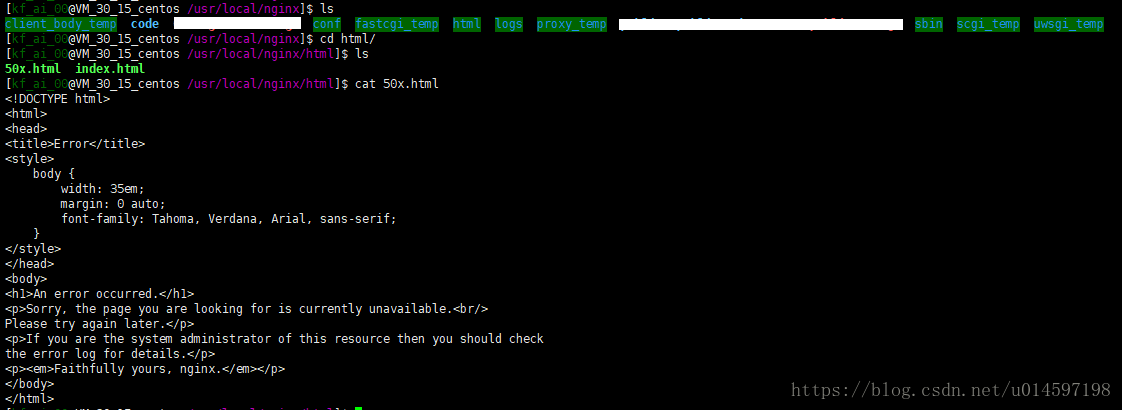
An error occurred.

Sorry, the page you are looking for is currently unavailable.
Please try again later.

If you are the system administrator of this resource then you should check the error log for details.
Faithfully yours, nginx.

Is it a familiar mistake?

Check out the error page of nginx.

This 50x. Html is found to be the error on the web page.

Then check the port
through the command: netstat – tnlp to view the opened TCP port.
Found that the 9000 port PHP is not on.
Then restart the PHP service, and the problem is solved.