Category Archives: How to Fix

dfs.namenode.name . dir and dfs.datanode.data .dir dfs.name.dir And dfs.data.dir What do you mean

dfs.namenode.name . dir and dfs.datanode.data What are the. Dir directories?
dfs.namenode.name . dir and dfs.datanode.data What are the. Dir directories? What’s the effect? Can we find the location of files or directories in the HDFS file system in the local file system?
Can we find the location of a specific file or directory in the HDFS file system in the above two directories of the local file system? Is there a one-to-one mapping relationship?
dfs.namenode.name . dir is the directory to save the fsimage image image, which is used to store the metadata in the namenode of Hadoop; dfs.datanode.data . dir is the directory where HDFS file system data files are stored. It is used to store multiple data blocks in the datanode of Hadoop.
According to HDFS- site.xml In the local file system, dfs.namenode.name The corresponding directory of. Dir is file / usr / local / Hadoop / TMP / DFs / name, dfs.datanode.data The corresponding directory of. Dir is file / usr / local / Hadoop / TMP / DFs / data.
There is no one-to-one pairing between files or directories in HDFS file system and files or directories in local Linux system

dfs.name.dir

Determines where on the local filesystem the DFS name node should store the name table(fsimage). If this is a comma-delimited list of directories then the name table is replicated in all of the directories, for redundancy.

This parameter is used to determine the directory where the meta information of HDFS file system is stored.

If this parameter is set to multiple directories, multiple copies of meta information are stored in these directories.

For example:

<property>
    <name> dfs.name.dir&lt ;/name>
    <value>/pvdata/hadoopdata/name/,/opt/hadoopdata/name/</value>
</property>

dfs.data.dir  

Determines where on the local filesystem an DFS data node should store its blocks. If this is a comma-delimited list of directories, then data will be stored in all named directories, typically on different devices. Directories that do not exist are ignored.

This parameter is used to determine the directory where the data of HDFS file system is stored.

We can set this parameter to the directory on multiple partitions, that is, we can build HDFS on different partitions.

For example:

<property>
    <name> dfs.data.dir&lt ;/name>
    <value>/dev/sda3/hadoopdata/,/dev/sda1/hadoopdata/</value>
</property>

How to deal with the data node after formatting the file system many times, Namenode can’t start
1. Problem description
when I format the file system many times, such as
2 root@localhost : / usr / local / hadoop-1.0.2 ᦇ bin / Hadoop namenode – Format
the datanode cannot be started. Check the log and find that the error is:
2012-04-20 20:39:46, 501 ERROR org.apache.hadoop . hdfs.server.datanode .DataNode: java.io.IOException : Incompatible namespaceIDs in /home/gqy/hadoop/data: namenode namespaceID = 155319143; Datanode namespaceid = 1036135033
2. The cause of the problem
when we perform file system formatting, it will be in the namenode data folder (that is, in the configuration file) dfs.name.dir Save a current / version file in the path of the local system, record the namespaceid, and identify the version of the formatted namenode. If we format the namenode frequently, we can save it in the datanode (that is, in the configuration file) dfs.data.dir The current / version file in the path of the local system is just the ID of the namenode that you saved when you first formatted it. Therefore, the ID between the datanode and the namenode is inconsistent.
3、 Solution
put the configuration file in the dfs.datadir Change the namespaceid in current / version in the path of the local system to the same as namenode

LeetCode 332. Reconstruct Itinerary

Given a list of airline tickets represented by pairs of departure and arrival airports [from, to], reconstruct the itinerary in order. All of the tickets belong to a man who departs from JFK. Thus, the itinerary must begin with JFK.
idea:
we have a list of edges, each node pair represents for [from, to]. and that are the series of tickets
and we know that the journel starts with JFK, we need to resort it and return with the nodes in order.
example:
Input: [[“JFK”,“SFO”],[“JFK”,“ATL”],[“SFO”,“ATL”],[“ATL”,“JFK”],[“ATL”,“SFO”]]
Output: [“JFK”,“ATL”,“JFK”,“SFO”,“ATL”,“SFO”]
Explanation: Another possible reconstruction is [“JFK”,“SFO”,“ATL”,“JFK”,“ATL”,“SFO”].
But it is larger in lexical order.
there are four instructions:
1 If there are multiple valid itineraries, you should return the itinerary that has the smallest lexical order when read as a single string. For example, the itinerary [“JFK”, “LGA”] has a smaller lexical order than [“JFK”, “LGB”].
2 All airports are represented by three capital letters (IATA code).
3 You may assume all tickets form at least one valid itinerary.
4 One must use all the tickets once and only once.

public List<String> findItinerary(List<List<String>> tickets)

I’m still trying to solve this using BFS, each time I only choose one neighbor to go, the one with smallest lexi order. so it’s bascally dfs but I’m too lazy to even think about how to write this in dfs.
but sadly, it’s MLE

class Solution {
    public List<String> findItinerary(List<List<String>> tickets) {
        HashMap<String, List<String>> map = new HashMap<>();
        
        for (List<String> ticket: tickets) {
            map.computeIfAbsent(ticket.get(0), k -> new ArrayList<>());
            map.get(ticket.get(0)).add(ticket.get(1));
        }
        // we will using bfs but each time we only go with negihbor with minimum lexi, although for situations like this, it's better for us to implement dfs instead of bfs
        Queue<String> queue = new LinkedList<>();
        queue.offer("JFK");
        List<String> res = new ArrayList<>();
        res.add("JFK");
        //i don;t think visited will be useful, because we might revisited previous node, like we might need to return the JFK again in example
        while (!queue.isEmpty()) {
            String cur = queue.poll();
            if (!map.containsKey(cur)) { //we neeed to check if map contains this key in case it is the last one
                break;
            }
            int size = map.get(cur).size();
            String min = "ZZZ";
            for (int i = 0; i < size; i++) {
                if (map.get(cur).get(i).compareTo(min) < 0) {
                    min = map.get(cur).get(i);
                }
            }
            queue.offer(min);
            res.add(min);
        }
        return res;
    }
}

So we using DFS:
/ / why can DFS guarantee to travel all the edges and only once?

class Solution {
    public List<String> findItinerary(List<List<String>> tickets) {
        HashMap<String, PriorityQueue<String>> map = new HashMap<>();
        
        for (List<String> ticket: tickets) {
            map.computeIfAbsent(ticket.get(0), k -> new PriorityQueue<>()).add(ticket.get(1));
        }
        List<String> route = new LinkedList<>();
        dfs(map, route, "JFK"); 
        return route;
    }
    
    private void dfs(HashMap<String, PriorityQueue<String>> map, List<String> route, String node) {
        while (map.containsKey(node) && !map.get(node).isEmpty()) { //if we can move forward 
            dfs(map, route, map.get(node).poll());
        }
        route.add(0, node); //alwatys added to the head of this route list
    }
}

Of course, we can write DFs in an iterative way

public List<String> findItinerary(String[][] tickets) {
    Map<String, PriorityQueue<String>> targets = new HashMap<>();
    for (String[] ticket : tickets)
        targets.computeIfAbsent(ticket[0], k -> new PriorityQueue()).add(ticket[1]);
    List<String> route = new LinkedList();
    Stack<String> stack = new Stack<>();
    stack.push("JFK");
    while (!stack.empty()) {
        while (targets.containsKey(stack.peek()) && !targets.get(stack.peek()).isEmpty())
            stack.push(targets.get(stack.peek()).poll());
        route.add(0, stack.pop());
    }
    return route;
}

Unity bug solution — invalid AABB inaabb

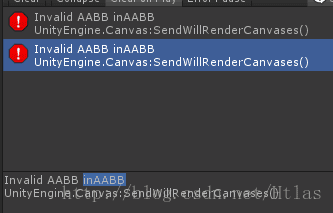
Invalid AABB inAABB UnityEngine.Canvas Solution to: sendwillrendercanvases()

Today, I wrote such a Bug. It’s amazing that where the code went wrong, it didn’t get in. It’s been a long time since we found out that the reason for bug is that when dividing the division, the divisor is 0. So when the next old fellow is confronted with such a situation, we can find out whether the divisor is 0 when doing division operations.

Android supportsrtl properties

Android studio comes with new projects android:supportsRtl This property.  

This property states whether your application is willing to support right to left layout.

If it is set to true and targetsdkversion is set to 17 or higher, various RTL APIs will be activated, and the system can display RTL layout using your application. If it is set to false, or targetsdkversion is 16 or lower, the RTL API will be ignored or the application will not be affected (your layout will be from left to right). The default value for this property is false. This property is added to API 17.

How to use Android android:supportsRtl attribute

Today, let’s talk about how to use Android

In the Android manifest file android:supportsRtl Property.


Previously, I found a problem on the app, that is, when the app is set to Arabic, the default layout direction of the mobile phone changes from right to left, resulting in a big problem in the interface. Later, by modifying the layout, some problems of the interface were solved, but the interface was not very good-looking when it was displayed from right to left. So I opened the app, and found that the app’s interface was normally arranged from left to right. So looking for information on the Internet, we found that android:supportsRtl Attribute, which finally solves this problem. Record it here.

Since Android 4.2, the Android SDK supports a right to left (RTL) UI layout, although this layout is often used in environments such as Arabic and Hebrew, and rarely used by Chinese users. However, it is very convenient for some special uses.

This is the official website, right android:supportsRtl The English is not very good, can only use the tool and own understanding translation

Link to the original text of the official website: http://developer.android.com/intl/zh-cn/guide/topics/manifest/application-element.html

android:supportsRtl

Declares whether your application is willing to support right-to-left (RTL) layouts.

If set to true and targetSdkVersion is set to 17 or higher, various RTL APIs will be activated and used by the system so your app can display RTL layouts. If set to false or if targetSdkVersion is set to 16 or lower, the RTL APIs will be ignored or will have no effect and your app will behave the same regardless of the layout direction ass ociated to the user’s Locale choice (your layouts will always be left-to-right).

The default value of this attribute is false.

This attribute was added in API level 17.

State whether your application is willing to support right to left layout.

If it is set to true and targetsdkversion is set to 17 or higher, various RTL APIs will be activated, and the system can display RTL layout using your application. If targetsdkversion is set to 16 or lower and set to false, the RTL API will be ignored or not affected, and your application will have the same behavior regardless of the layout direction related to user site selection (your layout will be from left to right).
The default value for this property is false.

This property is added to API 17.

The last sentence also says that this API is only available after 17 (that is, Android 4.2), and this attribute is false by default. APIs before 17 do not support this attribute.

What the hell is this right to left layout.

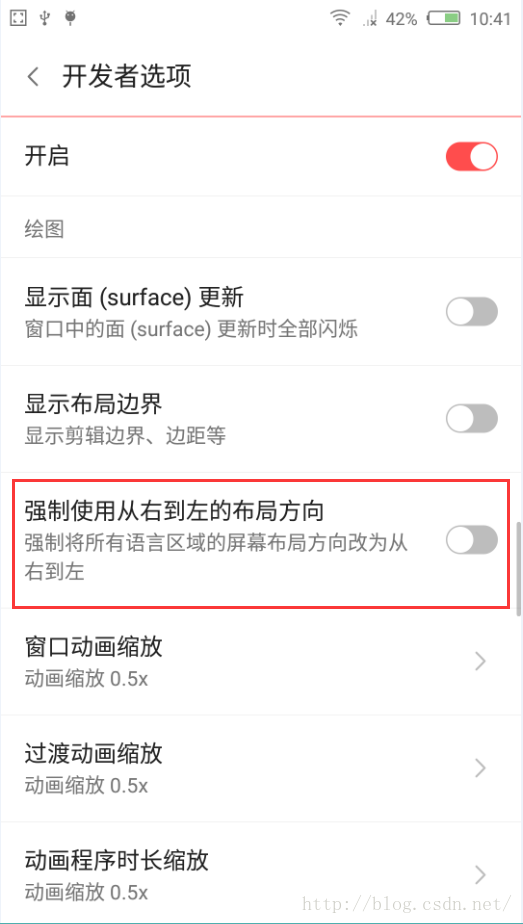
Frequent users should have found that in the settings – Developer option, there is a mandatory right to left layout direction, as shown in the figure

Since there is such a thing, open it and have a look

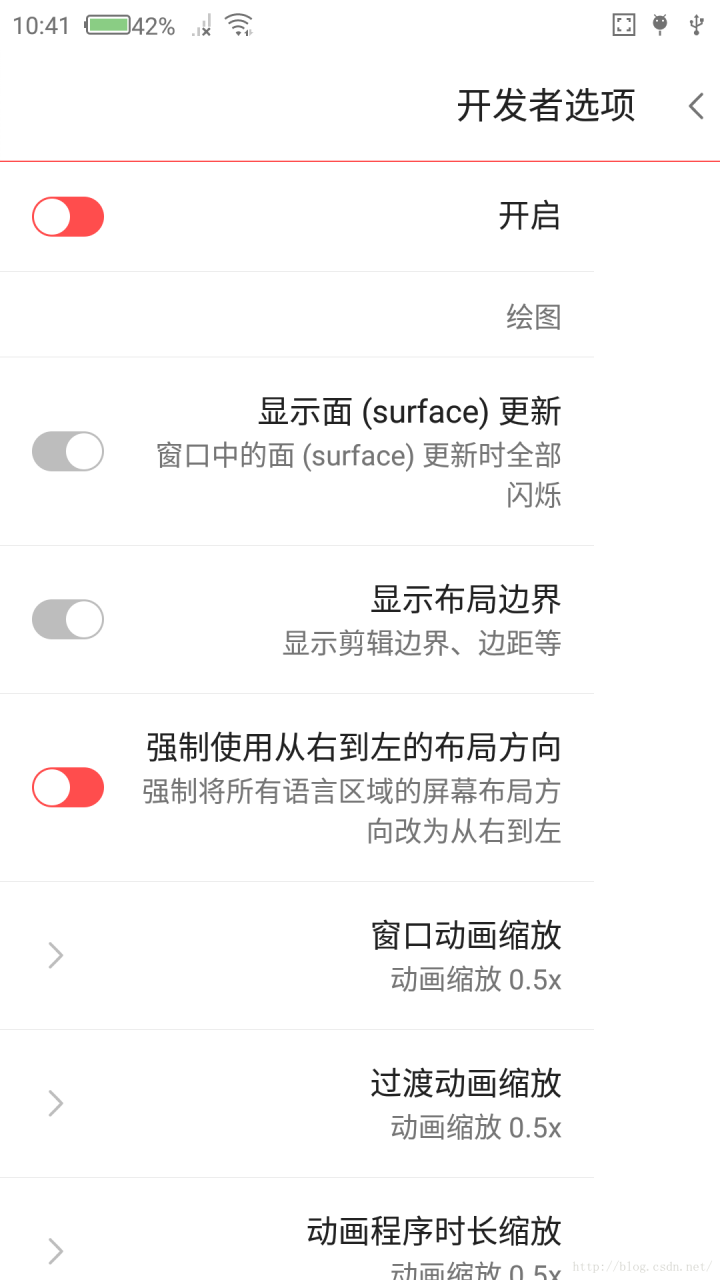
When it is turned on, the text on the left is put on the right, and the switch on the right is put on the left. When you see this, you can understand the meaning of this attribute

To prove this property, try a demo again

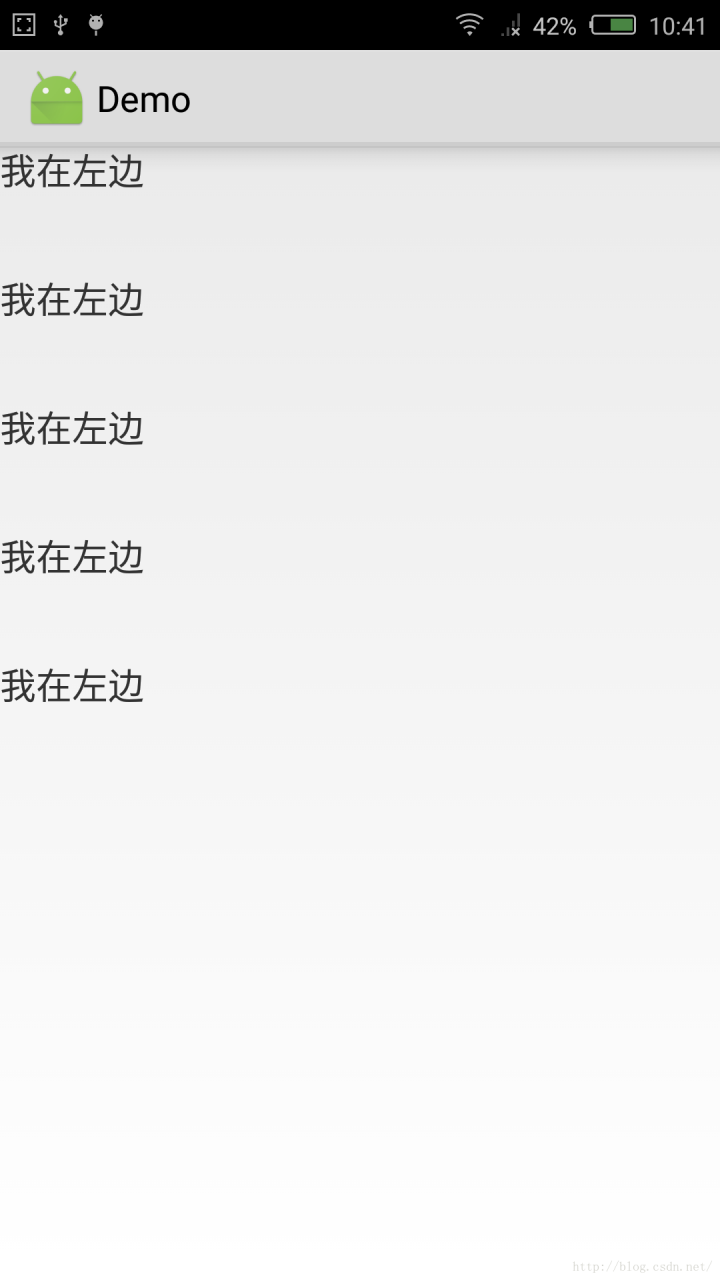
When android:supportsRtl When it is false, the layout of the app will not change even if the mobile phone is forced from right to left, as shown in the figure

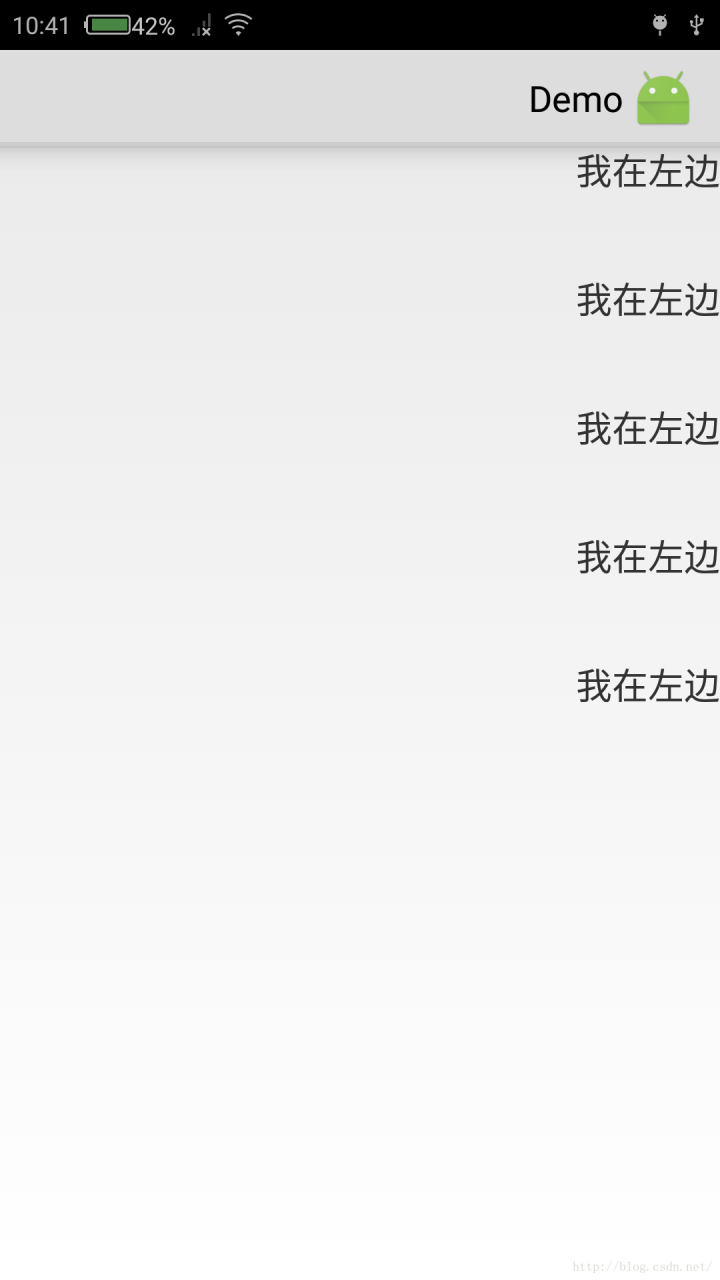
When android:supportsRtl When it is true, and the mobile phone also turns on the forced right to left switch, the layout will be arranged from right to left, as shown in the figure

If you want to use RTL layout, you should also pay attention to an important issue. Suppose there are two & lt; textview & gt; tags in a horizontal linear layout: textview1 and textview2. Textview1 is located in the upper left corner of the window, while textvew2 is on the right side of textview1. The distance to textview1 is 100dp. It’s actually the distance from the left edge of textview2 to the right edge of textview1. If the current layout mode is the default (LTR, left to right), you only need to change textview2’s android:layout_ Set the value of the marginleft property to “100dp”. However, this is the opposite in RTL layout. In RTL layout, textview1 is in the upper right corner of the window, while textview2 runs to the left of textview1, so the distance from textview2 to textview1 actually becomes the distance from the right edge of textview2 to the left edge of textview1. Therefore, textview2 should be set android:layout_ This will cause confusion of UI arrangement in RTL and LTR layout modes. To solve this problem, the following two layout properties are added in Android 4.2.

android:layout_ Marginstart: if in LTR layout mode, this attribute is equivalent to android:layout_ marginLeft。 In RTL layout mode, this attribute is equivalent to android:layout_ marginRight。

android:layout_ Marginend: if in LTR layout mode, this attribute is equivalent to android:layout_ marginRight。 In RTL layout mode, this attribute is equivalent to android:layout_ marginLeft。

In short, actually android:supportsRtl Property indicates whether the app supports right-to-left layout. If this property is false by default, the app will not have right-to-left layout in any case. If this property is set to true by default and targetsdkversion is set to 17 or higher, the layout of the mobile phone will be changed from right to left automatically in Arabic, Hebrew and other environments. Actually, I am android:supportsRtl= “False” solves the problem from right to left.

How to use Android android:supportsRtl That’s it.

It’s that simple.

Alibaba cloud builds FTP server 200 port command successful. Consider using PASV. 425 failed to establish connection

Alibaba cloud CentOS FTP server configures FTP in passive mode and reports an error
200 port command successful. Consider using PASV. 425 failed to establish connection

Answer:
you are using FTP in active mode.

Due to firewall and NAT, it may be troublesome to set up FTP in active mode nowadays.

The server may not be able to connect back to the client to establish a data transfer connection, which may be due to your local firewall or NAT.

Or your client does not know its external IP address, but provides an internal address to the server (in the
port
command), and the server obviously cannot use the internal address. But this is not the case, because vsftpd refuses the source address (
port) of FTP control connection by default_ Promiscuous
instruction).

Please refer to my article “active mode network configuration”.

If possible, you should use passive mode, as it usually does not require other settings on the client side. This is what the server suggests to you through “consider PASV.”. This
PASV
is the FTP command used to enter passive mode.

Unfortunately, the windows FTP command line client (
0 ftp.exe
)Passive mode is not supported at all. Now, it’s useless.

Please use any other third party windows FTP command line client instead. Most others support passive mode.

For example, the winscp FTP client defaults to passive mode, and provides guidelines for converting windows FTP scripts to winscp scripts.

(I’m the author of winscp)

Answer:
in fact, your window firewall blocks the connection, so you need to enter these commands from the administrator cmd.exe .

1) Netsh advfirewall add rule name = “FTP” dir = executing = allow program =% systemroot% \ \ system32\ ftp.exe Enable = yes protocol = TCP

2) Netsh advfirewall add rule name = “FTP” dir = executing = allow program =% systemroot% \ \ system32\ ftp.exe Enable = yes protocol = UDP

If something goes wrong, you can recover in the following ways:

1) Netsh advfirewall delete rule name = “FTP” program =% systemroot% \ \ system32\ ftp.exe

Questions:
I have setup FTP server in Ubuntu 12.04 LTS.

Now when when I try to connect to FTP server from Windows 7 through command-line
ftp.exe
, I get successfully connected but I cannot get the list of directory. I get error

200 PORT command successful. Consider using PASV.
425 Failed to establish connection.
Answers:
Try using the
passive
command before using
ls
.

From FTP client, to check if the FTP server supports passive mode, after login, type
quote PASV
.

Following are connection examples to a vsftpd server with passive mode on and off

vsftpd
with
pasv_ enable=NO
:

ftp localhost

Connected to localhost.localdomain .
220 (vsFTPd 2.3.5)
Name ( localhost:john ): anonymous
331 Please specify the password.
Password:
230 Login successful.
Remote system type is UNIX.
Using binary mode to transfer files.
ftp> quote PASV
550 Permission denied.
ftp>
vsftpd
with
pasv_ enable=YES
:

ftp localhost

Connected to localhost.localdomain .
220 (vsFTPd 2.3.5)
Name ( localhost:john ): anonymous
331 Please specify the password.
Password:
230 Login successful.
Remote system type is UNIX.
Using binary mode to transfer files.
ftp> quote PASV
227 Entering Passive Mode (127,0,0,1,173,104).
ftp>
Answers:
You are using the FTP in an active mode.

Setting up the FTP in the active mode can be cumbersome nowadays due to firewalls and NATs.

It’s likely because of your local firewall or NAT that the server was not able to connect back to your client to establish data transfer connection.

Or your client is not aware of its external IP address and provides an internal address instead to the server (in
PORT
command), which the server is obviously not able to use. But it should not be the case, as vsftpd by default rejects data transfer address not identical to source address of FTP control connection (the
port_ promiscuous
directive).

See my article Network Configuration for Active Mode.

If possible, you should use a passive mode as it typically requires no additional setup on a client-side. That’s also what the server suggested you by “Consider using PASV”. The
PASV
is an FTP command used to enter the passive mode.

Unfortunately Windows FTP command-line client (the
ftp.exe
) does not support passive mode at all. It makes it pretty useless nowadays.

Use any other 3rd party Windows FTP command-line client instead. Most other support the passive mode.

For example WinSCP FTP client defaults to the passive mode and there’s a guide available for converting Windows FTP script to WinSCP script.

(I’m the author of WinSCP)

Answers:
Actually your window firewall blocking the connection so you need to Enter these commands into cmd.exe from Administrator.

    netsh advfirewall firewall add rule name=”FTP” dir=in action=allow program=%SystemRoot%\System32\ ftp.exe enable=yes protocol=tcp netsh advfirewall firewall add rule name=”FTP” dir=in action=allow program=%SystemRoot%\System32\ ftp.exe enable=yes protocol=udp

if in case something goes wrong then you can revert by this:

    netsh advfirewall firewall delete rule name=”FTP” program=%SystemRoot%\System32\ ftp.exe

Analysis of shadows a parameter exception in C + +

string test1(string &str1){


string str1=”hello1″;

    return str1;

}

As shown in the above code, the exception of declaration of ‘STD:: string STR1’ shadows a parameter will be reported when compiling. The reason for the exception is the naming conflict between & amp; STR1 and STR1.

Datacamp course: database design

1. Processing, Storing, and Organizing Data
</> OLAP vs. OLTP
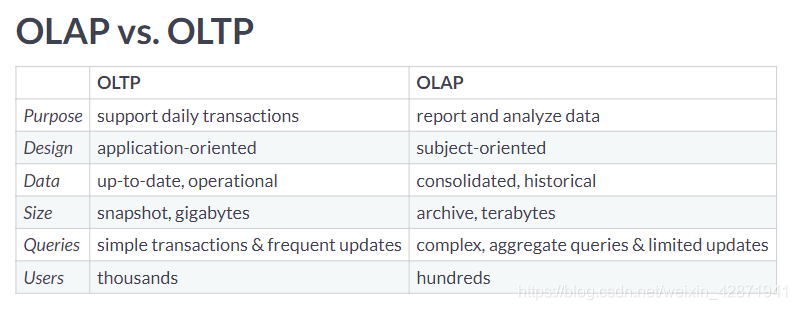
Categorize the cards into the approach that they describe best.

OLAP OLTP
Queries a larger amount of data Most likely to have data from the past hour
Helps businesses with decision making and problem solving Typically uses an operational database
Typically uses a data warehouse Data is inserted and updated more often

</> Which is better?
Explore the dataset. What data processing approach is this larger repository most likely using?
OLTP because this table could not be used for any analysis. OLAP because each record has a unique service request number. OLTP because this table’s structure appears to require frequent updates. OLAP because this table focuses on pothole requests only.
</> Name that data type!
Each of these cards hold a type of data. Place them in the correct category.

Unstructured Semi-Structured Structured
To-do notes in a text editor CSVs of open data downloaded from your local government websites A relational database with latest withdrawals and deposits made by clients
Images in your photo library JSON object of tweets outputted in real-time by the Twitter API
Zip file of all text messages ever received

</> Ordering ETL Tasks
In the ETL flow you design, different steps will take place. Place the steps in the most appropriate order.

eCommerce API outputs real time data of transactions

Python script drops null rows and clean data into pre-determined columns

Resulting dataframe is written into an AWS Redshift Warehouse

</> Recommend a storage solution
When should you choose a data warehouse over a data lake?
To train a machine learning model with a 150 GB of raw image data. To store real-time social media posts that may be used for future analysis To store customer data that needs to be updated regularly To create accessible and isolated data repositories for other analysts
</> Classifying data models
Each of these cards hold a tool or concept that fits into a certain type of data model. Place the cards in the correct category.

Conceptual Data Model Logical Data Model Physical Data Model
Gathers business requirements Relational model File structure of data storage
Entities, attributes, and relationships Determining tables and columns

</> Deciding fact and dimension tables
Out of these possible answers, what would be the best way to organize the fact table and dimensional tables?
A fact table holding duration_mins and foreign keys to dimension tables holding route details and week details, respectively. A fact table holding week,month, year and foreign keys to dimension tables holding route details and duration details, respectively. A fact table holding route_name,park_name, distance_km,city_name, and foreign keys to dimension tables holding week details and duration details, respectively.
Create a dimension table called route that will hold the route information.
Create a dimension table called week that will hold the week information.

CREATE TABLE route(
	route_id INTEGER PRIMARY KEY,
    park_name VARCHAR(160) NOT NULL,
    city_name VARCHAR(160) NOT NULL,
    distance_km FLOAT NOT NULL,
    route_name VARCHAR(160) NOT NULL
);

CREATE TABLE week(
	week_id INTEGER PRIMARY KEY,
    week INTEGER NOT NULL,
    month VARCHAR(160) NOT NULL,
    year INTEGER NOT NULL
);

</> Querying the dimensional model
Calculate the sum of the duration_mins column.

SELECT 
	SUM(duration_mins)
FROM 
	runs_fact;

sum
1172.16

Join week_dim and runs_fact.
Get all the week_id’s from July, 2019.

SELECT 
	SUM(duration_mins)
FROM 
	runs_fact
INNER JOIN week_dim ON runs_fact.week_id = week_dim.week_id
WHERE month = 'July' and year = '2019';

sum
381.46

2. Database Schemas and Normalization
</> Running from star to snowflake
After learning about the snowflake schema, you convert the current star schema into a snowflake schema. To do this, you normalize route_dim and week_dim. Which option best describes the resulting new tables after doing this?
The tables runs_fact, route_dim, and week_dim have been loaded.
week_dim is extended two dimensions with new tables for month and year. route_dim is extended one dimension with a new table for city. week_dim is extended two dimensions with new tables for month and year. route_dim is extended two dimensions with new tables for city and park. week_dim is extended three dimensions with new tables for week, month and year. route_dim is extended one dimension with new tables for city and park.
</> Adding foreign keys
In the constraint called sales_book, set book_id as a foreign key.
In the constraint called sales_time, set time_id as a foreign key.
In the constraint called sales_store, set store_id as a foreign key.

-- Add the book_id foreign key
ALTER TABLE fact_booksales ADD CONSTRAINT sales_book
    FOREIGN KEY (book_id) REFERENCES dim_book_star (book_id);
-- Add the time_id foreign key
ALTER TABLE fact_booksales ADD CONSTRAINT sales_time
    FOREIGN KEY (time_id) REFERENCES dim_time_star (time_id);
-- Add the store_id foreign key
ALTER TABLE fact_booksales ADD CONSTRAINT sales_store
    FOREIGN KEY (store_id) REFERENCES dim_store_star (store_id);

</> Extending the book dimension
Create dim_author with a column for author.
Insert all the distinct authors from dim_book_star into dim_author.

CREATE TABLE dim_author (
    author VARCHAR(256)  NOT NULL
);
-- Insert authors into the new table
INSERT INTO dim_author
SELECT DISTINCT author FROM dim_book_star;

Alter dim_author to have a primary key called author_id.
Output all the columns of dim_author.

CREATE TABLE dim_author (
    author varchar(256)  NOT NULL
);
INSERT INTO dim_author
SELECT DISTINCT author FROM dim_book_star;
-- Add a primary key 
ALTER TABLE dim_author ADD COLUMN author_id SERIAL PRIMARY KEY;
-- Output the new table
SELECT * FROM dim_author;

author				author_id
F. Scott Fitzgerald	1
Barack Obama		2
Agatha Christie		3
...

</> Querying the star schema
Select state from the appropriate table and the total sales_amount.
Complete the JOIN on book_id.
Complete the JOIN to connect the dim_store_star table
Conditionally select for books with the genre novel.
Group the results by state.

SELECT dim_store_star.state, SUM(fact_booksales.sales_amount)
FROM fact_booksales
    JOIN dim_book_star on fact_booksales.book_id = dim_book_star.book_id
    JOIN dim_store_star on fact_booksales.store_id = dim_store_star.store_id
WHERE  
    dim_book_star.genre = 'novel'
GROUP BY
    dim_store_star.state;

state		sum
Florida		295594.2
Vermont		216282
Louisiana	176979
...

</> Querying the snowflake schema
Select state from the appropriate table and the total sales_amount.
Complete the two JOINS to get the genre_id’s.
Complete the three JOINS to get the state_id’s.
Conditionally select for books with the genre novel.
Group the results by state.

SELECT dim_state_sf.state, SUM(fact_booksales.sales_amount)
FROM fact_booksales
    JOIN dim_book_sf on fact_booksales.book_id = dim_book_sf.book_id
    JOIN dim_genre_sf on dim_book_sf.genre_id = dim_genre_sf.genre_id
    JOIN dim_store_sf on fact_booksales.store_id = dim_store_sf.store_id 
    JOIN dim_city_sf on dim_store_sf.city_id = dim_city_sf.city_id
	JOIN dim_state_sf on  dim_city_sf.state_id = dim_state_sf.state_id
WHERE  
    dim_genre_sf.genre = 'novel'
GROUP BY
    dim_state_sf.state;

state				sum
British Columbia	374629.2
California			583248.6
Florida				295594.2
...

</> Updating countries
Output all the records that need to be updated in the star schema so that countries are represented by their abbreviations.

SELECT * FROM dim_store_star
WHERE country != 'USA' AND country !='CA';

store_id	store_address		city			state		country
798			23 Jeanne Ave		Montreal		Quebec		Canada
799			56 University St	Quebec City		Quebec		Canada
800			23 Verte Ave		Montreal		Quebec		Canada
...

How many records would need to be updated in the snowflake schema?
18 records 2 records 1 record 0 records
</> Extending the snowflake schema
Add a continent_id column to dim_country_sf with a default value of 1. Note that NOT NULL DEFAULT(1) constrains a value from being null and defaults its value to 1.
Make that new column a foreign key reference to dim_continent_sf’s continent_id.

ALTER TABLE dim_country_sf
ADD continent_id int NOT NULL DEFAULT(1);
-- Add the foreign key constraint
ALTER TABLE dim_country_sf ADD CONSTRAINT country_continent
   FOREIGN KEY (continent_id) REFERENCES dim_continent_sf(continent_id);
-- Output updated table
SELECT * FROM dim_country_sf;

country_id	country		continent_id
1			Canada		1
2			USA			1

</> Converting to 1NF
Does the customers table meet 1NF criteria?
Yes, all the records are unique. No, because there are multiple values in cars_rented and invoice_id No, because the non-key columns such as don’t depend on customer_id, the primary key.
cars_rented holds one or more car_ids and invoice_id holds multiple values. Create a new table to hold individual car_ids and invoice_ids of the customer_ids who’ve rented those cars.
Drop two columns from customers table to satisfy 1NF

-- Create a new table to satisfy 1NF
CREATE TABLE cust_rentals (
  customer_id INT NOT NULL,
  car_id VARCHAR(128) NULL,
  invoice_id VARCHAR(128) NULL
);
-- Drop column from customers table to satisfy 1NF
ALTER TABLE customers
DROP COLUMN cars_rented,
DROP COLUMN invoice_id;

</> Converting to 2NF
Why doesn’t customer_rentals meet 2NF criteria?
Because the end_date doesn’t depend on all the primary keys. Because there can only be at most two primary keys. Because there are non-key attributes describing the car that only depend on one primary key, car_id.
Create a new table for the non-key columns that were conflicting with 2NF criteria.
Drop those non-key columns from customer_rentals.

-- Create a new table to satisfy 2NF
CREATE TABLE cars (
  car_id VARCHAR(256) NULL,
  model VARCHAR(128),
  manufacturer VARCHAR(128),
  type_car VARCHAR(128),
  condition VARCHAR(128),
  color VARCHAR(128)
);
-- Drop columns in customer_rentals to satisfy 2NF
ALTER TABLE customer_rentals
DROP COLUMN model,
DROP COLUMN manufacturer, 
DROP COLUMN type_car,
DROP COLUMN condition,
DROP COLUMN color;

</> Converting to 3NF
Why doesn’t rental_cars meet 3NF criteria?
Because there are two columns that depend on the non-key column, model. Because there are two columns that depend on the non-key column, color. Because 2NF criteria isn’t satisfied.
Create a new table for the non-key columns that were conflicting with 3NF criteria.
Drop those non-key columns from rental_cars.

-- Create a new table to satisfy 3NF
CREATE TABLE car_model(
  model VARCHAR(128),
  manufacturer VARCHAR(128),
  type_car VARCHAR(128)
);
-- Drop columns in rental_cars to satisfy 3NF
ALTER TABLE rental_cars
DROP COLUMN manufacturer, 
DROP COLUMN type_car;

3. Database Views
</> Tables vs. views

Only Tables Views&Tables Only Views
Part of the physical schema of a database Contains rows and columns Always defined by a query
Can be queried Takes up less memory
Has access control

</> Viewing views
Query the information schema to get views.
Exclude system views in the results.

SELECT * FROM information_schema.views
WHERE table_schema NOT IN ('pg_catalog', 'information_schema');

What does view1 do?

SELECT content.reviewid,
content.content
FROM content
WHERE (length(content.content) > 4000);

Returns the content records with reviewids that have been viewed more than 4000 times. Returns the content records that have reviews of more than 4000 characters. Returns the first 4000 records in content.
What does view2 do?

SELECT reviews.reviewid,
reviews.title,
reviews.score
FROM reviews
WHERE (reviews.pub_year = 2017)
ORDER BY reviews.score DESC
LIMIT 10;

Returns 10 random reviews published in 2017. Returns the top 10 lowest scored reviews published in 2017. Returns the top 10 highest scored reviews published in 2017.
</> Creating and querying a view
Create a view called high_scores that holds reviews with scores above a 9.

CREATE VIEW high_scores AS
SELECT * FROM reviews
WHERE score > 9;

Count the number of records in high_scores that are self-released in the label field of the labels table.

CREATE VIEW high_scores AS
SELECT * FROM REVIEWS
WHERE score > 9;
-- Count the number of self-released works in high_scores
SELECT COUNT(*) FROM high_scores
INNER JOIN labels ON high_scores.reviewid = labels.reviewid
WHERE label = 'self-released';

count
3

</> Creating a view from other views
Create a view called top_artists_2017 with one column artist holding the top artists in 2017.
Join the views top_15_2017 and artist_title.
Output top_artists_2017.

CREATE VIEW top_artists_2017 AS
SELECT artist_title.artist FROM top_15_2017
INNER JOIN artist_title
ON top_15_2017.reviewid = artist_title.reviewid;
-- Output the new view
SELECT * FROM top_artists_2017;

artist
massive attack
krallice
uranium club
...

Which is the DROP command that would drop both top_15_2017 and top_artists_2017?
DROP VIEW top_15_2017 CASCADE; DROP VIEW top_15_2017 RESTRICT; DROP VIEW top_artists_2017 RESTRICT; DROP VIEW top_artists_2017 CASCADE;
</> Granting and revoking access
Revoke all database users’ update and insert privileges on the long_reviews view.
Grant the editor user update and insert privileges on the long_reviews view.

REVOKE update, insert ON long_reviews FROM PUBLIC; 
GRANT update, insert ON long_reviews TO editor; 

</> Updatable views
Which views are updatable?
long_reviews and top_25_2017 top_25_2017 long_reviews top_25_2017 and artist_title

SELECT * FROM information_schema.views
WHERE table_schema NOT IN ('pg_catalog', 'information_schema');

</> Redefining a view
Can the CREATE OR REPLACE statement be used to redefine the artist_title view?
Yes, as long as the label column comes at the end. No, because the new query requires a JOIN with the labels table. No, because a new column that did not exist previously is being added to the view. Yes, as long as the label column has the same data type as the other columns in artist_title
Redefine the artist_title view to include a column for the label field from the labels table.

CREATE OR REPLACE VIEW artist_title AS
SELECT reviews.reviewid, reviews.title, artists.artist, labels.label
FROM reviews
INNER JOIN artists
ON artists.reviewid = reviews.reviewid
INNER JOIN labels
ON labels.reviewid = reviews.reviewid;

SELECT * FROM artist_title;

reviewid	title					artist			label
22703		mezzanine				massive attack	virgin
22721		prelapsarian			krallice		hathenter
22659		all of them naturals	uranium club	fashionable idiots
...

</> Materialized versus non-materialized
Organize these characteristics into the category that they describe best.

Non-Materialized Views Non-Materialized&Materialized Views Materialized Views
Always turns up-to-date data Can be used in a data warehouse Stores the query result on disk
Better to use on write-intensive databases Helps reduce the overhead of writing queries Consumes more storage

</> Creating and refreshing a materialized view
Create a materialized view called genre_count that holds the number of reviews for each genre.
Refresh genre_count so that the view is up-to-date.

CREATE MATERIALIZED VIEW genre_count AS
SELECT genre, COUNT(*) 
FROM genres
GROUP BY genre;

INSERT INTO genres
VALUES (50000, 'classical');
-- Refresh genre_count
REFRESH MATERIALIZED VIEW genre_count;

SELECT * FROM genre_count;

</> Managing materialized views
Why do companies use pipeline schedulers, such as Airflow and Luigi, to manage materialized views?
To set up a data warehouse and make sure tables have the most up-to-date data. To refresh materialized views with consideration to dependences between views. To convert non-materialized views to materialized views. To prevent the creation of new materialized views when there are too many dependencies.
4. Database Management
</> Create a role
Create a role called data_scientist.

CREATE ROLE data_scientist;

Create a role called marta that has one attribute: the ability to login (LOGIN).

CREATE ROLE marta LOGIN;

Create a role called admin with the ability to create databases (CREATEDB) and to create roles (CREATEROLE).

CREATE ROLE admin WITH CREATEDB CREATEROLE;

</> GRANT privileges and ALTER attributes
Grant the data_scientist role update and insert privileges on the long_reviews view.
Alter Marta’s role to give her the provided password.

GRANT UPDATE, INSERT ON long_reviews TO data_scientist;

ALTER ROLE marta WITH PASSWORD 's3cur3p@ssw0rd';

</> Add a user role to a group role
Add Marta’s user role to the data scientist group role.
Celebrate! You hired multiple data scientists.
Remove Marta’s user role from the data scientist group role.

GRANT data_scientist TO marta;

REVOKE data_scientist FROM marta;

</> Reasons to partition
In the video, you saw some very good reasons to use partitioning. However, can you find which one wouldn’t be a good reason to use partitioning?
Improve data integrity Save records from 2017 or earlier on a slower medium Easily extend partitioning to sharding, and thus making use of parallelization
</> Partitioning and normalization
Can you classify the characteristics in the correct bucket?

Normalization Vertical Partitioning Horizontal Partitioning
Reduce redundancy in table Move specific columns to slower medium Sharding is an extension on this, using multiple machines
Changes the logical data model (Example) Move the third and fourth column to separate table (Examples) Use the timestamp to move rows from Q4 in a specific table

</> Creating vertical partitions
Create a new table film_descriptions containing 2 fields: film_id, which is of type INT, and long_description, which is of type TEXT.
Occupy the new table with values from the film table.

CREATE TABLE film_descriptions (
    film_id INT,
    long_description TEXT
);
-- Copy the descriptions from the film table
INSERT INTO film_descriptions
SELECT film_id, long_description FROM film;

Drop the field long_description from the film table.
Join the two resulting tables to view the original table.

CREATE TABLE film_descriptions (
    film_id INT,
    long_description TEXT
);
-- Copy the descriptions from the film table
INSERT INTO film_descriptions
SELECT film_id, long_description FROM film;
-- Drop the descriptions from the original table
ALTER TABLE film DROP COLUMN long_description;
-- Join to view the original table
SELECT * FROM film_descriptions 
JOIN film
ON film_descriptions.film_id = film.film_id;

film_id	long_description																						film_id	title				rental_duration		rental_rate	length	replacement_cost	rating	release_year
1		A Epic Drama of a Feminist And a Mad Scientist who must Battle a Teacher in The Canadian Rockies		1		ACADEMY DINOSAUR	6					0.99		86		20.99				PG		2019
2		A Astounding Epistle of a Database Administrator And a Explorer who must Find a Car in Ancient China	2		ACE GOLDFINGER		3					4.99		48		12.99				G		2017
3		A Astounding Reflection of a Lumberjack And a Car who must Sink a Lumberjack in A Baloon Factory		3		ADAPTATION HOLES	7					2.99		50		18.99				NC-17	2019
...

</> Creating horizontal partitions
Create the table film_partitioned, partitioned on the field release_year.

CREATE TABLE film_partitioned (
  film_id INT,
  title TEXT NOT NULL,
  release_year TEXT
)
PARTITION BY RANGE (release_year);

Create three partitions: one for each release year: 2017, 2018, and 2019. Call the partition for 2019 film_2019, etc.

CREATE TABLE film_partitioned (
  film_id INT,
  title TEXT NOT NULL,
  release_year TEXT
)
PARTITION BY LIST (release_year);
-- Create the partitions for 2019, 2018, and 2017
CREATE TABLE film_2019
	PARTITION OF film_partitioned FOR VALUES IN ('2019');
CREATE TABLE film_2018
	PARTITION OF film_partitioned FOR VALUES IN ('2018');  
CREATE TABLE film_2017
	PARTITION OF film_partitioned FOR VALUES IN ('2017');

Occupy the new table the three fields required from the film table.

CREATE TABLE film_partitioned (
  film_id INT,
  title TEXT NOT NULL,
  release_year TEXT
)
PARTITION BY LIST (release_year);
-- Create the partitions for 2019, 2018, and 2017
CREATE TABLE film_2019
	PARTITION OF film_partitioned FOR VALUES IN ('2019');
CREATE TABLE film_2018
	PARTITION OF film_partitioned FOR VALUES IN ('2018');
CREATE TABLE film_2017
	PARTITION OF film_partitioned FOR VALUES IN ('2017');
-- Insert the data into film_partitioned
INSERT INTO film_partitioned
SELECT film_id, title, release_year FROM film;
-- View film_partitioned
SELECT * FROM film_partitioned;

film_id	title				release_year
2		ACE GOLDFINGER		2017
4		AFFAIR PREJUDICE	2017
5		AFRICAN EGG			2017
...

</> Data integration do’s and dont’s
Categorize the following items as being True or False when talking about data integration.

False True
Everybody should have access to sensitive data in the final view. You should be careful choosing a hand-coded solution because of maintenance cost.
All your data has to be updated in real time in the final view. Being able to access the desired data through a single view does not mean all data is stored together.
Automated testing and proactive alerts are not needed. Data in the final view can be updated in different intervals.
You should choose whichever solution is right for the job right now. Data integration should be business driven, e.g. what combination of data will be useful for the business.
After data integration all your data should be in a single table. My source data can be stored in different physical locations.
Your data integration solution, hand-coded or ETL tool, should work once and then you can use the resulting view to run queries forever. My source data can be in different formats and database management systems.

</> Analyzing a data integration plan
Which risk is not clearly indicated on the data integration plan?
It is unclear if you took data governance into account. You didn’t clearly show where your data originated from. You should indicate that you plan to anonymize patient health records. If data is lost during ETL you will not find out.
</> SQL versus NoSQL
When is it better to use a SQL DBMS?
You are dealing with rapidly evolving features, functions, data types, and it’s difficult to predict how the application will grow over time. You have a lot of data, many different data types, and your data needs will only grow over time. You are concerned about data consistency and 100% data integrity is your top goal. Your data needs scale up, out, and down.
</> Choosing the right DBMS
Categorize the cards into the appropriate DBMS bucket.

SQL NoSQL
A banking application where it’s extremely important that data integrity is ensured. Data warehousing on big data.
A social media tool that provides users with the oppotunities to grow their networks via connections.
During the holiday shopping season, a e-commerce website needs to keep track of millions of shopping carts.
A blog that needs to create and incorporate new types of content, such as images, comments, and videos.

tf.layers.conv1d Function analysis (one dimensional convolution)

One dimensional convolution is usually used to process text, so the input is usually a long piece of text, which is a list of words


The function is defined as follows:

tf.layers.conv1d(
inputs,
filters,
kernel_size,
strides=1,
padding='valid',
data_format='channels_last',
dilation_rate=1,
activation=None,
use_bias=True,
kernel_initializer=None,
bias_initializer=tf.zeros_initializer(),
kernel_regularizer=None,
bias_regularizer=None,
activity_regularizer=None,
kernel_constraint=None,
bias_constraint=None,
trainable=True,
name=None,
reuse=None
)

The more important parameters are inputs, filters and kernel_ Size, which are described below


Inputs: input tensor. Dimension (none, a, b) is a three-dimensional tensor

None: usually the number of samples to be filled, batch_ size

A: the number of words or words in a sentence

B: vector dimension of word or word


Filters: the number of filters


kernel_ Size: the size of convolution kernel. Convolution kernel should be two-dimensional. Only one dimension needs to be specified here, because the second dimension of convolution kernel is consistent with the input word vector dimension, because for sentences, convolution can only move along the word direction, that is, it can only move in the column dimension


An example:

inputs = tf.placeholder (‘float’, shape=[None, 6, 8])

out = tf.layers.conv1d (inputs, 5, 3)


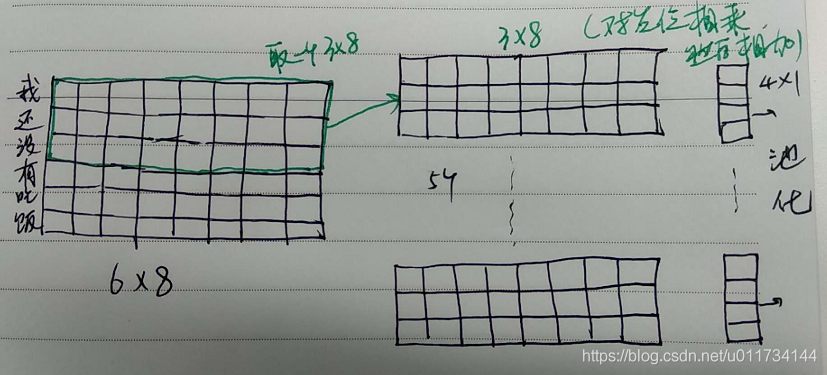
Note: for a sample, the sentence length is 6 words, and the dimension of the word vector is 8

filters=5, kernel_ Size = 3, so the dimension of convolution kernel is 3 * 8

Then the input 6 * 8 is convoluted by 3 * 8 convolution kernel to get a vector of 4 * 1 (4 = 6-3 + 1)

And because there are five filters, we get five 4 * 1 vectors

The drawing is as follows:


How to use latex argmin argmax subscript

this series of articles was published by

@yhl_ leo

products, reprint please indicate the source.

Article link:

http://blog.csdn.net/yhl_ leo/article/details/50036001


In latex, when using argmin , argmax , the following methods can be used to set subscripts:

\begin{equation}
	\mathop{\arg\min}_{\theta} \ \ \| \mathrm{J} (\theta)\|.
\end{equation}

arg

min

θ

By the way,

Road8741;

J

(

θ

)

Road8741;

[gasps]

\mathop{\arg\min_{\theta}} \ \.mathrm{J} (\theta)\.

Argθmin Shenzhen 8741; J(θ)8741;.

MSDN I tell you new site next I tell you open invitation code registration! Today’s quota is 5000!

Provide reliable original software

Twelve years of concentration and accumulation, the original intention has not changed, to create the next milestone.
* not everyone can accept and use the original software. Please fully understand your own needs.
* only provide the access method and use guidance of the original software, and do not provide the key and genuine authorization.

The new version of the website is more suitable for novices https://next.itellyou.cn Invitation code: itellyou666, today’s limit is 5000.

The solution of push D command execution error (/ bin / sh: 1: push D: not found) on Ubuntu

The solution of push D command execution error (/ bin / sh: 1: push D: not found) on Ubuntu

View reason: enter the / bin directory to view the link file of SH, which is shown as follows: the SH command is linked to dash, while the pushd command needs to be executed in the bash environment.

Solution: execute the sudo dpkg reconfigure dash command and set the dash to No.

Check again: the link to check SH has been changed to bash.