Category Archives: How to Fix

com.alibaba.druid.sql.parser.ParserException: syntax error

Remember a simple mistake.

sql.append("select"
+"a.MEMBER_NAME, b.ACTION_NAME"
+"from CLUB_MEMBER a,CLUB c, MEMBER_ACTION_RECORD d");
sql.append("WHERE a.CLUB_MEMBER_ID = d.CLUB_MEMBER_ID"
				+ "AND a.CLUB_ID = b.CLUB_ID"
				+ "AND d.ACTION_ID = ?"); 

It’s wrong, why is it wrong? No spaces, SQL prints.
selecta.MEMBER_NAME, b.ACTION_NAMEfrom CLUB_MEMBER a,CLUB c, MEMBER_ACTION_RECORD dWHERE a.CLUB_MEMBER_ID = d.CLUB_MEMBER_IDAND a.CLUB_ID = b.CLUB_IDAND d.ACTION_ID = ?
Now you know why it’s wrong, right?
Correct Codes.

sql.append("select"
+" a.MEMBER_NAME, b.ACTION_NAME"
+" from CLUB_MEMBER a,CLUB c, MEMBER_ACTION_RECORD d");
sql.append(" WHERE a.CLUB_MEMBER_ID = d.CLUB_MEMBER_ID"
				+ " AND a.CLUB_ID = b.CLUB_ID"
				+ " AND d.ACTION_ID = ?"); 

It doesn’t seem to make a big difference, but it’s enough to take half an hour and patience to look at the code.

Why not manage controller in spring container

Spring container and spring MVC container


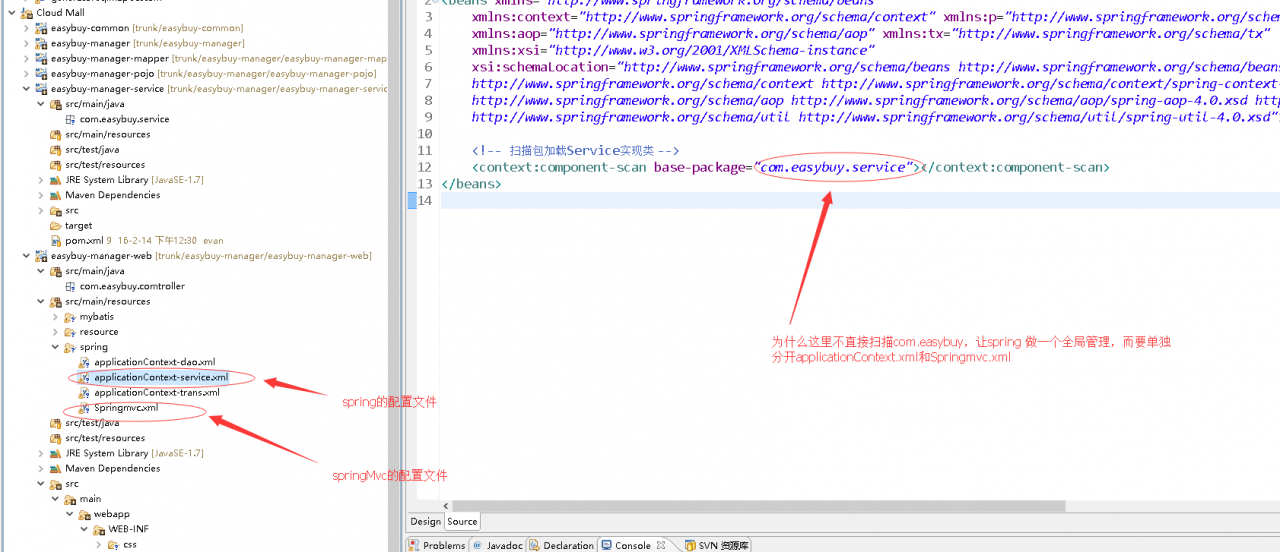
1. Question: why not use spring to manage all classes?

In our configuration of spring MVC, why does the controller not be directly managed by spring, but the spring MVC container should be managed separately


2. The relationship between spring container and spring MVC

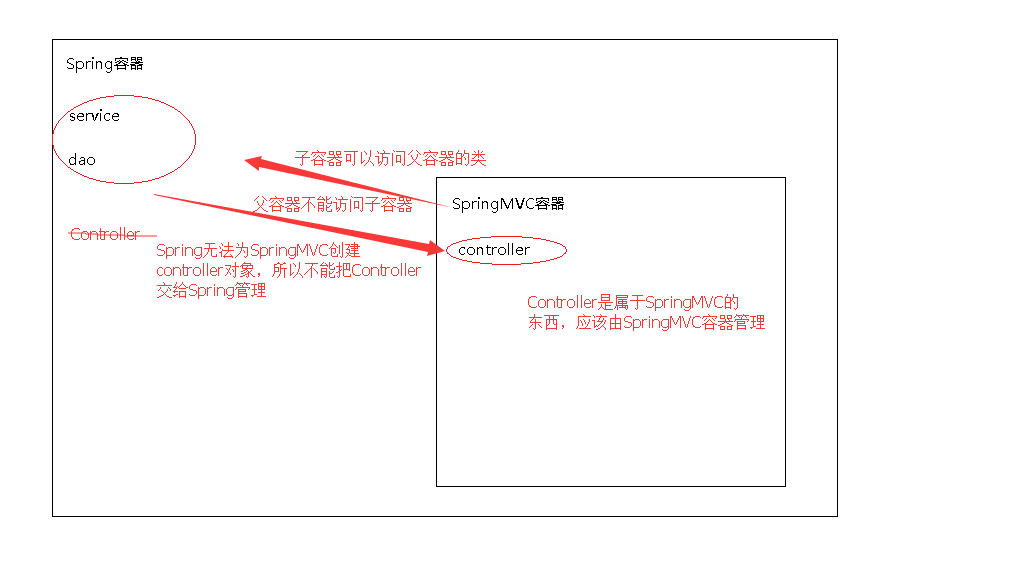
Spring container is a parent-child relationship with spring MVC container. The child container can access the objects of the parent container, but the parent container can’t access the classes of the child container. If we scan all classes directly in the spring MVC configuration file and hand over service, Dao and controller to spring MVC for management, but if spring is used to manage contoller, it can’t access this class, because Co The ntoller is in the spring MVC container. If you configure spring to scan all classes directly, including controller, but do not configure spring MVC, the request sent by the server will have a 404 problem, because it can’t find the controller and spring can’t inject the controller

Example.
Configure in applicationContext-service.
<! -- Scan package to load Service implementation classes -->
<context:component-scan base-package="com.easybuy"></context:component-scan>
will scan for @Controller, @Service, @Repository, @Compnent

Springmvc.Xml does not scan.
Conclusion: springmvc. cannot provide services because there is no controller object in the springmvc subcontainer.

3. Why not directly SpringMVC.xml Scan all classes in?

In principle, we can leave the service, Dao and controller to spring MVC for management, and just let it scan all packages directly in the spring MVC configuration file. However, for the sake of future expansion, spring and spring MVC are configured separately, and spring manages the service, which is conducive to later expansion. Even if multiple struct2 are added in the future, the original configuration will not be affected

Eclipse PyDev “interpreter does not exist in filesystem”

The reason for the problem: this kind of problem is generally should be will python.exe The file has been renamed

Solution: there are generally two ways:

1: change the file name back (basically, it won’t be changed back, because the file name is usually changed to include both python2 and python3 on the computer. In order to add environment variables and successfully run two different versions of python, the file name is usually changed)

2: modify the python path of eclipse

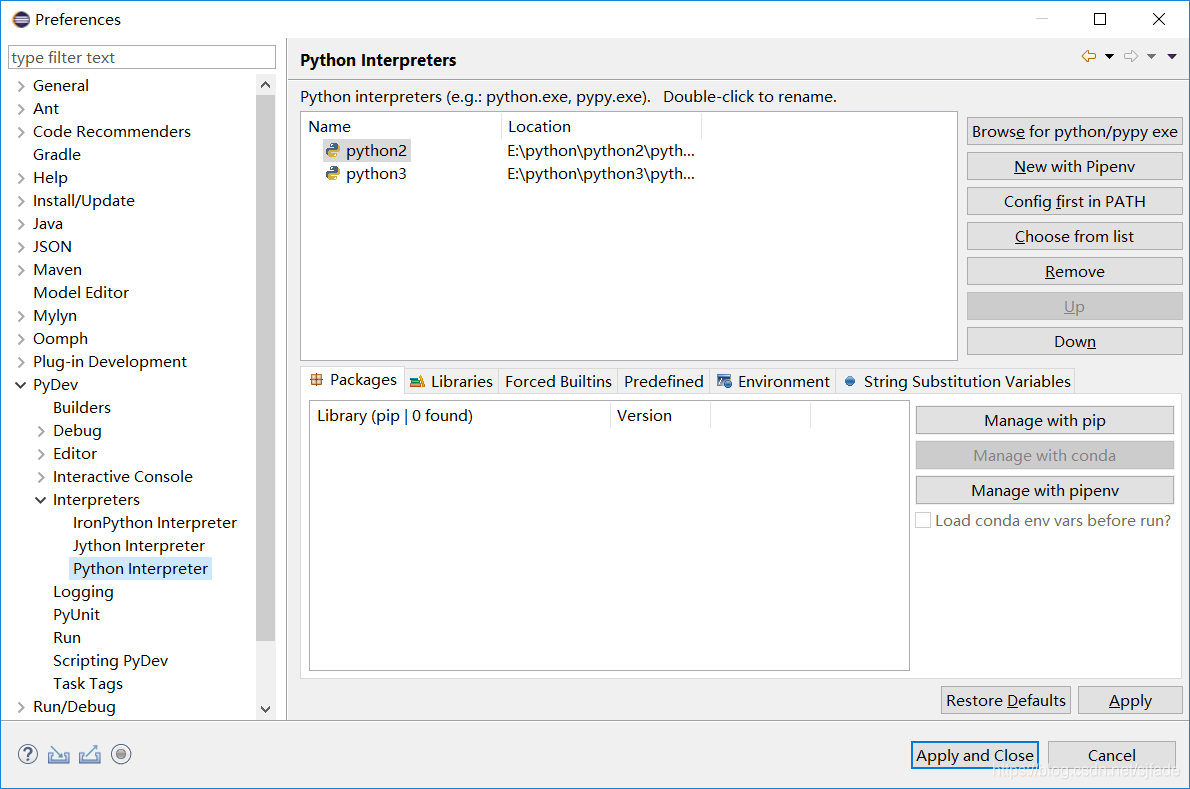
Modify in window – & gt; preferences – & gt; pydev – & gt; interpreters – & gt; Python interpreter


Use the remove button to delete the paths of the two Python versions, then click browse for Python/pypy exe, re select the path of python, and finally click apply and close


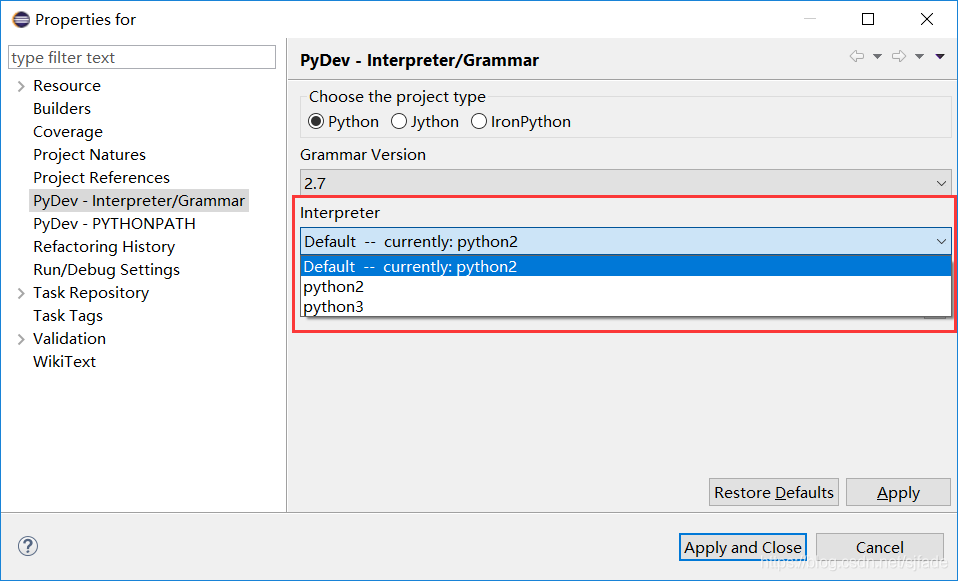
At this time, the project file still reports an error. At this time, select the project that reports an error, right-click and select the properties option – & gt; pydev interpreter/grammar, then switch to interpreter and select the corresponding Python Version (default)– currently:python2 Finally, click apply and close. Finally, restart eclipse


Nutz framework: using native SQL for CND conditions

case

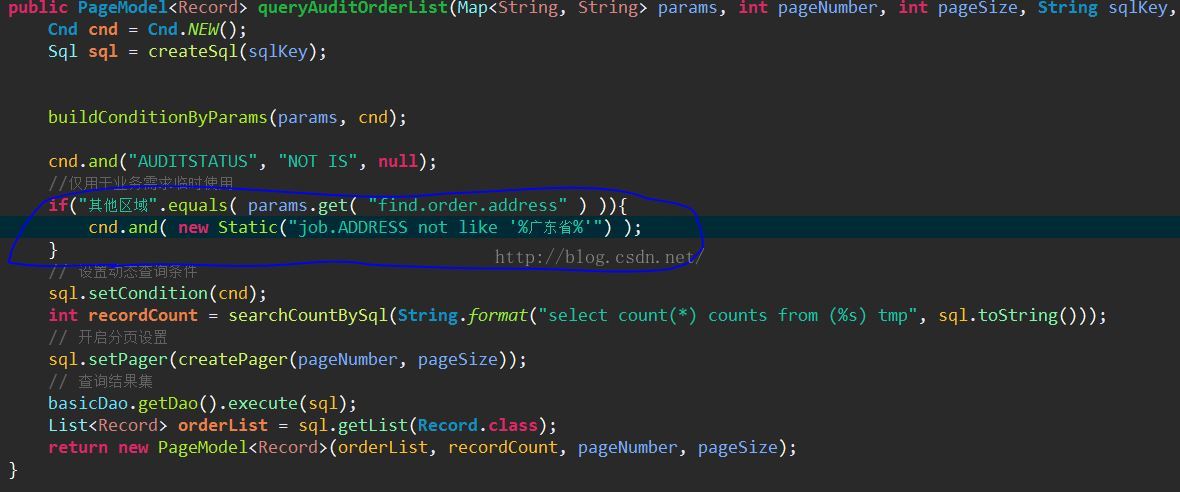
Today, I received a temporary business requirement. It takes a day or two for a simple filter to be used as a temporary business. So I thought of adding a not like to the original CND condition for filtering. However, I found that the existing CND condition query does not seem to meet the requirement


Solution

Using static class in Nutz framework to realize custom SQL and Cnd.and () splicing, new static (“xxxxx”) can connect any native SQL


cnd.and( new Static("job.ADDRESS not like '%GuangDong%'") );


Multithreading: when doing unit test, use thread pool to find that the specified code is not running and skip directly

Today, we did a unit test to debug the interface. We found that the interface call was successful, but we did not run the thread pool execution method. Instead, we directly skipped the execution code


 ExecutorService pool = Executors.newFixedThreadPool( 2 );


 public void callInterfaceCreditease(final String idcard,final String name,final String mobile){
        try{
            
            ExecutorService pool = Executors.newFixedThreadPool( 2 );
            //Interface
            pool.execute(new Runnable() {
                @Override
                public void run() {
                    creditCardCrediteaseService.doFetchCreditData(name, idcard, mobile);
                }
            });
            //Release thread pool resources
            pool.shutdown();
        }catch(Exception e){
            log.error("Calling interface exceptions:",e);
        }
                
    }


When using quartus for function simulation, “testbench” appears_ vector_ input_ The solution of “file option does not exist”

Environment: quartus 18 prime Standard Edition

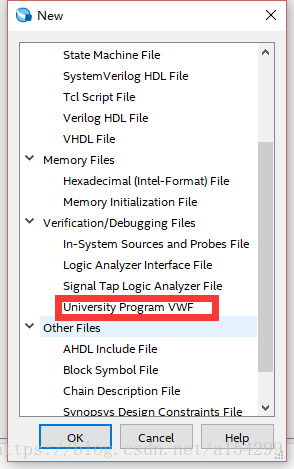
1. Create a new VMF file

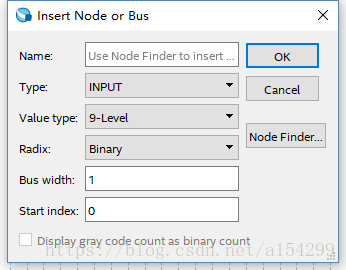
Add node or bus

2. Click processing – & gt; start – & gt; start test bench template writer, and a. VHT suffix file will be generated under the path of “project folder/simulation/Modelsim” (the path may be different due to different personal settings).

3. Copy the. VHT suffix file in the path of “project folder/simulation/Modelsim” to the path of “project folder/simulation/QSIM”.

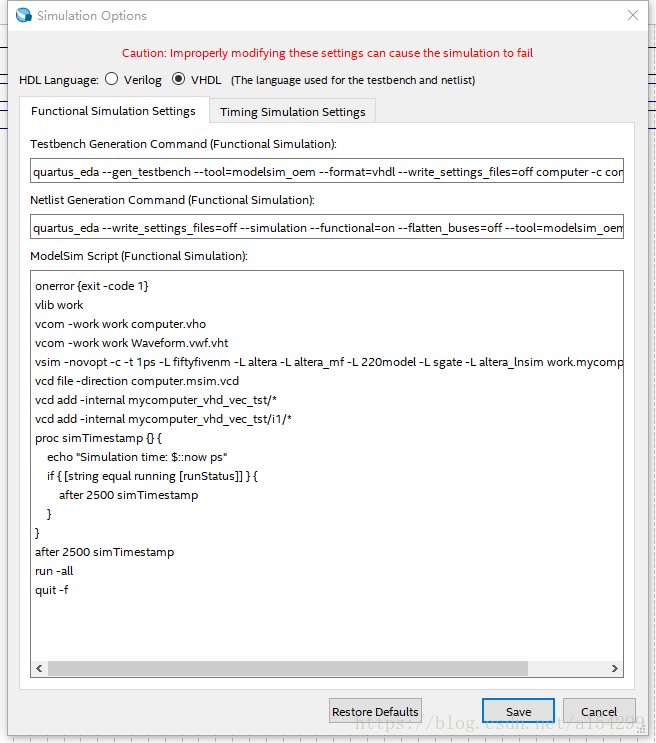
4. Open the vWF file created in step 1, click simulation – & gt; simulation settings, and the following interface will appear. Modify the contents in the functional simulation settings tab as follows (note that the direction of path separator in quartus software is opposite to that in windows, one is’/’, the other is’ \’):

(1) Change “- vector” in the testbench generation command (functional simulation) column to_ Change the path after “source” to the path of your own VWF file (note that the file name should also be changed to the name of your own file), “– testbench_ Change the path after “file” to the path of the. VHT suffix file copied in step 3 (note that the file name should also be changed to your own file name);

(2) Change “- output” in the netlist generation command (functional simulation) column_ The path after “directory” is changed to “project folder/simulation/QSIM”.

(3) Add VCOM – work in the Modelsim script (functional simulation) column Waveform.vwf.vht Change the file name to your own.

(4) If you want to do timing simulation, modify the contents of the timing simulation settings tab.

5. Finished, add input data and click simulation.

assert self.binded

 
assert self.binded
Error code:

mod_new.bind(for_training=False,data_shapes=[('data',(1,3,data_shape_w,data_shape_w))],label_shapes=mod_new.label_shapes)
  File "D:\Anaconda3\lib\site-packages\mxnet\module\module.py", line 231, in label_shapes
    assert self.binded


resolvent:

Remove parameter: Label_ shapes

mod_new.bind(for_training=False,data_shapes=[('data',(1,3,data_shape_w,data_shape_w))])


Common command of docker

1. CentOS version
docker requires that the kernel version of CentOS system is higher than 3.10, and view the version through uname – R

2. Upgrade package kernel (optional)
Yum update

3. Install docker
Yum install docker

4. Start docker
sudo service docker start

5. Set the docker service to boot
systemctl enable docker

6. Remove the docker from the boot entry
systemctl stop docker

7. Search docker image (docker search keyword)
docker search redis

8. Pull the image file
docker pull image name: tag (tag is optional, the default is latest)

9. View the downloaded image
docker images

10. Delete the image
docker RMI image ID (container ID)

11. Run the docker container (- D: running in the background)
docker – run – name custom container name – D specifies the image template( imageName:tag , if tag is latest, it can be omitted.)

12. View running containers (add – A to view all containers)
docker PS

13. Stop the running container
docker stop image ID

14. Delete container (different from deleting image, here is RM)
docker RM image ID

15. When starting the container, map the port of the JVM and the port of the Tomcat container
docker – run name custom container name – D – P 8888:8080 specify the image template
note: to start mysql, you need to specify the password, and you need to specify the password through the – e command

16. View the firewall status
service firewalld status

17. View the container log
docker log image ID

After Oracle 11g is installed, SQL_ Plus.exe The problem of Chinese garbled in command window

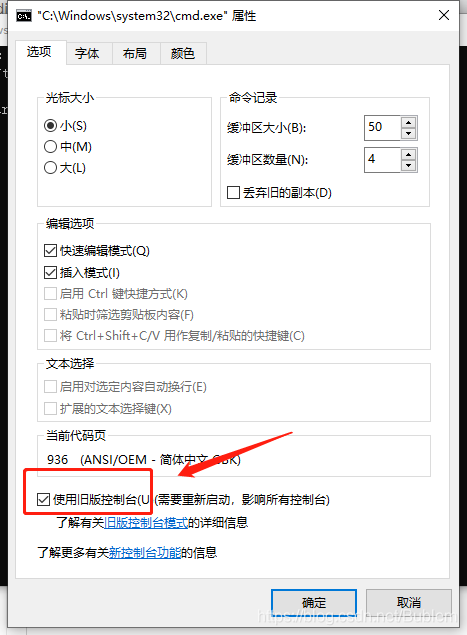
Today, after installing Oracle 11g, we encountered sqlplus.exe Command window user login Chinese garbled problem, hope to give yourself a note, also hope to let more people know how to solve. After entering the CMD, right-click the mouse, click properties, find the box as shown in the figure below, and use the old version of the console!

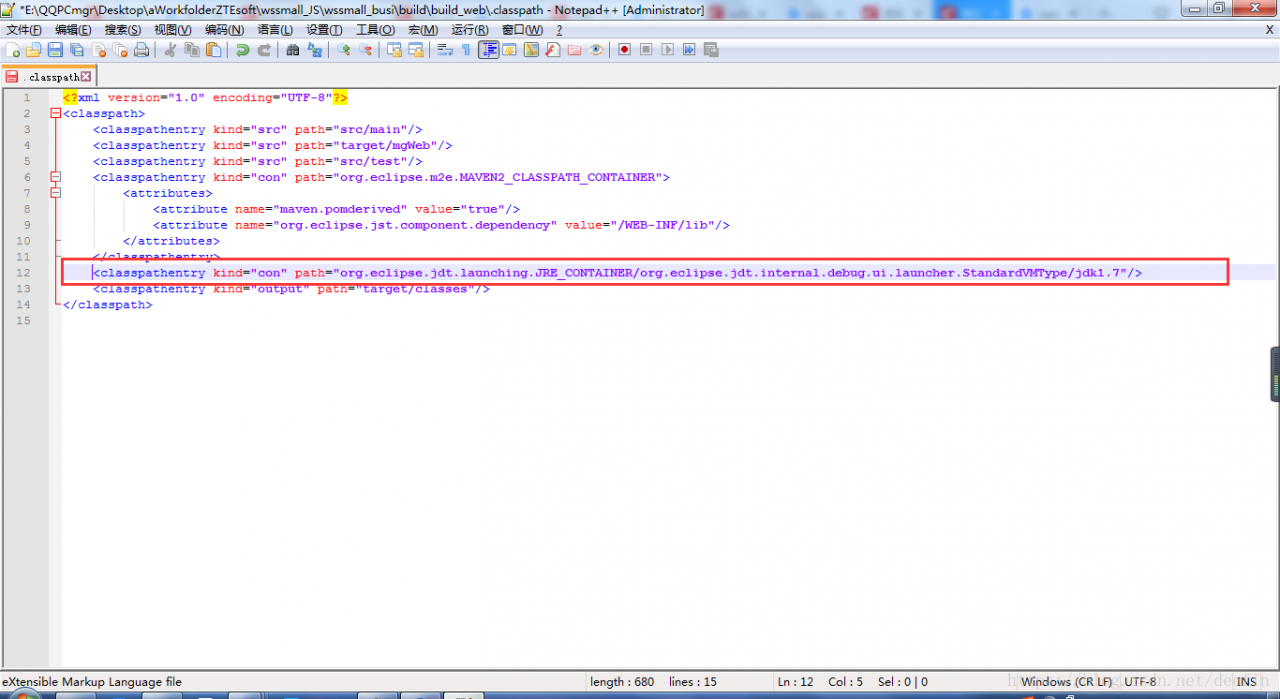
Unbound classpath container: ‘JRE System Library [JavaSE-1.7]’

maven ——> When updating a project, an error appears as shown in the title. After checking the cause, it is found that the. Classpath file in the project directory has more lines as shown in the figure below. Just comment them out. If necessary, configure build path to add JRE library again. (when this error occurs, another error may come out: the project cannot be built until build path errors are resolved)

Solutions for failure to start Axure RP (including failure to uninstall or install. Net framework)

Axure rp8 was well used in the last company last month. This week, when I joined another company, I will use Axure rp8 I can’t open it when I enter the interface. It’s completely on the black screen. It’s not like many people. When I enter the interface, I click any button and don’t respond (Note: This is the sign that the registration code has expired. I just need to get the registration code again. The specific scheme depends on other information. I won’t repeat it here). I can’t enter the interface at all. The small window is on the black screen, and then I stop working (because the problem has been solved) Absolutely, there is no way to post the picture of the problem here).
In general, there are several ways on the Internet:

Delete C: (users [user name] \ appdata/local/temp/axure-6 (or Axure 7.0) delete C: (users [user name] \ appdata/local/Axure add 3D support for graphics card

These are still of no help.
Here’s the point. The ultimate solution is to reload the. Net framework:
specific steps:

    Win + R run control, enter the change or delete program, find the. Net framework, click uninstall and download again. After the installation is completed, restart Axure, the problem is solved, and the mood is suddenly bright.

. net framework cannot be uninstalled or installed, https://pan.baidu.com/s/1N09AGC4LSjdaz_ 9l3ipdcq extraction code: oi97. Put the CAB file in C/windows, open powshell (administrator), and run dism/online/enable feature/all/Fe atureName:NetFx3 /Source :% windir% “/ limitaccess can install. Net framework

Note: here is only the last solution, other solutions can be found online.

It’s over.