Category Archives: How to Fix

A series of problems caused by the option allow output folders for source folders

To run a maven project of the company, colleagues can run on their own computer, but not on my computer. It lasted for 9 days, and they have been solving this problem all the time. During this period, they made many mistakes, but they can’t remember them clearly. So they can write down what they probably remember, so that they can quickly solve the problems when they are in trouble and save valuable working time. But the most important point is that these mistakes are all caused by the same mistake (it may also be that I made a lot of changes during the period, and it comes naturally. Don’t spray if there are mistakes).

    Maven dependency cannot be added.
    1.1. The Maven configuration is missing in the classpath configuration file. In the. Classpath of a project, sometimes there is an error that Maven is not configured;
    1.2 pom.xml Configuration existing in the file
    1.3. Right click on the project – & gt; Maven – & gt; Enable Maven management
    1.4. Execute MVN clean install on the parent project
    1.5. Delete the related jar packages in Maven repository, such as D:// program files/Maven server/Maven repository/Maven_ Then run as – & gt; maven installcannot find class for bean with name (this was not solved at that time, but it was solved with the third solution of the third problem) class cannot be compiled (actually, there is, but the path is wrong, all the errors start here)
    3.1. Find the source under Java build path, Under the default output folder, the default setting format is: [project name]/build/classes, now it is changed to [project name]/webcontent/WEB-INF/classes (or [project name]/target/classes)
    3.2. Project — & gt; automatically build check (or cancel check, manually build)?&Amp; manual build?
    3.3. Solutions: build path -> configure build path -> uncheck allow output folders for source folders –
    solve all problems Conclusion: if it’s not such a wonderful problem, many problems can be solved by carefully reading the error information of console. Even if it can’t be solved for the time being, you can know where the problem is, and it will be more targeted and efficient when consulting others or Du Niang.

Unsatisfied dependencyexception exception

Make a brief note:

Unsatisfied dependencyexception exception

*Why*

mapper.xml In the folder, I accidentally transposed several letters of a long word (because I use a laptop, sometimes I accidentally click on the touchpad)

*Solutions*

Because it was a mistake discovered in time, I went directly mapper.xml Folder Ctrl + Z recovered…

*Other solutions*

You may have changed a lot of content, many times Ctrl + Z is also very boring, and it is also a waste of energy and time. At this time: right click the project local history to select the version before the error

Error attempting to get column ‘STAFF_NAME’ from result set

Error attempting to get column ‘xxx’ from result set.
1. Check whether the database does not have this column, but generally consider that the field name is misspelled.
2. If the database has this field and there is no spelling error, check whether the wrong type is written in dto. The last time I reported an error, I wrote a varchar type field in dto as private long XXX. Change long to string to solve the problem.

Solution summary of VMware network card without IP and failure to start network card (continuous update)

-Virtual machine

    enter the IP a command, check the MAC address of link/ether, check whether this value is consistent with the hwaddr of/etc/sysconfig/network scripts/[corresponding network card], set the onboot of virtual machine/etc/sysconfig/network scripts/[corresponding network card] to yes, such as VI/etc/sysconfig/network scripts/ifcfg-ens33 , and then restart network systemctl Restart network systemctl stop NetworkManager systemctl disable NetworkManager systemctl restart network close NetworkManager and restart network

    -Host

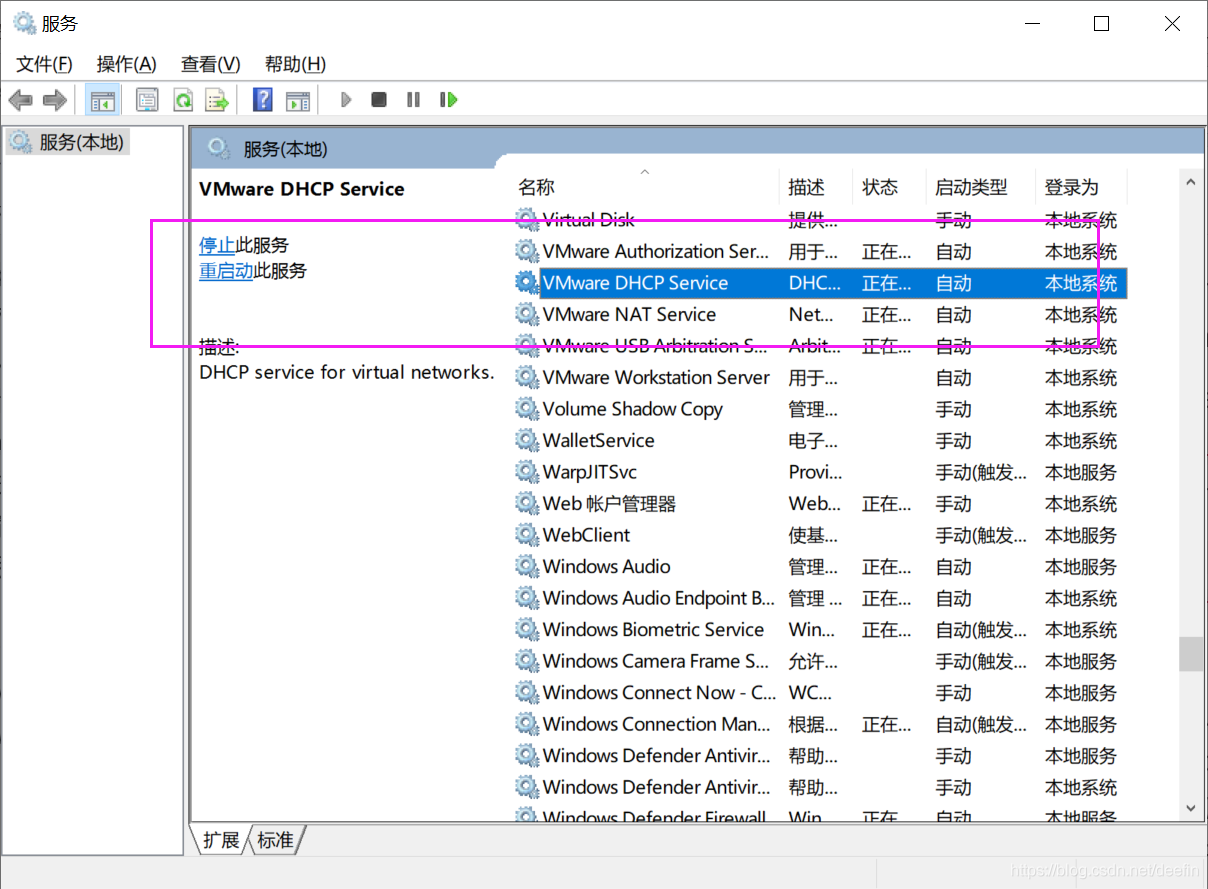
      if the host can not Ping the virtual machine, check whether the VMware network adapter 1 (corresponding to bridge mode) or VMware network adapter 8 (corresponding to NAT mode) network card is enabled in windows, if it is enabled, check whether the IP of the network card is in the same network segment as the virtual machine. For example, the IP of virtual machine is 192.168.184.137, while the IP of VMware network adapter 8 is 10.0.1.1, which means that Ping is not available. Just change the IP of VMware network adapter 8 to 192.168.184.1, and windows related VMware services are not started. Win + R running services.msc Open [service], and open the related services

Off line data storage and upload scheme

For reprint, please indicate the source: http://blog.csdn.net/itas109  


QQ technology exchange group: 129518033


Solution download address:

http://download.csdn.net/detail/itas109/9859688

GitHub related projects:

https://github.com/itas109/OfflineDataStorge


introduction


Nowadays, with the wide spread of network, the development of all walks of life have a great dependence on the network. Instantaneous network disconnection may cause huge losses to some industries, such as banking, finance and other industries with large amount of data. Network disconnection or network transmission failure may cause some immediate key data loss, In order to ensure the reliability of real-time data generation, sending and storage in some industries, especially the security of real-time data uploaded by clients, it is very important to use a secure offline data storage and automatic retransmission mechanism

Off line data storage technology

SQLite is a lightweight database, is to comply with the acid relational database management system, it is contained in a relatively small C library. It’s a public domain project founded by D. Richard HIPP. Its design goal is embedded, and it has been used in many embedded products. It occupies very low resources. In embedded devices, it may only need a few hundred K of memory. It can support Windows/Linux/Unix and other mainstream operating systems, and can be combined with many programming languages, such as TCL, C #, PHP, Java, etc., as well as ODBC interface. It is also faster than MySQL and PostgreSQL, two open source world-famous database management systems.

Unlike the common client server paradigm, the SQLite engine is not an independent process with which a program communicates, but a major part of it by connecting to the program. So the main communication protocol is the direct API call in the programming language. This has a positive effect on total consumption, delay time and overall simplicity. The entire database (definition, table, index and data itself) is stored in a single file on the host.

Cppsqlite encapsulates the API of SQLite once, which makes it more convenient for developers to use SQLite.

Automatic retransmission

The timer is used to check SQLite database on time during programming. If there is any data, it will be sent back and uploaded automatically to avoid the loss of data after transmission failure

Data upload solution

The existing problems: the data type is not unified when uploading, the data is scattered, the corresponding processing information is given for different data, and the data specification is stored when using the database

Solution: the design of the database only needs to give the key fields. The data submitted at one time is packaged into a type and stored as a data field (i.e. JSON data). The data and corresponding methods are stored by JSON. After sending successfully, the data is parsed according to JSON, so that different data can be stored in the other end of the database according to the corresponding type

The design of the database is as follows

Field:

id: INT
Data: TEXT
UpdateTime:DATETIME


JSON format:


{
    "businesses": [
        {
            "logicFunction":"firstFunction",
            "parms": [
                {
                    "parm":"1"
                }
            ]
        },
        {
            "logicFunction":"secondFunction ",
            "parms": [
                             {
                    "parm": "2"
                },
                {
                    "parm": "3"
                }
            ]
        }
    ]
}


Businesses: business array. The default business order is the storage order of the array

Parms: parameter array

ParM: the specific parameter value must be consistent with the parameter of the function corresponding to logicfunction

Logicfunction: logical function, used to determine which function to execute after data analysis, and its parameter is the value of parms array

For example, in this example, the first function is executed first, and then the second function is executed. If both functions succeed at the same time, it means success. In this way, the problem of business-related data retransmission is solved.


Think the article is helpful to you, you can scan the QR code to donate to the blogger, thank you!


For reprint, please indicate the source: http://blog.csdn.net/itas109  

QQ technology exchange group: 129518033


MySQL data backup scheme (compatible with local and remote)

For reprint, please indicate the source: http://blog.csdn.NET/itas109  

QQ technology exchange group: 129518033


This program will be updated continuously, and the software will be open source in the future…


At present, the solution:

1、 Execute CMD command, mysqldump and FTP by C + +

1. First of all, learn the syntax of mysqldump, which is not detailed here. For reference http://www.cnblogs.com/qq78292959/p/3637135.html

Export data (including remote) to local command

mysqldump -uroot -p123456 -h 192.168.1.101 databasetest > C:/data.sql

Pay attention to [seat according to the number]:

User name root

User name root

User name root

User name root

User name root

User name root

User name root

User name root Password 123456

Password 123456

User name root

User name root

User name root

User name root Password 123456

Password 123456 Local/remote IP 192.168.1.101 Database test
database test 2. C + + execute CMD command The above command is executed by anonymous pipeline, and the code will be open source later

2. C + + execute CMD command

Non real time fast synchronization scheme for mobile devices

For reprint, please indicate the source: http://blog.csdn.NET/itas109  

QQ technology exchange group: 129518033

Recently, we encountered a problem in the development process

The mobile terminal needs to synchronize the data of the server (only for query and subject to the data of the server), but with the increasing amount of data, the speed of synchronization will be slower and slower. It is mainly time-consuming to load the mobile device to operate the database and synchronize with the server.

Solutions:

In view of the pain points of the above problems, we mainly solve the time-consuming operation of the mobile terminal to the database and the time-consuming synchronization of the server for many times. Therefore, here we will give a lot of computing work to the server, that is, to solve this problem by using a way of database replacement. Generate a suitable database (such as sqllite) on the server and replace it after downloading. In this way, the time of the whole synchronization system is only the time of downloading and replacing database files, which can be shortened to a very short time.

Applicable conditions:

1. Synchronization is required for non real time, because it takes time for the server to generate database files.

2. The mobile terminal supports databases like sqllite, which can be replaced as a whole

For reprint, please indicate the source: http://blog.csdn.NET/itas109  

QQ technology exchange group: 129518033

[solution] coursera webpage can’t be posted, video can’t be opened -20.05.23-

115 coursera epidemic free open courses were ordered, and the deadline was July 31

Preparation: first of all, we should adjust the HTTP proxy to the global mode, otherwise we can’t open the website QAQ

Principle introduction

In order to facilitate the memory of users, we will IP address into a domain name, users do not need to remember the complex number of IP, the work to the computer to do. After we type in the domain name, the computer converts the domain name into the corresponding IP. DNS (domain name server) on the network is used for domain name resolution. Among the several blocking methods of GFW (wall), one is DNS pollution. GFW will interfere with the domain name resolution process, and the host will not be able to obtain resources. The main reason why the web page can’t be opened and the video loading fails is DNS cache pollution. In short, the DNS server’s processing is chaotic, that is, the corresponding relationship between the domain name and the server’s IP is wrong. The solution is to manually locate the domain name to the server. We use a simpler way to avoid DNS pollution, that is, modify the hosts file. Hosts is equivalent to a local DNS. When a user opens a browser to log on to a website, the system will first automatically find the corresponding IP address from the local hosts file. Once found, the corresponding web page will be opened immediately. If not found, the web address will be submitted to the DNS server for IP address resolution. Therefore, if we directly add the correct IP address to the hosts file, we don’t need to go to the DNS server to find it, and we can bypass the restrictions of GFW and avoid DNS pollution. This method is applicable to coursera. The principle is that coursera will go to D3 when opening the website njjcbhbojbot.cloudfront.net this server requests resources. Although the website is not blocked, it is slow to open. When you play the video, you will go to d3c33hcgiwev3 cloudfront.net this server requests resources, and the URL supported by this video is blocked, so you can log in to C Oursera but can't play the video.

The web page can't be opened

    find IP
    open the command prompt (press Win + R, and then enter CMD), and enter the code:

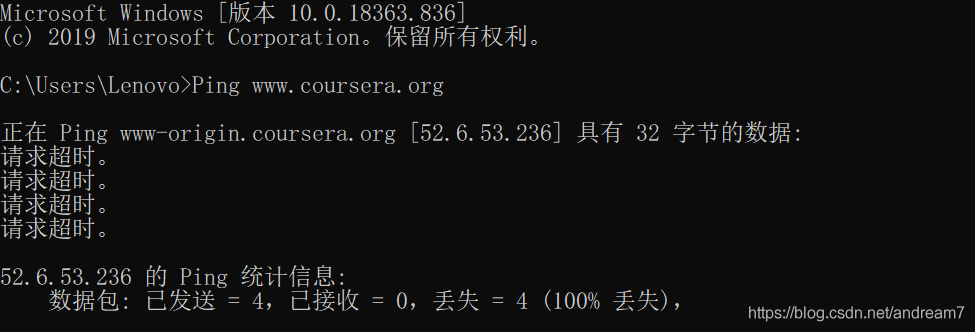
    Ping www.coursera.org
    

    The interface is as follows:

    the Ping here is an attempt to connect, but it obviously failed here, and [52.6.53.236] is the wrong IP cached in the DNS server, but we found that Ping can help us find the IP address.
    So, you can find the correct IP and continue to enter the code:

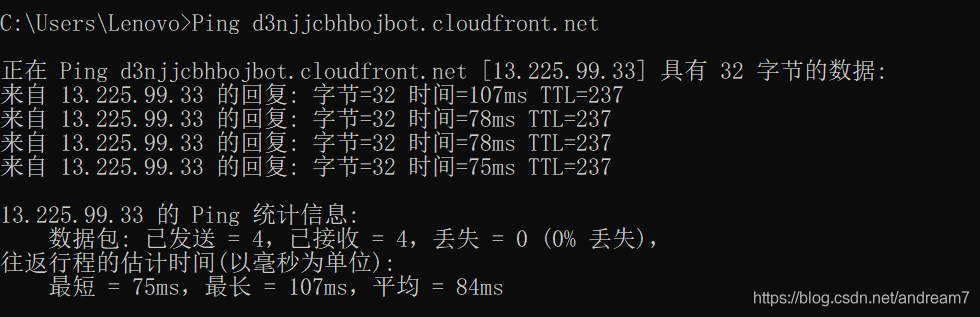
    Ping d3njjcbhbojbot.cloudfront.net
    

    This time, the connection is successful:

    this shows that [13.225.99.33] is the IP we are looking for, so we just need to change the http://www.coursera.org can be directed to this IP, which can be realized by modifying the hosts file. Modify the hosts file
    to find the hosts file in C: windows, system32, drivers, etc. do not double-click it. Open the hosts file in Notepad, add the code at the end, match the previously found IP with the domain name, and then save the CTRL + s:

    13.225.99.33    www.coursera.org
    

    Enter at the command prompt

    ipconfig/flushdns
    

    Enter refreshes DNS to take effect.

The video cannot be opened

    copy these lines of code into the hosts file

    52.84.246.90    d3c33hcgiwev3.cloudfront.net
    52.84.246.252    d3c33hcgiwev3.cloudfront.net
    52.84.246.144    d3c33hcgiwev3.cloudfront.net
    52.84.246.72    d3c33hcgiwev3.cloudfront.net
    52.84.246.106    d3c33hcgiwev3.cloudfront.net
    52.84.246.135    d3c33hcgiwev3.cloudfront.net
    52.84.246.114    d3c33hcgiwev3.cloudfront.net
    52.84.246.90    d3c33hcgiwev3.cloudfront.net
    52.84.246.227    d3c33hcgiwev3.cloudfront.net
    

    Don't forget to refresh DNS at last. At the command prompt, enter:

    ipconfig/flushdns
    

Enter coursera and start to study happily!

Course recommendation

Source: Zhihu: what courses are recommended on coursera?

    use Mysql to manage big data
    Jana schaich Borg, Duke University. It's a very good basic course of data analysis. The professor used two practical examples of data analysis, one is to analyze the data of a retailer for one year, and the other is to analyze the data of a pet website. Through these two examples, we can fully master the ability of SQL and data analysis. Lu Shihao, National Taiwan University. A baptism of humanity, after listening to this course, at least during the course, you won't often complain and worry. The first is why we study history in order to make better decisions. You can assume that you are a historical figure, what choices you will make in that scene at that time, and what choices the real historical figures have made, and how the results are compared with each other can help you make choices in your daily life. It's worth listening to. Algorithm, the first part is algorithm, and the second part is
    these two courses are all taught by Robert Sedgewick, the big guy of algorithm class. How wonderful is the old man. He just goes up and down, and suddenly finds out, eh, isn't the inventor of this algorithm himself. At that time, coursera also had Stanford's algorithms: design and analysis. I also watched some videos of this course, and I feel that the old man's lecture is better than the old man's. In particular, algorithms II talks about graph related algorithms, tries and string matching algorithms, which are really very clear.

Shrio | java.io.IOException: Resource [classpath:shiro.ini] could not be found

case

case

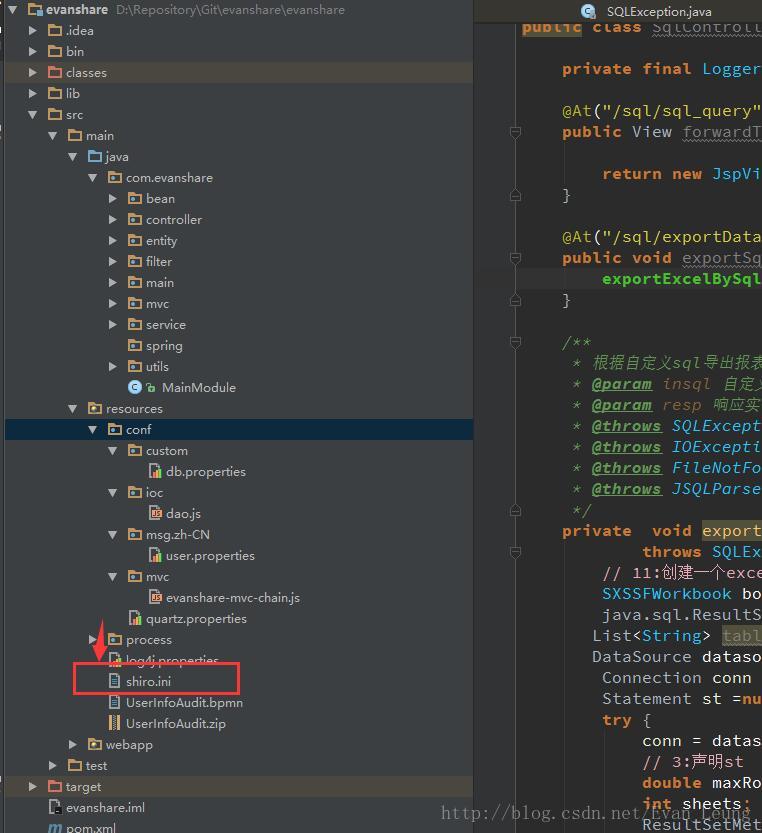
java.io.IOException: Resource [classpath:shiro.ini] could not be found

Directory of Shiro file:

Solution

After troubleshooting, there is no problem with the file storage directory structure, but the bytecode file directory under target is still the old storage location, under conf/instead of the class directory. Therefore, you can know that this exception must be a compilation problem. Just delete the whole target directory and recompile it

The introduction of third-party jar package in mavn project results in classnotfoundexception

Cases

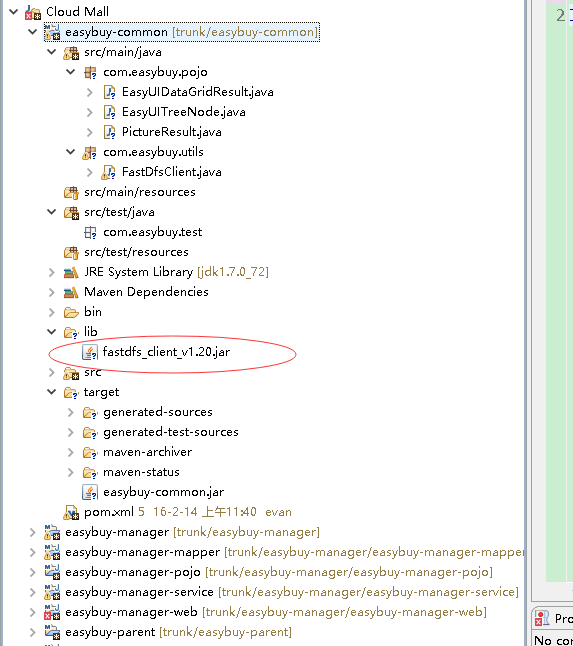
I have a maven built project. There are dependencies between the project modules. I need to use a local jar package, which cannot be configured pom.xml The file is automatically downloaded from the remote warehouse, so I directly import the jar package to one of the projects without passing the pom.xml As a result, other modules that depend on the module cannot reference the jar, and classnotfoundexception appears tion

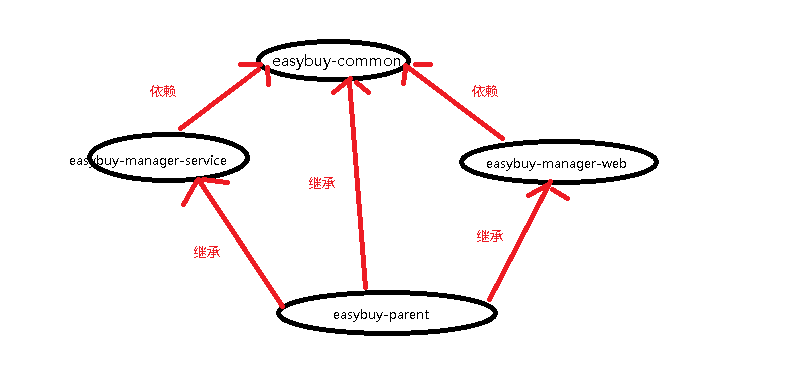
In this project, there are the following dependencies between modules:

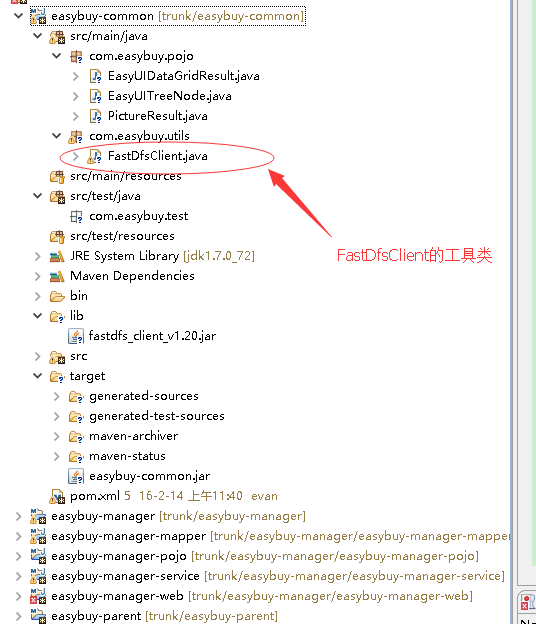
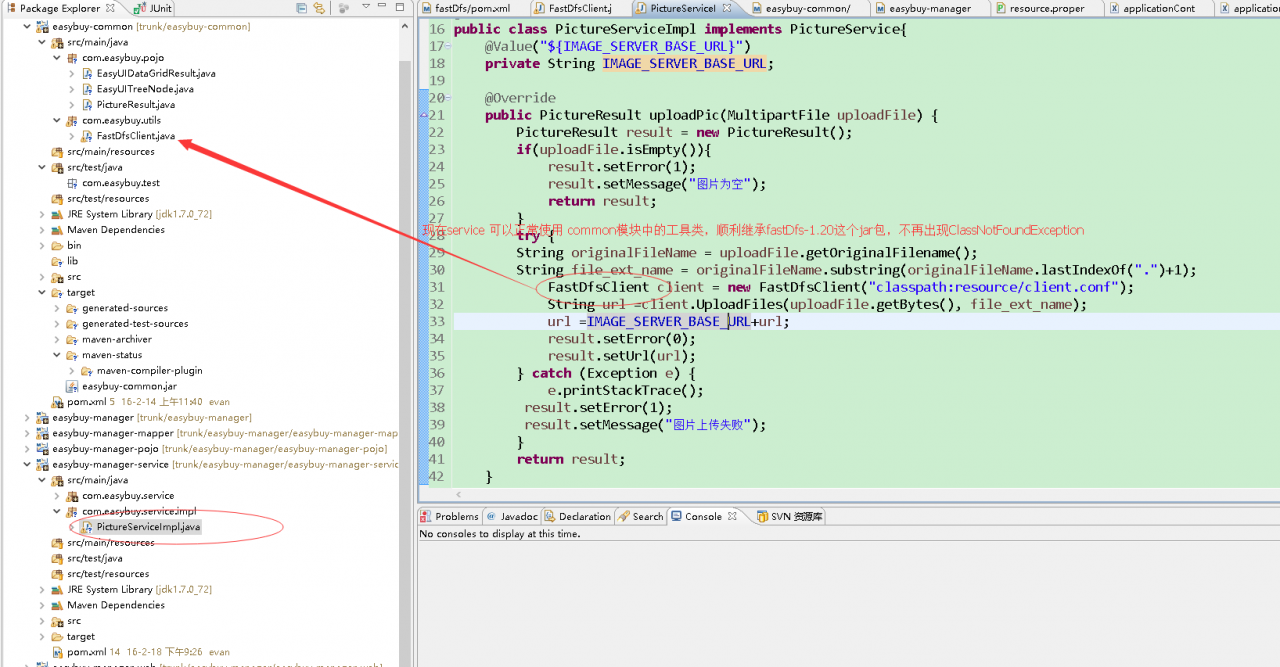
The project needs to introduce fastdfs_ client_ V1.20.jar package is used to operate the fastdfs distributed file system. Both service and controller are involved in the operation. So now we want to put the operation tool class of fastdfs in the common module for sharing. But now the common module directly uses fastdfs_ client_ If v1.20.jar is imported through lib, because this method is not built through maven, so service In other words, even if the tool class is placed in the common module, neither the service nor the web module can access the tool class and import the corresponding package. When running the whole web project and uploading the file to the fastdfs system, classnotfoundexception will appear, unless both the service and the web module can inherit Fastdfs in common module_ client_ The jar package v1.20.jar

Solutions

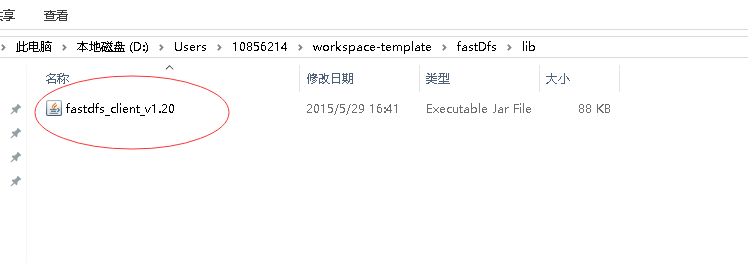
1. Find the specific location of the package

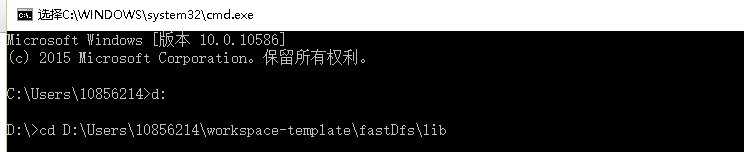
2. Open the CMD and enter the directory of the third party jar package

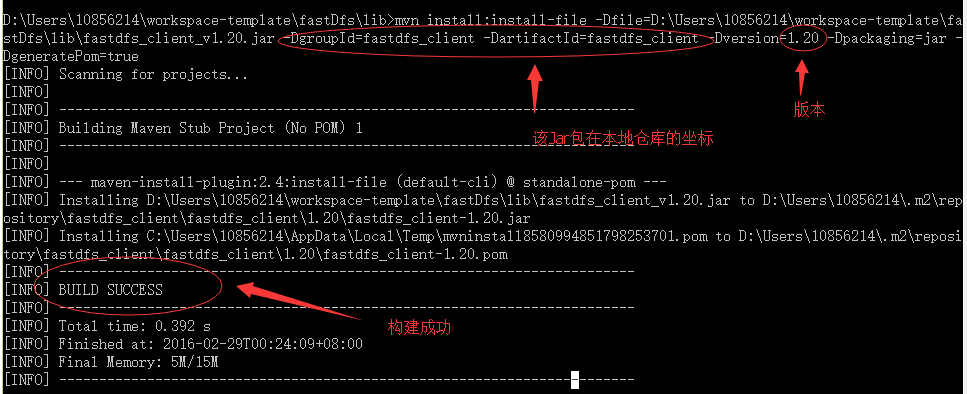
3. Run the command to build the jar package manually

mvn install:install-file -Dfile=D:\Users\10856214\workspace-template\fastDfs\lib\fastdfs_client_v1.20.jar -DgroupId=fastdfs_client -DartifactId=fastdfs_client -Dversion=1.20 -Dpackaging=jar -DgeneratePom=true

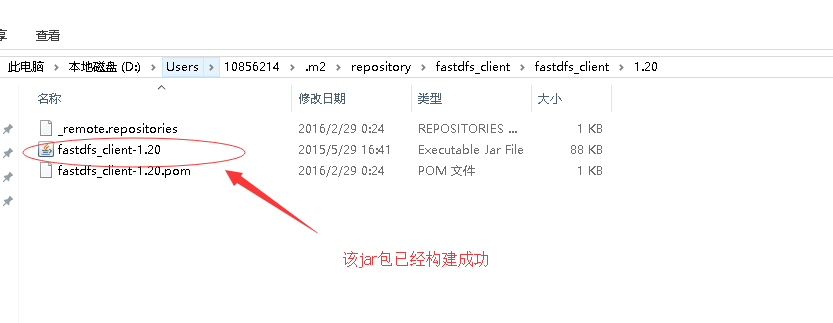
4. Check the local warehouse to see if the jar package has been added to the local warehouse folder

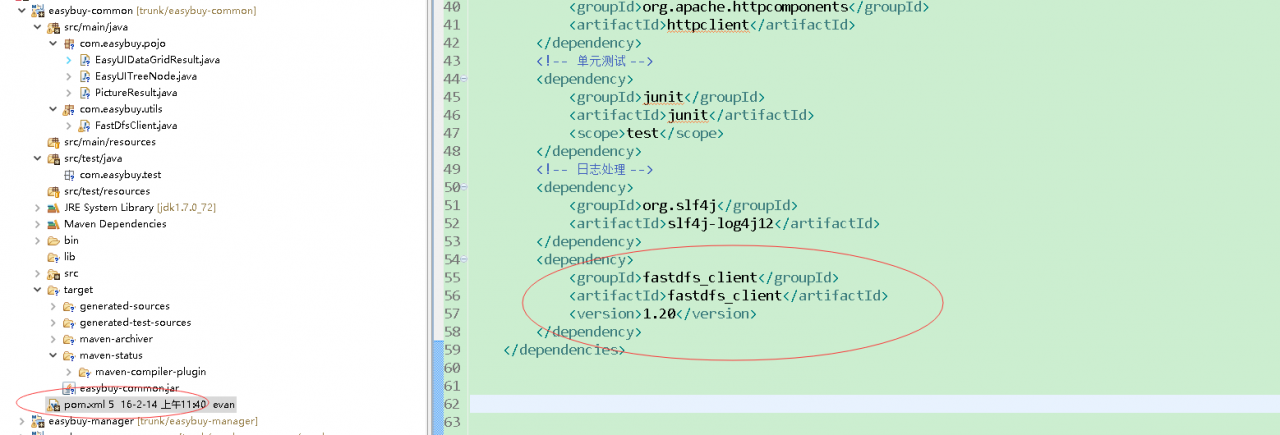
5. Give the jar package to Maven for management and add it to pom.xml in

<span style="white-space:pre">		</span><dependency>
<span style="white-space:pre">			</span><groupId>fastdfs_client</groupId>
<span style="white-space:pre">			</span><artifactId>fastdfs_client</artifactId>
<span style="white-space:pre">			</span><version>1.20</version>
<span style="white-space:pre">		</span></dependency>

6. Restart Maven install common module to see if the service and web modules have been imported into the common module’s tool classes

Idea | change the default configuration of idea to open a new project

background

Children’s shoes who have used idea should find that when you open a new project with idea, you always need to reconfigure it. It will use the default configuration of the system, such as maven, JDK and so on.

Solution

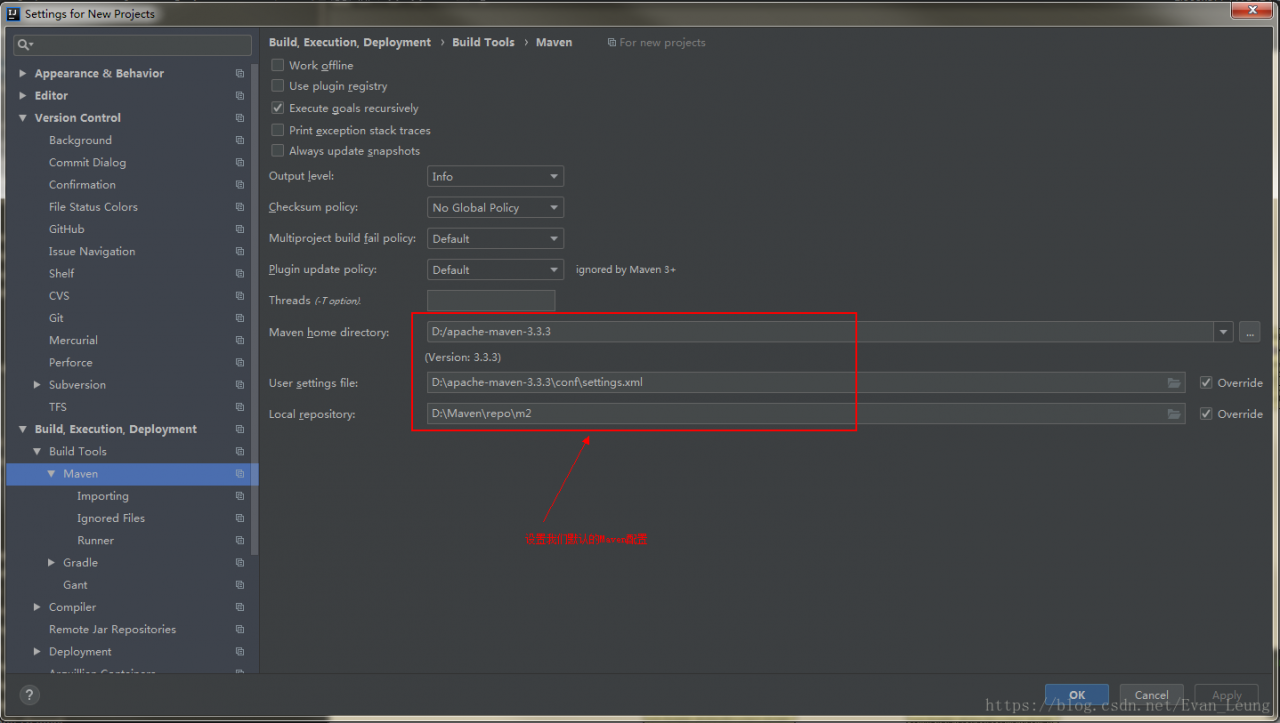
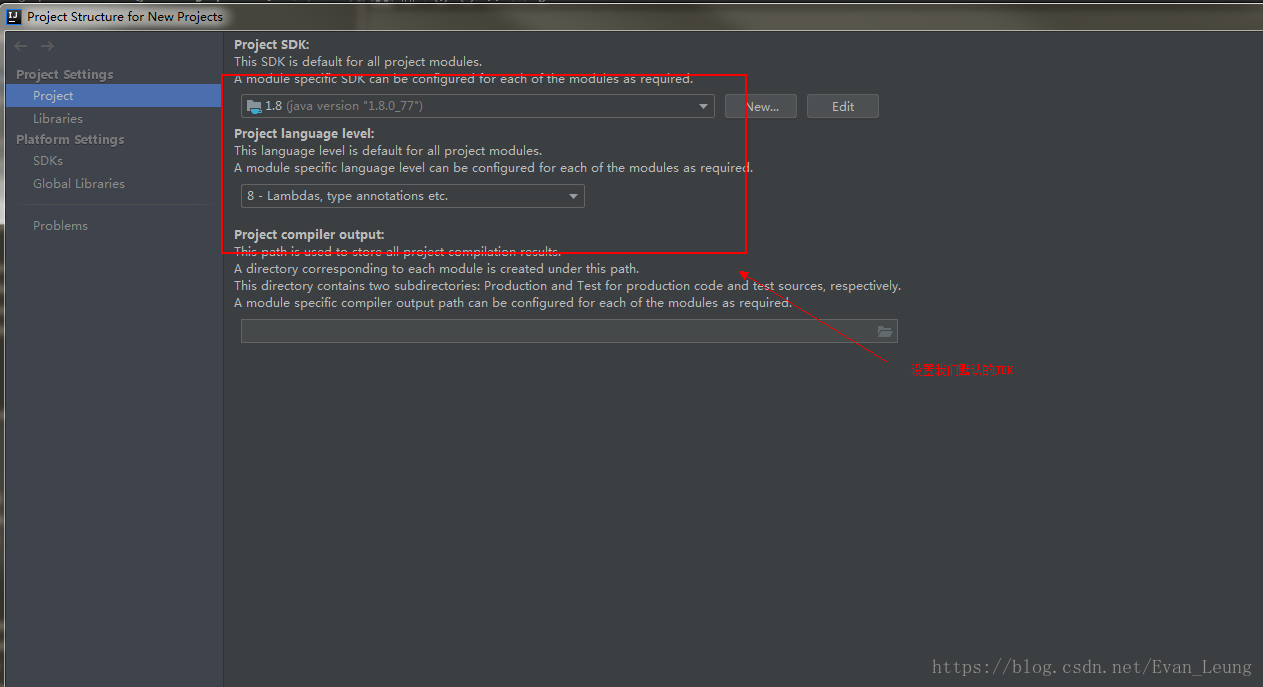
Idea actually has a setting to change the default configuration of new projects. You can change a default configuration for new projects through the following configuration:
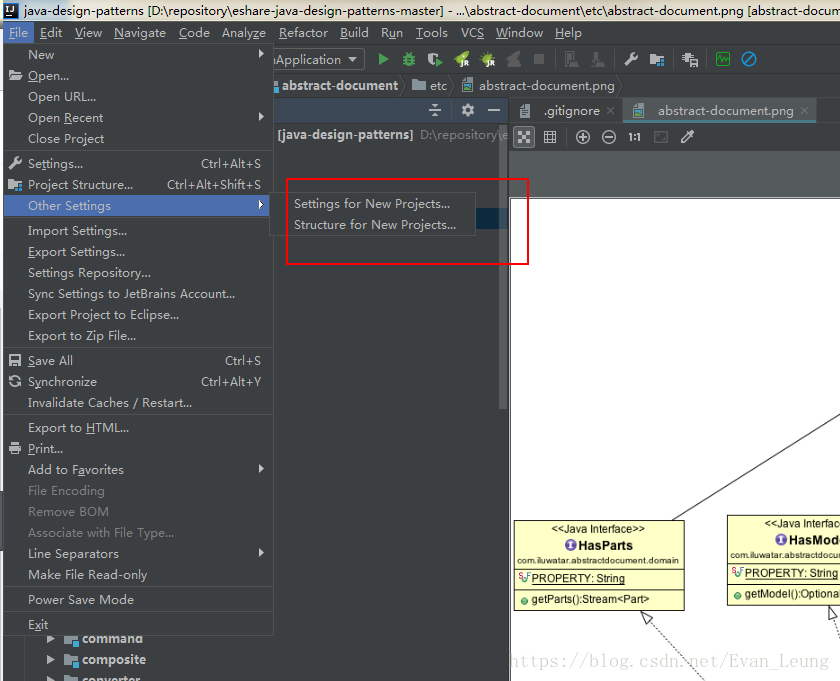
file - & gt; other settings - & gt; setting for new projects or file - & gt; other settings - & gt; structure for new projects