Category Archives: How to Fix

The solution of unsuccessful rosdep update

After encountering this problem, we refer to no less than ten online tutorials, none of which is effective, including but not limited to:

1. Hang up VPN (it seems that many people finally rely on science to get online, but I still can’t hang it here

2. Modify the upper limit of time parameter: useless, the system has the default maximum value, about one minute, to treat the symptoms but not the root cause

3. Modify the host file: all kinds of addresses of Google and GitHub have been added in, which is useless

4. Hang hot spot: same as 1, useless

For the final solution, please refer to Baidu Post Bar:

sudo apt-get update

sudo apt-get install python-rosdep

  In the second step, there is an error message when installing Python rosdep. It seems that some files were not successfully installed, but in the end, rosdep update succeeded.

’nvcc.exe‘ failed with exit status 1

F:/study/easy-faster-rcnn.pytorch-master/support/src/cuda/ROIAlign_cuda.cu(280): error: no instance of function template "THCCeilDiv" matches the argument list
            argument types are: (long long, long)

F:/study/easy-faster-rcnn.pytorch-master/support/src/cuda/ROIAlign_cuda.cu(280): error: no instance of overloaded function "std::min" matches the argument list
            argument types are: (<error-type>, long)

F:/study/easy-faster-rcnn.pytorch-master/support/src/cuda/ROIAlign_cuda.cu(327): error: no instance of function template "THCCeilDiv" matches the argument list
            argument types are: (int64_t, long)

F:/stud/easy-faster-rcnn.pytorch-master/support/src/cuda/ROIAlign_cuda.cu(327): error: no instance of overloaded function "std::min" matches the argument list
            argument types are: (<error-type>, long)

4 errors detected in the compilation of "C:/Users/����֮/AppData/Local/Temp/tmpxft_000032d8_00000000-10_ROIAlign_cuda.cpp1.ii".
ROIAlign_cuda.cu
error: command 'C:\\Program Files\\NVIDIA GPU Computing Toolkit\\CUDA\\v9.0\\bin\\nvcc.exe' failed with exit status 1

Solution
Add (long) to the error

Cause: java.sql.BatchUpdateException: Unknown column ‘xxx‘ in ‘field list‘

Error 12164 – [xnio-1 TASK-2] p.p.c.s.c.globalexception handler resolver: Global exception information ex = com.xxx.cd.mapper.cdinvoiceinfomapper.insert (batch index # 1) failed———— Error information

Cause: java.sql.batchupdateexception: unknown column ‘xxx’ in ‘field list’ — prompt reason

Finding problems

First of all, the error prompt means that the field cannot be found in the database and the input is invalid

resolvent

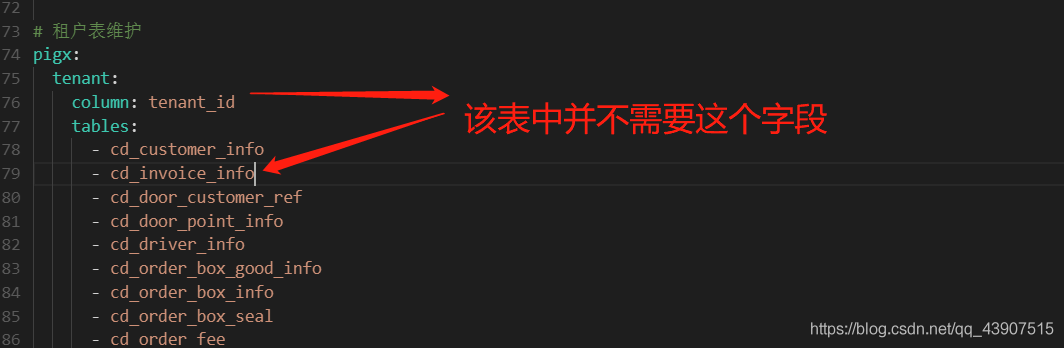
    first check the database to see if there is this field in the table. If not, add it. Then add this field to the corresponding mapper.xml and entity class. If the above problems do not exist or cannot be solved, it is recommended to check on the web side to see if there is this missing data in your input data. If not, check the service layer, Open the configuration in Nacos, maintain the table directory in this field, and find that there is this table, but this table does not need this field. Remove this table from it, and then you can do it

Summary

Don’t be afraid when you make mistakes. It’s best to read the error information and the reason patiently, and understand the meaning roughly. If you don’t understand, ask your colleagues first.

Typescript error “Cannot write file xxx because it would overwrite input file

The reason for this problem is that allowjs is turned on.

Because allowjs allows typescript compiler to compile JS. The compiled output file, namely XXX. JS, is the same as the source file.

So an error like “input file will be overwritten” will be reported.

In fact, we use third-party packaging tools such as webpack for our daily development. The compilation output is the responsibility of TS loader, so it is not necessary to care about the output of each TS file.

In this case, noemits can be set to true true

No Emit –
Do not emit compiler output files like JavaScript source code, source-maps or declarations.
This makes room for another tool like Babel, or swc to handle converting the TypeScript file to a file which can run inside a JavaScript environment.
You can then use TypeScript as a tool for providing editor integration, and as a source code type-checker.

In addition, you can specify the output directory to avoid conflicts.

For more details, please refer to https://github.com/kulshekhar/ts-jest/issues/1471

Uncaught type error: cannot read property ‘MSIE’ of undefined

Error:
uncaught typeerror: cannot read property ‘MSIE’ of undefined
reason:
$. Browser method has been removed in jQuery 1.9
write a $. Browser code by yourself (recommended)
write it in the script after jQuery reference

jQuery.browser = {};
(function () {
    jQuery.browser.msie = false;
    jQuery.browser.version = 0;
    if (navigator.userAgent.match(/MSIE ([0-9]+)\./)) {
        jQuery.browser.msie = true;
        jQuery.browser.version = RegExp.$1;
    }
})();

AttributeError: ‘Tensor‘ object has no attribute ‘_numpy‘

Problem Description:

In TF2. X environment, the user-defined loss function error, want to view y_ PRED and Y_ True, using K. Eval (y)_ pred),y_ Pred.numpy() error:
attributeerror: ‘tense’ object has no attribute ‘_ numpy’

resolvent:

Set run in model. Compile()_ When eagerly is changed to true, you can view it, but the running speed will be slow

Analysis of the reasons:

run_ Eagerly parameter setting model is to create dynamic graph or static graph (default is static graph, false)
running eagerly means that your model will run step by step, just like Python code. Dynamic graph mechanism may make the model run slowly, because it can’t use the optimization method of static graph in previous versions; But its advantage is that it is easy for you to debug
by default, we will compile your model and make it a static graph to get the best performance
reference blog
in TF2. X, by default, every tenor has numpy, but there is no GitHub problem description in keras

Error assembling WAR: Problem creating war: Execution exception (and the archive is probably corrup

Using idea development, Maven build error:

 Error assembling WAR: Problem creating war: Execution exception (and the archive is probably corrupt but I could not delete it)

The cause of the error is that the memory of the JVM is not enough, so it’s better to configure it. The steps are as follows:

So we modify Maven’s JVM parameters directly in idea,

file-> setting-> Build,Execution,Deployment-> Maven-> Runner

Set the JVM parameter in VM option column, – xmx1g – XX: maxmetaspacesize = 128M

After setting, click Install on the right side to start the compilation, the parameter takes effect, and the maximum heap memory becomes 1g
0  

After the new video card rtx3060 arrives, configure tensorflow and run “TF. Test. Is”_ gpu_ The solution of “available ()” output false

First of all, install according to the normal installation method:
the necessary conditions for success are:
1. The version number should be correct, that is, CUDA should be installed above 11.1 (because CUDA version supported by 30 AMP architecture graphics card starts from 11.1)
link: https://developer.nvidia.com/zh-cn/cuda-downloads
2. Cudnn needs to install the, Link (to register and log in to NVIDIA account) https://developer.nvidia.com/zh-cn/cudnn
If you haven’t installed it, you can see other posts https://so.csdn.net/so/search/all?q=3060%20tensorflow& t=all& p=1& s=0& tm=0& lv=-1& ft=0& l=& U =
after installation, enter the created environment and run tf.test.is_ gpu_ available()。
if the computer can detect the graphics card, it can display the number of cores, computing power and other parameters of each graphics card, but the final answer is false
if the command line shows that cusolver64 cannot be found_ 10 documents

, at the following address C:// program files/NVIDIA GPU computing toolkit/CUDA/V11.1/bin

Will cusolver64_ 11. DLL renamed to cusolver64_ 10. Dll
and then run tf.test.is again_ gpu_ available()

Your uncle made it!

docker.errors.DockerException: Error while fetching server API version: (‘Connection aborted.‘, File

Problem description

ocker.errors.DockerException: Error while fetching server API version: (‘Connection aborted.’, FileNotFoundError(2, ‘No such file or directory’))

Causes

The reason is that docker did not start

terms of settlement

Open docker:

systemctl start docker

Look at docker process

ps -ef | grep docker

Final execution

docker-compose up -d
