Background:
Webstorm2019.1 editor, import a new project, the package.json has been written, directly NPM install to install node_ Module package. And then the question came…
Problem Description:
Question 1: after installing node_ After the module, the eslint of the project does not work, so it can’t check the syntax and repair automatically; See editor tips eslint:this.cliEnigne is not a XXXX
Question 2: after installing eslint, the verification rules are not what you want…. For example: force all HTML tags to be written in Hump style, & lt; el-button> Change to & lt; ElButton> It’s awkward to look at…
terms of settlement:
The solution to problem 1:
The version of webstorm does not correspond to the version of eslint. I have reduced the version of eslint in the project.
npm uninstall eslint // Uninstall eslint
npm install [email protected] –save-dev // Install a lower version of eslint
be careful: Remember to install it in devdependencies. The following items will not be packaged in the production environment. Command NPM install XXX — When I installed save dev, I didn’t add dev, but it was installed under dependencies. As a result, I couldn’t install it or caused other errors.
The solution to problem 2:
Tried a lot of ways, also rewritten the eslintrc.js rule, added the rules about hump in the rules, but it didn’t work, I don’t know why…..
Finally, compared with the previous project, I changed the version of eslint package to the same one, and the problem was solved!
I changed these two bags
npm install [email protected] –save-dev
npm install [email protected] –save-dev
Little knowledge:
Do you really understand the difference between devdependencies and dependencies?
devdependencies for local environment development dependencies User publishing environment
Devdependencies are modules that will only be relied on in the development environment, and the production environment will not be included in the package. Through node_ Env = development or node_ Env = production specifies the development or production environment
the packages that depend on can be used not only in the development environment, but also in the production environment. In fact, this sentence is the key. According to this concept, it’s easy to decide whether to use — save or — save dev when installing a module
Solution of xshell error report on 2021.05.03
1. Problem: xshell error
Xshell 6 prompts “to continue using this program, you must apply the latest update or use the new version”, but it is already the latest version
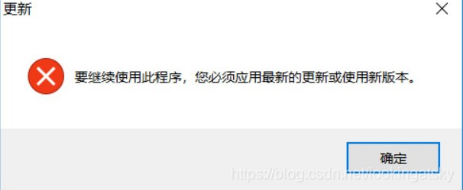
2. Solutions
According to the search to other people also encounter the solution of this situation, sort out, oneself solved the process of this problem
use the binary editor to modify the nslicense.dll file. The editor used here is UltraEdit
file location: xshell installation root directory
Specific steps:
Step 1: download the UltraEdit editor
Step 2: open the nslicense.dll file with the UltraEdit editor
Step 3: search for “7F 0C 81 F9 80 33 E1 01 0f 86 81”
Step 4: change “86” to “83”
Step 5: save the file
Re open xshell, found that it can be used, happy..
If xshell 5, step 3 searches for “7F 0C 81 F9 80 33 E1 01 0f 86 80”
Can’t Dubbo’s @ service be injected into the spring container?
Solution: rebuild the module and test again
when testing the Dubbo provider, adding @ service under the Dubbo path to the business implementation code will report that a test class is not injected
org.springframework.beans.factory.unsatisfied dependencyexception: error creating bean with name ‘com.tanhua.dubbo.server.api.testrecommenduserapi XXXXXX,
No qualifying bean of type ‘com. Tanhua. Dubbo. Server. API. Recommenduserapi’ available: (I think the interface recommenduserapi was not injected), so I replaced it with spring’s @ service line; But shouldn’t Dubbo’s @ service have spring’s @ service function?Baidu for a long time did not belong to their correct answer; After carefully checking the scan package, the annotation @ runwith (springrunner. Class) @ springboottest
on the test class has been added, and the @ service under Dubbo still reports an error
at last, the module was simply rebuilt by copying and pasting, and the final test was successful!! But what’s wrong?I don’t know. Maybe it’s related to building a module! Hope it works…
Solve the problem of jdk8 after win7 is installed. Has value ‘1.8’, but ‘1.7’ is required
I win7 x64 Ultimate Edition, installed JDK7 and jdk8 at the same time, after uninstalling jdk8, the CMD command line input: Java – version, originally thought to display java version 1.7, the result of error: has value ‘1.7’, but ‘1.8’ is required
I look at Java_ Home, the environment variable, is found to be OK, pointing to C:// Java/jdk1.7.0
resolvent:
After JDK7 is installed, jdk8 is installed, because when JDK1.8 is installed, java.exe, javaw.exe and javaws.exe are automatically copied to the directory C: (Windows) system32, because the priority of this directory in the windows environment variable is higher than Java_ The priority of the environment variable set by home.
After understanding this, you will know the cause of the error. Although JDK1.8 has been uninstalled, the three executable files of java.exe, javaw.exe and javaws.exe in the directory of C: (Windows) system32 are still JDK1.8, so the Java version of jdk1.7 is_ Copy the three corresponding executable files under home/bin to the directory of C: Windows/system32. At this time, enter Java – version on the command line of CMD, and everything is normal.
My situation is just the opposite of his, so I replace several files of jdk8 and overlay them in the directory of C: (Windows) system32.
According to the above modification, enter Java – version in CMD to display version 1.8
java.lang.AbstractMethodError: Receiver class com.alibaba.cloud.sentinel.feign.SentinelContractHolde
Caused by: java.lang.AbstractMethodError: Receiver class com.alibaba.cloud.sentinel.feign.SentinelContractHolder does not define or inherit an implementation of the resolved method abstract parseAndValidatateMetadata(Ljava/lang/Class;) Ljava/util/List; of interface feign.Contract.
When doing openfeign for sentinel service, I encountered the following errors:

according to the source code tracing, I found that there was a problem with the implementation class of feign’s contract interface. In my project springcloud, Sr1 version h, depends on the following:
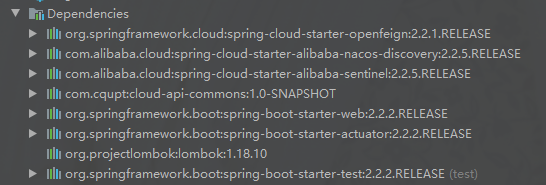
the reason for the problem is that the version is inconsistent. For feign’s contract interface, 2.2.1 and 2.2.2 are different
2.2.1.RELEASE:
// TODO: break this and correct spelling at some point
List<MethodMetadata> parseAndValidatateMetadata(Class<?> targetType);
2.2.2.RELEASE:
List<MethodMetadata> parseAndValidateMetadata(Class<?> targetType);
In 2.2.1.release, there is a line of comment description. The spelling of interface method name is wrong. In 2.2.2.release, the method name has been corrected, that is, the method name has changed
the sentinelcontractholder class in spring cloud Alibaba sentinel uses this method of the interface (feign 2.2.1. Release version)
```java
@Override
public List<MethodMetadata> parseAndValidatateMetadata(Class<?> targetType) {
	List<MethodMetadata> metadatas = delegate.parseAndValidatateMetadata(targetType);
	metadatas.forEach(metadata -> METADATA_MAP
			.put(targetType.getName() + metadata.configKey(), metadata));
	return metadatas;
}
After finding out the reason, modify the implementation class of contract interface of feign. Create a package of com.alibaba.cloud.sentinel.feign in the appropriate place of the project. Modify the implementation class sentinelcontractholder as follows:
/**
 * @author geng
 * @create 2021/4/30 -- 10:47
 */
public class SentinelContractHolder implements Contract {
    private final Contract delegate;

    /**
     * map key is constructed by ClassFullName + configKey. configKey is constructed by
     * {@link feign.Feign#configKey}
     */
    public final static Map<String, MethodMetadata> METADATA_MAP = new HashMap<>();

    public SentinelContractHolder(Contract delegate) {
        this.delegate = delegate;
    }

    @Override
    public List<MethodMetadata> parseAndValidateMetadata(Class<?> targetType) {
        List<MethodMetadata> metadatas = delegate.parseAndValidateMetadata(targetType);
        metadatas.forEach(metadata -> METADATA_MAP
                .put(targetType.getName() + metadata.configKey(), metadata));
        return metadatas;
    }
}
Run again, start successfully!
PhpMyAdmin localhost only displays the codes of configuration
One day, when using phpMyAdmin, you can’t jump out of the login page. Instead, it’s the code in configuration (see below). Due to the Mac operating system, the methods given by the Internet for a long time are not available. Later, it seems that some of the previous settings have been overridden.
<?php
/* vim: set expandtab sw=4 ts=4 sts=4: */
/**
 * Main loader script
 *
 * @package PhpMyAdmin
 */

/**
 * Gets some core libraries and displays a top message if required
 */
require_once 'libraries/common.inc.php';

/**
 * display Git revision if requested
 */
require_once 'libraries/display_git_revision.lib.php';
require_once 'libraries/Template.class.php';

/**
 * pass variables to child pages
 */
$drops = array(
    'lang',
    'server',
    'collation_connection',
    'db',
    'table'
);
foreach ($drops as $each_drop) {
    if (array_key_exists($each_drop, $_GET)) {
        unset($_GET[$each_drop]);
    }
}
unset($drops, $each_drop);
The LoaLoaLoaLoaLoaLoaLoaLoaLoaLoaLoaLoaLoaLoaLoaLoaLoaLoaLoaLoaLoaLoaLoaLoaLoaLoaLoaLoaLoaLoaLoaLoaLoaLoaLoaLoaLoaLoaLoaLoaLoaLoaLoaLoaLoaLoaLoaLoaLoaLoaLoaLoaLoaLoaLoaLoaLoaLoaLoaLoaLoaLoaLoaLoaLoaLoaLoaLoaLoaLoaLoaLoaLoaLoaLoaLoaLoaLoaLoaLoaLoaLoaLoaLoaLoaLoaLoaLoaLoaLoaLoaLoaLoaLoaLoaLoaLoaLoaLoaLoaLoaLoaLoaLoaLoaLoaLoaLoaLoaLoaLoaLoamodulmodulmodulmodulmodulmodulmodulmodulmodulmodulmodulmodulmodulmodulmodulmodulmodulmodulmodulmodulmodulmodulmodulmodulmodulmodulmodulmodulmodulmodulliblibliblibliblibliblibliblibliblibliblibliblibexe/ apaapache2/libliblibliblibliblibgaggaggaggaggaggaggaggaggaggaggaggaggaggaggaggaggaggaggaggaggaggaggaggaggaggaggag
sudo apachectl restart 256303;`
There is a problem with Microsoft Visual C + + 14.0 about Python installation package
If this problem arises, go https://www.lfd.uci.edu/~gohlke/pythonlibs/ Download, corresponding version
Impdp meets ora-31685
Impdp error:
Processing object type SCHEMA_EXPORT/MATERIALIZED_VIEW
ORA-31685: Object type  failed due to insufficient privileges. Failing sql is:
ORA-31685: Object type  failed due to insufficient privileges. Failing sql is:
ORA-31685: Object type  failed due to insufficient privileges. Failing sql is:
Job "SYS"."SYS_IMPORT_FULL_01" completed with 9 error(s) at 14:37:45
The reason is that there are materialized views in the exported objects, but the user does not have permission to create materialized views
After the user is authorized, delete the imported data and import it repeatedly to solve the problem
grant create materialized view to user2;
Solution of error in CAD license detection
Solution of error in CAD license detection
Reason: the optimization software has shut down the auto start service of Autodesk.
Remember the error of using unaddressable value of a novice goer
Go test, report an error;
Error in go test panic: reflect: reflect. Value. Set using addressable value [recovered].
Solution: generally, there is an error of using unaddressable value, which indicates that the pointer value passed is incorrect. For example, if the pointer address needs to be passed, but the value is passed. At that time, I had a hunch that DB should have passed a non pointer when finding. After verification, it was.
So, the summary is: when updating in Gorm, you can not pass the pointer (if you want to use the returned primary key, you still need to pass the pointer), but when querying, you must pass it, even if it is slice or map type.
Installation pyenvreward: fatal: unable to access ‘ https://github.com/pyenv/pyenv.git/ ‘
Questions

solve
Lack of dependency, just install Python dependency
yum update -y nss curl libcurl
Idea stuck and error reported: UI was frozen for xxxxx MS problem solving
Phenomenon
After idea starts and clicks a menu, there is no reaction at all. When you click close, you can’t close it. Check the log and report the following error:
➜  bin 2021-04-30 00:20:31,777 [ 317987]   WARN - .diagnostic.PerformanceWatcher - UI was frozen for 5750ms, details saved to /home/zeek/.cache/JetBrains/IntelliJIdea2020.3/log/threadDumps-freeze-20210430-002031-IU-203.7148.57-RandomAccessFile.readBytes-5sec
2021-04-30 00:20:45,194 [ 331404]   WARN - s.ui.configuration.SdkDetector - No version is returned for detected SDK IDEA JDK at /home/zeek/software/idea-IU-203.7148.57
2021-04-30 00:22:05,304 [ 411514]   WARN - ystem.impl.ActionPopupMenuImpl - 1174ms to fill popup menu ProjectViewPopup
2021-04-30 00:22:33,250 [ 439460]   WARN - ConfigurableExtensionPointUtil - ignore deprecated groupId: language for id: preferences.language.Kotlin.scripting
2021-04-30 00:22:33,426 [ 439636]   WARN - ConfigurableExtensionPointUtil - use other group instead of unexpected one: build.android
2021-04-30 00:22:44,580 [ 450790]   WARN - .diagnostic.PerformanceWatcher - UI was frozen for 12256ms, details saved to /home/zeek/.cache/JetBrains/IntelliJIdea2020.3/log/threadDumps-freeze-20210430-002237-IU-203.7148.57-ShowSettingsAction.perform-12sec
It was serious at the beginning, and I don’t know the specific reason.
Processing steps
First of all, because I use Linux operating system, the default JDK is openjdk 11. Generally speaking, openjdk is not as stable as Oracle JDK, and openjdk 11 is too new, so the default JDK of Jiujiang operating system is Oracle JDK 9.
➜  bin java -version
Picked up _JAVA_OPTIONS: -Dawt.useSystemAAFontSettings=on -Dswing.aatext=true
java version "9.0.1"
Java(TM) SE Runtime Environment (build 9.0.1+11)
Java HotSpot(TM) 64-Bit Server VM (build 9.0.1+11, mixed mode)
Secondly, because the default memory used by idea is about 700m, insufficient memory may also lead to the above situation. Therefore, the running memory of idea is adjusted to 2G, and the configuration file is idea installation directory/bin/idea64. Vmoptions . The configuration content is as follows (only the sizes of – XMS and – Xmx are modified)
-Xms512m
-Xmx2048m
-XX:ReservedCodeCacheSize=512m
-XX:+UseConcMarkSweepGC
-XX:SoftRefLRUPolicyMSPerMB=50
-XX:CICompilerCount=2
-XX:+HeapDumpOnOutOfMemoryError
-XX:-OmitStackTraceInFastThrow
-ea
-Dsun.io.useCanonCaches=false
-Djdk.http.auth.tunneling.disabledSchemes=""
-Djdk.attach.allowAttachSelf=true
-Djdk.module.illegalAccess.silent=true
-Dkotlinx.coroutines.debug=off
-Dsun.tools.attach.tmp.only=true
Finally, disable some plug-ins that you can’t use at ordinary times.
After the above three steps, the idea Caton phenomenon is not so obvious (invisible to the naked eye).
Title: idea stuck and error: UI was frozen for xxxxx MS problem solving
Author: zeekling
tips: Please note that the article is reproduced from personal blog: Xiaoling children’s shoes