Category Archives: How to Fix

Unbuntu 18.04 unable to install mkcramfs

Problem description

In the morning, I received user feedback and applied to add mkcramfs and libxml dev to the offline source
which was strange. After asking the user, the user gave a screenshot of the question:

Problem analysis

Firstly, the first step is to get the user node information and login mode, and the path of the command in the screenshot
after logging in, the user problem is reproduced, and the error is indeed reported; Try the following:

1、apt-get install mkcramfs

Report an error, indicating that there is no such package

2、apt-get install libxml2-dev

I still report an error. I feel strange. I suspect that there is something wrong with the source.
3. Check the source configuration of the user’s machine and find that there is no/etc/apt/source.list file, only/etc/apt/source.text; The reason is that the MV of the last step is not executed when the user installs the offline source document.
4. Modify the source information and update it

mv /etc/apt/source.text /etc/apt/source.list
apt-get update

5. After trying to install the previous two packages, it is found that libxml2 dev is installed normally, and mkcramfs cannot be installed

Problem solving

For all the relevant information on the Internet, it is found that some Ubuntu can’t install mkcramfs in APT get mode, so they need to download the package to the local and then install it.
1. Find the corresponding package in the offline source, and then download it:
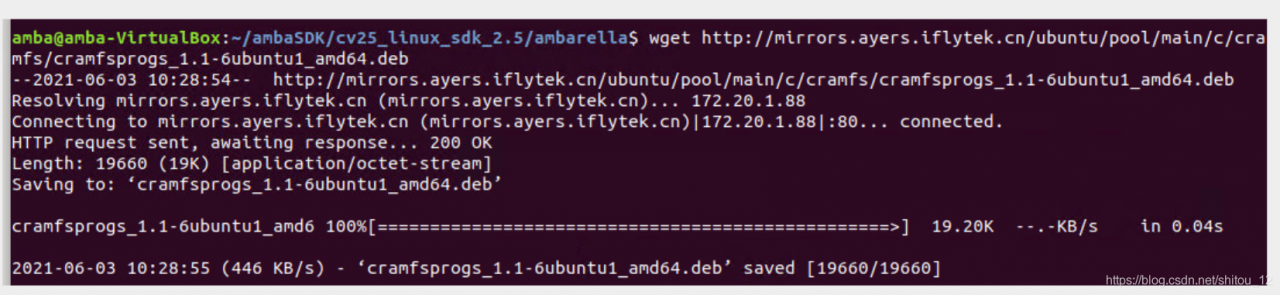
2. Install it in dpkg-i mode
3. Verify it by performing the user’s previous operation; Problem solving:

Summary

Some Ubuntu can’t install mkcramfs in APT get mode, so you need to download the package to the local and then install it
extension: there may be other packages with this situation, which can be used as a reference for subsequent analysis

JMeter: java.net.bindexception: address already in use: connect solution

The operating system will reserve a temporary port for TCP/IP services, and JMeter will start every thread (new operation) when running concurrency test

reason:

Windows reserves a temporary port for TCP/IP service. When JMeter runs concurrency test, every thread (new socket operation) will occupy a temporary port. If the TCP/IP port is occupied and not released in time (socket. Close() operation can not release the bound port immediately, but set the port to time_ Wait status, it will be released after a period of time, the default is 240s), and java.net.bindexception: address already in use: connect will appear.

resolvent:

To increase the number of ports reserved for TCP/IP service, it is necessary to operate on the system installed with JMeter. This paper introduces the solution on Windows system.

1. Key win + R, enter regedit to open the registry, or enter regedit command in CMD to open the registry;

2. Choose HKEY_ LOCAL_ MACHINE\SYSTEM\CurrentControlSet\Services\Tcpip\Parameters;

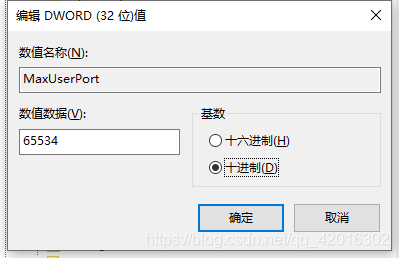
3. Right click parameters to create a new DWORD named maxuserport;

4. Then double-click maxuserport, select decimal base, input value data as 6553465534, which is the maximum value, exceeding     The system uses the closest effective value (min 5000 or max 65534);

5. Right click parameters to create a new DWORD named   TCPTimedWaitDelay;

6. Double click tcptimed waitdelay, select decimal base, input numerical data as 30, set time as 30 seconds, default is 240 seconds;

7. Restart the computer to take effect!!


AttributeError: ‘NoneType‘ object has no attribute ‘append‘

Python error:
attributeerror: ‘nonetype’ object has no attribute ‘append’

a=[]
b=[1,2,3,4]
a = a.append(b)

After one execution, the type of a changes to nonetype
the above errors will appear in the next execution.

This is because append modifies a itself and returns none. The return value cannot be reassigned to a.

terms of settlement:

Change the variable name:
C =]
b = [1,2,3,4]
C = A. append (b)
problem solving.

Or
change a = a.append (b) to a.append (b)

Solution to error report of Jackson coordinate introduced by spring

Solution to error report of Jackson coordinate introduced by spring

report errors:

The correct version of Jackson’s coordinates are introduced into pom.xml, but the error is still reported as follows:

java.lang.NoClassDefFoundError: com/fasterxml/jackson/databind/ObjectMapper

terms of settlement:

Open project structure – & gt; Delete the original one and add another one

Reference connection:
0 https://www.cnblogs.com/cocobear9/p/13746628.html

Jenkins docker push to harbor to report error

Jenkins docker push to harbor private service error solution

Jenkins reported an error

When using docker push to private service in jenkinsfile, an error is reported. The error information is as follows:

unauthorized: unauthorized to access repository: ocp/eureka-server, action: push: unauthorized to access repository: ocp/eureka-server, action: push

This is because Jenkins uses the pseudo user of Jenkins when pushing the image. Since you need to log in to push, you should first generate config.json in the current user

The current user uses docker login to generate config.json

The current user logs in with the following command

docker login ip:port

After entering the user name and you, a config.json file is generated in the. Docker directory of the current user’s root directory, as follows:

[wangxianfeng@hs ~]$ cat /root/.docker/config.json 
{
        "auths": {
                "harbor.aiuyo.com:643": {
                        "auth": "d2FuZ3hpYW5mZW5nOlhpYW5mZW5nOTk="
                }
        }
}

Copy. Docker to/var/lib/Jenkins directory

    after logging in with root, copy the/user name /. Docker/directory to/var/lib/Jenkins, and modify the folder permission chown – R Jenkins. Jenkins. Docker to/var/lib/Jenkins


    cp -r /root/.docker/ /var/lib/jenkins/
    cd /var/lib/jenkins/
    chown -R jenkins.jenkins .docker

    I am for this reason. After modification, it can be pushed

About LCM spy running error in LCM v1.4.0

I am a little white, but recently in the Linux system running LCM spy encountered a variety of error messages. Finally, after collecting all kinds of information on the Internet and a little bit of my imagination, I successfully solved the problem, so I want to share it with you and leave a file for myself, so as not to be at a loss when I encounter the same problem in the future.

First, follow the official LCM guidelines   Before installing LCM, be sure to download its recommended default JDK. This automatic download is the latest version of Java (I don’t know much about Java, but it also seems to download javac). Bloggers download Java 11 by default. Note: Java 8 can’t run make successfully, at least the blogger failed.

Default JDK installation steps:

$ sudo apt update
$ sudo apt install default-jdk

Then follow the steps to install according to the official website (cmake may say that some files in other languages cannot be found, but you can try to run make first)

$ mkdir build
$ cd build
$ cmake ..
$ make
$ sudo make install

If there is no error in make and make install, please check whether there is an LCM Java folder and whether there is lcm.jar in the folder under build. This is very important, because it determines whether you can run LCM spy

Next, you need to download Java 8 and change the default version of Java to Java 8. The method is as follows (the first and second behaviors download Java 8, and the third behavior change the version)

$ sudo apt-get update
$ sudo apt-get install openjdk-8-jdk
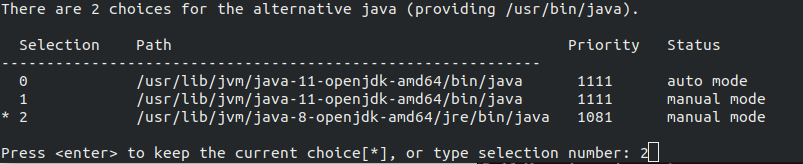
$ sudo update-alternatives --config java

Then select the number corresponding to Java 8 in the pop-up window and press enter:

Next, you need to move the lcm.jar to the Java folder. Note: the specific address varies from person to person. Please check the address of the Java folder in usr. Bloggers provide their own examples:

$ sudo cp ~/lcm-1.4.0/build/lcm-java/lcm.jar /usr/share/java/

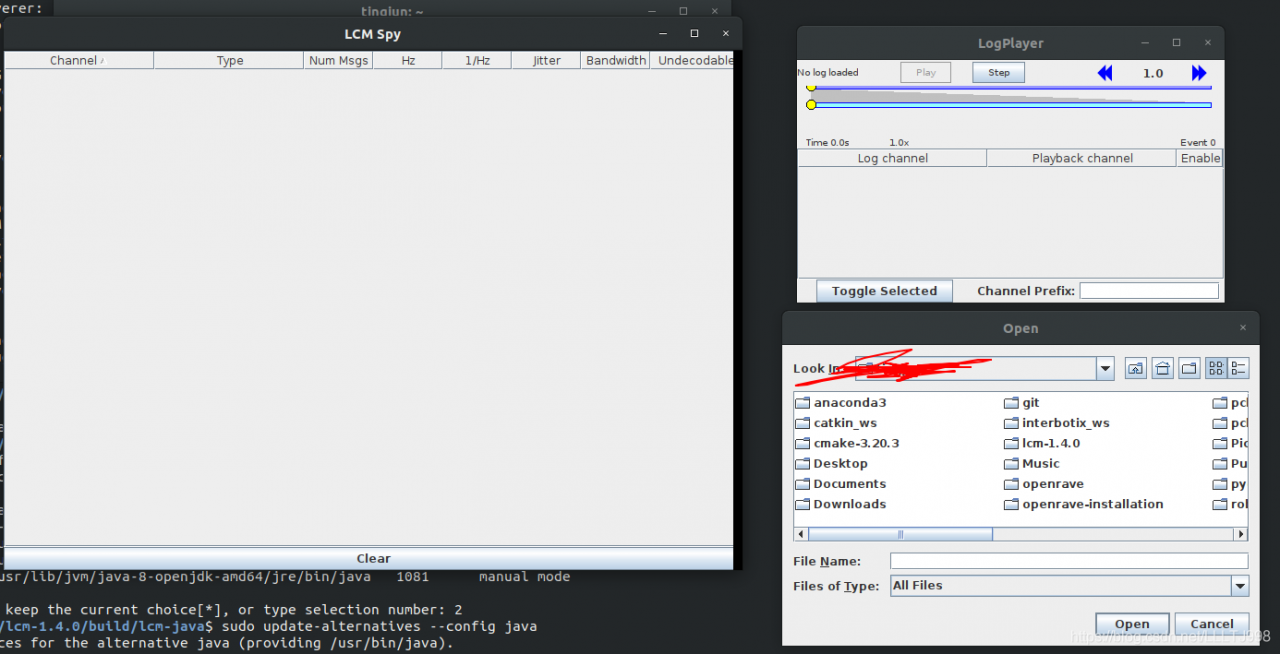
In this way, you can find the LCM. Jar file in the Java folder. If there is no accident, you can run LCM spy and LCM logplayer GUI in any path.

——————————————————————————————————————————

PS:

1. Two versions of Java are needed because during the installation of LCM v1.4.0, Java related files only support Java 11 (maybe Java 10), but not Java 8. However, the operation of LCM spy does not support Java 11, because Java 11 has deleted an option named “xincgc” in Java 8, so it needs to change the Java version to Java 8 to run successfully;

2. A Java application notes in the official website   Bloggers did not run successfully, so they have to manually copy LCM. Jar to the Java folder. If you are interested, you can also try whether the official website tutorial is useful.

SSM project controller layer calls static method to report an error

The controller layer of the SSM project calls the util tool class written by oneself. In the tool class, some static methods in some jar packages are invoked, and
runs up to report errors. Br> solution: add the jar package to the modules directory in the project
idea operation:
. Add through dependencies of modules:
1. Open file – & gt; Project Structure (Ctrl + Shift + Alt + S)

2. Click modules – & gt; Dependencies -> “+” -& gt; “ Jars or directories”

3. Select the project jar package
4. Apply – & gt; OK

UFIDA’s common package download failed with error forbidden

Could not GET ‘ https://dl.bintray.com/umsdk/release/com/umeng/umsdk/common/9.3.8/common-9.3.8.jar ‘. Received status code 403 from server: Forbidden Disable Gradle ‘offline mode’ and sync project

Now my friend League version upgrades, always report this error, there is no way to download the 9.3.8 package.  
It is found by query.

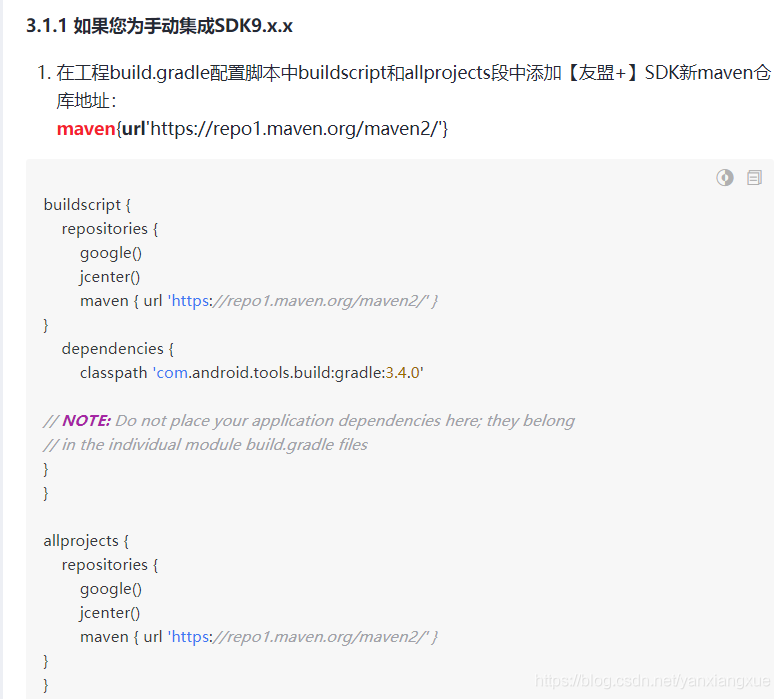
Add the new Maven warehouse address of [alliance +] SDK in the section of buildscript and allprojects in the project build. Gradle configuration script( Note that the original maven {URL ‘ https://dl.bintray.com/umsdk/release ‘} to: maven {URL’ https://repo1.maven.org/maven2/ ‘ })

Solve the problem of forward parameter req and resp parameter error

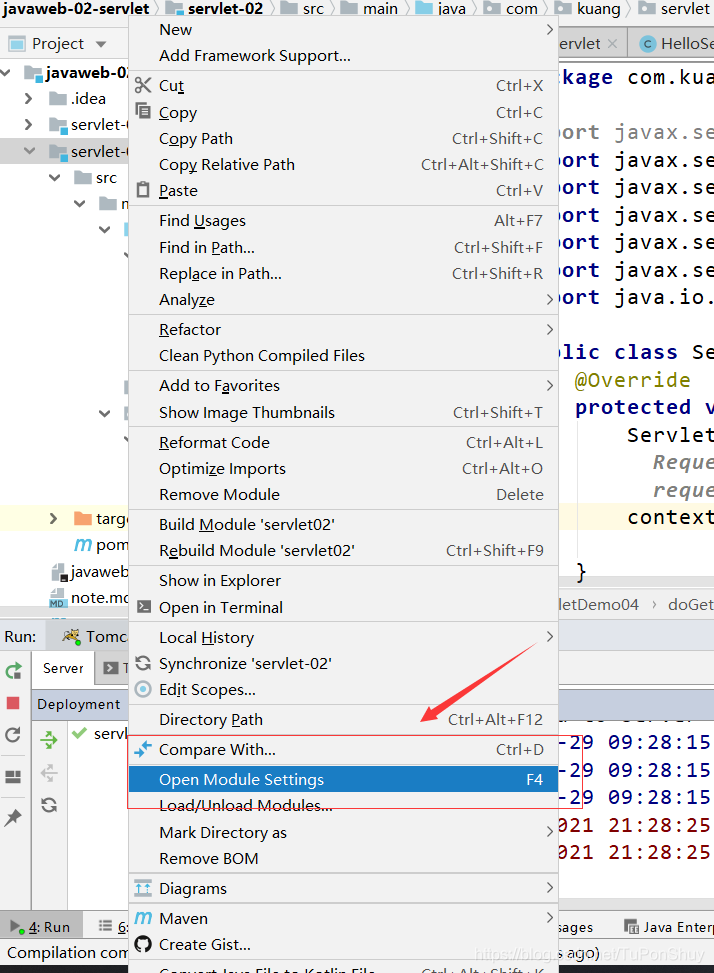
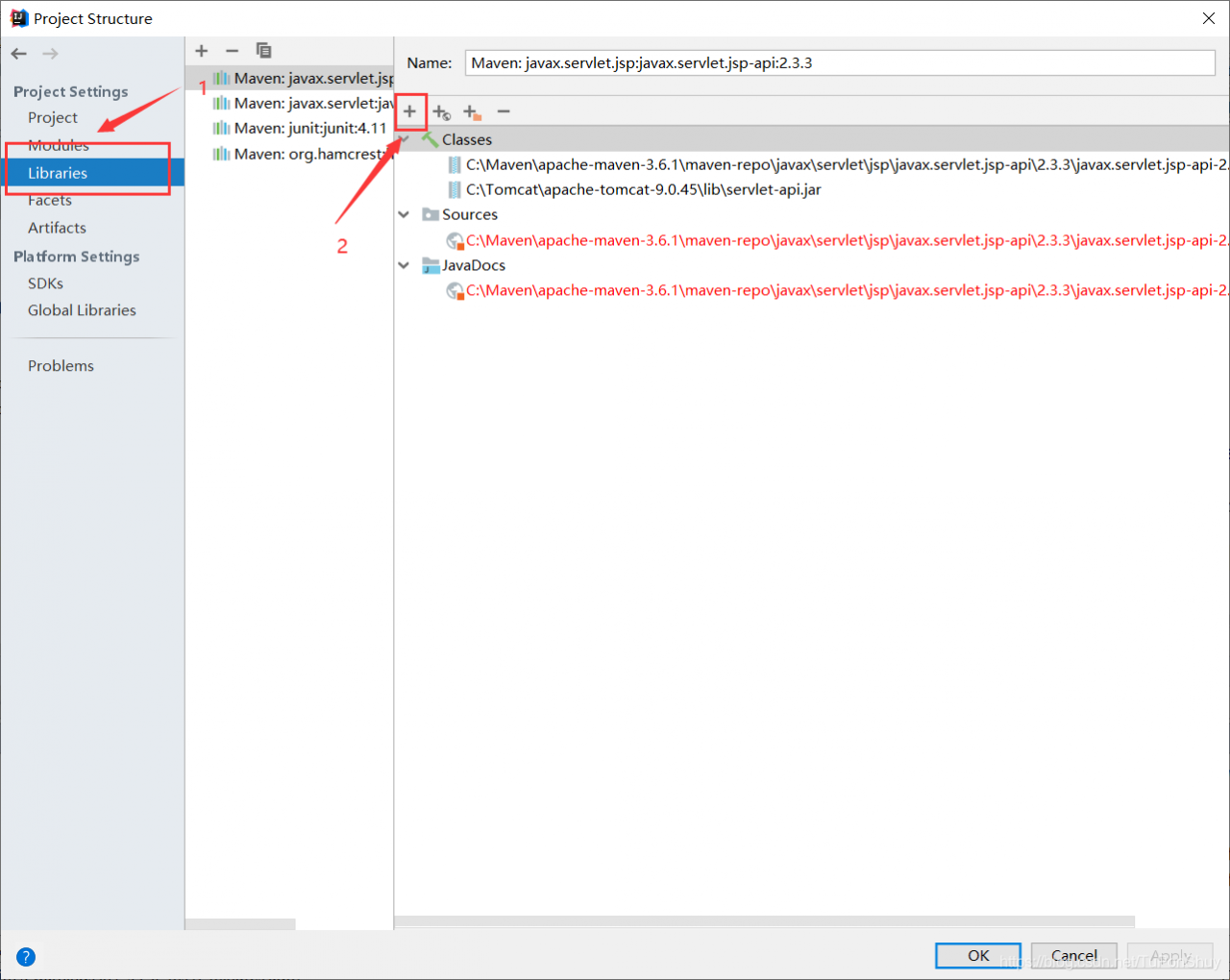
1. Right click the stand-alone project and select Open Cloud settings, as shown in the figure:

2. Then click libraries on the left, and then click + on the right, as shown in the figure:

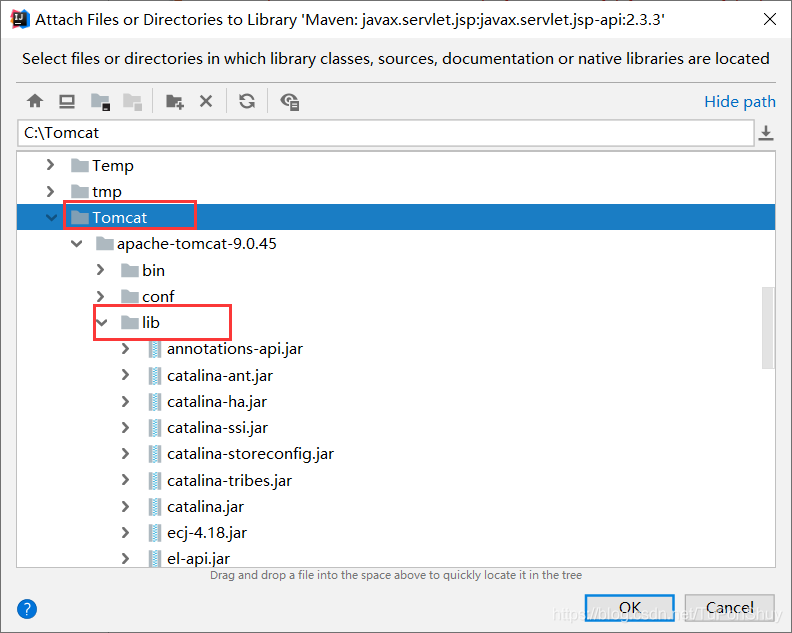
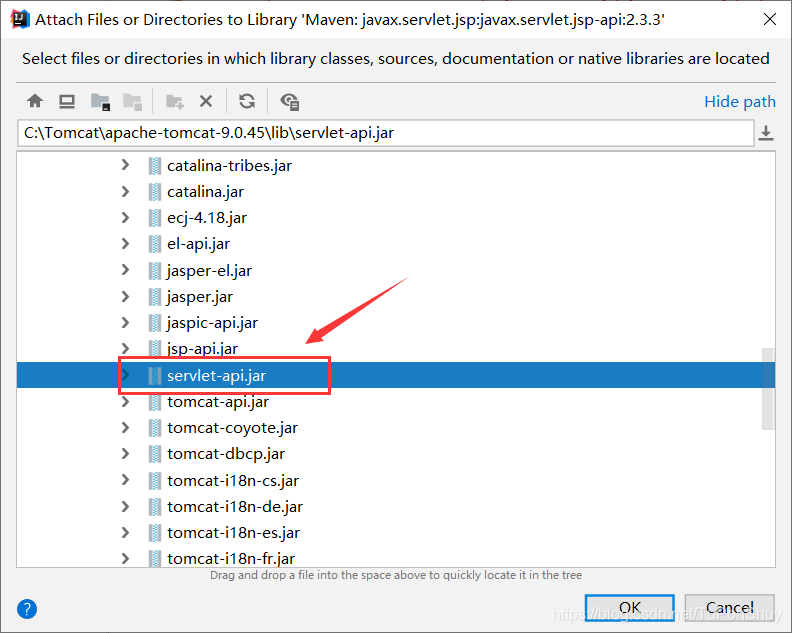
3. Then select the path Tomcat/lib/servlet-api.jar, as shown in the figure:

After completion, there will be no mistakes in testing context. Getrequestdispatcher (“/ GP”). Forward (req, resp)!!

Wechat applet error: unhandled project rejection type error: webassembly.instant

As a beginner of wechat app, I didn’t expect to run the code that day with a few surprises and errors
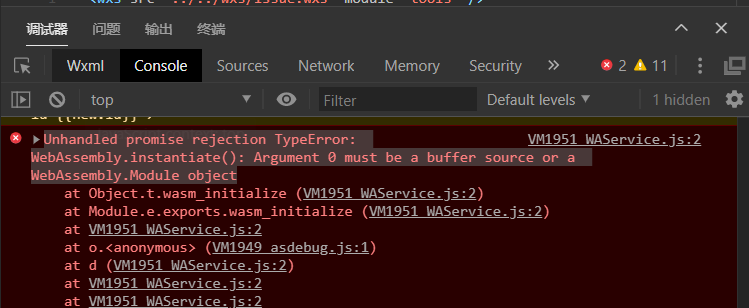
Unhandled promise rejection TypeError: WebAssembly.instantiate(): Argument 0 must be a buffer source or a WebAssembly.Module object
at Object.t.wasm_ initialize (VM1951 WAService.js:2)
at Module.e.exports.wasm_ Initialize (vm1951 waservice. JS: 2)
at vm1951 waservice. JS: 2
at O. (vm1949 asdebug. JS: 1)
at d (vm1951 waservice. JS: 2
at vm1951 waservice. JS: 2

after searching for a long time, baidu looked around and finally looked at the official documents. It turned out that the version was too low. It was suggested to set a higher version
https://developers.weixin.qq.com/miniprogram/dev/framework/custom-component/wxml-wxss.html
The version settings are as follows:
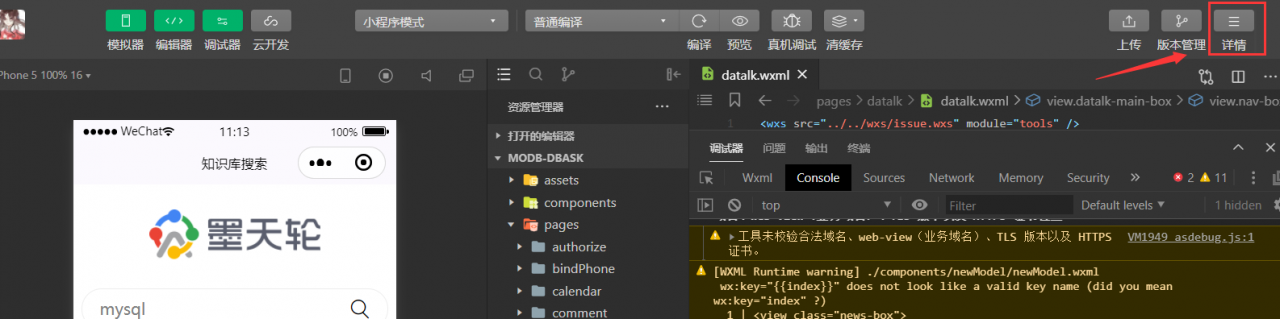
Step 1: click the details in the upper right corner and a pop-up box will appear

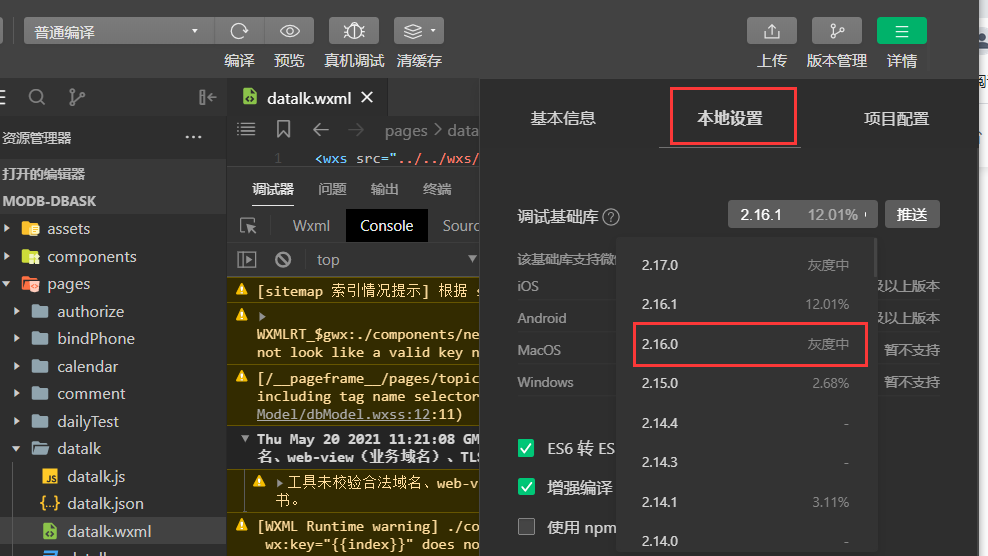
Step 2: select local settings from the three tabs of basic information, local settings and project configuration to find the basic debugging library, Select the version 2.16.0 from the drop-down box
[external link picture transfer failed, source station may have anti-theft chain mechanism, it is recommended to save the picture and upload it directly (img-uhelrikv-16226186337)( https://oss-emcsprod-public.modb.pro/image/editor/20210520-455b21d9-ae1-429d-84b-4e43858d4834.png )]


if you select it and recompile it, no more errors will be reported, At present, it is speculated that the version is too high

Although the problem of error reporting has been solved, we can see that there are still some warnings on the console. I don’t know if you hate this warning. Although it’s not an error reporting, you want to close it…

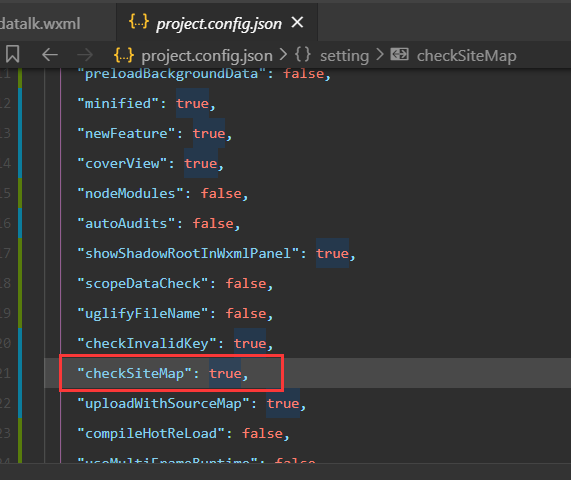
method: find project.config.json in the applet directory, find the setting configuration object, and set checksitemap to false, Finally, save and restart the developer tool

Sqlog connect to MySQL 8.0.24 remote server, error: 2058 solution

Write in front:

  I love technology, love sharing, love life, I always believe: technology is open source, knowledge is shared!   Most of the content in the blog is original. It is my daily learning record and summary, which is convenient for me to review later. Of course, I hope I can share my knowledge. The current content is almost basic knowledge and technology introduction, if you think it’s OK, you might as well pay attention to it, we make progress together!   In addition to sharing blog, I also like to read books, write some daily essays and share my mood. If you are interested, you can also pay attention!   WeChat official account: Mr.
, proud proud deer.  

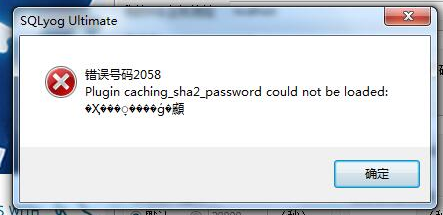
Sqlog connect Linux remote server to display 2058 error

 
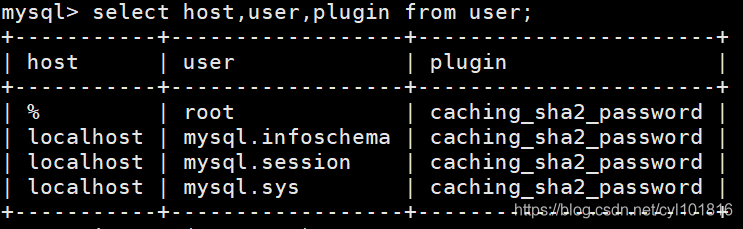
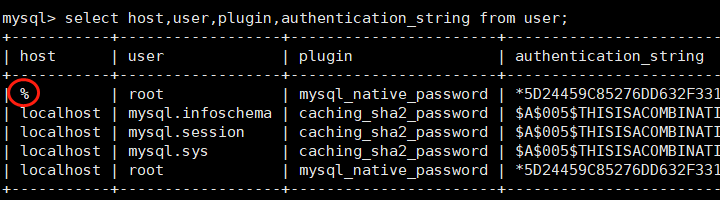
The reason for this error is that the default authentication plug-in in mysql8.0 has been changed   mysql_ navtive_ Password, now it’s caching_ sha2_ password

  resolvent:

If you are a local connection, enter the following command on the MySQL command line

ALTER USER 'root'@'localhost' IDENTIFIED WITH mysql_native_password BY 'password';

If you are a remote connection server mysql, then enter the following command. First of all, you must have% in the user table of your database and the host field

ALTER USER 'root'@'%' IDENTIFIED WITH mysql_native_password BY 'password';

Change the password to your MySQL password

The host field represents the address where you can access the database, localhost represents local access, and% represents remote access

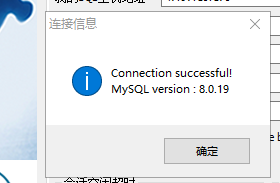
Connection successful: