The following issues arise during training.
File “C:\Users\urser\anaconda3\lib\site-packages\torch\distributed\distributed_c10d.py”, line 597, in _new_process_group_helper
raise RuntimeError(“Distributed package doesn’t have NCCL ”
RuntimeError: Distributed package doesn’t have NCCL built in
From the text, the error message is obvious, there is no NCCL
and windows does not support NCCL backend.
Let’s look at the official documentation.
As of PyTorch v1.8, Windows supports all collective communications backend but NCCL, If the init_method argument of init_process_group() points to a file it must adhere to the following schema:
And to solve this problem is also very simple, do not use NCCL backend.
Only one line of code is needed to solve the problem.
Category Archives: How to Fix
[Solved] KEIL MDK Warning: “no browse info for symbol in this context”
If there is no Chinese path, enter Option for target-> ouput-> Cancel the check of browse information, click rebuild all target files to recompile all the files, re check the check of browse information, re check the check of browse information, and recompile all the files, the perfect solution, you can go to define happily!!!
libxx.so: undefined reference, vector.reserve(n) [How to Solve]
background: Trying to avoid reallocation using the STL: std::vector.reserve(n).
declared static std::vector<int> sample_num in class AngleCal, and want to do it in AngleCal::AngleCal() sample_num.reserve(300) (assumming 300 is the size or, alternatively an upper bound on the size)
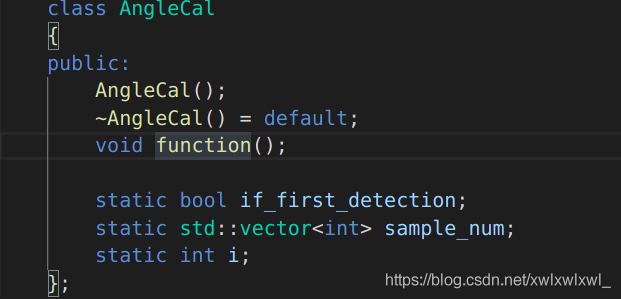
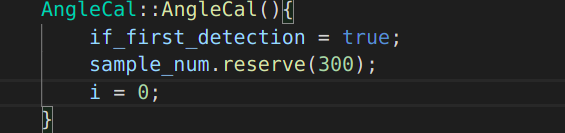
However, when compiling this AngleCal.cpp into libanglecal.so, the compiler gives the following error.
[build] /usr/bin/ld: ../lib/libanglecal.so: undefined reference to `hitcrt::AngleCal::if_first_detection’
[build] /usr/bin/ld: ../lib/libanglecal.so: undefined reference to `hitcrt::AngleCal::sample_num’
[build] /usr/bin/ld: ../lib/libanglecal.so: undefined reference to `hitcrt::AngleCal::i’
declared static std::vector<int> sample_num in class AngleCal, and want to do it in AngleCal::AngleCal() sample_num.reserve(300) (assumming 300 is the size or, alternatively an upper bound on the size)
However, when compiling this AngleCal.cpp into libanglecal.so, the compiler gives the following error.
[build] /usr/bin/ld: ../lib/libanglecal.so: undefined reference to `hitcrt::AngleCal::if_first_detection’
[build] /usr/bin/ld: ../lib/libanglecal.so: undefined reference to `hitcrt::AngleCal::sample_num’
[build] /usr/bin/ld: ../lib/libanglecal.so: undefined reference to `hitcrt::AngleCal::i’
Solution: A static member is shared by all objects of the class. All static data is initialized to zero when the first object is created, if no other initialization is present. We can’t put it in the class definition but it can be initialized outside the class as done in the following example by redeclaring the static variable, using the scope resolution operator :: to identify which class it belongs to.
#include <iostream>

using namespace std;

class Box {
   public:
      static int objectCount;

      // Constructor definition
      Box(double l = 2.0, double b = 2.0, double h = 2.0) {
         cout <<"Constructor called." << endl;
         length = l;
         breadth = b;
         height = h;

         // Increase every time object is created
         objectCount++;
      }
      double Volume() {
         return length * breadth * height;
      }

   private:
      double length;     // Length of a box
      double breadth;    // Breadth of a box
      double height;     // Height of a box
};

// Initialize static member of class Box
int Box::objectCount = 0;

int main(void) {
   Box Box1(3.3, 1.2, 1.5);    // Declare box1
   Box Box2(8.5, 6.0, 2.0);    // Declare box2

   // Print total number of objects.
   cout << "Total objects: " << Box::objectCount << endl;

   return 0;
}
The running results are as follows
Constructor called.
Constructor called.
Total objects: 2
Static decorated class members must be initialized outside the class before they can be manipulated.
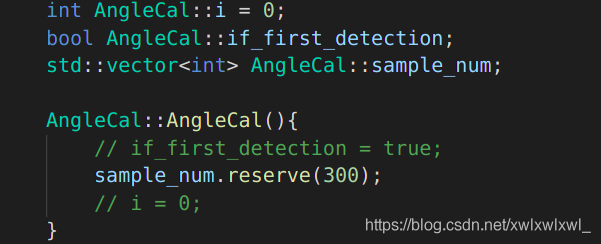
above.
To solve the problem of increasing video memory when training network (torch)
Method 1
torch.backends.cudnn.enabled = True
torch.backends.cudnn.benchmark = True
Principle:
Cundnn follows the following criteria:
- if the dimension or type of network input data changes little, set torch.backends.cudnn.benchmark = true It can increase the operation efficiency; If the input data of the network changes every iteration, cndnn will find the optimal configuration every time, which will improve the operation efficiency
Method 2
Tensor calculation should be written as follows:
train_loss += loss.item()Unable to find condarc file after installing CONDA
Generally, the condarc file appears in the/home/user directory, but sometimes it cannot be found. The solution is as follows:
Create condarc file command
CONDA config — add channels r
That is, the condarc file appears in the/home/user directory
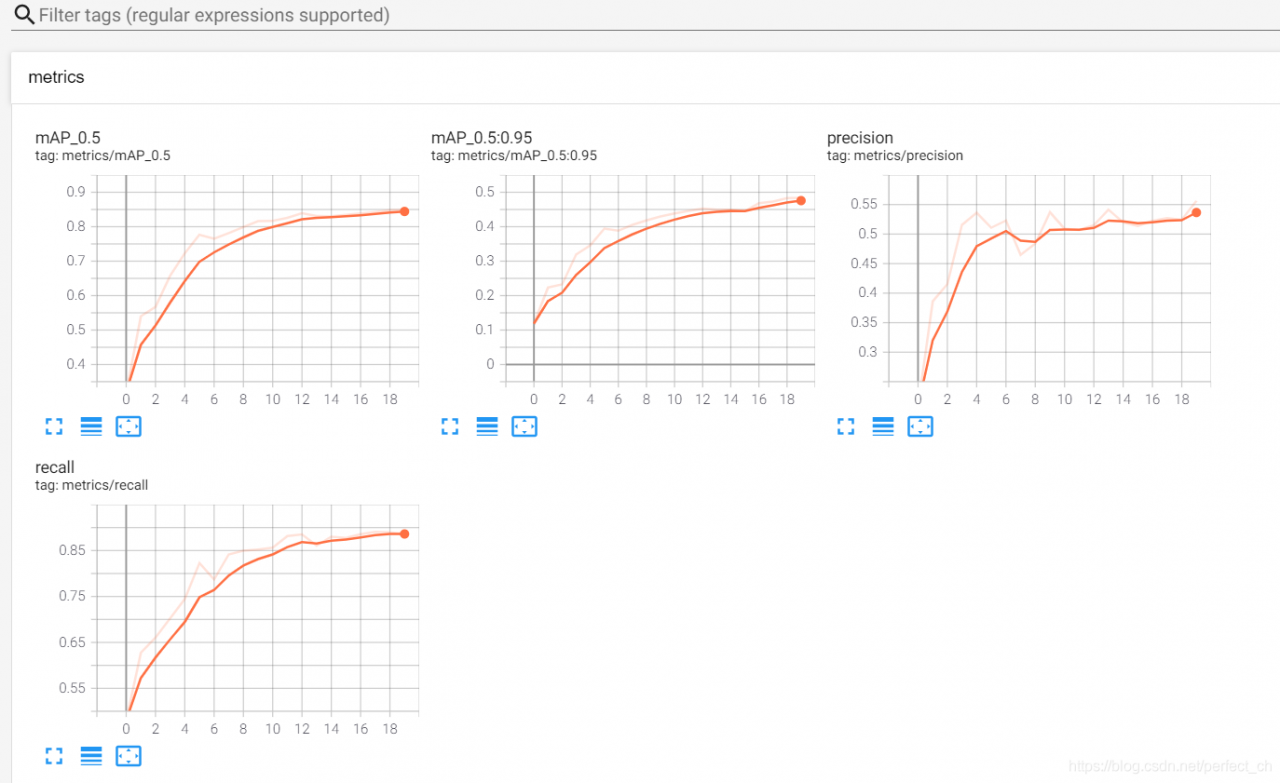
Viewing events.out.tfevents file visually in tensorboard
Command line
Tensorboard — logdir = event dir (event save path)
After meeting the problem of “no dashboards are active for the current data set”, it is not solved after searching on the Internet for several hours; I tried several times according to my own ideas and finally solved the problem. Now I share the solutions as follows:
1> Find the path of tensorboard, and then CD to the path;
2> Copy and paste the directory of the file to be displayed to the path of the tensorboard;
3> CD to the directory of tensorboard, enter:
tensorboard –logdir=
4> Copy address http://localhost : 6006 /, input to browser, finish.
Solution to the problem that some special characters in finereport cannot be displayed or displayed as question mark
M ² In the case of no processing, finereport will ² What is it
it’s not that finereport doesn’t support it, it’s because of the problem of character set conversion
solution:
in WEB-INF/resources/config.xml
<Write serverCharacterEncoding="GBK"/>
Change to:
<Write serverCharacterEncoding="UTF-8"/>
After restarting the service, you can see the ² It’s over
nginx: [warn] conflicting server name “www.yqq.org“ on 0.0.0.0:80, ignored
When implementing nginx redirection, the following warning appears:
[root@lnmp1 conf]# nginx -s reload
nginx: [warn] conflicting server name "www.yqq.org" on 0.0.0.0:80, ignored
reason:
www.yqq.org This domain name appears twice or even many times, resolving the same domain name to different directories. Generally, this error occurs when the configuration file is separated separately.
If you bind server name repeatedly, a warning will appear. However, this warning will not affect the operation of the server
moreover, this duplicate binding means that the nginx service running now is duplicate with the nginx service in the new configuration to be loaded. Therefore, this warning is unnecessary.
In the configuration file, the statement that also uses the domain name is annotated. If the domain name is loaded smoothly again, no warning will appear
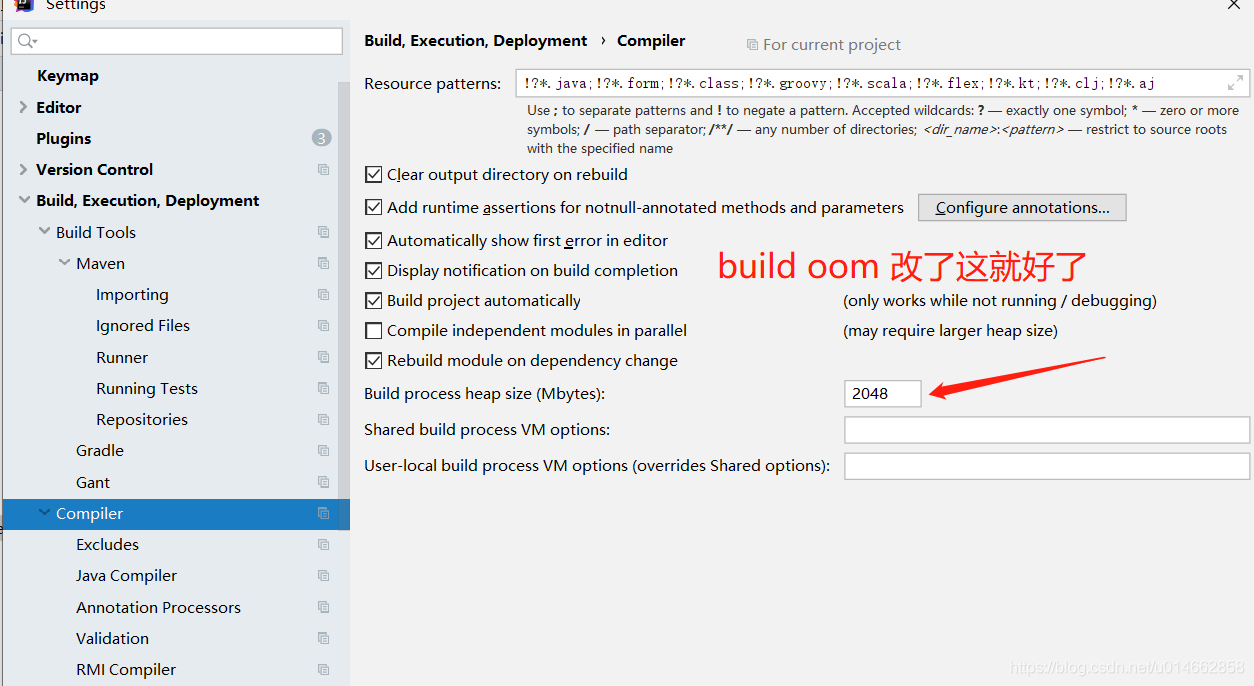
Java. Lang. outofmemoryerror when using idea build project
Recently, I ran a new monomer project with a large volume. During the start-up of the build process, it was always oom. Adjusting the Maven parameter and idea parameter didn’t work. When I flipped through the idea setting, I saw this configuration item: build process heap size. I adjusted it up a bit, and the problem was solved
How to use the menu of elementui unique opened sidebar
Unique opened can control the display of menu sidebar, whether to display only one submenu
We can set it to: unique opened = “true” in the tag
The results are as follows

However, sometimes this will report an error:
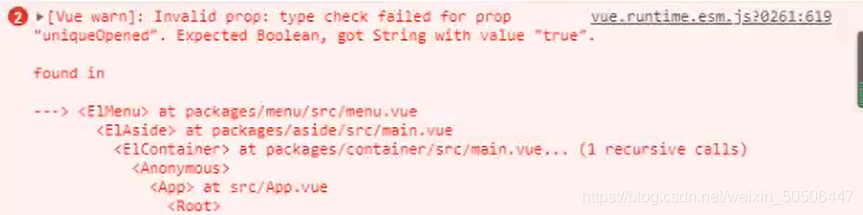
The solution is to define a bool type attribute in data, and then bind the attribute to the tag’s unique opened
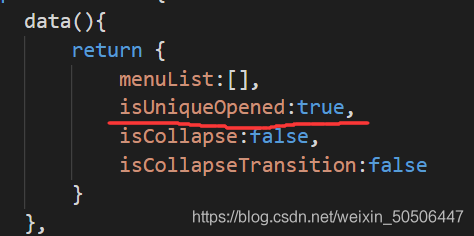
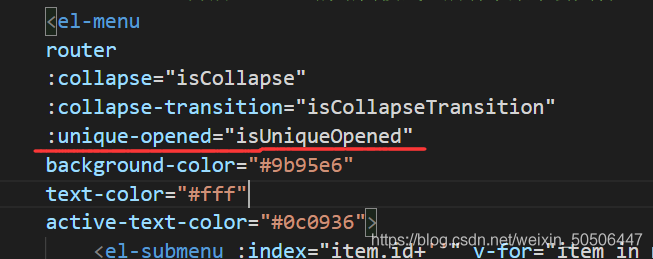
In this way, the effect is the same, and the problem of error message is solved.
Property xxx was accessed during render but is not defined on instance
Vue3. X version is used in combination with element plus. If you use form elements and V-model commands, you will see similar warnings on the console. Although it does not affect JS operation, it is hard for obsessive-compulsive disorder players. Let’s take a look at how this problem is generated and how to solve it
In vue3. X, a new composite API, namely the setup method, is added. In this method, we can create a data with a responsive basic data type through Ref. however, we can also set the ref attribute to the element to obtain dom. Please refer to the official documents for details, This also leads to the problem
I believe most people just want to know what the solution is. Look down at the solution
to ensure that the data of V-model and the value of ref do not have the same name
avoid using V-model when you do not need to use V-model (of course, this method is a bit of bullshit)
this method is a little bit of nonsense
Record a problem of no module named ‘tensorflow. Examples’ and’ tensorflow. Examples. Tutorials’ in tensorflow 2.0
1: No module named ‘tensorflow. Examples’
I downloaded tensorflow directly from the Internet, which is version 2.5. The path to add examples is in C:// program data/anaconda3/envs/tensorflow/lib/site packages/tensorflow, which is similar to that on the Internet_ In the core folder, there is no such folder in version 2.5, so all the next operations are performed in site package/tensorflow.
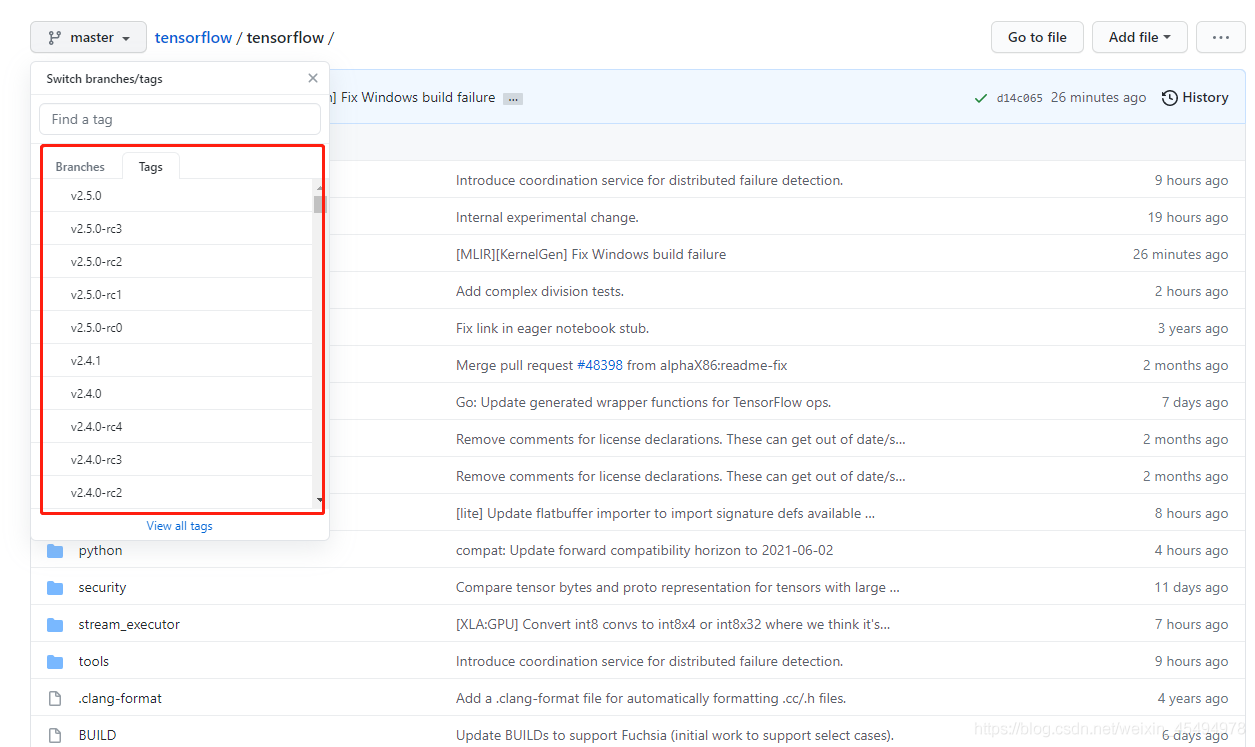
First of all, you have to go to the official website of tensorflow( https://github.com/tensorflow/tensorflow/tree/master/tensorflow )Download the examples folder and copy it to the site package/tensorflow folder mentioned above. If you continue to run your code, there will be a problem of no module named ‘tensorflow. Examples. Tutorials’.
2: No module named ‘tensorflow. Examples. Tutorials’
in the site package/tensorflow folder, click the examples file you just copied in (I believe you have downloaded many tutorials files on the Internet, just copy them in directly), and then the code can run
Note: if you have not downloaded to the tutorials file, you can go to the official website of tensorflow, and then adjust the version to the version before 2.40, you will find the tutorials file in the examples folder (this method has not been tested, if it is feasible after the test, you can leave a message in the comments area, thank you).