Category Archives: How to Fix

[Solved] emulator: glteximage2d: got err pre :( 0x502 internal 0x1908 format 0x1908 type 0x1401

emulator: glteximage2d: got err pre 🙁 0x502 internal 0x1908 format 0x1908 type 0x1401


How to Solve this error:

Go to Tools > AVD Manager > Virtual device configuration > Show advanced settings > Boot option > Cool boot

Then run again your project with that AVD. Close the session and set again Quick boot in Boot option.

[Solved] Could not find a version that satisfies the requirement onnx (from onnx-graphsurgeon0.2.6)

Could not find a version that satisfies the requirement onnx (from onnx-graphsurgeon0.2.6) (from versions: )
No matching distribution found for onnx (from onnx-graphsurgeon
0.2.6)
nvidia The official documentation gives the command sudo pip3 install onnx_graphsurgeon-0.2.6-py2.py3-none-any.whl
After many attempts it showed the above error. Finally I found out it was a permission problem. Changed the command to pip install onnx_graphsurgeon-0.2.6-py2.py3-none-any.whl and it installed

[Solved] VUE-pdf Plugin use error: To install them, you can run: npm install –save core-js/modules/es

1.How to use

How to use Vue pdf   Pdf preview using Vue PDF plug-in

2. Cause of error

To install them, you can run: NPM install — save core JS/modules/es.object.to-string.js core JS/modules/es.string.iterator.js core JS/modules/web.dom-collections.iterator.js pdfjs dist/Es5/build/pdf.js worker loader! pdfjs-dist/es5/build/pdf.worker.js pdfjs-dist/es5/web/pdf_ viewer

Vue PDF encapsulates pdf.js. The reason for the error is that the upgrade of pdf.js package version is not compatible with Vue PDF version.

3.How to solve it

You can specify the version of PDF.JS

Run the following command:

npm install [email protected]

[Solved] KEIL Error: source file ‘.XXX.o‘ – object file renamed from ‘XXX.o‘ to …

Problem description

1. In the Keil project, move the C file in the app component to the dev component,
2. When using keil, sometimes you accidentally add two identical. C files in different group folders
at this time, the compilation will appear:
note: source file ‘… (core/Src/GPIO. C) – object file renamed from’ 7.710.200c/GPIO. O ‘to’ 7.710.200c/GPIO_ 1. O ‘.
error report

Solution

1. Delete duplicate files to ensure that. C files are not duplicated in the project
2. Close the Keil project and run keilkill.bat to delete all the compiled link files
3. Open the project to compile

Keilkill.bat code attached

del *.bak /s
del *.ddk /s
del *.edk /s
del *.lst /s
del *.lnp /s
del *.mpf /s
del *.mpj /s
del *.obj /s
del *.omf /s
::del *.opt /s  ::Settings that do not allow JLINK to be deleted
del *.plg /s
del *.rpt /s
del *.tmp /s
del *.__i /s
del *.crf /s
del *.o /s
del *.d /s
del *.axf /s
del *.tra /s
del *.dep /s           
del JLinkLog.txt /s

del *.iex /s
del *.htm /s
del *.sct /s
del *.map /s
exit

Copy the content to a TXT file, save and exit. Then change the suffix of. Txt to. Bat. Put the modified bat file into the project and run it

The solution to reload and rollback of VMware after unloading

VMware reload is a rollback because win10 is not an enterprise version, some of the registry of VM can not be recognized, and some plug-ins are associated with other versions of win, which makes VM unable to be completely deleted. At this time, go to install win10 as enterprise version, and then re install VMware, this situation will not appear in the future. Remember, do not run immediately after installation, shut down and restart, do not install in C disk.

Springboot failed to parse MVC view

Problem Description:
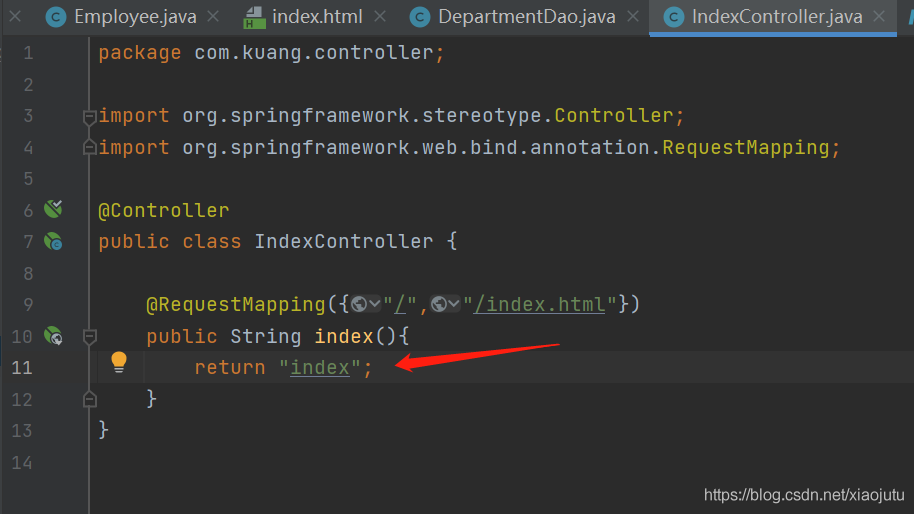
@ requestmapping always reports an error when returning to the view: unable to parse MVC view “index”

reason:
unable to parse because the pre suffix of splicing cannot be found, so it cannot jump. Forget to import template engine dependencies

Solution:
Add dependency in POM

    <dependency>
        <groupId>org.thymeleaf</groupId>
        <artifactId>thymeleaf-spring5</artifactId>
    </dependency>
    <dependency>
        <groupId>org.thymeleaf.extras</groupId>
        <artifactId>thymeleaf-extras-java8time</artifactId>
    </dependency>

The Vue project cannot use a component name that contains the word switch

Application scenario: you need to create a new version switching page in the Vue project, which is translated as versionswitch according to the Chinese name, so you build a versionswitch.vue. You find that errors have been reported all the time, and if you change the name to vesionchange.vue, no errors have been reported. After a search, it is found that components cannot be named with switch, nor can they be named with switchye .