Category Archives: How to Fix

Read in wannier90 output file hr.dat to construct real space Hamiltonian to calculate Fermi surface

def get_uniformity_kpoint(n):
    kPoints = []
    for i in range(n):
        for j in range(n):
            kPoints.append(i/n * rec[0] + j/n * rec[1])
    np.save("kPoints.npy", np.array(kPoints))
    return kPoints

Take points evenly along the inverted parallelogram. Carry out the previous calculation.

The whole Brillouin zone is restored by translation.

import numpy as np
import matplotlib.cm as cm
import matplotlib.pyplot as plt
from mpl_toolkits.mplot3d.axes3d import Axes3D
from matplotlib.ticker import LinearLocator, FormatStrFormatter

basis_vector = [[1.37287871,1.37287871,-2.74575742],[-2.74575742,1.37287871,1.37287871],[13.36629497,13.36629497,13.36629497]]
V = np.dot(basis_vector[0], np.cross(basis_vector[1], basis_vector[2]) )
rec = [np.cross(basis_vector[1], basis_vector[2]) * 2 * np.pi/V,
       np.cross(basis_vector[2], basis_vector[0]) * 2 * np.pi/V,
       np.cross(basis_vector[0], basis_vector[1]) * 2 * np.pi/V]

print(rec)
nk = 200
Ek = np.load("Ek_mesh.npy")[:, 0]
Ek = Ek.reshape(nk, nk)
print(Ek.shape)

kPoints = np.load("kPoints.npy")
print(kPoints.shape)
kx = kPoints[:,0]
ky = kPoints[:,1]
print(kx.shape)
kx = kx.reshape(nk, nk)
ky = ky.reshape(nk, nk)


plt.contour(kx, ky, Ek, [0.0])
plt.contour(kx + rec[0][0] -rec[1][0] , ky + rec[0][1] -rec[1][1] , Ek, [0.0])
plt.contour(kx - rec[0][0], ky - rec[0][1] , Ek, [0.0])
plt.contour(kx - rec[1][0], ky - rec[1][1] , Ek, [0.0])
plt.contour(kx  +rec[0][0], ky + rec[0][1] , Ek, [0.0])
plt.show()

SVN: Please execute the ‘Cleanup‘ command.

There is a new bug in the project. I need to extract a new branch, but after extraction, this problem occurs in the update branch

Please execute the ‘Cleanup’ command.

Why

Svn was interrupted due to an error updating the file with SVN

Solutions

Scheme 1:

Click TortoiseSVN
select clean up
select break write locks
OK

Scheme 2:

If scheme 1 fails, your SVN operation may be suspended

Download SQLite3 tool
decompress the sqlite3.exe file to the same level directory of. SVN directory
open the command line tool, switch to the same level directory of. SVN, and execute the following command
sqlite3.exe. SVN/wc.db “select * from work”_ queue”  
// this command can view the currently suspended SVN operations

sqlite3.exe .svn/wc.db “delete from work_ queue”  
// this command can delete the current suspended SVN operation

and then proceed to scheme 1

Scheme 3:

Check out a new. SVN file and replace the old. SVN file

Link to the original text: https://blog.csdn.net/lk1822791193/article/details/82655947

ValueError: The field admin.LogEntry.user was declared with a lazy reference to ‘MyApp.sysusers‘

Problem description


E:\SweetYaya\MyProj03>python manage.py migrate
Operations to perform:
  Apply all migrations: MyApp, admin, auth, contenttypes, sessions
Traceback (most recent call last):
  File "manage.py", line 22, in <module>
    main()
  File "manage.py", line 18, in main
    execute_from_command_line(sys.argv)
  File "D:\Program Files\Python36\lib\site-packages\django\core\management\__init__.py", line 419, in execute_from_command_line
    utility.execute()
  File "D:\Program Files\Python36\lib\site-packages\django\core\management\__init__.py", line 413, in execute
    self.fetch_command(subcommand).run_from_argv(self.argv)
  File "D:\Program Files\Python36\lib\site-packages\django\core\management\base.py", line 354, in run_from_argv
    self.execute(*args, **cmd_options)
  File "D:\Program Files\Python36\lib\site-packages\django\core\management\base.py", line 398, in execute
    output = self.handle(*args, **options)
  File "D:\Program Files\Python36\lib\site-packages\django\core\management\base.py", line 89, in wrapped
    res = handle_func(*args, **kwargs)
  File "D:\Program Files\Python36\lib\site-packages\django\core\management\commands\migrate.py", line 202, in handle
    pre_migrate_apps = pre_migrate_state.apps
  File "D:\Program Files\Python36\lib\site-packages\django\utils\functional.py", line 48, in __get__
    res = instance.__dict__[self.name] = self.func(instance)
  File "D:\Program Files\Python36\lib\site-packages\django\db\migrations\state.py", line 208, in apps
    return StateApps(self.real_apps, self.models)
  File "D:\Program Files\Python36\lib\site-packages\django\db\migrations\state.py", line 277, in __init__
    raise ValueError("\n".join(error.msg for error in errors))
ValueError: The field admin.LogEntry.user was declared with a lazy reference to 'MyApp.sysuser', but app 'MyApp' doesn't provide model 'sysuser'.

Find your own python3. X and enter the site packages/Django/contrib/admin/migrations file directory__ init__. Py file, delete all others( Be careful not to__ init__. If you delete the PY file, don’t delete the migrations in the folder contrib/contenttypes. Otherwise, the function of migrate will be invalid and Django can only be removed.

Python uses cxfree to package script files into executable programs

  I have tried to package Python scripts with pyinstall before, but I encountered many problems in the process of using pyinstall, such as too large volume of packaged files, too many irrelevant files in the root directory of packaged programs, and so on.

  So instead of pyinstaller, I use cxfree to package Python scripts. Without saying much, let’s get to the point.

1. Install CX_ Freeze:

  The version of Python I use is 3.8.8. I can install CX directly with pypi_ Freeze。

  Command: PIP install CX_ Freeze

  CX installed_ The version of freeze is 6.6. After installation, you can start to package the script. Let’s simply create a script file for packaging.

hello.py:

import datetime

Print (‘Hello, the current date and time are: ‘, datetime. Datetime. Now())

input()

I store this script in the pinstar folder under disk D

Next, we introduce two ways to package the above script as. Exe

  First, after win + R, enter CMD to enter the command line, and then CD   C: Enter the scripts directory in the python installation path.

Here, the path following the CD is the installation path of Python in my computer. Just replace this path with the path of Python in my computer. For example, if anaconda is used, the path can be changed to the path of scripts folder under anaconda.

  After the path is switched, use the command cxfree D:: (pinstarr) Hello. Py — target dir D:: (pinstarr) dist, and press enter

Python normality test: test whether the data obey the normal distribution

The Shapiro Wilk test can be used, and the ready-made wheels in SciPy can be used directly. The code is as follows:

>>> from scipy import stats
>>> import numpy as np
>>> np.random.seed(12345678)
>>> x = stats.norm.rvs(loc=5, scale=3, size=100)
>>> shapiro_test = stats.shapiro(x)
>>> shapiro_test
ShapiroResult(statistic=0.9772805571556091, pvalue=0.08144091814756393)
>>> shapiro_test.statistic
0.9772805571556091
>>> shapiro_test.pvalue
0.08144091814756393

The zero hypothesis of Shapiro Wilke test is that the data obey normal distribution, and the zero hypothesis can be overturned when the pvalue is small. Although the pvalue in the above code is small, it is still larger than 0.05, so it can be considered that the data is subject to normal distribution.

see also

scipy.stats.shapiro

Detailed explanation of Python__ new__() method

The new () method mainly exists in the new class of Python 2 and in Python 3. It is the static method responsible for creating class instances.

When Python instantiates an object, it first calls the__ new__() Method to construct an instance of a class and allocate the memory space of the corresponding type for it. The memory address of the instance is its unique identifier. And then call__ init__() Method to initialize an instance, usually the properties of the instance.

Here are some examples to illustrate:

Example 1: call first__ new__() Method call again__ init__() method

class Person(object):
    
    def __new__(cls):
        print("__new__ called")
        return super().__new__(cls)
    
    def __init__(self):
        print("__init__ called")
		  
a = Person()
		

result:

__new__ called
__init__ called

Example 2: the new () method constructs a class instance and passes it to its own__ init__() Method, i.e__ init__() The self parameter of the method.

class Person(object):
    
    def __new__(cls):
        print("__new__ called")
        instance = super().__new__(cls)
        print(type(instance))
        print(instance)
        print(id(instance))
        return instance
    
    def __init__(self):
        print("__init__ called")
        print(id(self))

b = Person()

result:

__new__ called
<class '__main__.Person'>
<__main__.Person object at 0x1093c1580>
4449899904
__init__ called
4449899904

Example 3: if__ new__() Method does not return any instances, the init () method will not be called.

class Person(object):
    
    def __new__(cls):
        print("__new__ called")

    def __init__(self):
        print("__init__ called")

c = Person()

result:

__new__ called

Example 4: if__ new__() Method returns an instance of another class__ init__() Method will not be called. Moreover, the new () method will initialize an object of another class.

class Animal(object):

    def __init__(self):
        pass

class Person(object):
    
    def __new__(cls):
        print("__new__ called")
        return Animal()

    def __init__(self):
        print("__init__ called")

d = Person()
print(type(d))
print(d)

result:

__new__ called
<class '__main__.Animal'>
<__main__.Animal object at 0x10fea3550>

Example 5: if overridden__ new__() Method, except for the CLS parameter, if no other parameters are set, it cannot be used__ init__() Method to set initialization parameters.

class Person(object):
    
    def __new__(cls):
        print("__new__ called")
        instance = super().__new__(cls)
        return instance
    
    def __init__(self, name):
        print("__init__ called")
        self.name = name

e = Person("Eric")
print(e.name)

result:

Traceback (most recent call last):
  File "example.py", line 102, in <module>
    e = Person("Eric")
TypeError: __new__() takes 1 positional argument but 2 were given

Example 6: in rewriting__ new__() Method, you need to add * args, * * kwargs to the parameters, or explicitly add the corresponding parameters to pass__ init__() Method initialization parameters.

class Person(object):
    
    def __new__(cls, *args,**kwargs):  # Or def __new__(cls, name)
        print("__new__ called")
        instance = super().__new__(cls)
        return instance
    
    def __init__(self, name):
        print("__init__ called")
        self.name = name

e = Person("Eric")
print(e.name)

result:

__new__ called
__init__ called
Eric
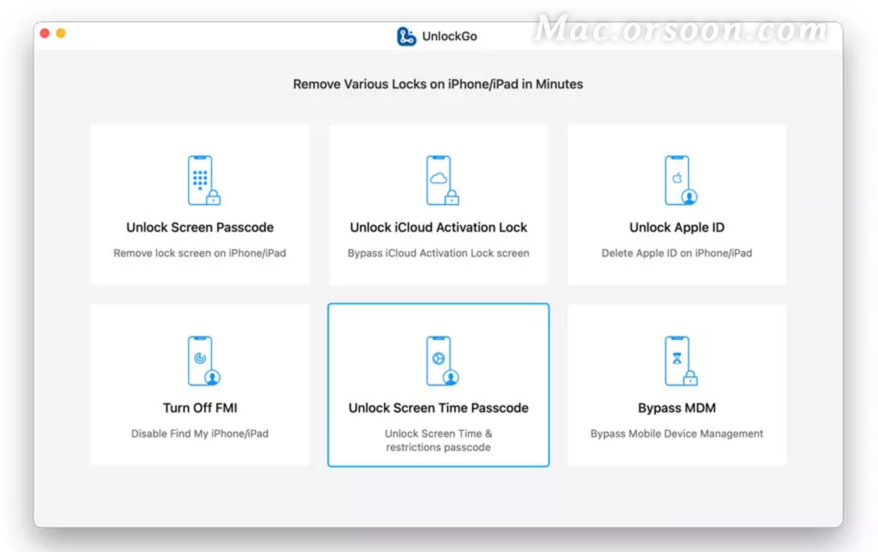
How to bypass screen time password with itolab unlockgo for Mac

If your device has screen usage enabled, you will be subject to various restrictions when using your phone. Forget the screen time, don’t know what to do?The future software park will bring you a guide to how to use itolab unlockgo for Mac to bypass screen time password. Come and have a look!

Itolab unlockgo for Mac supports M1 chip

How to bypass screen time password with itolab unlockgo for Mac

Step 1: connect your device to your computer

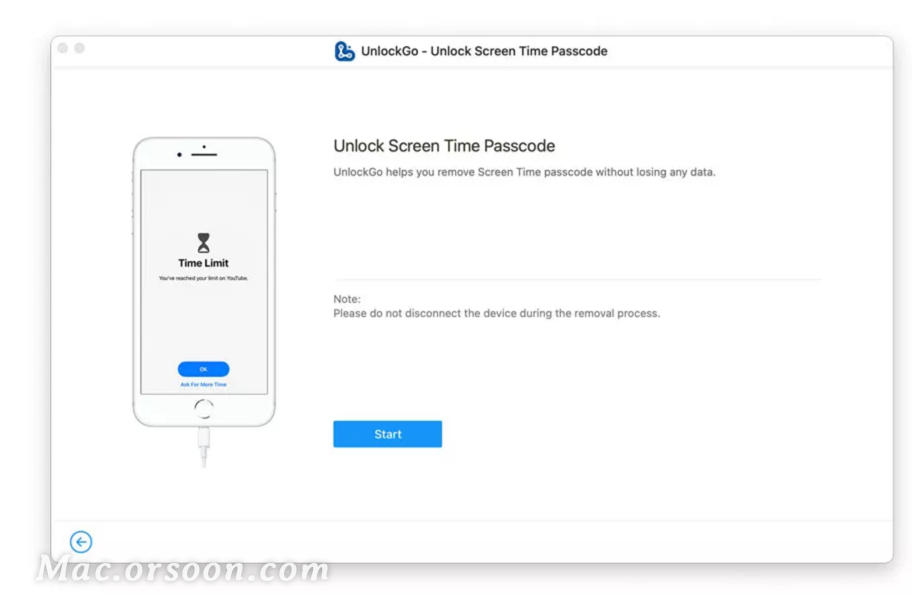
After connecting the device, open itolab unlockgo and select unlock screen time password, then click unlock now.

Step 2: enter the password to trust the computer

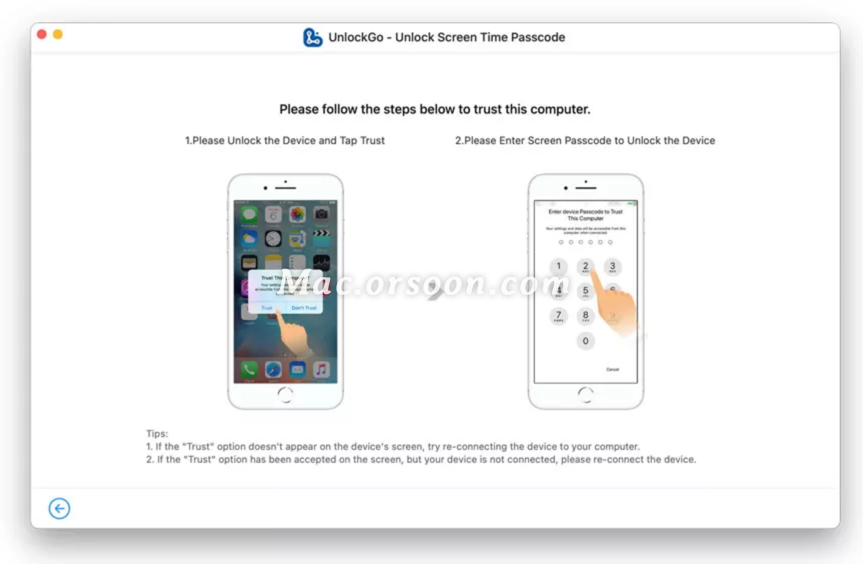
Next, you need to unlock the device and click the trust button, then enter the password to continue.

Step 3: unlock screen time password

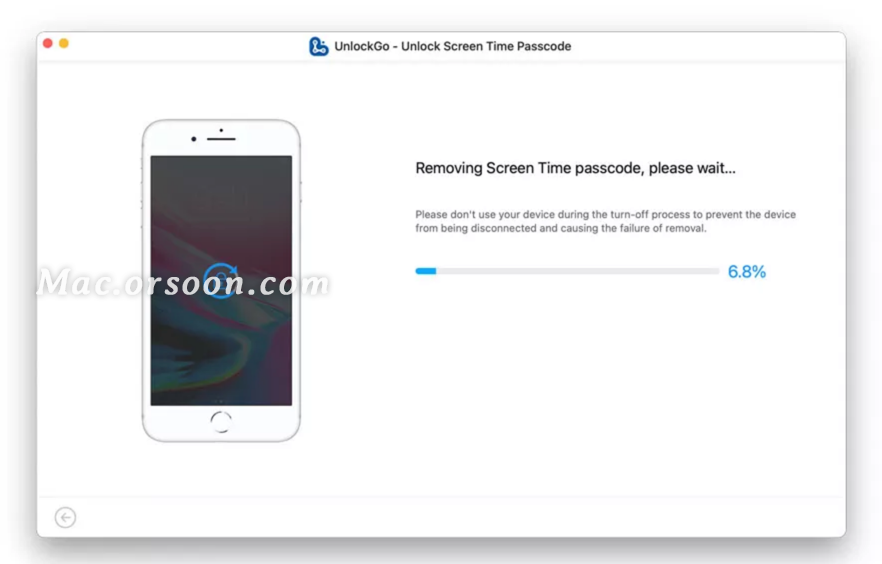
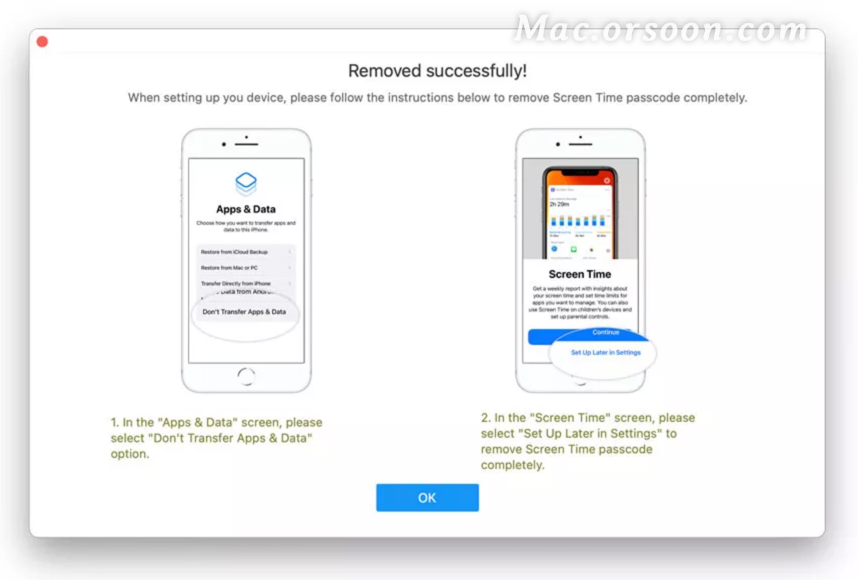
Now, unlockgo will begin to unlock the screen time password, and the whole process will take a few seconds. When you are finished, you will see the screen that was successfully deleted.

Integrate native IOS plug-ins into the flutter project

Modify signature

First, open the flutter project, open IOS module in Xcode, open the IOS folder in Xcode, modify the team, and change the signature to your IOS app signature.

In Android studio, run it on IOS simulator, and make sure there is no problem.

Add plug-in dependency

In pubspec.yaml, add plug-ins under dependencies to integrate zhgd with source code_ native_ Take the plugin native plug-in as an example

zhgd_native_plugin:
path: ../zhgd_native_plugin

Note: the plug-in project is located in the same level directory of the flutter project.

common problem

    file not found with < angled> include; Use "quotes" instead select target, build settings – & gt; Header search paths, add the corresponding header file search path, such as “${pods_ CONFIGURATION_ BUILD_ DIR}/Masonry/Masonry.framework/Headers” 'Masonry.h' file not found with < angled> include; Use is used in the use "quotes" instead podfile file_ frameworks!( Because several pods are swift libraries, and swift can only be integrated by framework. Therefore, the import method of header file has changed. It can only be imported through # import “masonry. H”, not # Import & lt; Masonry.h> Import in the same way:-1: Undefined symbol: _ OBJC_ CLASS_$_ Fluttermethodchannel and : - 1: undefined symbol:_ OBJC_ CLASS_$_ The fluttermethodchannel compiler cannot find the flutter. H header file. Most likely, use is used in podfile_ frameworks!( Because a swift plug-in is referenced in the project. This problem is the problem of flutter itself https://github.com/flutter/flutter/issues/10968 。

The Linux version of todesk cannot connect to the server

Problem description

Iniparser: input line too long in opt/todesk/config/todeskd.conf(1)

Can’t Parser config file: opt/todesk/config/todeskd.conf

Cause of the problem

Asked the customer service, it was the configuration file that had a problem

resolvent

Step 1. Delete configuration file

sudo   rm  / opt/todesk/config/todeskd.cfg

Step 2. Restart the service

sudo   systemctl   restart   todeskd.service


Because vcruntime140 was not found_ 1.dll, unable to continue code execution

Problem Description:

Error in installing MySQL: due to unable to find vcruntime140_ 1.dll, unable to continue code execution

resolvent:

This is the lack of dynamic link library (. DDL file), which has nothing to do with MySQL. You can download this DDL file
and decompress it to vcruntime140_ 1. DLL can be copied to C:// Windows/system32
note that the 32-bit version of vcruntime140_ 1. DLL needs to be copied to C:: (Windows) syswow64