Category Archives: How to Fix

The @ Autowired annotation in springboot is invalid in ordinary classes. How to solve and use the null pointer exception java.lang.nullpointerexception

Code directly

1. To create a serviceutils tool class, annotate it with @ Autowired

package com.deao.app.socket.netty.server.service.impl;

import com.deao.app.socket.netty.server.service.MessageService;
import com.deao.app.socket.netty.server.service.SocketGasExamArrangeManageService;
import org.springframework.beans.factory.annotation.Autowired;
import org.springframework.stereotype.Component;

import javax.annotation.PostConstruct;

@Component
public class ServiceUtils {
    @Autowired
    public SocketGasExamArrangeManageService socketGasExamArrangeManageService;
    @Autowired
    public MessageService messageService;
    public static ServiceUtils serviceUtils;

    @PostConstruct
    public void init() {
        serviceUtils = this;
    }

}

Used elsewhere

    public static void main(String[] args) {
        serviceUtils.socketGasExamArrangeManageService.selectGasExamArrangeManageByStudentId(studentId);
        serviceUtils.messageService.message(null, request, account, null, true);
    }
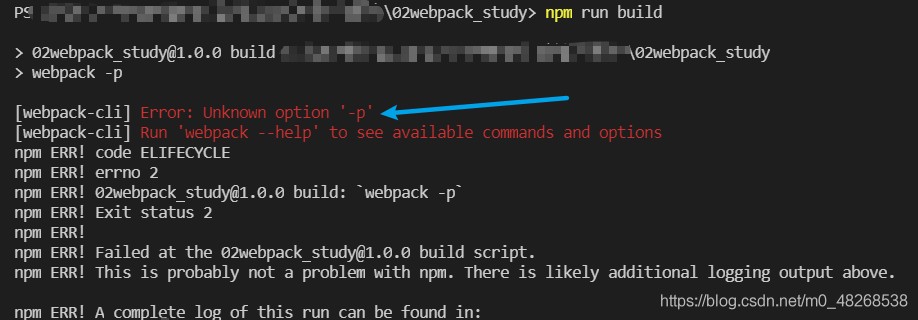
 

Error handling after mybatis custom paging plug-in

error message

Exception in thread "main" org.apache.ibatis.exceptions.PersistenceException: 
### Error opening session.  Cause: org.apache.ibatis.plugin.PluginException: Could not find method on interface org.apache.ibatis.executor.statement.StatementHandler named prepare. Cause: java.lang.NoSuchMethodException: org.apache.ibatis.executor.statement.StatementHandler.prepare(java.sql.Connection)
### Cause: org.apache.ibatis.plugin.PluginException: Could not find method on interface org.apache.ibatis.executor.statement.StatementHandler named prepare. Cause: java.lang.NoSuchMethodException: org.apache.ibatis.executor.statement.StatementHandler.prepare(java.sql.Connection)
at org.apache.ibatis.exceptions.ExceptionFactory.wrapException(ExceptionFactory.java:30)
at org.apache.ibatis.session.defaults.DefaultSqlSessionFactory.openSessionFromDataSource(DefaultSqlSessionFactory.java:100)

In fact, carefully read the error prompts, trace to the source code to see the reason, because the use of a relatively new or the latest mybatis   Jar package, and my interceptor code is written in an old way. In the new mybatis jar package, the prepare method in statementhandler has two parameters, as follows: statement   prepare(Connection   connection,   Integer   Transaction timeout), but there is only one parameter in my interceptor code, so I can’t get it. The solution is to add an integer. Class parameter to the rules of pagination interceptor. As follows:

@Intercepts({@Signature(type=StatementHandler.class,method="prepare",args={Connection.class, Integer.class })})


When executing shell script, $’r ‘: command not found appears

This kind of problem often occurs when using different systems or machines to write or modify scripts. The inconsistency of newline characters leads to this problem

Solution:
remove training sed -i 's/\r$//' filename

Explanation:
Option -i is for in-place editing, we delete the trailing \r directly in the input file. Thus be careful to type the pattern correctly.

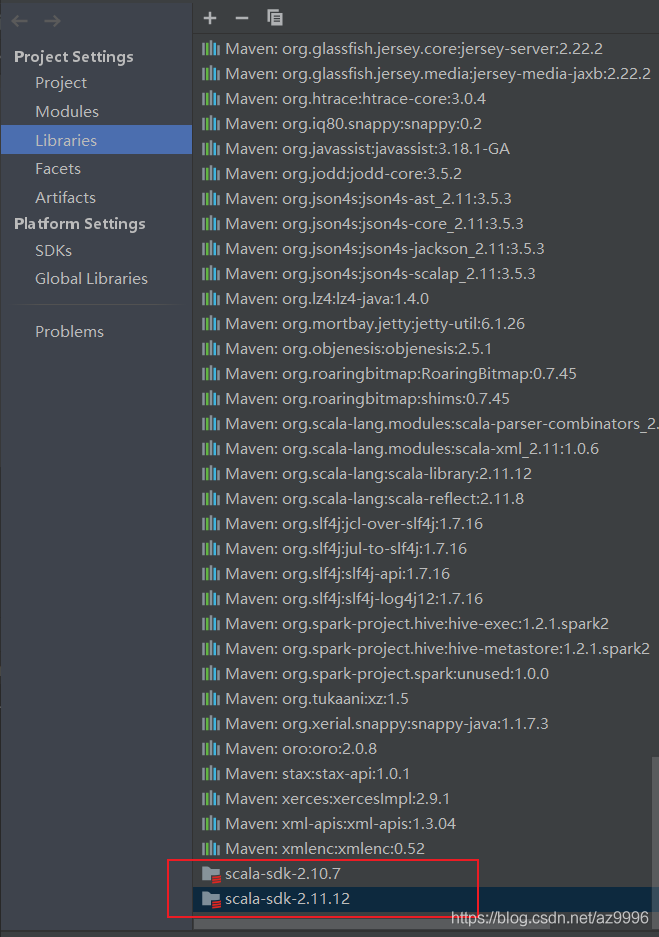
scalac: Token not found: C:\Users\User\AppData\Local\JetBrains\IntelliJIdea2020.3\compile-server\to

Record an error in idea Scala project:

Error message:

scalac: Token not found: C:\Users\User\AppData\Local\JetBrains\IntelliJIdea2020.3\compile-server\to

resolvent:

After deleting the scala SDK in Libraries under project structure, close idea, re open it, check the version of scala in pom.xml file, and re import the scala SDK

seaborn.load_ Data set error urlerror: < urlopen error [winerror 10060] the connection attempt failed because the connecting party did not reply correctly after a period of time or the connected host did not respond

In case of urlerror: & lt; Urlopen error [winerror 10060] the connection attempt failed because the connecting party did not reply correctly after a period of time or the connected host did not respond& gt; Before this problem, you may encounter this error: urllib. Error. Urlerror: & lt; urlopen error [Errno 11004] getaddrinfo failed>, The solutions are as follows:

 
one   urllib.error.URLError: < urlopen error [Errno 11004] getaddrinfo failed>

Method 1: modify the DNS address https://blog.csdn.net/qq_ 43474959/article/details/107902588

Method 2: if you still can’t get it, you can directly download the data set to the Seaborn data file directory. Generally, the address of Seaborn data is in the C: (users) directory, and the download address of Seaborn data set is: https://codechina.csdn.net/mirrors/mwaskom/seaborn-data?utm_ source=csdn_ github_ accelerator

 
2. URLError: < Urlopen error [winerror 10060] the connection attempt failed because the connecting party did not reply correctly after a period of time or the connected host did not respond& gt;

After solving the first problem, continue to run. You may encounter new errors. The solutions are as follows:

Step 1: make sure that the downloaded data set is stored in the Seaborn data folder. Note that this folder is generated automatically and should be brought with the Seaborn library when it is installed. The general path is C: (users) \ \ (user name) \ \ Seaborn data

Step 2: check the storage format of the downloaded library. My initial file format was. Data, which led to an error. It is recommended to change the suffix to. CSV, and then run it again

Resolution AAPT: error: resource drawable/ (aka xxx) not found

When an error occurs, do not suspect that the as is wrong! It’s just that there is an error in the newly compiled XML, not necessarily the file with the error prompt.

1. Execute file – & gt; Invalid cache/restart, recompile.

2. Check the latest XML file in the drawable folder for errors. Common errors are as follows:

I repeat

<?xml version=”1.0″ encoding=”utf-8″?& gt;

gazebo7 CMake Error:Could not find a package configuration file provided by “gazebo_plugins“

Running catkin on Ubuntu 16.04 gazebo7_ Cmake error

Error details:

CMake Error at /opt/ros/kinetic/share/catkin/cmake/catkinConfig.cmake:83 (find_package):
  Could not find a package configuration file provided by "gazebo_plugins"
  with any of the following names:

    gazebo_pluginsConfig.cmake
    gazebo_plugins-config.cmake

terms of settlement:

sudo apt-get install ros-kinetic-gazebo-ros-pkgs ros-kinetic-gazebo-ros-control

Catkin make

Idea for Mac setting JVM running parameters to solve running stuck problem

Mac platform, idea running project Karton

resolvent:

1、 Modify the host file:

Sudo VIM/private/etc/hosts
will

127.0.0.1 localhost
is modified to:

127.0.0.1 localhost [host name]. Local
problem solved
how to view your own host name?Use the following command:

hostname

XXX. Local is the information that needs to be added to the hosts file.

2、 Modify the VM parameters to the appropriate size
idea – help eidit custom VM options

-Xms2048m// minimum running memory
– xmx4096m// maximum running memory
– XX: reservedcodacache size = 240m// code cache size
(adjust according to the computer configuration) this setting is 16g memory configuration

3、 Reduce unnecessary breakpoint settings when debugging or running a project

Solution to error reporting in Java @ override

 
Sometimes when the eclipse project of Java is compiled on a different computer, the @ override always reports an error. Just remove the @ override, but it can’t fundamentally solve the problem, because sometimes there are too many @ override places.

This is a problem with JDK. We already have @ override for jdk5, but we don’t support the implementation of the interface. We think it’s not override and report an error. JDK6 fixed this bug. You can add @ override to both the method coverage of the parent class and the implementation of the interface.

To solve this problem, first make sure that JDK 1.6 is installed on the machine,

Then, select the eclipse menu windows – & gt; Preferences–> java-> Compiler–> Select 1.6 for compiler compliance level, refresh the project and recompile.

If the problem is not solved, right-click the project that reported the error and select properties — & gt; Java Compiler–> Select 1.6 from compiler compliance level to refresh the project and recompile.


django.db.utils.OperationalError: no such table: django_admin_log

Problem orientation


Using Python shell to delete custom user table data

from MyApp import models
dU = models.SysUsers.objects.all()
dU.delete()

The error is as follows

django.db.utils.OperationalError: no such table: django_admin_log

terms of settlement


Direct migrate may not work. Parameters should be added as follows

python manage.py makemigrations
python manage.py migrate --run-syncdb

Alpine Linux executable file crash report error / lib / x86 not found_ 64 Linux GNU / libc.so solution

reason:

reason:

Most linux software is connected with glibc, GNU libc Library (libc provides standard C library and POSIX API).

Most Linux distributions are based on glibc.

Alpine Linux is based on the musl libc library, which is a minimal implementation and strictly follows POSIX.

For example, executable files built on glibc distribution depend on/lib/x86_ 64 Linux GNU/libc. So. 6, which cannot be used on Alpine (except for static links).

resolvent:

Method 1: install the libc6 compatible package: APK add libc6 compat. This wrapper provides a lightweight glibc compatible layer. For simple applications, that’s enough.

Method 2, install the appropriate glibc on alpine, and provide all glibc methods and functions. Alpine can be built using glibc and should be installed in the following programs (for example):

# Source: https://github.com/anapsix/docker-alpine-java

ENV GLIBC_REPO=https://github.com/sgerrand/alpine-pkg-glibc
ENV GLIBC_VERSION=2.30-r0

RUN set -ex && \
    apk --update add libstdc++ curl ca-certificates && \
    for pkg in glibc-${GLIBC_VERSION} glibc-bin-${GLIBC_VERSION}; \
        do curl -sSL ${GLIBC_REPO}/releases/download/${GLIBC_VERSION}/${pkg}.apk -o /tmp/${pkg}.apk; done && \
    apk add --allow-untrusted /tmp/*.apk && \
    rm -v /tmp/*.apk && \
    /usr/glibc-compat/sbin/ldconfig /lib /usr/glibc-compat/lib

Method 3, using statically linked executable files. The static executable does not have dynamic dependencies and can run on any Linux.

Method 4, the software execution file can be built on alpine