Category Archives: Error

Grpc Compilation issues: “C++ versions less than C++11 are not supported.

# Official tutorial https://grpc.io/docs/languages/cpp/quickstart/
# mac compilation problems
“C++ versions less than C++11 are not supported.”
“`

# You need to add -DCMAKE_CXX_STANDARD=11 when compiling abseil, otherwise it will compile with an error

$ mkdir -p third_party/abseil-cpp/cmake/build
$ pushd third_party/abseil-cpp/cmake/build
$ cmake -DCMAKE_INSTALL_PREFIX=$MY_INSTALL_DIR \
      -DCMAKE_POSITION_INDEPENDENT_CODE=TRUE \
      -DCMAKE_CXX_STANDARD=11 \
      ../..
$ make -j 
$ make install
$ popd

Solve the problem of incorrect display of dialogfragment width

I wrote a download box. Relative layout for layout files   I wrote it. It is found that the width cannot be set on Android 11 devices. The layout controls are stacked together.

Solution:

1. Wrap the outermost layer with FrameLayout and match the width and height_ parent

 <FrameLayout xmlns:android="http://schemas.android.com/apk/res/android"
    android:orientation="vertical" android:layout_width="match_parent"
    android:layout_height="match_parent">
    <RelativeLayout
        android:id="@+id/bg"
        android:layout_width="600dp"
        android:layout_height="wrap_content"
        android:background="@drawable/bg"
        >
		
		Other sub-controls
</RelativeLayout>
</FrameLayout>

[Solved] TS Error: Could not find a declaration file for module

Some NPM packages have no problem using native JS, and some packages will report “could not find a declaration file for module” error after changing ts.

There are two ways to solve this problem

1. Download the @ type/error reporting package (some package developers may not upload their own. D.ts code to the NPM branch, then they will report an error saying that they can’t find this package, don’t worry about the next step)

2. The most direct, simple and effective solution: create a new shims-vue.d.ts file in the root directory of the project

//declare declaration declares an ambient module (i.e., a module declaration without internal implementation) 
declare module '*.vue' {
  import Vue from 'vue'
  export default Vue
}
 
 
declare module 'XX'
// xx is the name of the package that your package cannot find declared

The only thing to note is that after the first creation of the file with vscode, it should be restarted to see the effect, and then it will take effect. After the declaration is saved, the error will disappear immediately.

[Solved] Ubuntu 20.04 LTS Install k8s Error: The connection to the server localhost:8080 was refused

After Ubuntu 20.04 LTS is successfully added to the cluster on the node, the following prompt will appear:

This node has joined the cluster:
* Certificate signing request was sent to apiserver and a response was received.
* The Kubelet was informed of the new secure connection details.

Run 'kubectl get nodes' on the control-plane to see this node join the cluster.

Verify the success of adding by kubectl get nodes command. The following error occurs:

The connection to the server localhost:8080 was refused - did you specify the right host or port?

This error has also occurred on the master node. The solution gives the answer after successful installation

To start using your cluster, you need to run the following as a regular user:

  mkdir -p $HOME/.kube
  sudo cp -i /etc/kubernetes/admin.conf $HOME/.kube/config
  sudo chown $(id -u):$(id -g) $HOME/.kube/config

Alternatively, if you are the root user, you can run:

  export KUBECONFIG=/etc/kubernetes/admin.conf

I use the root account, so I need to execute the following command:

export KUBECONFIG=/etc/kubernetes/admin.conf

After the command is executed, verify it:

root@k8s-master-03:/etc/kubernetes# kubectl get nodes
W0706 10:27:55.181115   22817 loader.go:221] Config not found: /etc/kubernetes/admin.conf
The connection to the server localhost:8080 was refused - did you specify the right host or port?

The key information of the error report is that the configuration is not found

Config not found: /etc/kubernetes/admin.conf

Let’s go to the /etc/kubernetes/ Directory:

root@k8s-master-03:/etc/kubernetes# ls -l
total 12
-rw------- 1 root root 1910 Jul  6 09:52 kubelet.conf
drwxr-xr-x 2 root root 4096 Jul  6 09:41 manifests
drwxr-xr-x 2 root root 4096 Jul  6 09:52 pki

The results show that only kubelet. Conf (master node has admin. CONF), so we need to execute the following command:

export KUBECONFIG=/etc/kubernetes/kubelet.conf

[Solved] AttributeError: ‘openvino.inference_engine.ie_api.IENetwork‘ object has no attribute ‘input_info‘

[openvino] Problem Description: attributeerror: ‘openvino. Information’_ engine.ie_ api.IENetwork‘ object has no attribute ‘input_ Info ‘
this is due to the version problem. I use 2020.3.355, which is different from that on station B

next(iter(net.input_info))
Change to
next(iter(net.inputs))

There is also a small pit

n, c, h, w = net.inputs[input_blob].input_data.shape
Change to
n, c, h, w = net.inputs[input_blob].shape

[Solve] DAAS Pubulish Error: Failed read-only file system

Problem description

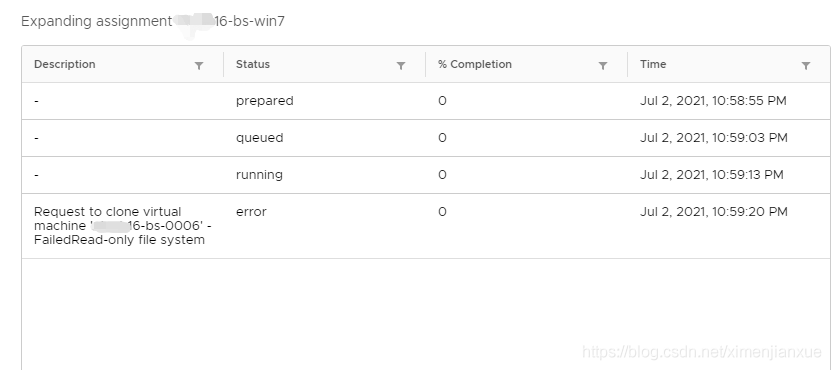
When publishing the expansion of horizon DAAS desktop resource pool, the expansion failed with the following error:

reason:

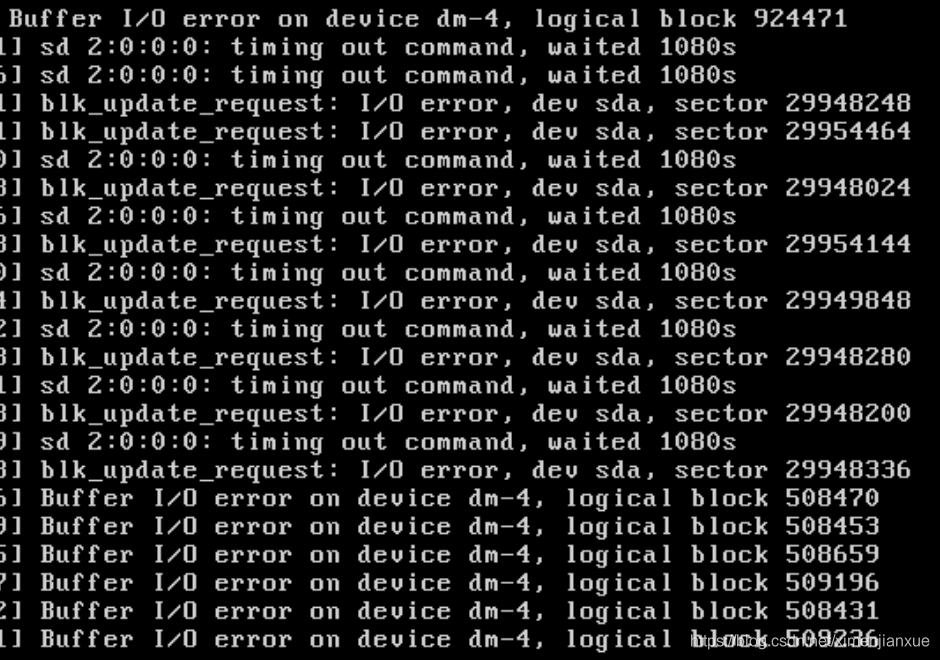
This is because the SP device has an I/O error due to the underlying storage failure. When checking the SP device pair, you will see the following error when logging in:

where the root partition is mounted on the SDA device, execute mount to check that the current state of the root partition is RW. In addition, check the slony state, and the error is also reported. The data communication between the SP device pairs is abnormal. And there is no file system error, this is the buffer logic block, and the SDA mount

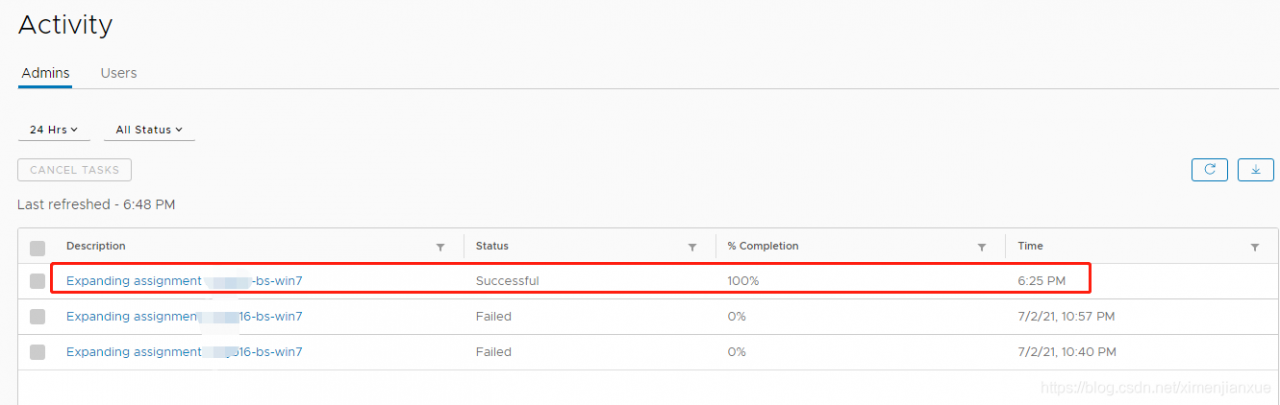
so, restart the SP device pair, and verify that the slony process communication is normal after restart; The desktop is normal again

[Solved] HTML report error, httprunner 3. X HTML report error, oserror: [winerror 6] handle invalid (resolved)

Preface
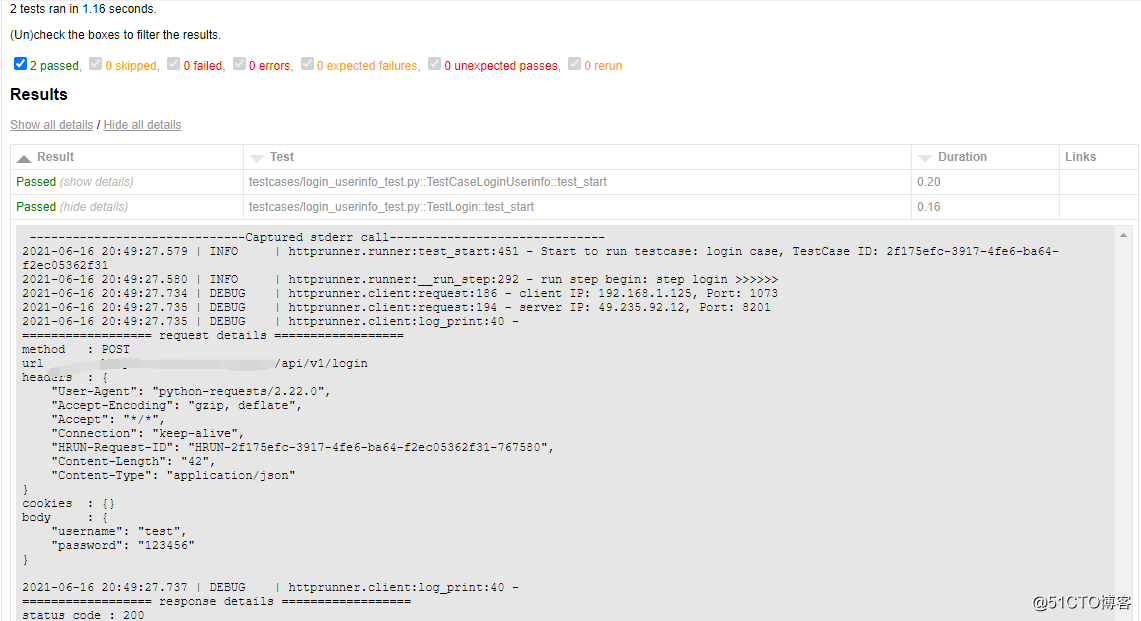
The html report generated by hrun command, although the use case is passed, check the details to find a large number of reported errors OSError: [WinError 6] Handle invalid.
Problem Description
System environment.
1.windows 10
2.python3.6.6
3.httprunner 3.1.4
4.pytest 5.4.3
5.pytest-html 2.1.1
Problem Description: Using hrun to run the use case, checking the details found a bunch of errors reporting OSError: [WinError 6] Invalid handle.
>hrun testcases/login_userinfo_test.py –html=. /reports/result.html –self-contained-html
Generated html content
——————————Captured stderr call——————————
— Logging error in Loguru Handler #0 —
Record was: {‘elapsed’: datetime.timedelta(0, 1, 859895), ‘exception’: None, ‘extra’: {},
‘file’: (name=’runner.py’, path=’e:\\python36\\lib\\site-packages\\httprunner\\runner.py’),
‘function’: ‘test_start’, ‘level’: (name=’INFO’, no=20, icon=’ℹ️’), ‘line’: 451,
‘message’: ‘Start to run testcase: logincase, TestCase ID: e6171c86-3f61-442d-842e-a6f6b105aba6’,
‘module’: ‘runner’, ‘name’: ‘httprunner.runner’, ‘process’: (id=10728, name=’MainProcess’),
‘thread’: (id=15200, name=’MainThread’), ‘time’: datetime(2021, 6, 16, 21, 15, 14, 919264, tzinfo=datetime.timezone(datetime.timedelta(0, 28800), ‘?D1¨²¡À¨º¡Á?¨º¡À??’))}
Traceback (most recent call last):
File “e:\python36\lib\site-packages\loguru\_handler.py”, line 177, in emit
self._sink.write(str_record)
File “e:\python36\lib\site-packages\loguru\_simple_sinks.py”, line 26, in write
self._stream.write(message)
File “e:\python36\lib\site-packages\colorama\ansitowin32.py”, line 41, in write
self.__convertor.write(text)
File “e:\python36\lib\site-packages\colorama\ansitowin32.py”, line 162, in write
self.write_and_convert(text)
File “e:\python36\lib\site-packages\colorama\ansitowin32.py”, line 187, in write_and_convert
self.write_plain_text(text, cursor, start)
File “e:\python36\lib\site-packages\colorama\ansitowin32.py”, line 196, in write_plain_text
self.wrapped.flush()
OSError: [WinError 6] The handle is invalid.
— End of logging error —

Solution:
The hrun execution pytest use case is not perfect, so instead use pytest to execute the py script
>pytest testcases/login_userinfo_test.py –html=. /reports/result.html –self-contained-html
After re-running the report, the problem was solved

Android r compiles OTA times error: ExternalError: Invalid ro.product.property_source_order

In make dist dist_ When compiling OTA package, dir = mydist encountered an error, which was not encountered in previous Android versions. Here is a record
error report content:

2021-07-02 09:53:29 - common.py - WARNING : Failed to read ODM/build.prop
2021-07-02 09:53:29 - add_img_to_target_files.py - ERROR   : 
   ERROR:
Traceback (most recent call last):
  File "/home/xxxx/yourdevice_r_1.0_dev_0616/android/out/host/linux-x86/bin/add_img_to_target_files/add_img_to_target_files.py", line 999, in <module>
  File "/home/xxxx/yourdevice_r_1.0_dev_0616/android/out/host/linux-x86/bin/add_img_to_target_files/add_img_to_target_files.py", line 993, in main
  File "/home/xxxx/yourdevice_r_1.0_dev_0616/android/out/host/linux-x86/bin/add_img_to_target_files/add_img_to_target_files.py", line 733, in AddImagesToTargetFiles
  File "/home/xxxx/yourdevice_r_1.0_dev_0616/android/out/host/linux-x86/bin/add_img_to_target_files/common.py", line 701, in LoadInfoDict
    build_info = BuildInfo(d)
  File "/home/xxxx/yourdevice_r_1.0_dev_0616/android/out/host/linux-x86/bin/add_img_to_target_files/common.py", line 393, in __init__
    self._device = self.GetOemProperty("ro.product.device")
  File "/home/xxxx/yourdevice_r_1.0_dev_0616/android/out/host/linux-x86/bin/add_img_to_target_files/common.py", line 509, in GetOemProperty
    return self.GetBuildProp(key)
  File "/home/xxxx/yourdevice_r_1.0_dev_0616/android/out/host/linux-x86/bin/add_img_to_target_files/common.py", line 451, in GetBuildProp
    return self._ResolveRoProductBuildProp(prop)
  File "/home/xxxx/yourdevice_r_1.0_dev_0616/android/out/host/linux-x86/bin/add_img_to_target_files/common.py", line 476, in _ResolveRoProductBuildProp
    "Invalid ro.product.property_source_order '{}'".format(source_order))
**ExternalError: Invalid ro.product.property_source_order '['odm', 'vendor', 'product', 'product_services', 'system']'**

Analyze the corresponding common. Py code

common.py script
 def _ResolveRoProductBuildProp(self, prop):
   default_source_order = self._GetRoProductPropsDefaultSourceOrder()
   source_order_val = self._GetRawBuildProp(
        "ro.product.property_source_order", None)
   source_order = source_order_val.split(",")
       if any([x not in default_source_order for x in source_order]):
      raise ExternalError(
          "Invalid ro.product.property_source_order '{}'".format(source_order))#挂在这行

  def _GetRoProductPropsDefaultSourceOrder(self):
  ...
  return BuildInfo._RO_PRODUCT_PROPS_DEFAULT_SOURCE_ORDER_CURRENT

  _RO_PRODUCT_PROPS_DEFAULT_SOURCE_ORDER_CURRENT = [
      "product", "odm", "vendor", "system_ext", "system"]

Open systme.prop in the board

ro.product.property_source_order=odm,vendor,product,product_services,system

It can be seen that the two do not match, resulting in an error
modify the ro.product.property in system.prop_ source_ The content of the order property, so that the two are equal, the compiler will no longer report an error.

#ro.product.property_source_order=odm,vendor,product,product_services,system
ro.product.property_source_order=odm,vendor,product,system_ext,system

Error (17) solves the problem of losing the request header of multithread asynchronous feign call

questions

In microservice, the request header will be lost in multithreading asynchronous + feign call

solving
    1. in the main thread, the request header parameters are first obtained and passed into the sub thread, and then the sub thread sets the request header parameters to the context. Finally, in feign forwarding processing, the request header data of the context set by the sub thread is obtained and forwarded to the downstream

Get context request parameter tool class

@Slf4j
public class RequestContextUtil {

    /**
     * Get request header data
     *
     * @return key-> request header name value-> request header value
     * @author zhengqingya
     * @date 2021/6/30 9:39 PM
     */
    public static Map<String, String> getHeaderMap() {
        Map<String, String> headerMap = Maps.newLinkedHashMap();
        try {
            ServletRequestAttributes requestAttributes = (ServletRequestAttributes) RequestContextHolder.getRequestAttributes();
            if (requestAttributes == null) {
                return headerMap;
            }
            HttpServletRequest request = requestAttributes.getRequest();
            Enumeration<String> enumeration = request.getHeaderNames();
            while (enumeration.hasMoreElements()) {
                String key = enumeration.nextElement();
                String value = request.getHeader(key);
                headerMap.put(key, value);
            }
        } catch (Exception e) {
            log.error("《RequestContextUtil》 Failed to get request header parameters:", e);
        }
        return headerMap;
    }

}

Request header context

@Slf4j
public class RequestHeaderHandler {

    public static final ThreadLocal<Map<String, String>> THREAD_LOCAL = new ThreadLocal<>();

    public static void setHeaderMap(Map<String, String> headerMap) {
        THREAD_LOCAL.set(headerMap);
    }

    public static Map<String, String> getHeaderMap() {
        return THREAD_LOCAL.get();
    }

    public static void remove() {
        THREAD_LOCAL.remove();
    }

}

Feign forwarding process RPC call parameter transfer

 */
@Slf4j
@Configuration
public class FeignRequestInterceptor implements RequestInterceptor {

    @Override
    @SneakyThrows
    public void apply(RequestTemplate requestTemplate) {
        log.debug("========================== ↓↓↓↓↓↓ 《FeignRequestInterceptor》 Start... ↓↓↓↓↓↓ ==========================");
        Map<String, String> threadHeaderNameMap = RequestHeaderHandler.getHeaderMap();
        if (!CollectionUtils.isEmpty(threadHeaderNameMap)) {
            threadHeaderNameMap.forEach((headerName, headerValue) -> {
                log.debug("《FeignRequestInterceptor》 Multi-threaded headerName:[{}] headerValue:[{}]", headerName, headerValue);
                requestTemplate.header(headerName, headerValue);
            });
        }
        Map<String, String> headerMap = RequestContextUtil.getHeaderMap();
        headerMap.forEach((headerName, headerValue) -> {
            log.debug("《FeignRequestInterceptor》 headerName:[{}] headerValue:[{}]", headerName, headerValue);
            requestTemplate.header(headerName, headerValue);
        });
        log.debug("========================== ↑↑↑↑↑↑ 《FeignRequestInterceptor》 End... ↑↑↑↑↑↑ ==========================");
    }

}

Use cases

@Slf4j
@RestController
@RequestMapping("/web/api/demo/test")
@Api(tags = "test api")
@AllArgsConstructor
public class RpcController extends BaseController {

    private SystemTaskThread systemTaskThread;

    @GetMapping("getContextUserId")
    @ApiOperation("rpc Call test - Async")
    public void getContextUserId() {
        Map<String, String> headerMap = RequestContextUtil.getHeaderMap();
        log.info("Main thread request header value: {}", headerMap.get("userId"));
        this.systemTaskThread.getRequestHeaderUserId(RequestContextUtil.getHeaderMap());
    }

}

@Slf4j
@Component
@AllArgsConstructor
public class SystemTaskThread {

    private ISystemClient systemClient;

    @SneakyThrows
    @Async(ThreadPoolConstant.SMALL_TOOLS_THREAD_POOL)
    public void getRequestHeaderUserId(Map<String, String> headerMap) {
        RequestHeaderHandler.setHeaderMap(headerMap);
        log.info("Sub-thread request header value: {}", this.systemClient.getRequestHeaderUserId());
    }

}

Note: it is also mentioned on the Internet that the main thread obtains the request parameters requestattributes, requestattributes = requestcontextholder. Getrequestattributes() to the child thread, and then re assign requestcontextholder. Setrequestattributes (requestattributes) But this method is not effective. Please record it here by the way~