Category Archives: Error

The SDK of Android webrtc compiled with Ninja – C out / release command reported an error, and the Android NDK processing method could not be found

We have also introduced a lot about webrtc compilation before. Because GN is much faster than gyp, we use GN to generate construction scripts and Ninja to build webrtc.

GN generate Ninja command

Common commands for generating Ninja build files using GN are as follows:

// Generate a debug version of the build file, default configuration
gn gen out/Debug 

// Generate a build file for the release version
gn gen out/Release --args="is_debug=false"

Ninja script

The gyp scripts under skia \ gyp are templates. When sync and gyp is executed, the actual build scripts will be generated dynamically according to these templates. Many module dependencies and conditions can be found in gyp or gypi under this directory.

Use the Ninja – C out/release instruction to compile and report an error

When compiling the webrtc SDK required by Android using the Ninja – C out/release instruction, the following error occurred:
Ninja: entering directory ` Android/release ‘
Ninja: error:’… /…/third ‘_party/android_ ndk/sources/android/cpufeatures/cpu-features.c’, needed by ‘obj/third_ party/android_sdk/cpu_features/cpu-features.o’, missing and no known rule to make it

From this error report, we can know that there is a problem with the file dependency and the required file cannot be found. Sometimes, the project directory changes and dependencies cannot be found. For webrtc, the plug-ins that depend on will be downloaded to the third-party library in webrtc, but the cpu-features.c file cannot be found when opening the third-party library in webrtc, which indicates that webrtc lacks an Android NDK third-party.

Therefore, we need to download the required NDK from the official Android website(https://developer.android.google.cn/ndk/downloads/revision_History) and copy it to third under the webrtc directory_part/android_Inside the NDK. Then run the Ninja – C out/release command again, and the error disappears.
How to Solve Springboot Error: Failed to convert value of type

Resolved [org.springframework.web.method.annotation.MethodArgumentTypeMismatchException: Failed to convert value of type ‘java.lang.String’ to required type ‘java.lang.Integer’; nested exception is java.lang.NumberFormatException: For input string: “50.5”]

General meaning:
failed to convert the value of type “Java. Lang. string” to the required type “Java. Lang. integer”; Nested exception is java.lang.numberformatexception: for input string: “50.5”]

This kind of error is usually caused by the parameters passed by the front end and the failure of the back end parsing, that is, it is wearing illegal parameters. For example, the upper front end gives me a floating point number, and the back end will fail when the string is parsed into a number!

[Solved] Tensorflow-gpu 2.0.0 Run Error: ModuleNotFoundError: No module named ‘tensorflow_core.estimator‘

Operating system: windows10
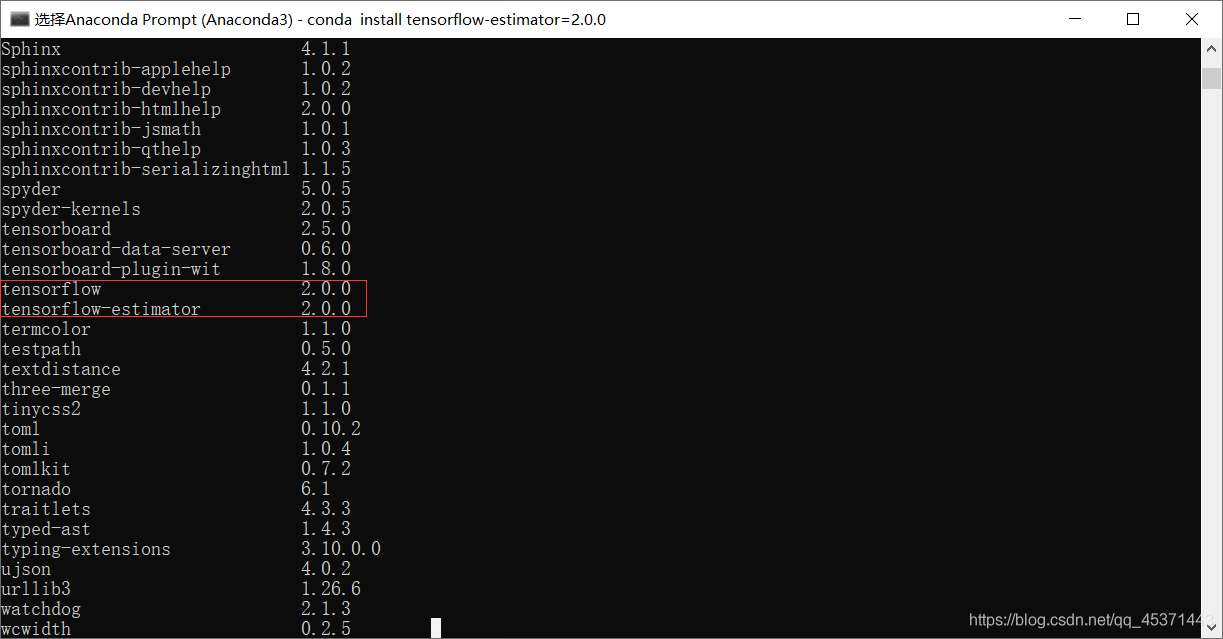
problem discovery: switch to the tensorflow 2.0.0 installation environment in CMD and enter PIP list. It is found that the corresponding version of tensorflow estimator is 2.5.0, which is inconsistent with the tensorflow version
solution: upgrade or lower the tensorflow estimator to a version consistent with tensorflow
if my version is tensorflow 2.0.0, type CONDA install tensorflow estimator = = 2.0.0 in CMD, and different versions will be seated according to their numbers
as shown in the following figure:

restart the Spyder console and it should be all right

How to Solve pod Error: “Authentication token is invalid or unverified. Either verify it with the email that…”

The following error occurs when executing pod trunk push:

[!] Authentication token is invalid or unverified. Either verify it with the email that was sent or register a new session.

Solution:

1. Execute the command: pod trunk register ‘your mailbox’, ‘XXXXXX’ — description =’xxxx ‘   Re register your account
2. Find and open the verification link in your email
3. Return to the terminal and execute the command again: pod trunk push xxxxx.podspec — allow warnings

Error in loading latex project compilation [How to Solve]

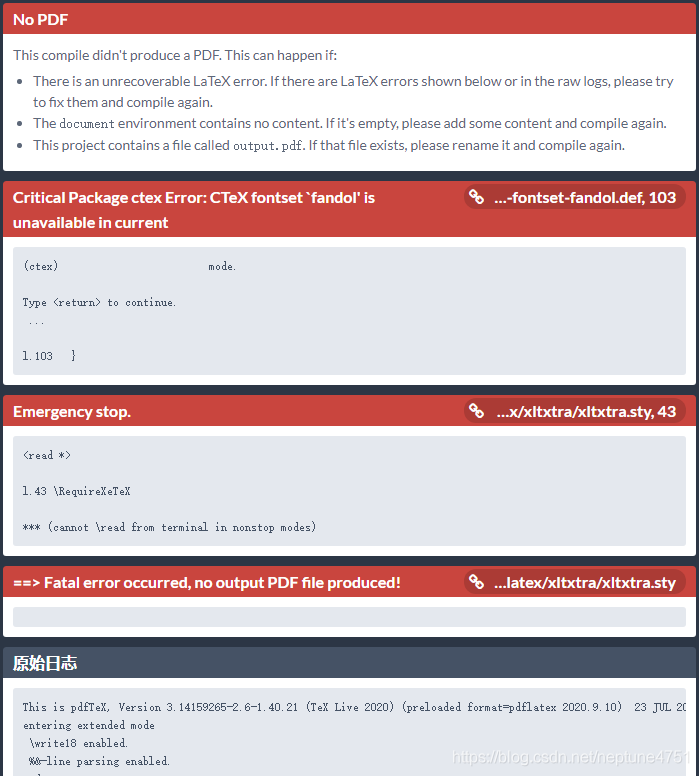
The following error occurs when overleaf loads the latex template online.
This compile didn’t produce a PDF. This can happen if:
There is an unrecoverable LaTeX error. If there are LaTeX errors shown below or in the raw logs, please try to fix them and compile again.The document environment contains no content. If it’s empty, please add some content and compile again.This project contains a file called output.pdf. If that file exists, please rename it and compile again.

Select “menu” – “Compiler” – “XeLatex”.

Compiled again, successfully.

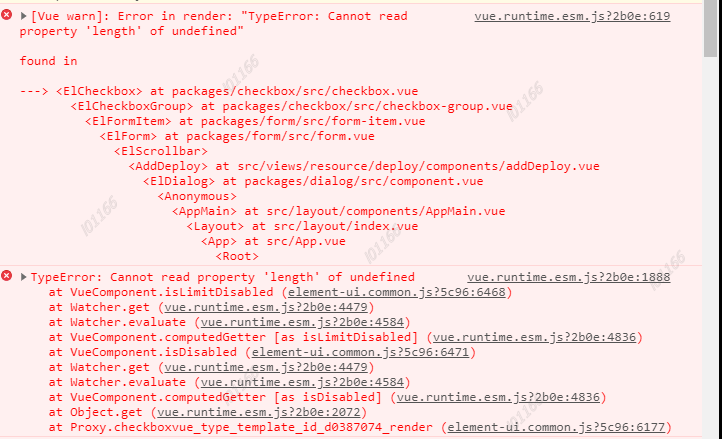
[Solved] vue.runtime.esm.js?2b0e:619 [Vue warn]: Error in render: “TypeError: Cannot read property ‘length‘

When using element UI as the form check box, the error vue.runtime.esm.js appears?2b0e: 619 [Vue warn]: error in render: “typeerror: cannot read property ‘length’, as shown in the following figure:

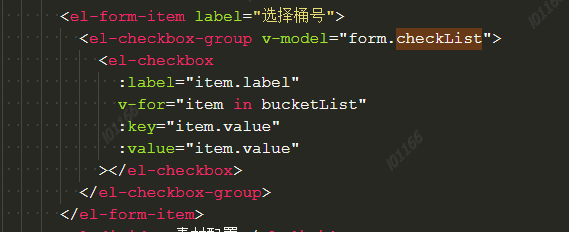
the code is as follows:

the solution is to add the checklist field in the form object as follows:

export default {
	data() {
 		return {
			form: {
				checkList: []
			}
		}
 	}
}

[Solved] MinIO Start Error: “WARNING: Console endpoint is listening on a dynamic port…”

Error overview:

WARNING: Console endpoint is listening on a dynamic port (35734), please use --console-address ":PORT" to choose a static port.

The error message is obvious. You need to choose a static port .

I wrote a shell myself to start Minio, and used -- console address' to deploy the Minio IP in the shell: what port do I want to open the Minio console page '

The specific shell is as follows:

nohup ./minio server --address '172.20.10.10:9002' --console-address '172.20.10.10:9001' /home/minio/data &

Note: -- Address' 172.20.10.10:9002 ' is used to specify the Minio interface.

Make complaints about it.

The -- Address , -- console address parameters cannot be seen using mini - H
:

[root@localhost local]# ./minio -h
NAME:
 minio - High Performance Object Storage

DESCRIPTION:
 Build high performance data infrastructure for machine learning, analytics and application data workloads with MinIO

USAGE:
 minio [FLAGS] COMMAND [ARGS...]

COMMANDS:
 server   start object storage server
 gateway  start object storage gateway

FLAGS:
 --certs-dir value, -S value  path to certs directory (default: "/root/.minio/certs")
 --quiet                      disable startup information
 --anonymous                  hide sensitive information from logging
 --json                       output server logs and startup information in json format
 --help, -h                   show help
 --version, -v                print the version

VERSION:
 RELEASE.2021-07-12T02-44-53Z

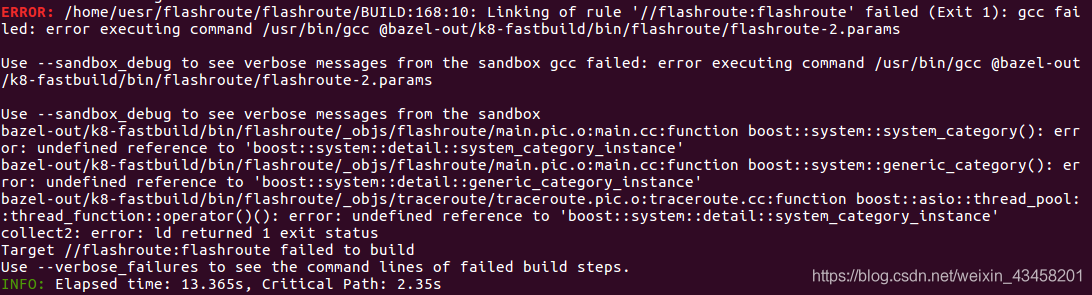
Bazel error executing command /usr/bin/gcc @bazel-out/k8-fastbuild/bin/flashroute/flashroute-2.p

When executing the command bazel build //flashroute:flashroute reports an error.
error executing command /usr/bin/gcc @bazel-out/k8-fastbuild/bin/flashroute/flashroute-
FAILED: Build did NOT complete successfully

Solution:
it is a system problem.“On some systems, the default version of C++ is not set to 14, in this case, you may specify it in --cxxopt.”
change the command to:

bazel build --cxxopt="--std=c++14" flashroute

Done!