Category Archives: Error

Turn off eslint checksum and resolve formatting conflicts

Turn off eslint verification

1. Modify the following code for index.js in config

    useEslint: false,

2. The universal method is to write in the first line of the error reporting JS file

/* eslint-disable */

3. There is a file. Eslintignore file in the root directory. You can add files that you do not need to verify.
for example, if you do not want it to verify Vue files, add. Vue. Of course, this will make all Vue files not verified. Similarly,. JS does not verify all JS files.
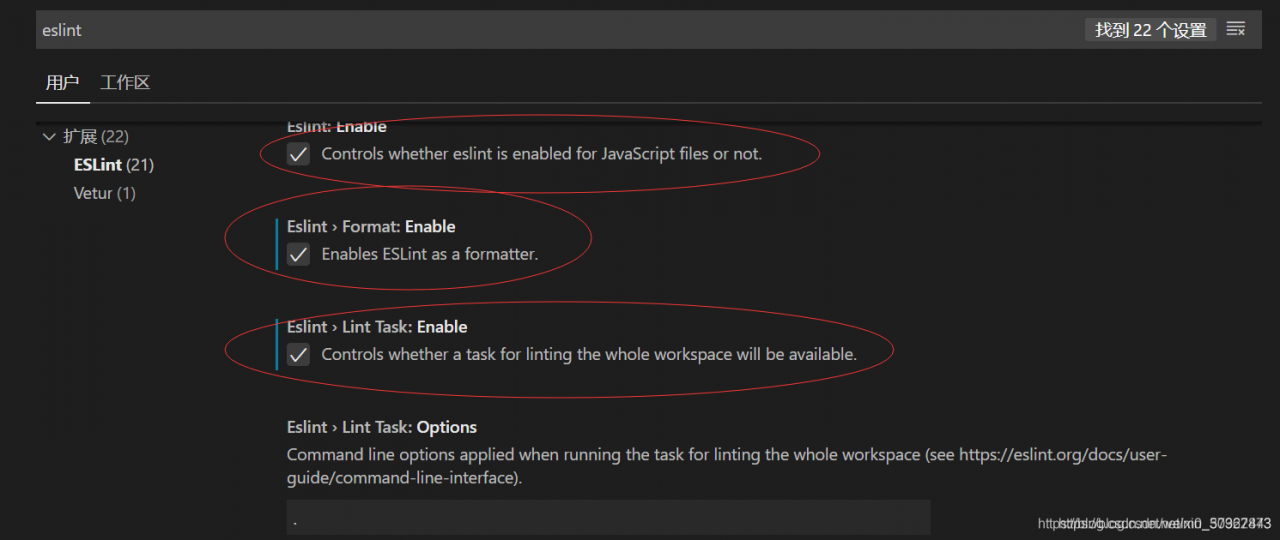
4. Open the extension of vscode editor and enter eslint search, Disable the eslint extension to solve the problem fundamentally
5. Check as shown in the figure to cancel the error reporting, restart vscode, and no error will be reported during compilation
6. Change the verification rule to 0 (0 means no verification, 1 means warning, 2 means error reporting)

 rules: {
    'vue/html-self-closing': 0,
    'vue/html-indent': 0,
    'vue/max-attributes-per-line': [
      1,
      {
        singleline: 10,
        multiline: {
          max: 4,
          allowFirstLine: true
        }
      }
    ],
  }

7. Directly modify the configuration file vue.config.js

module.exports = {
  lintOnSave: false
}

Causes and solutions of configuration conflict between eslint and prettier in vscode

Vscode uses the eslint plug-in and the prettier plug-in. The settings.json configuration of the editor is as follows:

{
  "editor.formatOnSave": true, // Auto-formatting on save
    "[javascript]": {
    "editor.defaultFormatter": "esbenp.prettier-vscode", // use prettier when formatting
  },
  "editor.codeActionsOnSave": {
        "source.fixAll.eslint": true // use eslint to verify files when saving
    }
}

Eslint, prettier, eslint config prettier, eslint plugin prettier
are installed in the project. Pretierrc is added to the root directory

{
    "singleQuote": true,
    "semi": true,
}
[Solved] Opencv3. X fatal error: opencv2/nonfree/nonfree.hpp: there is no such file or directory

When SIFT algorithm is used for matching, an error is reported during compilation:

fatal error: opencv2/nonfree/nonfree.hpp: Not having that file or directory
#include <opencv2/nonfree/nonfree.hpp>

When you go online, you basically say to download opencv nonfree:

sudo apt-get update
sudo add-apt-repository --yes ppa:xqms/opencv-nonfree
sudo apt-get update
sudo apt-get install libopencv-nonfree-dev

As a result, a new error is reported when the second instruction is run:

sudo add-apt-repository --yes ppa:xqms/opencv-nonfree
Cannot add PPA: 'ppa:~xqms/ubuntu/opencv-nonfree'.
ERROR: '~xqms' user or team does not exist.

After careful review, it is found that the opencv2. X version is still very good to install under the Ubuntu system. You only need to install it through the above instructions

opencv-3.4.0/opencv_contrib-3.4.0/modules/xfeatures2d/include/opencv2/xfeatures2d/nonfree.hpp

Put #include < opencv2/nonfree/nonfree.hpp> Change to absolute path and solve it.

[Solved] Conversion not supported for type java.time.LocalDateTime

Conversion not supported for type java.time.LocalDateTime

After the springboot is started, use the postman access path to prompt the conversion not supported for type java.time.localdatetime error. Check the information on the Internet,

In the entity entity class, the localdatetime of the java8 feature requires that the MySQL connector java version should not be lower than 5.1.37, and the early POM file can run normally after being modified to version 5.3.7

<dependency>
            <groupId>org.springframework</groupId>
            <artifactId>spring-tx</artifactId>
            <version>5.3.7</version>
        </dependency>

[Solved] Canoe CAPL Error: “the test module is not assigned or invalid”

The specific reason is unknown

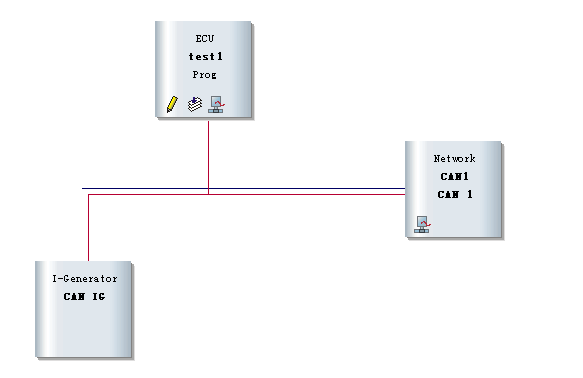
When using canoe’s CAPL function, in the can network diagram of simulation setup:

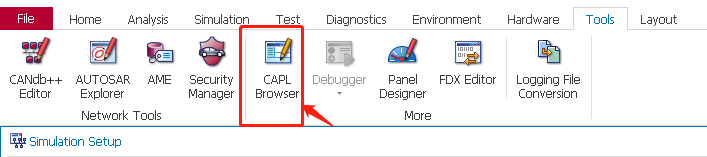
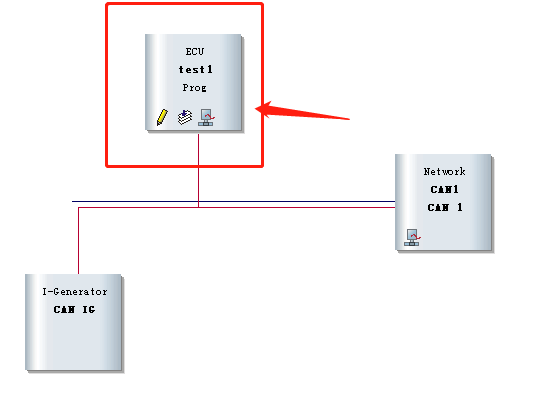
right click on the connection to add “insert CAPL test module”, as shown in the red box below, click “pencil”, open the CAPL editing interface, compile and run, and find an error: “the test module is not assigned or invalid”


Solution:

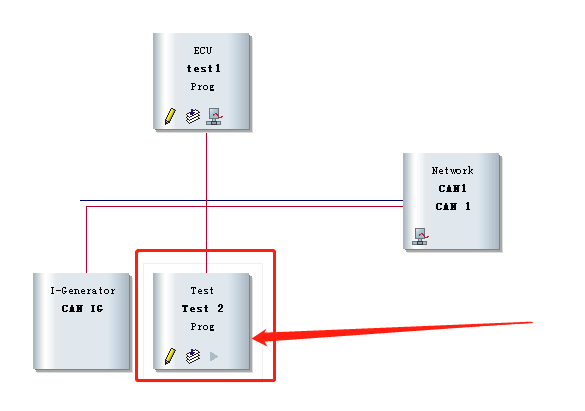
Create a new CAPL file

as shown in the figure below, right-click to add “insert network node”

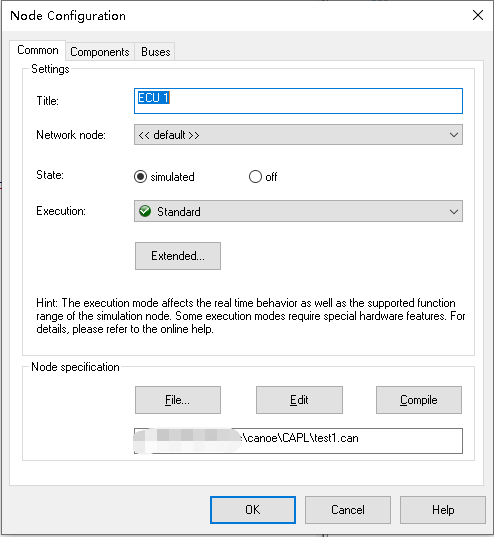
right-click test1, and click “configuration…”:
load your new. Can file

compile, run and test OK, and no more errors will be reported!

If you have any friends who know the reason, please reply in the comment area. Thank you first!!!

Mac Start IDEA Error: Cannot load JVM bundle…Value of IDEA_VM_OPTIONS is (null)

Open the package under the application. Double click MacOS/idea to open it. The following error message is displayed:

Last login: Wed Jul 21 10:25:35 on ttys000
/Applications/IntelliJ\ IDEA.app/Contents/MacOS/idea ; exit;
lyuwalle@lyuwalle ~ % /Applications/IntelliJ\ IDEA.app/Contents/MacOS/idea ; exit;
2021-07-21 10:25:44.347 idea[2312:81949] allVms required 1.8*,1.8+
2021-07-21 10:25:44.349 idea[2312:81953] Cannot load JVM bundle: Error Domain=NSCocoaErrorDomain Code=3585 "dlopen_preflight(/Applications/IntelliJ IDEA.app/Contents/jbr/Contents/MacOS/libjli.dylib): no suitable image found.  Did find:
	/Applications/IntelliJ IDEA.app/Contents/jbr/Contents/MacOS/libjli.dylib: mach-o, but wrong architecture
	/Applications/IntelliJ IDEA.app/Contents/jbr/Contents/MacOS/libjli.dylib: mach-o, but wrong architecture" UserInfo={NSLocalizedFailureReason=The bundle doesn’t contain a version for the current architecture., NSLocalizedRecoverySuggestion=Try installing a universal version of the bundle., NSFilePath=/Applications/IntelliJ IDEA.app/Contents/jbr/Contents/MacOS/libjli.dylib, NSDebugDescription=dlopen_preflight(/Applications/IntelliJ IDEA.app/Contents/jbr/Contents/MacOS/libjli.dylib): no suitable image found.  Did find:
	/Applications/IntelliJ IDEA.app/Contents/jbr/Contents/MacOS/libjli.dylib: mach-o, but wrong architecture
	/Applications/IntelliJ IDEA.app/Contents/jbr/Contents/MacOS/libjli.dylib: mach-o, but wrong architecture, NSBundlePath=/Applications/IntelliJ IDEA.app/Contents/jbr, NSLocalizedDescription=The bundle “OpenJDK 11.0.11” couldn’t be loaded because it doesn’t contain a version for the current architecture.}
2021-07-21 10:25:44.349 idea[2312:81953] Retrying as x86_64...
2021-07-21 10:25:44.390 idea[2312:81955] allVms required 1.8*,1.8+
2021-07-21 10:25:44.392 idea[2312:81968] Current Directory: /Users/lyuwalle
2021-07-21 10:25:44.392 idea[2312:81968] Value of IDEA_VM_OPTIONS is (null)
2021-07-21 10:25:44.392 idea[2312:81968] Processing VMOptions file at /Users/lyuwalle/Library/Application Support/JetBrains/IntelliJIdea2021.1/idea.vmoptions
2021-07-21 10:25:44.393 idea[2312:81968] Done
Improperly specified VM option 'SoftRefLRUPolicyMSPerMB=50Å'
2021-07-21 10:25:44.441 idea[2312:81968] JNI_CreateJavaVM (/Applications/IntelliJ IDEA.app/Contents/jbr) failed: -6
Saving session...
...copying shared history...
...saving history...truncating history files...
...completed.

The reason is that the idea.vmoptions file conflicts. Delete the idea.vmoptions (database library is a hidden folder) under the following folder
/users/XXXX/library/Application Support/JetBrains/intellijidea2020.1/idea.vmoptions

[Solved] JSON parse error: Unexpected character (‘‘‘ (code 39)): was expecting double-quote to start ……

This problem is encountered in spring MVC and JSP simulating asynchronous requests of Ajax.

Complete error message:

JSON parse error: Unexpected character (''' (code 39)): was expecting double-quote to start field name; nested exception is com.fasterxml.jackson.core.JsonParseException: Unexpected character (''' (code 39)): was expecting double-quote to start field name

Error reason: the format of JSON in the front-end Ajax request is incorrect. The outer part of the array should be wrapped in single quotation marks, and the inner key & amp; Value pairs are enclosed in double quotes.

As shown below.

           $.ajax(
                {
                    url:"testAjax",
                    contentType:"application/json;charset=UTF-8",
                    //Right
                    data:'{"username":"zs","password":"12456","age":"18"}',
                    //Wrong
                    data:"{'username':'zs','password':'12456','age':'18'}",
                    dataType:"json",
                    type:"post",
                    success:function (data) {
                    //    data is the server-side response data
                        alert(data);
                        alert(data.username)
                    }
                }

[Solved] ambiguous import: found package github.com/spf13/cobra/cobra in multiple modules

Quoted articles: https://stackoverflow.com/questions/63710830/spf13-cobra-cant-download-binary-to-gopath-bin

When the package is managed by go mod, it will be downloaded to $gopath/PKG/mod.

When downloading cobra, the executable binary Cobra will be automatically created in the $gopath/bin directory. If the following command line ~ /. Bashrc is added, cobra can be automatically referenced as a command line tool:

export PATH=$PATH:$GOROOT/bin:$GOPATH/bin

However, an error is reported in go get github.com/spf13/cobra/cobra: ambiguous import: found package github.com/spf13/cobra/cobra in multiple modules, indicating that duplicate packages exist. At this time, the solution is to set the version value. The replacement installation command is as follows:

go get -u github.com/spf13/cobra/[email protected]

[Solved] Canal Error: CanalParseException: column size is not match,parse row data failed

1、 Background phenomenon

Background: there is a problem with the company’s flick task, and the data is not written to the result library.

So immediately check the flick task. On the web page, there are no exceptions, checkpoints and backpressure
then the problem is not my program. The spearhead is directed at environmental problems

2、 Environmental investigation

First, I checked the log printed by the task manager of Flink and found that the data was consumed for a certain period of time, and no data came in later
it means that the data is not sent to the Flink program, so there is a problem at the source
after checking Kafka, it is found that there is no message backlog and the consumption rate is normal
then the problem is not Kafka. Then it can only come from a more original place: canal

3、 Culprit canal

The operation and maintenance boss checked the canal log:

com.alibaba.otter.canal.parse.exception.CanalParseException: com.alibaba.otter.canal.parse.exception.CanalParseException: com.alibaba.otter.canal.parse.exception.CanalParseException: parse row data failed.
Caused by: com.alibaba.otter.canal.parse.exception.CanalParseException: com.alibaba.otter.canal.parse.exception.CanalParseException: parse row data failed.
Caused by: com.alibaba.otter.canal.parse.exception.CanalParseException: parse row data failed.
Caused by: com.alibaba.otter.canal.parse.exception.CanalParseException: column size is not match for table:xxxx.xxx,22 vs 21

Obviously, this log says that a new field has been added to the database, which is inconsistent with the number of fields in the previous database. It causes an error in canal, and then the message is not sent

At that time, I thought that canal must support DDL compatibility, which must be a problem with one of canal’s settings
then I went to GitHub to find the document of canal
during the search, an issue was found. The content in the issue is similar to mine.
the key points are:

 canal.instance.filter.query.ddl = true 

Semantically speaking, it is obvious that canal filters out the DDL statements of MySQL, so it is naturally impossible to perceive that MySQL has added a new field. In this way, when a new piece of data comes after adding a field, canal will report an error if it cannot match the number of fields.

Solution

canal.instance.filter.query.ddl = false

In this way, canal can receive DDL statements and adapt to the changes after adding new fields.

[Solved] Castle.MicroKernel.ComponentNotFoundException: No component for supporting the service ****** was f

;Castle.MicroKernel.ComponentNotFoundException: No component for supporting the service ****** was found
In Castle.MicroKernel.DefaultKernel.Castle.MicroKernel.IKernelInternal.Resolve(Type service, Arguments arguments, IReleasePolicy policy, Boolean ignoreParentContext)
In Castle.MicroKernel.DefaultKernel.Resolve(Type service, Arguments arguments)
In Castle.Windsor.WindsorContainer.Resolve[T]()
In Abp.Dependency.IocManager.Resolve[T]() location D:\Github\aspnetboilerplate\src\Abp\Dependency\IocManager.cs:line 179
In Abp.Dependency.IocResolverExtensions.ResolveAsDisposable[T](IIocResolver iocResolver) location D:\Github\aspnetboilerplate\src\Abp\Dependency\IocResolverExtensions.cs:line 18

Castle.MicroKernel.ComponentNotFoundException
HResult=0x80131500
Message=No component for supporting the service  was found
Source=Castle.Windsor
StackTrace:
at Castle.MicroKernel.DefaultKernel.Castle.MicroKernel.IKernelInternal.Resolve(Type service, Arguments arguments, IReleasePolicy policy, Boolean ignoreParentContext)
at Castle.MicroKernel.DefaultKernel.Resolve(Type service, Arguments arguments)
at Castle.Windsor.WindsorContainer.Resolve[T]()
at Abp.Dependency.IocManager.Resolve[T]()
at Abp.Dependency.IocResolverExtensions.ResolveAsDisposable[T](IIocResolver iocResolver)

Solution:
using (var bootstrapper = AbpBootstrapper.Create<OrderServiceModule>())
{
//bootstrapper.IocManager
//    .IocContainer
//    .AddFacility<LoggingFacility>(f => f.UseLog4Net().WithConfig(“log4net.config”));
bootstrapper.IocManager.IocContainer.AddFacility<LoggingFacility>(f => f.UseAbpLog4Net().WithConfig(Path.Combine(AppDomain.CurrentDomain.BaseDirectory, “log4net.config”)));
bootstrapper.Initialize();

}

k8s kubernetes ingress error: endpoints “default-http-backend“ not found

Phenomenon

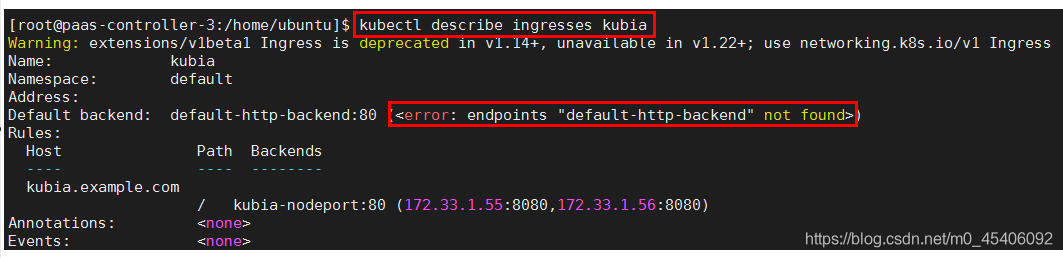
After creating an address, it is found that no address is assigned:

kubectl describe expressions kubia Default HTTP backend not found when viewing expressions

reason

The ingresses component cannot exist alone. It depends on the ingresses controller component. In the process of creating the ingresses controller, you need to configure a default backend.

See [k8s] ingress service and ingress controller

Default backend function:
the principle of ingresses is similar to nginx. For URL forwarding, you need to customize rules. A portal without rules sends all traffic to a default backend. The default backend is usually a configuration option for the progress controller.

If neither the host nor the path in the ingress object matches the HTTP request, the traffic will be routed to the default backend.

Puppeteer Error: Chromium revision is not downloaded. Run “npm install“ or “yarn install“

1. Introduction

Running after local installation, it is found that chromium has not been downloaded

2. Solution

Look at the information carefully

npm install [email protected]

> [email protected] install D:\workspace\team\takewalk\TakeWalks-FrontEnd\node_modules\puppeteer
> node install.js

**INFO** Skipping browser download. "PUPPETEER_SKIP_CHROMIUM_DOWNLOAD" environment variable was found.

The environment variable has been set before. You can delete it