Category Archives: Error

[Solved] Synchronous operations are disallowed. Call ReadAsync or set AllowSynchronousIO to true instead.


#Accident scene

In the asp.net core web API project, when reading the stream stream of request.body, the following error is reported:

Synchronous operations are disallowed. Call ReadAsync or set AllowSynchronousIO to true instead.

The code is as follows:

var request = context.HttpContext.Request;
if (request.Method == "POST")
{
    request.Body.Seek(0, SeekOrigin.Begin);
    using (var reader = new StreamReader(request.Body, Encoding.UTF8))
    {
        var data = reader.ReadToEnd();
    }
}

#Solution

The synchronous reading method of the body needs to be configured in configureservices to allow synchronous reading of IO streams. Otherwise, an exception may be thrown. Call readasync or set allowsynchronous IO to true instead.
configure according to the managed service used or directly use the asynchronous reading method.

public void ConfigureServices(IServiceCollection services)
{
	//other
	
	services.Configure<KestrelServerOptions>(x => x.AllowSynchronousIO = true)
                .Configure<IISServerOptions>(x=>x.AllowSynchronousIO = true);
}

The URL is timestamped to avoid caching problems when requesting the current path again

The URL is timestamped to avoid caching problems when requesting the current path again

1. Explanation: adding a timestamp to the URL will ensure that every request initiated is different from the previous request, so as to avoid the browser caching the URL.

2. Introduce the following code in HTML head:

<script type="text/javascript">
var timeTag = sessionStorage.getItem("time") || null;  
if(!timeTag) {  //Determine if there is a timestamp in sessionStorage, if not, add a timestamp to the url and save it
var arr = location.href.split('#/');
var timestamp = new Date().getTime(); //get the timestamp of the entry item
if( location.href.indexOf('?time=') ! = -1 ){ //judge sessionStorage did not save the timestamp, but the url has a timestamp case, you need to convert the url's timestamp to the latest, to avoid the cache of the current path again request
var arr2 = location.href.split('?time=');
window.location.href = arr2[0] + '?time=' + timestamp + '#/' +arr[1];
}else { //judge sessionStorage did not save the timestamp, and the url does not have a timestamp case, timestamp added to the url
window.location.href = arr[0] + '?time=' + timestamp + '#/' +arr[1];
}
sessionStorage.setItem("time",timestamp) // store the timestamp of the current entry item
}
</script>

C# Error: Import “google/protobuf/timestamp.proto“ was not found or had errors. [How to Solve]

When using c# as the development language to convert Pb files into CS files, I believe many people will encounter a very difficult problem

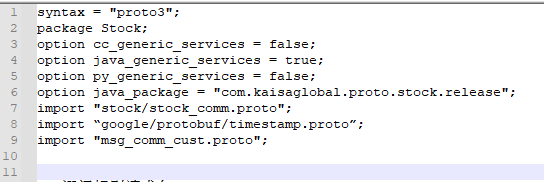
The first question: in the protoc3 environment, import timestamp. In the header, import “Google/protobuf/timestamp. Proto”; Exceptions will be thrown when: Google/protobuf/timestamp. Proto “was not found or had errors;

Solution [sharing of original articles by blogger “pamxy”:

(Note: it was found later that it is not necessary to add this directory, because the timestamp.pb.cc file generated by timestamp.proto has been compiled as the source code when compiling libprotobuf.lib file, and libprotobuf.lib is also used in compiling protoc.exe, so it is natural to default that there is already a source code, so there is no need to import it again!)
Just delete the import “Google/protobuf/timestamp. Proto”.

Second question:  ” google.protobuf.Timestamp” is not defined.

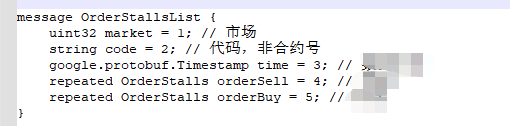
Under normal circumstances, there is no need to import google.protobuf.timestamp directly in the protoc3 environment, because in the compilation process, the problem will be read in the Lib file, but if timestamp is called in the file, it is as follows:

It is necessary to call the timestamp file in the header, but bloggers are always prompted during the call  ” google.protobuf.Timestamp” is not defined.

There is really no way, so I have to find the path of this file: timestamp.proto file in protobuf master \ SRC \ Google \ protobuf folder, directly copy the file to the same level directory of the file you want to compile, and then modify the timestamp file in the header. The call path: Import “timestamp. Proto”;

Finally, the file was finally solved…….

The third question: how to call after converting the protocol file into a CS file?

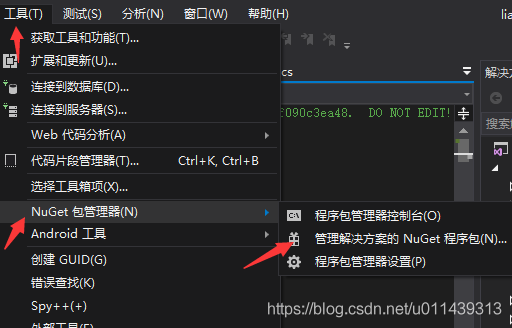
a. Found in referenced project: Tools & gt& gt; Nuget package manager & gt& gt; Nuget package for management solution & gt& gt; Search for “Google. Protocolbuffers” and install

B, directly convert the protoc file into the CS file, and call it in the project.

This small problem is recorded, which is also convenient for you to use as a reference when you encounter this problem.

[Solved] panic: runtime error: invalid memory address or nil pointer dereference

Error code:

type MongoConn struct {
	clientOptions *options.ClientOptions
	client        *mongo.Client
	collections   *mongo.Collection
}

var mongoConn *MongoConn

func InitMongoConn() error{

	ctx, cancelFunc := context.WithTimeout(context.Background(), 10*time.Second)
	defer cancelFunc()

	mongoUrl := "mongodb://" + user + ":" + password + "@" + url + "/" + dbname
	mongoConn.clientOptions = options.Client().ApplyURI(mongoUrl)
	
	//......
}

To solve the problem caused by pointer assignment:

var mongoConn MongoConn

[Solved] Android Studio Compile error: Cannot use connection to Gradle distribution . as it has been stopped.

Article catalog

1、 Error message II. Solution


1、 Error message


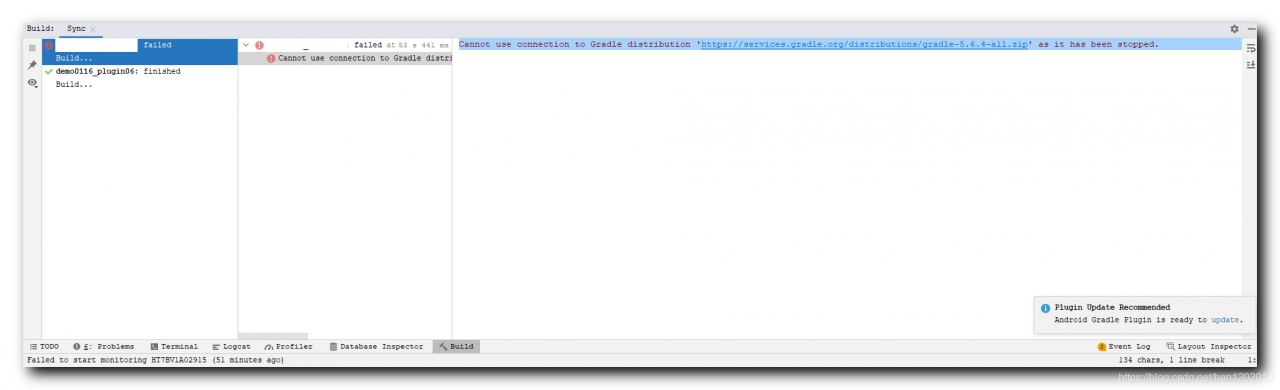
Cannot use connection to Gradle distribution 'https://services.gradle.org/distributions/gradle-5.6.4-all.zip' as it has been stopped.


2、 Solution


Occasional errors disappear after recompilation. This problem is encountered only once, and a record is made here;

[Solved] Vue + uniapp Uncaught TypeError: Cannot read property ‘getters‘ of undefined

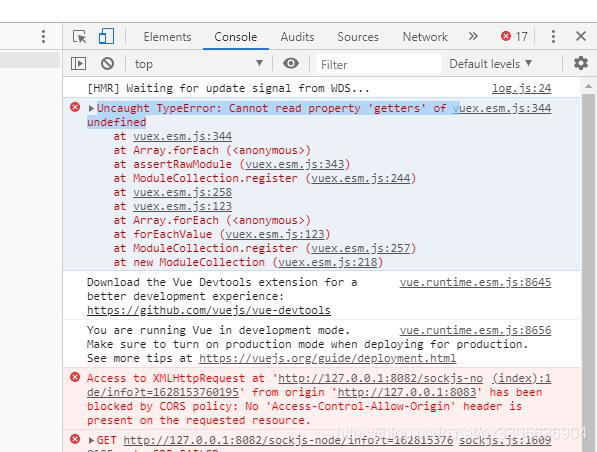
Uncaught TypeError: Cannot read property ‘getters’ of undefined
When migrating vuex-related code, the startup reports: Uncaught TypeError: Cannot read property 'getters' of undefined

store/index.js File:

import Vue from 'vue'
import Vuex from 'vuex'

import getters from './getters.js'

Vue.use(Vuex)

// https://webpack.js.org/guides/dependency-management/#requirecontext
const modulesFiles = require.context('./modules', true, /\.js$/)

// you do not need `import app from './modules/app'`
// it will auto require all vuex module from modules file
const modules = modulesFiles.keys().reduce((modules, modulePath) => {
  // set './app.js' => 'app'
  const moduleName = modulePath.replace(/^\.\/(.*)\.\w+$/, '$1')
  const value = modulesFiles(modulePath)
  modules[moduleName] = value.default
  return modules
}, {})

const store = new Vuex.Store({
	modules,
	getters
})
export default store

All. JS files in the modules directory obtained at this time are saved as vuex of named attributes.

Solution: the reason is that a file under my modules has not been written empty. Just delete it temporarily.

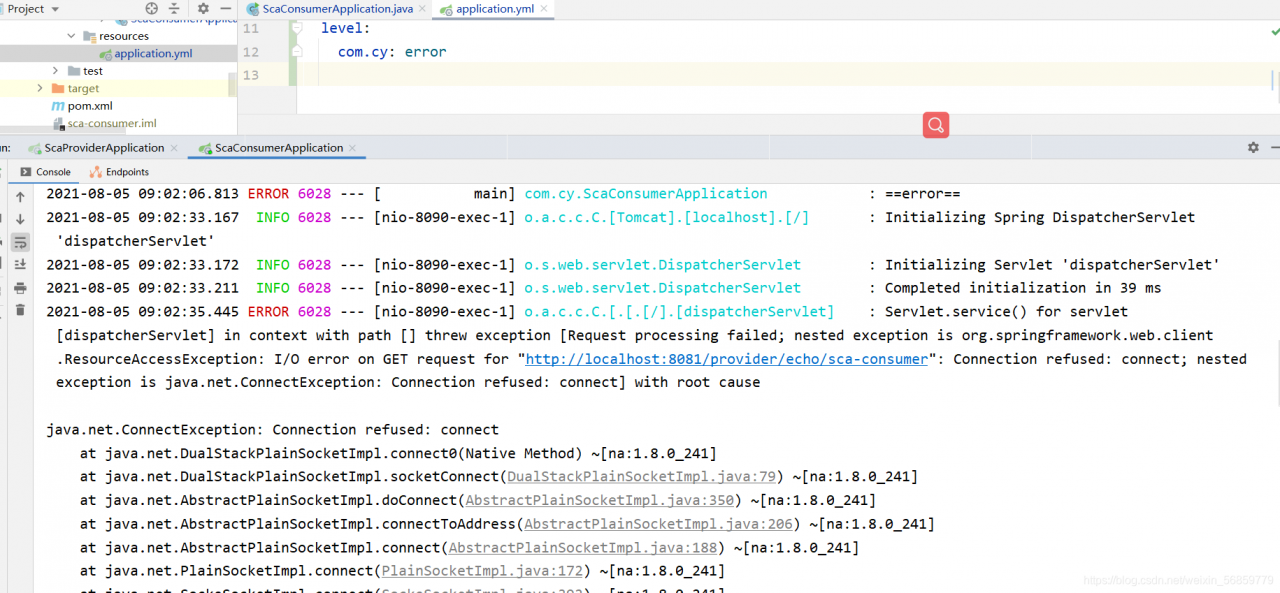
Connection refused: connect; nested exception is java.net.ConnectException: Connection refused: [How to Solve]

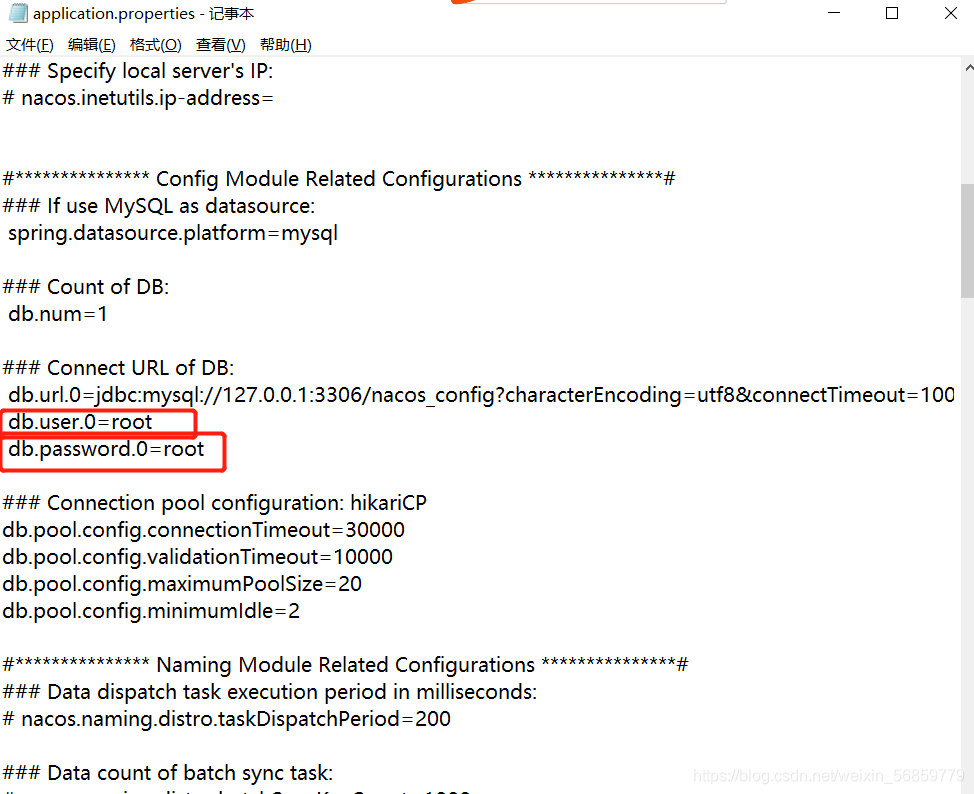
1. Cause of error: the password of the database connection is wrong, so it can be modified

I use the Nacos registry to check whether the password is correct in the configuration file application.properties

2. Reasons for error reporting  : The access port is occupied. Please refer to this document to release the port

https://blog.csdn.net/weixin_ 56859779/article/details/119204459?spm=1001.2014.3001.5502

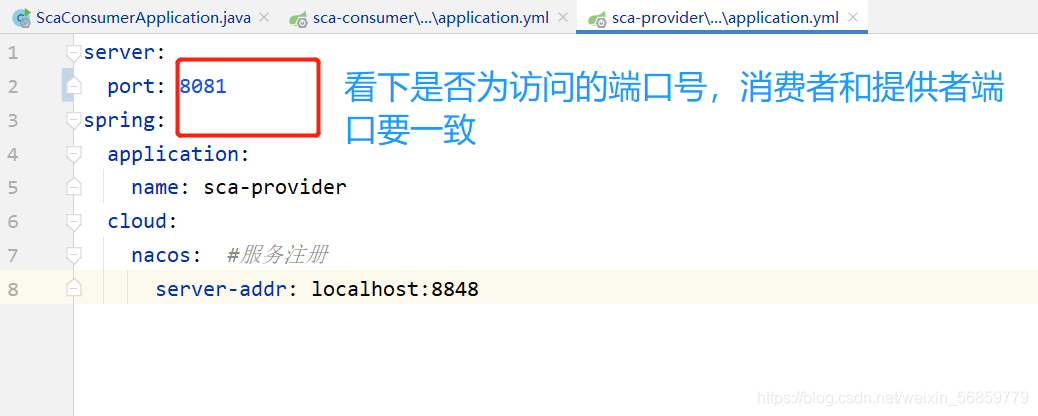
3. Cause of error: the provider of remote call, the port of application.yml in the configuration file is wrong, and it is changed to the access port

[Solved] RuntimeError: each element in list of batch should be of equal size

RuntimeError: each element in list of batch should be of equal size

1. Example code 2. Running result 3. Error reason 4. Batch_ Size = 25. Analyze reason 6. Complete code

1. Example code

"""
Complete the preparation of the dataset
"""
from torch.utils.data import DataLoader, Dataset
import os
import re

def tokenlize(content):
    content = re.sub('<.*?>', ' ', content, flags=re.S)
    filters = ['!', '"', '#', '$', '%', '&', '\(', '\)', '\*', '\+', ',', '-', '\.', '/', ':', ';', '<', '=', '>', '\?',
               '@', '\[', '\\', '\]', '^', '_', '`', '\{', '\|', '\}', '~', '\t', '\n', '\x97', '\x96', '”', '“', ]

    content = re.sub('|'.join(filters), ' ', content)
    tokens = [i.strip().lower() for i in content.split()]

    return tokens


class ImdbDataset(Dataset):
    def __init__(self, train=True):
        self.train_data_path = r'E:\Python资料\视频\Py5.0\00.8-12课件资料V5.0\阶段9-人工智能NLP项目\第四天\代码\data\aclImdb_v1\aclImdb\train'
        self.test_data_path = r'E:\Python资料\视频\Py5.0\00.8-12课件资料V5.0\阶段9-人工智能NLP项目\第四天\代码\data\aclImdb_v1\aclImdb\test'
        data_path = self.train_data_path if train else self.test_data_path

        temp_data_path = [os.path.join(data_path, 'pos'), os.path.join(data_path, 'neg')]
        self.total_file_path = [] 
        for path in temp_data_path:
            file_name_list = os.listdir(path)
            file_path_list = [os.path.join(path, i) for i in file_name_list if i.endswith('.txt')]
            self.total_file_path.extend(file_path_list)

    def __getitem__(self, idx):
        file_path = self.total_file_path[idx]
        # 获取了label
        label_str = file_path.split('\\')[-2]
        label = 0 if label_str == 'neg' else 1
        # 获取内容
        # 分词
        tokens = tokenlize(open(file_path).read())
        return tokens, label

    def __len__(self):
        return len(self.total_file_path)


def get_dataloader(train=True):
    imdb_dataset = ImdbDataset(train)
    print(imdb_dataset[1])
    data_loader = DataLoader(imdb_dataset, batch_size=2, shuffle=True)
    return data_loader


if __name__ == '__main__':
    for idx, (input, target) in enumerate(get_dataloader()):
        print('idx', idx)
        print('input', input)
        print('target', target)
        break

2. Operation results

3. Reasons for error reporting

dataloader = DataLoader(dataset=dataset, batch_size=2, shuffle=True)

If batch_ Size = 2 changed to batch_ When size = 1 , no more errors will be reported. The operation results are as follows:

4. batch_ size=2

However, if you want batch_ When size = 2 , how to solve it?

resolvent:

The reason for the problem is the parameter collate in the dataloader_ fn

collate_ The default value of FN is Default customized by torch_ collate, collate_ FN is used to process each batch, and the default default_ Collate processing error.

Solution:

    1. first convert the data into a digital sequence and observe whether the results meet the requirements. No similar errors have occurred before using dataloader. Consider customizing a collate_ FN, observations. </ OL>

Here, use method 2 to customize a collate_ FN , and then observe the results:

def collate_fn(batch):
    """
    Processing of batch data
    :param batch: [the result of a getitem, the result of getitem, the result of getitem]
    :return: tuple
    """
    reviews,labels = zip(*batch)
    reviews = torch.LongTensor([config.ws.transform(i,max_len=config.max_len) for i in reviews])
    labels = torch.LongTensor(labels)

    return reviews, labels

collate_fn第二种定义方式:

import config

def collate_fn(batch):
    """
    Processing of batch data
    :param batch: [the result of a getitem, the result of getitem, the result of getitem]
    :return: tuple
    """
    reviews,labels = zip(*batch)
    reviews = torch.LongTensor([config.ws.transform(i,max_len=config.max_len) for i in reviews])
    labels = torch.LongTensor(labels)

    return reviews,labels

5. Analyze the causes

According to the error information, you can find the source of the error in the collate. Py source code, and the error appears in default_ Collate() function. Baidu found the defaul of this source code_ The collate function is the default batch processing method of the dataloader class. If collate is not used when defining the dataloader_ FN parameter specifies the function, and the method in the following source code will be called by default. If you have the above error, it should be the error in the penultimate line of this function

Source code:

def default_collate(batch):
    r"""Puts each data field into a tensor with outer dimension batch size"""

    elem = batch[0]
    elem_type = type(elem)
    if isinstance(elem, torch.Tensor):
        out = None
        if torch.utils.data.get_worker_info() is not None:
            # If we're in a background process, concatenate directly into a
            # shared memory tensor to avoid an extra copy
            numel = sum([x.numel() for x in batch])
            storage = elem.storage()._new_shared(numel)
            out = elem.new(storage)
        return torch.stack(batch, 0, out=out)
    elif elem_type.__module__ == 'numpy' and elem_type.__name__ != 'str_' \
            and elem_type.__name__ != 'string_':
        if elem_type.__name__ == 'ndarray' or elem_type.__name__ == 'memmap':
            # array of string classes and object
            if np_str_obj_array_pattern.search(elem.dtype.str) is not None:
                raise TypeError(default_collate_err_msg_format.format(elem.dtype))

            return default_collate([torch.as_tensor(b) for b in batch])
        elif elem.shape == ():  # scalars
            return torch.as_tensor(batch)
    elif isinstance(elem, float):
        return torch.tensor(batch, dtype=torch.float64)
    elif isinstance(elem, int_classes):
        return torch.tensor(batch)
    elif isinstance(elem, string_classes):
        return batch
    elif isinstance(elem, container_abcs.Mapping):
        return {key: default_collate([d[key] for d in batch]) for key in elem}
    elif isinstance(elem, tuple) and hasattr(elem, '_fields'):  # namedtuple
        return elem_type(*(default_collate(samples) for samples in zip(*batch)))
    elif isinstance(elem, container_abcs.Sequence):
        # check to make sure that the elements in batch have consistent size
        it = iter(batch)
        elem_size = len(next(it))
        if not all(len(elem) == elem_size for elem in it):
            raise RuntimeError('each element in list of batch should be of equal size')
        transposed = zip(*batch)
        return [default_collate(samples) for samples in transposed]

    raise TypeError(default_collate_err_msg_format.format(elem_type))

The function of this function is to pass in a batch data tuple. Each data in the tuple is in the dataset class you define__ getitem__() method. The tuple length is your batch_ Size sets the size of the. However, one field of the iteratable object finally returned in the dataloader class is batch_ The corresponding fields of the size sample are spliced together.

Therefore, when this method is called by default, the penultimate line of the statement return [default] will be entered for the first time_ Collate (samples) for samples in translated] generate iteratable objects from batch tuples through zip function. Then, the same field is extracted through iteration and recursively re passed in default_ In the collate() function, take out the first field and judge that the data type is among the types listed above, then the dateset content can be returned correctly.

If batch data is processed in the above order, the above error will not occur. If the data of the element is not in the listed data type after the second recursion, it will still enter the next recursion, that is, the third recursion. At this time, even if the data can be returned normally, it does not meet our requirements, and the error usually appears after the third recursion. Therefore, to solve this error, you need to carefully check the data type of the returned field of the dataset class you define. It can also be found in defaule_ The collate() method outputs the batch content before and after processing. View the specific processing flow of the function to help you find the error of the returned field data type.

Friendly tip: do not change the defaule in the source file_ The collate() method can copy this code and define its own collate_ Fn() function and specify its own defined collate when instantiating the dataloader class_ FN function.

6. Complete code

"""
Complete the preparation of the dataset
"""
from torch.utils.data import DataLoader, Dataset
import os
import re
import torch

def tokenlize(content):
    content = re.sub('<.*?>', ' ', content, flags=re.S)
    # filters = ['!', '"', '#', '$', '%', '&', '\(', '\)', '\*', '\+', ',', '-', '\.', '/', ':', ';', '<', '=', '>', '\?',
    #            '@', '\[', '\\', '\]', '^', '_', '`', '\{', '\|', '\}', '~', '\t', '\n', '\x97', '\x96', '”', '“', ]
    filters = ['\.', '\t', '\n', '\x97', '\x96', '#', '$', '%', '&']
    content = re.sub('|'.join(filters), ' ', content)
    tokens = [i.strip().lower() for i in content.split()]
    return tokens


class ImdbDataset(Dataset):
    def __init__(self, train=True):
        self.train_data_path = r'.\aclImdb\train'
        self.test_data_path = r'.\aclImdb\test'
        data_path = self.train_data_path if train else self.test_data_path

        temp_data_path = [os.path.join(data_path, 'pos'), os.path.join(data_path, 'neg')]
        self.total_file_path = []  
        for path in temp_data_path:
            file_name_list = os.listdir(path)
            file_path_list = [os.path.join(path, i) for i in file_name_list if i.endswith('.txt')]
            self.total_file_path.extend(file_path_list)

    def __getitem__(self, idx):
        file_path = self.total_file_path[idx]
        label_str = file_path.split('\\')[-2]
        label = 0 if label_str == 'neg' else 1
        tokens = tokenlize(open(file_path).read().strip())  
        return label, tokens

    def __len__(self):
        return len(self.total_file_path)

def collate_fn(batch):
    batch = list(zip(*batch))
    labels = torch.tensor(batch[0], dtype=torch.int32)
    texts = batch[1]
    del batch
    return labels, texts


def get_dataloader(train=True):
    imdb_dataset = ImdbDataset(train)
    data_loader = DataLoader(imdb_dataset, batch_size=2, shuffle=True, collate_fn=collate_fn)
    return data_loader

if __name__ == '__main__':
    for idx, (input, target) in enumerate(get_dataloader()):
        print('idx', idx)
        print('input', input)
        print('target', target)
        break

I wish you solve the bug and run through the model as soon as possible!
How to Solve Hmaster hangs up issue due to namenode switching in Ha mode

Solve the problem that hmaster hangs up due to namenode switching in Ha mode

Question:

When we build our own big data cluster for learning, the virtual machine often gets stuck and the nodes hang up inexplicably because the machine configuration is not high enough.

In Hadoop’s highly available cluster, the machine configuration is not enough, and the two namenodes always switch state automatically, resulting in the hang up of the hmaster node of the HBase cluster.

Causes of problems:

Let’s check the master log of HBase:

# Go to the log file directory
[root@hadoop001 ~]# cd /opt/module/hbase-1.3.1/logs/
[root@hadoop001 logs]# vim hbase-root-master-hadoop001.log 

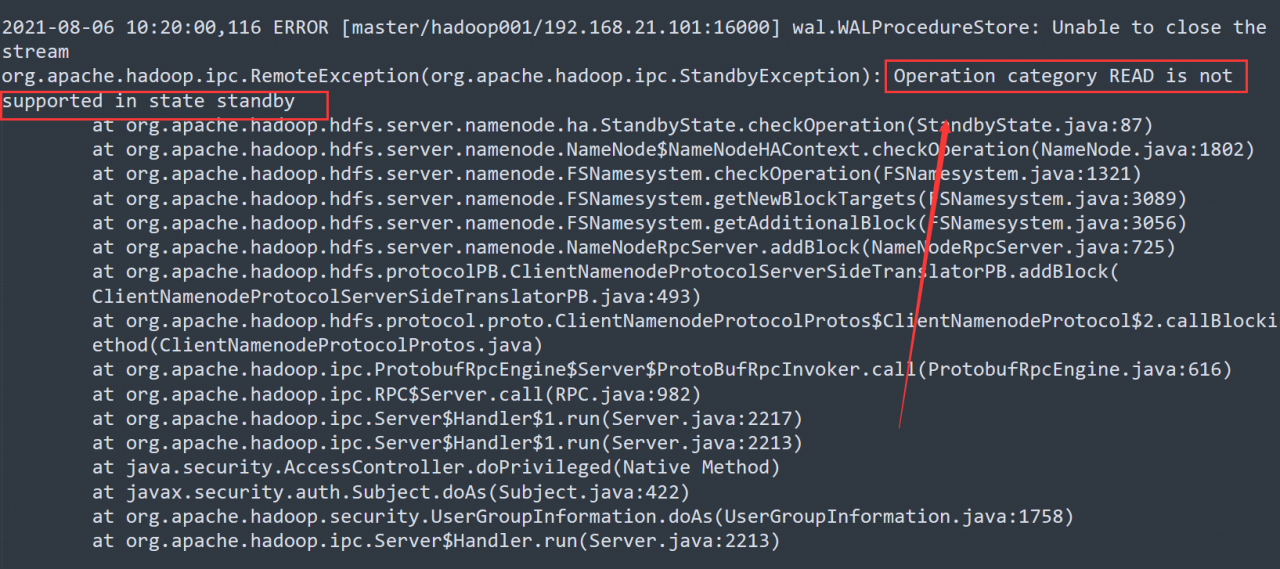
From the log, it is easy to find that the error is caused by the active/standby switching of namenode.

resolvent:

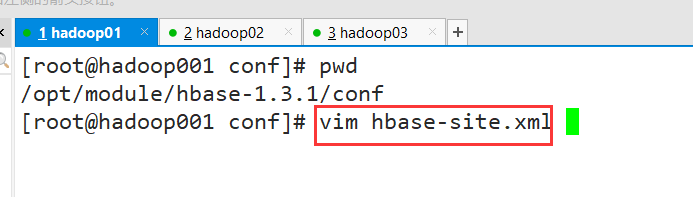
1. Modify the hbase-site.xml configuration file

Modify the configuration of base.roodir

<property>
     <name>hbase.roodir</name>
     <value>hdfs://hadoop001:9000/hbase</value>
</property>

# change to 
<property>
     <name>hbase.roodir</name>
     <value>hdfs://ns/hbase</value>
</property>

# Note that the ns here is the value of hadoop's dfs.nameservices (configured in hdfs-site-xml, fill in according to your own configuration)

2. Establish soft connection

[root@hadoop001 ~]# ln -s /opt/module/hadoop-2.7.6/etc/hadoop/hdfs-site.xml /opt/module/hbase-1.3.1/conf/hdfs-site.xml
[root@hadoop001 ~]# ln -s /opt/module/hadoop-2.7.6/etc/hadoop/core-site.xml /opt/module/hbase-1.3.1/conf/core-site.xml 

3. Synchronize HBase profiles for all clusters

Use SCP instruction to distribute to other nodes

Then restart the cluster to solve the hang up problem of the hmaster node

[Solved] Git pull error: cannot pull with rebase: Your index contains uncommitted changes.

Git pull reports an error
error: cannot pull with rebase: your index contains uncommitted changes.
error: Please commit or stage them


Solution:

1. Execute
git stash first

2. Then execute
git pull – rebase

3. Finally, execute
git stash pop


Remember to git stash pop after git stash, otherwise the code will be lost

Git stash: # can be used to temporarily store work in progress
git stash Pop: # read the last saved content from git stack

Ant Design Vue-Table Error: warning.js?2149:7 [How to Solve]

When using the table of ant component library today, I encountered a problem: warning.js?2149:7 Warning: [antdv: Each record in table should have a unique `key` prop,or set `rowKey` to an unique primary key.] 。 Record it

This is because the default key value defined in columns does not have the current field in the returned data. One is to use rowkey to specify a corresponding key value pair by default, or use a subscript index similar to that in the V-for loop

Therefore, the following fields can be introduced into the table component:

:rowKey="(record,index)=>{return index}"

After introduction, it is as follows:

<a-table :columns="columns" :data-source="data" :rowKey="(record,index)=>{return index}" />

So you won’t report an error