Category Archives: Error

[Solved] Vscode Error: “export ‘default‘ (imported as ‘VueRouter‘) was not found in ‘vue-router‘

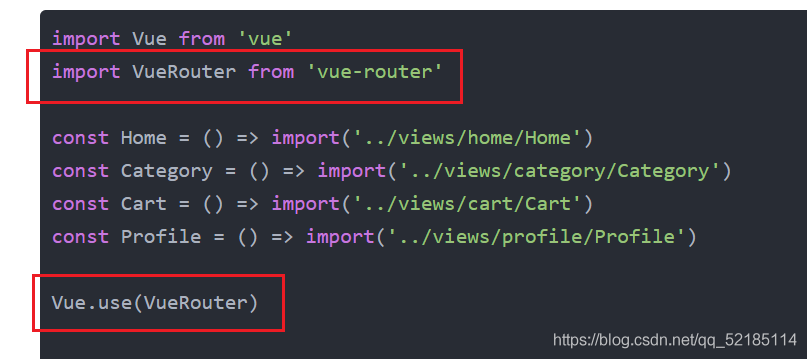
import Vue from 'vue'
import VueRouter from 'vue-router'

const Home = () => import('../views/home/Home')
const Category = () => import('../views/category/Category')
const Cart = () => import('../views/cart/Cart')
const Profile = () => import('../views/profile/Profile')

Vue.use(VueRouter)

const routes = [
    {
        Path: '',
        redirect: '/home'
    },
    {
        path: '/home',
        component: Home
    },
    {
        path: '/category',
        component: Category
    },
    {
        path: '/cart',
        component: Cart
    },
    {
        path: '/profile',
        component: Profile
    }
]

const router = new VueRouter({
    routes,
    mode: 'history'
})

export default router

There is no problem with using vue2 and vue3 in this code, but we are now vue4, and many things have changed. For example, for this routing problem, the error reported in the vscode terminal is: “export ‘default’ (imported as’ vuerouter ‘) was not found in’ Vue router ‘

The result of Baidu translation is that the default value of “export” cannot be found in “Vue router” (imported as “vuerouter”)

The errors reported in the browser are:   Uncaught TypeError: Cannot read property ‘use’ of undefined

The result of Baidu translation is: uncapped typeerror: the undefined attribute “use” cannot be read

Let’s go to the terminal first. The main keys are “vuerouter” and “Vue router”, which we have imported and installed here

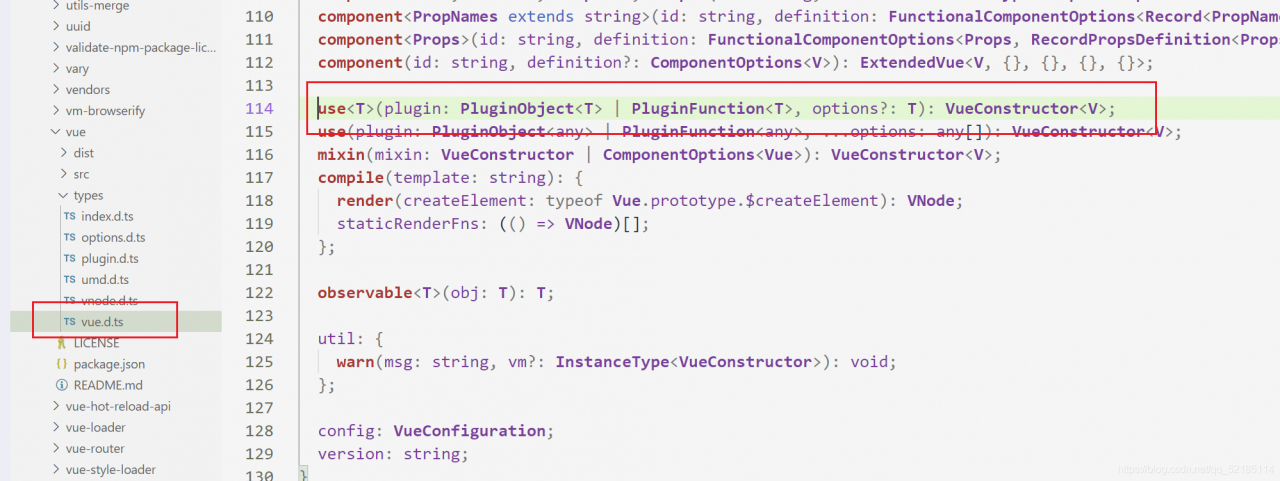
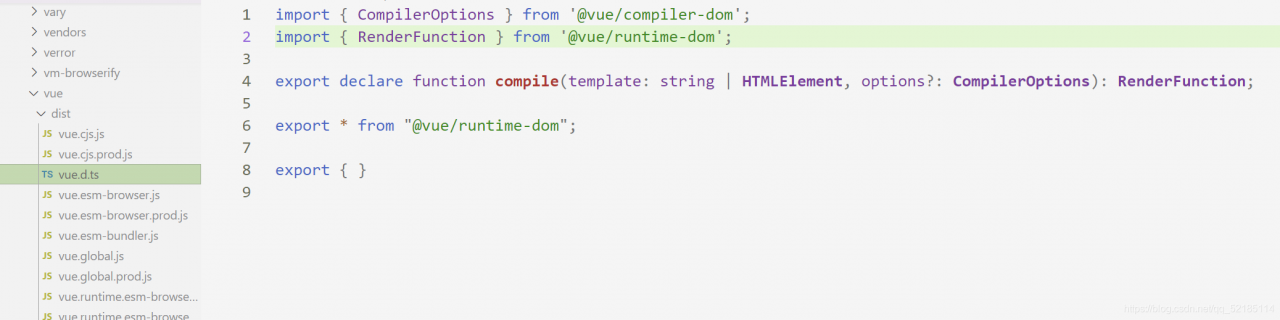
Then the problem may not be here. Next, let’s look at the problem on the browser. Its key is “use”. According to our understanding, “use” should be a function defined in Vue. Then we press and hold Ctrl and left click in vscode to find its definition. The result is no response, so the problem may appear here, We can also go to the folder and look for it. Here I provide vue2 and the folder where we have problems

This is vue2’s

This is a problem

If you have an idea, you can also look in the two imported files. There is no definition, which is the reason for the error. The solution is to use another method to use routing.

import {createRouter, createWebHistory} from "vue-router";

const Home = () => import('../views/home/Home')
const Category = () => import('../views/category/Category')
const Cart = () => import('../views/cart/Cart')
const Profile = () => import('../views/profile/Profile')

const routes = [
    {
        Path: '',
        redirect: '/home'
    },
    {
        path: '/home',
        component: Home
    },
    {
        path: '/category',
        component: Category
    },
    {
        path: '/cart',
        component: Cart
    },
    {
        path: '/profile',
        component: Profile
    }
]

const router = createRouter({
    history: createWebHistory(),
    routes
})

export default router

This level is solved.

The Ajax return value reports an error, and the spring boot development Ajax return value reports an error

org.thymeleaf.exceptions.TemplateInputException: Error resolving template “succeed”, template might not exist or might not be accessible by any of the configured Template Resolvers
at org.thymeleaf.engine.TemplateManager.resolveTemplate(TemplateManager.java:870) ~[thymeleaf-3.0.9.RELEASE.jar:3.0.9.RELEASE]
at org.thymeleaf.engine.TemplateManager.parseAndProcess(TemplateManager.java:607) ~[thymeleaf-3.0.9.RELEASE.jar:3.0.9.RELEASE]
at org.thymeleaf.TemplateEngine.process(TemplateEngine.java:1098) ~[thymeleaf-3.0.9.RELEASE.jar:3.0.9.RELEASE]
at org.thymeleaf.TemplateEngine.process(TemplateEngine.java:1072) ~[thymeleaf-3.0.9.RELEASE.jar:3.0.9.RELEASE]
at org.thymeleaf.spring5.view.ThymeleafView.renderFragment(ThymeleafView.java:354) ~[thymeleaf-spring5-3.0.9.RELEASE.jar:3.0.9.RELEASE]
at org.thymeleaf.spring5.view.ThymeleafView.render(ThymeleafView.java:187) ~[thymeleaf-spring5-3.0.9.RELEASE.jar:3.0.9.RELEASE]
at org.springframework.web.servlet.DispatcherServlet.render(DispatcherServlet.java:1325) ~[spring-webmvc-5.0.6.RELEASE.jar:5.0.6.RELEASE]
at org.springframework.web.servlet.DispatcherServlet.processDispatchResult(DispatcherServlet.java:1069) ~[spring-webmvc-5.0.6.RELEASE.jar:5.0.6.RELEASE]
at org.springframework.web.servlet.DispatcherServlet.doDispatch(DispatcherServlet.java:1008) ~[spring-webmvc-5.0.6.RELEASE.jar:5.0.6.RELEASE]
at org.springframework.web.servlet.DispatcherServlet.doService(DispatcherServlet.java:925) ~[spring-webmvc-5.0.6.RELEASE.jar:5.0.6.RELEASE]
at org.springframework.web.servlet.FrameworkServlet.processRequest(FrameworkServlet.java:974) [spring-webmvc-5.0.6.RELEASE.jar:5.0.6.RELEASE]
at org.springframework.web.servlet.FrameworkServlet.doPost(FrameworkServlet.java:877) [spring-webmvc-5.0.6.RELEASE.jar:5.0.6.RELEASE]
at javax.servlet.http.HttpServlet.service(HttpServlet.java:661) [tomcat-embed-core-8.5.31.jar:8.5.31]
at org.springframework.web.servlet.FrameworkServlet.service(FrameworkServlet.java:851) [spring-webmvc-5.0.6.RELEASE.jar:5.0.6.RELEASE]
at javax.servlet.http.HttpServlet.service(HttpServlet.java:742) [tomcat-embed-core-8.5.31.jar:8.5.31]
at org.apache.catalina.core.ApplicationFilterChain.internalDoFilter(ApplicationFilterChain.java:231) [tomcat-embed-core-8.5.31.jar:8.5.31]
at org.apache.catalina.core.ApplicationFilterChain.doFilter(ApplicationFilterChain.java:166) [tomcat-embed-core-8.5.31.jar:8.5.31]
at org.apache.tomcat.websocket.server.WsFilter.doFilter(WsFilter.java:52) [tomcat-embed-websocket-8.5.31.jar:8.5.31]
at org.apache.catalina.core.ApplicationFilterChain.internalDoFilter(ApplicationFilterChain.java:193) [tomcat-embed-core-8.5.31.jar:8.5.31]
at org.apache.catalina.core.ApplicationFilterChain.doFilter(ApplicationFilterChain.java:166) [tomcat-embed-core-8.5.31.jar:8.5.31]
at org.springframework.web.filter.RequestContextFilter.doFilterInternal(RequestContextFilter.java:99) [spring-web-5.0.6.RELEASE.jar:5.0.6.RELEASE]
at org.springframework.web.filter.OncePerRequestFilter.doFilter(OncePerRequestFilter.java:107) [spring-web-5.0.6.RELEASE.jar:5.0.6.RELEASE]
at org.apache.catalina.core.ApplicationFilterChain.internalDoFilter(ApplicationFilterChain.java:193) [tomcat-embed-core-8.5.31.jar:8.5.31]
at org.apache.catalina.core.ApplicationFilterChain.doFilter(ApplicationFilterChain.java:166) [tomcat-embed-core-8.5.31.jar:8.5.31]
at org.springframework.web.filter.HttpPutFormContentFilter.doFilterInternal(HttpPutFormContentFilter.java:109) [spring-web-5.0.6.RELEASE.jar:5.0.6.RELEASE]
at org.springframework.web.filter.OncePerRequestFilter.doFilter(OncePerRequestFilter.java:107) [spring-web-5.0.6.RELEASE.jar:5.0.6.RELEASE]
at org.apache.catalina.core.ApplicationFilterChain.internalDoFilter(ApplicationFilterChain.java:193) [tomcat-embed-core-8.5.31.jar:8.5.31]
at org.apache.catalina.core.ApplicationFilterChain.doFilter(ApplicationFilterChain.java:166) [tomcat-embed-core-8.5.31.jar:8.5.31]
at org.springframework.web.filter.HiddenHttpMethodFilter.doFilterInternal(HiddenHttpMethodFilter.java:81) [spring-web-5.0.6.RELEASE.jar:5.0.6.RELEASE]
at org.springframework.web.filter.OncePerRequestFilter.doFilter(OncePerRequestFilter.java:107) [spring-web-5.0.6.RELEASE.jar:5.0.6.RELEASE]
at org.apache.catalina.core.ApplicationFilterChain.internalDoFilter(ApplicationFilterChain.java:193) [tomcat-embed-core-8.5.31.jar:8.5.31]
at org.apache.catalina.core.ApplicationFilterChain.doFilter(ApplicationFilterChain.java:166) [tomcat-embed-core-8.5.31.jar:8.5.31]
at org.springframework.web.filter.CharacterEncodingFilter.doFilterInternal(CharacterEncodingFilter.java:200) [spring-web-5.0.6.RELEASE.jar:5.0.6.RELEASE]
at org.springframework.web.filter.OncePerRequestFilter.doFilter(OncePerRequestFilter.java:107) [spring-web-5.0.6.RELEASE.jar:5.0.6.RELEASE]
at org.apache.catalina.core.ApplicationFilterChain.internalDoFilter(ApplicationFilterChain.java:193) [tomcat-embed-core-8.5.31.jar:8.5.31]
at org.apache.catalina.core.ApplicationFilterChain.doFilter(ApplicationFilterChain.java:166) [tomcat-embed-core-8.5.31.jar:8.5.31]
at org.apache.catalina.core.StandardWrapperValve.invoke(StandardWrapperValve.java:198) [tomcat-embed-core-8.5.31.jar:8.5.31]
at org.apache.catalina.core.StandardContextValve.invoke(StandardContextValve.java:96) [tomcat-embed-core-8.5.31.jar:8.5.31]
at org.apache.catalina.authenticator.AuthenticatorBase.invoke(AuthenticatorBase.java:496) [tomcat-embed-core-8.5.31.jar:8.5.31]
at org.apache.catalina.core.StandardHostValve.invoke(StandardHostValve.java:140) [tomcat-embed-core-8.5.31.jar:8.5.31]
at org.apache.catalina.valves.ErrorReportValve.invoke(ErrorReportValve.java:81) [tomcat-embed-core-8.5.31.jar:8.5.31]
at org.apache.catalina.core.StandardEngineValve.invoke(StandardEngineValve.java:87) [tomcat-embed-core-8.5.31.jar:8.5.31]
at org.apache.catalina.connector.CoyoteAdapter.service(CoyoteAdapter.java:342) [tomcat-embed-core-8.5.31.jar:8.5.31]
at org.apache.coyote.http11.Http11Processor.service(Http11Processor.java:803) [tomcat-embed-core-8.5.31.jar:8.5.31]
at org.apache.coyote.AbstractProcessorLight.process(AbstractProcessorLight.java:66) [tomcat-embed-core-8.5.31.jar:8.5.31]
at org.apache.coyote.AbstractProtocol$ConnectionHandler.process(AbstractProtocol.java:790) [tomcat-embed-core-8.5.31.jar:8.5.31]
at org.apache.tomcat.util.net.NioEndpoint$SocketProcessor.doRun(NioEndpoint.java:1468) [tomcat-embed-core-8.5.31.jar:8.5.31]
at org.apache.tomcat.util.net.SocketProcessorBase.run(SocketProcessorBase.java:49) [tomcat-embed-core-8.5.31.jar:8.5.31]
at java.util.concurrent.ThreadPoolExecutor.runWorker(Unknown Source) [na:1.8.0_172]
at java.util.concurrent.ThreadPoolExecutor$Worker.run(Unknown Source) [na:1.8.0_172]
at org.apache.tomcat.util.threads.TaskThread$WrappingRunnable.run(TaskThread.java:61) [tomcat-embed-core-8.5.31.jar:8.5.31]
at java.lang.Thread.run(Unknown Source) [na:1.8.0_172]

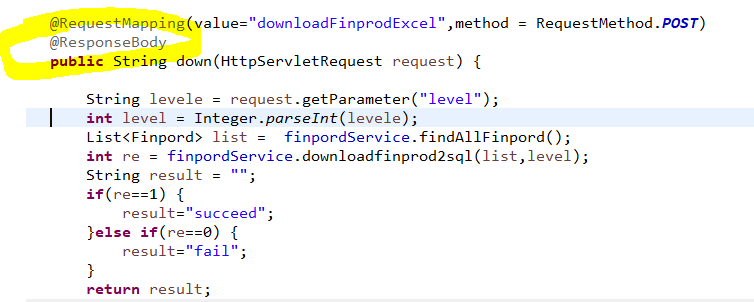
Add the @ResponseBody annotation to the method

[Solved] Flume Error: java.lang.NoClassDefFoundError: org/apache/hadoop/conf/Configuration

flume error: java.lang.NoClassDefFoundError: org/apache/hadoop/conf/Configuration
Failed to start agent because dependencies were not found in classpath. Error follows. java.lang.NoClassDefFoundError:org/apache/hadoop/conf/Configuration at org.apache.flume.sink.hdfs.HDFSEventSink.getCodec(HDFSEventSink.java:324)Caused by: java.lang.ClassNotFoundException: org.apache.hadoop.conf.Configuration at java.net.URLClassLoader.findClass(URLClassLoader.java:382)
The above error occurs because the server needs to be configured with: environment variables for Hadoop.

Error reporting and resolution of kubernetes installation

A, the initialization of the cluster error reporting
1. Error reported.
[WARNING Hostname]: hostname “master1” could not be reached
[WARNING Hostname]: hostname “master1”: lookup master1 on 114.114.114.114:53: no such host,
details:

[root@k8smaster ~]# kubeadm init --config kubeadm.yaml
W1124 09:40:03.139811   68129 strict.go:54] error unmarshaling configuration schema.GroupVersionKind{Group:"kubeadm.k8s.io", Version:"v1beta2", Kind:"ClusterConfiguration"}: error unmarshaling JSON: while decoding JSON: json: unknown field "scheduler"
W1124 09:40:03.333487   68129 configset.go:348] WARNING: kubeadm cannot validate component configs for API groups [kubelet.config.k8s.io kubeproxy.config.k8s.io]
[init] Using Kubernetes version: v1.19.3
[preflight] Running pre-flight checks
        [WARNING Hostname]: hostname "master1" could not be reached
        [WARNING Hostname]: hostname "master1": lookup master1 on 114.114.114.114:53: no such host
error execution phase preflight: [preflight] Some fatal errors occurred:
        [ERROR Port-6443]: Port 6443 is in use
        [ERROR Port-10259]: Port 10259 is in use
        [ERROR Port-10257]: Port 10257 is in use
        [ERROR FileAvailable--etc-kubernetes-manifests-kube-apiserver.yaml]: /etc/kubernetes/manifests/kube-apiserver.yaml already exists
        [ERROR FileAvailable--etc-kubernetes-manifests-kube-controller-manager.yaml]: /etc/kubernetes/manifests/kube-controller-manager.yaml already exists
        [ERROR FileAvailable--etc-kubernetes-manifests-kube-scheduler.yaml]: /etc/kubernetes/manifests/kube-scheduler.yaml already exists
        [ERROR FileAvailable--etc-kubernetes-manifests-etcd.yaml]: /etc/kubernetes/manifests/etcd.yaml already exists
        [ERROR Port-10250]: Port 10250 is in use
        [ERROR Port-2379]: Port 2379 is in use
        [ERROR Port-2380]: Port 2380 is in use
        [ERROR DirAvailable--var-lib-etcd]: /var/lib/etcd is not empty
[preflight] If you know what you are doing, you can make a check non-fatal with `--ignore-preflight-errors=...`
To see the stack trace of this error execute with --v=5 or higher

Solution:
delete/etc/kubernetes/manifest
Modify kubedm.yaml. Change the name to the host’s hostname
and then perform initialization.

[root@k8smaster ~]# ls /etc/kubernetes/
admin.conf  controller-manager.conf  kubelet.conf  manifests  pki  scheduler.conf
[root@k8smaster ~]# ls
anaconda-ks.cfg  kubeadm.yaml
[root@k8smaster ~]# rm -rf  /etc/kubernetes/manifests
[root@k8smaster ~]# ls /etc/kubernetes/
admin.conf  controller-manager.conf  kubelet.conf  pki  scheduler.conf

2.error message:
WARNING: kubeadm cannot validate component configs for API groups [kubelet.config.k8s.io kubeproxy.config.k8s.io]
details:

[root@k8smaster ~]# kubeadm init --config kubeadm.yaml
W1124 09:47:13.677697   70122 strict.go:54] error unmarshaling configuration schema.GroupVersionKind{Group:"kubeadm.k8s.io", Version:"v1beta2", Kind:"ClusterConfiguration"}: error unmarshaling JSON: while decoding JSON: json: unknown field "scheduler"
W1124 09:47:13.876821   70122 configset.go:348] WARNING: kubeadm cannot validate component configs for API groups [kubelet.config.k8s.io kubeproxy.config.k8s.io]
[init] Using Kubernetes version: v1.19.3
[preflight] Running pre-flight checks
error execution phase preflight: [preflight] Some fatal errors occurred:
        [ERROR Port-10250]: Port 10250 is in use
        [ERROR DirAvailable--var-lib-etcd]: /var/lib/etcd is not empty
[preflight] If you know what you are doing, you can make a check non-fatal with `--ignore-preflight-errors=...`
To see the stack trace of this error execute with --v=5 or higher

Solution:
during initialization, add: – ignore preflight errors = all
that is:

kubeadm init --config kubeadm.yaml --ignore-preflight-errors=all

3.error:
[kubelet-check] Initial timeout of 40s passed.
error execution phase upload-config/kubelet: Error writing Crisocket information for the control-plane node: timed out waiting for the condition
To see the stack trace of this error execute with –v=5 or higher
details:

[root@k8smaster ~]# kubeadm init --config kubeadm.yaml --ignore-preflight-errors=all
W1124 09:54:07.361765   71406 strict.go:54] error unmarshaling configuration schema.GroupVersionKind{Group:"kubeadm.k8s.io", Version:"v1beta2", Kind:"ClusterConfiguration"}: error unmarshaling JSON: while decoding JSON: json: unknown field "scheduler"
W1124 09:54:07.480565   71406 configset.go:348] WARNING: kubeadm cannot validate component configs for API groups [kubelet.config.k8s.io kubeproxy.config.k8s.io]
[init] Using Kubernetes version: v1.19.3
[preflight] Running pre-flight checks
        [WARNING Port-10250]: Port 10250 is in use
        [WARNING DirAvailable--var-lib-etcd]: /var/lib/etcd is not empty
[preflight] Pulling images required for setting up a Kubernetes cluster
[preflight] This might take a minute or two, depending on the speed of your internet connection
[preflight] You can also perform this action in beforehand using 'kubeadm config images pull'
[certs] Using certificateDir folder "/etc/kubernetes/pki"
[certs] Using existing ca certificate authority
[certs] Using existing apiserver certificate and key on disk
[certs] Using existing apiserver-kubelet-client certificate and key on disk
[certs] Using existing front-proxy-ca certificate authority
[certs] Using existing front-proxy-client certificate and key on disk
[certs] Using existing etcd/ca certificate authority
[certs] Using existing etcd/server certificate and key on disk
[certs] Using existing etcd/peer certificate and key on disk
[certs] Using existing etcd/healthcheck-client certificate and key on disk
[certs] Using existing apiserver-etcd-client certificate and key on disk
[certs] Using the existing "sa" key
[kubeconfig] Using kubeconfig folder "/etc/kubernetes"
[kubeconfig] Using existing kubeconfig file: "/etc/kubernetes/admin.conf"
[kubeconfig] Using existing kubeconfig file: "/etc/kubernetes/kubelet.conf"
[kubeconfig] Using existing kubeconfig file: "/etc/kubernetes/controller-manager.conf"
[kubeconfig] Using existing kubeconfig file: "/etc/kubernetes/scheduler.conf"
[kubelet-start] Writing kubelet environment file with flags to file "/var/lib/kubelet/kubeadm-flags.env"
[kubelet-start] Writing kubelet configuration to file "/var/lib/kubelet/config.yaml"
[kubelet-start] Starting the kubelet
[control-plane] Using manifest folder "/etc/kubernetes/manifests"
[control-plane] Creating static Pod manifest for "kube-apiserver"
[control-plane] Creating static Pod manifest for "kube-controller-manager"
[control-plane] Creating static Pod manifest for "kube-scheduler"
[etcd] Creating static Pod manifest for local etcd in "/etc/kubernetes/manifests"
[wait-control-plane] Waiting for the kubelet to boot up the control plane as static Pods from directory "/etc/kubernetes/manifests". This can take up to 4m0s
[apiclient] All control plane components are healthy after 13.510116 seconds
[upload-config] Storing the configuration used in ConfigMap "kubeadm-config" in the "kube-system" Namespace
[kubelet] Creating a ConfigMap "kubelet-config-1.19" in namespace kube-system with the configuration for the kubelets in the cluster
[kubelet-check] Initial timeout of 40s passed.
error execution phase upload-config/kubelet: Error writing Crisocket information for the control-plane node: timed out waiting for the condition
To see the stack trace of this error execute with --v=5 or higher

Solution:
execute:

swapoff -a && kubeadm reset  && systemctl daemon-reload && systemctl restart kubelet  && iptables -F && iptables -t nat -F && iptables -t mangle -F && iptables -X

After execution, it is OK to initialize again.

[root@k8smaster ~]# kubeadm init --config kubeadm.yaml --ignore-preflight-errors=all                                                                                                  
W1124 10:00:18.648091   74450 strict.go:54] error unmarshaling configuration schema.GroupVersionKind{Group:"kubeadm.k8s.io", Version:"v1beta2", Kind:"ClusterConfiguration"}: error unmarshaling JSON: while decoding JSON: json: unknown field "scheduler"
W1124 10:00:18.760000   74450 configset.go:348] WARNING: kubeadm cannot validate component configs for API groups [kubelet.config.k8s.io kubeproxy.config.k8s.io]
[init] Using Kubernetes version: v1.19.3
[preflight] Running pre-flight checks
[preflight] Pulling images required for setting up a Kubernetes cluster
[preflight] This might take a minute or two, depending on the speed of your internet connection
[preflight] You can also perform this action in beforehand using 'kubeadm config images pull'
[certs] Using certificateDir folder "/etc/kubernetes/pki"
[certs] Generating "ca" certificate and key
[certs] Generating "apiserver" certificate and key
[certs] apiserver serving cert is signed for DNS names [k8smaster kubernetes kubernetes.default kubernetes.default.svc kubernetes.default.svc.cluster.local] and IPs [10.96.0.1 192.168.68.127]
[certs] Generating "apiserver-kubelet-client" certificate and key
[certs] Generating "front-proxy-ca" certificate and key
[certs] Generating "front-proxy-client" certificate and key
[certs] Generating "etcd/ca" certificate and key
[certs] Generating "etcd/server" certificate and key
[certs] etcd/server serving cert is signed for DNS names [k8smaster localhost] and IPs [192.168.68.127 127.0.0.1 ::1]
[certs] Generating "etcd/peer" certificate and key
[certs] etcd/peer serving cert is signed for DNS names [k8smaster localhost] and IPs [192.168.68.127 127.0.0.1 ::1]
[certs] Generating "etcd/healthcheck-client" certificate and key
[certs] Generating "apiserver-etcd-client" certificate and key
[certs] Generating "sa" key and public key
[kubeconfig] Using kubeconfig folder "/etc/kubernetes"
[kubeconfig] Writing "admin.conf" kubeconfig file
[kubeconfig] Writing "kubelet.conf" kubeconfig file
[kubeconfig] Writing "controller-manager.conf" kubeconfig file
[kubeconfig] Writing "scheduler.conf" kubeconfig file
[kubelet-start] Writing kubelet environment file with flags to file "/var/lib/kubelet/kubeadm-flags.env"
[kubelet-start] Writing kubelet configuration to file "/var/lib/kubelet/config.yaml"
[kubelet-start] Starting the kubelet
[control-plane] Using manifest folder "/etc/kubernetes/manifests"
[control-plane] Creating static Pod manifest for "kube-apiserver"
[control-plane] Creating static Pod manifest for "kube-controller-manager"
[control-plane] Creating static Pod manifest for "kube-scheduler"
[etcd] Creating static Pod manifest for local etcd in "/etc/kubernetes/manifests"
[wait-control-plane] Waiting for the kubelet to boot up the control plane as static Pods from directory "/etc/kubernetes/manifests". This can take up to 4m0s
[apiclient] All control plane components are healthy after 10.517451 seconds
[upload-config] Storing the configuration used in ConfigMap "kubeadm-config" in the "kube-system" Namespace
[kubelet] Creating a ConfigMap "kubelet-config-1.19" in namespace kube-system with the configuration for the kubelets in the cluster
[upload-certs] Skipping phase. Please see --upload-certs
[mark-control-plane] Marking the node k8smaster as control-plane by adding the label "node-role.kubernetes.io/master=''"
[mark-control-plane] Marking the node k8smaster as control-plane by adding the taints [node-role.kubernetes.io/master:NoSchedule]
[bootstrap-token] Using token: abcdef.0123456789abcdef
[bootstrap-token] Configuring bootstrap tokens, cluster-info ConfigMap, RBAC Roles
[bootstrap-token] configured RBAC rules to allow Node Bootstrap tokens to get nodes
[bootstrap-token] configured RBAC rules to allow Node Bootstrap tokens to post CSRs in order for nodes to get long term certificate credentials
[bootstrap-token] configured RBAC rules to allow the csrapprover controller automatically approve CSRs from a Node Bootstrap Token
[bootstrap-token] configured RBAC rules to allow certificate rotation for all node client certificates in the cluster
[bootstrap-token] Creating the "cluster-info" ConfigMap in the "kube-public" namespace
[kubelet-finalize] Updating "/etc/kubernetes/kubelet.conf" to point to a rotatable kubelet client certificate and key
[addons] Applied essential addon: CoreDNS
[addons] Applied essential addon: kube-proxy

Your Kubernetes control-plane has initialized successfully!

To start using your cluster, you need to run the following as a regular user:

  mkdir -p $HOME/.kube
  sudo cp -i /etc/kubernetes/admin.conf $HOME/.kube/config
  sudo chown $(id -u):$(id -g) $HOME/.kube/config

You should now deploy a pod network to the cluster.
Run "kubectl apply -f [podnetwork].yaml" with one of the options listed at:
  https://kubernetes.io/docs/concepts/cluster-administration/addons/

Then you can join any number of worker nodes by running the following on each as root:

kubeadm join 192.168.68.127:6443 --token abcdef.0123456789abcdef \
    --discovery-token-ca-cert-hash sha256:31020d84f523a2af6fc4fea38e514af8e5e1943a26312f0515e65075da314b29

[Solved] SecureCRT error: keyboard-interactive authentication with the ssh2 server failed

The SecureCRT connection server reported an error

Two solutions:

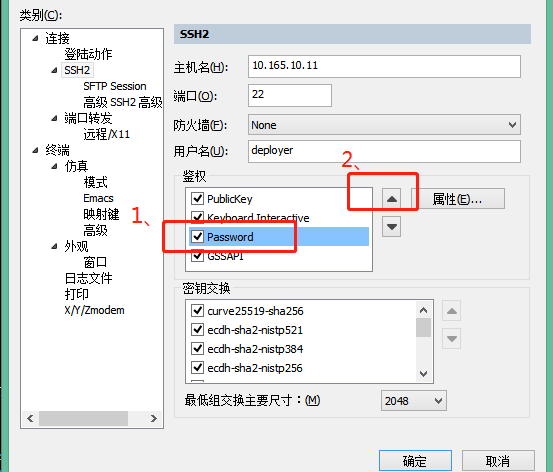
1、 Select SSH2, authentication, check password, and then move the option up to the first place

Or:

2、 Server side modification configuration

By default,/etc/SSH/sshd_ The config file is commented out,

#PasswordAuthentication no

Change to

PasswordAuthentication yes

# the following shall be modified as appropriate

#PermitRootLogin = no

Change to

PermitRootLogin = yes           # Allow root user to log in directly # not recommended, which may involve security issues

[Solved] IDEA Start Project Error: Abnormal build process termination:Could not create the Java Virtual Machine.

Idea project startup error

Solution to error reporting during idea project startup

Idea project startup error

Abnormal build process termination: 
"C:\Program Files\Java\jdk1.8.0_161\bin\java.exe" -Xmx700m -Djava.awt.headless=true -Djava.endorsed.dirs=\"\" -Dexternal.project.config=C:\Users\wf870\AppData\Local\JetBrains\IntelliJIdea2021.2\external_build_system\sugar.ad7b8821 -Dcompile.parallel=false -Drebuild.on.dependency.change=true -Djdt.compiler.useSingleThread=true -Daether.connector.resumeDownloads=false -Dio.netty.initialSeedUniquifier=3989273803388531595 -Dfile.encoding=GBK -Duser.language=zh -Duser.country=CN -Didea.paths.selector=IntelliJIdea2021.2 "-Didea.home.path=D:\idea\IntelliJ IDEA 2021.2" -Didea.config.path=C:\Users\wf870\AppData\Roaming\JetBrains\IntelliJIdea2021.2 -Didea.plugins.path=C:\Users\wf870\AppData\Roaming\JetBrains\IntelliJIdea2021.2\plugins -Djps.log.dir=C:/Users/wf870/AppData/Local/JetBrains/IntelliJIdea2021.2/log/build-log "-Djps.fallback.jdk.home=D:/idea/IntelliJ IDEA 2021.2/jbr" -Djps.fallback.jdk.version=11.0.11 -Dio.netty.noUnsafe=true -Djava.io.tmpdir=C:/Users/wf870/AppData/Local/JetBrains/IntelliJIdea2021.2/compile-server/sugar_eaae1db7/_temp_ -Djps.backward.ref.index.builder=true -Djps.track.ap.dependencies=false --add-opens=jdk.compiler/com.sun.tools.javac.code=ALL-UNNAMED --add-opens=jdk.compiler/com.sun.tools.javac.comp=ALL-UNNAMED --add-opens=jdk.compiler/com.sun.tools.javac.file=ALL-UNNAMED --add-opens=jdk.compiler/com.sun.tools.javac.main=ALL-UNNAMED --add-opens=jdk.compiler/com.sun.tools.javac.model=ALL-UNNAMED --add-opens=jdk.compiler/com.sun.tools.javac.parser=ALL-UNNAMED --add-opens=jdk.compiler/com.sun.tools.javac.processing=ALL-UNNAMED --add-opens=jdk.compiler/com.sun.tools.javac.tree=ALL-UNNAMED --add-opens=jdk.compiler/com.sun.tools.javac.util=ALL-UNNAMED --add-opens=jdk.compiler/com.sun.tools.javac.jvm=ALL-UNNAMED -Dtmh.instrument.annotations=true -Dtmh.generate.line.numbers=true -Dkotlin.incremental.compilation=true -Dkotlin.incremental.compilation.js=true -Dkotlin.daemon.enabled -Dkotlin.daemon.client.alive.path=\"C:\Users\wf870\AppData\Local\Temp\kotlin-idea-11852903351073037841-is-running\" -classpath "D:/idea/IntelliJ IDEA 2021.2/plugins/java/lib/jps-launcher.jar;C:/Program Files/Java/jdk1.8.0_161/lib/tools.jar" org.jetbrains.jps.cmdline.Launcher "D:/idea/IntelliJ IDEA 2021.2/plugins/java/lib/maven-resolver-transport-http-1.3.3.jar;D:/idea/IntelliJ IDEA 2021.2/lib/util.jar;D:/idea/IntelliJ IDEA 2021.2/lib/platform-api.jar;D:/idea/IntelliJ IDEA 2021.2/plugins/java/lib/jps-builders-6.jar;D:/idea/IntelliJ IDEA 2021.2/lib/forms_rt.jar;D:/idea/IntelliJ IDEA 2021.2/plugins/java/lib/jps-javac-extension-1.jar;D:/idea/IntelliJ IDEA 2021.2/plugins/java/lib/jps-builders.jar;D:/idea/IntelliJ IDEA 2021.2/lib/3rd-party.jar;D:/idea/IntelliJ IDEA 2021.2/plugins/java/lib/maven-resolver-connector-basic-1.3.3.jar;D:/idea/IntelliJ IDEA 2021.2/lib/protobuf-java-3.15.8.jar;D:/idea/IntelliJ IDEA 2021.2/plugins/java/lib/aether-dependency-resolver.jar;D:/idea/IntelliJ IDEA 2021.2/lib/jna.jar;D:/idea/IntelliJ IDEA 2021.2/lib/jna-platform.jar;D:/idea/IntelliJ IDEA 2021.2/plugins/java/lib/maven-resolver-transport-file-1.3.3.jar;D:/idea/IntelliJ IDEA 2021.2/lib/kotlin-stdlib-jdk8.jar;D:/idea/IntelliJ IDEA 2021.2/plugins/java/lib/javac2.jar;D:/idea/IntelliJ IDEA 2021.2/lib/slf4j.jar;D:/idea/IntelliJ IDEA 2021.2/lib/jps-model.jar;D:/idea/IntelliJ IDEA 2021.2/lib/annotations.jar;D:/idea/IntelliJ IDEA 2021.2/lib/idea_rt.jar;D:/idea/IntelliJ IDEA 2021.2/plugins/JavaEE/lib/jasper-v2-rt.jar;D:/idea/IntelliJ IDEA 2021.2/plugins/Kotlin/lib/kotlin-reflect.jar;D:/idea/IntelliJ IDEA 2021.2/plugins/Kotlin/lib/kotlin-plugin.jar;D:/idea/IntelliJ IDEA 2021.2/plugins/ant/lib/ant-jps.jar;D:/idea/IntelliJ IDEA 2021.2/plugins/uiDesigner/lib/jps/java-guiForms-jps.jar;D:/idea/IntelliJ IDEA 2021.2/plugins/eclipse/lib/eclipse-jps.jar;D:/idea/IntelliJ IDEA 2021.2/plugins/eclipse/lib/eclipse-common.jar;D:/idea/IntelliJ IDEA 2021.2/plugins/IntelliLang/lib/java-langInjection-jps.jar;D:/idea/IntelliJ IDEA 2021.2/plugins/Groovy/lib/groovy-jps.jar;D:/idea/IntelliJ IDEA 2021.2/plugins/Groovy/lib/groovy-constants-rt.jar;D:/idea/IntelliJ IDEA 2021.2/plugins/maven/lib/maven-jps.jar;D:/idea/IntelliJ IDEA 2021.2/plugins/gradle-java/lib/gradle-jps.jar;D:/idea/IntelliJ IDEA 2021.2/plugins/devkit/lib/devkit-jps.jar;D:/idea/IntelliJ IDEA 2021.2/plugins/javaFX/lib/javaFX-jps.jar;D:/idea/IntelliJ IDEA 2021.2/plugins/javaFX/lib/javaFX-common.jar;D:/idea/IntelliJ IDEA 2021.2/plugins/JavaEE/lib/javaee-jps.jar;D:/idea/IntelliJ IDEA 2021.2/plugins/webSphereIntegration/lib/jps/javaee-appServers-websphere-jps.jar;D:/idea/IntelliJ IDEA 2021.2/plugins/weblogicIntegration/lib/jps/javaee-appServers-weblogic-jps.jar;D:/idea/IntelliJ IDEA 2021.2/plugins/JPA/lib/jps/javaee-jpa-jps.jar;D:/idea/IntelliJ IDEA 2021.2/plugins/Grails/lib/groovy-grails-jps.jar;D:/idea/IntelliJ IDEA 2021.2/plugins/Grails/lib/groovy-grails-compilerPatch.jar;D:/idea/IntelliJ IDEA 2021.2/plugins/Kotlin/lib/jps/kotlin-jps-plugin.jar;D:/idea/IntelliJ IDEA 2021.2/plugins/Kotlin/lib/kotlin-jps-common.jar;D:/idea/IntelliJ IDEA 2021.2/plugins/Kotlin/lib/kotlin-common.jar" org.jetbrains.jps.cmdline.BuildMain 127.0.0.1 52091 2a22c86a-66f8-4710-a186-028d07a1fe2d C:/Users/wf870/AppData/Local/JetBrains/IntelliJIdea2021.2/compile-server
Error: Could not create the Java Virtual Machine.
Error: A fatal exception has occurred. Program will exit.
Unrecognized option: --add-opens=jdk.compiler/com.sun.tools.javac.code=ALL-UNNAMED

2021.2 idea project startup error:
abnormal build process termination:
error: could not create the Java virtual machine.
error: a fatal exception has occurred. Program will exit.
unrecognized option: — add opens = JDK. Compiler/com. Sun. Tools. Javac. Code = all-unnamed

Idea project startup solution

Many people on the Internet said that the JDK was not installed correctly. At first, they suspected that the JDK was not installed in the default directory, so they reinstalled it and configured the JDK environment. But still report an error. The JDK is re imported in idea again, but it still doesn’t work.

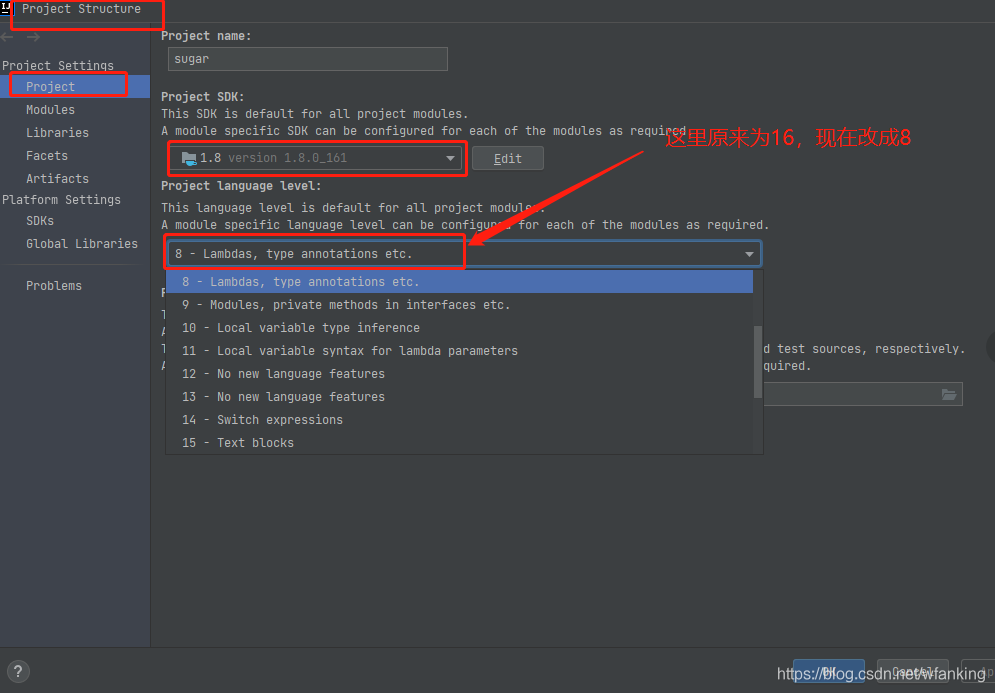
Many methods failed. Finally, it was found that the default project language level was 16 (the idea version used by bloggers was 2021), so it was changed to 8 and the error was reported.

Hbase Error: Regions In Transition [How to Solve]

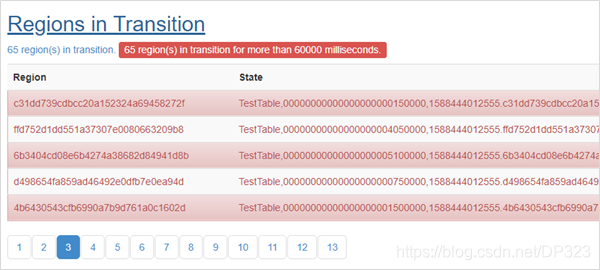
1.Problem Analysis
Region Split is executed when the system is down or the Region file in HDFS has been deleted.
The status of Region is tracked by master, including the following status.

State Description
Offline Region is offline
Pending Open A request to open the region was sent to the server
Opening The server has started opening the region
Open The region is open and is fully operational
Pending Close A request to close the region has been sent to the server
Closing The server has started closing the region
Closed The region is closed
Splitting The server started splitting the region
Split The region has been split by the serve

Region migration (transition) between these states can be triggered either by the master or by the region server.
2. Solutions
2.1 Use hbase hbck to find out which Region has Error
2.2 Remove the failed Region using the following command
deleteall “hbase:meta”,”TestTable,00000000000000000005850000,1588444012555.89e1c07384a56c77761e490ae3f34a8d.”
2.3  restart hbase

[Solved] Failed update hbase:meta table descriptor HBase Startup Error

In the past two days, the content related to big data was deployed on the new server. HBase was installed successfully, but the hmaster failed to start when it was started. Sometimes, JPS found that the hmaster hung up after tens of seconds (there are seven servers in total, node1 is the master and node2 is the Backup Master). Check the log and the error contents are as follows:

2021-08-04 15:32:38,839 INFO  [main] util.FSTableDescriptors: ta', {TABLE_ATTRIBUTES => {IS_META => 'true', REGION_REPLICATION => '1', coprocessor$1 => '|org.apache.hadoop.hbase.coprocessor.MultiRowMutationEndpoint|536870911|'}}, {NAME => 'info', BLOOMFILTER => 'NONE', IN_MEMORY => 'true', VERSIONS => '3', KEEP_DELETED_CELLS => 'FALSE', DATA_BLOCK_ENCODING => 'NONE', COMPRESSION => 'NONE', TTL => 'FOREVER', MIN_VERSIONS => '0', BLOCKCACHE => 'true', BLOCKSIZE => '8192', REPLICATION_SCOPE => '0'}, {NAME => 'rep_barrier', BLOOMFILTER => 'NONE', IN_MEMORY => 'true', VERSIONS => '2147483647', KEEP_DELETED_CELLS => 'FALSE', DATA_BLOCK_ENCODING => 'NONE', COMPRESSION => 'NONE', TTL => 'FOREVER', MIN_VERSIONS => '0', BLOCKCACHE => 'true', BLOCKSIZE => '65536', REPLICATION_SCOPE => '0'}, {NAME => 'table', BLOOMFILTER => 'NONE', IN_MEMORY => 'true', VERSIONS => '3', KEEP_DELETED_CELLS => 'FALSE', DATA_BLOCK_ENCODING => 'NONE', COMPRESSION => 'NONE', TTL => 'FOREVER', MIN_VERSIONS => '0', BLOCKCACHE => 'true', BLOCKSIZE => '8192', REPLICATION_SCOPE => '0'}
2021-08-04 15:32:39,026 WARN  [main] util.FSTableDescriptors: Failed cleanup of hdfs://node1:9000/user/hbase/data/hbase/meta/.tmp/.tableinfo.0000000001
2021-08-04 15:32:39,042 WARN  [main] util.FSTableDescriptors: Failed cleanup of hdfs://node1:9000/user/hbase/data/hbase/meta/.tmp/.tableinfo.0000000002
2021-08-04 15:32:39,052 WARN  [main] util.FSTableDescriptors: Failed cleanup of hdfs://node1:9000/user/hbase/data/hbase/meta/.tmp/.tableinfo.0000000003
2021-08-04 15:32:39,062 WARN  [main] util.FSTableDescriptors: Failed cleanup of hdfs://node1:9000/user/hbase/data/hbase/meta/.tmp/.tableinfo.0000000004
2021-08-04 15:32:39,072 WARN  [main] util.FSTableDescriptors: Failed cleanup of hdfs://node1:9000/user/hbase/data/hbase/meta/.tmp/.tableinfo.0000000005
2021-08-04 15:32:39,082 WARN  [main] util.FSTableDescriptors: Failed cleanup of hdfs://node1:9000/user/hbase/data/hbase/meta/.tmp/.tableinfo.0000000006
2021-08-04 15:32:39,094 WARN  [main] util.FSTableDescriptors: Failed cleanup of hdfs://node1:9000/user/hbase/data/hbase/meta/.tmp/.tableinfo.0000000007
2021-08-04 15:32:39,104 WARN  [main] util.FSTableDescriptors: Failed cleanup of hdfs://node1:9000/user/hbase/data/hbase/meta/.tmp/.tableinfo.0000000008
2021-08-04 15:32:39,115 WARN  [main] util.FSTableDescriptors: Failed cleanup of hdfs://node1:9000/user/hbase/data/hbase/meta/.tmp/.tableinfo.0000000009
2021-08-04 15:32:39,123 WARN  [main] util.FSTableDescriptors: Failed cleanup of hdfs://node1:9000/user/hbase/data/hbase/meta/.tmp/.tableinfo.0000000010
2021-08-04 15:32:39,124 ERROR [main] regionserver.HRegionServer: Failed construction RegionServer
java.io.IOException: Failed update hbase:meta table descriptor
	at org.apache.hadoop.hbase.util.FSTableDescriptors.tryUpdateMetaTableDescriptor(FSTableDescriptors.java:144)
	at org.apache.hadoop.hbase.regionserver.HRegionServer.initializeFileSystem(HRegionServer.java:738)
	at org.apache.hadoop.hbase.regionserver.HRegionServer.<init>(HRegionServer.java:635)
	at org.apache.hadoop.hbase.master.HMaster.<init>(HMaster.java:528)
	at sun.reflect.NativeConstructorAccessorImpl.newInstance0(Native Method)
	at sun.reflect.NativeConstructorAccessorImpl.newInstance(NativeConstructorAccessorImpl.java:62)
	at sun.reflect.DelegatingConstructorAccessorImpl.newInstance(DelegatingConstructorAccessorImpl.java:45)
	at java.lang.reflect.Constructor.newInstance(Constructor.java:423)
	at org.apache.hadoop.hbase.master.HMaster.constructMaster(HMaster.java:3163)
	at org.apache.hadoop.hbase.master.HMasterCommandLine.startMaster(HMasterCommandLine.java:253)
	at org.apache.hadoop.hbase.master.HMasterCommandLine.run(HMasterCommandLine.java:149)
	at org.apache.hadoop.util.ToolRunner.run(ToolRunner.java:76)
	at org.apache.hadoop.hbase.util.ServerCommandLine.doMain(ServerCommandLine.java:149)
	at org.apache.hadoop.hbase.master.HMaster.main(HMaster.java:3181)
2021-08-04 15:32:39,135 ERROR [main] master.HMasterCommandLine: Master exiting
java.lang.RuntimeException: Failed construction of Master: class org.apache.hadoop.hbase.master.HMaster. 
	at org.apache.hadoop.hbase.master.HMaster.constructMaster(HMaster.java:3170)
	at org.apache.hadoop.hbase.master.HMasterCommandLine.startMaster(HMasterCommandLine.java:253)
	at org.apache.hadoop.hbase.master.HMasterCommandLine.run(HMasterCommandLine.java:149)
	at org.apache.hadoop.util.ToolRunner.run(ToolRunner.java:76)
	at org.apache.hadoop.hbase.util.ServerCommandLine.doMain(ServerCommandLine.java:149)
	at org.apache.hadoop.hbase.master.HMaster.main(HMaster.java:3181)
Caused by: java.io.IOException: Failed update hbase:meta table descriptor
	at org.apache.hadoop.hbase.util.FSTableDescriptors.tryUpdateMetaTableDescriptor(FSTableDescriptors.java:144)
	at org.apache.hadoop.hbase.regionserver.HRegionServer.initializeFileSystem(HRegionServer.java:738)
	at org.apache.hadoop.hbase.regionserver.HRegionServer.<init>(HRegionServer.java:635)
	at org.apache.hadoop.hbase.master.HMaster.<init>(HMaster.java:528)
	at sun.reflect.NativeConstructorAccessorImpl.newInstance0(Native Method)
	at sun.reflect.NativeConstructorAccessorImpl.newInstance(NativeConstructorAccessorImpl.java:62)
	at sun.reflect.DelegatingConstructorAccessorImpl.newInstance(DelegatingConstructorAccessorImpl.java:45)
	at java.lang.reflect.Constructor.newInstance(Constructor.java:423)
	at org.apache.hadoop.hbase.master.HMaster.constructMaster(HMaster.java:3163)
	... 5 more

Checked a lot of information, but they didn’t solve it. Later, there was no initialized HBase folder on HDFS
troubleshooting reasons:
what is the situation?After calming down, continue to look at its log. The log says very clearly that it is impossible to update its metadata information. HDFS does not have this folder. Of course, it cannot be updated. Is there a problem with the metadata when it is created
when using Hadoop FS – MKDIR/user/HBase, it turns out that it is not successful without permission. I use the wearing folder where the root user does not have permission???I suddenly realized that although I have root permission, for Hadoop, if it controls permission, I still can’t create it successfully. The reason has been found, and the following is the solution
solution:
the permission of Hadoop is controlled in hdfs-sit.xml, which I will still do. Therefore,
1. Go to/data/Hadoop/Hadoop/etc/Hadoop and find hdfs-site.xml
2.vim hdfs-site.xml. Sure enough, dfs.permissions.enabled is not added (the default is true)
3. Join

<property>
    <name>dfs.permissions.enabled</name>
    <value>false</value>
</property>

If your is true, change it to false
: WQ save and exit
4. Restart Hadoop, first stop-yard.sh, then stop-dfs.sh, and then JPS to see if the stop is successful (check whether datanode and namenode still exist). When starting, start start-dfs.sh first, and start-yard.xml
5. After the previous step is successful, you can start HBase. This time, the start is successful
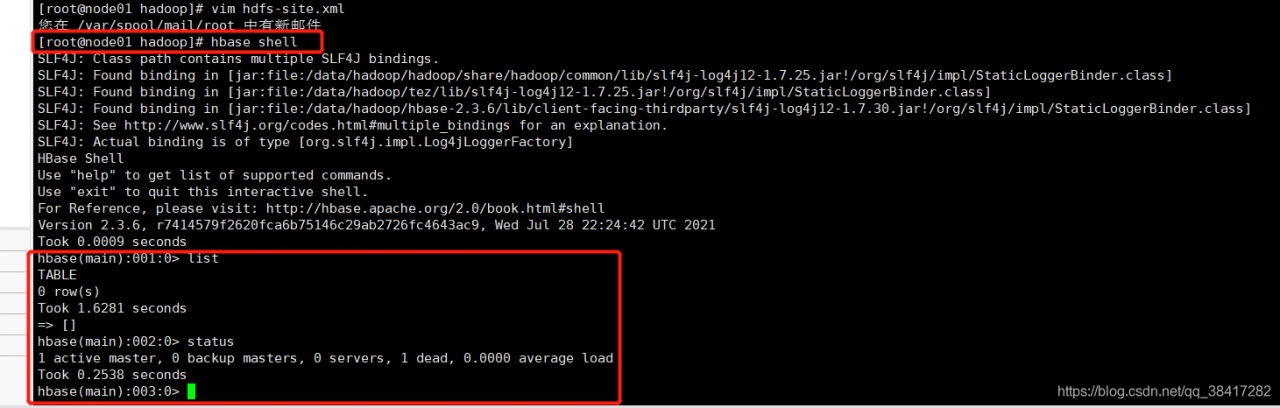
direct HBase shell (if the environment variable is not configured, enter the bin directory of HBase and start it with the command./HBase shell) as shown in the following figure