Category Archives: Error

Vscode configures eslint to solve terminal syntax error

1. Problem scenario

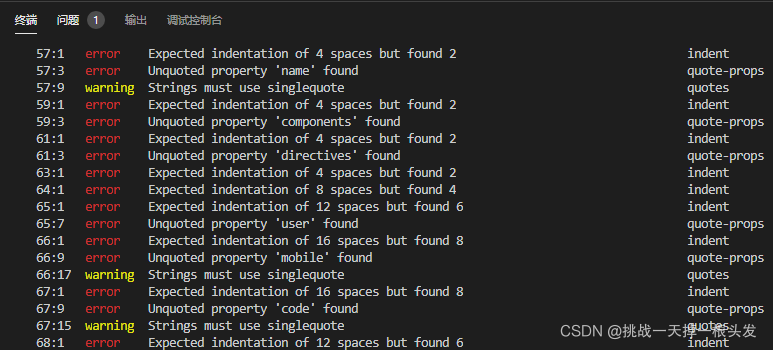
Pull the code from GitHub or build the project with the scaffold Vue cli. The terminal has syntax errors that do not comply with eslint, which is very uncomfortable

2. Solutions

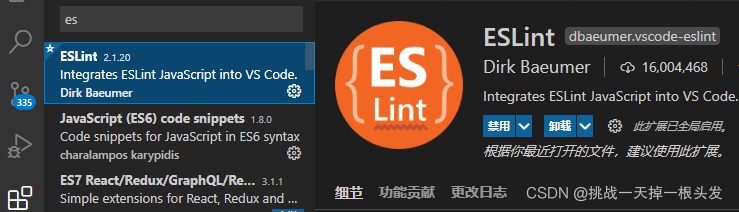
First, install eslint

Second, configure setting

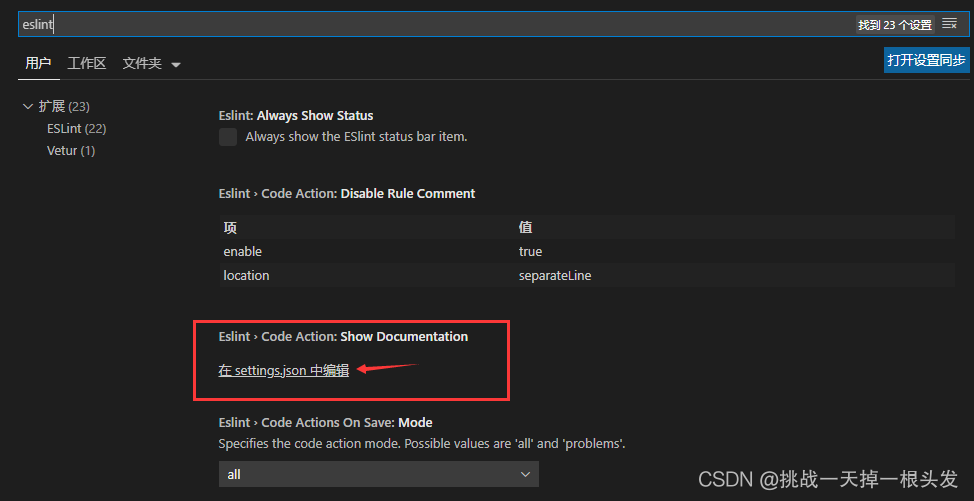
File – & gt; Preferences – & gt; Settings – & gt; Search eslint

Fill in the following configuration code

// By default, vscode has enabled the option to automatically set tabsize based on file type

"editor.detectIndentation": false,

// Reset tabsize

"editor.tabSize": 2,

// # Automatically format each time it is saved

"editor.formatOnSave": true,

// # Fix the code in eslint format every time it saves

"eslint.autoFixOnSave": true,

// Add vue support

"eslint.validate": [

  "javascript",

  "javascriptreact",

  {
    "language": "vue",

    "autoFix": true

  }

],

//  #Let prettier use eslint's code format for checksums

"prettier.eslintIntegration": true,

// # Remove the semicolon at the end of the code

"prettier.semi": false,

// # Use quoted instead of double quotes

"prettier.singleQuote": true,

// # Make a space between the function (name) and the parentheses that follow it No space false

"javascript.format.insertSpaceBeforeFunctionParenthesis": false,

// # Make the js in vue formatted according to the editor's own ts format

"vetur.format.defaultFormatter.js": "vscode-typescript",

"vetur.format.defaultFormatterOptions": {
  "js-beautify-html": {
    "wrap_attributes": "force-aligned"

    // # formatting styles for html code in vue components

  }

},

"window.zoomLevel": 0,

"explorer.confirmDelete": false,

"explorer.confirmDragAndDrop": false,

"editor.renderControlCharacters": true,

"editor.renderWhitespace": "all",

"editor.codeActionsOnSave": {
  "source.fixAll.eslint": true

}

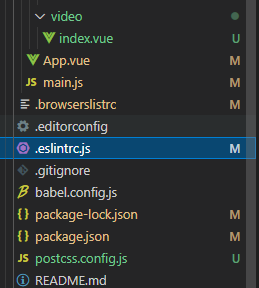
Step 3 open . Eslitrc. JS of the project

Fill in the following configuration code

// https://eslint.org/docs/user-guide/configuring


module.exports = {
  root: true,

  parserOptions: {
    parser: 'babel-eslint'

  },

  env: {
    browser: true

  },

  extends: [

    // https://github.com/vuejs/eslint-plugin-vue#priority-a-essential-error-prevention

    // consider switching to `plugin:vue/strongly-recommended` or `plugin:vue/recommended` for stricter rules.

    'plugin:vue/essential',

    // https://github.com/standard/standard/blob/master/docs/RULES-en.md

    'standard'

  ],

  // required to lint *.vue files

  plugins: ['vue'],

  // add your custom rules here
  rules: {
    // allow async-await
    'no-console': 'off',
    indent: ['error', 2, { SwitchCase: 1 }],
    semi: ['error', 'always'],
    'space-before-function-paren': [
      'error',
      { anonymous: 'always', named: 'never' }
    ],
    'generator-star-spacing': 'off',
    // allow debugger during development
    'no-debugger': process.env.NODE_ENV === 'production' ?'error' : 'off'
  }
}

M1 MacBook cannot use pip to install pandas [How to Solve]

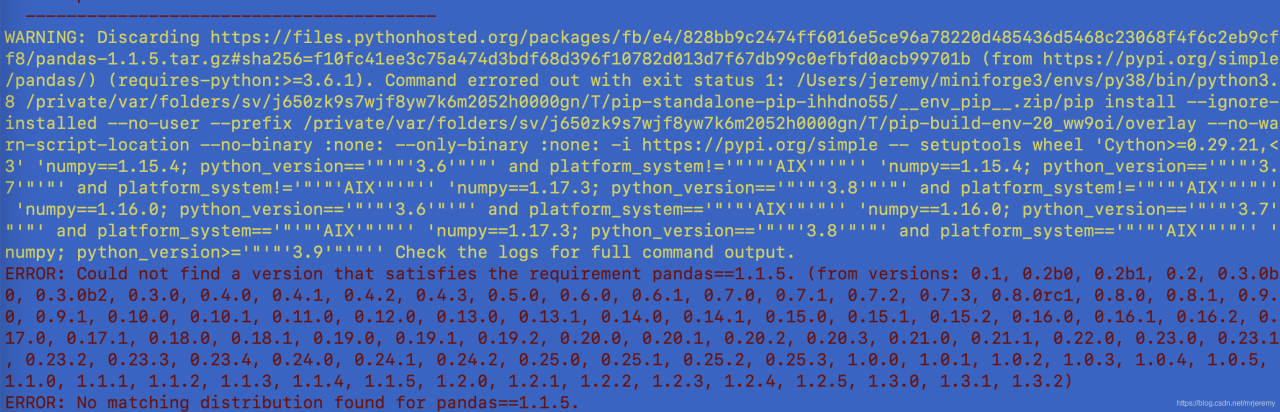
Use pip install pandas==1.1.5 report an error:

WARNING: Discarding https://files.pythonhosted.org/packages/fb/e4/828bb9c2474ff6016e5ce96a78220d485436d5468c23068f4f6c2eb9cff8/pandas-1.1.5.tar.gz#sha256=f10fc41ee3c75a474d3bdf68d396f10782d013d7f67db99c0efbfd0acb99701b (from https://pypi.org/simple/pandas/) (requires-python:>=3.6.1). Command errored out with exit status 1: /Users/jeremy/miniforge3/envs/py38/bin/python3.8 /private/var/folders/sv/j650zk9s7wjf8yw7k6m2052h0000gn/T/pip-standalone-pip-ihhdno55/__env_pip__.zip/pip install –ignore-installed –no-user –prefix /private/var/folders/sv/j650zk9s7wjf8yw7k6m2052h0000gn/T/pip-build-env-20_ww9oi/overlay –no-warn-script-location –no-binary :none: –only-binary :none: -i https://pypi.org/simple — setuptools wheel ‘Cython>=0.29.21,<3’ ‘numpy==1.15.4; python_version=='”‘”‘3.6′”‘”‘ and platform_system!='”‘”‘AIX'”‘”” ‘numpy==1.15.4; python_version=='”‘”‘3.7′”‘”‘ and platform_system!='”‘”‘AIX'”‘”” ‘numpy==1.17.3; python_version=='”‘”‘3.8′”‘”‘ and platform_system!='”‘”‘AIX'”‘”” ‘numpy==1.16.0; python_version=='”‘”‘3.6′”‘”‘ and platform_system=='”‘”‘AIX'”‘”” ‘numpy==1.16.0; python_version=='”‘”‘3.7′”‘”‘ and platform_system=='”‘”‘AIX'”‘”” ‘numpy==1.17.3; python_version=='”‘”‘3.8′”‘”‘ and platform_system=='”‘”‘AIX'”‘”” ‘numpy; python_version>='”‘”‘3.9′”‘”” Check the logs for full command output.
ERROR: Could not find a version that satisfies the requirement pandas==1.1.5. (from versions: 0.1, 0.2b0, 0.2b1, 0.2, 0.3.0b0, 0.3.0b2, 0.3.0, 0.4.0, 0.4.1, 0.4.2, 0.4.3, 0.5.0, 0.6.0, 0.6.1, 0.7.0, 0.7.1, 0.7.2, 0.7.3, 0.8.0rc1, 0.8.0, 0.8.1, 0.9.0, 0.9.1, 0.10.0, 0.10.1, 0.11.0, 0.12.0, 0.13.0, 0.13.1, 0.14.0, 0.14.1, 0.15.0, 0.15.1, 0.15.2, 0.16.0, 0.16.1, 0.16.2, 0.17.0, 0.17.1, 0.18.0, 0.18.1, 0.19.0, 0.19.1, 0.19.2, 0.20.0, 0.20.1, 0.20.2, 0.20.3, 0.21.0, 0.21.1, 0.22.0, 0.23.0, 0.23.1, 0.23.2, 0.23.3, 0.23.4, 0.24.0, 0.24.1, 0.24.2, 0.25.0, 0.25.1, 0.25.2, 0.25.3, 1.0.0, 1.0.1, 1.0.2, 1.0.3, 1.0.4, 1.0.5, 1.1.0, 1.1.1, 1.1.2, 1.1.3, 1.1.4, 1.1.5, 1.2.0, 1.2.1, 1.2.2, 1.2.3, 1.2.4, 1.2.5, 1.3.0, 1.3.1, 1.3.2)
ERROR: No matching distribution found for pandas==1.1.5


Solution:
conda install pandas==1.1.5

[Solved] Vsync Error: this error in animationcontroller in fluent

When using animation, it is usually written like this

  AnimationController _controller;
  Animation<double> _animation;
  Animation<Offset> _offsetAnimation;


  @override
  void initState() {
    super.initState();
    _controller =
    AnimationController(vsync: this, duration: Duration(seconds: 2))
      ..repeat(reverse: true);
    _animation = CurvedAnimation(parent: _controller, curve: Curves.easeIn);
    _offsetAnimation = Tween<Offset>(begin: Offset.zero, end: Offset(1.5, 0.0))
        .animate(_controller);
  }

However, Vsync: this in the animationcontroller will report an error (when Vsync exists, it will prevent off screen animation (when the UI of the animation is not on the current screen) from consuming unnecessary resources.)

Here, we need to add singletickerproviderstatemixin to the class definition, and use the statefulwidget class object as the value of this in Vsync. If you want to use a custom state object as Vsync, you can also use tickerproviderstatemixin

Writing method I

class DemoSizeTransition extends StatefulWidget {
  @override
  _DemoSizeTransitionState createState() => _DemoSizeTransitionState();
}

class _DemoSizeTransitionState extends State<DemoSizeTransition>
{
	with SingleTickerProviderStateMixin {
	.....//
	}
}

Writing method 2

import 'package:flutter/material.dart';
class DemoSizeTransition extends StatefulWidget {
  @override
  _DemoSizeTransitionState createState() => _DemoSizeTransitionState();
}

class _DemoSizeTransitionState extends State<DemoSizeTransition> with SingleTickerProviderStateMixin
{

  AnimationController _controller;
  Animation<double> _animation;
  Animation<Offset> _offsetAnimation;


  @override
  void initState() {
    super.initState();
    _controller =
    AnimationController(vsync: this, duration: Duration(seconds: 2))
      ..repeat(reverse: true);
    _animation = CurvedAnimation(parent: _controller, curve: Curves.easeIn);
    _offsetAnimation = Tween<Offset>(begin: Offset.zero, end: Offset(1.5, 0.0))
        .animate(_controller);
  }

  @override
  Widget build(BuildContext context) {
    return Scaffold(
      body: Container(
        child: Row(
          mainAxisAlignment: MainAxisAlignment.spaceEvenly,
          children: [
            FadeTransition(
              opacity: _animation,
              child: FlutterLogo(
                size: 150,
              ),
            ),
            SlideTransition(
              position: _offsetAnimation,
              child: FlutterLogo(
                size: 150,
              ),
            ),
          ],
        ),
      ),
    );
  }
}


[Solved] Vue3 Error: export ‘createRouter‘ was not found in ‘vue-router‘

I started learning vue3 recently, because I have been using vue2. X before. When I write vue3, I will find that there are some differences between the two. Then I will have a variety of problems during practice. I summarize and share it with you here.

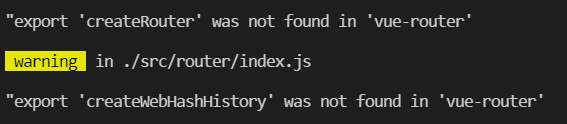
1.Error reporting

“export ‘createRouter’ was not found in ‘vue-router’
“export ‘createWebHashHistory’ was not found in ‘vue-router’

2. Error reporting causes and Solutions

If you read my last article, you should be able to see the reason for the error at a glance. This error occurs because we use the wrong Vue router package. We have installed version 2. X. because we are developing and using vue3, we also need to install the Vue router package of vue3. We only need to uninstall the previously installed Vue router package, and then reinstall the Vue router package of vue3.

// uninstall vue2.x vue-router
npm uninstall vue-router --save
// install vue3 vue-router
npm install vue-router@next --save

This can be solved. I hope it will help you!

[Solved] Android DataBinding Error: java.lang.ArrayIndexOutOfBoundsException: length=2; index=2 fragment Changes to Fragm

Android databinding error: Java. Lang. ArrayIndexOutOfBoundsException: length = 2; Index = 2 replace fragment with fragmentcontainerview

Preface bug replacing fragmentcontainerview

preface

When fixing the bug today, I upgraded the library associated with the project. After upgrading, an error appears in the databinding. Unexpectedly, it is still java.lang.arrayindexoutofboundsexception: length = 2; Index = 2, it’s still a list position error,???Full of question marks

BUG

E/AndroidRuntime: FATAL EXCEPTION: main
    Process: com.xxx, PID: 27182
    java.lang.RuntimeException: Unable to start activity ComponentInfo{com.xxx/com.xxx.activity.main.MainActivity}: java.lang.ArrayIndexOutOfBoundsException: length=2; index=2
        at android.app.ActivityThread.performLaunchActivity(ActivityThread.java:3898)
        at android.app.ActivityThread.handleLaunchActivity(ActivityThread.java:4081)
        at android.app.servertransaction.LaunchActivityItem.execute(LaunchActivityItem.java:91)
        at android.app.servertransaction.TransactionExecutor.executeCallbacks(TransactionExecutor.java:149)
        at android.app.servertransaction.TransactionExecutor.execute(TransactionExecutor.java:103)
        at android.app.ActivityThread$H.handleMessage(ActivityThread.java:2462)
        at android.os.Handler.dispatchMessage(Handler.java:110)
        at android.os.Looper.loop(Looper.java:219)
        at android.app.ActivityThread.main(ActivityThread.java:8393)
        at java.lang.reflect.Method.invoke(Native Method)
        at com.android.internal.os.RuntimeInit$MethodAndArgsCaller.run(RuntimeInit.java:513)
        at com.android.internal.os.ZygoteInit.main(ZygoteInit.java:1055)
     Caused by: java.lang.ArrayIndexOutOfBoundsException: length=2; index=2
        at androidx.databinding.ViewDataBinding.mapBindings(ViewDataBinding.java:1211)
        at androidx.databinding.ViewDataBinding.mapBindings(ViewDataBinding.java:1268)
        at androidx.databinding.ViewDataBinding.mapBindings(ViewDataBinding.java:1268)
        at androidx.databinding.ViewDataBinding.mapBindings(ViewDataBinding.java:1268)
        at androidx.databinding.ViewDataBinding.mapBindings(ViewDataBinding.java:1268)
        at androidx.databinding.ViewDataBinding.mapBindings(ViewDataBinding.java:719)
        at com.xxx.databinding.ActivityMainBindingImpl.<init>(ActivityMainBindingImpl.java:28)
        at com.xxx.DataBinderMapperImpl.internalGetViewDataBinding0(DataBinderMapperImpl.java:378)
        at com.xxx.DataBinderMapperImpl.getDataBinder(DataBinderMapperImpl.java:663)
        at androidx.databinding.MergedDataBinderMapper.getDataBinder(MergedDataBinderMapper.java:74)
        at androidx.databinding.DataBindingUtil.bind(DataBindingUtil.java:199)
        at androidx.databinding.DataBindingUtil.bindToAddedViews(DataBindingUtil.java:327)
        at androidx.databinding.DataBindingUtil.setContentView(DataBindingUtil.java:306)
        at androidx.databinding.DataBindingUtil.setContentView(DataBindingUtil.java:284)
        at com.xxx.activity.main.MainActivity.onCreate(MainActivity.kt:72)
        at android.app.Activity.performCreate(Activity.java:8121)
        at android.app.Activity.performCreate(Activity.java:8109)
        at android.app.Instrumentation.callActivityOnCreate(Instrumentation.java:1320)
        at android.app.ActivityThread.performLaunchActivity(ActivityThread.java:3871)
        at android.app.ActivityThread.handleLaunchActivity(ActivityThread.java:4081) 
        at android.app.servertransaction.LaunchActivityItem.execute(LaunchActivityItem.java:91) 
        at android.app.servertransaction.TransactionExecutor.executeCallbacks(TransactionExecutor.java:149) 
        at android.app.servertransaction.TransactionExecutor.execute(TransactionExecutor.java:103) 
        at android.app.ActivityThread$H.handleMessage(ActivityThread.java:2462) 
        at android.os.Handler.dispatchMessage(Handler.java:110) 
        at android.os.Looper.loop(Looper.java:219) 
        at android.app.ActivityThread.main(ActivityThread.java:8393) 
        at java.lang.reflect.Method.invoke(Native Method) 
        at com.android.internal.os.RuntimeInit$MethodAndArgsCaller.run(RuntimeInit.java:513) 
        at com.android.internal.os.ZygoteInit.main(ZygoteInit.java:1055) 

After troubleshooting, I suspect that the fragment is used in the page, because the problem will not occur when starting other pages without this data binding;

Click the page layout XML to see the prompt:

replace the & lt; fragment > tag with FragmentContainerView.

Replace fragmentcontainerview

Replace the fragment with fragmentcontainerview according to the prompt, run it again, and no longer report “Java. Lang. ArrayIndexOutOfBoundsException: length = 2; “Index = 2” is wrong, but a new error is reported:

E/AndroidRuntime: FATAL EXCEPTION: main
    Process: com.xxx, PID: 27863
    java.lang.RuntimeException: Unable to start activity ComponentInfo{com.xxx/com.xxx.activity.main.MainActivity}: java.lang.IllegalStateException: Activity com.xxx.activity.main.MainActivity@1f5b1e does not have a NavController set on 2131296506
        at android.app.ActivityThread.performLaunchActivity(ActivityThread.java:3898)
        at android.app.ActivityThread.handleLaunchActivity(ActivityThread.java:4081)
        at android.app.servertransaction.LaunchActivityItem.execute(LaunchActivityItem.java:91)
        at android.app.servertransaction.TransactionExecutor.executeCallbacks(TransactionExecutor.java:149)
        at android.app.servertransaction.TransactionExecutor.execute(TransactionExecutor.java:103)
        at android.app.ActivityThread$H.handleMessage(ActivityThread.java:2462)
        at android.os.Handler.dispatchMessage(Handler.java:110)
        at android.os.Looper.loop(Looper.java:219)
        at android.app.ActivityThread.main(ActivityThread.java:8393)
        at java.lang.reflect.Method.invoke(Native Method)
        at com.android.internal.os.RuntimeInit$MethodAndArgsCaller.run(RuntimeInit.java:513)
        at com.android.internal.os.ZygoteInit.main(ZygoteInit.java:1055)
     Caused by: java.lang.IllegalStateException: Activity com.xxx.activity.main.MainActivity@1f5b1e does not have a NavController set on 2131296506
        at androidx.navigation.Navigation.findNavController(Navigation.java:61)
        at com.xxx.activity.main.MainActivity.onCreate(MainActivity.kt:75)
        at android.app.Activity.performCreate(Activity.java:8121)
        at android.app.Activity.performCreate(Activity.java:8109)
        at android.app.Instrumentation.callActivityOnCreate(Instrumentation.java:1320)
        at android.app.ActivityThread.performLaunchActivity(ActivityThread.java:3871)
        at android.app.ActivityThread.handleLaunchActivity(ActivityThread.java:4081) 
        at android.app.servertransaction.LaunchActivityItem.execute(LaunchActivityItem.java:91) 
        at android.app.servertransaction.TransactionExecutor.executeCallbacks(TransactionExecutor.java:149) 
        at android.app.servertransaction.TransactionExecutor.execute(TransactionExecutor.java:103) 
        at android.app.ActivityThread$H.handleMessage(ActivityThread.java:2462) 
        at android.os.Handler.dispatchMessage(Handler.java:110) 
        at android.os.Looper.loop(Looper.java:219) 
        at android.app.ActivityThread.main(ActivityThread.java:8393) 
        at java.lang.reflect.Method.invoke(Native Method) 
        at com.android.internal.os.RuntimeInit$MethodAndArgsCaller.run(RuntimeInit.java:513) 
        at com.android.internal.os.ZygoteInit.main(ZygoteInit.java:1055) 

This problem is reported in obtaining the navcontroller. After searching the StackOverflow, we found the new method of fragmentcontainerview to obtain the navcontroller

reference resources: https://stackoverflow.com/questions/64170603/replace-the-fragment-tag-with-fragmentcontainerview


// FragmentContainerView
val navHostFragment = supportFragmentManager.findFragmentById(R.id.fragment) as NavHostFragment
navController = navHostFragment.navController
// Fragment
//navController = Navigation.findNavController(this, R.id.fragment)

// Set the tab bar to bind to the fragment
NavigationUI.setupWithNavController(binding.bottomNavigationView, navController)

confusion

-keepnames class androidx.navigation.fragment.NavHostFragment
-keepnames class com.google.android.gms.maps.SupportMapFragment

Finish

Re-run and solve the problem.

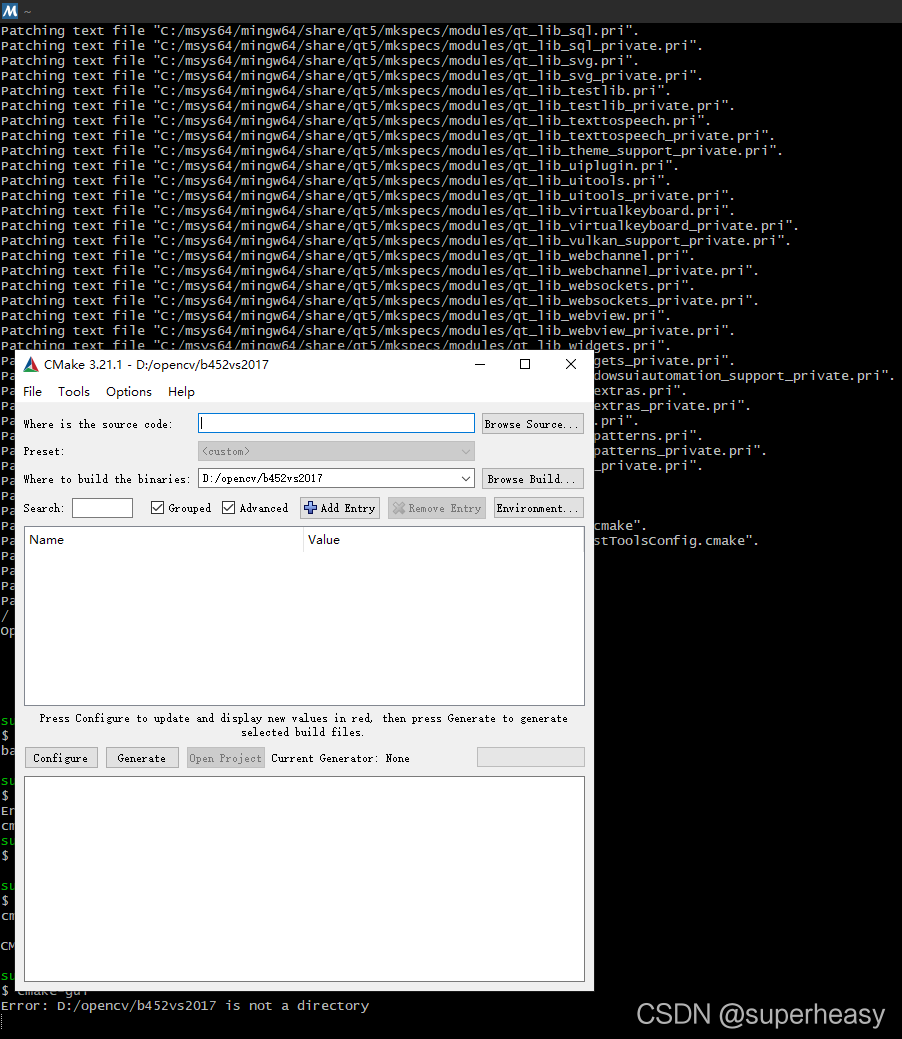
How to Solve Msys2/mingw64 Run cmake GUI Error

August 24, 2021
It has been updated to the latest version.

MINGW64 ~
$ cmake-gui –version
cmake version 3.21.1
CMake suite maintained and supported by Kitware (kitware.com/cmake).

But still error as below:

$ cmake-gui
C:/msys64/mingw64/bin/cmake-gui.exe: error while loading shared libraries: zlib1.dll: cannot open shared object file: No such file or directory

Finally found that the installation of qt5 can be solved

pacman -S mingw-w64-x86_64-qt5
resolving dependencies…
looking for conflicting packages…
Packages (16) mingw-w64-x86_64-assimp-5.0.1-11  mingw-w64-x86_64-dbus-1.12.20-3  mingw-w64-x86_64-double-conversion-3.1.5-1  mingw-w64-x86_64-icu-debug-libs-68.2-3  mingw-w64-x86_64-libgcrypt-1.9.2-2
mingw-w64-x86_64-libgpg-error-1.42-1  mingw-w64-x86_64-libmng-2.0.3-4  mingw-w64-x86_64-libmysofa-1.2-1  mingw-w64-x86_64-libxslt-1.1.34-4  mingw-w64-x86_64-minizip-git-1.2.445.e67b996-2  mingw-w64-x86_64-openal-1.21.1-2
mingw-w64-x86_64-pcre2-10.36-1  mingw-w64-x86_64-qtbinpatcher-2.2.0-4  mingw-w64-x86_64-xpm-nox-4.2.0-6  mingw-w64-x86_64-z3-4.8.9-2  mingw-w64-x86_64-qt5-5.15.2-10
Total Download Size:   223.16 MiB
Total Installed Size:  873.75 MiB
…………………………

then re-run:

cmake-gui

You will be able to value the dialog box of the gui pop-up!

Huawei kafka Authentication error: Server not found in Kerberos database (7) – LOOKING_UP_SERVER

Error reporting original text

principal is [email protected]
Will use keytab
Commit Succeeded 

21/08/23 10:20:14 INFO NewConsumer: subscribe:bc_test
Exception in thread "main" java.lang.reflect.InvocationTargetException
	at sun.reflect.NativeMethodAccessorImpl.invoke0(Native Method)
	at sun.reflect.NativeMethodAccessorImpl.invoke(NativeMethodAccessorImpl.java:62)
	at sun.reflect.DelegatingMethodAccessorImpl.invoke(DelegatingMethodAccessorImpl.java:43)
	at java.lang.reflect.Method.invoke(Method.java:498)
	at org.springframework.boot.loader.MainMethodRunner.run(MainMethodRunner.java:49)
	at org.springframework.boot.loader.Launcher.launch(Launcher.java:108)
	at org.springframework.boot.loader.Launcher.launch(Launcher.java:58)
	at org.springframework.boot.loader.JarLauncher.main(JarLauncher.java:88)
Caused by: org.apache.kafka.common.errors.SaslAuthenticationException: An error: (java.security.PrivilegedActionException: javax.security.sasl.SaslException: GSS initiate failed [Caused by GSSException: No valid credentials provided (Mechanism level: Server not found in Kerberos database (7) - LOOKING_UP_SERVER)]) occurred when evaluating SASL token received from the Kafka Broker. Kafka Client will go to AUTHENTICATION_FAILED state.
Caused by: javax.security.sasl.SaslException: GSS initiate failed [Caused by GSSException: No valid credentials provided (Mechanism level: Server not found in Kerberos database (7) - LOOKING_UP_SERVER)]
	at com.sun.security.sasl.gsskerb.GssKrb5Client.evaluateChallenge(GssKrb5Client.java:211)
	at org.apache.kafka.common.security.authenticator.SaslClientAuthenticator$2.run(SaslClientAuthenticator.java:361)
	at org.apache.kafka.common.security.authenticator.SaslClientAuthenticator$2.run(SaslClientAuthenticator.java:359)
	at java.security.AccessController.doPrivileged(Native Method)
	at javax.security.auth.Subject.doAs(Subject.java:422)
	at org.apache.kafka.common.security.authenticator.SaslClientAuthenticator.createSaslToken(SaslClientAuthenticator.java:359)
	at org.apache.kafka.common.security.authenticator.SaslClientAuthenticator.sendSaslClientToken(SaslClientAuthenticator.java:269)
	at org.apache.kafka.common.security.authenticator.SaslClientAuthenticator.authenticate(SaslClientAuthenticator.java:206)
	at org.apache.kafka.common.network.KafkaChannel.prepare(KafkaChannel.java:81)
	at org.apache.kafka.common.network.Selector.pollSelectionKeys(Selector.java:486)
	at org.apache.kafka.common.network.Selector.poll(Selector.java:424)
	at org.apache.kafka.clients.NetworkClient.poll(NetworkClient.java:460)
	at org.apache.kafka.clients.consumer.internals.ConsumerNetworkClient.poll(ConsumerNetworkClient.java:261)
	at org.apache.kafka.clients.consumer.internals.ConsumerNetworkClient.poll(ConsumerNetworkClient.java:233)
	at org.apache.kafka.clients.consumer.internals.ConsumerNetworkClient.poll(ConsumerNetworkClient.java:209)
	at org.apache.kafka.clients.consumer.internals.AbstractCoordinator.ensureCoordinatorReady(AbstractCoordinator.java:219)
	at org.apache.kafka.clients.consumer.internals.AbstractCoordinator.ensureCoordinatorReady(AbstractCoordinator.java:205)
	at org.apache.kafka.clients.consumer.internals.ConsumerCoordinator.poll(ConsumerCoordinator.java:279)
	at org.apache.kafka.clients.consumer.KafkaConsumer.pollOnce(KafkaConsumer.java:1149)
	at org.apache.kafka.clients.consumer.KafkaConsumer.poll(KafkaConsumer.java:1115)
	at receive.NewConsumer.doWork(NewConsumer.java:102)
	at receive.NewConsumer.main(NewConsumer.java:127)
	at sun.reflect.NativeMethodAccessorImpl.invoke0(Native Method)
	at sun.reflect.NativeMethodAccessorImpl.invoke(NativeMethodAccessorImpl.java:62)
	at sun.reflect.DelegatingMethodAccessorImpl.invoke(DelegatingMethodAccessorImpl.java:43)
	at java.lang.reflect.Method.invoke(Method.java:498)
	at org.springframework.boot.loader.MainMethodRunner.run(MainMethodRunner.java:49)
	at org.springframework.boot.loader.Launcher.launch(Launcher.java:108)
	at org.springframework.boot.loader.Launcher.launch(Launcher.java:58)
	at org.springframework.boot.loader.JarLauncher.main(JarLauncher.java:88)
Caused by: GSSException: No valid credentials provided (Mechanism level: Server not found in Kerberos database (7) - LOOKING_UP_SERVER)
	at sun.security.jgss.krb5.Krb5Context.initSecContext(Krb5Context.java:770)
	at sun.security.jgss.GSSContextImpl.initSecContext(GSSContextImpl.java:248)
	at sun.security.jgss.GSSContextImpl.initSecContext(GSSContextImpl.java:179)
	at com.sun.security.sasl.gsskerb.GssKrb5Client.evaluateChallenge(GssKrb5Client.java:192)
	... 29 more
Caused by: KrbException: Server not found in Kerberos database (7) - LOOKING_UP_SERVER
	at sun.security.krb5.KrbTgsRep.<init>(KrbTgsRep.java:73)
	at sun.security.krb5.KrbTgsReq.getReply(KrbTgsReq.java:251)
	at sun.security.krb5.KrbTgsReq.sendAndGetCreds(KrbTgsReq.java:262)
	at sun.security.krb5.internal.CredentialsUtil.serviceCreds(CredentialsUtil.java:308)
	at sun.security.krb5.internal.CredentialsUtil.acquireServiceCreds(CredentialsUtil.java:126)
	at sun.security.krb5.Credentials.acquireServiceCreds(Credentials.java:458)
	at sun.security.jgss.krb5.Krb5Context.initSecContext(Krb5Context.java:693)
	... 32 more
Caused by: KrbException: Identifier doesn't match expected value (906)
	at sun.security.krb5.internal.KDCRep.init(KDCRep.java:140)
	at sun.security.krb5.internal.TGSRep.init(TGSRep.java:65)
	at sun.security.krb5.internal.TGSRep.<init>(TGSRep.java:60)
	at sun.security.krb5.KrbTgsRep.<init>(KrbTgsRep.java:55)
	... 38 more


Solution:

After troubleshooting the error reported by connecting to Huawei big data platform, it was found that the Kerberos authentication passed, because the words will use KeyTab commit succeeded appeared, and there was an exception message when creating a consumer. The methods on the Internet have been tried, such as configuring hosts, checking the generated jaas.conf file, comparing krb5 files, etc
finally, replace Kafka’s dependent package with Huawei’s three packages (Kafka)_ 2.11-1.1.0.jar, kafka-clients-1.1.0.jar, zookeeper-3.5.1. Jar) passed!

Maven local package

Maven’s command to install jar package is:
MVN install: install file
– dfile = jar package location
– dgroupid = groupid in POM file
– dartifactid = artifactid in POM file
– dversion = version in POM file
– dpacking = jar

mvn install:install-file -Dfile=./kafka_2.11-1.1.0.jar -DgroupId=org.apache.kafka -DartifactId=kafka_2.11 -Dversion=1.1.0-hw -Dpackaging=jar

Maven introduction

       <dependency>
            <groupId>org.apache.kafka</groupId>
            <artifactId>kafka_2.11</artifactId>
            <version>1.1.0-hw</version>
        </dependency>

Laravel model save if the table has no ID field Error [How to Solve]

$model = Test::first();
$model->status = 2;
$model->save();

If the Test model does not have an ID field in the corresponding table, an error will be reported

Illuminate\Database\QueryException: SQLSTATE[42S22]: Column not found: 1054 Unknown column ‘id’ in ‘where clause’ (SQL: update test set status = 2, test.updated_at = 2020-09-04 15:03:06 where id is null) in file D:\www\wb-mg\vendor\laravel\framework\src\Illuminate\Database\Connection.php on line 671

As you can see above, save() is to match the updated data through the id field, so don’t use save() if the table doesn’t have an ID field.

[Solved] Jupyter Kernel error: kernel Cannot Connect—-import win32api; ImportError: DLL load failed…

The kernel is not connected

Error original

Traceback (most recent call last):
  File "D:\Anaconda\envs\tf2\lib\runpy.py", line 193, in _run_module_as_main
    "__main__", mod_spec)
  File "D:\Anaconda\envs\tf2\lib\runpy.py", line 85, in _run_code
    exec(code, run_globals)
  File "D:\Anaconda\envs\tf2\lib\site-packages\ipykernel_launcher.py", line 16, in <module>
    app.launch_new_instance()
  File "D:\Anaconda\envs\tf2\lib\site-packages\traitlets\config\application.py", line 844, in launch_instance
    app.initialize(argv)
  File "D:\Anaconda\envs\tf2\lib\site-packages\traitlets\config\application.py", line 87, in inner
    return method(app, *args, **kwargs)
  File "D:\Anaconda\envs\tf2\lib\site-packages\ipykernel\kernelapp.py", line 625, in initialize
    self.write_connection_file()
  File "D:\Anaconda\envs\tf2\lib\site-packages\ipykernel\kernelapp.py", line 236, in write_connection_file
    iopub_port=self.iopub_port, control_port=self.control_port)
  File "D:\Anaconda\envs\tf2\lib\site-packages\jupyter_client\connect.py", line 136, in write_connection_file
    with secure_write(fname) as f:
  File "D:\Anaconda\envs\tf2\lib\contextlib.py", line 112, in __enter__
    return next(self.gen)
  File "D:\Anaconda\envs\tf2\lib\site-packages\jupyter_core\paths.py", line 461, in secure_write
    win32_restrict_file_to_user(fname)
  File "D:\Anaconda\envs\tf2\lib\site-packages\jupyter_core\paths.py", line 387, in win32_restrict_file_to_user
    import win32api
ImportError: DLL load failed: 找不到指定的程序。
[I 16:31:42.557 NotebookApp] KernelRestarter: restarting kernel (1/5), new random ports
[IPKernelApp] ERROR | Failed to load connection file: 'C:\\Users\\YJF\\AppData\\Roaming\\jupyter\\runtime\\kernel-edcd3c8f-6a6b-4512-a376-4a71c0a0b1d5.json'
Traceback (most recent call last):
  File "D:\Anaconda\envs\tf2\lib\site-packages\ipykernel\kernelapp.py", line 261, in init_connection_file
    self.load_connection_file()
  File "D:\Anaconda\envs\tf2\lib\site-packages\jupyter_client\connect.py", line 494, in load_connection_file
    info = json.load(f)
  File "D:\Anaconda\envs\tf2\lib\json\__init__.py", line 296, in load
    parse_constant=parse_constant, object_pairs_hook=object_pairs_hook, **kw)
  File "D:\Anaconda\envs\tf2\lib\json\__init__.py", line 348, in loads
    return _default_decoder.decode(s)
  File "D:\Anaconda\envs\tf2\lib\json\decoder.py", line 337, in decode
    obj, end = self.raw_decode(s, idx=_w(s, 0).end())
  File "D:\Anaconda\envs\tf2\lib\json\decoder.py", line 355, in raw_decode
    raise JSONDecodeError("Expecting value", s, err.value) from None
json.decoder.JSONDecodeError: Expecting value: line 1 column 1 (char 0)
[I 16:31:45.568 NotebookApp] KernelRestarter: restarting kernel (2/5), new random ports
[IPKernelApp] ERROR | Failed to load connection file: 'C:\\Users\\YJF\\AppData\\Roaming\\jupyter\\runtime\\kernel-edcd3c8f-6a6b-4512-a376-4a71c0a0b1d5.json'
Traceback (most recent call last):
  File "D:\Anaconda\envs\tf2\lib\site-packages\ipykernel\kernelapp.py", line 261, in init_connection_file
    self.load_connection_file()
  File "D:\Anaconda\envs\tf2\lib\site-packages\jupyter_client\connect.py", line 494, in load_connection_file
    info = json.load(f)
  File "D:\Anaconda\envs\tf2\lib\json\__init__.py", line 296, in load
    parse_constant=parse_constant, object_pairs_hook=object_pairs_hook, **kw)
  File "D:\Anaconda\envs\tf2\lib\json\__init__.py", line 348, in loads
    return _default_decoder.decode(s)
  File "D:\Anaconda\envs\tf2\lib\json\decoder.py", line 337, in decode
    obj, end = self.raw_decode(s, idx=_w(s, 0).end())
  File "D:\Anaconda\envs\tf2\lib\json\decoder.py", line 355, in raw_decode
    raise JSONDecodeError("Expecting value", s, err.value) from None
json.decoder.JSONDecodeError: Expecting value: line 1 column 1 (char 0)
[I 16:31:48.584 NotebookApp] KernelRestarter: restarting kernel (3/5), new random ports
[IPKernelApp] ERROR | Failed to load connection file: 'C:\\Users\\YJF\\AppData\\Roaming\\jupyter\\runtime\\kernel-edcd3c8f-6a6b-4512-a376-4a71c0a0b1d5.json'
Traceback (most recent call last):
  File "D:\Anaconda\envs\tf2\lib\site-packages\ipykernel\kernelapp.py", line 261, in init_connection_file
    self.load_connection_file()
  File "D:\Anaconda\envs\tf2\lib\site-packages\jupyter_client\connect.py", line 494, in load_connection_file
    info = json.load(f)
  File "D:\Anaconda\envs\tf2\lib\json\__init__.py", line 296, in load
    parse_constant=parse_constant, object_pairs_hook=object_pairs_hook, **kw)
  File "D:\Anaconda\envs\tf2\lib\json\__init__.py", line 348, in loads
    return _default_decoder.decode(s)
  File "D:\Anaconda\envs\tf2\lib\json\decoder.py", line 337, in decode
    obj, end = self.raw_decode(s, idx=_w(s, 0).end())
  File "D:\Anaconda\envs\tf2\lib\json\decoder.py", line 355, in raw_decode
    raise JSONDecodeError("Expecting value", s, err.value) from None
json.decoder.JSONDecodeError: Expecting value: line 1 column 1 (char 0)
[I 16:31:51.595 NotebookApp] KernelRestarter: restarting kernel (4/5), new random ports
[IPKernelApp] ERROR | Failed to load connection file: 'C:\\Users\\YJF\\AppData\\Roaming\\jupyter\\runtime\\kernel-edcd3c8f-6a6b-4512-a376-4a71c0a0b1d5.json'
Traceback (most recent call last):
  File "D:\Anaconda\envs\tf2\lib\site-packages\ipykernel\kernelapp.py", line 261, in init_connection_file
    self.load_connection_file()
  File "D:\Anaconda\envs\tf2\lib\site-packages\jupyter_client\connect.py", line 494, in load_connection_file
    info = json.load(f)
  File "D:\Anaconda\envs\tf2\lib\json\__init__.py", line 296, in load
    parse_constant=parse_constant, object_pairs_hook=object_pairs_hook, **kw)
  File "D:\Anaconda\envs\tf2\lib\json\__init__.py", line 348, in loads
    return _default_decoder.decode(s)
  File "D:\Anaconda\envs\tf2\lib\json\decoder.py", line 337, in decode
    obj, end = self.raw_decode(s, idx=_w(s, 0).end())
  File "D:\Anaconda\envs\tf2\lib\json\decoder.py", line 355, in raw_decode
    raise JSONDecodeError("Expecting value", s, err.value) from None
json.decoder.JSONDecodeError: Expecting value: line 1 column 1 (char 0)
[W 16:31:54.603 NotebookApp] KernelRestarter: restart failed
[W 16:31:54.603 NotebookApp] Kernel edcd3c8f-6a6b-4512-a376-4a71c0a0b1d5 died, removing from map.
[W 16:32:22.967 NotebookApp] Config option `template_path` not recognized by `ExporterCollapsibleHeadings`.  Did you mean one of: `extra_template_paths, template_name, template_paths`?
[W 16:32:22.977 NotebookApp] Config option `template_path` not recognized by `ExporterCollapsibleHeadings`.  Did you mean one of: `extra_template_paths, template_name, template_paths`?
[W 16:32:23.024 NotebookApp] Config option `template_path` not recognized by `TocExporter`.  Did you mean one of: `extra_template_paths, template_name, template_paths`?
[W 16:32:23.031 NotebookApp] Config option `template_path` not recognized by `TocExporter`.  Did you mean one of: `extra_template_paths, template_name, template_paths`?
[W 16:32:23.052 NotebookApp] Config option `template_path` not recognized by `LenvsHTMLExporter`.  Did you mean one of: `extra_template_paths, template_name, template_paths`?
[W 16:32:23.062 NotebookApp] Config option `template_path` not recognized by `LenvsHTMLExporter`.  Did you mean one of: `extra_template_paths, template_name, template_paths`?
[W 16:32:23.088 NotebookApp] Config option `template_path` not recognized by `LenvsTocHTMLExporter`.  Did you mean one of: `extra_template_paths, template_name, template_paths`?
[W 16:32:23.098 NotebookApp] Config option `template_path` not recognized by `LenvsTocHTMLExporter`.  Did you mean one of: `extra_template_paths, template_name, template_paths`?
[W 16:32:23.151 NotebookApp] Config option `template_path` not recognized by `LenvsLatexExporter`.  Did you mean one of: `extra_template_paths, template_name, template_paths`?
[W 16:32:23.157 NotebookApp] Config option `template_path` not recognized by `LenvsLatexExporter`.  Did you mean one of: `extra_template_paths, template_name, template_paths`?
[W 16:32:23.380 NotebookApp] Config option `template_path` not recognized by `LenvsSlidesExporter`.  Did you mean one of: `extra_template_paths, template_name, template_paths`?
[W 16:32:23.388 NotebookApp] Config option `template_path` not recognized by `LenvsSlidesExporter`.  Did you mean one of: `extra_template_paths, template_name, template_paths`?
[W 16:32:23.515 NotebookApp] Config option `template_path` not recognized by `ExporterCollapsibleHeadings`.  Did you mean one of: `extra_template_paths, template_name, template_paths`?
[W 16:32:23.523 NotebookApp] Config option `template_path` not recognized by `ExporterCollapsibleHeadings`.  Did you mean one of: `extra_template_paths, template_name, template_paths`?
[W 16:32:23.570 NotebookApp] Config option `template_path` not recognized by `TocExporter`.  Did you mean one of: `extra_template_paths, template_name, template_paths`?
[W 16:32:23.577 NotebookApp] Config option `template_path` not recognized by `TocExporter`.  Did you mean one of: `extra_template_paths, template_name, template_paths`?
[W 16:32:23.598 NotebookApp] Config option `template_path` not recognized by `LenvsHTMLExporter`.  Did you mean one of: `extra_template_paths, template_name, template_paths`?
[W 16:32:23.609 NotebookApp] Config option `template_path` not recognized by `LenvsHTMLExporter`.  Did you mean one of: `extra_template_paths, template_name, template_paths`?
[W 16:32:23.633 NotebookApp] Config option `template_path` not recognized by `LenvsTocHTMLExporter`.  Did you mean one of: `extra_template_paths, template_name, template_paths`?
[W 16:32:23.643 NotebookApp] Config option `template_path` not recognized by `LenvsTocHTMLExporter`.  Did you mean one of: `extra_template_paths, template_name, template_paths`?
[W 16:32:23.694 NotebookApp] Config option `template_path` not recognized by `LenvsLatexExporter`.  Did you mean one of: `extra_template_paths, template_name, template_paths`?
[W 16:32:23.700 NotebookApp] Config option `template_path` not recognized by `LenvsLatexExporter`.  Did you mean one of: `extra_template_paths, template_name, template_paths`?
[W 16:32:23.921 NotebookApp] Config option `template_path` not recognized by `LenvsSlidesExporter`.  Did you mean one of: `extra_template_paths, template_name, template_paths`?
[W 16:32:23.928 NotebookApp] Config option `template_path` not recognized by `LenvsSlidesExporter`.  Did you mean one of: `extra_template_paths, template_name, template_paths`?

Error reporting reason

    import win32api
ImportError: DLL load failed: The specified program could not be found.

This is caused by the incompatibility between the python version and the pywin32 version.
Solution:

Reinstall the latest version of pywin32 = = 301 in the TF2 environment with CONDA error. Solution: CONDA install pywin32 = = 301

Vue Uncaught (in promise) Error: Navigation cancelled from “/home“ to “/login“ with a new navigation

1. Initialize the entry item, redirect to the login page after the login expires, and the routing error is reported

import Vue from 'vue'
import VueRouter from 'vue-router'
Vue.use(VueRouter)

//Solve the situation that programmatic routing to the same address will report an error
const originalPush = VueRouter.prototype.push;
const originalReplace = VueRouter.prototype.replace;
//push
VueRouter.prototype.push = function push(location, onResolve, onReject) {
  if (onResolve || onReject)
    return originalPush.call(this, location, onResolve, onReject);
  return originalPush.call(this, location).catch(err => err);
};
//replace
VueRouter.prototype.replace = function push(location, onResolve, onReject) {
  if (onResolve || onReject)
    return originalReplace.call(this, location, onResolve, onReject);
  return originalReplace.call(this, location).catch(err => err);
};