Category Archives: Error

Error occurred when finalizing generatordataset iterator [How to Solve]

tensorflow.python.framework.errors_impl.UnknownError: Failed to get convolution algorithm. This is probably because cuDNN failed to initialize, so try looking to see if a warning log message was printed above. [Op:Conv2D]
2021-09-24 15:31:45.989272: W tensorflow/core/kernels/data/generator_dataset_op.cc:103] Error occurred when finalizing GeneratorDataset iterator: Failed precondition: Python interpreter state is not initialized. The process may be terminated.
Googled the blog and said that the batchsize was set too large, resulting in insufficient memory. So I changed the batchsize from 16 to 4, and then to 1, and I still got this error.
I don’t think the model I’m running is very big, so why is there this problem?
Solution!
It is not set properly when calling the GPU
Just add these two lines of code at the top of the code

config = tf.compat.v1.ConfigProto(gpu_options=tf.compat.v1.GPUOptions(allow_growth=True))
sess = tf.compat.v1.Session(config=config)

[Solved] Upstream connect error or disconnect occurs after the k8s istio virtual machine is restarted

Error (common problem after virtual machine reboot):
upstream connect error or disconnect/reset before headers. reset reason: connection failure, transport failure reason: TLS error: 268436501:SSL routines:OPENSSL_internal:SSLV3_ALERT_CERTIFICATE_EXPIRED

Solution:
The pods under istio-system are out of order, you need kubectl delete pods xxx -n istio-system to restart


Jmeter not-GUI Run Error: Error generaing the report:java.langNullPointerException

Error generating the report: java.langnullpointerexception when JMeter runs on the command line

This error is caused by CSV. Error reading CSV file path,   The CSV set file is not found, and there is no result after running. This error will occur only when an error is reported in the generated report, so you only need to configure the correct file path to run successfully. During distributed pressure measurement, the file path on the slave machine is used and placed in the bin directory. The file paths of multiple slave machines are consistent. Problem solving.

How to Solve QT error: LNK1158: Cannot Run “rc.exe”

[problem description]

Qt5.9.11 is installed on windows10, and the compilation error is: error: lnk1158: unable to run “RC. Exe”

[problem location]

The path of rc.exe is not put into the environment variable

[solution]

Add the path “C:\program files (x86)\windows kits\8.1\bin\x86” to the environment variable path.

Restart qtcreator and the compilation is successful.

[Solved] Pytorch Error: RuntimeError: Trying to backward through the graph a second time

During Gan’s training, we often encounter this problem: runtimeerror: trying to backward through the graph a second time, but the saved intermediate results have already been free

The description of this error is that when you are propagating in the direction, the cache is released in advance. Many solutions are to change loss. Backward() to loss. Backward (retain_graph = true). In fact, most of the code problems are not here, and the retention of the calculation chart may cause the cache to accumulate rapidly and lead to the explosion of the video memory, In fact, the real reason is that the discriminator and the producer share the same variables. Just add detach () when using variables for the first time.

#### Update Discriminator ###
real_preds = netD(real_gt)
fake_preds = netD(fake_coarse)


#### Update Generator #####
real_preds = netD(real_gt)
fake_preds = netD(fake_coarse)

Change to:

#### Update Discriminator ###
real_preds = netD(real_gt.detach())
fake_preds = netD(fake_coarse.detach())


#### Update Generator #####
real_preds = netD(real_gt)
fake_preds = netD(fake_coarse)

It’s not easy to find the method. Thank you for your support

file_name.sh: 3: Syntax error: “(“ unexpected [How to Solve]

An error was encountered

Execute the command $./example03. Sh error:
./example03. Sh: 3: syntax error: “(” unexpected
check the document

#!/bin/sh
#function hello
function hello(){
    echo "hello SXU."
}
#main
hello	
exit 0

Confirm again and again that there is no error.

Find the reason

Related to the actual shell version used
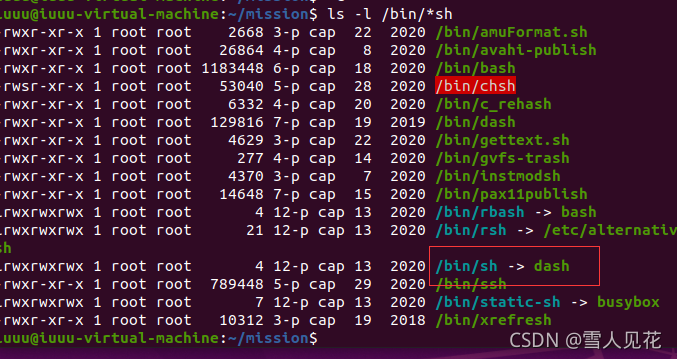
use the command LS - L/bin/* sh to print and view. For example:
you can see that SH is redirected to dash. Therefore, if./example.sh is executed, dash is used.

Solution:

bash example. Sh the first line of the script #/ Change bin/sh to: #/ Bin/bash, and then execute./example. Sh. The code is correct for standard bash, because Ubuntu/Debian uses dash instead of traditional bash in order to speed up startup. The solution is to cancel Dash: sudo dpkg reconfigure dash , and select no in the selection, choose one of the three methods to succeed.

Module build failed: Error: Node Sass version 6.0.0 is incompatible with ^4.0.0

When executing the named NPM run dev to start the front-end project, the following error is reported

Module build failed: Error: Node Sass version 6.0.0 is incompatible with ^4.0.0.

From the prompt, I downloaded the latest dependency. The current version is incompatible. Later, I checked the relevant documents, which is really caused by the high version;

The simple way is to find the appropriate version and install the specified version (try it several times if you don’t know the version)

The processing steps are as follows:

#uninstall
npm uninstall node-sass

#install with the version
npm install [email protected] --save-dev

Run NPM run dev again

Golang Error: fatal error: concurrent map read and map writ

The reason for the error is that the map is thread unsafe and an error will be reported when there are concurrent reads and writes
solution: use the read-write lock sync.rwmutex:
golang read-write lock
rules
when the read lock exists, other read locks can exist together, but the write lock needs to wait
when the write lock exists, both the read lock and the write lock need to wait
the read lock can be concurrent, and the read lock and the write lock are mutually exclusive, Write lock and write lock are mutually exclusive

var rw sync.RWMutex
//Read lock and locking
rw.Rlock()
//Read lock and unlocking
rw.Runlock()

AAPT: error: attribute cardBackgroundColor (aka com.x.x:cardBackgroundColor) not found.

* What went wrong:
Execution failed for task ':launcher:processReleaseResources'.
> Android resource linking failed
  C:\Users\Administrator\.gradle\caches\transforms-2\files-2.1\a3890adfdb75cc00c9c342ba929acf1b\res\layout\com_facebook_device_auth_dialog_fragment.xml:22: AAPT: error: attribute cardBackgroundColor (aka com.test.k22:cardBackgroundColor) not found.
      
  C:\Users\Administrator\.gradle\caches\transforms-2\files-2.1\a3890adfdb75cc00c9c342ba929acf1b\res\layout\com_facebook_device_auth_dialog_fragment.xml:22: AAPT: error: attribute cardElevation (aka com.test.k22:cardElevation) not found.
      
  C:\Users\Administrator\.gradle\caches\transforms-2\files-2.1\a3890adfdb75cc00c9c342ba929acf1b\res\layout\com_facebook_smart_device_dialog_fragment.xml:22: AAPT: error: attribute cardBackgroundColor (aka com.test.k22:cardBackgroundColor) not found.
      
  C:\Users\Administrator\.gradle\caches\transforms-2\files-2.1\a3890adfdb75cc00c9c342ba929acf1b\res\layout\com_facebook_smart_device_dialog_fragment.xml:22: AAPT: error: attribute cardElevation (aka com.test.k22:cardElevation) not found.

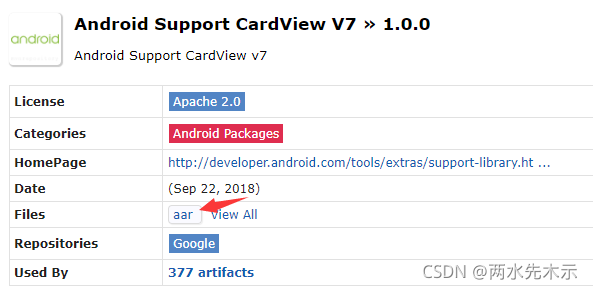
https://mvnrepository.com/artifact/androidx.cardview/cardview/1.0.0

Download cardview-1.0.0.aar and import it into Assets/Plugins/Android directory.

[Solved] OpenCV ERROR: The minSdk version should not be declared in the android manifest file

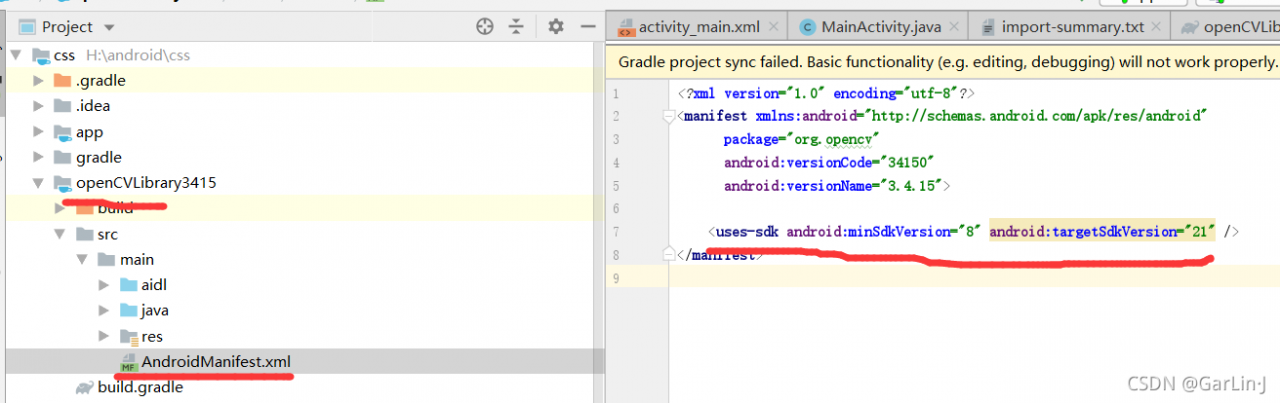
ERROR: The minSdk version should not be declared in the android manifest file. You can move the version from the manifest to the defaultConfig in the build.gradle file.
Remove minSdkVersion and sync project
Affected Modules: openCVLibrary3415


Solution: Just comment it out and run it again!!!
ERROR: The minSdk version should not be declared in the android manifest file. You can move the version from the manifest to the defaultConfig in the build.gradle file.
Remove minSdkVersion and sync project
Affected Modules: openCVLibrary3415

[Solved] Vscode Connect SSH Error: Error Running the contributed command ‘_workbench.downloadResource

Question

An error occurred while connecting with vscode error: running the contributed command: '"_ workbench.downloadResource

Solution

Using common online solutions does not solve the problem. The last reason is that the remote network has not been updated for a long time, and the local network has been updated automatically. Therefore, the local vscode cannot be connected to the remote because the remote has not been updated.

I only need to connect the local computer and the remote computer to the same network (must be able to access the Internet), and then use the local vscode to connect to the remote. The remote will automatically update the connected service.