Category Archives: Error

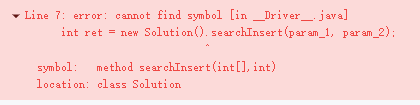
C++ Primer Program in VsCode error: no match for call to ‘(std::__cxx11::string…)

In the original file, total. Isbn() = = trans. Isbn() will report an error in vscode, “unable to match the call error”
compile. CPP: 12:37: error: no match for call to ‘(STD:: _cxx11:: String
{aka STD:: _cxx11:: basic_string}) ()’
if (total. Isbn() = = trans. Isbn())
solution: remove the brackets after. Isbn() and change the primitive sentence to

if (total.isbn==trans.isbn)

The reason is that ISBN should be a parameter value rather than a method, or it may be caused by my environment. It is for reference only.

#include <iostream>

#include"Sales_item.h"
int main(){
   Sales_item total;
   if (std::cin>>total)
   {Sales_item trans;
   while (std::cin>>trans)
   {
       if (total.isbn()==trans.isbn())
            total+=trans;
        else
        {
       std::cout<<total<<std::endl;
       total=trans;
        }
   
     
   }
   
    std::cout<<total<<std::endl;
   }
   else{
       std::cerr<<"NO Data?!"<<std::endl;
       return -1;
   }
   return 0;
    
}
Tensorflow Run Error or the interface is stuck or report error: Could not create cudnn handle: CUDNN_STATUS_INTERNAL_ERROR

When running the more complex deep learning model of tessorflow, it is easy to get stuck in the interface
if it is a single graphics card (there is f at the end of the CPU model), you can install OpenGL and restart it before running the code
if course not create cudnn handle: cudnn appears_STATUS_INTERNAL_Error is reported, which is caused by insufficient video memory. Add

#Used to limit the use of video memory
config = tf.compat.v1.ConfigProto(gpu_options=tf.compat.v1.GPUOptions(allow_growth=True))
sess = tf.compat.v1.Session(config=config)
###############

The problem can be solved

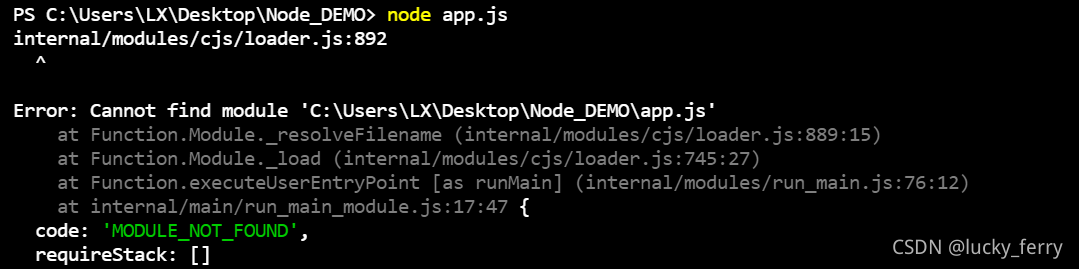
[Solved] internal/modules/cjs/loader.js:892 ^Error: Cannot find module ‘C:\Users\LX\Desktop\Node_DEMO\a

When I first started learning node.js, I reported an error at the beginning and my mentality collapsed

———————————————————————————–

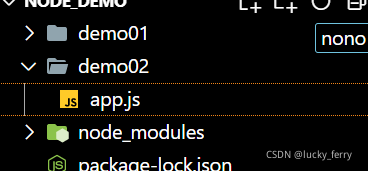
I create a folder node on my desktop_ Demo, my xx.js file is in node_ demo> demo2> app.js

In vscode, I directly Ctrl + ` (backquote) to open the terminal, but the following error occurs

Look at the path carefully and find that it is wrong. My app.js should be in demo2. Maybe this shortcut does not open the target file….

Therefore, click JS file in the left directory, right-click and select open to open it in the integration terminal~~

Successful problem solving is tiring~~~~

[Solved] Docker Error: SyntaxError: Non-ASCII character ‘\xe5‘ in file xxx

Problem description

Use the following docker command to temporarily run the image: (XXX is a python file)

sudo docker run -it --rm -p 8888:8888 xxx

report errors:

SyntaxError: Non-ASCII character '\xe5' in file xxx on line 1, but no encoding declared; see http://python.org/dev/peps/pep-0263/ for details

Cause analysis

Unsupported character sets may be included when packaging docker images.

Solution

In the first line of dockerfile, add:

ENV LANG C.UTF-8

Robo3T Remote Connect MongoDB Error: Failed to refresh ‘Collections‘. Error: ListCollections failed

First, set up the remote connection of Mongo server:

vim  /usr/local/mongodb/etc/mongodb.conf

Note out:

bindIp: 127.0.0.1  # Listen to local interface only, comment to listen on all interfaces.

The binding IP is 127.0.0.1 by default. Only local connections are allowed

bind_ip = 0.0.0.0

Restart Mongo remote connection:

service mongod restart

Robo3T reports error connecting to remote MongoDB: Failed to refresh ‘Collections’. Error: ListCollections failed:
Possible version issue.
Robo 3T 1.4 -> MongoDB 4.2
Robo 3T 1.3 -> MongoDB 4.0
Robo 3T 1.1 -> MongoDB 3.4
Robo 3T 0.9 -> MongoDB 3.2
Robo 3T 0.8.x -> MongoDB 2.4.0
Download the corresponding version.
https://github.com/Studio3T/robomongo/releases/tag/v1.3.1

[Solved] ibatis.builder.BuilderException: Error parsing Mapper XML: Could not resolve type alias ‘XXX‘

Error: org.apache.ibatis.builder.BuilderException: Error parsing Mapper XML. : Could not resolve type alias ‘XXX’.

Error Message:
org.apache.ibatis.builder.BuilderException: Error parsing Mapper XML. The XML location is ‘com/huangmy3/community/dao/DiscussPostDao.xml’. Cause: org.apache.ibatis.builder.BuilderException: Error resolving class. Cause: org.apache.ibatis.type.TypeException: Could not resolve type alias ‘DiscussPost’. Cause: java.lang.ClassNotFoundException: Cannot find class: DiscussPost

Error reported means.
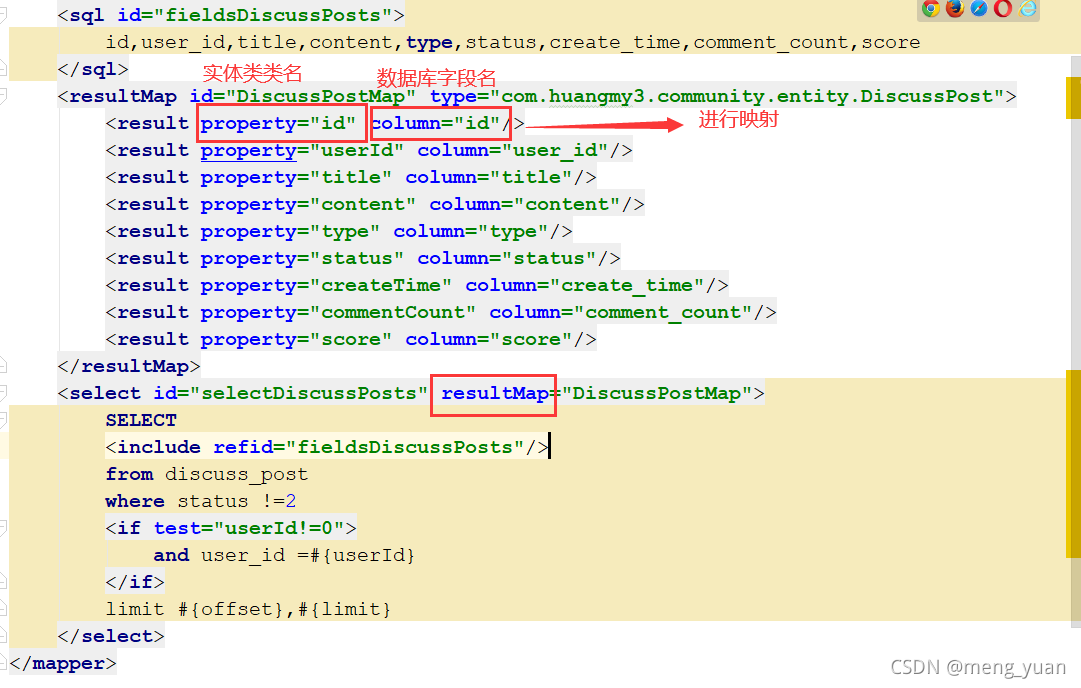
Binding exception, the type (DiscussPostMap entity class) could not be found
The reason is: The return type of the entity class should be resultMap

修改后:

MacTex Font Missing Error: The font “TeX Gyre Termes Math“ cannot be found.

Problem: the font “tex gyre termes math” cannot be found after the installation configuration is completed

\setmathfont{TeX Gyre Termes Math}

Software: mactex + sublime text

Cause: the Mac OS system lacks tex gyre termes math font

Solution:

1. Download font package

get into http://www.gust.org.pl/projects/e-foundry Download, find tex gyre termes math from the font bar on the left and download:

2. Install font

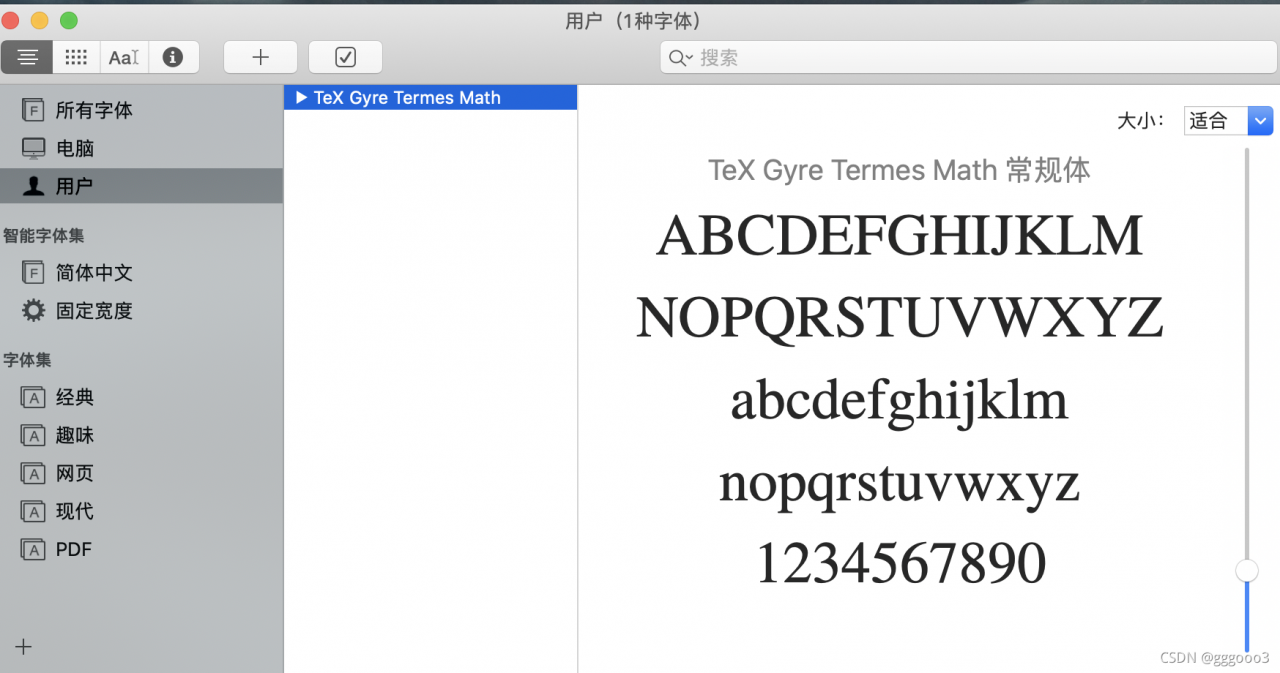
After decompression, there are doc and OpenType folders in the font package, and the OpenType file contains a textgyreterms-math.otf file. Double click the installation directly under the MAC system to install the system font. After successful installation, see the following figure:

For the installation process of other systems, refer to install.txt in the doc folder. After the installation is completed, it can be compiled!

[ERROR] [1632398141.557684, 290.045000]: Spawn service failed. Exiting.

When executing the gazebo startup file it appears:

[ERROR] [1632398141.557684, 290.045000]: Spawn service failed. Exiting.

[urdf_spawner-6] process has died [pid 5510, exit code 1, cmd /opt/ros/noetic/lib/gazebo_ros/spawn_model -urdf -model mrobot -param robot_description __name:=urdf_spawner __log:=/home/wyf/.ros/log/28660358-1c66-11ec-aa75-efd91e7f34ce/urdf_spawner-6.log].
log file: /home/wyf/.ros/log/28660358-1c66-11ec-aa75-efd91e7f34ce/urdf_spawner-6*.log

Solution:

source ~/catkin_ws/devel/setup.bash

Execute the launch file again

Another problem is that the model file is not added

[Solved] Rabbitmq Server Error: unable to perform an operation on node ‘rabbit@nscczzms‘. P

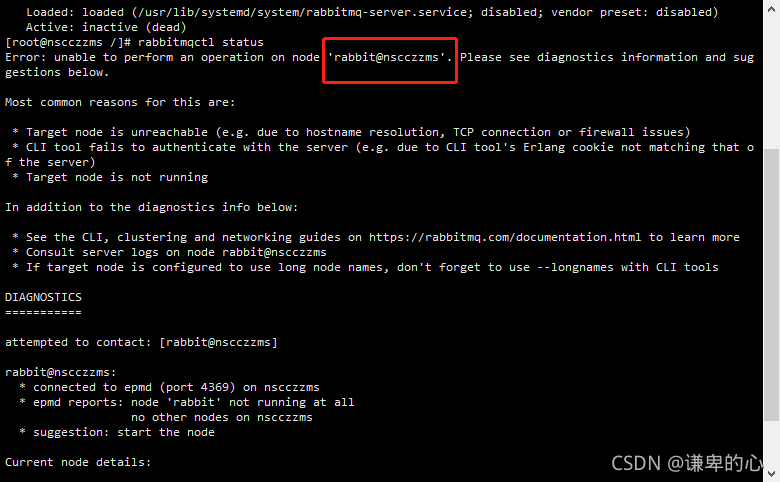
Rabbitmq server reports error: unable to perform an operation on node ‘ rabbit@nscczzms ‘. Please see diagnostics information and suggestions below

Step 1: check the rabbitmq service status:

systemctl status rabbitmq-server.service

Viewing rabbitmq error message: rabbitmqctl status

The above problem occurs: modify the hosts file CD/etc VI hosts

127.0.0.1 the name nscczzms// nscczzms must be consistent with the name circled in the picture above.

Then save and exit

Finally, restart rabbitmq: systemctl restart rabbitmq server