Category Archives: Error

[Solved] Error(22) WARNING: IPv4 forwarding is disabled. Networking will not work.

Question

The following warning is given when docker runs the container ⚠️:

WARNING: IPv4 forwarding is disabled. Networking will not work.

Solution:

# modify configuration
echo "net.ipv4.ip_forward=1" >> /etc/sysctl.conf

# restart network
systemctl restart network

# Check
sysctl net.ipv4.ip_forward
# net.ipv4.ip_forward = 1

# restart docker
systemctl restart docker

Then restart the container ^_^

Android Error: Android resource linking failed [How to Solve]

Problems encountered during compilation during development:

Android resource linking failed

Output:  error: resource style/Theme.AppCompat.Light.DarkActionBar (aka com.hp.sortfilebysize:style/Theme.AppCompat.Light.DarkActionBar) not found.

E:\ASWorkSpace\SortFileBySize\app\build\intermediates\incremental\mergeDebugResources\merged.dir\values\values.xml:9: error: style attribute 'attr/colorPrimary (aka com.hp.sortfilebysize:attr/colorPrimary)' not found.

E:\ASWorkSpace\SortFileBySize\app\build\intermediates\incremental\mergeDebugResources\merged.dir\values\values.xml:10: error: style attribute 'attr/colorPrimaryDark (aka com.hp.sortfilebysize:attr/colorPrimaryDark)' not found.

E:\ASWorkSpace\SortFileBySize\app\build\intermediates\incremental\mergeDebugResources\merged.dir\values\values.xml:11: error: style attribute 'attr/colorAccent (aka com.hp.sortfilebysize:attr/colorAccent)' not found.

error: failed linking references.

Command: C:\Users\tangdekun\.gradle\caches\transforms-1\files-1.1\aapt2-3.2.0-beta03-4818971-windows.jar\868db5e9c484c628dee78cdbe6877651\aapt2-3.2.0-beta03-4818971-windows\aapt2.exe link -I\

        N:\ProgramFiles\android\sdk\platforms\android-28\android.jar\

        --manifest\

        E:\ASWorkSpace\SortFileBySize\app\build\intermediates\merged_manifests\debug\processDebugManifest\merged\AndroidManifest.xml\

        -o\

        E:\ASWorkSpace\SortFileBySize\app\build\intermediates\processed_res\debug\processDebugResources\out\resources-debug.ap_\

        -R\

        @E:\ASWorkSpace\SortFileBySize\app\build\intermediates\incremental\processDebugResources\resources-list-for-resources-debug.ap_.txt\

        --auto-add-overlay\

        --java\

        E:\ASWorkSpace\SortFileBySize\app\build\generated\not_namespaced_r_class_sources\debug\processDebugResources\r\

        --custom-package\

        com.hp.sortfilebysize\

        -0\

        apk\

        --output-text-symbols\

        E:\ASWorkSpace\SortFileBySize\app\build\intermediates\symbols\debug\R.txt\

        --no-version-vectors

For errors like this, you have tried to add “implementation ‘Android x.appcompat: appcompat: 1.0.0-alpha1’, but it still fails. You can try the following method to solve it

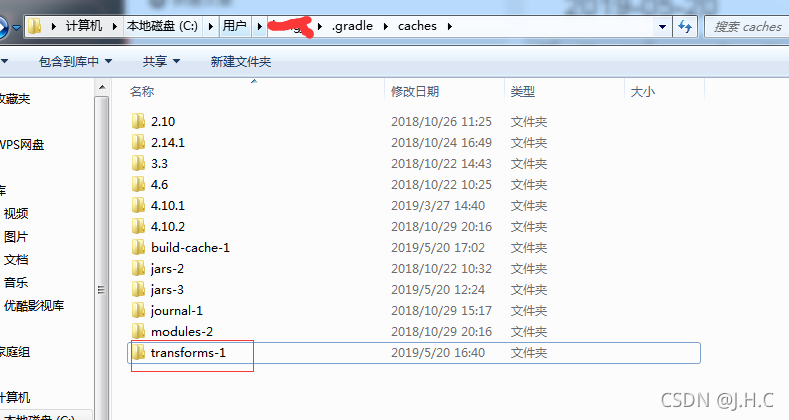
Enter caches under. Gradle

Delete transform-1 and restart Android studio (file → invalidate caches/restart → invalidate caches and restart)

How to Solve Error in importing scala word2vecmodel

import org.apache.spark.mllib.feature.{Word2Vec, Word2VecModel}
import org.apache.spark.sql.{DataFrame, Row, SparkSession}
model save:
Link: http://spark.apache.org/docs/2.3.4/api/scala/index.html#org.apache.spark.mllib.feature.Word2VecModel

var model = Word2VecModel.load(spark.sparkContext, config.model_path)

model read:
Link: http://spark.apache.org/docs/2.3.4/api/scala/index.html#org.apache.spark.mllib.feature.Word2VecModel$

var model = Word2VecModel.load(spark.sparkContext, config.model_path)

Read Error:

Exception in thread "main" java.lang.IllegalAccessError: tried to access method com.google.common.base.Stopwatch.<init>()V from class org.apache.hadoop.mapred.FileInputFormat
	at org.apache.hadoop.mapred.FileInputFormat.getSplits(FileInputFormat.java:312)
	at org.apache.spark.rdd.HadoopRDD.getPartitions(HadoopRDD.scala:200)
	at org.apache.spark.rdd.RDD$$anonfun$partitions$2.apply(RDD.scala:253)
	at org.apache.spark.rdd.RDD$$anonfun$partitions$2.apply(RDD.scala:251)
	at scala.Option.getOrElse(Option.scala:121)
	at org.apache.spark.rdd.RDD.partitions(RDD.scala:251)
	at org.apache.spark.rdd.MapPartitionsRDD.getPartitions(MapPartitionsRDD.scala:35)
	at org.apache.spark.rdd.RDD$$anonfun$partitions$2.apply(RDD.scala:253)
	at org.apache.spark.rdd.RDD$$anonfun$partitions$2.apply(RDD.scala:251)
	at scala.Option.getOrElse(Option.scala:121)
	at org.apache.spark.rdd.RDD.partitions(RDD.scala:251)
	at org.apache.spark.rdd.RDD$$anonfun$take$1.apply(RDD.scala:1337)
	at org.apache.spark.rdd.RDDOperationScope$.withScope(RDDOperationScope.scala:151)
	at org.apache.spark.rdd.RDDOperationScope$.withScope(RDDOperationScope.scala:112)
	at org.apache.spark.rdd.RDD.withScope(RDD.scala:363)
	at org.apache.spark.rdd.RDD.take(RDD.scala:1331)
	at org.apache.spark.rdd.RDD$$anonfun$first$1.apply(RDD.scala:1372)
	at org.apache.spark.rdd.RDDOperationScope$.withScope(RDDOperationScope.scala:151)
	at org.apache.spark.rdd.RDDOperationScope$.withScope(RDDOperationScope.scala:112)
	at org.apache.spark.rdd.RDD.withScope(RDD.scala:363)
	at org.apache.spark.rdd.RDD.first(RDD.scala:1371)
	at org.apache.spark.mllib.util.Loader$.loadMetadata(modelSaveLoad.scala:129)
	at org.apache.spark.mllib.feature.Word2VecModel$.load(Word2Vec.scala:699)
	at job.ml.embeddingModel.graphEmbedding$.run(graphEmbedding.scala:40)
	at job.ml.embeddingModel.graphEmbedding$.main(graphEmbedding.scala:24)
	at job.ml.embeddingModel.graphEmbedding.main(graphEmbedding.scala)
	

POM file add

    <dependency>
      <groupId>com.google.guava</groupId>
      <artifactId>guava</artifactId>
      <version>15.0</version>
    </dependency>

Run OK again!
Project startup error: outofmemoryerror [How to Solve]

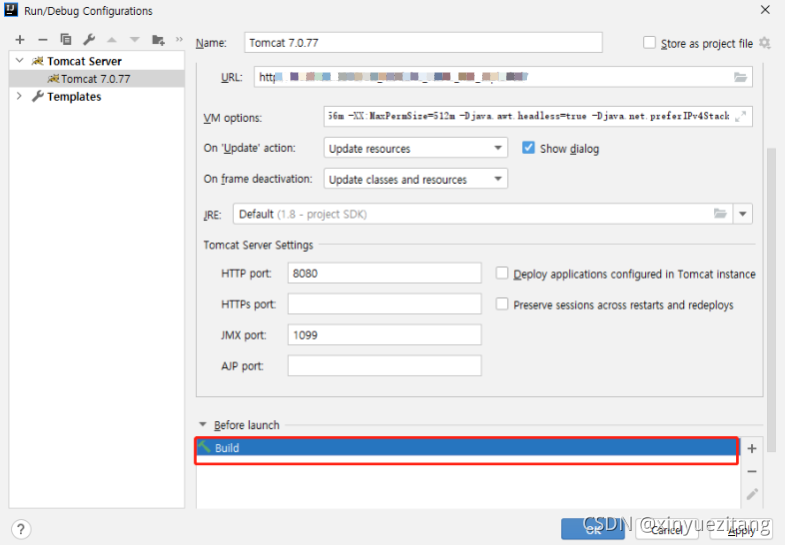
1. check tomcat settings, whether the start is set at the same time build, if so, to remove
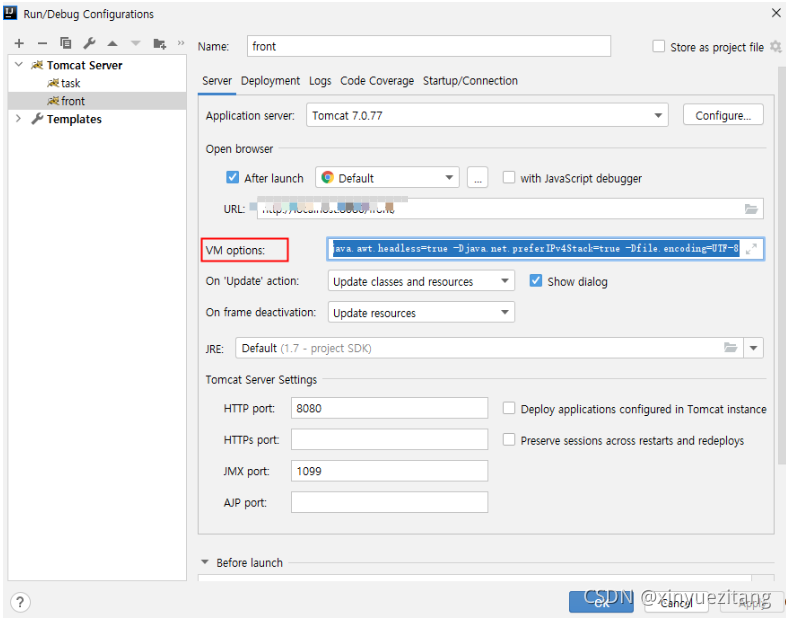
2.  configurate tomcat的vm option

-server -Xms512m -Xmx2048m -XX:PermSize=64M -XX:MaxNewSize=256m -XX:MaxPermSize=512m -Djava.awt.headless=true -Djava.net.preferIPv4Stack=true -Dfile.encoding=UTF-8

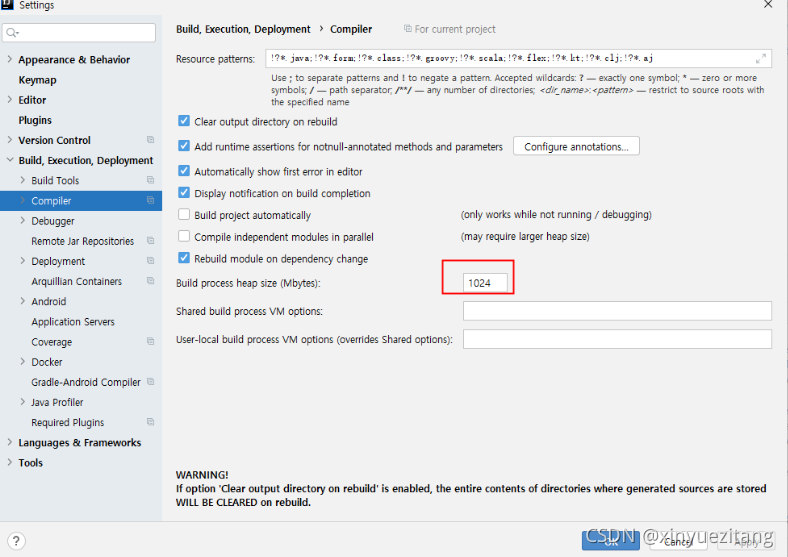
3 Set the compile size
Settings -> Build, Execution, Deployment -> Complier -> Build process heap size VM options

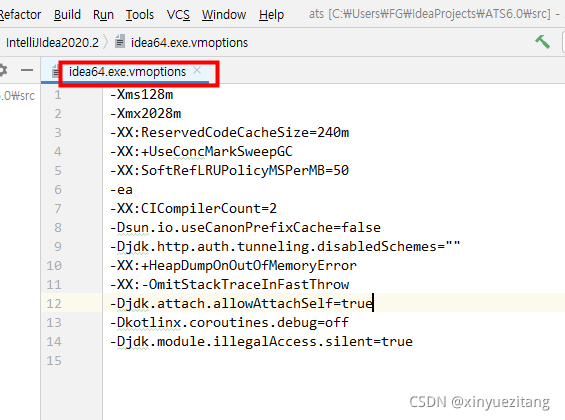
4 Check the VMs that come with Idea
Help – >Edit  Custom VM Options

How to Solve Sqlyog error 2058

Sqlyog configures a new connection and reports an error: the error number is 2058. It is analyzed that the MySQL password encryption method has changed
solution:
alter user ‘root’ @ ‘localhost’ identified with MySQL_ native_ password BY ‘password’; (note the semicolon)
#password is the root password you set yourself

after reconfiguring the connection of sqlyog, the connection is successful and it is OK.

[Solved] java.lang.noclassdeffounderror when idea runs Flink: org/Apache/flick/API/common/executionconfig

Solution:
change provided to compile ,for example:

		<dependency>
			<groupId>org.apache.flink</groupId>
			<artifactId>flink-java</artifactId>
			<version>${flink.version}</version>
			<scope>compile</scope>
		</dependency>
		<dependency>
			<groupId>org.apache.flink</groupId>
			<artifactId>flink-streaming-java_${scala.binary.version}</artifactId>
			<version>${flink.version}</version>
			<scope>compile</scope>
		</dependency>
		<dependency>
			<groupId>org.apache.flink</groupId>
			<artifactId>flink-clients_${scala.binary.version}</artifactId>
			<version>${flink.version}</version>
			<scope>compile</scope>
		</dependency>

Click POM. XML refresh in idea to refresh

[Solved] error: external/googletest/googletest: MODULE.TARGET.STATIC_LIBRARIES.libgtest already defined

Android9.0 System compilation error
170/978] including external/google-tv-pairing-protocol/Android.mk …
[171/978] including external/googletest/Android.mk …
build/make/core/base_rules.mk:260: error: external/googletest/googletest: MODULE.TARGET.STATIC_LIBRARIES.libgtest already defined by external/googletest/googletest.
09:42:55 ckati failed with: exit status 1
0;31m#### failed to build some targets (49 seconds) ####
The reason of the error
The compiler server has defined NDK_ROOT environment variable, which conflicts with Android compiler environment variable.
Check whether NDK_ROOT environment variable or SDK_ROOT environment variable is defined.

echo $NDK_ROOT

My compilation server defines NDK_Root environment variable, so echo $NDK_Root outputs the following path:
/xxx_NDK_Root/
indicates that the change amount is defined.

Solution:

Remove the environment variable temporarily

export NDK_ROOT=""

Continue to compile the system.