Author Archives: Robins

[Solved] Vue Error: Error in nextTick: “RangeError: Maximum call stack size exceeded“

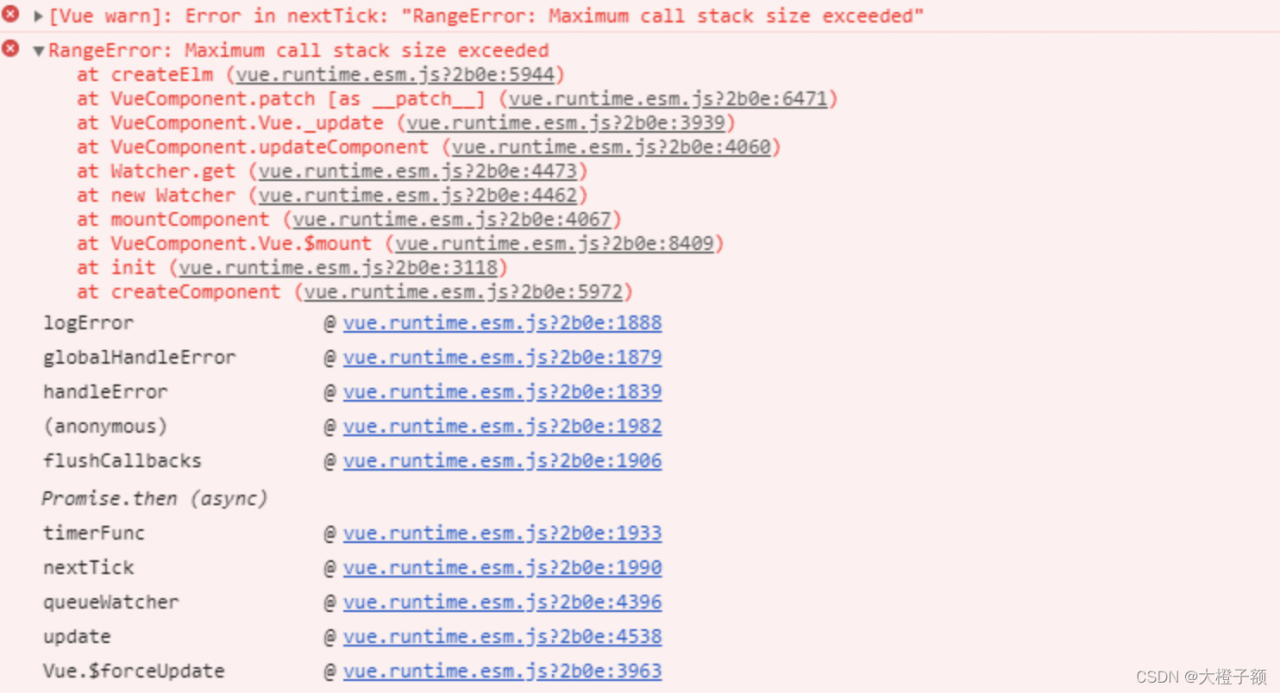
maximum call stack size exceeded

Vue item error report: error in nexttick: maximum call stack size exceeded because the names of two components are the same, correct them and solve them

Initially, this error was reported as a stack overflow, and I thought there was a circular reference inside the code, and after checking all the methods, there was no circular call.
Later found that the error was reported after the introduction of a component, checked all the code in the component is fine, the use of the component alone in the route will not report an error, the introduction of the error will be reported. After checking, I found that the name of the two components was duplicated and the page was displayed normally after correcting it

export default {
  name: 'Chart'
}

[Solved] Model training Error: _pickle.PicklingError: Can’t pickle

How to Solve Model training Error: _pickle.Picklingerror: can’t pickle


1. Problem description

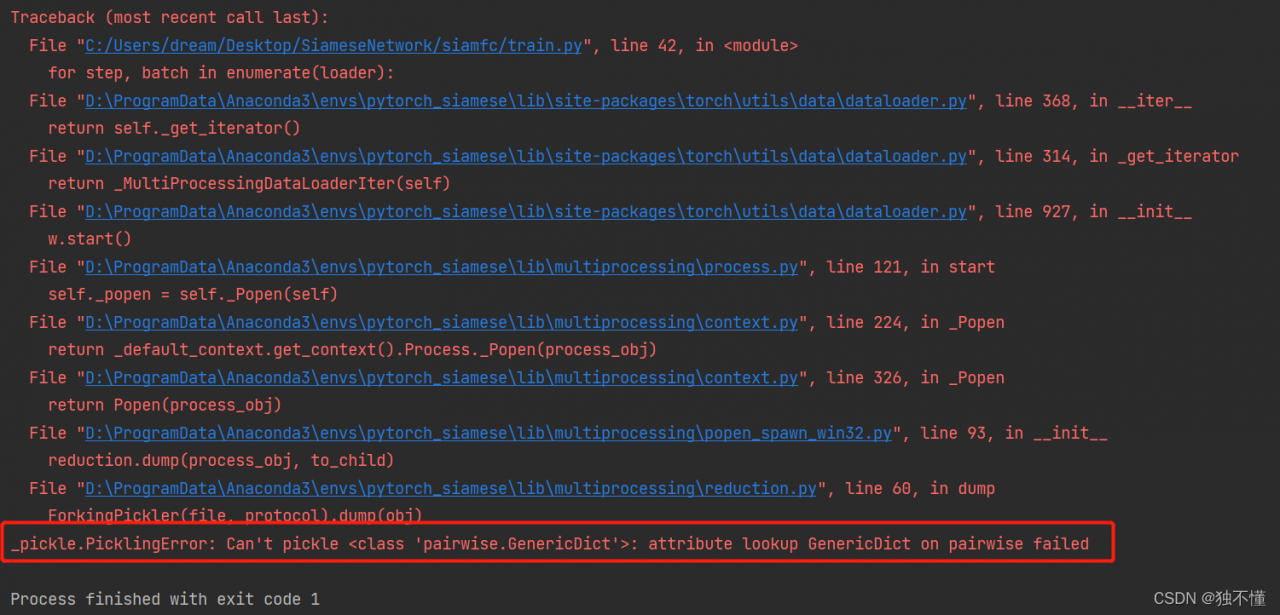
Recently, when learning the target tracking model of siamfc model, it is found that the following problems always occur during model training on window platform:

_pickle.PicklingError: Can’t pickle <class ‘pairwise.GenericDict’>: attribute lookup GenericDict on pairwise failed

See the following figure for details:

2. Solution

The main problem is that the code is written on Linux platform, test.py has no problem in actual operation, but train.py has problem in window platform, the main problem is on Dataloader, so we can modify this part of the code. The main problem lies in the Dataloader, so we can modify this part of the code. Or we can directly train and test the model under Linux with the source code.

The solution to this problem on Window platform is as follows:

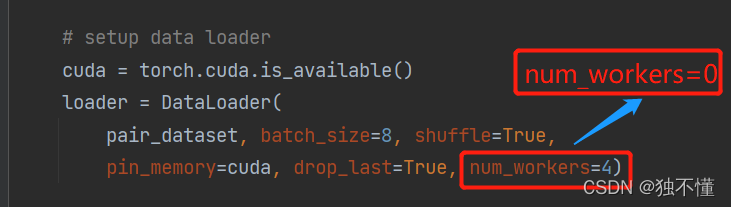
Modify the original code from num_workers = 4 to num_workers = 0 and it will work as follows.

after the modification is completed, the operation effect is as follows:

[Solved] MybatisPlus Error: Error querying database. Cause: java.lang.IndexOutOfBoundsException

Cause: java.lang.IndexOutOfBoundsException” error when testing after using mybatisplus to generate code changes.

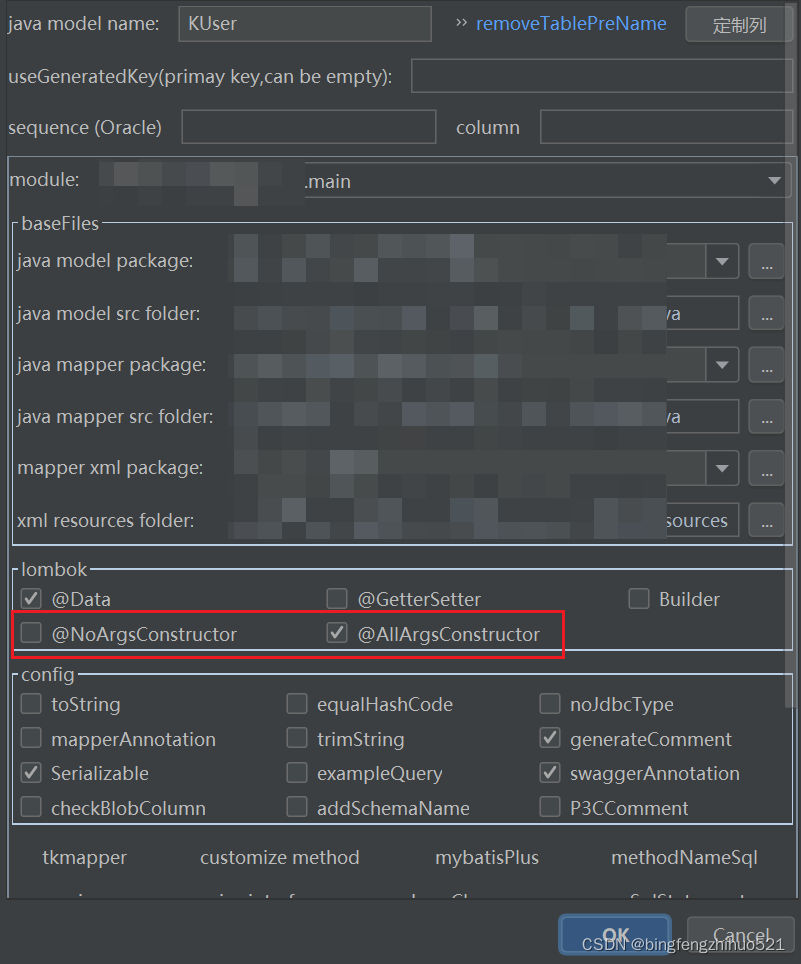
Using mybatis-plus code generation tool `@AllArgsConstructor` is not checked `@NoArgsConstructor` lombok annotation; in the resultSet session, can not find the appropriate object generation method to generate an exception, here for the record to find.

[Solved] Error occurred when finalizing GeneratorDataset iterator: Failed precondition: Python interpreter st

When using tensorflow.keras, this error is often reported during model training:

tensorflow/core/kernels/data/generator_dataset_op.cc:107] Error occurred when finalizing GeneratorDataset iterator: Failed precondition: Python interpreter state is not initialized. The process may be terminated.
	 [[{{node PyFunc}}]]
tensorflow/core/kernels/data/generator_dataset_op.cc:107] Error occurred when finalizing GeneratorDataset iterator: Failed precondition: Python interpreter state is not initialized. The process may be terminated.

       [[{{node PyFunc}}]]


According to my own experience, there are several reasons for this errory:

1. The input image_size and input_shape does not match or is not defined when the model is built. Note that the input_shape must be defined when defining the first layer of the convolutional layer, e.g.

    model = keras.models.Sequential([
        # Input image [None,224,224,3]
        # Convolution layer 1: 32 5*5*3 filters, step size set to 1, fill set to same
        # Output [None,32,32,3]
        keras.layers.Conv2D(32, kernel_size=5, strides=1, padding='same', data_format='channels_last',
                            activation='relu', input_shape=(224, 224, 3)),

2. There is also train_generator and validate_generator related parameters must be consistent, such as batch_size, target_size, class_mode, etc.

3. The configuration limit itself, try to change the batch_size to a smaller size, or even to 1

4. The last program did not finish completely, finish all python programs to see.

[Solved] leetcode Common Error: :runtime error: member access within misaligned address 0xbebebebebebebebe for type ‘str

Common mistakes of brush force buckle:

runtime error: member access within misaligned address 0xbebebebebebebebe for type ‘struct TreeNode’, which requires 8 byte alignment [TreeNode.c]
0xbebebebebebebebe: note: pointer points here



cause:
when we access a variable, it contains an unassigned pointer. Pointers that are defined but not assigned are called wild pointers. The direction of the wild pointer is unknown, which has unknown consequences for the program, and the citation is a big problem. Therefore, C language strictly opposes the wild pointer.

In this topic, use

TreeNode* root = (TreeNode*)malloc(sizeof(TreeNode));

The root->left and root->right pointers are not assigned initial values or set to NULL, resulting in an error when assigning values to left and right later.

This can be solved by adding two statements.

TreeNode* root = (TreeNode*)malloc(sizeof(TreeNode));
root->left = NULL;	// Here's the problem!!! A null pointer without an assignment must be set to NULL
root->right = NULL;	// 

This is the correct code:

/**
 * Definition for a binary tree node.
 * struct TreeNode {
 *     int val;
 *     struct TreeNode *left;
 *     struct TreeNode *right;
 * };
 */

typedef struct TreeNode TreeNode;


TreeNode* CreatTree(int* preorder,int* inorder,int l1,int r1,int l2,int r2){
    if(l1 > r1 || l2 > r2){      // Return NULL
        printf("%d",1);
        return NULL;
    }
    TreeNode* root = (TreeNode*)malloc(sizeof(TreeNode));
    root->left = NULL;	// Here's the problem!!! A null pointer without an assignment must be set to NULL
    root->right = NULL;	// 
    int i;
    root->val = preorder[l1];
    
    for(i=l2;inorder[i]!=root->val;i++);
    int lLen = i - l2;
    int rLen = r2 - i;
    if(lLen > 0){
        root->left = CreatTree(preorder,inorder,l1+1,l1+lLen,l2,l2+lLen-1);
    }
    
    if(rLen > 0){
        root->right = CreatTree(preorder,inorder,r1-rLen+1,r1,r2-rLen+1,r2);
    }
    return root;

}


struct TreeNode* buildTree(int* preorder, int preorderSize, int* inorder, int inorderSize){
    TreeNode* root = CreatTree(preorder,inorder,0,preorderSize-1,0,inorderSize-1);
    return root;
}
[Solved] xxl-job Error: xxl-rpc remoting error(connect timed out)

Unable to register due to connection using local network.


Error reporting information:

address:  http://192.168.x.xxx:9999/ code: 500 msg: xxl-rpc remoting error(connect timed out), for url: http://192.168.x.xxx:9999/run


Solution:

1. Change automatic registration to manual registration
2. Use intranet penetration tool
3. Fill in the manually registered address as the address of Intranet penetration

[Solved] urllib.error.URLError: <urlopen error [SSL: WRONG_VERSION_NUMBER] wrong version number

There are totally four methods to solve this error


Solution:
Method 1: the SSL certificate problem
you can open the URL with the following code

import ssl
 
# This restores the same behavior as before.
context = ssl._create_unverified_context()
response = urllib.request.urlopen("https://no-valid-cert", context=context)

https://no-valid-cert you can change it to the website you want

Method 2: Change https to http, because some versions of python verify the SSL certificate once when you urllib.urlopen an https.

Method 3: Add the following codes:

import ssl
ssl._create_default_https_context = ssl._create_unverified_context

I just add it to the py file when calling commands from the urllib library that comes with python 3.8.0

model = ALBEF(config=config, text_encoder=args.text_encoder, tokenizer=tokenizer, init_deit=True)

That is, when the model is initialized (init_deit), the error occurs when calling return self.sslsocket_class._create in lib/python3.8/http/client.py under python 3.8, but at the beginning of the py file for initializing the model Add these two lines and you’ll be fine

Method 4:
Upgrade your python interpreter version, e.g. 2.7 or 3.7 to 3.8 or even 3.9

[Solved] AttributeError: ‘_IncompatibleKeys‘ object has no attribute ‘parameters‘

Errors are reported when running the pytorch program. It should be a problem with the torch syntax.

Original code:

model=CNN()#CNN as a self-compiling neural network model
best_model_wts = copy.deepcopy(model.state_dict())
*************************************#(the error codes is below)
model=model.load_state_dict(best_model_wts)

Error message:

Modified code:

model=CNN()#CNN as a self-compiling neural network model
best_model_wts = copy.deepcopy(model.state_dict())
model.load_state_dict(best_model_wts)

Python 3.7 Error: AttributeError: ‘str‘ object has no attribute ‘decode‘ [How to Solve]

Background

python 3.7.6
django 2.2

Phenomenon

Execute Python manage Error in py makemigrations:

  File "E:\software\Python3-64bit\lib\site-packages\django\db\backends\mysql\operations.py", line 146, in last_executed_query
    query = query.decode(errors='replace')
AttributeError: 'str' object has no attribute 'decode'

reason:

The reason is unknown. This problem will occur in some versions.

Solution:

Modify line 146 of {PYHTON_HOME}\lib\site-packages\django\db\backends\mysql\operations.py to change
query = query.decode(errors=’replace’) to query = query.encode(errors=’replace’)