Author Archives: Robins

[Solved] IP Core Map Compile Error: Buffers of the same direction cannot beplaced in series.

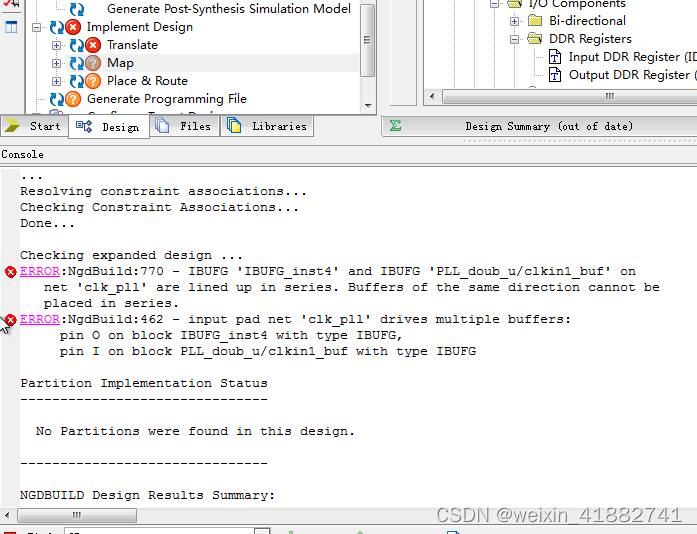
Ibufg reports an error during compilation

ERROR :;NgdBuild:770 - IBUFG ‘IBUFG_inst4’ and IBUFG ‘PLL_doub_u/clkin1_buf’ on
net ‘clk_pll’ are lined up in series. Buffers of the same direction cannot beplaced in series.
ERROR:NgdBuild:462 - input pad net ‘clk pll’ drives multiple buffers:
pin o on block IBUFG_inst4 with type IBUFG,
pin I on block PLL_doub_u/ clkin1_buf with type IBUEG.


Ibufg error analysis

The first error says that the buffer has the same point
The second error refers to multiple buffer conflicts on the clock pin clk_pll that I have defined.

map compilation failed

Solution:

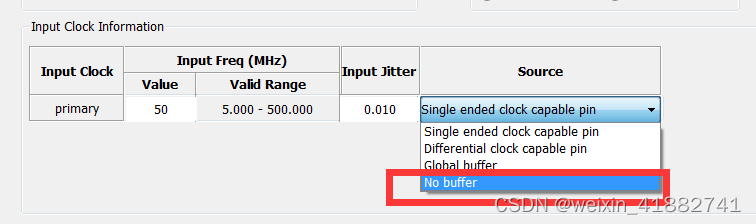
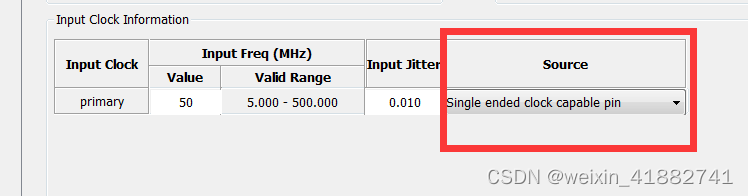
This error is caused by adding buffer to the input clock source in the IP core of PLL


after modifying to no buffer, we can use our global ibufg

[Solved] Project Startup Error: Redis health check failed:Unable to connect to localhost6379

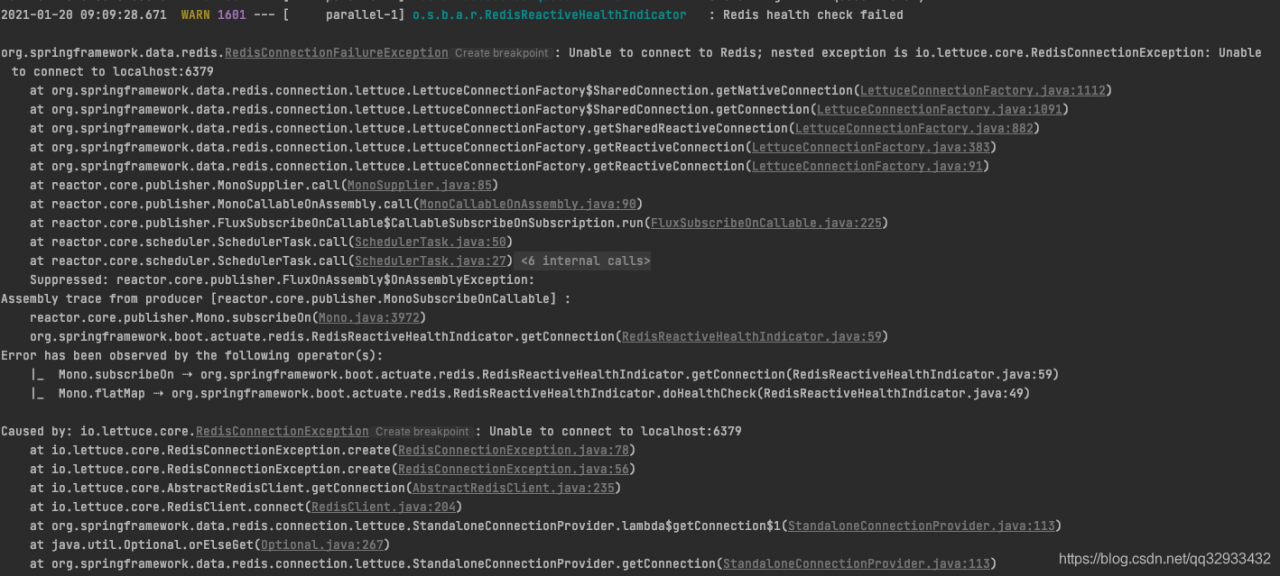
Error reporting details

Analysis and solution

There is no connection of Redis in my project, so it’s strange to report an error. Combined with the sentence redis health check failed , I guess maybe someone introduced Redis, and then do the health check of redis.

Solution: Configurate as below in application.yml:

# Disable Actuator Monitoring of Redis Connections
management:
  health:
    redis:
      enabled: false

[Soled] MTPuTTY error: unable to run putty the system cannot find the specified file

Problem Description:

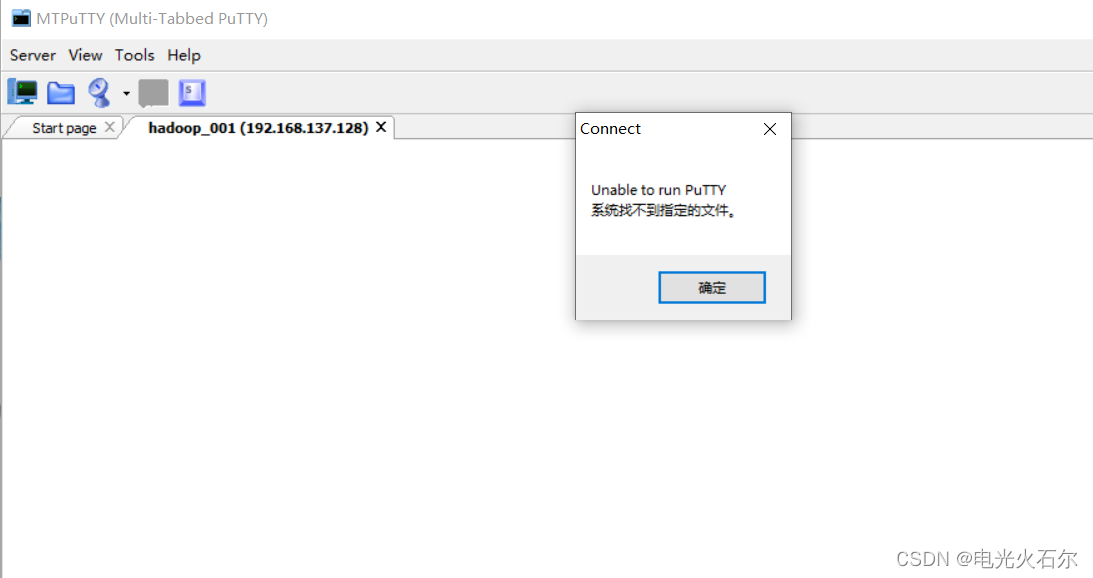
After moving the putty path a few days ago, an error is encountered when opening mtputty: unable to run putty. The system cannot find the specified file

It’s obviously a putty file path problem

Solution:

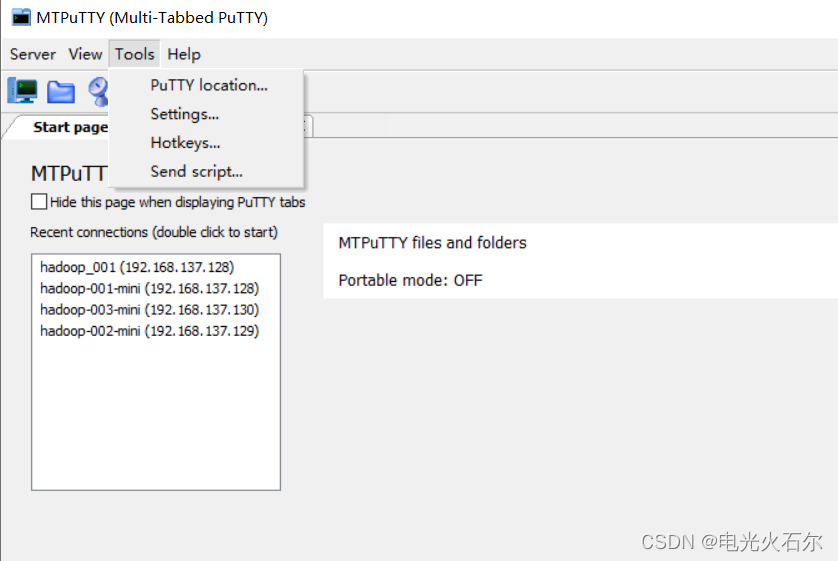
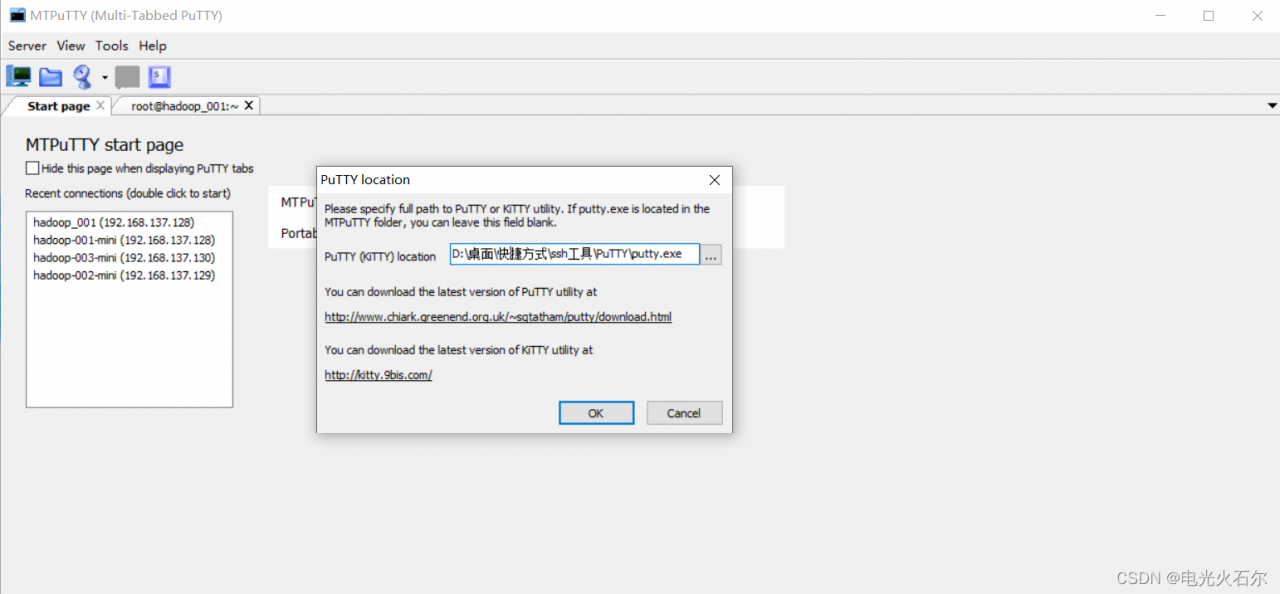
Upper left corner tools -> PuTTY location…

Modify the path where putty is located

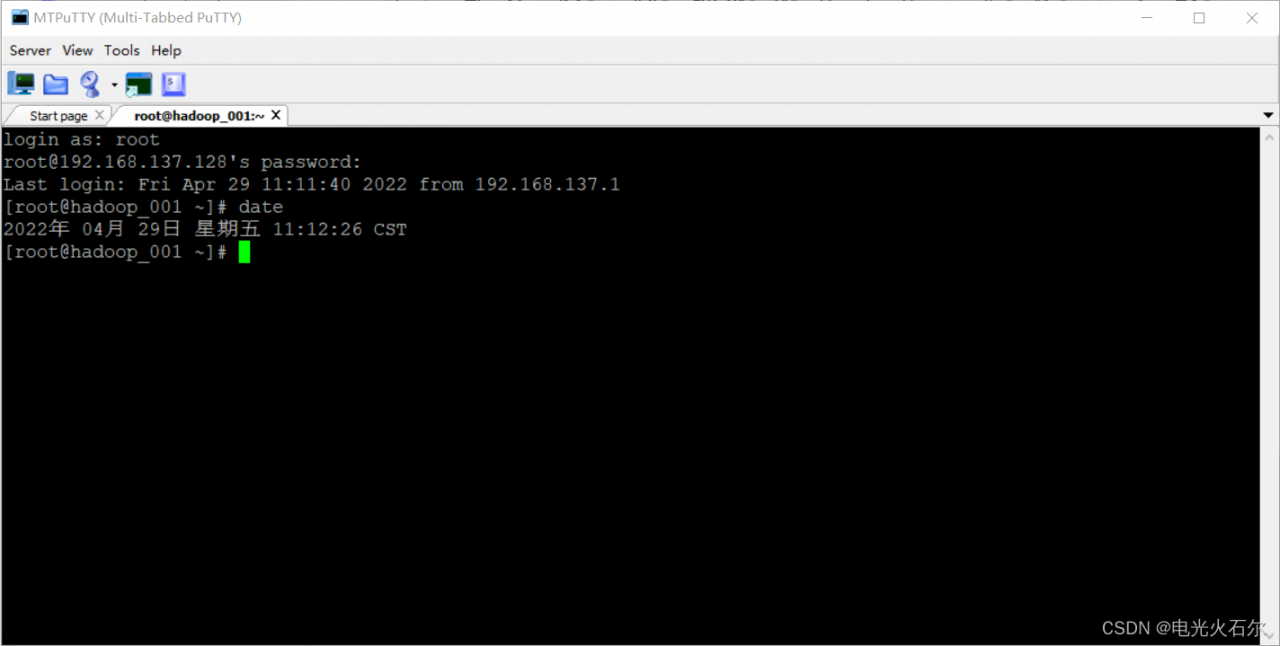
So far, the connection is successful and the problem is solved.

Record problems and solve them.

[Solved] error: db5 error(11) from dbenv->open: Resource temporarily unavailable

Error: 
CentOS7 use yum to install program Error:

error: db5 error(11) from dbenv->open: Resource temporarily unavailable
error: cannot open Packages index using db5 - Resource temporarily unavailable (11)
error: cannot open Packages database in /var/lib/rpm
CRITICAL:yum.main:
Error: rpmdb open failed


Solution:
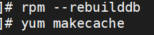
#rpm –rebuilddb
# yum makecache
It will be OK!

[Solved] Android studio Start Error: internal error

1. Fault

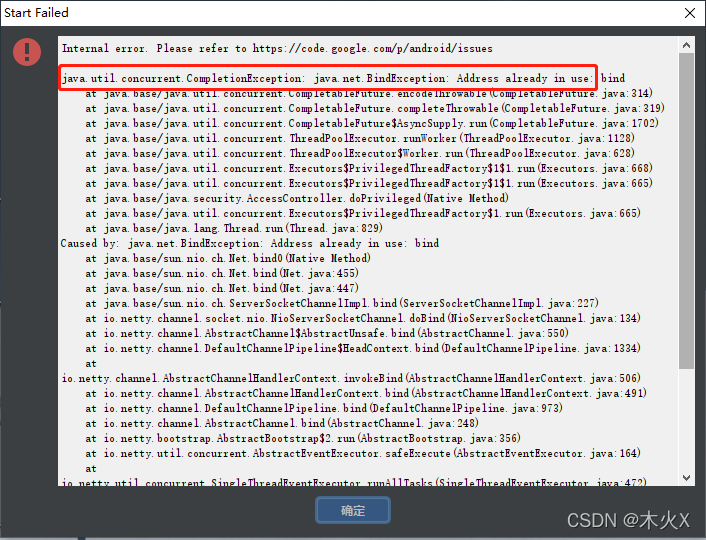
Android studio start error: internal error
java.util.concurrent.CompletionException: java.net.BindException: Address already in use
the IDE cannot be opened due to such an error
2. General solutions

According to the analysis of many people, it is necessary to use Netsh Winsock reset on CMD to reset the network:

netsh winsock reset

If you restart your computer and open Android Studio again, you can open it successfully if you open it immediately, but if you open Android Studio after a while after your computer restarts, you may still report an error and cannot open it. There is also a possibility that if you open it this time, you will not be able to open it again next time.

So this solution does not work.

On the Internet, there are also those who turn off the firewall, and add a line of code disable.android.first.run=true at the end of Android Studio\bin\idea.properties in the installation directory, but they are not reliable.

Uninstall Android Studio and reinstall it.


3. The ultimate solution
Android Studio will start the server on the local host for internal processes and try to bind on any port between 6942 and 6991. And the computer Hyper-V will reserve many ports, once the ports 6942~6991 are in reserved state, Android Studio cannot be opened (report java.util.concurrent.CompletionException: java.net: Address already in use error).

Check the reserved port using the command.

netsh int ipv4 show excludedportrange protocol=tcp
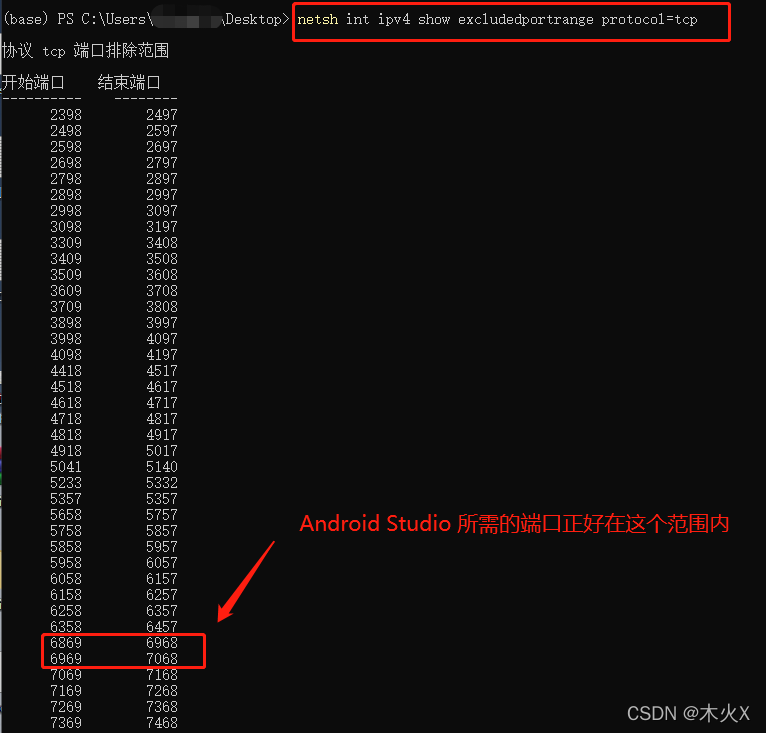
Solution: exclude the port range we need and don’t let Hyper-V keep it

Restart the computer, open CMD with administrator authority, and enter the following instructions:

netsh int ip add excludedportrange protocol=tcp startport=6942 numberofports=50
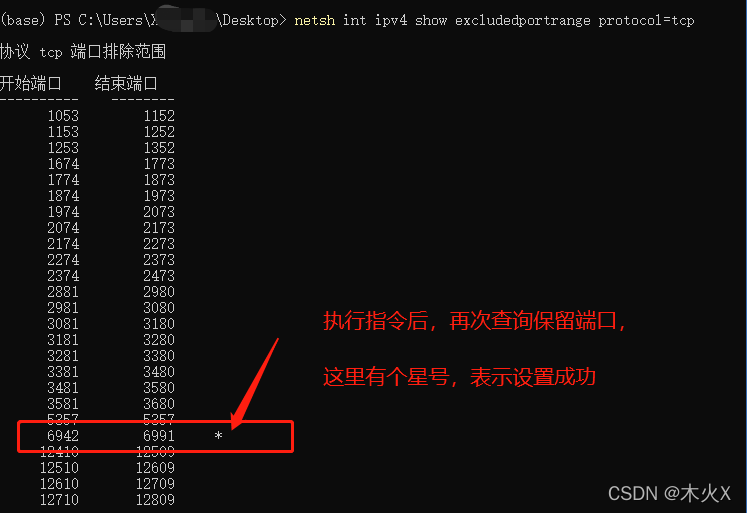
It’s that simple. If you solve the problem, there will be no problem that Android studio can’t open and report errors in the future.

Such errors may occur when using the above instructions:

This is because, after restarting the computer, the commands are entered too slowly and are taken up by Hyper-V before they have a chance to be executed. Remember to be fast.
Or, go to the BIOS to turn Hyper-V off, then start the computer, slowly enter the above instructions, and when the instructions are finished, go to the BIOS to turn on Hyper-V
[Solved] headless pyrender offscreen render Error: OpenGL.error.GLError: GLError(err = 12296,

Error description

When running vibe, the CentOS server without display is used. When using pyrender for off screen rendering, errors are reported OpenGL.error.GLError: GLError(err = 12296), as follows:

Traceback (most recent call last):
  File "demo.py", line 416, in <module>
    main(args)
  File "demo.py", line 278, in main
    renderer = Renderer(resolution=(orig_width, orig_height), orig_img=True, wireframe=args.wireframe)
  File "***/VIBE/lib/utils/renderer.py", line 60, in __init__
    point_size=1.0
  File "***/anaconda3/envs/vibe-env/lib/python3.7/site-packages/pyrender/offscreen.py", line 31, in __init__
    self._create()
  File "***/anaconda3/envs/vibe-env/lib/python3.7/site-packages/pyrender/offscreen.py", line 134, in _create
    self._platform.init_context()
  File "***/anaconda3/envs/vibe-env/lib/python3.7/site-packages/pyrender/platforms/egl.py", line 177, in init_context
    assert eglInitialize(self._egl_display, major, minor)
  File "***/anaconda3/envs/vibe-env/lib/python3.7/site-packages/OpenGL/platform/baseplatform.py", line 409, in __call__
    return self( *args, **named )
  File "***/anaconda3/envs/vibe-env/lib/python3.7/site-packages/OpenGL/error.py", line 232, in glCheckError
    baseOperation = baseOperation,
OpenGL.error.GLError: GLError(
        err = 12296,
        baseOperation = eglInitialize,
        cArguments = (
                <OpenGL._opaque.EGLDisplay_pointer object at 0x7f883a03a170>,
                c_long(0),
                c_long(0),
        ),
        result = 0
)

Solution

Ubuntu: https://pyrender.readthedocs.io/en/latest/install/index.html#installmesa Use OSMesa to offscreen render.

It is more convenient to use · CONDA · to install osmesa as follows:

conda install osmesa

Note: after installing osmesa, reinstall pyopengl, otherwise an error will still be reported, as follows:

pip uninstall pyopengl
git clone https://github.com/mmatl/pyopengl.git
pip install ./pyopengl

Specify PYOPENGL_PLATFORM before running the scriptis osmesa , as follows:

# demp.py
import os
# os.environ['PYOPENGL_PLATFORM'] = 'egl'
os.environ['PYOPENGL_PLATFORM'] = 'osmesa'

Note: os.environ[‘PYOPENGL_PLATFORM’] = ‘osmesa’ should ideally follow import os to ensure that PYOPENGL_PLATFORM is changed to osmesa before using render, or you can explicitly specify os.environ before using render specifically [‘PYOPENGL_PLATFORM’] = ‘osmesa’.

[Solved] ninja: error: build.ninja:1802: multiple rules generate Debug/xxx.exe [-w dupbuild=err]

Error Messages:

— Configuring done
— Generating done
CMake Error:
Running    ‘D:/Qt/Tools/Ninja/ninja.exe’ ‘-C’ ‘D:/code/build-EFR-linux247-Debug’ ‘-t’ ‘recompact’   failed with:    ninja: error: build.ninja:1802: multiple rules generate Debug/xxx.exe [-w dupbuild=err]

Cause:
Duplicate multiple targets
CMAKE If the specified target is the same as the target path automatically generated by qt, this problem will occur
Solution:
Modify the target path

[Solved] MongoDB Error: Command failed with error 251 (NoSuchTransaction)

Recently, I encountered an online bug. Accessing a specific interface will cause occasional exceptions. After checking the log, it is found that an error is reported during the operation of mongodb. The error information is as follows:

error message: Command failed with error 251 (NoSuchTransaction): 'Given transaction number 115 does not match any in-progress transactions. The active transaction number is 114' on server xx.xx.xx.xx:xxxx. The full response is {"errorLabels": ["TransientTransactionError"], "ok": 0.0, "errmsg": "Given transaction number 115 does not match any in-progress transactions. The active transaction number is 114", "code": 251, "codeName": "NoSuchTransaction"}

Through searching and troubleshooting, the problem was located to be due to processing MongoDB operations where two requests in the same transaction are sent to the DB at the same time, with the probability of generating the following scenario.

1. request 1 and request 2 are sent to Mongo at the same time and start execution
2. Request 1 is still executing and request 2 has completed
3. Since request 1 is not yet completed, the transaction has not really started at DB level, so request 2 cannot end normally (that is why the error states that transaction id 115 cannot be found, because the transaction is not yet registered in DB), resulting in transaction rollback and throwing exceptions
4. request 1 execution is complete, but the transaction has been rolled back, the operation is invalid
Reviewing the code, we found that the reason why two requests are sent to DB at the same time is that the zipWith() method is used for data merging. The feature of this method is that it will request two data to be merged to the database at the same time, which will trigger the aforementioned problem when operating Mongo.

The solution is very simple, just use the zipWhen() method instead. zipWhen will block and wait for the first data requested to arrive before requesting the second data, which perfectly circumvents this problem.

[Solved] Error processing condition on org.springframework.boot.autoconfigure.context.PropertyPlaceholderA

The error information is as follows:

2022-04-21 17:43:26.473 ERROR [em-service,,,] 17272 --- [           main] org.springframework.boot.SpringApplication : Application run failed

java.lang.IllegalStateException: Error processing condition on org.springframework.boot.autoconfigure.context.PropertyPlaceholderAutoConfiguration.propertySourcesPlaceholderConfigurer
    at org.springframework.boot.autoconfigure.condition.SpringBootCondition.matches(SpringBootCondition.java:64)
    at org.springframework.context.annotation.ConditionEvaluator.shouldSkip(ConditionEvaluator.java:108)
    at org.springframework.context.annotation.ConfigurationClassBeanDefinitionReader.loadBeanDefinitionsForBeanMethod(ConfigurationClassBeanDefinitionReader.java:180)
    at org.springframework.context.annotation.ConfigurationClassBeanDefinitionReader.loadBeanDefinitionsForConfigurationClass(ConfigurationClassBeanDefinitionReader.java:141)
    at org.springframework.context.annotation.ConfigurationClassBeanDefinitionReader.loadBeanDefinitions(ConfigurationClassBeanDefinitionReader.java:117)
    at org.springframework.context.annotation.ConfigurationClassPostProcessor.processConfigBeanDefinitions(ConfigurationClassPostProcessor.java:328)
    at org.springframework.context.annotation.ConfigurationClassPostProcessor.postProcessBeanDefinitionRegistry(ConfigurationClassPostProcessor.java:233)
    at org.springframework.context.support.PostProcessorRegistrationDelegate.invokeBeanDefinitionRegistryPostProcessors(PostProcessorRegistrationDelegate.java:271)
    at org.springframework.context.support.PostProcessorRegistrationDelegate.invokeBeanFactoryPostProcessors(PostProcessorRegistrationDelegate.java:91)
    at org.springframework.context.support.AbstractApplicationContext.invokeBeanFactoryPostProcessors(AbstractApplicationContext.java:694)
    at org.springframework.context.support.AbstractApplicationContext.refresh(AbstractApplicationContext.java:532)
    at org.springframework.boot.web.servlet.context.ServletWebServerApplicationContext.refresh(ServletWebServerApplicationContext.java:140)
    at org.springframework.boot.SpringApplication.refresh(SpringApplication.java:762)
    at org.springframework.boot.SpringApplication.refreshContext(SpringApplication.java:398)
    at org.springframework.boot.SpringApplication.run(SpringApplication.java:330)
    at org.springframework.boot.SpringApplication.run(SpringApplication.java:1258)
    at org.springframework.boot.SpringApplication.run(SpringApplication.java:1246)
    at com.ey.fssc.em.EmApplication.main(EmApplication.java:30)
Caused by: java.lang.reflect.MalformedParameterizedTypeException: null
    at sun.reflect.generics.reflectiveObjects.ParameterizedTypeImpl.validateConstructorArguments(ParameterizedTypeImpl.java:58)
    at sun.reflect.generics.reflectiveObjects.ParameterizedTypeImpl.<init>(ParameterizedTypeImpl.java:51)
    at sun.reflect.generics.reflectiveObjects.ParameterizedTypeImpl.make(ParameterizedTypeImpl.java:92)
    at sun.reflect.generics.factory.CoreReflectionFactory.makeParameterizedType(CoreReflectionFactory.java:105)
    at sun.reflect.generics.visitor.Reifier.visitClassTypeSignature(Reifier.java:140)
    at sun.reflect.generics.tree.ClassTypeSignature.accept(ClassTypeSignature.java:49)
    at sun.reflect.generics.repository.MethodRepository.getReturnType(MethodRepository.java:68)
    at java.lang.reflect.Method.getGenericReturnType(Method.java:255)
    at org.springframework.core.MethodParameter.getGenericParameterType(MethodParameter.java:419)
    at org.springframework.core.SerializableTypeWrapper$MethodParameterTypeProvider.getType(SerializableTypeWrapper.java:317)
    at org.springframework.core.SerializableTypeWrapper.forTypeProvider(SerializableTypeWrapper.java:137)
    at org.springframework.core.ResolvableType.forType(ResolvableType.java:1384)
    at org.springframework.core.ResolvableType.forMethodParameter(ResolvableType.java:1285)
    at org.springframework.core.ResolvableType.forMethodParameter(ResolvableType.java:1251)
    at org.springframework.core.ResolvableType.forMethodReturnType(ResolvableType.java:1194)
    at org.springframework.beans.factory.support.AbstractAutowireCapableBeanFactory.getTypeForFactoryMethod(AbstractAutowireCapableBeanFactory.java:779)
    at org.springframework.beans.factory.support.AbstractAutowireCapableBeanFactory.determineTargetType(AbstractAutowireCapableBeanFactory.java:659)
    at org.springframework.beans.factory.support.AbstractAutowireCapableBeanFactory.predictBeanType(AbstractAutowireCapableBeanFactory.java:627)
    at org.springframework.beans.factory.support.AbstractBeanFactory.isFactoryBean(AbstractBeanFactory.java:1489)
    at org.springframework.beans.factory.support.AbstractBeanFactory.isFactoryBean(AbstractBeanFactory.java:1012)
    at org.springframework.boot.autoconfigure.condition.BeanTypeRegistry.addBeanTypeForNonAliasDefinition(BeanTypeRegistry.java:180)
    at org.springframework.boot.autoconfigure.condition.BeanTypeRegistry.addBeanTypeForNonAliasDefinition(BeanTypeRegistry.java:160)
    at org.springframework.boot.autoconfigure.condition.BeanTypeRegistry.addBeanType(BeanTypeRegistry.java:153)
    at org.springframework.boot.autoconfigure.condition.BeanTypeRegistry.updateTypesIfNecessary(BeanTypeRegistry.java:215)
    at org.springframework.boot.autoconfigure.condition.BeanTypeRegistry.getNamesForType(BeanTypeRegistry.java:115)
    at org.springframework.boot.autoconfigure.condition.OnBeanCondition.collectBeanNamesForType(OnBeanCondition.java:265)
    at org.springframework.boot.autoconfigure.condition.OnBeanCondition.getBeanNamesForType(OnBeanCondition.java:254)
    at org.springframework.boot.autoconfigure.condition.OnBeanCondition.getMatchingBeans(OnBeanCondition.java:196)
    at org.springframework.boot.autoconfigure.condition.OnBeanCondition.getMatchOutcome(OnBeanCondition.java:116)
    at org.springframework.boot.autoconfigure.condition.SpringBootCondition.matches(SpringBootCondition.java:47)
    ... 17 common frames omitted

By:

at org.springframework.boot.autoconfigure.condition.SpringBootCondition.matches(SpringBootCondition.java:64)

I thought the PropertyPlaceholderAutoConfiguration class didn’t match automatically. After checking, it’s not the problem.

Then by:

Caused by: java.lang.reflect.MalformedParameterizedTypeException: null
	at java.lang.reflect.Method.getGenericReturnType(Method.java:255)
	at org.springframework.core.MethodParameter.getGenericParameterType(MethodParameter.java:419)

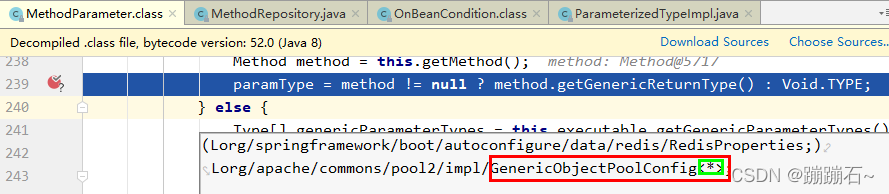
Find the problem that may be the type mismatch, go to the breakpoint where the error occurs, and debug:

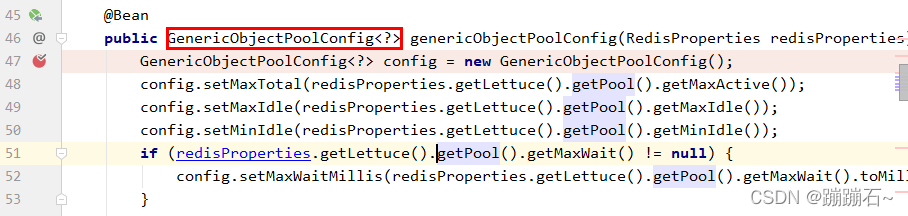
From the figure, you can see that when redis does the configuration, the type returned is GenericObjectPoolConfig<? >, search the code and find where redis configures the data source.

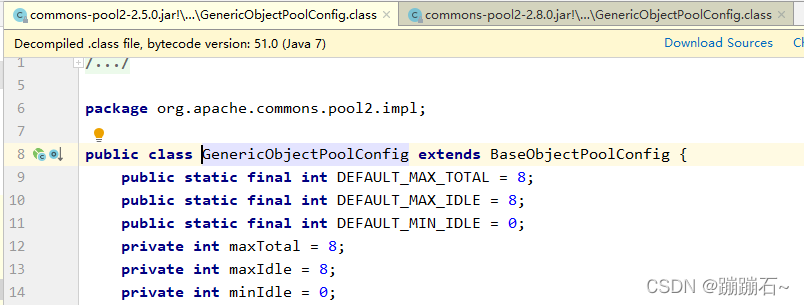
Defining the return type is indeed GenericObjectPoolConfig<? >, however, clicking GenericObjectPoolConfig jumps to:

I found that the referenced class, surprisingly GenericObjectPoolConfig after not with a generic, so strange!

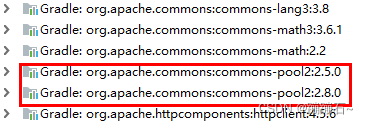
Could it be a version problem? So, I checked the project dependency tree and found that I was right in guessing that two different versions of commons-pool jars had been introduced.

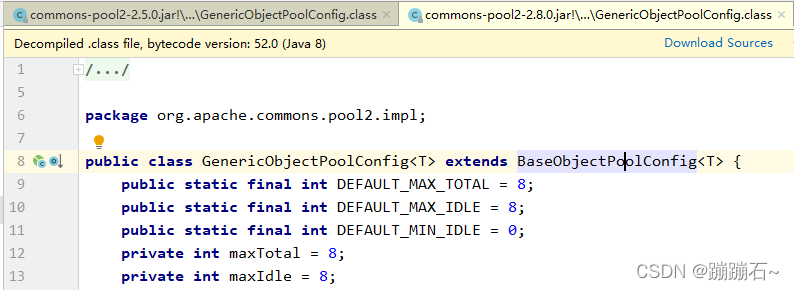
Checking the code, in version 2.8.0, GenericObjectPoolConfig<T> with generic type is used.

When the problem is found, the jar package of version 2.5.0 is excluded from the POM dependency.

Restart the project, normal.

Hexo Error: error: spawn failed [How to Solve]

Problem description

First, an error occurred:

error:spawn failed...

After some blog operations, the following problems will occur:

fatal: cannot lock ref 'HEAD': unable to resolve reference HEAD: Invalid argument error: src refspec

Or:

error: src refspec HEAD does not match any.

The following picture is an error report after uploading GitHub by myself hexo d:

FATAL {
  err: Error: Spawn failed
      at ChildProcess.<anonymous> (D:\Program Files\blog\node_modules\hexo-util\lib\spawn.js:51:21)
      at ChildProcess.emit (node:events:526:28)
      at ChildProcess.cp.emit (D:\Program Files\blog\node_modules\cross-spawn\lib\enoent.js:34:29)
      at Process.ChildProcess._handle.onexit (node:internal/child_process:291:12) {
    code: 128
  }
} Something's wrong. Maybe you can find the solution here: %s https://hexo.io/docs/troubleshooting.html


Cause analysis:

The problem is mostly due to git doing a push or hexo d and changing some of the content under the .deploy_git file.


Solution:

Solution: 1

1. Delete .deploy_git folder
2. Enter git config --global core.autocrlf false
3. Then, execute in sequence:

hexo clean
hexo g
hexo d

Solution: 2

1. Enter the hexo root directory
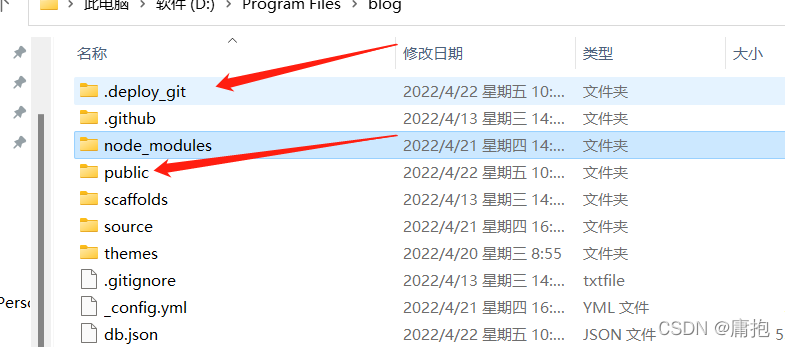
2 Direct the arrow to .deploy_git and public are deleted directly

3. Then, execute in sequence:

hexo clean
hexo g
hexo d

Be careful!!: Deleting these two folders will not affect you! After the implementation of hexo, the third company will redeploy simple violence!

[Solved] JNI DETECTED ERROR IN APPLICATION: GetStringUTFChars received NULL jstring

JNI DETECTED ERROR IN APPLICATION: GetStringUTFChars received NULL jstring

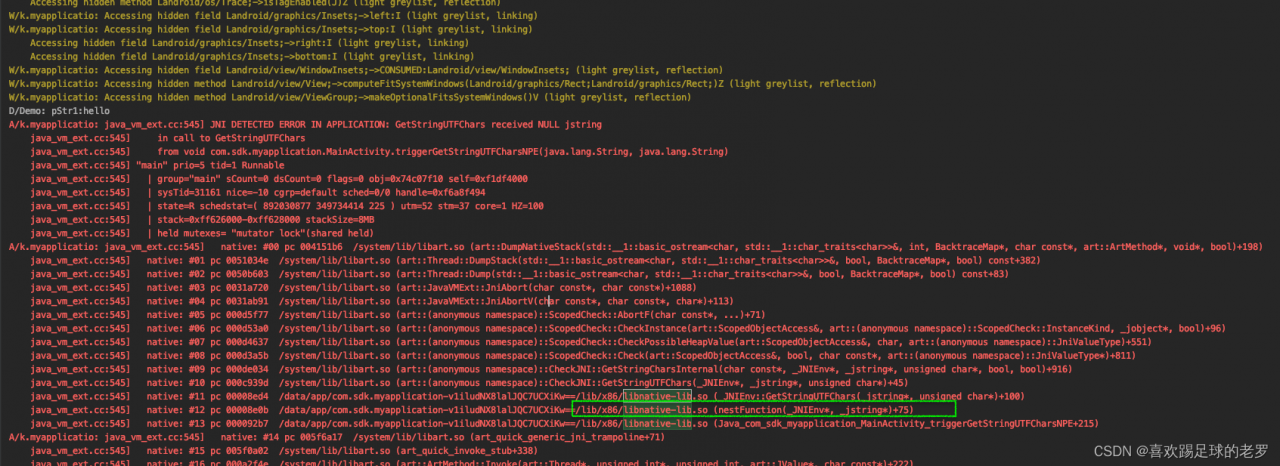
A/k.myapplicatio: java_vm_ext.cc:545] JNI DETECTED ERROR IN APPLICATION: GetStringUTFChars received NULL jstring
    java_vm_ext.cc:545]     in call to GetStringUTFChars
    java_vm_ext.cc:545]     from void com.sdk.myapplication.MainActivity.triggerGetStringUTFCharsNPE(java.lang.String, java.lang.String)

The reason for the above message, from a Jni method, refers to the case where the JVM calls the method and the GetStringUTFChars entry jstring is empty, it must not refer specifically to the method body where the GetStringUTFChars call has a NULl pointer, but includes other C/C++ method calls in the method that have a NULL pointer. NULL pointer. So we have to look at the crash stack carefully to quickly locate the place where the NULL pointer is generated to avoid invalid output.

the above example is extracted according to our own business code
the example code is as follows
java

public class MainActivity extends AppCompatActivity {

    // Used to load the 'native-lib' library on application startup.
    static {
        System.loadLibrary("native-lib");
    }

    @Override
    protected void onCreate(Bundle savedInstanceState) {
        super.onCreate(savedInstanceState);
        setContentView(R.layout.activity_main);

        // Example of a call to a native method
        TextView tv = findViewById(R.id.sample_text);
        tv.setText(stringFromJNI());
        triggerGetStringUTFCharsNPE("hello", null);//introduce a null
    }

    /**
     * A native method that is implemented by the 'native-lib' native library,
     * which is packaged with this application.
     */
    public native String stringFromJNI();


    public native void triggerGetStringUTFCharsNPE(String p1, String p2);
}

jni

#include <jni.h>
#include <string>
#include <android/log.h>

static const char* TAG = "Demo";


void nestFunction(JNIEnv *env, jstring p2) {
    //Here p1 is simply passed in via a parameter, but the actual business logic may be obtained by other methods/ways
    const char* pStr = env->GetStringUTFChars(p2, nullptr);
    __android_log_print(ANDROID_LOG_DEBUG, TAG, "pStr:%s", pStr);
    env->ReleaseStringUTFChars(p2, pStr);
}

extern "C" JNIEXPORT jstring JNICALL
Java_com_sdk_myapplication_MainActivity_stringFromJNI(
        JNIEnv* env,
        jobject /* this */) {
    std::string hello = "Hello from C++";
    return env->NewStringUTF(hello.c_str());
}extern "C"
JNIEXPORT void JNICALL
Java_com_sdk_myapplication_MainActivity_triggerGetStringUTFCharsNPE(JNIEnv *env, jobject thiz,
                                                                    jstring p1, jstring p2) {
    const char* pStr1 = env->GetStringUTFChars(p1, nullptr);
    __android_log_print(ANDROID_LOG_DEBUG, TAG, "pStr1:%s", pStr1);
    env->ReleaseStringUTFChars(p1, pStr1);
    //故意让nestFunction产生 JNI DETECTED ERROR IN APPLICATION: GetStringUTFChars received NULL jstring
    nestFunction(env, p2);
}

[Solved] dyld: Library not loaded: /System/Library/Frameworks/Network.framework/Network

Question:

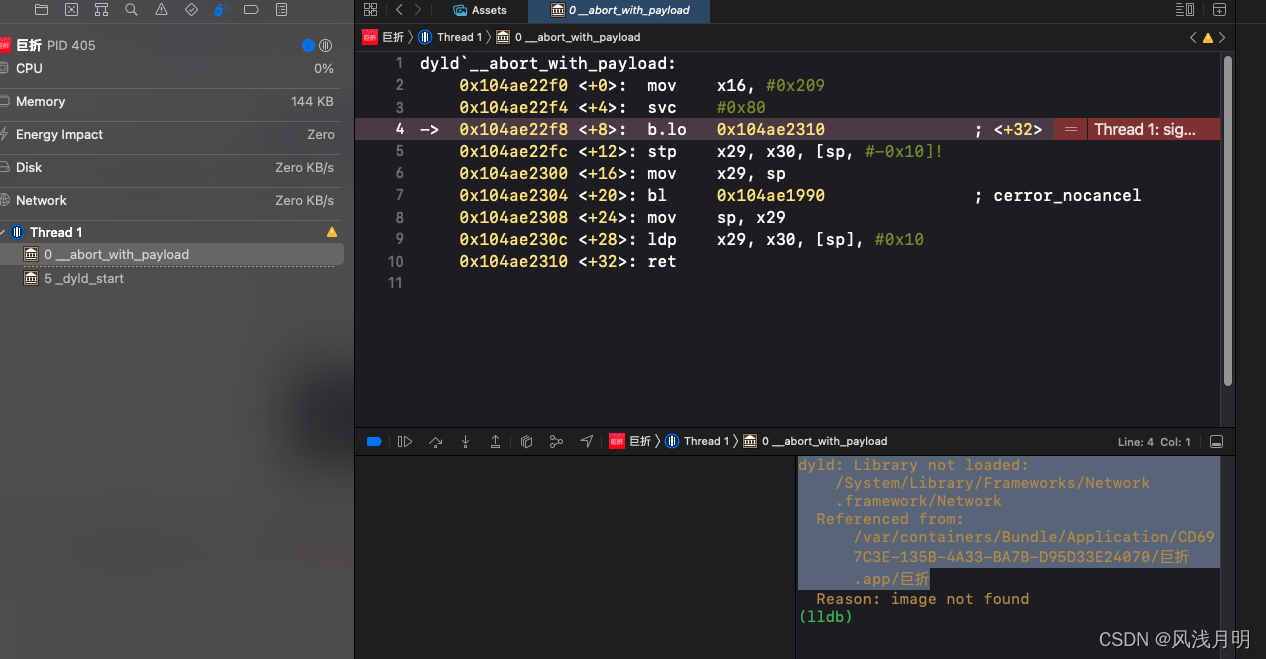
Today’s test brought a low version of iPhone. I ran the project with it and reported the following errors
dyld: Library not loaded: /System/Library/Frameworks/Network.framework/Network
Referenced from: /var/containers/Bundle/Application/CD697C3E-135B-4A33-BA7B-D95D33E24070/巨折.app/巨折

Solution:

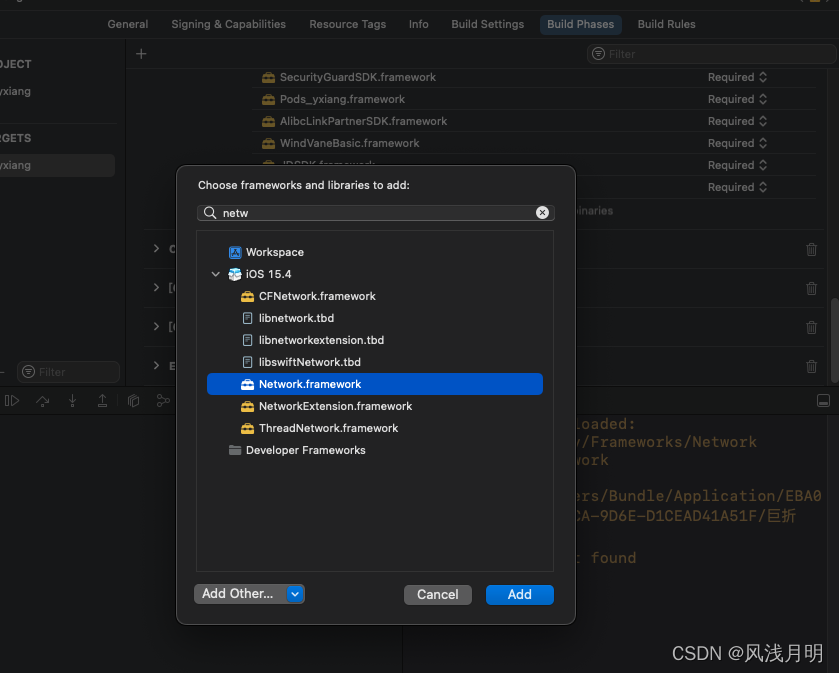
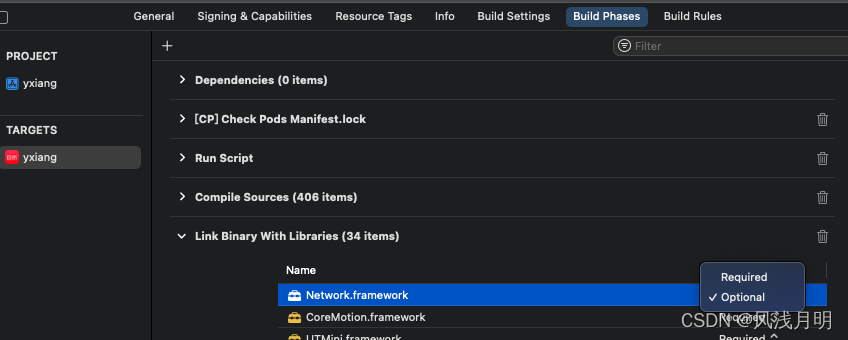
Follow the prompts and go to Build Phases -> Link Binary With Libraries and add Network.framework

After running it still reports the same error, then you need to go to Link Bnary With Libraries and set Network to Optional.