Author Archives: Robins

[Solved] RuntimeError: The size of tensor a (4) must match the size of tensor b (3) at non-singleton dim

Error Messages:
tensor.sub_(mean[:, None, None]).div_(std[:, None, None])
RuntimeError: The size of tensor a (4) must match the size of tensor b (3) at non-singleton dimension 0

Error Reason:
Dimensional information mismatch

Original Code:

image = Image.open(image_path)

After modification:

image = Image.open(image_path).convert('RGB')

Python Openyxl Error: AttributeError: ‘int‘ object has no attribute ‘upper‘ [How to Solve]

preface

I use the openpyxl library. When I want to read out a value and put it into a variable, there is an error like the title.

Wrong line

I wanted to read the contents of cell A1 into the value variable, but there was an error in the execution of the code.

value = sheet.cell(1, 1).value

How to Solve:

After Reading some articles, it is found that the parameter dislocation problem is caused by the openpyxl version. The first and second parameters of this version are not row and column. Reading this, I believe there must be a smart little partner who came up with a solution. This paper lists two solutions.

Solution 1:

Set the first parameter to null

value = sheet.cell(None, 1, 1).value

Solution 2:

It’s okay if you don’t want to write None. Just write the assignment to the specified parameter directly in parentheses.

value = sheet.cell(row=1, column=1).value

Summary

The execution effect of these two methods is the same. The first method is to copy an unnecessary variable as empty. The second method is to copy the specified variable without caring about other variables.

Both methods have the same goal, but I prefer the second method, so that we can no longer worry about dislocation and write the position freely, while the first method locks the position of parameter input.

Examples

When using the first method

1. The first line of code below will read the values of the cells in the first line and the second column

2. The second line of code below will read the value of the cell in the first column of the second line

value = sheet.cell(None, 1, 2).value
value = sheet.cell(None, 2, 1).value

When using the second method

1. The execution effect of the following two lines of code is the same. They both get values from the cells in the first row and the second column

value = sheet.cell(column=2, row=1).value
value = sheet.cell(row=1, column=2).value

[Solved] vue.esm.js?efeb:591 [Vue warn]: Error in event handler for “click“: “TypeError: Cannot read property

vue.esm.js?efeb:591 [Vue warn]: Error in event handler for “click”: “TypeError: Cannot read property ‘setCheckedKeys’ of undefined”

This is because this.dialogVisible = true does not update the dom immediately, but waits for the entire logic to be executed and then renders it again, so the popup box is not rendered at this time and does not exist in the dom tree.
This.$refs.tree is undefined so setCheckedKeys must also be undefined.

Solution: Use this.$nextTick(), this.$nextTick() will execute callback after DOM update:

opetation (auth) {
  this.dialogVisible = true
  this.$nextTick(function() {
    this.$refs.tree.setCheckedKeys(auth)
  })
}

[Solved] IDEA Add maven Project Error: Error:(3,21)java: Package javax.servletdoes not exist

1. Error in adding Maven project in idea: Java: package javax Servlet does not exist. As shown in the figure:

2. Solution

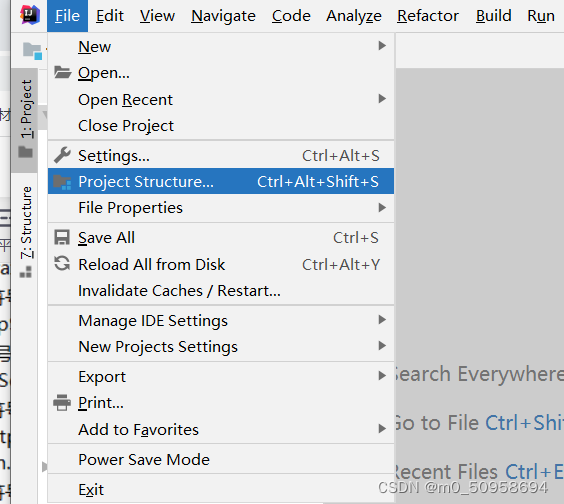
1. In file — > Project Structure –> Make changes in modules

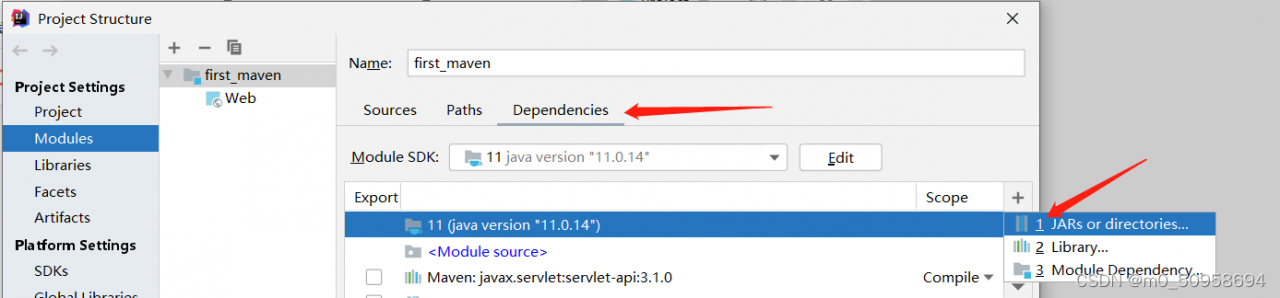
2. Select dependencies in modules and click + — > Jars or directories to add

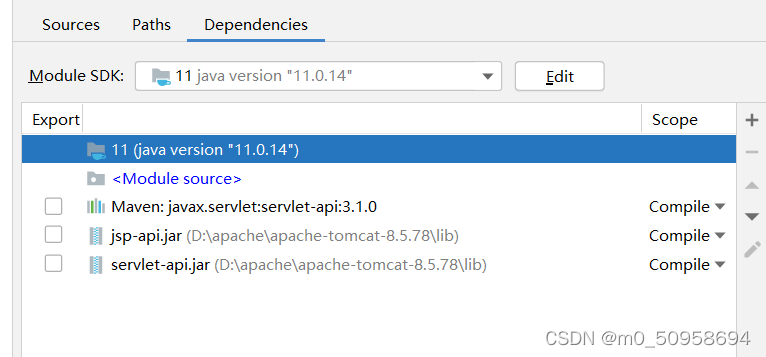
3. Select the local Tomcat installation path, go to the lib folder and select: jsp-api.jar and servlet-ap.jar, then click OK, we can see two more packages, click Apply OK, the following figure.

4. Redeploy the project to run successfully.

[Solved] An error occurred while processing your request…enable the Development environment by setting …

When a web project is deployed to the local machine, an exception occurs when accessing:

Error.
An error occurred while processing your request.
Request ID: |ee4a30bd-4030df869db691a6.

Development Mode
Swapping to Development environment will display more detailed information about the error that occurred.

The Development environment shouldn't be enabled for deployed applications. It can result in displaying sensitive information from exceptions to end users. For local debugging, enable the Development environment by setting the ASPNETCORE_ENVIRONMENT environment variable to Development and restarting the app.


Reason for the error:

The project itself uses the .netcore 3.1 framework, published to the IIS web.config, missing the ASPNETCORE_ENVIRONMENT configuration.

This error is displayed, meaning that the project itself reported an error, IIS thinks you can set the development version (Development) to see more detailed exception information, but you do not configure ASPNETCORE_ENVIRONMENT, so you can not think that this is the development version, you need to add, in order to show you the specific cause of the exception. So the configuration needs to be added.

Solution:
In the <aspNetCore> node of IIS web.config, add the ASPNETCORE_ENVIRONMENT configuration as follows.

<aspNetCore processPath="dotnet" arguments=".\IndustryWeb.dll" stdoutLogEnabled="false" stdoutLogFile=".\logs\stdout" hostingModel="inprocess" >
  <environmentVariables>
    <environmentVariable name="ASPNETCORE_ENVIRONMENT" value="Development" />
  </environmentVariables>
</aspNetCore>

[Solved] You have an error in your SQL syntax; check the manual that corresponds to your MySQL server version

INSERT INTO report(NAME,keyword,refile,content,DATE,STATUS) VALUES ('%s','%s','%s','%s','%s',0)%("name", "key", "refile", "content",str(datetime.now()))

report errors

ERROR CODE: 1064
You have an error in your SQL syntax; check the manual that corresponds to your MySQL server version for the right syntax to use near 'key,refile,content,date,status) VALUES ('%s','%s','%s','%s','%s',0)%("name", "ke' at line 1

The keyword of MySQL is used. After modification

    sql="INSERT INTO report(`name`,`keyword`,`refile`,`content`,`date`,`status`) VALUES ('%s','%s','%s','%s','%s',0)"%(name,key, refile, content,str(datetime.now()))

[Solved] yii error: Setting unknown property: yii\console\Request: :cookieValidationKey

1. Command:
php yii
2. Error:
Exception ‘yii\base\UnknownPropertyException’ with message ‘Setting unknown property: yii\console\Request::cookieValidationKey’
3. Reason:
console/yii file

$config = yii\helpers\ArrayHelper::merge(
    require __DIR__ . '/config/main.php',
    require __DIR__ . '/../conf/main-local.php'
);

$application = new yii\console\Application($config);

The above program execution entry combines all configurations before actual operation, and some configuration parameters are invalid for console operation

4. Solution:
Delete these parameters before performing console operations

unset($config['components']['request']);
$application = new yii\console\Application($config);

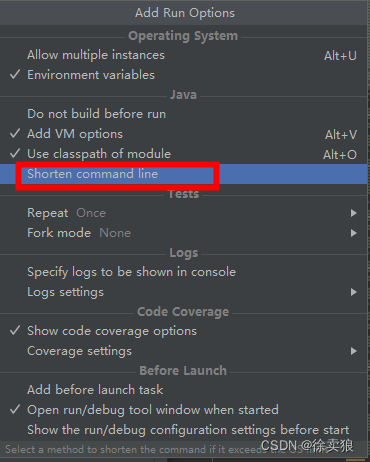
[Solved] Command line is too long. Shorten command line for XXXXXXXTest.rmLogRecordOver Error running

The following error is reported when the test case is started:

Command line is too long. Shorten command line for XXXXXXTest. or also for JUnit default configuration?
Error running ‘XXXXXXXXXX.rmLogRecordOverDue’:

Error:Command line is too long
Solution 1:
Modify workspace.xml file,  add the following in <component name="PropertiesComponent">:

<property name="dynamic.classpath" value="true" />

It is also possible that the configuration file cannot be modified and will be automatically deleted after modification, so you can see solution 2

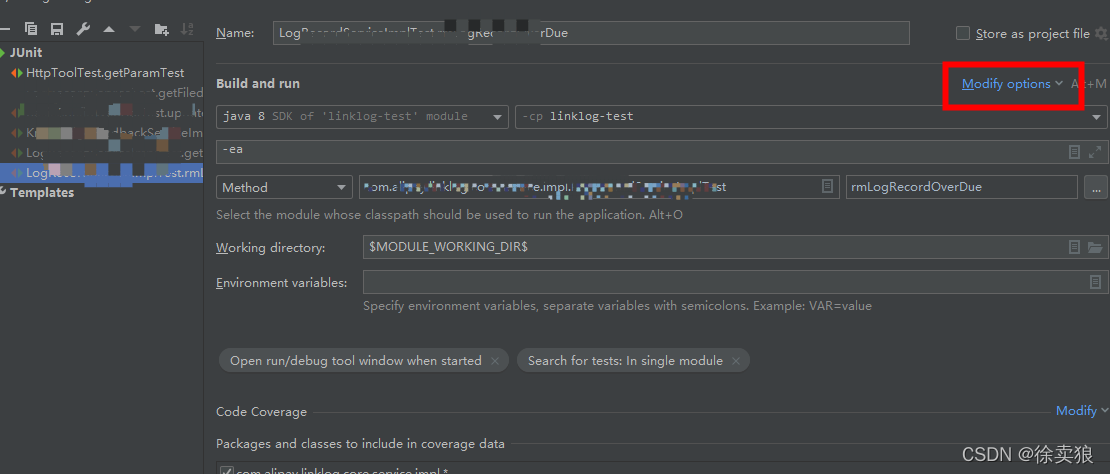
Solution 2:

Modify the startup scheme of local test cases as jar

select

finally select jar mainfest to start

[Solved] PaddleX ERROR: Unexpected BUS error encountered in DataLoader worker

ERROR: Unexpected BUS error encountered in DataLoader worker. This might be caused by insufficient shared memory (shm),

reason

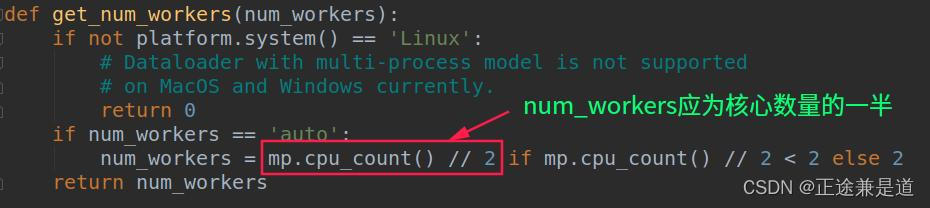
Set the number of num_workers is larger than the actual situation

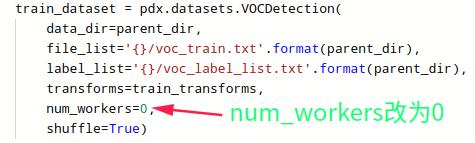
Solution:

Change num_workers  to 0, or half the number of cores. It can also be configured not to let the system automatically obtain

The error message is as follows:

ERROR: Unexpected BUS error encountered in DataLoader worker. This might be caused by insufficient shared memory (shm), please check whether use_shared_memory is set and storage space in /dev/shm is enough
Traceback (most recent call last):
  File "train.py", line 72, in <module>
    use_vdl=True)  # 其用visuadl进行可视化训练记录
  File "/opt/conda/envs/python35-paddle120-env/lib/python3.7/site-packages/paddlex/cv/models/detector.py", line 334, in train
    use_vdl=use_vdl)
  File "/opt/conda/envs/python35-paddle120-env/lib/python3.7/site-packages/paddlex/cv/models/base.py", line 333, in train_loop
    Exception in thread Thread-3:
Traceback (most recent call last):
  File "/opt/conda/envs/python35-paddle120-env/lib/python3.7/site-packages/paddle/fluid/dataloader/dataloader_iter.py", line 583, in _get_data
    data = self._data_queue.get(timeout=self._timeout)
  File "/opt/conda/envs/python35-paddle120-env/lib/python3.7/multiprocessing/queues.py", line 105, in get
    raise Empty
_queue.Empty

During handling of the above exception, another exception occurred:

Traceback (most recent call last):
  File "/opt/conda/envs/python35-paddle120-env/lib/python3.7/threading.py", line 926, in _bootstrap_inner
    self.run()
  File "/opt/conda/envs/python35-paddle120-env/lib/python3.7/threading.py", line 870, in run
    self._target(*self._args, **self._kwargs)
  File "/opt/conda/envs/python35-paddle120-env/lib/python3.7/site-packages/paddle/fluid/dataloader/dataloader_iter.py", line 505, in _thread_loop
    batch = self._get_data()
  File "/opt/conda/envs/python35-paddle120-env/lib/python3.7/site-packages/paddle/fluid/dataloader/dataloader_iter.py", line 599, in _get_data
    "pids: {}".format(len(failed_workers), pids))
RuntimeError: DataLoader 1 workers exit unexpectedly, pids: 4652
for step, data in enumerate(self.train_data_loader()):

  File "/opt/conda/envs/python35-paddle120-env/lib/python3.7/site-packages/paddle/fluid/dataloader/dataloader_iter.py", line 697, in __next__
    data = self._reader.read_next_var_list()
SystemError: (Fatal) Blocking queue is killed because the data reader raises an exception.
  [Hint: Expected killed_ != true, but received killed_:1 == true:1.] (at /paddle/paddle/fluid/operators/reader/blocking_queue.h:166)

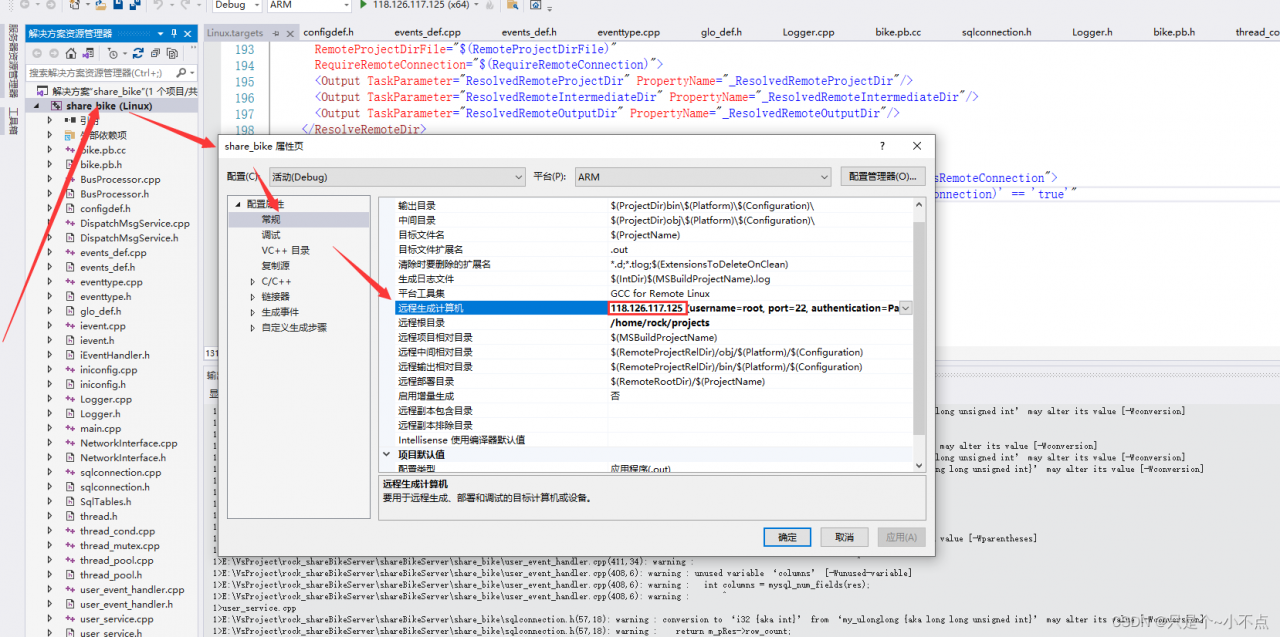
[Solved] vs Error: VS_error MSB4044, the required parameter ‘RemoteTarget’ of the task ‘ValidateValidArchitecture’ was not assigned a value

vs Error: VS_error MSB4044, the required parameter ‘RemoteTarget’ of the task ‘ValidateValidArchitecture’ was not assigned a value


Solution: configure the item properties to ensure that the remote generation computer has only one IP address. Just don’t have anything else. Delete the redundant