Author Archives: Robins

Change Jupyter Notebook Default Directory

Change Jupyter Notebook Default Directory

There are three way to change the default (i.e., start-up) directory of jupyter notebook.

Solution #1
1. Use command line (aka, cmd), run the following command: this will generate a config file (jupyter_notebook_config.py), in your working location (C:\Users[Your Username].jupyter).
jupyter notebook --generate-config
2. Goto that location (C:\Users[Your Username].jupyter) and edit file jupyter_notebook_config.py as follow.
Find line:

## The directory to use for notebooks and kernels.
#c.NotebookApp.notebook_dir = ''

3. Delete the “#” and type your default directory inside the ”. (Make sure the directory is exist, or it may causes some troubles)
For example:

## The directory to use for notebooks and kernels.
c.NotebookApp.notebook_dir = 'E:\Default Jupyter Dir\'

Solution #2
1. Find the Jupyter Notebook execute file.
2. Right click the file
3. Find “properties” tab and click it; this will lead you to the “Jupyter Notebook Properties”
4. Check the pop-up window, and you should see “Start in” property.
5. Change the directory to your default directory, e.g., ‘E:\Default Jupyter Dir\’
Solution #3

This solution is based on Anaconda, since Jupyter Notebook load the profile from Anaconda.

You may see the following information from properties window if you had gone through Solution #2.

"Target: D:\Anaconda3\python.exe d:\Anaconda3\cwp.py d:\Anaconda3 "d:/Anaconda3/python.exe" "d:/Anaconda3/Scripts/jupyter-notebook-script.py" %USERPROFILE%"

1. Goto the Anaconda installed location.
2. Find the ‘etc’ directory in Anaconda.
3. Open file ‘jupyter_notebook_config.json’
4. Add your default directory to the ‘notebook_dir’.
How to generate UML Diagrams from Java code in Eclipse

From: http://fuzz-box.blogspot.com/2012/09/how-to-generate-uml-diagrams-from-java.html

UML diagrams compliment inline documentation ( 
javadoc ) and allow to better explore/understand a design. Moreover, you can print and bring them to table to discuss a design.

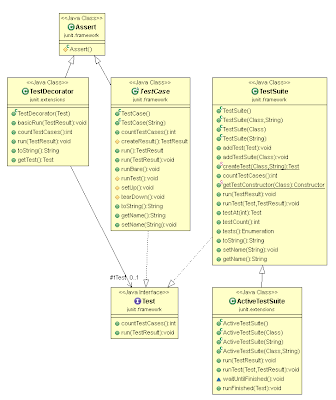
In this post, we will install and use the ObjectAid plugin for Eclipse to produce jUnit lib class diagrams. Then, we will be able to generate UML diagrams by simply dragging and dropping classes into the editor. We can further manipulate the diagram by selecting which references, operations or attributes to display.  

Open Eclipse and go to Help > Install New Software
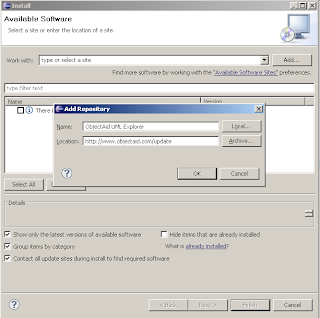
Click on add to add a new repository
Enter name ObjectAid UML Explorer
Enter Location http://www.objectaid.net/update

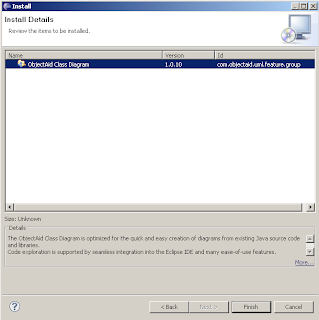
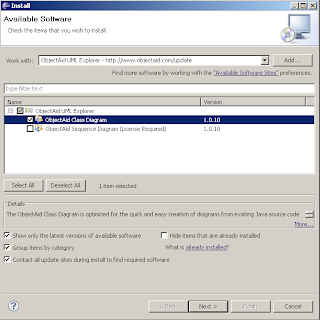
Next, select the ObjectAid Class Diagram plugin – 
it is free – and click Next. The Sequence Diagram one requires a paid license.

Click 
Finish to confirm your choices and start the instalation process.

Click Ok on the security warningSelect Restart Now after the installation completes to restart Eclipse.

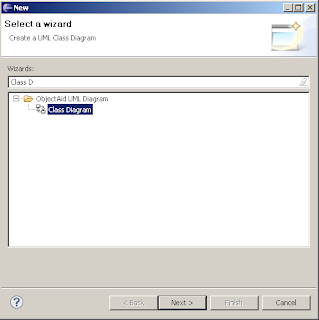
To create a new UML diagram we start the ObjectAid wizard with 
File >
 New >
 Other…  and start typing in the textbox 
Class Diagram to filter the desired wizard. Click 
Next, and enter a directory and name for the diagram.

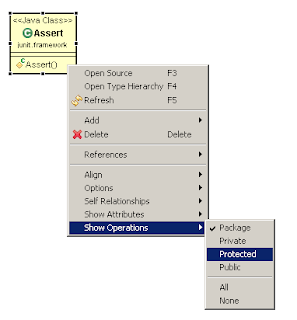
Drop java source or compiled class files into the visual UML editor to start populating the diagram. Right click on a generated class to bring up a context menu and adjust visibility, operations attributes, etc as you like.

Below, we see the 
Assert class from the jUnit library with all operations and fileds hidden.

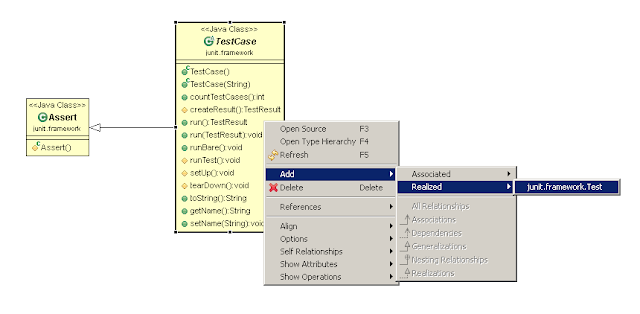
From the context menu, we can add implementations and associations for a selected class. In the following screen, we add the interface 
Test implemented by the 
TestCase class.

This is how part of the jUnit UML class diagram look after adding some more classes.

To auto layout the diagram right click anywhere within the editor and select 
Layout Diagram. From the same menu, you can export the diagram to an image ( 
gif png jpeg ) by clicking the Save As Image… menu item

Have fun with the plugin, leave a comment if you like 🙂

The solution of GDB code designed problem in Mac OS X

After MacOS X 10.8, the GDB debugging tool installed will prompt error when used:

Unable to find Mach task port for process-id 28885: (os/kern) failure (0x5).

 (please check gdb is codesigned - see taskgated(8))

This is because the Darwin kernel will refuse to allow gdb to debug another process if you don’t have special rights, since debugging a process means having full control over that process, and that isn’t allowed by default since it would be exploitable by malware. (The kernel won’t refuse if you are root, but of course you don’t want to be root to debug.)
The most up to date method to allow gdb to control another process is to sign it with any system-trusted code signing authority. This is an easy process once you have a certificate (see the section below).


This error occurs because OSX implements a pid access policy which requires a digital signature for binaries to access other processes pids. To enable gdb access to other processes, we must first code sign the binary. This signature depends on a particular certificate, which the user must create and register with the system.


To create a code signing certificate, open the Keychain Access application. Choose menu Keychain Access -> Certificate Assistant -> Create a Certificate…
Choose a name for the certificate (e.g., gdb-cert), set Identity Type to Self Signed Root, set Certificate Type to Code Signing and select the Let me override defaults. Click several times on Continue until you get to the Specify a Location For The Certificate screen, then set Keychain to System.
Double click on the certificate, open Trust section, and set Code Signing to Always Trust. Exit Keychain Access application.


Restart the taskgated service, and sign the binary.

sudokillalltaskgated

s

u

d

o

k

i

l

l

a

l

l

t

a

s

k

g

a

t

e

d

codesign -fs gdb-cert “$(which gdb)”
source http://andresabino.com/2015/04/14/codesign-gdb-on-mac-os-x-yosemite-10-10-2/
On macOS 10.12 (Sierra) and later, you must also
Use gdb 7.12.1 or later Additionally prevent gdb from using a shell to start the program to be debugged. You can use the following command for this inside gdb:
set startup-with-shell off
You can also put this last command in a file called .gdbinit in your home directory, in which case it will be applied automatically every time you start gdb
echo “set startup-with-shell off” >> ~/.gdbinit

What are the common clearing commands in MATLAB?

(If you need various versions of MATLAB software, you can leave a message and immediately reply when you see it.)
https://blog.csdn.net/weibo1230123/article/details/81016643
What are the common clear commands in MATLAB?

1.clc command: empty the command window.
2. CLF command: clear the current figure.
3. Close command: close the currently open figure graphical interface.
4. Clear: clear the variables in the workspace. 5. Exit command: exit MATLAB, and directly exit the software after execution.

Mac & how to uninstall LANDesk

Mac & how to uninstall LANDesk

Mac – LANDesk – Uninstall LANDesk


https://community.ivanti.com/docs/DOC-22475
https://www.quora.com/How-do-you-remove-LANDESK-from-your-computer
https://community.ivanti.com/docs/DOC-2092

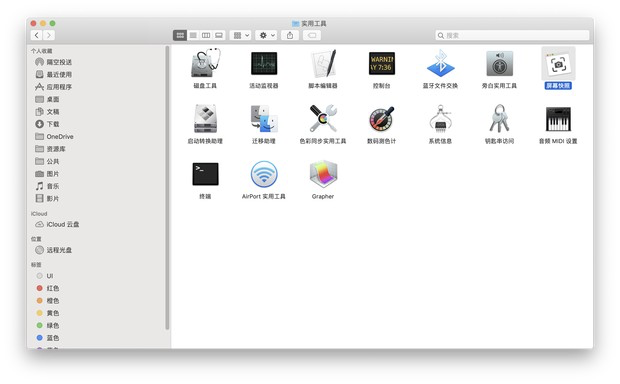
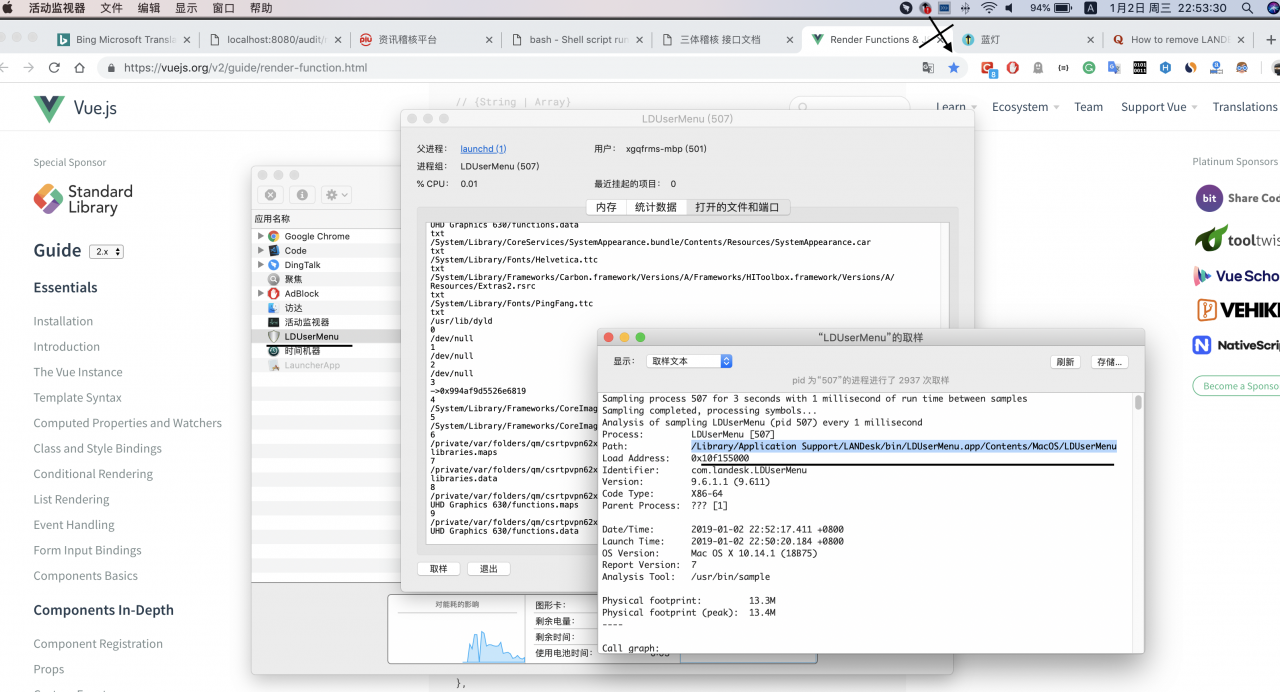
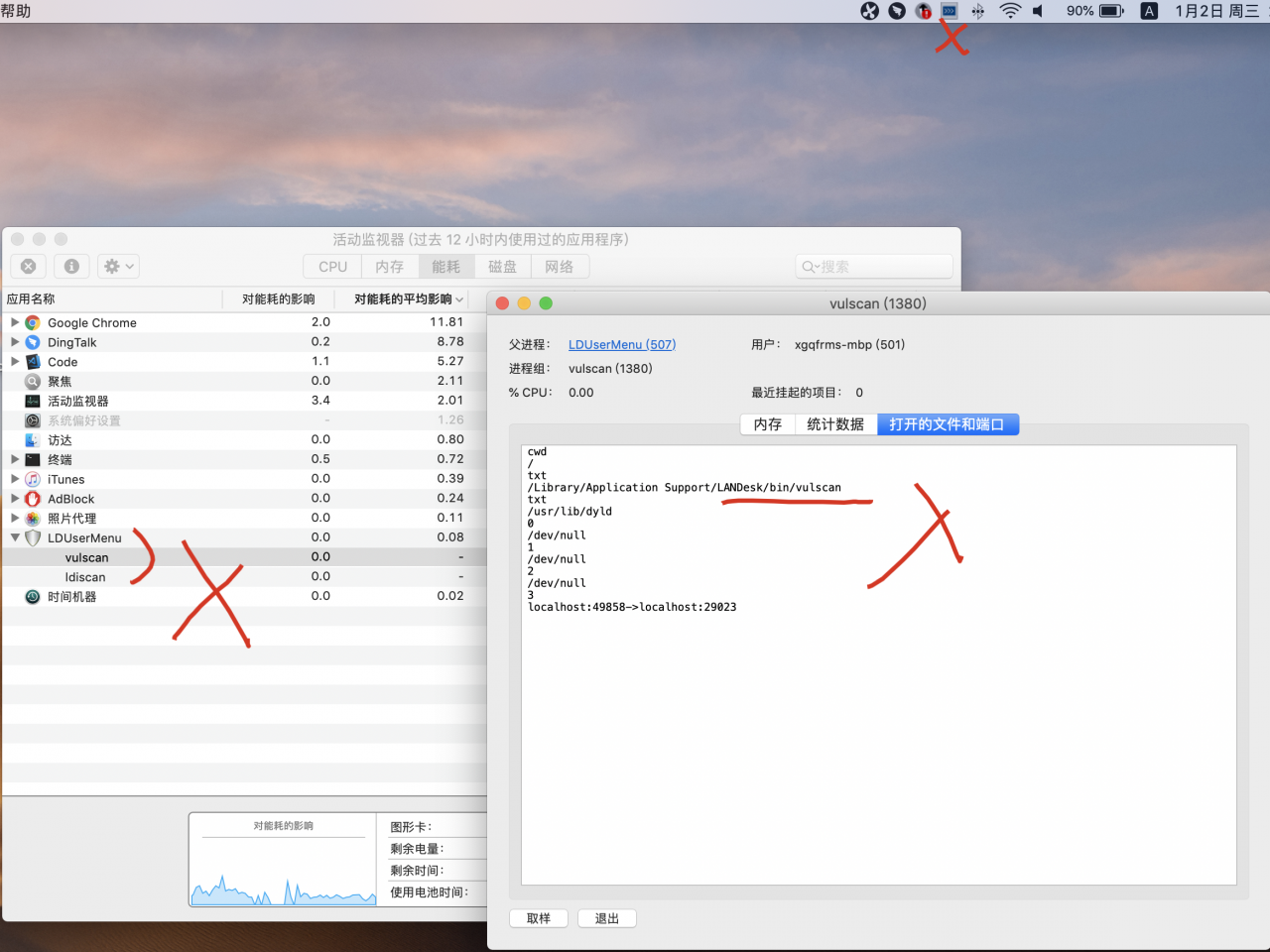
/Library/Application Support/LANDesk/bin/LDUserMenu.app/Contents/MacOS/LDUserMenu


https://blog.csdn.net/cangraoo/article/details/81254848
https://download.csdn.net/download/e345ug/10206162
solution


#!/bin/bash
#####################################################
# LANDesk Agent framework uninstaller
# Description: script to remove landesk agent
# components.
#
# Note: do not use 'rm -rf' on  directories.  Use the
# remove_landesk_dir or one of the other remove_dir
# functions.  They are safer and will protect you
# from making silly mistakes.
#####################################################
REMOVED=0
CLEAN=0
PKGUTIL=
SCRIPT=`/usr/bin/basename $0`
[ -x /usr/sbin/pkgutil ] && PKGUTIL=/usr/sbin/pkgutil

if [ `/usr/bin/id -u` -ne 0 ]; then
    echo "Uninstalling the LANDesk agent requires administrative priveleges."
    echo "Please enter your password to continue or press CTRL-C to cancel."
    sudo "$0" "$@"
    exit 0
fi


function show_help()
{
    echo "LANDesk agent uninstaller"
    echo "Usage: $SCRIPT [ -h | -c ]"
    echo "  options: "
    echo "     -h           Show this help message"
    echo "     -c           Force the uninstall and completely remove the install directories."
    echo "                  The default is to only remove empty directories."
    echo ""
}

function remove_flat_receipt( )
{
    RDIR=$1
    [ -z "$RDIR" ] && fatal "remove_flat_receipt(${RDIR}) must be passed a valid application name"
    # remove the receipt file
    if [ -d /Library/Receipts/$RDIR ]; then
        echo "removing receipt for: $RDIR "
        rm -rf /Library/Receipts/$RDIR
        [ "$?" != "0" ] && ( echo "ERROR: failed to remove receipt: $RDIR. \n\t$!"; exit 1 )
        ((REMOVED++))
    fi
}

function remove_database_receipt( )
{
    OBJ=$1
    [ -z "$OBJ" ] && fatal "remove_database_receipt(${OBJ}) must be passed a valid application name"
    if [ -n "$PKGUTIL" ]; then
        RES=`$PKGUTIL --pkgs | grep $OBJ`
        if [ -n "$RES" ]; then
            echo "Removing receipt database entry for: $OBJ "
            $PKGUTIL --forget $OBJ
        fi
    fi

}

function remove_framework_dir()
{
    FDIR=$1
    echo "Checking $FDIR"
    [ -z "$FDIR" ] && fatal "remove_framework_dir(${FDIR}) must be passed a valid directory"
    # remove the framework directory
    if [ -d /System/Library/Frameworks/${FDIR} ]; then
        echo "removing framework installation: $FDIR"
        rm -rf /System/Library/Frameworks/${FDIR}
        [ "$?" != "0" ] && ( echo "ERROR: failed to remove framework: ${FDIR}  \n\t$!"; exit 1 )
        ((REMOVED++))
    fi
}

function remove_LaunchDaemon()
{
    FNAME=$1
    [ -z "$FNAME" ] && fatal "remove_LaunchDaemon(${FNAME}) must be passed a valid file name"
    # remove the framework directory
    if [ -e /Library/LaunchDaemons/${FNAME} ]; then
        echo "removing LaunchDaemon: $FNAME"
        rm -f /Library/LaunchDaemons/${FNAME}
        [ "$?" != "0" ] && ( echo "ERROR: failed to remove file: ${FNAME}  \n\t$!"; exit 1 )
        ((REMOVED++))
    fi

}

function unload_LaunchAgent()
{
    FNAME=$1
    [ -z "$FNAME" ] && fatal "remove_LaunchAgent(${FNAME}) must be passed a valid file name"

    # unload launch agent
    if [ -f /Library/Application\ Support/LANDesk/bin/launchInContext.sh ]  && [ -e /Library/LaunchAgents/${FNAME} ]; then
        echo "unloading LaunchAgent: $FNAME"
        /Library/Application\ Support/LANDesk/bin/launchInContext.sh console /bin/launchctl unload -S Aqua /Library/LaunchAgents/${FNAME}
        [ "$?" != "0" ] && ( echo "ERROR: failed to unload file: ${FNAME}  \n\t$!"; exit 1 )
    fi
}

function remove_LaunchAgent()
{
    FNAME=$1
    [ -z "$FNAME" ] && fatal "remove_LaunchAgent(${FNAME}) must be passed a valid file name"
    # remove the framework directory
    if [ -e /Library/LaunchAgents/${FNAME} ]; then
        echo "removing LaunchAgent: $FNAME"
        rm -f /Library/LaunchAgents/${FNAME}
        [ "$?" != "0" ] && ( echo "ERROR: failed to remove file: ${FNAME}  \n\t$!"; exit 1 )
        ((REMOVED++))
    fi

}

function remove_startup()
{
    FNAME=$1
    [ -z "$FNAME" ] && fatal "remove_startup(${FDIR}) must be passed a valid file name"
    # remove the startup item
    if [ -d "/Library/StartupItems/${FNAME}" ]; then
        echo "removing launch daemon: $FDIR"
        rm -rf "/Library/StartupItems/${FNAME}"
        [ "$?" != "0" ] && ( echo "ERROR: failed to remove file: ${FNAME}  \n\t$!"; exit 1 )
        ((REMOVED++))
    fi

}

function remove_Preferences()
{
    FNAME=$1
    [ -z "$FNAME" ] && fatal "remove_Preferences(${FNAME}) must be passed a valid file name"
    # remove the preferences file
    if [ -e "/Library/Preferences/${FNAME}" ]; then
        echo "removing Preference: ${FNAME}"
        defaults delete "/Library/Preferences/${FNAME}"
        [ "$?" != "0" ] && ( echo "ERROR: failed to remove file: ${FNAME}  \n\t$!"; exit 1 )
        ((REMOVED++))
    fi
}


function remove_PreferencePane()
{
    FNAME="$@"
    [ -z "$FNAME" ] && fatal "remove_PreferencePane(${FNAME}) must be passed a valid dir name"
    # remove the preference pane directory
    if [ -d "/Library/PreferencePanes/${FNAME}.prefPane" ]; then
        echo "removing Preference: $FNAME"
        rm -rf "/Library/PreferencePanes/${FNAME}.prefPane"
        [ "$?" != "0" ] && ( echo "ERROR: failed to remove file: ${FNAME}  \n\t$!"; exit 1 )
        ((REMOVED++))
    fi
}

function remove_application_support_application()
{
    FNAME=$1
    [ -z "$FNAME" ] && fatal "remove_application_support_application(${FDIR}) must be passed a valid dir name"
    # remove the preference pane directory
    if [ -d "/Library/Application Support/${FNAME}" ]; then
        echo "removing Application Support directory: $FNAME"
        rm -rf "/Library/Application Support/${FNAME}"
        [ "$?" != "0" ] && ( echo "ERROR: failed to remove file: ${FNAME}  \n\t$!"; exit 1 )
        ((REMOVED++))
    fi
}

function remove_landesk_dir()
{
    DNAME=$1
    [ -z "$DNAME" ] && fatal "remove_landesk_dir(${DNAME}) must be passed a valid dir name"
    # remove the landesk directory named:
    if [ -d "/usr/local/LANDesk/${DNAME}" ]; then
        echo "removing LANDesk directory: $DNAME"
        rm -rf "/usr/local/LANDesk/${DNAME}"
        [ "$?" != "0" ] && ( echo "ERROR: failed to remove file: ${DNAME}  \n\t$!"; exit 1 )
        ((REMOVED++))
    fi
    if [ -d "/usr/LANDesk/${DNAME}" ]; then
        echo "removing LANDesk directory: $DNAME"
        rm -rf "/usr/LANDesk/${DNAME}"
        [ "$?" != "0" ] && ( echo "ERROR: failed to remove file: ${DNAME}  \n\t$!"; exit 1 )
        ((REMOVED++))
    fi
    if [ -d "/opt/landesk/${DNAME}" ]; then
        echo "removing LANDesk directory: $DNAME"
        rm -rf "/opt/landesk/${DNAME}"
        [ "$?" != "0" ] && ( echo "ERROR: failed to remove file: ${DNAME}  \n\t$!"; exit 1 )
        ((REMOVED++))
    fi
}

function remove_landesk_files()
{
    for DNAME in "$@"; do
        [ -z "$DNAME" ] && fatal "remove_landesk_file(${DNAME}) must be passed a valid filek name"
        # remove the landesk directory named:
        if [ -f "/usr/local/LANDesk/${DNAME}" ]; then
            echo "removing LANDesk file: $DNAME"
            rm -f "/usr/local/LANDesk/${DNAME}"
            [ "$?" != "0" ] && ( echo "ERROR: failed to remove file: ${DNAME}  \n\t$!"; exit 1 )
            ((REMOVED++))
        fi
        if [ -f "/usr/LANDesk/${DNAME}" ]; then
            echo "removing LANDesk file: $DNAME"
            rm -f "/usr/LANDesk/${DNAME}"
            [ "$?" != "0" ] && ( echo "ERROR: failed to remove file: ${DNAME}  \n\t$!"; exit 1 )
            ((REMOVED++))
        fi
        if [ -f "/opt/landesk/${DNAME}" ]; then
            echo "removing LANDesk file: $DNAME"
            rm -f "/opt/landesk/${DNAME}"
            [ "$?" != "0" ] && ( echo "ERROR: failed to remove file: ${DNAME}  \n\t$!"; exit 1 )
            ((REMOVED++))
        fi
    done
}

function remove_landesk_links()
{
    for DNAME in "$@"; do
        [ -z "$DNAME" ] && fatal "remove_landesk_link(${DNAME}) must be passed a valid symlink name"
        # remove the landesk directory named:
        if [ -h "/usr/local/LANDesk/${DNAME}" ]; then
            echo "removing LANDesk link: $DNAME"
            rm -f "/usr/local/LANDesk/${DNAME}"
            [ "$?" != "0" ] && ( echo "ERROR: failed to remove link: ${DNAME}  \n\t$!"; exit 1 )
            ((REMOVED++))
        fi
        if [ -h "/usr/LANDesk/${DNAME}" ]; then
            echo "removing LANDesk link: $DNAME"
            rm -f "/usr/LANDesk/${DNAME}"
            [ "$?" != "0" ] && ( echo "ERROR: failed to remove link: ${DNAME}  \n\t$!"; exit 1 )
            ((REMOVED++))
        fi
        if [ -h "/opt/landesk/${DNAME}" ]; then
            echo "removing LANDesk link: $DNAME"
            rm -f "/opt/landesk/${DNAME}"
            [ "$?" != "0" ] && ( echo "ERROR: failed to remove link: ${DNAME}  \n\t$!"; exit 1 )
            ((REMOVED++))
        fi
    done
}


function remove_sharedtech()
{
    remove_Preferences com.landesk.cba8.plist
    remove_Preferences com.landesk.msgsys.plist
    remove_Preferences com.landesk.broker.plist

    if [ -e /Library/StartupItems/cba8/cba8 ]; then
        /Library/StartupItems/cba8/cba8 stop
    fi
    remove_startup cba8

    remove_LaunchDaemon com.landesk.pds.plist
    remove_LaunchDaemon com.landesk.pds1.plist
    remove_LaunchDaemon com.landesk.pds2.plist
    remove_LaunchDaemon com.landesk.msgsys.plist
    remove_LaunchDaemon com.landesk.cba8.plist
    remove_LaunchDaemon com.landesk.broker.plist
    remove_LaunchDaemon com.landesk.rotatelog.plist
    remove_LaunchDaemon com.landesk.reboot.plist
    remove_LaunchDaemon com.landesk.vulscan.plist
    remove_LaunchDaemon com.landesk.dispatch.plist
    remove_LaunchDaemon com.landesk.ldlaunch_daemon.plist
    remove_LaunchDaemon com.landesk.scheduler.plist
    remove_LaunchDaemon com.landesk.ldwatch.plist
    remove_LaunchAgent com.landesk.ldusermenu.plist
    remove_LaunchAgent com.landesk.hideScreen.plist
    remove_LaunchAgent com.landesk.ldswprogress.plist
    remove_LaunchAgent com.landesk.remotelaunch.plist
    remove_LaunchAgent com.landesk.dispatch.pl.plist
    remove_LaunchAgent com.landesk.dispatch.ui.plist
    remove_LaunchAgent com.landesk.dispatch.sui.plist
    remove_LaunchAgent com.landesk.ldlaunch_daemon.plist
    remove_LaunchAgent com.landesk.ldNotificationMonitor.plist
    remove_LaunchAgent com.landesk.logged_in.plist
    remove_LaunchAgent com.landesk.logged_out.plist
    remove_LaunchAgent com.landesk.ldwatch.plist
    remove_LaunchAgent com.landesk.ldNotificationMonitor.plist
    remove_LaunchAgent com.landesk.lockscreen.plist

    echo "removing SharedTech: "

    remove_landesk_files  common/{addhandler,makekey,sha1tool,shutdownhandler.sh}
    remove_landesk_files  common/{reboothandler.sh,cba8_uninstall.sh,alert}
    remove_landesk_files  common/{resetguard,cba,proxyhost,ldpgp}
    remove_landesk_files  common/{alertrender,postbsa,ldnacgi,httpclient,ldpds1}
    remove_landesk_files  common/{brokerconfig,pds2_uninstall.sh,pds2d,pds2dis,poweroff.exe,uniqueid}
    remove_landesk_files  common/cbaroot/certs/064eb6a5.0
    remove_landesk_files  common/cbaroot/allowed/{cba8.crt,logodk.gif,hdr_lsdk.gif,ldping,index.tmpl}
    remove_landesk_files  common/cbaroot/services/{filexfer,exec}
    remove_landesk_files  common/cbaroot/alert/alert.xml
    remove_landesk_files  common/stop.time
    remove_landesk_files  common/start.time
    remove_landesk_links /bin/{addhandler,alert,cba,alertrender,makekey,httpclient,ldpgp,ldping,proxyhost}
    remove_landesk_links /bin/{resetguard,sha1tool,shutdownhandler.sh,reboothandler.sh,postbsa,ldnacgi,httpclient}


    cd /opt/landesk/
    STRING_FILES=`ls common/*strings.xml`
    for FILENAME in $STRING_FILES; do
        remove_landesk_files  ${FILENAME}
    done


    #rm -f /opt/landesk/bin/{addhandler,makekey,sha1tool,shutdownhandler.sh,reboothandler.sh,cba8_uninstall.sh}
    #rm -f /opt/landesk/bin/{aler,resetguard,cba,proxyhost,ldpgp,alertrender,postbsa,ldnacgi,httpclient}
    #rm -f /opt/landesk/etc/cbaroot/certs/064eb6a5.0
    #rm -f /opt/landesk/etc/cbaroot/allowed/{cba8.crt,logodk.gif,hdr_lsdk.gif,ldping,index.tmpl}
    #rm -f /opt/landesk/etc/cbaroot/services/{filexfer,exec}
    #rm -f /opt/landesk/etc/cbaroot/alert/alert.xml
    #rm -f /opt/landesk/bin/{addhandler,alert,cba,alertrender,makekey,httpclient,ldpgp,ldping,proxyhost}
    #rm -f /opt/landesk/bin/{resetguard,sha1tool,shutdownhandler.sh,reboothandler.sh,postbsa,ldnacgi,httpclient}
    [ -e /etc/pam.d/cba8 ] && rm -f /etc/pam.d/cba8
    [ -e /etc/xinetd.d/cba8 ] && rm -f /etc/xinetd.d/cba8

    remove_landesk_dir common/cbaroot
    remove_landesk_dir Resources
    remove_landesk_dir common

    /usr/bin/killall -HUP xinetd
}

function remove_crontab()
{
    # remove the crontab
    local crontabTag="# ldms"                                   # used to determine if the crontab file has already setup
    local installed=`sudo crontab -l -u root | grep -c '# ldms'`
    if [ $installed -gt 0 ]; then
        sudo crontab -l | sed '/ldms/d' | sudo crontab -
    fi
}

function remove_firewall()
{
    # remove the port exceptions we put in the firewall at installation
    if [ -e "/Library/Preferences/com.apple.sharing.firewall.plist" ]; then
        local saveDir=`pwd`
        cd /Library/Application\ Support/LANDesk/bin/
        echo `pwd`
        echo "Removing LANDesk Remote Control port exceptions"
        sudo ./ldxmlutil -d -f /Library/Preferences/com.apple.sharing.firewall.plist -k "/firewall/LANDesk Remote Control"
        echo "Removing LANDesk Trageted Multicast port exceptions"
        sudo ./ldxmlutil -d -f /Library/Preferences/com.apple.sharing.firewall.plist -k "/firewall/LANDesk Targeted Multicast"
        echo "Removing LANDesk CBA8 port exceptions"
        sudo ./ldxmlutil -d -f /Library/Preferences/com.apple.sharing.firewall.plist -k "/firewall/LANDesk CBA8"
        cd $saveDir
        echo `pwd`
    fi
    if [ -e "/System/Library/PrivateFrameworks/NetworkConfig.framework/Versions/Current/Resources/firewalltool" ]; then
        sudo /System/Library/PrivateFrameworks/NetworkConfig.framework/Versions/Current/Resources/firewalltool
    else
        echo "Warning the firewall must be restarted"
    fi
}

function remove_framework()
{
    # remove agent framework
    echo "Removing agent framework"
    remove_flat_receipt "LANDeskAgentFramework.pkg"
    remove_database_receipt "LANDeskAgent.framework"
    remove_framework_dir "LANDeskAgent.framework"
}

function remove_pkg_receipts()
{
    remove_flat_receipt "ldslm.pkg"
    remove_flat_receipt "agentconfig.pkg"
    remove_flat_receipt "brokerconfig.pkg"
    remove_flat_receipt "vulscan.pkg"
    remove_flat_receipt "swd.pkg"
    remove_flat_receipt "stuffitutility9.pkg"
    remove_flat_receipt "stuffitutility10.pkg"
    remove_flat_receipt "sharedtech.pkg"
    remove_flat_receipt "remotecontrol.pkg"
    remove_flat_receipt "ldusermenu.pkg"

    remove_database_receipt "com.landesk.agent.sharedtech"
    remove_database_receipt "com.landesk.stuffitutility9"
    remove_database_receipt "com.landesk.stuffitutility10"
    remove_database_receipt "com.landesk.agent.configui"
    remove_database_receipt "com.landesk.agent.ldslm"
    remove_database_receipt "com.landesk.agent.remotecontrol"
    remove_database_receipt "com.landesk.agent.swd"
    remove_database_receipt "com.landesk.agent.vulscan"
    remove_database_receipt "com.landesk.agent.brokerconfig"
    remove_database_receipt "com.landesk.agent.ldusermenu"

}

function remove_config_app()
{
    DNAME=$1
    [ -z "$DNAME" ] && fatal "remove_config_apps(${DNAME}) must be passed a valid dir name"
    # remove the landesk directory named:
    if [ -d "/Applications/Utilities/${DNAME}" ]; then
        echo "removing LANDesk application: $DNAME"
        rm -rf "/Applications/Utilities/${DNAME}"
        [ "$?" != "0" ] && ( echo "ERROR: failed to remove file: ${DNAME}  \n\t$!"; exit 1 )
        ((REMOVED++))
    fi
}

function remove_Fuze()
{
    DNAME=$1
    [ -z "$DNAME" ] && fatal "remove_config_apps(${DNAME}) must be passed a valid dir name"
    # remove the landesk directory named:
    if [ -d "/Applications/${DNAME}" ]; then
        echo "removing LANDESK: $DNAME"
        rm -rf "/Applications/${DNAME}"
        [ "$?" != "0" ] && ( echo "ERROR: failed to remove file: ${DNAME}  \n\t$!"; exit 1 )
        ((REMOVED++))
    fi
}


function remove_baseagent()
{
    #remove baseagent
    remove_flat_receipt "baseagent.pkg"
    remove_database_receipt "baseagent"

    remove_landesk_files common/{sendstatus,alertsync,ldcron,lddaemon,ldwatch,ldiscan,ldxmlutil}
    remove_landesk_files common/{ldpds1,brokerconfig,pds2_uninstall.sh,pds2d,pds2dis,poweroff.exe,uniqueid}

    remove_landesk_links bin/{sendstatus,alertsync,ldcron,lddaemon,ldwatch,ldiscan,ldxmlutil}

    remove_LaunchDaemon com.landesk.ldwatch.plist
    remove_Preferences com.landesk.ldms.plist
    # remove preference panes
    remove_PreferencePane "LANDesk Agent"
    remove_PreferencePane "LANDesk Client"
    remove_startup LANDesk
    remove_application_support_application LANDesk

    remove_config_app "LANDesk Agent.app"

    remove_landesk_dir data common
}

function remove_gateway()
{
    remove_config_app "LANDesk Management Gateway.app"
}

function remove_tmc()
{
    remove_LaunchDaemon com.landesk.ldtmc.plist
}

function remove_swd()
{
    remove_LaunchDaemon com.landesk.remote.plist
    remove_landesk_links common/{ldgidget,ldkahuna,sdclient}
}

function remove_rc()
{
    echo "removing rc files"

}

function remove_ldav()
{
# only remove if we installed application
# check /Library/LaunchDaemons/com.landesk.ldav.plist for Disabled
# this will only be set to false if Kaspersky was installed by ldinstallav

    output=""

    if [ -e /Library/LaunchDaemons/com.landesk.ldav.plist ]; then
        output=`/usr/libexec/PlistBuddy -c "print Disabled" /Library/LaunchDaemons/com.landesk.ldav.plist`
        if [ "$?" -eq "0" ] && [ "$output" == "false" ]; then
            echo "detected /Library/LaunchDaemons/com.landesk.ldav.com:Disabled  = ${output}"
            echo "Uninstall Kaspersky AV"
            if [ -e '/Library/Application Support/LANDesk/bin/ldinstallav' ]; then
                /Library/Application\ Support/LANDesk/bin/ldinstallav /uninstall
            fi
            if [ -e '/Library/Application Support/Kaspersky Lab' ]; then
                rm -rf '/Library/Application Support/Kaspersky Lab'
            fi
        fi
    fi

    remove_LaunchDaemon com.landesk.ldav.plist
    remove_LaunchAgent com.landesk.ldav.agent.plist
}

function cleanup_directories()
{
    echo "Attempting to remove directory structure..."
    ECNT=0

    if [ -d "/usr/local/LANDesk" ]; then
        if [ $CLEAN -ne 0 ]; then
            rm -rf "/usr/local/LANDesk"
            return;
        fi
        if [ -d "/usr/local/LANDesk/common" ]; then
            rmdir "/usr/local/LANDesk/common"
            [ $?-eq 0 ] && ((ECNT++))
        fi
        if [ -d "/usr/local/LANDesk/bin" ]; then
            rmdir "/usr/local/LANDesk/bin"
            [ $?-eq 0 ] && ((ECNT++))
        fi

        if [ $ECNT -eq 0 ]; then
            rmdir "/usr/local/LANDesk";
        fi
    fi
    if [ -d "/usr/LANDesk" ]; then
        if [ $CLEAN -ne 0 ]; then
            rm -rf "/usr/LANDesk"
            return;
        fi
        if [ -d "/usr/LANDesk/common" ]; then
            rmdir "/usr/LANDesk/common"
            [ $?-eq 0 ] && ((ECNT++))
        fi
        if [ -d "/usr/LANDesk/bin" ]; then
            rmdir "/usr/LANDesk/bin"
            [ $?-eq 0 ] && ((ECNT++))
        fi

        if [ $ECNT -eq 0 ]; then
            rmdir "/usr/LANDesk";
        fi
    fi
    if [ -d "/opt/landesk" ]; then
        if [ $CLEAN -ne 0 ]; then
            rm -rf "/opt/landesk"
            return;
        fi
        if [ -d "/opt/landesk/common" ]; then
            rmdir "/usr/local/LANDesk/common"
            [ $?-eq 0 ] && ((ECNT++))
        fi
        if [ -d "/opt/landesk/bin" ]; then
            rmdir "/usr/local/LANDesk/bin"
            [ $?-eq 0 ] && ((ECNT++))
        fi

        if [ $ECNT -eq 0 ]; then
            rmdir "/opt/landesk";
        fi
    fi
    [ -e /tmp/postinstaller ] && rm -f /tmp/postinstaller
    [ -e /tmp/LDMSClient.mpkg.zip ] && rm -f /tmp/LDMSClient.mkpg.zip
    [ -e /tmp/LDMSClient.mpkg ] && rm -f /tmp/LDMSClient.mkpg
}

function killAllProcs(  )
{
    sudo /usr/bin/killall $1
    /bin/ps ax | /usr/bin/grep $1 | grep -v grep | /usr/bin/awk '{print $1}' | /usr/bin/xargs sudo kill -9
}

function stop_processes()
{
    # stop our processes

    if [ -e "/Library/LaunchDaemons" ]; then
        [ -f /bin/launchctl ] && /bin/launchctl unload /Library/LaunchDaemons/com.landesk.*
        [ -f /bin/launchctl ] && /bin/launchctl unload /Library/LaunchAgents/com.landesk.*
        killAllProcs "ldslm"
        killAllProcs "ldtmc"
        killAllProcs "ldcron"
        killAllProcs "lddaemon"
        killAllProcs "LDUserMenu"
        killAllProcs "ldremotelaunch"
        killAllProcs "ldNotificationMonitor"
        killAllProcs "LANDesk Agent"
        killAllProcs "ldav"
    else
        killAllProcs "ldwatch"
        killAllProcs "ldcba"
        killAllProcs "ldslm"
        killAllProcs "ldremote"
        killAllProcs "ldtmc"
        killAllProcs "ldcron"
        killAllProcs "lddaemon"
    fi
}

function remove_crashlogs()
{
    # remove user crash logs
    local loglist="ldcba ldremote ldscan ldwatch ldorwell ldobserve ldremotemenu"

    for app in $loglist
    do
        if [ -e "~/Library/Logs/CrashReporter/$app.crash.log" ]; then
            echo " removing user $app.crash.log"
            sudo rm "~/Library/Logs/CrashReporter/$app.crash.log"
            ((REMOVED++))
        fi

        if [ -e "/Library/Logs/CrashReporter/$app.crash.log" ]; then
            echo " removing system $app.crash.log"
            sudo rm "/Library/Logs/CrashReporter/$app.crash.log"
            ((REMOVED++))
        fi
    done
}

function remove_pidfiles()
{
    if [ -e "/var/run/landesk" ]; then
        echo " removing pid files"
        sudo rm -r "/var/run/landesk"
        ((REMOVED++))
    fi
}

function remove_xinetd_files
{
    # remove Xinet files
    local doomedFiles="LANDeskCBA ldpds1 ldpds2 cba8 pds2"
    for target in $doomedFiles; do

        if [ -e "/etc/xinetd.d/$target" ]; then
            echo " removing $target xinet files"
            sudo rm "/etc/xinetd.d/$target"
            ((REMOVED++))
        fi
    done
}

function remove_netinfo_entries()
{
    # get our system version
    local sysVersion=$(uname -r)
    local sysMajorVersion=${sysVersion%%.*}
    local tempMinorVersion=${sysVersion#*.}
    local sysMinorVersion=${tempMinorVersion%%.*}

    if [ $sysMajorVersion -lt 8 ] ; then
        echo "Uninstaller: Uninstalling Jaguar and Panther items"
        sudo nicl . -delete /services/pds
        sudo nicl . -delete /services/pds1
        sudo nicl . -delete /services/pds2
        sudo nicl . -delete /services/cba8
        sudo nicl . -delete /services/msgsys
    else
        echo "Uninstaller: Uninstalling Tiger or later items"
        sudo dscl . -delete /services/pds
        sudo dscl . -delete /services/pds1
        sudo dscl . -delete /services/pds2
        sudo dscl . -delete /services/cba8
        sudo dscl . -delete /services/msgsys
    fi
}

function remove_service_entries()
{
    echo " removing services entries"
    sudo cp -f /etc/services /etc/services.bak
    sudo /bin/sh -c 'sed -e /cba8/d -e /pds/d -e /pds1/d -e /pds2/d -e /msgsys/d /etc/services.bak > /etc/services'
    sudo rm /etc/services.bak
}

function remove_inet_entries()
{
    echo " removing inet entries"
    sudo cp -f /etc/inetd.conf /etc/inetd.conf.bak
    sudo /bin/sh -c 'sed -e /cba8/d -e /pds/d -e /pds1/d -e /pds2/d -e /msgsys/d /etc/inetd.conf.bak > /etc/inetd.conf'
    sudo rm /etc/inetd.conf.bak
}

function update_xinetd()
{
    if [ -e "/var/run/xinetd.pid" ]; then
        echo " hupping xinetd"
        sudo /usr/bin/killall -HUP xinetd
        sudo /bin/sleep 5
    fi
    if [ ! -e "/var/run/xinetd.pid" ]; then
        # If not Xinet, restart it. (The HUP might kill it if there are no services.)
        echo " restarting xinetd"
        sudo xinetd -pidfile /var/run/xinetd.pid
    fi
}

### main ###

for arg in "$@"; do
    case "$arg" in
        -c)
            CLEAN=1
            ;;
        -h)
            show_help
            exit 1
            ;;
    esac
done

#uninstall ldav to ensure Kaspersky gets uninstalled and agents unloaded properly
remove_ldav

#unload launch agents to ensure are stopped in the proper context
unload_LaunchAgent com.landesk.remotelaunch.plist
unload_LaunchAgent com.landesk.usermenu.plist
unload_LaunchAgent com.landesk.ldNotificationMonitor.plist
unload_LaunchAgent com.landesk.ldusermenu.plist
unload_LaunchAgent com.landesk.dispatch.ui.plist
unload_LaunchAgent com.landesk.dispatch.sui.plist
unload_LaunchAgent com.landesk.ldlaunch_daemon.plist
unload_LaunchAgent com.landesk.ldwatch.plist
unload_LaunchAgent com.landesk.lockscreen.plist
unload_LaunchAgent com.landesk.ldlogged_in.plist
unload_LaunchAgent com.landesk.ldlogged_out.plist
unload_LaunchAgent com.landesk.usermenu.plist

stop_processes

remove_crontab

remove_firewall

remove_tmc

remove_rc

remove_swd

remove_baseagent

remove_framework

remove_gateway

remove_sharedtech

remove_pkg_receipts

remove_crontab

remove_firewall

cleanup_directories

remove_crashlogs

remove_pidfiles

remove_xinetd_files

remove_netinfo_entries

remove_service_entries

remove_inet_entries

remove_Fuze "LANDESK Fuse.app"

remove_Fuze "BridgeIT.app"

update_xinetd

defaults delete /Library/Preferences/com.apple.SoftwareUpdate CatalogURL

echo "Cleanup complete: $REMOVED elements were removed."


# vim:ts=4:sw=4

Reproduced in: https://www.cnblogs.com/xgqfrms/p/10216954.html

Screen Overlay Detected

Screen overlay detected – How do I fix this on an Android phone

– 
Rachel Green
April 12, 2017 | attention
Facebook
,
Twitter
,
Google+
 
For more information.

through
[email protected]
With us,
contact
Seek professional solutions to your problems.

Are you insane/crazy/out of use
Small C detects glume coverage
On Android phones?

It looks something like this.

detection

To change this permission setting, you must first change the permissions in “Settings” > In the application
Close the screen overlay
.

In general,
Android screen coverage detection
Appear on many Android phones, such as Samsung Galaxy S7, S6, Note 5, LG V10, OnePlus 3, LG G Stylo, LG Stylo, etc.

Let’s look at how to fix the screen overlay detection step by step.  

You may like:
If my LG G4 doesn’t turn on
How to do?

Why screen overlay detection appears:

Different applications already installed on your Android device may cause this error, but we will apply the final solution to resolve this error.  

Detected screen install any new application on Android, your Android phones in а р р е а r.. Once the following error occurs, you will not be able to continue and open any applications.  

Please also see:
How do I enable USB debugging with a disconnected screen
?

Detected how to fix screen overlay solution

The most important thing to do first to avoid this screen overlay detection error is to exit an application that has a screen overlay or a floating window.  

Second, major applications will always cause screen coverage detection in such cases, such as Facebook messages, Lux, Cleaning master, etc.  

Third, when you run the floating application, the screen overrides are displayed, and now you need to install a new one, at this point, request access rights. And it appears at the top of other apps, like Facebook Messenger’s chat header.

How to solve screen coverage detection for all Android phones

How to solve screen coverage detection for Samsung Galaxy (S7, S6, Note 5, note 4, etc.)?


How to fix screen coverage detection for all Android phones

Here are 2 solutions for all Android screen coverage detection:

Solution 1:

1.
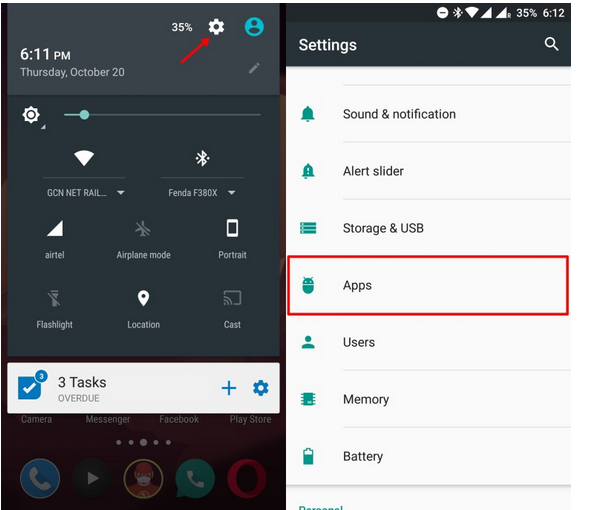
Open Settings, and then click Application.

2. Click in the top right corner of the three, and then click configure а р р ѕ.

3. In this screen, you will find”
Draw the Oth

The application
, click on it.  

4. Now, on the “Draw Oth” application page, you can see that the screen overwrites/removes additional permissions for the application.

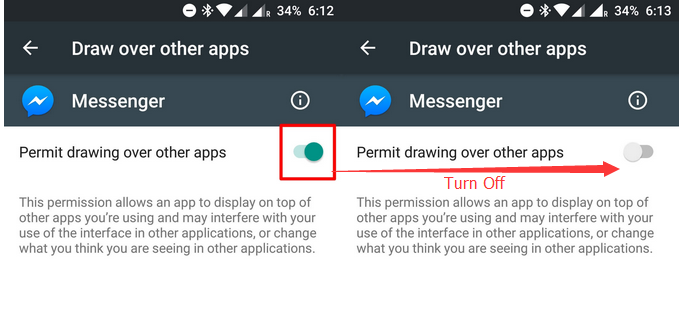
5. On this page, you need to close”
Allows you to draw other applications
Button, as shown below: The above solution can resolve any screen coverage error detected on any Android device. Still can’t solve your problem?Moving on, let’s show you the solution 2. Don’t miss it. Follow us.

Solution 2: How do I turn off screen coverage

1. Turn on Settings

2. Click on the app or app

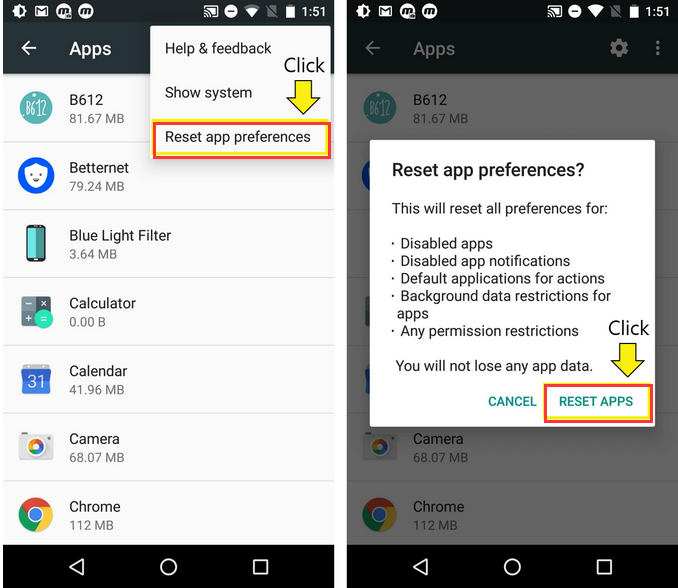
3. Triple button to the right of t, and then click Reset Application Preferences.

4.Finish this solution will be final and the notice of the detected Screen Overlay will no longer appear. So, what’s Samsung’s solution for screen coverage detection?Read on
See also:
How does LG G3 solve the restart problem
?


Screen coverage detection s6


Here is another set of solutions from the Internet

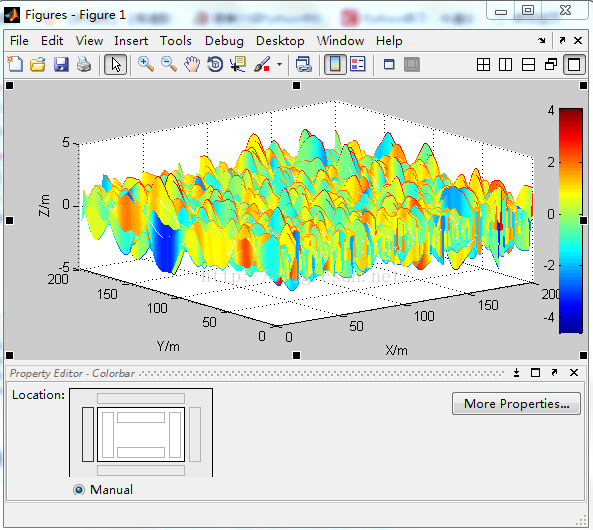
The image operation of MATLAB — every detail operation of colorbar

Recently in the paper matlab generated height field, online search a lot, do a small summary of their own.

First, if you want to add colorbar to the generated image, you can do it in two ways:
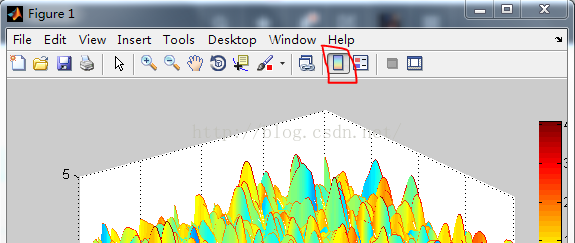
1: Insert — Colorbar in the menu bar of the generated Figure image, or click on the shortcut area at the top to add Colorbar, as shown below:

2: Directly from the command line

colorbar;

If you want to specify the location at will:

colorbar('position',[0.95 0.1 0.04 0.8]);

The data in square brackets refer to the x-coordinate, y-coordinate, width, and height of the colorbar bottom-left point. You can try to change the data and see what happens.

Second, sometimes the resulting colorbar is not what we want it to be. How can we arbitrarily adjust the range and position of the colorbar?

Here is a control method for a program statement:

1、set(a, 'CLim', [0 1]);
2、caxis([0,1]);

before colorbar, you can set its upper and lower limits, usually the second method is relatively simple!

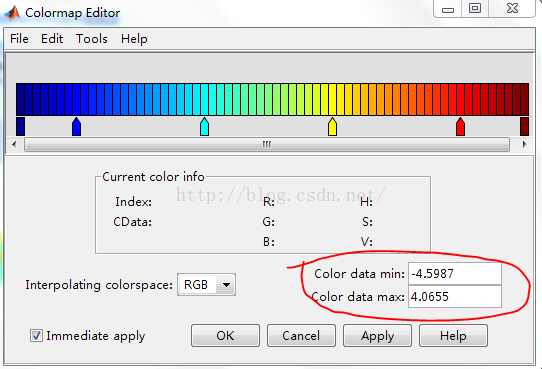
To adjust the value range of the colorbar, right-click on it and select Launch ColorMap Editor

So we want our colorbar to be as big, as long, as big, as wide as we want, and that’s pretty easy!
Click ColorBar, right-click — select Show Property Editor

Click on each of the small rectangles in Location to let our Colorbar position change.

We can even click colorbar in the image


Feel free to drag and resize.

The usage of Matlab function downsample

(I) Downsample
Reduce the sampling rate by an integer multiple

    syntax
    y =downsample (x, n)
    y =downsample (x, n, phase) y =downsample (x, n) reduces the sampling rate of x by retaining the first sample and then the NTH sample after the first sample. If x is a matrix, the function treats each column as a separate sequence. Y = Downsample (x, n, phase) specifies the number of samples for the sampling sequence under offset. Example 1:
    reduces the sampling rate of the sequence by a factor of 3. x = [1 2 3 4 5 6 7 8 9 10];
    y =downsample (x, 3)
    y = 1×4 1 4 7 10 example 2: reduce the sampling rate of the sequence by 3 times and increase the phase offset by 2. That is to offset two Numbers backward from the first number for downsampling y =downsample (x, 3, 2)
    y = 1×3 3 6 9
    x1 = [1 2 3 4 5 6 7 8 9];
    y =downsample(x1,3,1) y = 2 5 8
    example 3:
    reduces the sampling rate of the matrix by 3 times. X = [1 2 3;
    4 5 6;
    7 8 9;
    10, 11 12];
    y =downsample (x, 3)
    y = 2×3 12 3
    10 11 12 input parameters
    x — input array
    vector | matrix
    input array, specified as a vector or matrix. If x is a matrix, the function treats the columns as independent channels. Example: Cosine (PI/4 * (0:15 9)) + RANDn (1,160) specifies the sine curve plus the White Gaussian noise. Example: cos (PI./ [4; 2] * (0:15 9)) ‘+ randn (160,2) specifies a two-channel sine wave. Data type: single | double
    complex number support: is
    n – down sampling coefficient
    positive integer
    under sampling factor, specified as a positive integer. Data type: single | double
    phase – offset
    (default) | positive integer
    offset, specified as a positive integer between 0 and n-1. Data type: single | double output parameter
    y – down sampling array
    vector | matrix
    down sampling array, returned as a vector or matrix.

Python scapy module installation and dependency module

Scapy module installation

Windows:
PIP install scapy
successfully installed.
mac:

pip install scapy

Unexpectedly prompt permission problem, then

sudo pip install scapy

Or an error permission denied
so query on the Internet, found that the original MAC system caused by the sip mechanism.
reference: reference link

sudo pip install scapy --user -U

Installation successful.
Scapy module is installed with
and used.

>>python
>>import scapy

No problem. I thought the installation was successful, so I started writing code. Reference code links:

http://blog.csdn.net/hitwangpeng/article/details/49278409 found that at the time of import module after error:

from scapy.all import *

If you encounter an error that does not exist in the module, you simply need PIP Install XX to install the corresponding module.
MAC encountered this error:

importError: No module named pcapy

Then install the PCAPY module and encounter the same permission problem. Use:

pip install pcapy --user -U

After the installation, an error occurred:

ImportError: No module named dumbnet

When installing with PIP, the module did not exist, and I was surprised to find a suitable solution after a web search:
download the source code and install using setup.py.
reference link: https://stackoverflow.com/questions/40272077/importerror-no-module-named-dumbnet-when-trying-to-run-a-script-that-leverage

git clone https://github.com/dugsong/libdnet.git
cd libdnet
./configure && make
cd python
python setup.py install

At this point, the MAC installation is complete and the script Demo mentioned at the beginning of the test is successful.
But Windows encountered a strange error:

    self._handle = _dlopen(self._name, mode)
WindowsError: [Error 126]

The error message goes up to trace, sees is in loads wpcap.DLL this module times gives the error, therefore, searches in the computer, discovers as expected my machine does not have wpcap.DLL file, searches on the net, discovers can oneself download installs wpcap.DLL module. Specific methods, refer to the tutorial, I’m in the way a, has not been successful, then after use method 2 is very effective, recommend to you
reference links: http://www.jb51.net/os/windows/378774.html
Once the installation is complete, import IT and run the script. praise