Author Archives: Robins

[Solved] Parcel Service Error: regeneratorRuntime is not defined

When using the Parcelfront-end packaging tool to start the local service, the consoleconsole reports an error: Uncaught ReferenceError: regeneratorRuntime is not defined, according to the information: regeneratorRuntimeit is a global auxiliary function generated by the packaging tool, which is babelgenerated and is used for compatible async/awaitsyntax, so you need to configure the corresponding babelplugin.

Front-end engineering Parcel

First, configure babel

There are two ways to configure the babelplugin :

1. Create a separate configuration file .babelrc.

Under the windowsystem, a file whose name starts with . cannot be generated directly, but it can be generated by using the command echo on the cmd command line. The operation is as follows:

echo > .babelrc

Edit the .babelrcfile and configure it as follows:

{  "plugins": [    '@babel/plugin-transform-runtime'  ]}

2. Configure babelin package.json

"babel": {  "plugins": [    '@babel/plugin-transform-runtime'  ]}

After the configuration is successful, restart the service, and Parcelthe dependencies will be downloaded and installed automatically, without manual operation npm install, which is really friendly.

2. Summary

Note: package.json higher than .babelrcthe weight.

If the project is not too complicated, it is highly recommended to use Parcelto build web applications, which is absolutely worry-free, convenient and fast.

[Solved] Flink Hadoop is not in the classpath/dependencies

Error background

After installing the Flink on yarn cluster, the Flink cluster cannot be started.

Version:

flink-1.14.4

hadoop-3.2.3

error phenomenon

2022-04-18 10:22:31,395 ERROR org.apache.flink.runtime.entrypoint.ClusterEntrypoint[] - Could not start cluster entrypoint StandaloneSessionClusterEntrypoint.
org.apache.flink.runtime.entrypoint.ClusterEntrypointException: Failed to initialize the cluster entrypoint StandaloneSessionClusterEntrypoint.
    at org.apache.flink.runtime.entrypoint.ClusterEntrypoint.startCluster(ClusterEntrypoint.java:216) ~[flink-dist_2.12-1.14.4.jar:1.14.4]
    at org.apache.flink.runtime.entrypoint.ClusterEntrypoint.runClusterEntrypoint(ClusterEntrypoint.java:617) [flink-dist_2.12-1.14.4.jar:1.14.4]
    at org.apache.flink.runtime.entrypoint.StandaloneSessionClusterEntrypoint.main(StandaloneSessionClusterEntrypoint.java:59) [flink-dist_2.12-1.14.4.jar:1.14.4]
Caused by: java.io.IOException: Could not create FileSystem for highly available storage path (hdfs://flink/ha/default)
    at org.apache.flink.runtime.blob.BlobUtils.createFileSystemBlobStore(BlobUtils.java:92) ~[flink-dist_2.12-1.14.4.jar:1.14.4]
    at org.apache.flink.runtime.blob.BlobUtils.createBlobStoreFromConfig(BlobUtils.java:76) ~[flink-dist_2.12-1.14.4.jar:1.14.4]
    at org.apache.flink.runtime.highavailability.HighAvailabilityServicesUtils.createHighAvailabilityServices(HighAvailabilityServicesUtils.java:121) ~[flink-dist_2.12-1.14.4.jar:1.14.4]
    at org.apache.flink.runtime.entrypoint.ClusterEntrypoint.createHaServices(ClusterEntrypoint.java:361) ~[flink-dist_2.12-1.14.4.jar:1.14.4]
    at org.apache.flink.runtime.entrypoint.ClusterEntrypoint.initializeServices(ClusterEntrypoint.java:318) ~[flink-dist_2.12-1.14.4.jar:1.14.4]
    at org.apache.flink.runtime.entrypoint.ClusterEntrypoint.runCluster(ClusterEntrypoint.java:243) ~[flink-dist_2.12-1.14.4.jar:1.14.4]
    at org.apache.flink.runtime.entrypoint.ClusterEntrypoint.lambda$startCluster$1(ClusterEntrypoint.java:193) ~[flink-dist_2.12-1.14.4.jar:1.14.4]
    at org.apache.flink.runtime.security.contexts.NoOpSecurityContext.runSecured(NoOpSecurityContext.java:28) ~[flink-dist_2.12-1.14.4.jar:1.14.4]
    at org.apache.flink.runtime.entrypoint.ClusterEntrypoint.startCluster(ClusterEntrypoint.java:190) ~[flink-dist_2.12-1.14.4.jar:1.14.4]
    ... 2 more
Caused by: org.apache.flink.core.fs.UnsupportedFileSystemSchemeException: Could not find a file system implementation for scheme 'hdfs'. The scheme is not directly supported by Flink and no Hadoop file system to support this scheme could be loaded. For a full list of supported file systems, please see https://nightlies.apache.org/flink/flink-docs-stable/ops/filesystems/.
    at org.apache.flink.core.fs.FileSystem.getUnguardedFileSystem(FileSystem.java:532) ~[flink-dist_2.12-1.14.4.jar:1.14.4]
    at org.apache.flink.core.fs.FileSystem.get(FileSystem.java:409) ~[flink-dist_2.12-1.14.4.jar:1.14.4]
    at org.apache.flink.core.fs.Path.getFileSystem(Path.java:274) ~[flink-dist_2.12-1.14.4.jar:1.14.4]
    at org.apache.flink.runtime.blob.BlobUtils.createFileSystemBlobStore(BlobUtils.java:89) ~[flink-dist_2.12-1.14.4.jar:1.14.4]
    at org.apache.flink.runtime.blob.BlobUtils.createBlobStoreFromConfig(BlobUtils.java:76) ~[flink-dist_2.12-1.14.4.jar:1.14.4]
    at org.apache.flink.runtime.highavailability.HighAvailabilityServicesUtils.createHighAvailabilityServices(HighAvailabilityServicesUtils.java:121) ~[flink-dist_2.12-1.14.4.jar:1.14.4]
    at org.apache.flink.runtime.entrypoint.ClusterEntrypoint.createHaServices(ClusterEntrypoint.java:361) ~[flink-dist_2.12-1.14.4.jar:1.14.4]
    at org.apache.flink.runtime.entrypoint.ClusterEntrypoint.initializeServices(ClusterEntrypoint.java:318) ~[flink-dist_2.12-1.14.4.jar:1.14.4]
    at org.apache.flink.runtime.entrypoint.ClusterEntrypoint.runCluster(ClusterEntrypoint.java:243) ~[flink-dist_2.12-1.14.4.jar:1.14.4]
    at org.apache.flink.runtime.entrypoint.ClusterEntrypoint.lambda$startCluster$1(ClusterEntrypoint.java:193) ~[flink-dist_2.12-1.14.4.jar:1.14.4]
    at org.apache.flink.runtime.security.contexts.NoOpSecurityContext.runSecured(NoOpSecurityContext.java:28) ~[flink-dist_2.12-1.14.4.jar:1.14.4]
    at org.apache.flink.runtime.entrypoint.ClusterEntrypoint.startCluster(ClusterEntrypoint.java:190) ~[flink-dist_2.12-1.14.4.jar:1.14.4]
    ... 2 more
Caused by: org.apache.flink.core.fs.UnsupportedFileSystemSchemeException: Hadoop is not in the classpath/dependencies.
    at org.apache.flink.core.fs.UnsupportedSchemeFactory.create(UnsupportedSchemeFactory.java:55) ~[flink-dist_2.12-1.14.4.jar:1.14.4]
    at org.apache.flink.core.fs.FileSystem.getUnguardedFileSystem(FileSystem.java:528) ~[flink-dist_2.12-1.14.4.jar:1.14.4]
    at org.apache.flink.core.fs.FileSystem.get(FileSystem.java:409) ~[flink-dist_2.12-1.14.4.jar:1.14.4]
    at org.apache.flink.core.fs.Path.getFileSystem(Path.java:274) ~[flink-dist_2.12-1.14.4.jar:1.14.4]
    at org.apache.flink.runtime.blob.BlobUtils.createFileSystemBlobStore(BlobUtils.java:89) ~[flink-dist_2.12-1.14.4.jar:1.14.4]
    at org.apache.flink.runtime.blob.BlobUtils.createBlobStoreFromConfig(BlobUtils.java:76) ~[flink-dist_2.12-1.14.4.jar:1.14.4]
    at org.apache.flink.runtime.highavailability.HighAvailabilityServicesUtils.createHighAvailabilityServices(HighAvailabilityServicesUtils.java:121) ~[flink-dist_2.12-1.14.4.jar:1.14.4]
    at org.apache.flink.runtime.entrypoint.ClusterEntrypoint.createHaServices(ClusterEntrypoint.java:361) ~[flink-dist_2.12-1.14.4.jar:1.14.4]
    at org.apache.flink.runtime.entrypoint.ClusterEntrypoint.initializeServices(ClusterEntrypoint.java:318) ~[flink-dist_2.12-1.14.4.jar:1.14.4]
    at org.apache.flink.runtime.entrypoint.ClusterEntrypoint.runCluster(ClusterEntrypoint.java:243) ~[flink-dist_2.12-1.14.4.jar:1.14.4]
    at org.apache.flink.runtime.entrypoint.ClusterEntrypoint.lambda$startCluster$1(ClusterEntrypoint.java:193) ~[flink-dist_2.12-1.14.4.jar:1.14.4]
    at org.apache.flink.runtime.security.contexts.NoOpSecurityContext.runSecured(NoOpSecurityContext.java:28) ~[flink-dist_2.12-1.14.4.jar:1.14.4]
    at org.apache.flink.runtime.entrypoint.ClusterEntrypoint.startCluster(ClusterEntrypoint.java:190) ~[flink-dist_2.12-1.14.4.jar:1.14.4]
    ... 2 more
Reason for error

Flink needs two jar package dependencies to access HDFS. Flink itself does not have it, so it needs to be put in by itself.

flink-shaded-hadoop-3-3.1.1.7.2.9.0-173-9.0.jar

commons-cli-1.5.0.jar

Error solution

Search these two jar packages directly in the maven repository to download: https://mvnrepository.com/

Put the jar package into the /flink/lib directory.

Pytorch Error: error: identifier “AT_CHECK“ is undefined [How to Solve]

These two days, run a mask RCNN series of network code, and execute the command Python 3 setup A bunch of such errors are received during py build development, as follows:

.../detectron2/layers/csrc/deformable/deform_conv.h(136): error: identifier "AT_CHECK" is undefined

.../detectron2/layers/csrc/deformable/deform_conv.h(184): error: identifier "AT_CHECK" is undefined

.../detectron2/layers/csrc/deformable/deform_conv.h(234): error: identifier "AT_CHECK" is undefined

.../detectron2/layers/csrc/deformable/deform_conv.h(284): error: identifier "AT_CHECK" is undefined

.../detectron2/layers/csrc/deformable/deform_conv.h(341): error: identifier "AT_CHECK" is undefined

.../detectron2/layers/csrc/deformable/deform_conv_cuda.cu(155): error: identifier "AT_CHECK " is undefined

.../detectron2/layers/csrc/deformable/deform_conv_cuda.cu(338): error: identifier "AT_CHECK " is undefined

.../detectron2/layers/csrc/deformable/deform_conv_cuda.cu(503): error: identifier "AT_CHECK " is undefined

.../detectron2/layers/csrc/deformable/deform_conv_cuda.cu(696): error: identifier "AT_CHECK " is undefined

.../detectron2/layers/csrc/deformable/deform_conv_cuda.cu(823): error: identifier "AT_CHECK " is undefined

.../detectron2/layers/csrc/deformable/deform_conv_cuda.cu(953): error: identifier "AT_CHECK " is undefined

11 errors detected in the compilation of ".../detectron2/layers/csrc/deformable/deform_conv _cuda.cu".

Solution:

Replace all AT_CHECK in deform_conv_cuda.cpp with TORCH_CHECK

or macro definition:

#ifndef AT_CHECK
#define AT_CHECK TORCH_CHECK 
#endif

[Solved] VUE3 Error: Error: ENOSPC: System limit for number of file watchers reached

(env) [root@VM-20-16-centos vue_test2]# npm run serve

> [email protected] serve
> vue-cli-service serve

 INFO  Starting development server...
[10%] building (0/0 modules)
node:internal/errors:464
    ErrorCaptureStackTrace(err);
    ^

Error: ENOSPC: System limit for number of file watchers reached, watch '/root/work/vue3/vue_test2/public'
    at FSWatcher.<computed> (node:internal/fs/watchers:244:19)
    at Object.watch (node:fs:2251:34)
    at createFsWatchInstance (/root/work/vue3/vue_test2/node_modules/chokidar/lib/nodefs-handler.js:119:15)
    at setFsWatchListener (/root/work/vue3/vue_test2/node_modules/chokidar/lib/nodefs-handler.js:166:15)
    at NodeFsHandler._watchWithNodeFs (/root/work/vue3/vue_test2/node_modules/chokidar/lib/nodefs-handler.js:331:14)
    at NodeFsHandler._handleDir (/root/work/vue3/vue_test2/node_modules/chokidar/lib/nodefs-handler.js:567:19)
    at processTicksAndRejections (node:internal/process/task_queues:96:5)
    at async NodeFsHandler._addToNodeFs (/root/work/vue3/vue_test2/node_modules/chokidar/lib/nodefs-handler.js:617:16)
    at async /root/work/vue3/vue_test2/node_modules/chokidar/index.js:451:21
    at async Promise.all (index 0)
Emitted 'error' event on FSWatcher instance at:
    at FSWatcher._handleError (/root/work/vue3/vue_test2/node_modules/chokidar/index.js:647:10)
    at NodeFsHandler._addToNodeFs (/root/work/vue3/vue_test2/node_modules/chokidar/lib/nodefs-handler.js:645:18)
    at processTicksAndRejections (node:internal/process/task_queues:96:5)
    at async /root/work/vue3/vue_test2/node_modules/chokidar/index.js:451:21
    at async Promise.all (index 0) {
  errno: -28,
  syscall: 'watch',
  code: 'ENOSPC',
  path: '/root/work/vue3/vue_test2/public',
  filename: '/root/work/vue3/vue_test2/public'
}

Solution:

Execute the following command

echo fs.inotify.max_user_watches=524288 | sudo tee -a /etc/sysctl.conf && sudo sysctl -p

[Solved] Vue Project Error: Module build failed: Error: Missing binding

Train of thought

Through the error message, we can see that the core problem is that the sass file cannot be found in the dependent file. This prompts us to reinstall sass

1. Switch to the dependent folder of the current project through CD, that is, node_modules file, and then run the command to install sass. The command is as follows

npm rebuild node-sass

2 . Then switch to the project folder and run the command to update it. The command is as follows:

npm update

3. Finally, run the command to start the project

npm run dev

[Solved] SyntaxError: E:\IdeaProject\src\main.js: Identifier ‘ElementPlus‘ has already been declared

Problems encountered


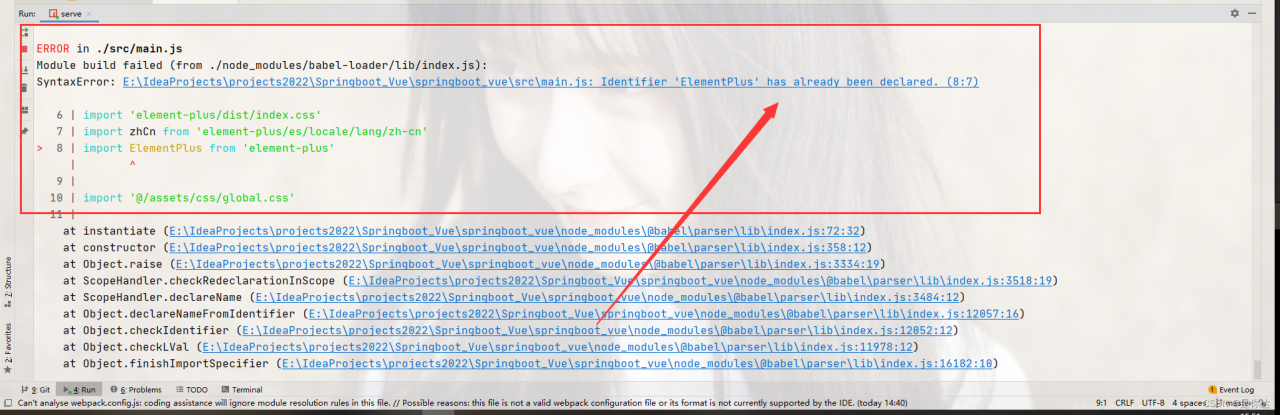
Module build failed (from .de_modules/babel-loaderb/index.js):
SyntaxError: E:\IdeaProjects\![Please add image description](https://img-blog.csdnimg.cn/c9d36e8ab6984fc390345ad4d7129c70.png)
springboot_vue\src\main.js: Identifier 'ElementPlus' has already been declared. (8:7)


Solution:
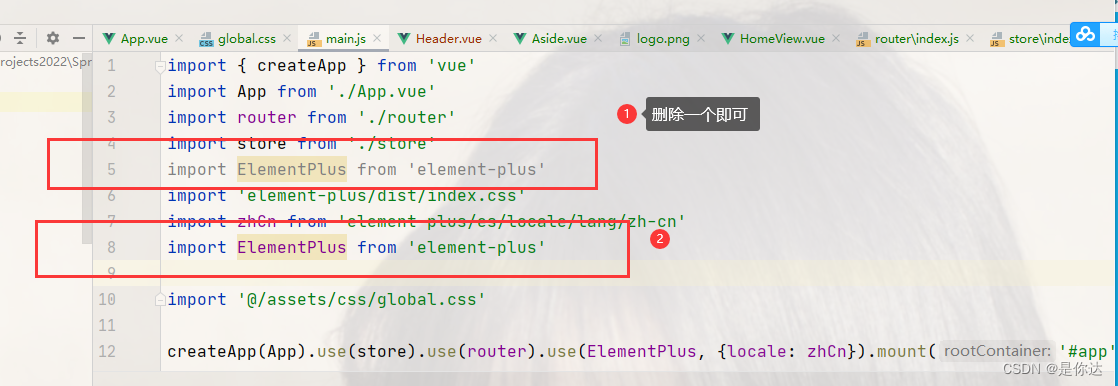
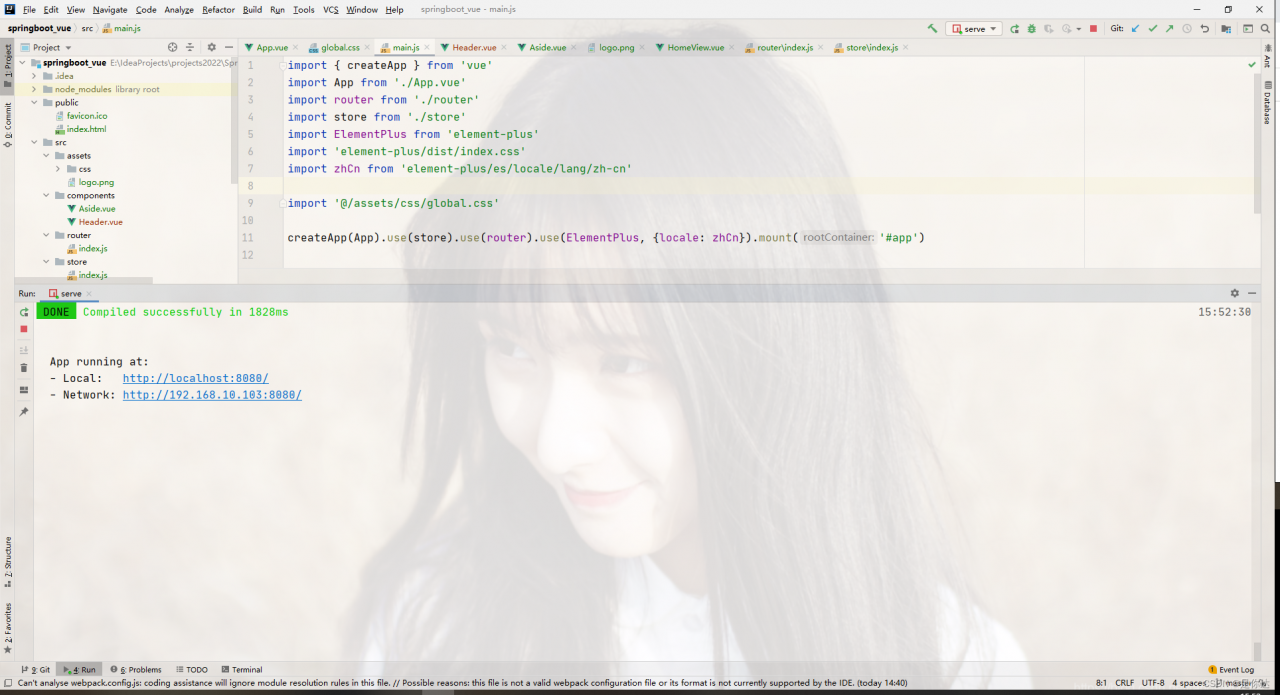
by checking the project source code, it is found that the reason for this error is that elementplus has been imported twice. The solution is to delete one!

The effects after the solution are as follows:


Summary

As a back-end R & D personnel, I think it is necessary to have a little understanding of the front-end. Although I may not take the road of R & D in the future, I feel that with the existence of the epidemic, the reduction of Posts and the improvement of academic qualifications, the internal volume may become more and more serious, and the iron still needs to be hard! Choose a road and stick to it. At least the result won’t be too bad. Come on~

[Solved] Error building SqlSession.The error may exist in XXXXXMapper/xml


Problem description

describe the problems encountered in the project here:
caused by: org.apache.ibatis.exceptions.PersistenceException:

Error building SqlSession.

The error may exist in XXXXXMapper/xml

Cause analysis:

1. Cannot find mapper file associated with; Error in mapper’s fully qualified name (primary cause)


Solution:

1. Check whether the corresponding mapper file name is correct
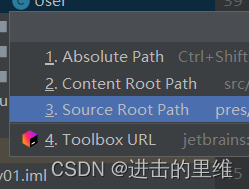
2. Check whether the fully qualified name corresponding to mapper file in the configuration file is correct. The fully qualified name is separated by “/”
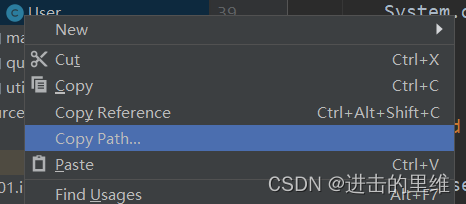
quick copy file fully qualified name:
right click the target file as follows

[Solved] error processing package libapache2-mod-php7.2

Error in installing libpciaccess:


Setting up php7.2-cli (7.2.24-0ubuntu0.18.04.11) ...
dpkg: error processing package php7.2-cli (--configure):
 installed php7.2-cli package post-installation script subprocess returned error exit status 10
No apport report written because MaxReports is reached already
                                                              Setting up python-libxml2 (2.9.4+dfsg1-6.1ubuntu1.5) ...
Processing triggers for man-db (2.8.3-2ubuntu0.1) ...
dpkg: dependency problems prevent configuration of libapache2-mod-php7.2:
 libapache2-mod-php7.2 depends on php7.2-cli; however:
  Package php7.2-cli is not configured yet.

dpkg: error processing package libapache2-mod-php7.2 (--configure):
 dependency problems - leaving unconfigured
Setting up libsqlite0 (2.8.17-14fakesync1) ...
No apport report written because MaxReports is reached already
                                                              Setting up librpm8 (4.14.1+dfsg1-2) ...

... ...

Errors were encountered while processing:
 ufw
 nfs-common
 openssh-server
 php7.2-cli
 libapache2-mod-php7.2
E: Sub-process /usr/bin/dpkg returned an error code (1)

To view installation information:

 apt list | grep libapache2-mod-php

WARNING: apt does not have a stable CLI interface. Use with caution in scripts.

libapache2-mod-php/bionic,bionic,now 1:7.2+60ubuntu1 all [installed]
libapache2-mod-php5filter/trusty 5.5.9+dfsg-1ubuntu4 amd64
libapache2-mod-php7.2/bionic-security,bionic-updates,now 7.2.24-0ubuntu0.18.04.11 amd64 [installed]

Just remove the contents reported as errors:

apt-get remove --purge libapache2-mod-php7.2
apt-get remove --purge nfs-common
apt-get remove --purge php7.2-cli
apt-get remove --purge ufw
apt-get remove --purge openssh-server
... ...

Upgrade list:

apt-get update

Review the installed information again and confirm remove:

apt list | grep libapache2-mod-php*

WARNING: apt does not have a stable CLI interface. Use with caution in scripts.

libapache2-mod-php/bionic,bionic 1:7.2+60ubuntu1 all
libapache2-mod-php5filter/trusty 5.5.9+dfsg-1ubuntu4 amd64
libapache2-mod-php7.2/bionic-security,bionic-updates,now 7.2.24-0ubuntu0.18.04.11 amd64 [residual-config]

Reinstall, done!:

apt install libpciaccess
Reading package lists... Done
Building dependency tree       
Reading state information... Done
E: Unable to locate package libpciaccess
e0005055@ibudev20:~/wk/bak_load/win2030/buildroot/dl$ sd apt-get install libpciaccess-dev
Reading package lists... Done
Building dependency tree       
Reading state information... Done
libpciaccess-dev is already the newest version (0.14-1).
The following packages were automatically installed and are no longer required:
  keyutils libnfsidmap2 libtirpc1 ncurses-term openssh-sftp-server php7.2-common php7.2-json php7.2-opcache php7.2-readline rpcbind ssh-import-id
Use 'sudo apt autoremove' to remove them.
0 upgraded, 0 newly installed, 0 to remove and 32 not upgraded.

Error: Host Key Verification Failed [How to Solve]

Delete the previous GitHub account information (including the deletion of the file under. SSH and the modification of user, name and user.email), reuse the new GitHub account to generate the public-private key, and then configure it into the settings of the new GitHub account. After that, an error is reported in the GIT clone project. Git error: host key verification failed

Solution:
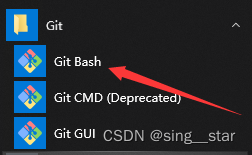
Open git bash

Enter the following commands in sequence to solve the problem

mkdir -p ~/.ssh
ssh-keyscan -t rsa github.com >> ~/.ssh/known_hosts
ssh-keygen -t rsa -C "user.email"

Reference: stackoverflow

[Solved] ESLint: Parsing error: Unexpected token(prettier/prettier)

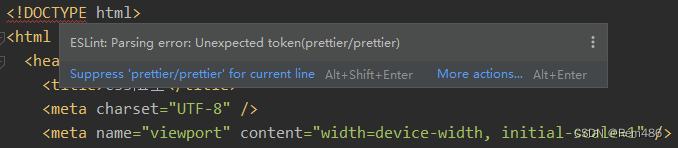
eslint HTML file error after introducing prettier: parsing error: unexpected token (prettier/prettier)

Cause of problem

The parser of prettier is not configured correctly. (I don’t know why it needs to be configured separately. It should have default configuration for all corresponding file types)

Solution

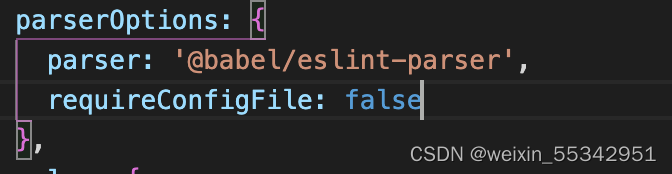
Modify .prettierrc.json , add overides , and configure the parser of HTML. Configurable item: Reference

{
  "printWidth": 120,
  "singleQuote": true,
  "bracketSpacing": true,
  "jsxBracketSameLine": true,
  "htmlWhitespaceSensitivity": "ignore",
  "overrides": [
    {
      "files": "*.html",
      "options": {
        "parser": "html"
      }
    }
  ]
}

[Solved] sqoop Error: jSQLException in nextKeyValue Caused by: ORA-24920:column size too large for client

Question

When importing Oracle data with sqoop, the following errors are reported:

INFO mapreduce.Job: Task Id : attempt_1646802944907_15460_m_000000_1, Status : FAILED
Error: java.io.IOException: SQLException in nextKeyValue
        at org.apache.sqoop.mapreduce.db.DBRecordReader.nextKeyValue(DBRecordReader.java:275)
        at org.apache.hadoop.mapred.MapTask$NewTrackingRecordReader.nextKeyValue(MapTask.java:568)
        at org.apache.hadoop.mapreduce.task.MapContextImpl.nextKeyValue(MapContextImpl.java:80)
        at org.apache.hadoop.mapreduce.lib.map.WrappedMapper$Context.nextKeyValue(WrappedMapper.java:91)
        at org.apache.hadoop.mapreduce.Mapper.run(Mapper.java:145)
        at org.apache.sqoop.mapreduce.AutoProgressMapper.run(AutoProgressMapper.java:64)
        at org.apache.hadoop.mapred.MapTask.runNewMapper(MapTask.java:799)
        at org.apache.hadoop.mapred.MapTask.run(MapTask.java:347)
        at org.apache.hadoop.mapred.YarnChild$2.run(YarnChild.java:174)
        at java.security.AccessController.doPrivileged(Native Method)
        at javax.security.auth.Subject.doAs(Subject.java:422)
        at org.apache.hadoop.security.UserGroupInformation.doAs(UserGroupInformation.java:1875)
        at org.apache.hadoop.mapred.YarnChild.main(YarnChild.java:168)
Caused by: java.sql.SQLException: ORA-24920: column size too large for client

reason

Before using sqoop import other database is normal, this time from the new database import data problems, first check what is the difference between the two databases, found an Oracle version is 11, the new Oracle database version is 19, which may be the cause of the problem.
Go online to check the ORA-24920 error, said to upgrade the oracle client, further speculation may be the problem of Oracle driver.
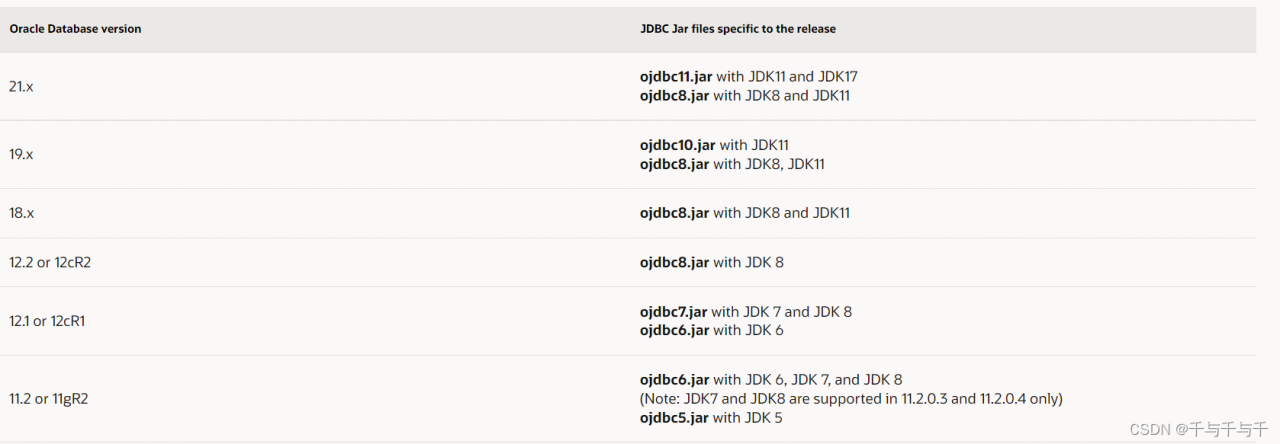
Under the lib file of sqoop tool, the Oracle JDBC driver found for sqoop is ojdbc6.jar, which does not match with Oracle version 19.
You can check the Oracle version and the corresponding Oracle JDBC driver version on this page:
https://www.oracle.com/database/technologies/faq-jdbc.html#02_03
The screenshot is as follows:

the link to the download page is as follows:
https://www.oracle.com/database/technologies/appdev/jdbc-downloads.html

Solution:

According to the version, ojdbc8.0.jar was downloaded. After uploading, delete the original version and re import the data.
the driver of the original version here needs to be deleted or moved, otherwise it will not succeed. Guess that if there are two versions, the old version may be read