Author Archives: Robins

[Solved] Eureka Startup Error: Root name (‘timestamp‘) does not match expected type EurekaApplications

Eureka Startup Error: Root name (‘timestamp‘) does not match expected type EurekaApplications

1. Eureka startup error

Recently, I was learning that Eureka started the client to report errors, and checked a bunch of fucking answers on the Internet

  • Some people say that the spring security csrf authentication control is turned on, you have to add a configuration to cancel the csrf authentication
    I see that my configuration does not introduce spring security package ah, where to open the login authentication, bullshit it
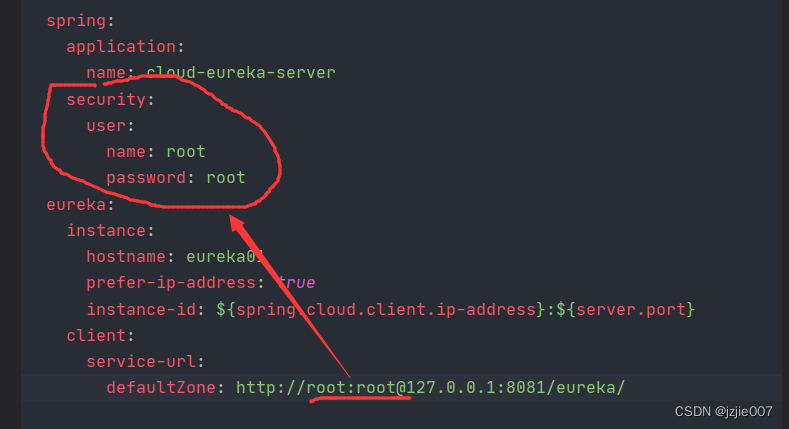
  • Some people say it is eureka url to add userName:password My eureka does not have a username password, should not be the problem here either

If you have introduced spring security and set login authentication to be added, the fundamental problem is not here
the error message is

Root name (‘timestamp’) does not match expected (‘applications’) for type EurekaApplications

Caused by: com.fasterxml.jackson.databind.exc.MismatchedInputException: Root name (‘timestamp’) does not match expected (‘applications’) for type org.springframework.cloud.netflix.eureka.http.EurekaApplications
at [Source: (org.springframework.util.StreamUtils$NonClosingInputStream); line: 1, column: 2] (through reference chain: org.springframework.cloud.netflix.eureka.http.EurekaApplications[“timestamp”])


Caused by: com.fasterxml.jackson.databind.exc.MismatchedInputException: Root name ('timestamp') does not match expected ('applications') for type `org.springframework.cloud.netflix.eureka.http.EurekaApplications`
 at [Source: (org.springframework.util.StreamUtils$NonClosingInputStream); line: 1, column: 2] (through reference chain: org.springframework.cloud.netflix.eureka.http.EurekaApplications["timestamp"])

2. Solutions

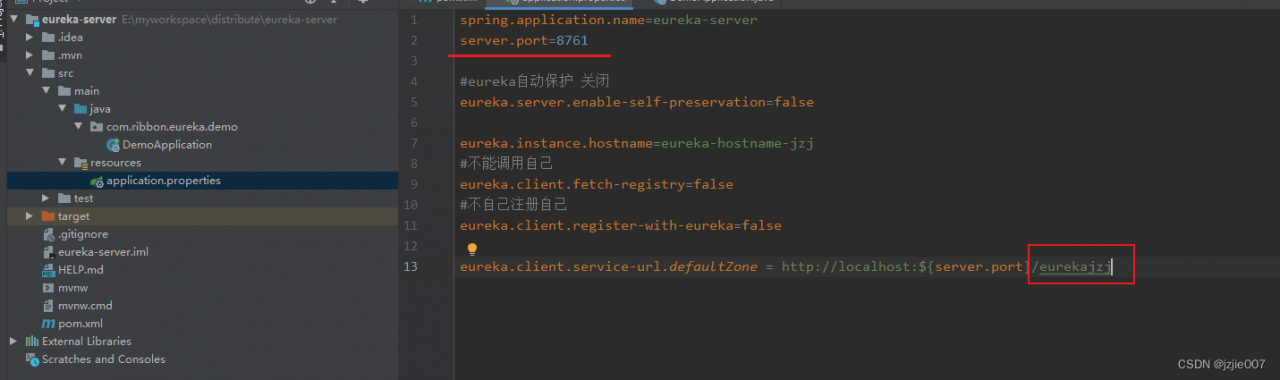
Eureka requires that the suffix end of your serviceurl must be Eureka
if you write something else, the above error will appear
what I write is http://localhost:${server.port}/eurekajzj is wrong

The server is consistent with the client http://localhost: ${server. Port}/Eureka will do

Otherwise, the above error will appear

3. Eureka server configuration

First, start the class eurekaserver
to see the configuration of the server

spring.application.name=eureka-server
server.port=8761

#eureka auto-preservation off
eureka.server.enable-self-preservation=false

eureka.instance.hostname=eureka-hostname-jzj
# Cannot call self
eureka.client.fetch-registry=false
#Does not register itself
eureka.client.register-with-eureka=false

eureka.client.service-url.defaultZone = http://localhost:${server.port}/eurekajzj
4. Eureka client configuration

server.port=8088

#user service
spring.application.name=user-client

#eureka
eureka.client.serviceUrl.defaultZone=http://localhost:8761/eurekajzj

5. Problems

The problem is the eurekajzj suffix
The serviceUrl address of my Eureka Server configuration
eureka.client.service-url.defaultZone = http://localhost:${server.port}/eurekajzj
My client’s configured eureka address
eureka.client.serviceUrl.defaultZone = http://localhost:8761/eurekajzj
The suffix ending is not eureka

After modification, all Eureka services and clients are working fine
[Solved] Model Error: must return a relationship instance

Model Error: must return a relationship instance

There is a method in the model as follows:

public function adjustbills()
    {
        if($this->user_combined == '1'){
            $invoiceNumberArr = ['xxx'];
            return Adjustbill::whereIn('invoice_number',$invoiceNumberArr)->where('user_id', $this->user_id);
        }else{
            return $this->hasMany(Adjustbill::class, 'invoice_number', 'invoice_number')->where('user_id', $this->user_id);
        }
    }

When the calling method is model -> When adjustbills,

  1. If it goes to the following judgment, no error will be reported
  2. If it goes to the above judgment, it will report an error must return a relationship instance, because laravel uses the following hasMany relationship by default, if not, it will report an error.

Solution:

  1. Find a way to modify the above logic to the following way of relationship
  2. Called as :model->adjustbills->get()

How to Solve kubelet starts error (k8s Cluster Restarted)

How to Solve kubelet starts error after k8s Cluster is Restarted

After the k8s cluster restarts, kubelet starts to solve the error

1 k8s version 1.23.0, docker CE version 20.10.14

2. An error is reported for the problem, and an error is reported for starting kubelet. The contents are as follows:

May 16 09:47:13 k8s-master kubelet: E0516 09:47:13.512956    7403 server.go:302] "Failed to run kubelet" err="failed to run Kubelet: misconfiguration: kubelet cgroup driver: \"systemd\" is different from docker cgroup driver: \"cgroupfs\""
May 16 09:47:13 k8s-master systemd: kubelet.service: main process exited, code=exited, status=1/FAILURE
May 16 09:47:13 k8s-master systemd: Unit kubelet.service entered failed state.
May 16 09:47:13 k8s-master systemd: kubelet.service failed

3 problem analysis: according to the error report, the reason should be that kubelet’s cgroups are inconsistent with docker

4. Solve the problem and modify the docker configuration

cat > /etc/docker/daemon.json <<EOF
{"exec-opts": ["native.cgroupdriver=systemd"]}
EOF

5. Restart docker to solve the problem

[root@k8s-master ~]# systemctl restart docker
[root@k8s-master ~]# systemctl restart kubelet
[root@k8s-master ~]# 
[root@k8s-master ~]# systemctl status  kubelet
● kubelet.service - kubelet: The Kubernetes Node Agent
   Loaded: loaded (/usr/lib/systemd/system/kubelet.service; enabled; vendor preset: disabled)
  Drop-In: /usr/lib/systemd/system/kubelet.service.d
           └─10-kubeadm.conf
   Active: active (running) since Mon 2022-05-16 09:48:06 CST; 3s ago
     Docs: https://kubernetes.io/docs/
 Main PID: 8226 (kubelet)
    Tasks: 23
   Memory: 56.9M
   CGroup: /system.slice/kubelet.service
           ├─8226 /usr/bin/kubelet --bootstrap-kubeconfig=/etc/kubernetes/bootstrap-kubelet.conf --kubeconfig=/etc/kubernetes/kubelet.conf --config...
           └─8745 /opt/cni/bin/calico

[Solved] pod Error: back off restarting failed container

pod Error: back off restarting failed container


Solution:

1. Find the corrosponding deployment
2. Add command: [ “/bin/bash”, “-ce”, “tail -f /dev/null” ]
as following:

kind: Deployment
apiVersion: apps/v1beta2
metadata:
  labels:
    app: jenkins-master
  name: jenkins-master-deploy
spec:
  replicas: 1
  selector:
    matchLabels:
      app: jenkins-master
  template:
    metadata:
      labels:
        app: jenkins-master
    spec:
      containers:
      - name: jenkins-master
        image: drud/jenkins-master:v0.29.0
        imagePullPolicy: IfNotPresent
        command: [ "/bin/bash", "-ce", "tail -f /dev/null" ]
        volumeMounts:
        - mountPath: /var/jenkins_home/
          name: masterjkshome
        ports:
        - containerPort: 8080
      volumes:
      - name: masterjkshome
        persistentVolumeClaim:
          claimName: pvcjkshome

[Solved] Vue eslint Error: Component name “*****“ should always be multi-word

Vue eslint Error: error “Component name “*****“ should always be multi-word”

Problems:

In the project created by Vue-cli, after the file is created and named, an error will be reported as “component name” ***** “should always be multi-word”;

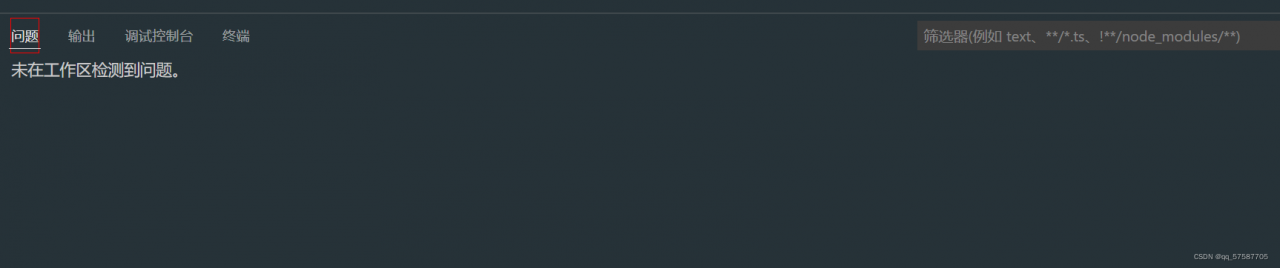
The screenshot of error reporting is as follows:

Component name "******" should always be multi-word.eslintvue/multi-word-component-names

Reasons for error reporting:

The naming of components is not standardized. According to the official style guide of eslint, in addition to the root component (app.vue), the user-defined group

The part name should be composed of multiple words (using the naming method of big hump or connecting words with “-“) to prevent conflict with HTML tags;


The project created by the latest vue-cli uses the latest vue/cli-plugin-eslint plugin, which references the vue/multi-word-component-names rule after vue/cli-plugin-eslint v7.20.0.

The vue/multi-word-component-names rule has been referenced since vue/cli-plugin-eslint v7.20.0, so this error was determined at compile time.

Solution:

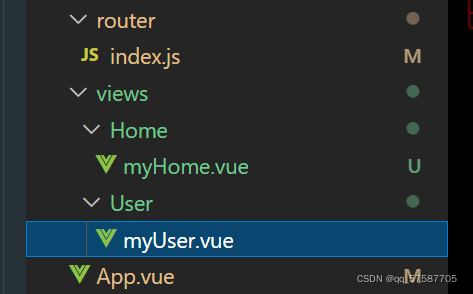
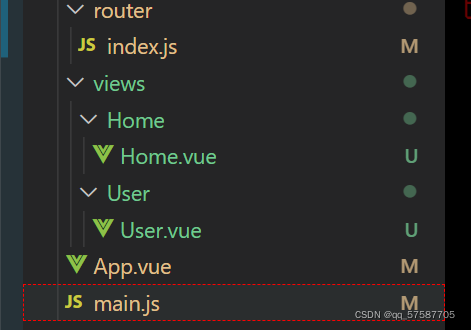
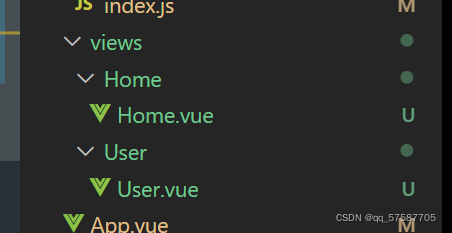
Scheme 1: Rename (valid for personal test)

Rename the name of the file

Modify the component name to multiple words, use hump naming method or connect words with “-“.

So the problem is solved~~~~

Examples are as follows:

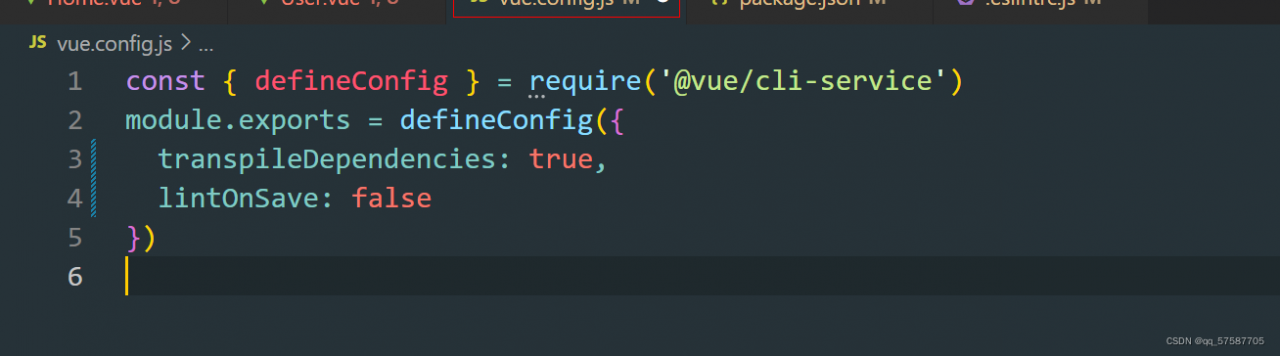
Scheme 2: configure Vue config.js file (online method, invalid for my use)

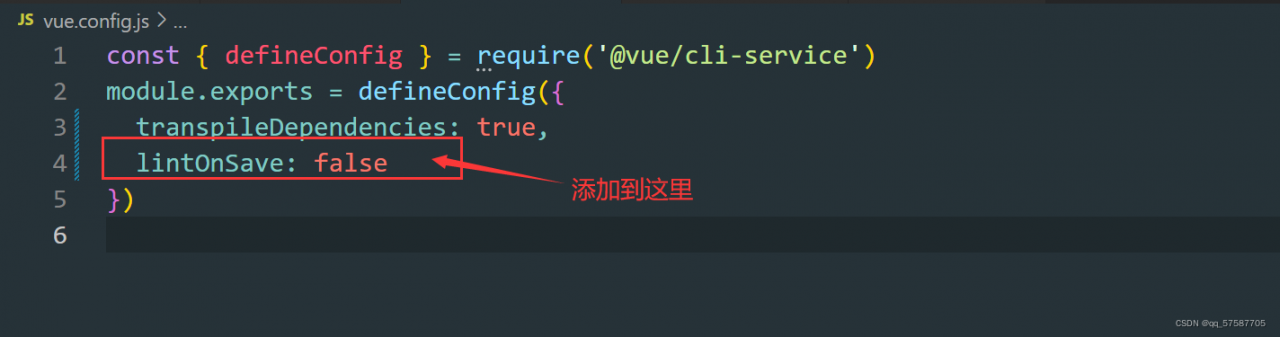
Find vue.com in the root directory config. JS file (if not, create a new one), and add the following code in Vue config. JS file, add the following code

lintOnSave: false // Close eslint verification

Examples are as follows:

This scheme only does not report errors during compilation. If vscode + eslint is used, a red prompt will be marked in the file header, and the official does not recommend turning off the verification directly;

Configure Vue config. The method of JS file (scheme 2) generally can not solve the problem, so it is not recommended to use it

If you find that you haven’t solved the problem, you might as well try other solutions

Method 3: configuration eslintrc.js file (valid for personal test)

1. Turn off naming rules

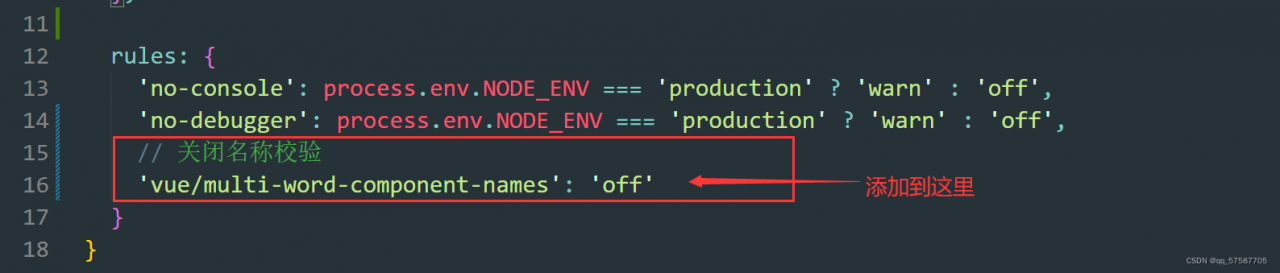
Find it eslintrc.js file and adds such a sentence in rules

'vue/multi-word-component-names': "off" // Close name verification

It is suggested to use this method, which is more correct and reasonable;

Examples are as follows:

It is found that there is no error, and it can run normally ~ ~ ~

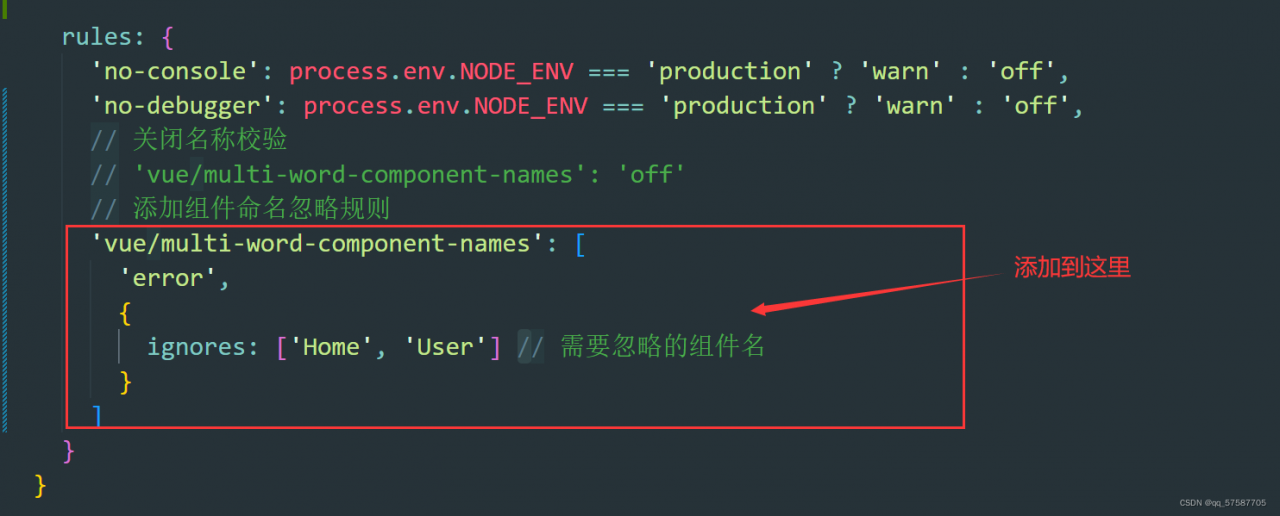
The above is to close the naming rules, and the component name will not be verified. The official recommended setting is to ignore the component name

2. Ignore individual component names

// Add component naming ignore rule
    "vue/multi-word-component-names": ["error",{
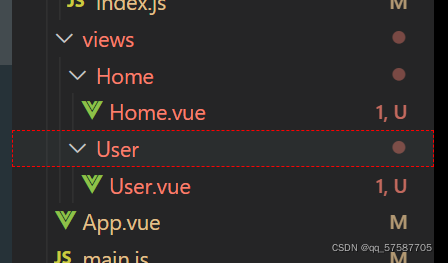
       "ignores": ["Home", "User"]//Component names to ignore
    }]

Recommended scheme 3, highly recommended!!!

For example:

Scheme 4:

The third scheme is to close and ignore the rule of component name; Ignore by component name

The fourth scheme is the closing rule according to the file.

Close a file naming rule verification

Found in the root directory eslintrc. JS file, (if not, create a new one (note that there is a point in front of the file))

Add the following code to the overrides of the file:

{  
 files: ['src/views/index.vue','src/views/**/index.vue'],   // Match index.vue in views and secondary directories
 rules: {
 'vue/multi-word-component-names': "off",
 } // assign rules to the files matched above
}

Where files: [] is used to match files, and the * sign represents all files. index. Vue can also be changed to * Vue, which is all Vue files in the matching directory

Document content:

module.exports = {
  root: true,
  env: {
    node: true
  },
  'extends': [
    'plugin:vue/essential',
    'eslint:recommended'
  ],
  parserOptions: {
    parser: '@babel/eslint-parser'
  },
  rules: {
    'no-console': process.env.NODE_ENV === 'production' ?'warn' : 'off',
    'no-debugger': process.env.NODE_ENV === 'production' ?'warn' : 'off',
  },
  overrides: [
        //Here is the code added
        { 
          files: ['src/views/index.vue','src/views/**/index.vue'], // match index.vue in views and secondary directories
          rules: {
          'vue/multi-word-component-names': "off",
          } // Assign rules to the files matched above
        },
    {
      files: [
        '**/__tests__/*.{j,t}s?(x)',
        '**/tests/unit/**/*.spec.{j,t}s?(x)'
      ],
      env: {
        jest: true
      }
    }
  ]
}

Four schemes I suggest using scheme 3 and scheme 4. I don’t recommend using the method of scheme 2, which is common on the Internet. It’s not easy to use!

Very important notes: (the configuration file will take effect only after the project is restarted)

In a running project, to modify the configuration file, you must first delete the project in the terminal and click Ctrl + C twice to terminate the project, and then NPM run serve to re run the project. The modified configuration file can take effect

[Solved] SSM startup error: ClassNotFoundException: java.lang.ClassNotFoundException: org.springframework.web.context.ContextLoaderListener

SSM Startup Error: ClassNotFoundException

Phenomenon

Error message after adding jar package again:
java.lang.ClassNotFoundException: org.springframework.web.context.ContextLoaderListener


Solution:

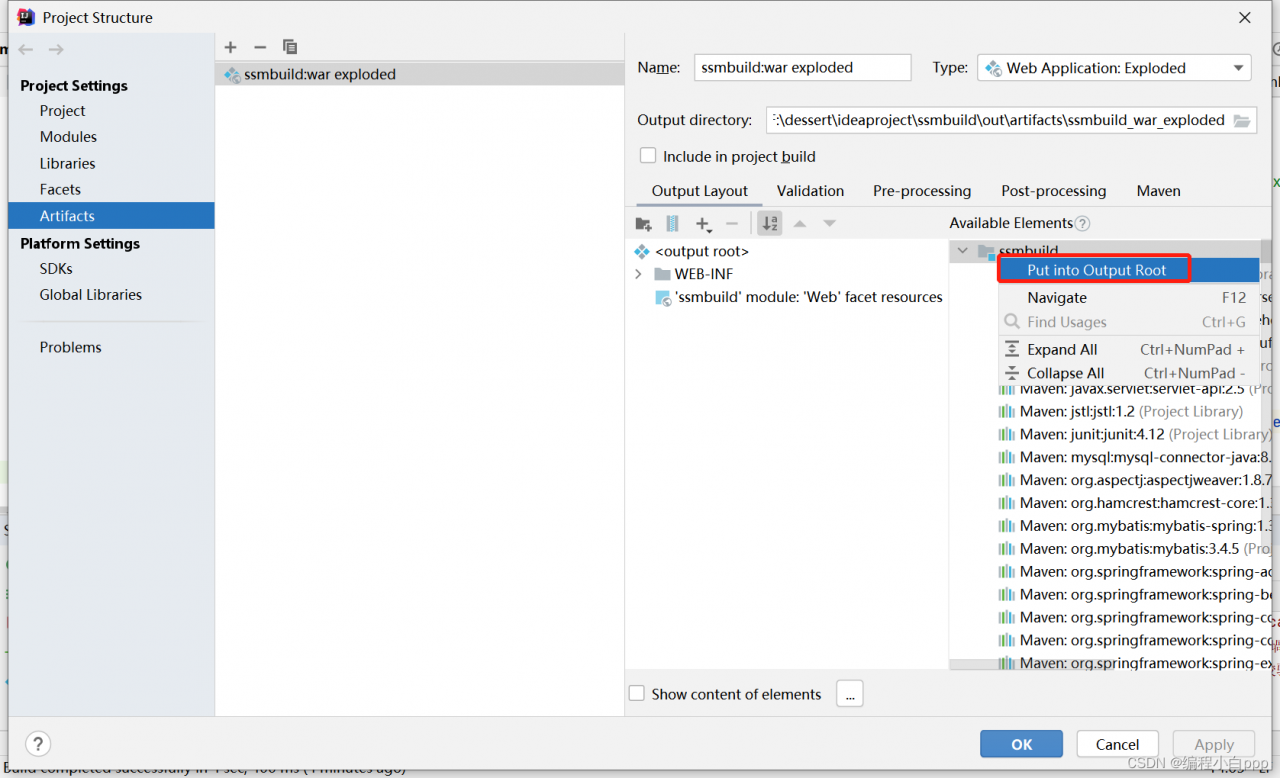
Select Project Structure in the file and then select Artifacts, right click on the rightmost project name and select Put into Output Root

How to Solve UE Shader develop error

As far as I can observe, the UE is generally loaded to 39%-45% when the compilation of the Shader will be carried out, but due to our sometimes negligent, often write shader with errors, resulting in the UE directly crash without prompting error messages, given that only the ConsoleVariables.ini file needs to be configured.

original:

[Startup]
; Uncomment to get detailed logs on shader compiles and the opportunity to retry on errors
;r.ShaderDevelopmentMode=1
; Uncomment to dump shaders in the Saved folder
; Warning: leaving this on for a while will fill your hard drive with many small files and ...

After modification:

[Startup]
; Uncomment to get detailed logs on shader compiles and the opportunity to retry on errors
r.ShaderDevelopmentMode=1
; Uncomment to dump shaders in the Saved folder
; Warning: leaving this on for a while will fill your hard drive with many small files and ...

Can’t you see the change? Pay attention

r.ShaderDevelopmentMode=1

Removed the “;” in front, This is the difference. In this way, when we write the shader, it will directly tell us what errors are, which will greatly help us eliminate errors, such as undefined variables (written incorrectly due to negligence).

React: How to Solve Web3 import error

How to Solve Web3 import error

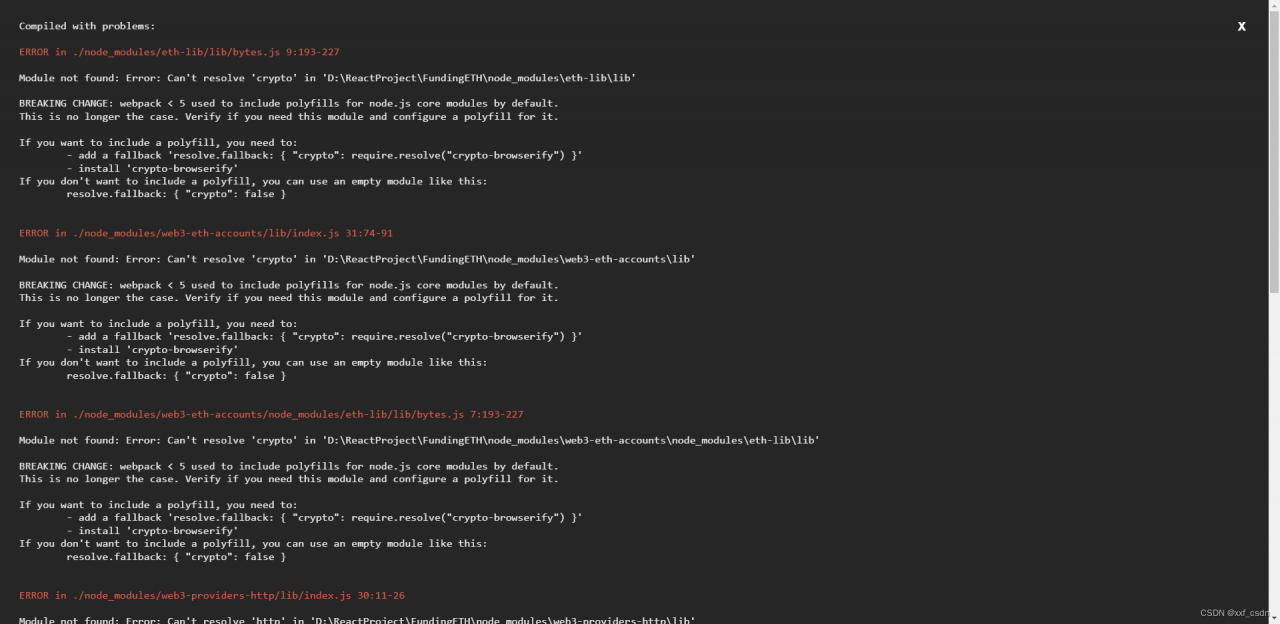
Error Messages:
Solution:
Web3 and Create-react-app
If you are using create-react-app version >=5 you may run into issues building. This is because NodeJS polyfills are not included in the latest version of create-react-app.
Solution:
Install react-app-rewired and the missing modules
1. Down the Dependency below
yarn:
If you are using yarn:

yarn add --dev react-app-rewired process crypto-browserify stream-browserify assert stream-http https-browserify os-browserify url buffer

npm:
If you are using npm:

npm install --save-dev react-app-rewired crypto-browserify stream-browserify assert stream-http https-browserify os-browserify url buffer process

Create config-overrides.js in the root of your project folder with the content
2. Create config-overrides.js file in the main directory:

const webpack = require('webpack');

module.exports = function override(config) {
    const fallback = config.resolve.fallback || {};
    Object.assign(fallback, {
        "crypto": require.resolve("crypto-browserify"),
        "stream": require.resolve("stream-browserify"),
        "assert": require.resolve("assert"),
        "http": require.resolve("stream-http"),
        "https": require.resolve("https-browserify"),
        "os": require.resolve("os-browserify"),
        "url": require.resolve("url")
    })
    config.resolve.fallback = fallback;
    config.plugins = (config.plugins || []).concat([
        new webpack.ProvidePlugin({
            process: 'process/browser',
            Buffer: ['buffer', 'Buffer']
        })
    ])
    return config;
}

3.Modify package.json
Within package.json change the scripts field for start, build and test. Instead of react-scripts replace it with react-app-rewired
before:
Before:

"scripts": {
    "start": "react-scripts start",
    "build": "react-scripts build",
    "test": "react-scripts test",
    "eject": "react-scripts eject"
},

After change:

"scripts": {
    "start": "react-app-rewired start",
    "build": "react-app-rewired build",
    "test": "react-app-rewired test",
    "eject": "react-scripts eject"
},

4.Close the warning in the terminal
The missing Nodejs polyfills should be included now and your app should be functional with web3.
If you want to hide the warnings created by the console:
In config-overrides.js within the override function, add:
Add the following code in override method of config-overrides.js

config.ignoreWarnings = [/Failed to parse source map/];

The above contents are the processing methods on Web3 GIT

How to Solve Flynk Task Java verifyerror 209 error

Flynk Task Java verifyerror 209 error

Projects developed using java will more or less encounter problems similar to verifyerror
flash version: flash-1.10.1
JDK version: 1.8.0_20

java version "1.8.0_20"
Java(TM) SE Runtime Environment (build 1.8.0_20-b26)
Java HotSpot(TM) 64-Bit Server VM (build 25.20-b23, mixed mode)

report errors:

22/05/16 16:46:08 INFO entrypoint.ClusterEntrypoint: Shutting YarnJobClusterEntrypoint down with application status FAILED. Diagnostics java.lang.Exception: Could not create actor system
	at org.apache.flink.runtime.clusterframework.BootstrapTools.startActorSystem(BootstrapTools.java:278)
	at org.apache.flink.runtime.clusterframework.BootstrapTools.startActorSystem(BootstrapTools.java:164)
	at org.apache.flink.runtime.clusterframework.BootstrapTools.startActorSystem(BootstrapTools.java:123)
	at org.apache.flink.runtime.clusterframework.BootstrapTools.startActorSystem(BootstrapTools.java:98)
	at org.apache.flink.runtime.rpc.akka.AkkaRpcServiceUtils.createRpcService(AkkaRpcServiceUtils.java:85)
	at org.apache.flink.runtime.entrypoint.ClusterEntrypoint.createRpcService(ClusterEntrypoint.java:285)
	at org.apache.flink.runtime.entrypoint.ClusterEntrypoint.initializeServices(ClusterEntrypoint.java:254)
	at org.apache.flink.runtime.entrypoint.ClusterEntrypoint.runCluster(ClusterEntrypoint.java:207)
	at org.apache.flink.runtime.entrypoint.ClusterEntrypoint.lambda$startCluster$0(ClusterEntrypoint.java:169)
	at org.apache.flink.runtime.entrypoint.ClusterEntrypoint$$Lambda$18/1199262943.call(Unknown Source)
	at org.apache.flink.runtime.security.HadoopSecurityContext$$Lambda$19/590845366.run(Unknown Source)
	at java.security.AccessController.doPrivileged(Native Method)
	at javax.security.auth.Subject.doAs(Subject.java:422)
	at org.apache.hadoop.security.UserGroupInformation.doAs(UserGroupInformation.java:1836)
	at org.apache.flink.runtime.security.HadoopSecurityContext.runSecured(HadoopSecurityContext.java:41)
	at org.apache.flink.runtime.entrypoint.ClusterEntrypoint.startCluster(ClusterEntrypoint.java:168)
	at org.apache.flink.runtime.entrypoint.ClusterEntrypoint.runClusterEntrypoint(ClusterEntrypoint.java:518)
	at org.apache.flink.yarn.entrypoint.YarnJobClusterEntrypoint.main(YarnJobClusterEntrypoint.java:119)
Caused by: java.lang.VerifyError: Uninitialized object exists on backward branch 209
Exception Details:
  Location:
    scala/collection/immutable/HashMap$HashTrieMap.split()Lscala/collection/immutable/Seq; @249: goto
  Reason:
    Error exists in the bytecode
  Bytecode:
    0x0000000: 2ab6 0064 04a0 001e b200 c1b2 00c6 04bd
    0x0000010: 0002 5903 2a53 c000 c8b6 00cc b600 d0c0
    0x0000020: 00d2 b02a b600 38b8 0042 3c1b 04a4 0156
    0x0000030: 1b05 6c3d 2a1b 056c 2ab6 0038 b700 d43e
    0x0000040: 2ab6 0038 021d 787e 3604 2ab6 0038 0210
    0x0000050: 201d 647c 7e36 05bb 0019 59b2 00c6 2ab6
    0x0000060: 003a c000 c8b6 00d8 b700 db1c b600 df3a
    0x0000070: 0619 06c6 001a 1906 b600 e3c0 008b 3a07
    0x0000080: 1906 b600 e6c0 008b 3a08 a700 0dbb 00e8
    0x0000090: 5919 06b7 00eb bf19 073a 0919 083a 0abb
    0x00000a0: 0002 5915 0419 09bb 0019 59b2 00c6 1909
    0x00000b0: c000 c8b6 00d8 b700 db03 b800 f13a 0e3a
    0x00000c0: 0d03 190d b900 f501 0019 0e3a 1136 1036
    0x00000d0: 0f15 0f15 109f 0027 150f 0460 1510 190d
    0x00000e0: 150f b900 f802 00c0 0005 3a17 1911 1917
    0x00000f0: b800 fc3a 1136 1036 0fa7 ffd8 1911 b801
    0x0000100: 00b7 0069 3a0b bb00 0259 1505 190a bb00
    0x0000110: 1959 b200 c619 0ac0 00c8 b600 d8b7 00db
    0x0000120: 03b8 00f1 3a13 3a12 0319 12b9 00f5 0100
    0x0000130: 1913 3a16 3615 3614 1514 1515 9f00 2715
    0x0000140: 1404 6015 1519 1215 14b9 00f8 0200 c000
    0x0000150: 053a 1819 1619 18b8 0103 3a16 3615 3614
    0x0000160: a7ff d819 16b8 0100 b700 693a 0cbb 0105
    0x0000170: 5919 0bbb 0105 5919 0cb2 010a b701 0db7
    0x0000180: 010d b02a b600 3a03 32b6 010f b0       
  Stackmap Table:
    same_frame(@35)
    full_frame(@141,{Object[#2],Integer,Integer,Integer,Integer,Integer,Object[#118]},{})
    append_frame(@151,Object[#139],Object[#139])
    full_frame(@209,{Object[#2],Integer,Integer,Integer,Integer,Integer,Object[#118],Object[#139],Object[#139],Object[#139],Object[#139],Top,Top,Object[#25],Object[#62],Integer,Integer,Object[#116]},{Uninitialized[#159],Uninitialized[#159],Integer,Object[#139]})
    full_frame(@252,{Object[#2],Integer,Integer,Integer,Integer,Integer,Object[#118],Object[#139],Object[#139],Object[#139],Object[#139],Top,Top,Object[#25],Object[#62],Integer,Integer,Object[#116]},{Uninitialized[#159],Uninitialized[#159],Integer,Object[#139]})
    full_frame(@312,{Object[#2],Integer,Integer,Integer,Integer,Integer,Object[#118],Object[#139],Object[#139],Object[#139],Object[#139],Object[#2],Top,Object[#25],Object[#62],Integer,Integer,Object[#116],Object[#25],Object[#62],Integer,Integer,Object[#116]},{Uninitialized[#262],Uninitialized[#262],Integer,Object[#139]})
    full_frame(@355,{Object[#2],Integer,Integer,Integer,Integer,Integer,Object[#118],Object[#139],Object[#139],Object[#139],Object[#139],Object[#2],Top,Object[#25],Object[#62],Integer,Integer,Object[#116],Object[#25],Object[#62],Integer,Integer,Object[#116]},{Uninitialized[#262],Uninitialized[#262],Integer,Object[#139]})
    full_frame(@387,{Object[#2],Integer},{})

Solution:
change JDK version to: 1.8.0_271

java version "1.8.0_271"
Java(TM) SE Runtime Environment (build 1.8.0_271-b09)
Java HotSpot(TM) 64-Bit Server VM (build 25.271-b09, mixed mode)

[Solved] TVM operate error: TVMError: AssertionError

TVM operate error: TVMError: AssertionError

Traceback (most recent call last):
  File "tune_relay_x86.py", line 248, in <module>
    tune_and_evaluate(tuning_option)
  File "tune_relay_x86.py", line 241, in tune_and_evaluate
    lib = relay.build_module.build(mod, target=target, params=params)
  File "/home/lizhenxu/ZJJ/tvm_0.9/tvm/python/tvm/relay/build_module.py", line 468, in build
    graph_json, runtime_mod, params = bld_mod.build(
  File "/home/lizhenxu/ZJJ/tvm_0.9/tvm/python/tvm/relay/build_module.py", line 196, in build
    self._build(mod, target, target_host, executor, runtime, workspace_memory_pools, mod_name)
  File "/home/lizhenxu/ZJJ/tvm_0.9/tvm/python/tvm/_ffi/_ctypes/packed_func.py", line 237, in __call__
    raise get_last_ffi_error()
tvm._ffi.base.TVMError: Traceback (most recent call last):
  30: TVMFuncCall
  29: tvm::relay::backend::RelayBuildModule::GetFunction(std::__cxx11::basic_string<char, std::char_traits<char>, std::allocator<char> > const&, tvm::runtime::ObjectPtr<tvm::runtime::Object> const&)::{lambda(tvm::runtime::TVMArgs, tvm::runtime::TVMRetValue*)#3}::operator()(tvm::runtime::TVMArgs, tvm::runtime::TVMRetValue*) const
  28: tvm::relay::backend::RelayBuildModule::BuildRelay(tvm::IRModule, tvm::runtime::String const&)
  27: tvm::relay::backend::RelayBuildModule::OptimizeImpl(tvm::IRModule)
  26: tvm::transform::Pass::operator()(tvm::IRModule) const
  25: tvm::transform::Pass::operator()(tvm::IRModule, tvm::transform::PassContext const&) const
  24: tvm::transform::SequentialNode::operator()(tvm::IRModule, tvm::transform::PassContext const&) const
  23: tvm::transform::Pass::operator()(tvm::IRModule, tvm::transform::PassContext const&) const
  22: tvm::relay::transform::FunctionPassNode::operator()(tvm::IRModule, tvm::transform::PassContext const&) const
  21: _ZN3tvm7runtime13PackedFuncObj9ExtractorINS0_16PackedFuncSubObjIZNS0_15TypedPackedFuncIFNS_5relay8FunctionES6_NS_8IRModuleENS_9transform11PassContextEEE17AssignTypedLambdaIZNS5_9transform13AlterOpLayoutEvEUlS6_S7_S9_E_EEvT_EUlRKNS0_7TVMArgsEPNS0_11TVMRetValueEE_EEE4CallEPKS1_SG_SK_
  20: tvm::relay::alter_op_layout::AlterOpLayout(tvm::RelayExpr const&)
  19: tvm::relay::ForwardRewrite(tvm::RelayExpr const&, tvm::runtime::TypedPackedFunc<tvm::RelayExpr (tvm::relay::Call const&, tvm::runtime::Array<tvm::RelayExpr, void> const&, tvm::runtime::ObjectRef const&)> const&, std::function<tvm::runtime::ObjectRef (tvm::relay::Call const&)>, std::function<tvm::RelayExpr (tvm::RelayExpr const&)>)
  18: tvm::relay::MixedModeMutator::VisitExpr(tvm::RelayExpr const&)
  17: tvm::relay::MixedModeMutator::VisitLeaf(tvm::RelayExpr const&)
  16: _ZN3tvm5relay16MixedModeMutator17DispatchVisitExprERKNS_9Re
  15: tvm::relay::ExprMutator::VisitExpr(tvm::RelayExpr const&)
  14: tvm::relay::ExprFunctor<tvm::RelayExpr (tvm::RelayExpr const&)>::VisitExpr(tvm::RelayExpr const&)
  13: _ZZN3tvm5relay11ExprFunctorIFNS_9RelayExprERKS2_EE10InitVTableEvENUlR
  12: tvm::relay::ExprMutator::VisitExpr_(tvm::relay::FunctionNode const*)
  11: tvm::relay::MixedModeMutator::VisitExpr(tvm::RelayExpr const&)
  10: tvm::relay::MixedModeMutator::VisitLeaf(tvm::RelayExpr const&)
  9: _ZN3tvm5relay16MixedModeMutator17DispatchVisitExprERKNS_9Re
  8: tvm::relay::ExprMutator::VisitExpr(tvm::RelayExpr const&)
  7: tvm::relay::ExprFunctor<tvm::RelayExpr (tvm::RelayExpr const&)>::VisitExpr(tvm::RelayExpr const&)
  6: _ZZN3tvm5relay11ExprFunctorIFNS_9RelayExprERKS2_EE10InitVTableEvENUlR
  5: tvm::relay::MixedModeMutator::VisitExpr_(tvm::relay::CallNode const*)
  4: tvm::relay::ForwardRewriter::Rewrite_(tvm::relay::CallNode const*, tvm::RelayExpr const&)
  3: tvm::runtime::PackedFuncObj::Extractor<tvm::runtime::PackedFuncSubObj<tvm::runtime::TypedPackedFunc<tvm::RelayExpr (tvm::relay::Call const&, tvm::runtime::Array<tvm::RelayExpr, void> const&, tvm::runtime::ObjectRef const&)>::AssignTypedLambda<tvm::RelayExpr (*)(tvm::relay::Call const&, tvm::runtime::Array<tvm::RelayExpr, void> const&, tvm::runtime::ObjectRef const&)>(tvm::RelayExpr (*)(tvm::relay::Call const&, tvm::runtime::Array<tvm::RelayExpr, void> const&, tvm::runtime::ObjectRef const&))::{lambda(tvm::runtime::TVMArgs const&, tvm::runtime::TVMRetValue*)#1}> >::Call(tvm::runtime::PackedFuncObj const*, tvm::runtime::TVMArgs, tvm::runtime::TVMRetValue*)
  2: tvm::RelayExpr tvm::relay::LayoutRewriter<tvm::relay::alter_op_layout::AlterTransformMemorizer>(tvm::relay::Call const&, tvm::runtime::Array<tvm::RelayExpr, void> const&, tvm::runtime::ObjectRef const&)
  1: tvm::relay::alter_op_layout::AlterTransformMemorizerNode::CallWithNewLayouts(tvm::relay::Call const&, tvm::Attrs, std::vector<tvm::RelayExpr, std::allocator<tvm::RelayExpr> > const&)
  0: tvm::runtime::PackedFuncObj::Extractor<tvm::runtime::PackedFuncSubObj<TVMFuncCreateFromCFunc::{lambda(tvm::runtime::TVMArgs, tvm::runtime::TVMRetValue*)#2}> >::Call(tvm::runtime::PackedFuncObj const*, tvm::runtime::TVMArgs, tvm::runtime::TVMRetValue*)
  File "/home/lizhenxu/ZJJ/tvm_0.9/tvm/python/tvm/_ffi/_ctypes/packed_func.py", line 81, in cfun
    rv = local_pyfunc(*pyargs)
  File "/home/lizhenxu/ZJJ/tvm_0.9/tvm/python/tvm/relay/op/nn/_nn.py", line 112, in alter_op_layout_dense
    return topi.nn.dense_alter_layout(attrs, inputs, tinfos, out_type)
  File "/home/lizhenxu/anaconda3/lib/python3.8/site-packages/decorator.py", line 231, in fun
    return caller(func, *(extras + args), **kw)
  File "/home/lizhenxu/ZJJ/tvm_0.9/tvm/python/tvm/target/generic_func.py", line 286, in dispatch_func
    return dispatch_dict[k](*args, **kwargs)
  File "/home/lizhenxu/ZJJ/tvm_0.9/tvm/python/tvm/topi/x86/dense_alter_op.py", line 51, in _alter_dense_layout
    _, outs = relay.backend.te_compiler.select_implementation(
  File "/home/lizhenxu/ZJJ/tvm_0.9/tvm/python/tvm/relay/backend/te_compiler.py", line 201, in select_implementation
    outs = impl.compute(attrs, inputs, out_type)
  File "/home/lizhenxu/ZJJ/tvm_0.9/tvm/python/tvm/relay/op/op.py", line 126, in compute
    return _OpImplementationCompute(self, attrs, inputs, out_type)
  File "/home/lizhenxu/ZJJ/tvm_0.9/tvm/python/tvm/_ffi/_ctypes/packed_func.py", line 237, in __call__
    raise get_last_ffi_error()
  3: TVMFuncCall
  2: tvm::runtime::PackedFuncObj::Extractor<tvm::runtime::PackedFuncSubObj<tvm::relay::{lambda(tvm::runtime::TVMArgs, tvm::runtime::TVMRetValue*)#4}> >::Call(tvm::runtime::PackedFuncObj const*, tvm::runtime::TVMArgs, tvm::runtime::TVMRetValue*)
  1: tvm::relay::OpImplementation::Compute(tvm::Attrs const&, tvm::runtime::Array<tvm::te::Tensor, void> const&, tvm::Type const&)
  0: tvm::runtime::PackedFuncObj::Extractor<tvm::runtime::PackedFuncSubObj<TVMFuncCreateFromCFunc::{lambda(tvm::runtime::TVMArgs, tvm::runtime::TVMRetValue*)#2}> >::Call(tvm::runtime::PackedFuncObj const*, tvm::runtime::TVMArgs, tvm::runtime::TVMRetValue*)
  File "/home/lizhenxu/ZJJ/tvm_0.9/tvm/python/tvm/_ffi/_ctypes/packed_func.py", line 81, in cfun
    rv = local_pyfunc(*pyargs)
  File "/home/lizhenxu/ZJJ/tvm_0.9/tvm/python/tvm/relay/op/strategy/generic.py", line 833, in _compute_dense
    return [topi_compute(*args)]
  File "/home/lizhenxu/ZJJ/tvm_0.9/tvm/python/tvm/autotvm/task/topi_integration.py", line 164, in wrapper
    cfg = DispatchContext.current.query(tgt, workload)
  File "/home/lizhenxu/ZJJ/tvm_0.9/tvm/python/tvm/autotvm/task/dispatcher.py", line 76, in query
    ret = self._query_inside(target, workload)
  File "/home/lizhenxu/ZJJ/tvm_0.9/tvm/python/tvm/autotvm/task/dispatcher.py", line 421, in _query_inside
    assert wkl == workload
TVMError: AssertionError

Run the official website code tune_relay_x86.py report the error above.

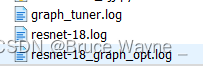
Solution: delete the .log file that was generated by running this code before