Author Archives: Robins

[Solved] Pyinstaller Package and Run Error: RuntimeError: Unable to open/read ui device

Just made a Python program to calculate body mass index BMI, and used Pyside6 to draw the user interface. When using auto-py-exe ( auto-py-to-exe is based on pyinstaller, compared to pyinstaller, it has more GUI interface, which makes it easier to use. for simplicity). After packaging, click main.exe, but it prompts an error: RuntimeError: Unable to open/read ui device. Repeated debugging does not know where the problem is.
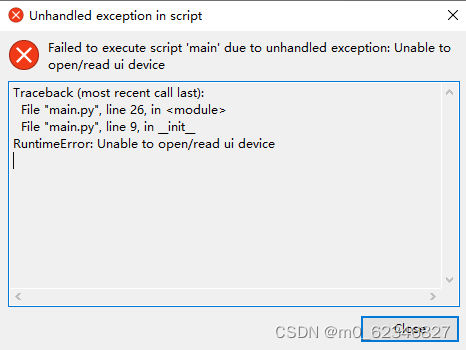
At first, I thought there was a problem with the loading UI statement in the main program (main.py). I repeatedly modified the main program, and finally found that it was not the problem of the program.

class Stats():
    def __init__(self):
	    # loading UI file
        self.ui = QUiLoader().load(".\\cac_BMI.ui") 

Finally, I found that I needed to put the UI file into the packaged executable folder.

Put the UI file and the main program in the same folder, which is convenient for the main program to call.
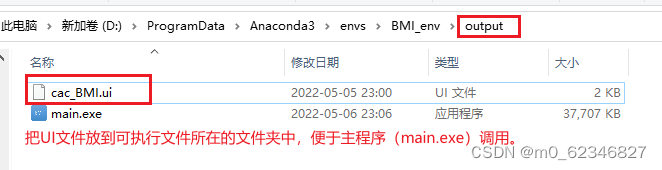
Then double-click main.exe, has been able to successfully open the program user interface, and the problem has been successfully solved.

[Solved] RabbitMQ Error: Error creating bean with name ‘rabbitConnectionFactory‘ defined in class path resource

1. Error Messages:

Error creating bean with name 'rabbitConnectionFactory' defined in class path resource [org/springframework/boot/autoconfigure/amqp/RabbitAutoConfiguration$RabbitConnectionFactoryCreator.class]: Bean instantiation via factory method failed; nested exception is org.springframework.beans.BeanInstantiationException: Failed to instantiate [org.springframework.amqp.rabbit.connection.CachingConnectionFactory]: Factory method 'rabbitConnectionFactory' threw exception; nested exception is java.lang.IllegalArgumentException: Address 192.168.74.128:5672:5672 seems to contain an unquoted IPv6 address. Make sure you quote IPv6 addresses like so: [2001:db8:85a3:8d3:1319:8a2e:370:7348]
2. Reason
Address 192.168.74.128:5672:5672 seems to contain an unquoted IPv6 address. Make sure you quote IPv6 addresses like so: [2001:db8:85a3:8d3:1319:8a2e:370:7348]
Identified as ipv6, rabbitmq should also support IPV6
3. Solution
application.yml File

 rabbitmq:
  #host: 192.168.74.128:5672//去掉端口
  host: 192.168.74.128
  username: admin
  password: 123123
  virtual-host: /

[Solved] Error 1044: Access denied for user ‘syz-remote‘@‘%‘ to database ‘webapp‘

Error 1044: Access denied for user ‘syz-remote’@‘%’ to database ‘webapp’

Cause: I was testing the code of golang connecting to the database. I finally reinstalled MySQL and set up remote login, but this problem still occurred.

My SYZ-remote account is specially created for remote login. Therefore, unlike the root user, it does not have the due permission. We need to set its permissions in MySQL .

View MySQL account permissions through this code

mysql> SELECT host,user,password_expired,Grant_priv,Super_priv FROM mysql.user;
+-----------+------------------+------------------+------------+------------+
| host      | user             | password_expired | Grant_priv | Super_priv |
+-----------+------------------+------------------+------------+------------+
| localhost | root             | N                | Y          | Y          |
| localhost | mysql.session    | N                | N          | Y          |
| localhost | mysql.sys        | N                | N          | N          |
| localhost | debian-sys-maint | N                | Y          | Y          |
| %         | syz-remote       | N                | N          | N          |
+-----------+------------------+------------------+------------+------------+
5 rows in set (0.00 sec)

You can see that the permission of Grant_priv and Super_priv in syz-remote is N

We gave him authority

update mysql.user set grant_priv = 'Y', Super_priv='Y' where user = 'syz-remote';

Refresh it again

flush privilegs;

[DL Common Issue] RuntimeError: CUDA error 59: Device-side assert triggered

Problem: Run into a CUDA error during training
Solutions:
This error occurs due to the following two reasons:

    Inconsistency between the number of labels/classes and the number of output unitsThe input of the loss function may be incorrect

In my case the error occurs as the loss function is not correctly chosen : change to nn.BCELoss() from nn.CrossEntropyLoss()
Reference: https://towardsdatascience.com/cuda-error-device-side-assert-triggered-c6ae1c8fa4c3

[Solved] ERROR: Command errored out with exit status 1: python setup.py egg_info Check the logs for full comm

The error information is as follows:

ERROR: Command errored out with exit status 1:
     command: /home/hanqing/PycharmProjects/djangoProject/hz_venv/bin/python -c 'import sys, setuptools, tokenize; sys.argv[0] = '"'"'/tmp/pip-install-79c7p3i8/mysqlclient/setup.py'"'"'; __file__='"'"'/tmp/pip-install-79c7p3i8/mysqlclient/setup.py'"'"';f=getattr(tokenize, '"'"'open'"'"', open)(__file__);code=f.read().replace('"'"'\r\n'"'"', '"'"'\n'"'"');f.close();exec(compile(code, __file__, '"'"'exec'"'"'))' egg_info --egg-base /tmp/pip-pip-egg-info-jhaimgx4
         cwd: /tmp/pip-install-79c7p3i8/mysqlclient/
    Complete output (12 lines):
    /bin/sh: 1: mysql_config: not found
    /bin/sh: 1: mariadb_config: not found
    /bin/sh: 1: mysql_config: not found
    Traceback (most recent call last):
      File "<string>", line 1, in <module>
      File "/tmp/pip-install-79c7p3i8/mysqlclient/setup.py", line 15, in <module>
        metadata, options = get_config()
      File "/tmp/pip-install-79c7p3i8/mysqlclient/setup_posix.py", line 65, in get_config
        libs = mysql_config("libs")
      File "/tmp/pip-install-79c7p3i8/mysqlclient/setup_posix.py", line 31, in mysql_config
        raise OSError("{} not found".format(_mysql_config_path))
    OSError: mysql_config not found
    ----------------------------------------
ERROR: Command errored out with exit status 1: python setup.py egg_info Check the logs for full command output.


Solution:

sudo apt-get install libmysqlclient-dev
pip install mysqlclient

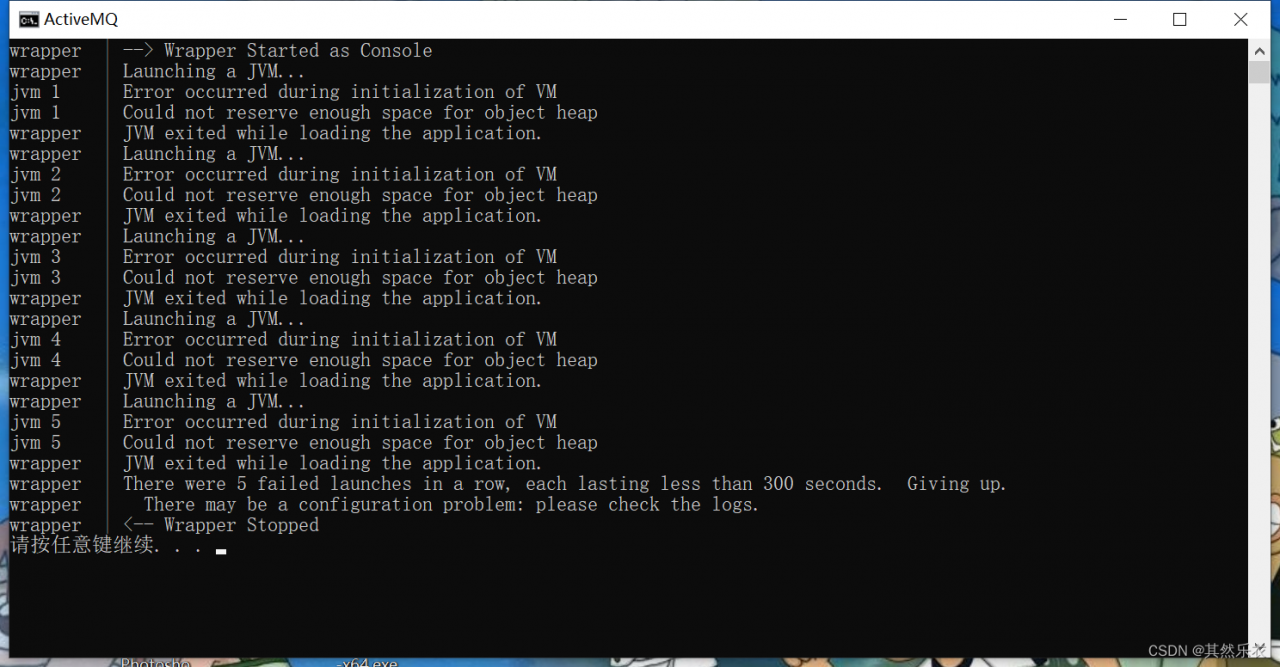
[Solved] jvm 1 Error occurred during initialization of VM Could not reserve enough space for object heap

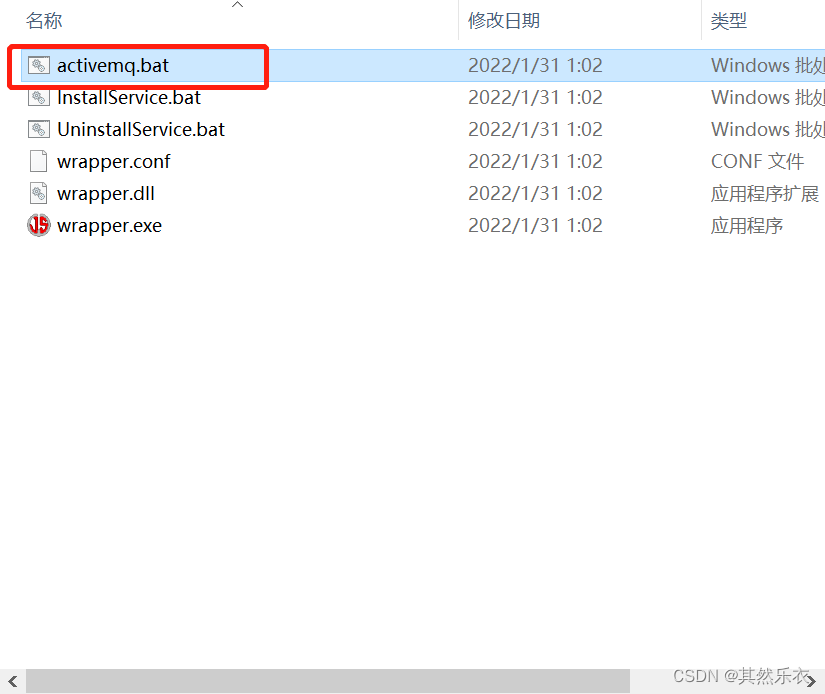
When I double click activemq.bat to start MQ and reports the following error,

The reason is caused by insufficient memory. You can use Ctrl + Alt + Del –> Task manager, close some process tasks to make room, and then start again


Solution:

Method 1:

There may be other similar situations, which may also be caused by the non rent of memory

For example, the error of starting Kafka package in the following figure: Java HotSpot(TM) 64-Bit Server VM warning: INFO: os::commit_memory(0x00000000c0000000, 1073741824, 0) failed; error=’The page file is too small and it can be operated.’ (DOS error/errno=1455)

Through the method agreed above, you can start successfully


Method 2:

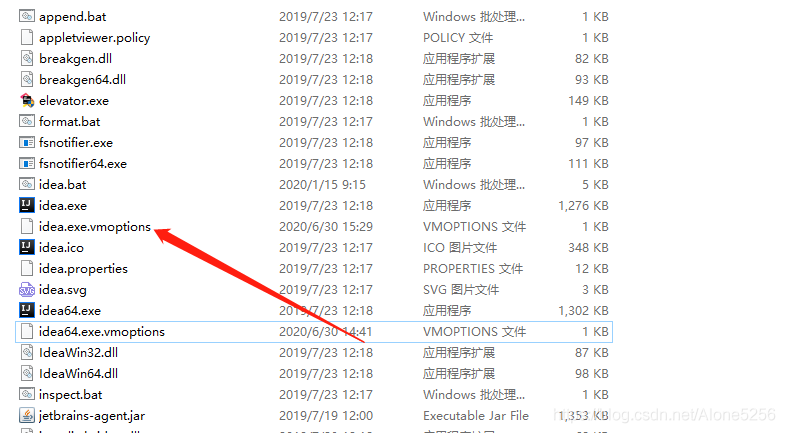
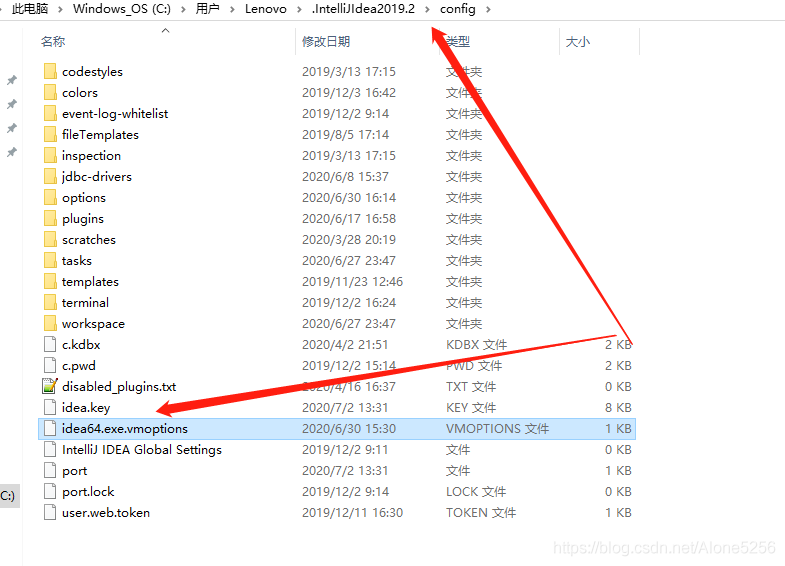
  1. Open the idea location and select the idea64.exe.vmoptions file.

  1. Open this file as a text document
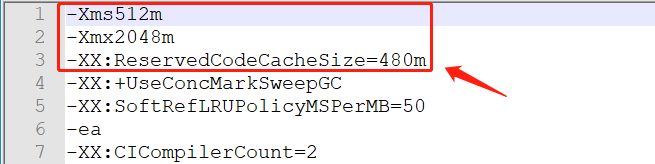
  2. Modify the parameters to be larger


Notice:

  1. Restart the idea and project after making changes
  2. If it does not take effect, modify the other one under the same folder as shown in Figure 1 below
  3. If it does not take effect yet, modify the file in this path in the C drive, as shown in Figure 2 below

[Solved] standard_init_linux.go:190: exec user process caused “exec format error“

Scene

In the process of packaging the golang application into a docker image, execute the following command

docker run -it -P --name docker_client -m 1024m --net host docker_client:1.0

After execution, the server reported this error

standard_init_linux.go:190: exec user process caused "exec format error"

It’s useless to follow the online method. I can run normally on the virtual machine. I’ll look at my dockerfile carefully later

FROM golang:alpine

ENV GO111MODULE=on \
    GOPROXY=https://goproxy.cn,direct \
    CGO_ENABLED=0 \
    GOOS=linux \
    GOARCH=amd64

# Create an apps directory in the container root directory
WORKDIR /build

# Copy the go_docker_demo1 executable from the current directory
COPY . .

# Compile our code into a binary executable app
RUN go build -o app .

# Move to the /dist directory where the generated binaries are stored
WORKDIR /dist

# Copy the binaries from the /build directory to here
RUN cp /build/app .

# Expose the port
EXPOSE 8080

# The command to run the golang program
CMD ["/dist/app"]

It is found that the goarch parameter is AMD64. Check the relevant version of the server later

 docker version
 #check the version of the docker

A problem was found in the output information. One line of parameters is arm64

 OS/Arch:           linux/arm64

So I modified the dockerfile file

FROM golang:alpine

ENV GO111MODULE=on \
    GOPROXY=https://goproxy.cn,direct \
    CGO_ENABLED=0 \
    GOOS=linux \
    GOARCH=arm64

# Create an apps directory in the container root directory
WORKDIR /build

# Copy the go_docker_demo1 executable from the current directory
COPY . .

# Compile our code into a binary executable app
RUN go build -o app .

# Move to the /dist directory where the generated binaries are stored
WORKDIR /dist

# Copy the binaries from the /build directory to here
RUN cp /build/app .

# Expose the port
EXPOSE 8080

# The command to run the golang program
CMD ["/dist/app"]

After rebuilding the dockerfile image, it will run normally.

[Solved] latex Import ntheorem Package Error: Package ntheorem Error: Theorem style plain already defined.

This may be caused by a conflict between the ntheorem package and the amsthm package.

Solution: don’t use both, just delete the reference of one package.

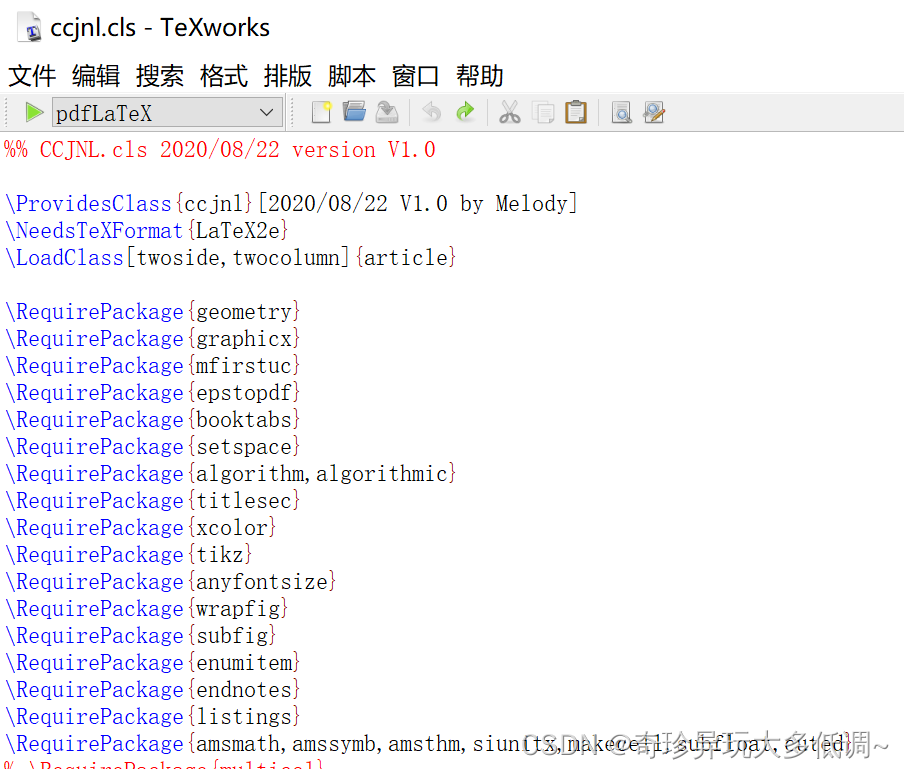
Note that some template class files (.cls) may introduce one of the packages in advance. For example, the template file (ccjnl.cls) of China communication introduces the amsthm package in advance

At this time, you can only use the amsthm package instead of the ntheorem package.

[Solved] hydra Install Error: AttributeError: module ‘hydra‘ has no attribute ‘main‘

AttributeError: module ‘hydra’ has no attribute ‘main’

Error:

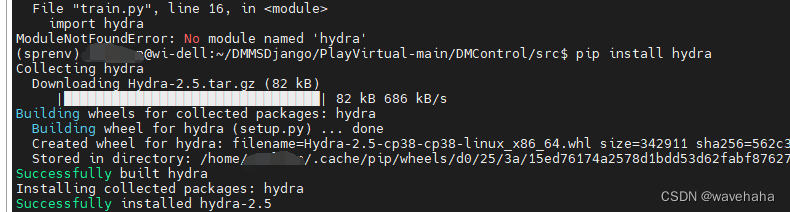
1. use the following command to install hydra:pip install hydra,an error is reported:AttributeError: module 'hydra' has no attribute 'main'


Solution:

2. Uninstall the installed hydra: pip uninstall hydra
3. Instead of using the following command: pip install hydra-core --upgrade, It will be install fine!

[Solved] shell Error: Syntax error: “(“ unexpected (expecting “}“)

The hard disk is damaged and the system is reinstalled. An error is reported when executing the previous script

Syntax error: “(” unexpected (expecting “}”)

Troubleshooting:

ls -l /bin/sh

The default link is dash

Knowledge supplement

Bash: Unix shell written for GNU Project

SH: equivalent to /bin/bash –posix. It is bash that opens POSIX standard

Dash: it has faster execution speed than bash, but supports fewer statement leaves

Solution:

Here, I have no requirements for the speed of script execution, only that it can be used, so I can change it to bash

cd /bin/; ln -sf bash /bin/sh

l

Problem-solving.