Author Archives: Robins

Implementation of HTTPS file server based on nginx in win2012

Nginx and openssl: http://nginx.org/en/download.html

http://slproweb.com/products/Win32OpenSSL.html
Environment variable:
c:\ openssl-win64 \bin
th variable add %OPENSSL_HOME%

openssl genrsa -des3 -out xxx.key 1024
openssl req -new -key xxx.key -out xxx.csr
cp xxx.key xxx.key.org
openssl rsa -in xxx.key.org -out xxx.key
openssl x509 -req -days 365 -in xxx.csr -signkey xxx.key -out xxx.crt

Start nginx after modifying nginx.conf

server {
        listen       443 ssl;
        server_name  localhost;
		ssl_certificate      C://nginx-1.18.0//ssl//xxx.crt;
	    ssl_certificate_key  C://nginx-1.18.0//ssl//xxx.key;
        
		#charset koi8-r;

        #access_log  logs/host.access.log  main;

	    ssl_session_cache    shared:SSL:1m;
	    ssl_session_timeout  5m;
	
	    ssl_ciphers  HIGH:!aNULL:!MD5;
	    ssl_prefer_server_ciphers  on;

     location /update {
	        alias C:/hy-8000;
			allow all;
			autoindex on;

	        proxy_set_header   X-Real-IP            $remote_addr;
	        proxy_set_header   X-Forwarded-For  $proxy_add_x_forwarded_for;
	        proxy_set_header   Host                   $http_host;
	        proxy_set_header   X-NginX-Proxy    true;
	        proxy_set_header   Connection "";
	        proxy_http_version 1.1;
     }

Analysis of JDBC connection to MySQL

JDBC connection to MySQL problem resolution
Recently, a series of problems occurred while configuring JDBC to connect to MySQL. Fortunately, it all worked out in the end. Here is a summary of the problems, hoping to help others with the same problems.
BlueStragglers shares the joy of technology growth

directory
A JDBC connection to MySQL analytical error: com.mysql.jdbc.exceptions.jdbc4.Com municationsException: Communications link failure2. Unknown initial character set index ‘255’ received from server.Initial client character3. Error: references to the entity ‘characterEncoding’ must begin with ‘; ‘End of delimiter 4. Reference content

1. An error: com.mysql.jdbc.exceptions.jdbc4.Com municationsException: Communications link failure
This problem is most likely due to a problem with the mysql-connector-java version of the pom.xml file. I started with version 5.1.44 and found that I kept reporting this error. This issue can be resolved by returning 5.1.6.
Of course, there is another case where this error is reported: MySQL Server will automatically disconnect and report an error if the connection takes more than 8 hours. The solution is usually to modify the configuration file.
Unknown initial character set index ‘255’ received from server.Initial client character
This problem is generally caused by the occurrence of Chinese in MySQL, which can not be properly resolved. The solution is to put a UTF8 encoding requirement at the end of the URL to avoid errors. For example, the source statement is:

<property name="url" value="jdbc:mysql://10.201.0.27:3307/mybatis"/>

This can be modified to the following statement:

<property name="url" value="jdbc:mysql://10.201.0.27:3307/mybatis?useUnicode=true&amp;characterEncoding=utf8"/>

3. Error: references to the entity ‘CharacterEncoding’ must begin with ‘; ‘End of the delimiter
Encounter this problem, I am quite surprised, actually is Chinese report error. It was later discovered that MySQL had a problem with characterEncoding= UTF8, so it may have been for this reason that the error was reported in Chinese.
& & instead. For example, the following statement:

<property name="url" value="jdbc:mysql://localhost:3306/mybatis?useSSL=true&characterEncoding=utf8" />

The above statement will report an error. If you need to modify it to the following statement, it will not report an error:

<property name="url" value="jdbc:mysql://localhost:3306/mybatis?useSSL=true&amp;characterEncoding=utf8" />

4. References

    JDBC connection to MySQL references to the entity 'CharacterEncoding' must begin with '; 'End of delimiter

Detecting memory consumption by Python program

First install the memory_profiler and psutil (psutil is mainly used to improve the performance of memory_profile, recommended) (you can use PIP directly)
PIP install memory_profiler
p install psutil
Mprof run test. Py generates a
results. Dat file, such as “mprofile_20160716170529. Dat”, which records the memory along with the change of time
mprof plot
using the commands in the form of pictures showing
the original:
https://blog.csdn.net/baidu_33122327/article/details/79195176

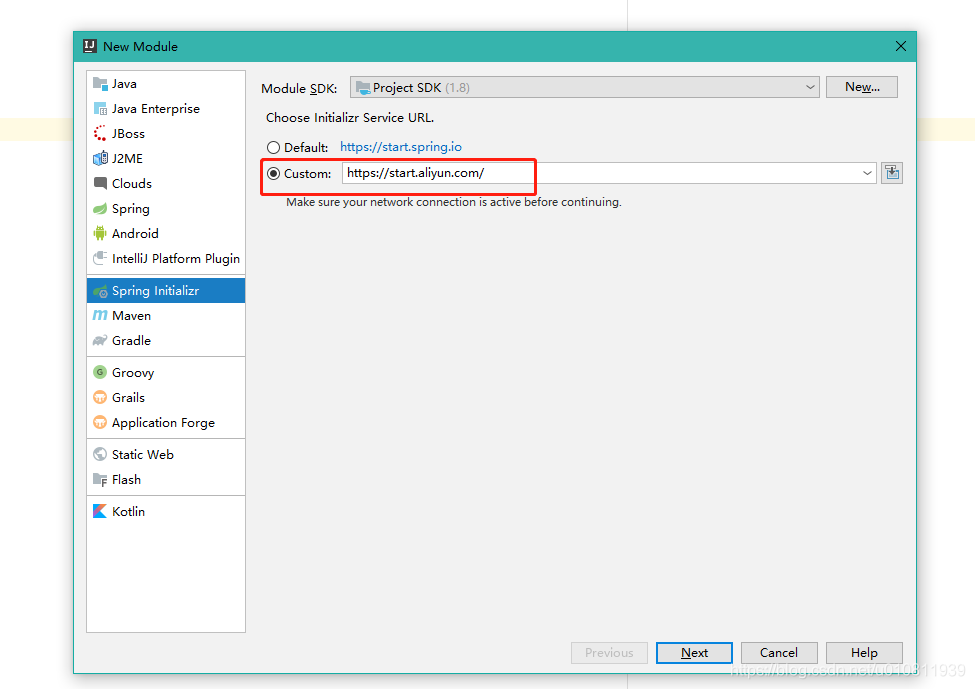
Spring initializer error: initialization failed for ‘ https://start.spring.io ‘

Error message

Initialization failed for 'https://start.spring.io'

The solution
There are two
The first kind of
Change HTTPS to HTTP in https://start.spring.io/
The second,
-> Open Settings interface
- & gt; pearance & >
code> -> Click HTTP Proxy menu
- & gt; Check Auto - detect the proxy Settings check box
- & gt; Check Automatic proxy configuration URL: check box, and enter https://start.spring.io/
in the input box - & gt; e> exit

Module build failed: TypeError [ERR_INVALID_ARG_TYPE]: The “path“ argument must be of type string.

The following error was reported for the VUE project

Module build failed: TypeError [ERR_INVALID_ARG_TYPE]: The "path" argument must be of type string. Received undefined
    at validateString (internal/validators.js:121:11)
    at Object.join (path.js:375:7)
    at getSassOptions (D:\VueProj\test\node_modules\sass-loader\dist\utils.js:160:37)
    at Object.loader (D:\VueProj\test\node_modules\sass-loader\dist\index.js:36:49)

sass-loader version is too high cause, reinstall the lower version of sass-loader.

npm uninstall sass-loader
npm install --save-dev [email protected]

After introducing sass into Vue project, start to report error typeerror [err]_ INVALID_ ARG_ Type]: the “path” argument must be of type string

 
Vue file using lang=” SCSS “,
The solution: be sure to install sass-loader and node-sass
TypeError [ERR_INVALID_ARG_TYPE]: The “path” argument must be of type string.
 
Json: “node-sass”: “^4.11.1”, “sass-loader”: “^7.3.0
Delete the node_modules folder and re-execute NPM install. Perfect solution

appear org.springframework.beans . factory.BeanCreationException Causes and solutions of abnormal

1 Abnormal description
After checking out the project from SVN and configuring it, start the Tomcat server and report the following error:

2 Abnormal Causes
By observing the abnormal information marked in the figure above, we can know

Org. Springframework. Beans. Factory. BeanCreationException: Error creating bean with the name ‘XXX’

This exception is: Injection bean failed exception.
To put it bluntly, if this exception occurs, the corresponding bean cannot be found! The reasons why bean injection can fail include but are not limited to the following:
The corresponding bean is not annotated; @service stead of dubbo; Select the wrong automatic injection method, etc.
3 Solutions
Now that we know the cause of this exception, we look back at the corresponding Bean declaration and see that the code that injected the Facade is:

@Autowired
ErrorCodeFacade errorCodeFacade;

Well, here’s the mistake! In general, when injecting interfaces at the Service and Biz layer, you can use @Autowiredfor example:

@Autowired
ErrorCodeService errorCodeService;

But, when injected into the Facade layer interface, should use the RemoteServiceFactory. GetService () , such as:

ErrorCodeFacade errorCodeFacade = RemoteServiceFactory.getService(ErrorCodeFacade.class);

That is, the exception is resolved by declaring the ErrorCodeFacade with the code above.


Warm prompt: there are many reasons for this exception, the above only lists the problems I encountered and solutions, I hope to be helpful to you!

Version 1.8.0_201 of the JVM is not suitable for this product. Version: 11 or greater is required.

Eclipse starts with this problem:
Version 1.8.0_201 of the JVM is not suitable for this product. Version: 11 or greater is required.
 
Solution: Open Eclipse.ini and modify it as follows


-Xmx1024m
-startup
plugins/org.eclipse.equinox.launcher_1.5.800.v20200727-1323.jar
--launcher.library
plugins/org.eclipse.equinox.launcher.win32.win32.x86_64_1.1.1300.v20200819-0940
-product
org.eclipse.epp.package.java.product
-showsplash
org.eclipse.epp.package.common
--launcher.defaultAction
openFile
--launcher.defaultAction
openFile
--launcher.appendVmargs
-vmargs
-Dosgi.requiredJavaVersion=1.8
[email protected]/eclipse-workspace
-XX:+UseG1GC
-XX:+UseStringDeduplication
--add-modules=ALL-SYSTEM
-Dosgi.requiredJavaVersion=1.8
-Dosgi.dataAreaRequiresExplicitInit=true
-Xms256m
-Xmx2048m
--add-modules=ALL-SYSTEM
-vm
-D:\java\jdk\bin\javaw.exe

Add JDK path:
-vm
-D:\java\jdk\bin\javaw.exe
The modified version is 1.8

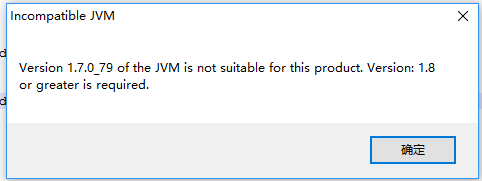
Start eclipse and prompt version 1.7.0_ 79 of the JVM is not suitable for this product. Version: 1.8 or greater i…

When you start Eclipse, the following pop-up box pops up:

Solutions:
Find the eclipse.ini file in the Eclipse installation directory and go to the
– vmargs.
– Dosgi requiredJavaVersion = 1.8
prefix
– vm
D:/Program Files/Java/jdk1.8.0 _111/jre/bin/server/JVM. DLL
Note: -vm is to be added before -vmargs
– vm
D:/Program Files/Java/jdk1.8.0 _111/jre/bin/server/JVM. DLL should pay attention to the direction of the slash, if written
– vm
D: \ \ Program Files \ Java \ jdk1.8.0 _111 \ jre \ bin \ server \ JVM DLL
Eclipse will exit automatically after starting Eclipse
There is another option: uninstall JDK 1.7 and install JDK 1.8
 

Reproduced in: https://www.cnblogs.com/nana-blog/p/10385723.html

How to solve the problem of “version 11 or greater is required” in eclipse 2020

After I installed Eclipse 2020, I opened it directly and said “Version 11 or greater is required”, so I installed JDK11 following its instructions, but I still reported the same error after I installed Eclipse 2020. After searching on the Internet, I found that this should be the solution:
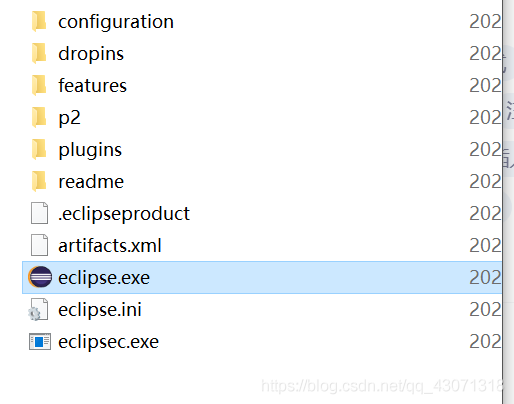
Find the eclipse in the file directory. The ini file:

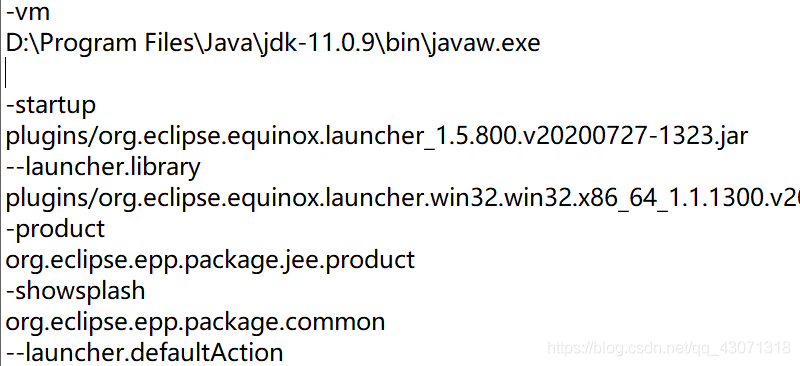
at the beginning of the ini file to add this two lines:

the first line – vm, the second line of the JDK package javaw. Exe open path. Save it and you’ll be able to open Eclipse 2020 normally.