Author Archives: Robins

The attributes of Oracle batch modification sequence (such as cache)_size, increment_(by et al.)

Oracle self-growing columns can be set as sequences, such as self-growing IDs.

Create a sequence

--Create Sequence dept_deptid_seq
create sequence dept_deptid_seq
    increment by 10
    start with 1
    maxvalue 9990
    nocycle
    nocache

--Create default sequence no_no_seq
create sequence no_no_seq

Sequence (start with n) as the value of the first sequence, the sequence value (increment by n) for each of the increase, the maximum sequence as the maxvalue (n), the sequence of the minimum value for (minvalue n)
cycle said if the sequence of maximum value is greater than the start from the minimum cycle (the default is not cycle), database cache n said pre-allocated n values stored in memory (the default) 20
The query sequence
Note: After a sequence has been created, the value of the current sequence cannot be directly queryed.nextVal must be used to query the value of the next sequence before using currVal to query the value of the current sequence.

select sequence_name ,last_number, min_value,max_value,increment_by,cache_size from user_sequences

Modify the sequence

alter sequence sequence_name increment by 1 cache 3000

Batch modification sequence

--bulk change sequence
declare
  v_sql varchar2(2000);
  CURSOR seqs IS select sequence_name from user_sequences where user_sequences.CACHE_SIZE<=20  and user_sequences.LAST_NUMBER>10000;
begin
  FOR seq IN seqs LOOP
    v_sql:='alter sequence '||seq.sequence_name
           ||' increment by 1 cache 3000';
    dbms_output.put_line(v_sql);
    execute immediate v_sql;
  end loop;
end;

The cursor places the sequence to be modified. Loop out the sequence name and modify it.

Resources is configured in the build of Maven project to prevent the failure of resource export

Since the convention in Maven is larger than the configuration we may run into the problem that the configuration file we write cannot be exported or valid.

<!--    Configure resources in build to prevent our resource export from failing-->
    <build>
        <resources>
            <resource>
                <directory>src/main/resources</directory>
                <includes>
                    <include>**/*.properties</include>
                    <include>**/*.xml</include>
                </includes>
            </resource>
            <resource>
                <directory>src/main/java</directory>
                <includes>
                    <include>**/*.properties</include>
                    <include>**/*.xml</include>
                </includes>
            </resource>
        </resources>
    </build>

ubuntu20.04——hdaudioC0D2: unable to bind the codec

The problem
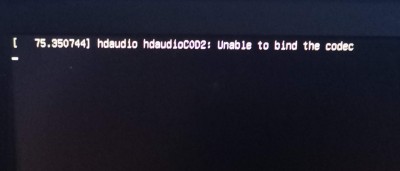
Not long ago, try the dual system, win10+ubuntu20.04, the installation is relatively smooth, can normally enter the system. However, when I updated the graphics driver (proprietary nvidia-drivers-390), I rebooted and couldn’t access the system’s graphical interface, which was stuck on the following page.
The diagram below:

To solve
After that, select ubunru advanced option select l> version of the kernel to boot>ut can enter the graphical interface.
But, it makes me feel bad…
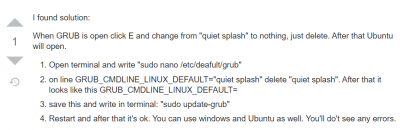
/etc/default/grub

Ctr+Alt+F2

# The original line
# GRUB_CMDLINE_LINUX_DEFAULT="quiet splash nomodeset"
# Modified
GRUB_CMDLINE_LINUX_DEFAULT=""


After editing and saving, update GRUB:

sudo update-grub

After rebooting, you can finally enter the graphical interface.
The appendix
https://forum.ubuntu.com.cn/viewtopic.php?t=490617

Python: RNN principle realized by numpy

Python implements the principle of RNN
I’ve tweaked the code a little bit so it can do gradient descent.

import numpy as np
import torch
from torch import nn

class Rnn(nn.Module):

    def __init__(self, input_size, hidden_size, num_layers, bidirectional=False):
        super(Rnn, self).__init__()
        self.input_size = input_size
        self.hidden_size = hidden_size
        self.num_layers = num_layers
        self.bidirectional = bidirectional

    def forward(self, x):
        '''

        :param x: [seq, batch_size, embedding]
        :return: out, hidden
        '''

        # x.shape [sep, batch, feature]
        # hidden.shape [hidden_size, batch]
        # Whh0.shape [hidden_size, hidden_size]  Wih0.shape [hidden_size, feature]
        # Whh1.shape [hidden_size, hidden_size]  Wih1.size  [hidden_size, hidden_size]

        out = []
        x, hidden = np.array(x), [np.zeros((self.hidden_size, x.shape[1])) for i in range(self.num_layers)]
        Wih = [np.random.random((self.hidden_size, self.hidden_size)) for i in range(1, self.num_layers)]
        Wih0 = np.random.random((self.hidden_size, x.shape[2]))
        Whh = [np.random.random((self.hidden_size, self.hidden_size)) for i in range(self.num_layers)]
        # x, hidden, Wih, Whh = torch.from_numpy(x), torch.tensor(hidden), torch.tensor(Wih), torch.tensor(Whh)

        x = torch.from_numpy(x)
        hidden = torch.tensor(hidden)
        Wih0 = torch.tensor(Wih0, requires_grad=True)
        Wih, Whh = torch.tensor(Wih, requires_grad=True), torch.tensor(Whh, requires_grad=True)

        time = x.shape[0]
        for i in range(time):
            hidden[0] = torch.tanh((torch.matmul(Wih0, torch.transpose(x[i, ...], 1, 0)) +
                              torch.matmul(Whh[0], hidden[0])
                              ))

            for i in range(1, self.num_layers):
                hidden[i] = torch.tanh((torch.matmul(Wih[i-1], hidden[i-1]) +
                                     torch.matmul(Whh[i], hidden[i])
                                     ))

            out.append(hidden[self.num_layers-1])
        # If the element in the list is a tensor, it cannot be converted with torch.tensor() and an error will be reported
        return torch.stack([i for i in out]), hidden


def sigmoid(x):
    return 1.0/(1.0 + 1.0/np.exp(x))


if __name__ == '__main__':
    a = torch.tensor([1, 2, 3])
    print(torch.cuda.is_available(), type(a))
    rnn = Rnn(1, 5, 4)
    input = np.random.random((6, 2, 1))
    out, h = rnn(input)
    print(f'seq is {input.shape[0]}, batch_size is {input.shape[1]} ', 'out.shape ', out.shape, ' h.shape ', h.shape)
    # print(sigmoid(np.random.random((2, 3))))
    #
    # element-wise multiplication
    # print(np.array([1, 2])*np.array([2, 1]))
The divider
First of all, the code is just for understanding. The gradient descent part is not written. The default parameters have been fixed, so it does not affect understanding. Code mainly to achieve the principle of RNN, only use NUMPY library, can not be used for GPU acceleration.

import numpy as np


class Rnn():

    def __init__(self, input_size, hidden_size, num_layers, bidirectional=False):
        self.input_size = input_size
        self.hidden_size = hidden_size
        self.num_layers = num_layers
        self.bidirectional = bidirectional

    def feed(self, x):
        '''

        :param x: [seq, batch_size, embedding]
        :return: out, hidden
        '''

        # x.shape [sep, batch, feature]
        # hidden.shape [hidden_size, batch]
        # Whh0.shape [hidden_size, hidden_size]  Wih0.shape [hidden_size, feature]
        # Whh1.shape [hidden_size, hidden_size]  Wih1.size  [hidden_size, hidden_size]

        out = []
        x, hidden = np.array(x), [np.zeros((self.hidden_size, x.shape[1])) for i in range(self.num_layers)]
        Wih = [np.random.random((self.hidden_size, self.hidden_size)) for i in range(1, self.num_layers)]
        Wih.insert(0, np.random.random((self.hidden_size, x.shape[2])))
        Whh = [np.random.random((self.hidden_size, self.hidden_size)) for i in range(self.num_layers)]

        time = x.shape[0]
        for i in range(time):
            hidden[0] = np.tanh((np.dot(Wih[0], np.transpose(x[i, ...], (1, 0))) +
                              np.dot(Whh[0], hidden[0])
                              ))

            for i in range(1, self.num_layers):
                hidden[i] = np.tanh((np.dot(Wih[i], hidden[i-1]) +
                                     np.dot(Whh[i], hidden[i])
                                     ))

            out.append(hidden[self.num_layers-1])

        return np.array(out), np.array(hidden)


def sigmoid(x):
    return 1.0/(1.0 + 1.0/np.exp(x))


if __name__ == '__main__':
    rnn = Rnn(1, 5, 4)
    input = np.random.random((6, 2, 1))
    out, h = rnn.feed(input)
    print(f'seq is {input.shape[0]}, batch_size is {input.shape[1]} ', 'out.shape ', out.shape, ' h.shape ', h.shape)
    # print(sigmoid(np.random.random((2, 3))))
    #
    # element-wise multiplication
    # print(np.array([1, 2])*np.array([2, 1]))
JS getting ${pageContext.request.contextPath} Get the root path of the project

As we know, direct access to the JSP EL expression in js is unable to obtain, if you want to get ${pageContext. Request. ContextPath} value, we can use the following two ways:
1, in the ${pageContext. Request. ContextPath} with single quotes, this is the most simple way
2. Create a form with type= “hidden”, for example:

<input name="rootUrl" id="rootUrl" type="hidden" value="${pageContext.request.contextPath}"/>

Then get the value of the form through the JS action:

//Get the project root path
var rootUrl = "";
$(function () {
    rootUrl = $("#rootUrl").val();
})

Where’s Maven pom.xml Configure aliyun warehouse in

<repositories>
        <repository>
            <id>nexus-aliyun</id>
            <name>Nexus aliyun</name>
            <url>https://maven.aliyun.com/repository/public</url>
            <layout>default</layout>
            <snapshots>
                <enabled>false</enabled>
            </snapshots>
            <releases>
                <enabled>true</enabled>
            </releases>
        </repository>
    </repositories>
    <pluginRepositories>
        <pluginRepository>
            <id>nexus-aliyun</id>
            <name>Nexus aliyun</name>
            <url>https://maven.aliyun.com/repository/public</url>
            <snapshots>
                <enabled>false</enabled>
            </snapshots>
            <releases>
                <enabled>true</enabled>
            </releases>
        </pluginRepository>
    </pluginRepositories>


Expected indentation of 6 spaces but found 10

Expected indentation of 6 Spaces but found
10 The code is automatically formatted according to IDEA’s reformat
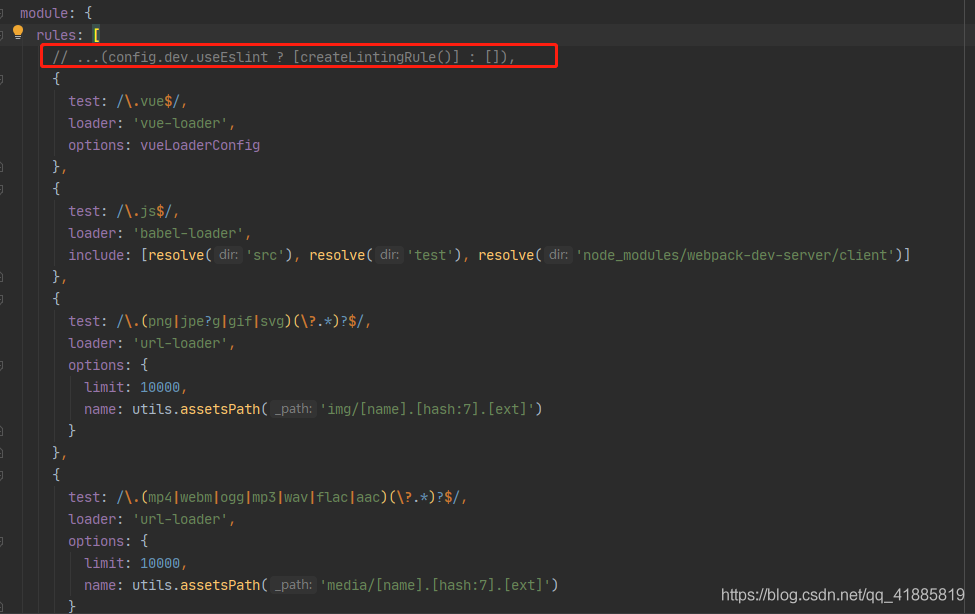
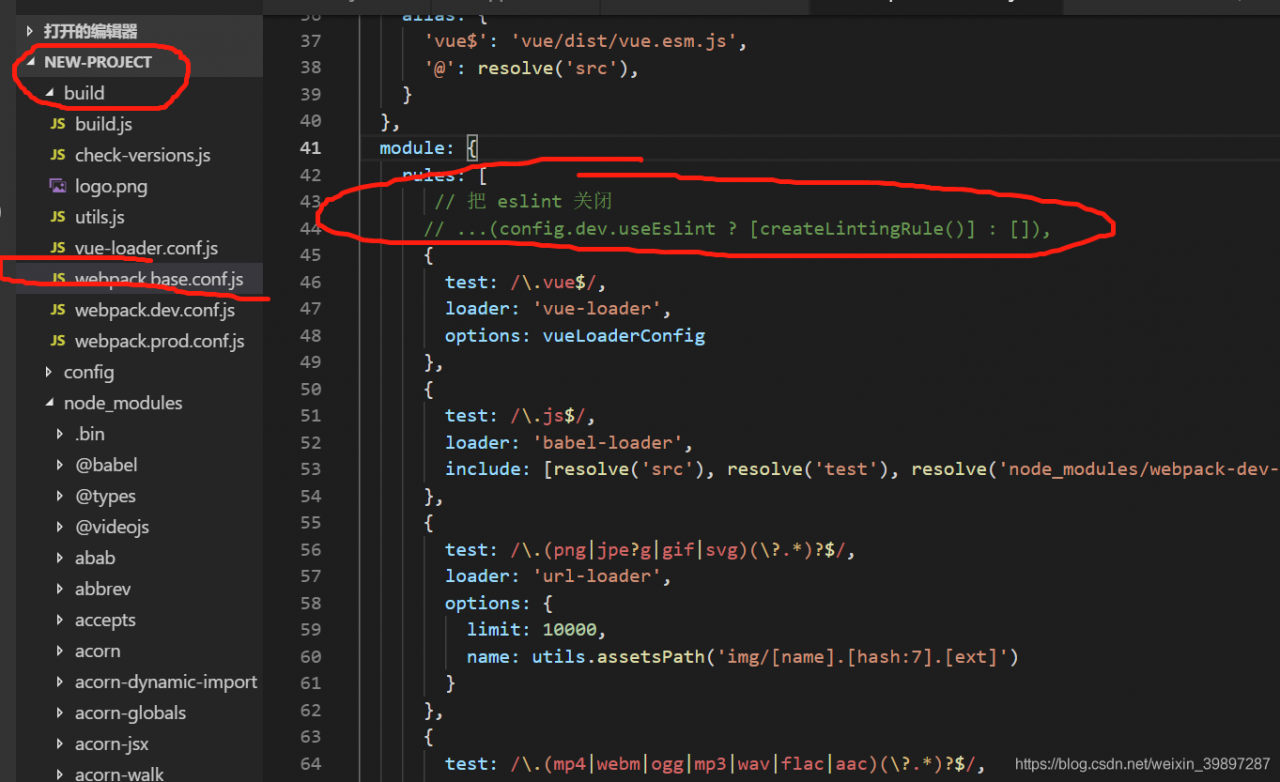
de, and the result is that the error is reported more and more. When Vue projects are initialized, ESLint is installed by default (ESLint is a syntax-rule and style-checking tool that can be used to ensure that syntax-correct, style-consistent code is written).

The solution here is to turn ESLint off, as follows.
Open the project’s…/build/webpack. Base. Conf. Js file, find the module properties, comment out the following this line of code.

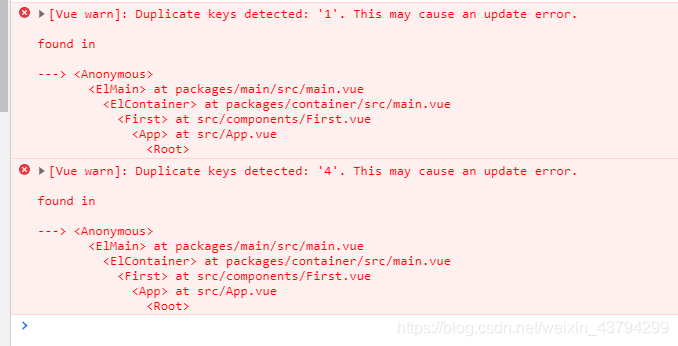
Vue warn: duplicate keys detected: ‘1’. This may cause an update error

[VUE WARN]: Duplicate keys detected: ‘1’. This may cause an update error. :

/ font>


Problem description:


Reason analysis:
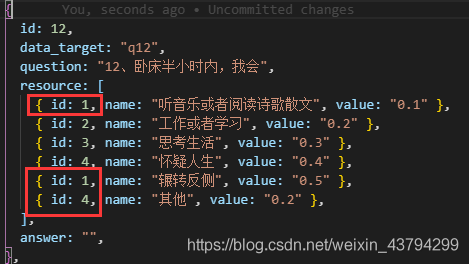
> Keys value binding problem
My problem is my problem when doing the project binding:

here my page rendering is based on id to apply colours to a drawing


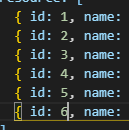
Solution:


br>

2059 error in connecting to database by Navicat premium

Error 2059 in new connection after installing Navicat
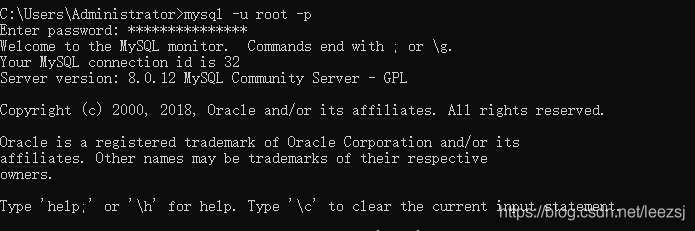
Open Doc window Win + D type CMD to open
The input
Mysql -u root -p
Enter the password for root

Select database
The input
use mysql

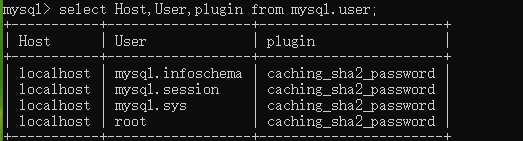
View the rules for encryption
The input
select Host,User,plugin from mysql.user;

Encryption mode is the new encryption mode
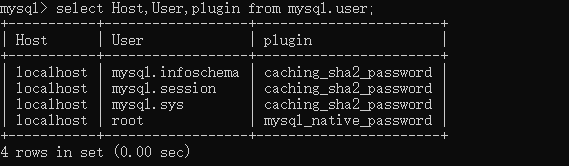
Change back to the original encryption mode
The input
ALTER USER ‘root’@’localhost’ IDENTIFIED WITH ‘mysql_native_password ‘;
The refresh
FLUSH PRIVIEGES;

Check the encryption again
select Host,User,plugin from mysql.user;

Now you can connect to the database