Author Archives: Robins

urlopen error unknown url type:httpë/HTTP Error 400:Bad Request

DevTools listening on ws://127.0.0.1:18388/devtools/browser/166d68b9-5bd6-4eaf-9c9c-90b26921a7ae
Traceback (most recent call last):
  File "C:\Users\yanghang\Desktop\comic.py", line 39, in <module>
    urllib.request.urlretrieve(**thisurl2**,filename=localpath)
  File "F:\Python\lib\urllib\request.py", line 248, in urlretrieve
    with contextlib.closing(urlopen(url, data)) as fp:
  File "F:\Python\lib\urllib\request.py", line 223, in urlopen
    return opener.open(url, data, timeout)
  File "F:\Python\lib\urllib\request.py", line 526, in open
    response = self._open(req, data)
  File "F:\Python\lib\urllib\request.py", line 549, in _open
    'unknown_open', req)
  File "F:\Python\lib\urllib\request.py", line 504, in _call_chain
    result = func(*args)
  File "F:\Python\lib\urllib\request.py", line 1388, in unknown_open
    raise URLError('unknown url type: %s' % type)
urllib.error.URLError:  urlopen error unknown url type: "http

To solve this problem, I have tried many methods on the Internet. But I found that there is no error when I change thisurl2 to a certain URL, so the easiest way is to put all the URLs in a list first, and then call it
When sending HTTP request, python encountered: error 54, ‘connection reset by peer’ solution

When sending HTTP request, python encountered: error 54, ‘connection reset by peer’ solution


background

The company will change all the Intranet environment from HTTP access to HTTPS access, and need to issue the self-made CA [certificate authority] to all the machines accessing the Intranet environment in order to log in to the Intranet environment.
When you need to send an HTTP request to the server to get some data, you will report an error “connection reset by peer”. The code is as follows:

f_path = '/tmp/ca.cert.pem'

def add_ca():
    # Importing ca certificates
    f = open(f_path, 'w+')
    ca = "-----BEGIN CERTIFICATE-----xxxxx-----END CERTIFICATE-----"
    f.writelines(ca)

url = 'https://jira.xx.local/rest/api/2/search'
res = requests.post(url, json=text, headers={"Authorization": "xxxx"}, verify=f_path)

reason

The OpenSSL library is too old. The URL you are requesting is not compatible.

Important

If more than one version of Python is installed in the system at the same time, please check which version of Python your code uses before taking the solution.

How to Fix

      1. the best way is to upgrade Python to 2.7. X or above, which will solve this problem. If you don’t want to upgrade python, you can use:

    PIP install requests [security]

      1. another outdated method:

    PIP install pyopenssl NDG httpclient pyasn1

Using certificate embedded code can save the trouble of installing CA manually for each machine

def add_ca():
    # Importing ca certificates
    f = open(f_path, 'w+')
    ca = "-----BEGIN CERTIFICATE----------END CERTIFICATE-----"
    f.writelines(ca)

This CA certificate is mandatory when sending HTTP request:

 res = requests.post(url, json=text, headers={"Authorization": "xxxxx"},verify=f_path)
 #f_path is the path to the ca certificate

Python: crawler handles strings of XML and HTML

When crawling a web page, sometimes the data returned by the web page is XML or HTML fragments, which needs to be processed and analyzed by yourself. After searching the processing methods on the Internet, here is a summary.
First, let’s give a simple “Crawler”:

import urllib2
def get_html(url,response_handler):
    response=urllib2.urlopen(url)
    return response_handler(response.read())

#crawl the page
get_html("www.zhihu.com/topics",html_parser)

The above is to get a single page of the “Crawler”, it is indeed very simple, but also describes the core process of crawler: grab the web page and analyze the web page.
The process of crawling web pages is basically solidified, and our focus is on response_ In the handler, this parameter is the method of analyzing web pages. In some popular crawler frameworks, we mainly need to complete the process of analyzing web pages. The example above uses XML_ The parser function, do not think that there is a default implementation (in fact, there is no), let’s complete this function:

#Use lxml library to analyze web pages, the detailed use of this library can be Google
import lxml.etree
def html_parser(response):
    page=lxml.etree.HTML(response)
    #XPATH is used here to fetch the elements, XPATH usage on your own Google
    for elem in page.xpath('//ul[@class="zm-topic-cat-main"]/li'):
        print elem.xpath('a/text()')[0]

We used it lxml.etree.HTML () load the content of the web page. The returned object can use XPath to retrieve the elements of the web page. It seems that it also supports CSS syntax to retrieve elements. For details, please refer to the relevant documents. The above analysis function completes printing the names of all categories.

For the method of parsing XML strings, it is similar to the above, with the following examples:

import lxml.etree
def xml_parser(response):
    page=lxml.etree.fromstring(response)
    #do what you want
    pass

That’s all for now

Wechat payment API V3 payment notice asynchronous signature verification failed

WeChat payment V3 asynchronous check failed
Here we receive parameters (message body) generally through the framework of the built-in request.
TP6: $this-> request-> param();
if you use the receive mode in here to convert the json attestation will fail.
We need to use the native receive method: file_get_contents(‘ PHP ://input ‘);
directly take the data after receiving the signature verification.

public function verifySign()
    {
        $timestamp = "Timestamp in header header";
        $nonce = "random string in header header";
        $signature = "signature in header header";
        $certZs = "Platform certificate";//        $data = $this->request->param();
        $data = file_get_contents('php://input');

        $message = "$timestamp\n$nonce\n$data\n";

        //Verify signature

        if (!$this->verify($message, $signature, $certZs)) {
            throw new \Exception('Failed visa check', 123456);
        }
    }123456789101112131415161718

ValueError: Found array with dim 4. Estimator expected and ValueError: Expected 2D array, got 1D array i

NumPy array is reduced or increased in dimension in Python 3
Resolve to report errors such as:
1.ValueError: Found array with dim 4. Estimator expected
2.ValueError: Expected 2D array, got 1D array instead:
Error 1 valueerror: Found array with dim 4. Estimator expected – solution: use the
np. Concatenate

Function model: Concatenate ((A1, A2…)) , axis=0)

• Passed Parameters (A1, A2, A3…) Must be a multiple of the array a tuple or list
also need to specify the stitching direction, the default axis = 0, that is an array of 0 axis (X/or line) object for joining together to get a combination of longitudinal array, (opposite the axis = 1); Note: In general, Axis = 0 is an operation on the array along this axis, and the direction of operation is another axis, namely Axis =1.

import numpy as np
a = np.array([[1,2],[2,3]])
b = np .array([[4,5],[3,4]])
print(np.concatenate((a, b), axis=0))

print(np.concatenate((a), axis=0))

Output :(This will reduce the dimensionality of the array (strip out a set of brackets []))

[[1 2]
 [2 3]
 [4 5]
 [3 4]]
 
[1 2 2 3]

Refer to the link: https://blog.csdn.net/brucewong0516/article/details/79158758
Error 2 function fit when ValueError: Expected a 2 d array, got home 1 d array: – solution:
here I will function when an error code fragment interception, the specific function of the data is not intercept method
1: use the brackets [] :
the original code:

import numpy as np  
from sklearn.neighbors import KNeighborsClassifier
knn = KNeighborsClassifier()  
knn.fit(x,y)                 
x_new = [50000,8,1.2]
y_pred = knn.predict(x_new)

An error:

Reshape your data either using array.reshape(-1, 1) if your data has a single feature or array.reshape(1, -1) if it contains a single sample.

NP.array. Reshape

x_new = np.array([50000,8,1.2]).reshape(1,-1)

Reshape (1,-1) : reshape(1,-1);

x_new = np.array([[50000,8,1.2]])

In the Python 3 version of Sklearn, all data should be two-dimensional matrices, that is, np.array() should contain at least two pairs of brackets [].

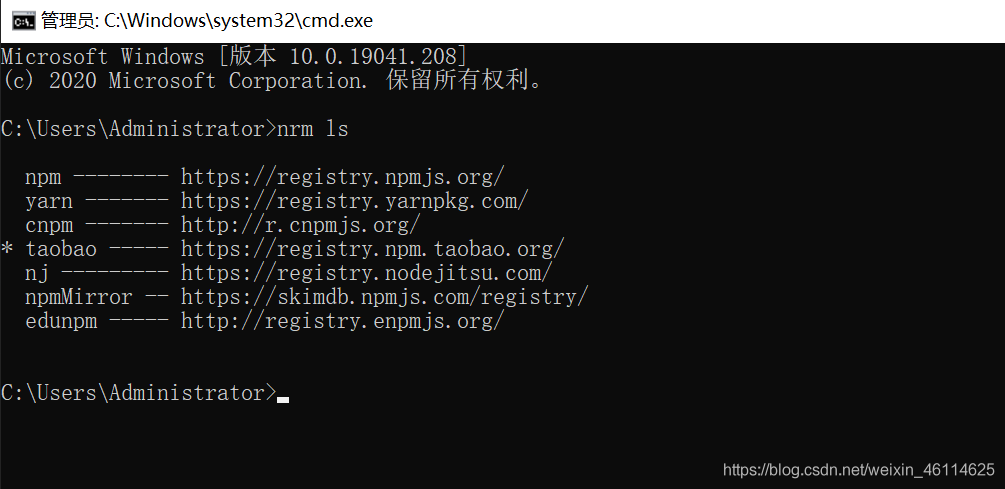
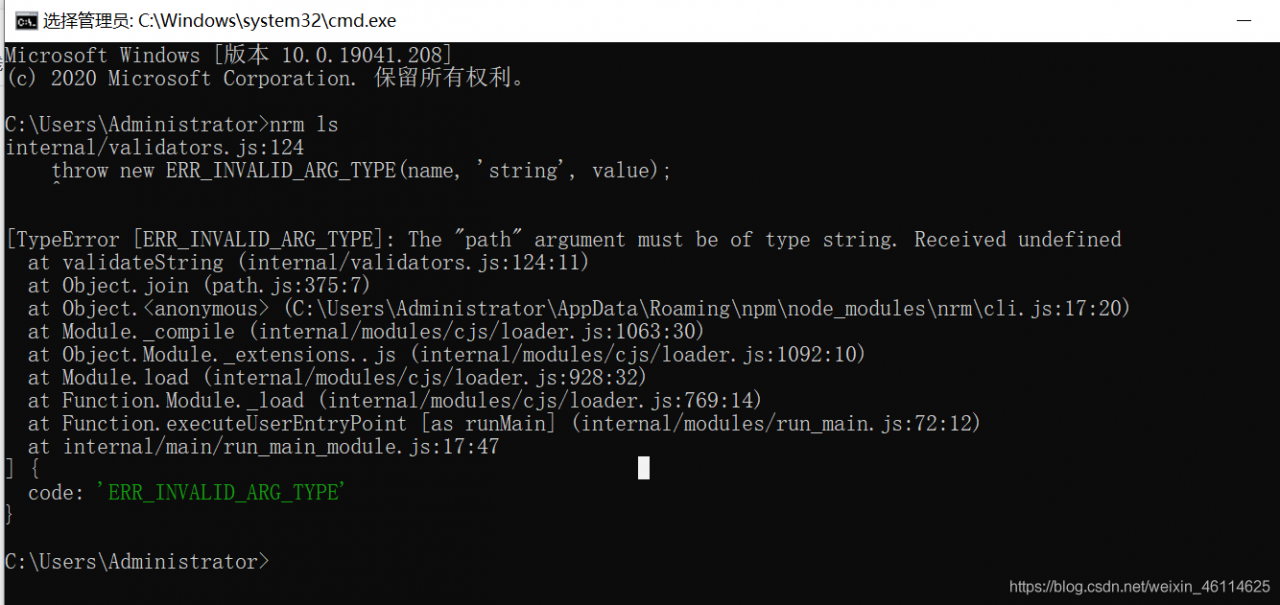
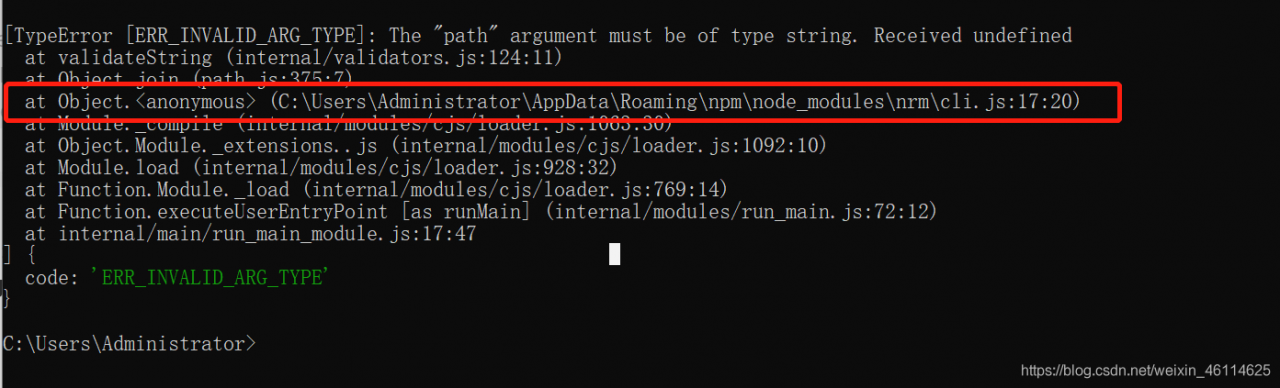
After installing NPM, NRM LS reports an error throw new err_INVALID_ARG_TYPE(name, ‘string‘, value)

Error screenshot:

error screenshots are seen in the cli. Js file line 17 error,

According to the path to find the file:
open files found an error line 17, note down the original 17 rows instead as shown in figure:

//const NRMRC = path.join(process.env.HOME, '.nrmrc');(Note these codes)
const NRMRC = path.join(process.env[(process.platform == 'win32') ?'USERPROFILE' : 'HOME'], '.nrmrc');

After executing CMD, enter NRM ls problem solved

Eclipse specifies JDK version to start, and resolves version XXXX of the JVM is not suitable

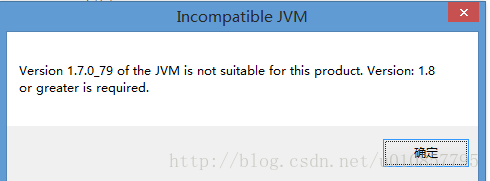
How to Fix Version XXXX of the JVM is not suitable for this product.Version:XXXXXX or greater is required。

Verson1.7.0_79 of the JVM is not suitable for this product Version:1.8 or greater is required

Configure the eclipse.ini file under the Eclipse folder.
add the following fields:

D: vm/jdk1.8.0 _40/bin/and \
it’s complete configuration:

-vm
D:/jdk1.8.0_40/bin
-startup
plugins/org.eclipse.equinox.launcher_1.3.201.v20161025-1711.jar
--launcher.library
plugins/org.eclipse.equinox.launcher.win32.win32.x86_64_1.1.401.v20161122-1740
-product
org.eclipse.epp.package.jee.product
--launcher.defaultAction
openFile
-showsplash
org.eclipse.platform
--launcher.defaultAction
openFile
--launcher.appendVmargs
-vmargs
-Dosgi.requiredJavaVersion=1.8
-XX:+UseG1GC
-XX:+UseStringDeduplication
-Dosgi.requiredJavaVersion=1.8
-Xms256m
-Xmx1024m

[ERR_INVALID_ARG_TYPE]: The “path“ argument must be of type string. Received undefined error

Start the React project and report the following error:

[ERR_INVALID_ARG_TYPE]: The "path" argument must be of type string. Received undefined
    at validateString (internal/validators.js:120:11)......

There are two possible reasons for this error. The solution is as follows:
The React – Scripts version may be too low. The solution is as follows:

   1. In package.json, replace "react-scripts": "^3.3.0" with
   "react-scripts": "^3.4.0"
   2. Delete the node_modules folder
   3. Run cnpm i for a second

2. Modify the config/webpackDevServer. Config. Js file, as follows:
Look at the config/webpackDevServer. Config. Js files have the following code:

       app.use(noopServiceWorkerMiddleware());

Modified into

app.use(noopServiceWorkerMiddleware('/'));

Done!

C#: How to get the value or text value of the select drop-down list

Such as the following code

to obtain the value

The HTML code

<body>
    <form id="form1" runat="server">
        <div>
            <div>
            	<select id="select1" runat="server">
                	<option value ="video1" runat="server">video 1</option>
                	<option value ="video2" runat="server">video 2</option>
                	<option value="video3" runat="server">video 3</option>
            	</select>
            	<asp:Button ID="Button1" runat="server" OnClick="Button1_Click" Text="start" />
            </div>
            <asp:Label ID="Label1" runat="server" Text="Label"></asp:Label>
        </div>
    </form>
</body>

C # code

protected void Button1_Click(object sender, EventArgs e)
        {
        	String str = select1.Items[select1.SelectedIndex].Value;//Get the value of the drop-down list
        	Label1.Text = str;	// Display the values in the list through the Lable component
        }

String STR = select1.items [select1.selecteDindex].Value; in the select1 for HTML code to the select components id

get Text

Text>e> v> String STR = sel>.items [select1.selecteDindex].Value; in the Value instead. The Text

Nvidia-smi has failed because it could’t communicate with the NVIDIA driver

NVIDIA-SMI error:
NVIDIA-SMI has failed because it couldn’t communicate with the NVIDIA driver. Make sure that the latest NVIDIA driver is installed and running
This is a common problem that often occurs in Ubuntu systems, mainly because the kernel has been upgraded and the new kernel does not match the old graphics driver
Solution 1:
Just execute two commands:
Sudo apt-get install DKMS

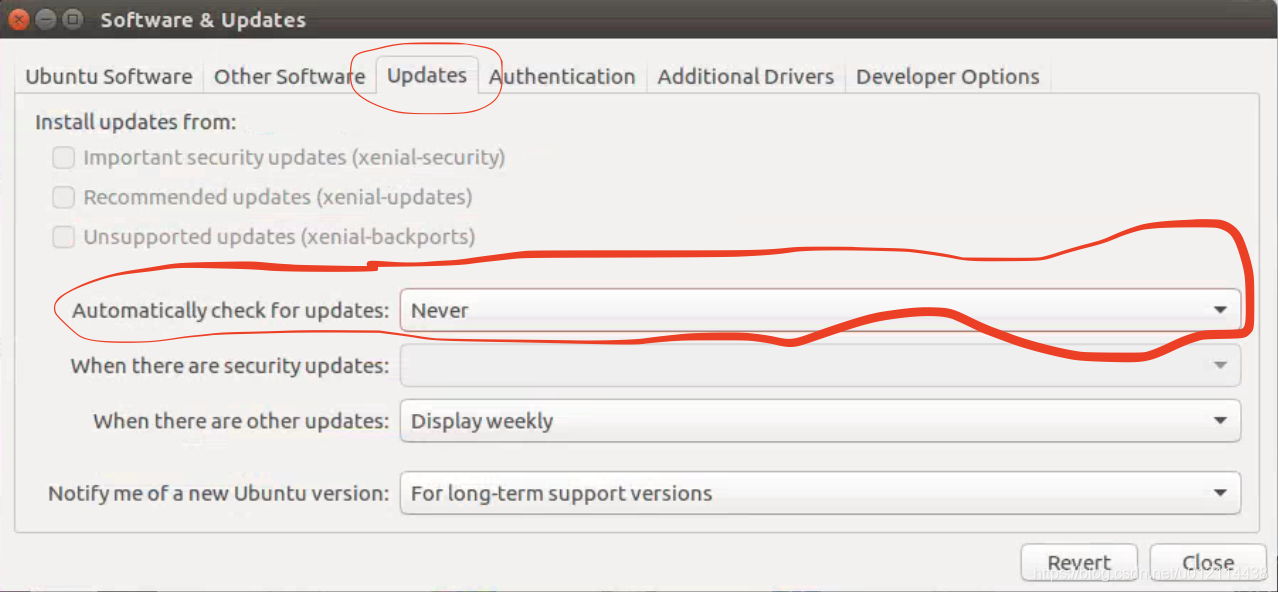
Set all the “1” in the double quotation marks to “0”, and save after modification.
To turn off auto-update using a graphical interface, go to System Settings –>; Software Update (Software & Updates)

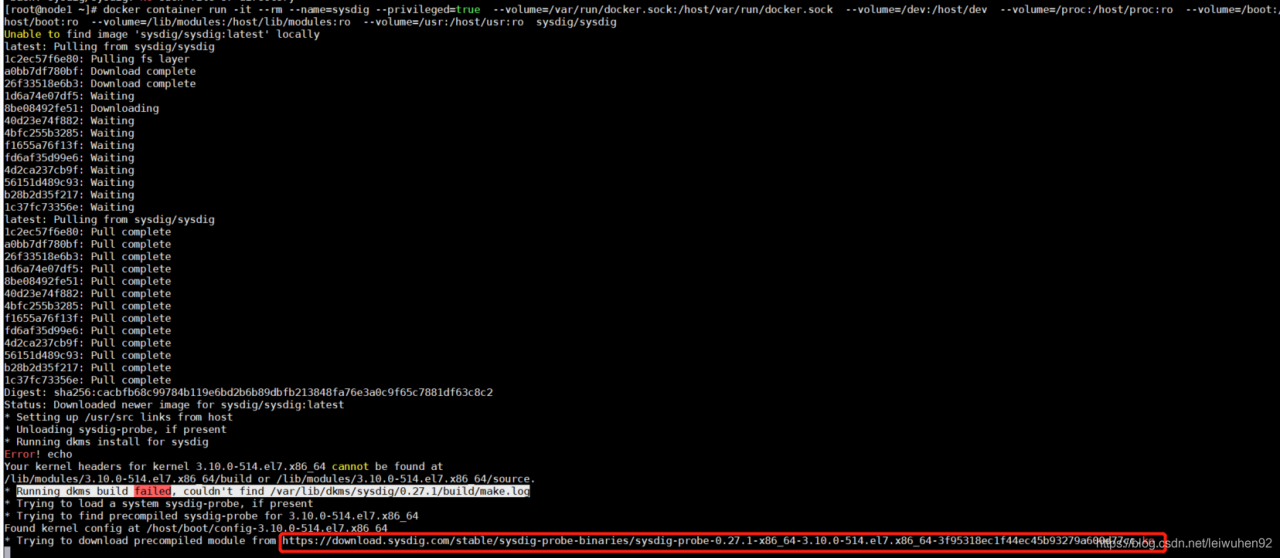
Docker installation sysdig error: running DKMS build failed, could’t find / var / lib / DKMS / sysdig / 0.27.1/build/ make.log

Docker sysdig installation error:

According to the online https://www.cnblogs.com/lkun/p/7898900.html centos7 install docker monitoring – sysdig (solve installation errors) did not successfully solved
 
Then I saw this reply under Cloudman’s message:

 
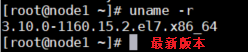
1, his host host kernel upgrade, upgrade instructions: yum update – y kernel, using the uname -r see if upgrade success

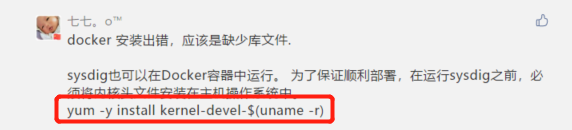
2. Install yum -y kernel-devel-$(uname -r) to install the kernel header file in the host operating system
Sysdig command: sysdig command

docker container run -it --rm --name=sysdig --privileged=true  --volume=/var/run/docker.sock:/host/var/run/docker.sock  --volume=/dev:/host/dev  --volume=/proc:/host/proc:ro  --volume=/boot:/host/boot:ro  --volume=/lib/modules:/host/lib/modules:ro  --volume=/usr:/host/usr:ro  sysdig/sysdig

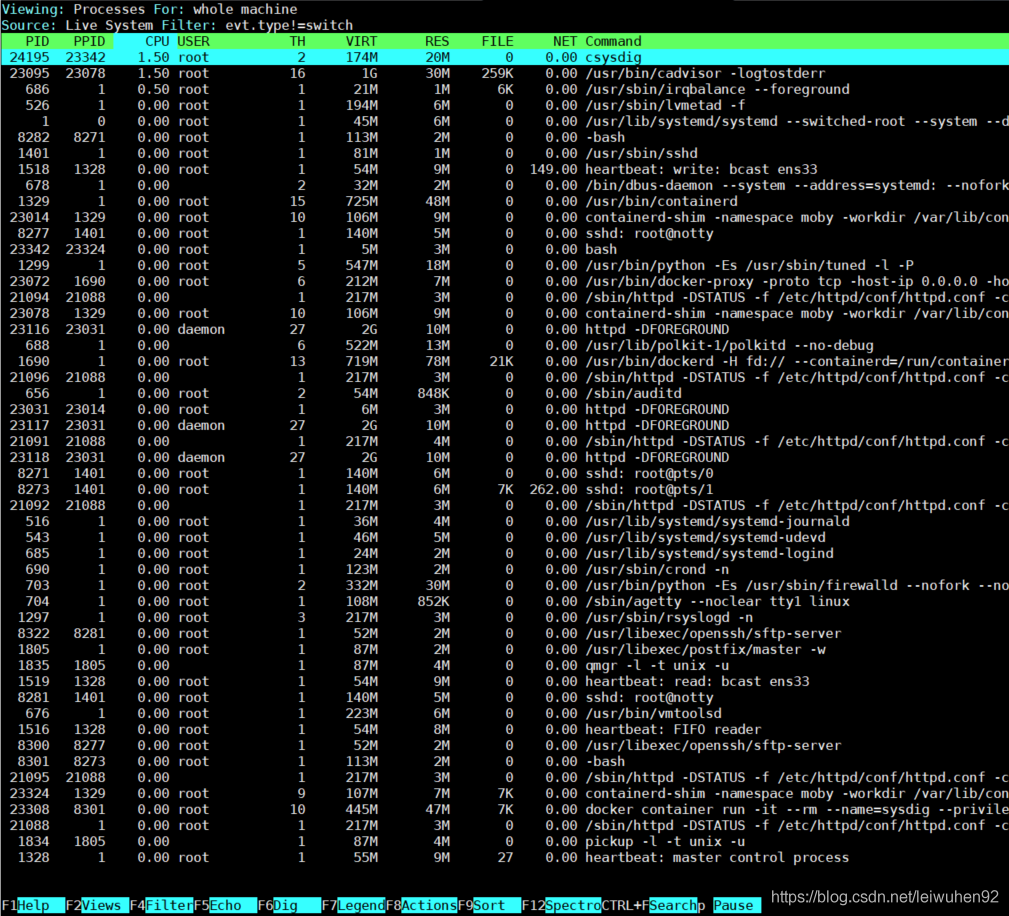
Input csysdig: