Author Archives: Robins

package xxx does not exist cannot find symbol

When deploying services on Linux, a large number of packages were thrown and no exception was found

[ERROR] /home/jenkins/agent/workspace/pipeline_p-h6sbk-4/src/main/java/com/UserServiceImpl.java:[3,28] package com.alibaba.fastjson does not exist

[ERROR] /home/jenkins/agent/workspace/pipeline_p-h6sbk-4/src/main/java/com/User.java:[9,2] cannot find symbol

[ERROR]   symbol: class Data

[ERROR]   location: class com.xxx

[ERROR] /home/jenkins/agent/workspace/pipeline_p-h6sbk-4/src/main/java/com/User.java:[3,14] package lombok does not exist

[ERROR] /home/jenkins/agent/workspace/pipeline_p-h6sbk-4/src/main/java/com/User.java:[9,2] cannot find symbol

[ERROR]   symbol: class Data

[ERROR]   location: class com.xxx

[ERROR] -> [Help 1]

[ERROR] 

[ERROR] To see the full stack trace of the errors, re-run Maven with the -e switch.

[ERROR] Re-run Maven using the -X switch to enable full debug logging.

[ERROR] 

[ERROR] For more information about the errors and possible solutions, please read the following articles:

[ERROR] [Help 1] http://cwiki.apache.org/confluence/display/MAVEN/MojoFailureException

This is Maven’s problem

    check whether the settings.xml file is configured. Check & lt; in the settings.xml file; localRepository> If the path is configured correctly, & lt; mirror> Whether the image address is correct and the network is unblocked. Whether the jar package and the corresponding version exist in Maven warehouse. Whether the Maven version configured in pom.xml corresponds to the Linux Installation version

The solution of “error in NLS loop more than 50” in R language

When using multiple nonlinear regression (NLS function) in R language, we often encounter the problem that “the number of error in NLS cycles exceeds the maximum of 50”.

The main reason is that the default maximum number of iterations in NLS is 50. At this time, you only need to use NLS. Control to modify the maximum number of iterations
for example, change the maximum number of iterations to 1000:

nlc <- nls.control(maxiter = 1000)
m1 <- nls(y ~ a * x1 ^ b * x2 ^ c, 
          control = nlc, 
          start = list(a = 1, b = 1, c = 1),
          trace = T)

Error installing redis: redis requires Ruby Version > = 2.3.0

Error installing redis: redis requires Ruby Version & gt= 2.3.0.

Error installing redis: redis requires Ruby Version & gt= 2.3.0.

Recently, the following error was reported when installing redis cluster:
the version of ruby in centos7 Yum library supports 2.0.0, but gem needs at least 2.3.0 to install redis, and uses RVM to update ruby

Follow the steps below

1. Install curl

yum -y install curl

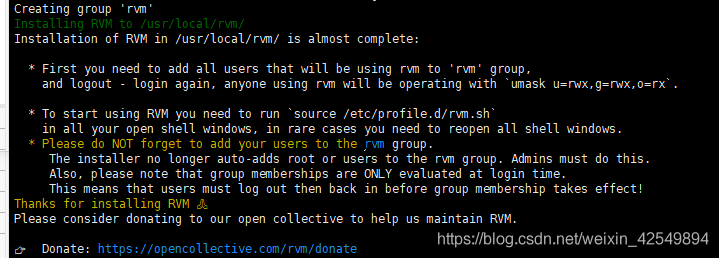
2. Install RVM

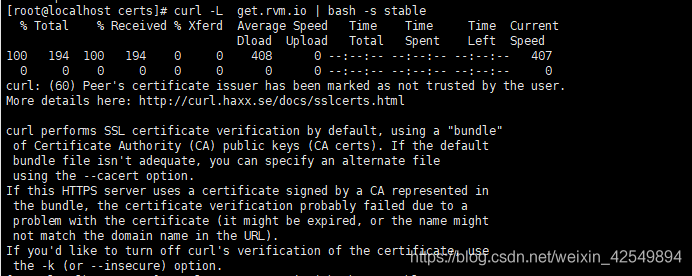
curl - L get.rvm.io | bash - s stable
this is an installation failure error

this situation mostly occurs in self signed certificates. The error report means that the issuing certificate authority is not authenticated and cannot be identified.

3. Modify hosts

VI/etc/hosts
add the following
199.232.28.133 raw.githubusercontent.com

4. Execute curl command and download RVM

curl - L get.rvm.io | bash - s stable

Load shell configuration
source/usr/local/RVM/scripts/RVM

5. Check the known Ruby versions in RVM library

rvm list known

6. Install the ruby version

rvm install 2.6.3

7. Use Ruby Version

rvm use 2.6.3

8. Set the default version

ruby --version

9. Uninstall the old version

rvm remove 2.0.0

10. Install the interface version of redis and ruby

gem install redis

This is the perfect solution~

Mxnet general optimizer usage

 
Adam optimizer:

weight_decay=5e-4

adam_lr=0.01
optimizer = mx.optimizer.Adam(learning_rate=adam_lr, wd=weight_decay)


wd = 0.0005

   opt = optimizer.SGD(learning_rate=lr,
                        momentum=0.9,
                        wd=wd,
                        rescale_grad=1.0/len(ctx),
                        clip_gradient=None)


Apache Groovy——java.lang.NoSuchMethodError: x.x.x: method <init>()V not found

Original address: Apache groovy — Java. Lang. nosuchmethoderror: x.x.x: method() V not found 🙃)

Problem description

During the execution of groovy code, the following error occurred:

ava.lang.NoSuchMethodError: com.lispstudio.model.TeamLispstudio: method <init>()V not found

Cause of the problem

After inheriting the parent class, the constructor of the parent class is not called.

resolvent

There are two solutions: 1) call the same constructor as the parent class; 2) Use inheritconstructors annotation;

Call the same constructor as the parent class

class Creature {
    Creature (String feature) {}
}

class Humman extends Creature{
    Humman (String feature) {
		super(feature)
    }
}

new Humman("legs")

Using inheritconstructors annotation

class Creature {
    Creature (String feature) {}

SwiftUI 2.0: How to Import Files into iOS Apps

Task

I wanted to import an audio file into an iOS 14.0 or later app built using Swift UI 2.0 at work, but I had problems with security-scoped URL s and styling, so I wanted to share my experience …

File picker

With the release of iOS 14 Beta 6, Apple has provided a new view qualifier that allows users to import existing files from their iOS device or iCloud Drive . First, fileImporter()let’s check out this new modifier …

fileImporterModifier

fileImporter(isPresented:allowedContentTypes:allowsMultipleSelection:onCompletion:)The method allows the user to import one or more files.

Declaration
SwiftUI
func fileImporter(
    isPresented: Binding<Bool>, 
    allowedContentTypes: [UTType], 
    allowsMultipleSelection: Bool, 
    onCompletion: @escaping (Result<[URL], Error>) -> Void
) -> some View
parameter
  • isPresented : A binding that supports whether to display the file picker interface.
  • allowedContentTypes : A list of supported content types that can be imported .
  • allowsMultipleSelection : A Boolean value that supports whether the user can select and import multiple files at the same time.
  • onCompletion : A callback that will be called when the operation is successful.
Details
  • To display the file picker , set the isPresentedvariable bound with to true .
  • When the file to import is selected onCompletionisPresentedis automatically set back to false before the callback is called .
  • If the user cancels the import, isPresentedis automatically set back to false and the onCompletioncallback is not called.
  • onCompletionWhen the callback is invoked, resultteeth .successor .failurebe either.
  • .successIf, contains a list resultof URLs of files to import .
Note

allowedContentTypesCan be changed
as soon as the file importer is displayed, but has no immediate effect and is only applied the next time the file importer is displayed.

Sample code

Let’s test the implementation code by importing and playing one audio file:

SwiftUI
import SwiftUI
import AVFoundation
...
    @State private var isImporting = false
    var body: some View {
        Button(action: {
            isImporting = true
        }) {
        Image(systemName: "waveform.circle.fill")
            .font(.system(size: 40))
        }
        .fileImporter(
            isPresented: $isImporting,
            allowedContentTypes: [.audio],
            allowsMultipleSelection: false
        ) { result in
            if case .success = result {
                do {
                    let audioURL: URL = try result.get().first!

                    let audioPlayer = try AVAudioPlayer(contentsOf: audioURL)
                    audioPlayer.delegate = ...
                    audioPlayer.prepareToPlay()
                    audioPlayer.play() // ← ERROR raised here

                } catch {
                    let nsError = error as NSError
                    fatalError("File Import Error \(nsError), \(nsError.userInfo)")
                }
            } else {
                print("File Import Failed")
            }
        }
    }
...

what happened? !!

error

Below is the error I got in the XCode console when I ran the code for the actual implementation:

XCode
2021-04-23 10:00:01.123456+0900 MyApp[10691:1234567] Could not signal service com.apple.WebKit.WebContent: 113: Could not find specified service
Playback initialization for "file:///private/var/mobile/Containers/Shared/AppGroup/XXXXXXXX-XXXX-XXXX-XXXX-XXXXXXXXXXXX/File%20Provider%20Storage/Voice/TestFile.m4a" file has failed: Error Domain=NSOSStatusErrorDomain Code=-54 "(null)".
Fatal error: Unexpectedly found nil while implicitly unwrapping an Optional value: file MyApp/AudioPlayer.swift, line 123

Meaning of error

Apps on iOS are sandboxed and access to files inside the sandbox is unlimited , but access to files outside the sandbox is restricted without proper permissions .

How do I get permissions to access files outside the app’s sandbox?

Security authority

Once you have a list of URLs for the files you want to import, you need to get permissions to access them.

startAccessingSecurityScopedResource() Method

Declaration
Swift
func startAccessingSecurityScopedResource() -> Bool
Return value

This function returns true if the request to access the file was successful , false otherwise.

Details

Once you get the security scope URL, you can’t immediately use the file it points to.

To access the file, you need to call a startAccessingSecurityScopedResource()method (or Core Foundation equivalent CFURLStartAccessingSecurityScopedResource(_:)function) at the security scope URL, which adds the file location to your app’s sandbox and makes the file available to your app. ..

After successfully gaining access to a file, you should give up access to the file as soon as you finish using it.

As a result, calling a stopAccessingSecurityScopedResource()method (or its equivalent Core Foundation equivalent CFURLStopAccessingSecurityScopedResource(_:)) in a URL relinquishes access and immediately makes the file inaccessible.

Note

If you don’t give up access when file system resources are no longer needed, your app will leak kernel resources. If a lot of kernel resources are leaked, the app will not be able to add the file system location to the sandbox until it is restarted.

Sample code
SwiftUI
...
    @State var audioFiles: Array<MediaFileObject> = Array<MediaFileObject>()
    @State private var isImporting = false
    var body: some View {
        Button(action: {
            isImporting = true
        }) {
        Image(systemName: "waveform.circle.fill")
            .font(.system(size: 40))
        }
        .fileImporter(
            isPresented: $isImporting,
            allowedContentTypes: [.audio],
            allowsMultipleSelection: false
        ) { result in
            if case .success = result {
                do {
                    let audioURL: URL = try result.get().first!
                    if audioURL.startAccessingSecurityScopedResource() {
                        audioFiles.append(AudioObject(id: UUID().uuidString, url: audioURL))
                    }
                } catch {
                    let nsError = error as NSError
                    fatalError("File Import Error \(nsError), \(nsError.userInfo)")
                }
            } else {
                print("File Import Failed")
            }
        }
    }
...

File type

Shared system data formats can be used for resources to load, save, and open from other apps . Alternatively, you can define your own files and data formats as needed .

In my code, it represents all kinds of audio files, belong to the category “image, audio, and basic type of video” .audiousing the type;

  • image : A basic type that represents image data.
  • audio : A type that represents audio that does not contain video.
  • audiovisualContent : A basic type that represents data that contains video content that may or may not contain audio.
  • movie : A basic type that represents a media format that may contain both video and audio.
  • video : A type that represents a video that does not contain audio.

styling

With SwiftUI 2.0 (expecting SwiftUI 3.0), styling isn’t really easy yet, but I’ve found some ways to change the look of the file picker:

  • UINavigationBar.appearance().tintColor: UIColor: The color of the toolbar item in the header of the file picker.
  • UITabBar.appearance().barTintColor: UIColor: The background color of the tab bar at the bottom of the file picker.
  • UITabBar.appearance().tintColor: UIColor: The color of the currently selected tab bar item.
  • UITabBar.appearance().unselectedItemTintColor: UIColor: The color of the toolbar item that is not currently selected.

be careful ! Using UIKit settings in this way can affect the appearance of the navigation bar and tab bar in other parts of the application.

At the end

We hope this article helps you implement file imports in your app.

How to do SwiftUI 1.0?

I tried to implement a file picker that imports ( fileImporter()none) audio files in another way, but I couldn’t!

fileExporterModifier

fileExporter(isPresented:document:contentType:defaultFilename:onCompletion:)The method allows the user to export a document in memory to a file on disk.

fileMoverModifier

fileMover(isPresented:file:onCompletion:)The method allows the user to move an existing file to a new location.
How to Avoid Windows Error in Gitbook Serve

In Windows environment

$ gitbook serve

If you edit the markdown after execution

Error: EPERM: operation not permitted, lstat [_book directory name]

This is an urgent measure when the gitbook terminates abnormally with the error.

After starting gitbook serve, once you delete the “_book” folder, for some
reason it works normally after that,

[node.js global installation path] /bin/node_modules/gitbook-cli/bin/gitbook.js

If you add a description to delete the “_book” folder, for example, around the 180th to 194th lines of, gitbook servewill not end abnormally.

  • If you are using bash (git bash, etc.) for your shell
program
    .command('*')
    .description('run a command with a specific gitbook version')
    .action(function(commandName){
        var args = parsedArgv._.slice(1);
        var kwargs = _.omit(parsedArgv, '$0', '_');
        runPromise(
            manager.ensureAndLoad(bookRoot, program.gitbook)
            .then(function(gitbook) {
                if(commandName === 'serve'){
                    setTimeout(function(){
                        require('child_process').execSync('rm -rf _book');
                    },1000);
                }
                return commands.exec(gitbook.commands, commandName, args, kwargs);
            })
        );
    });
  • If you are using PowerShell as the shell, make the delete command part as follows
require('child_process').execSync('rm _book -Recurse');

(If you don’t want to make it dependent on the shell, you can delete it with fs.unlink, fs.rmdir, etc.)

How to Solve Embulk Error: OutputPlugin’bigquery’ is not found

I am transferring from MySQL to BigQuery with Embulk, but when I try to execute it in a certain environment after a long time, an error occurs.

embulk Error: OutputPlugin 'bigquery' is not found

If you take a closer look, you will see that the ruby ​​version does not support faraday with the following error.

[91mERROR: Error installing embulk-output-bigquery:
faraday-net_http requires Ruby version >= 2.4.0.[0m[91m

There was a description in output-bigquery GitHub Issue .

Since it is running on Docker this time, the problem was solved by describing the following in the Docker file.

#Install Embulk
RUN wget -q https://dl.embulk.org/embulk-latest.jar -O /bin/embulk \
    && chmod +x /bin/embulk

# Response to this error
RUN embulk gem install representable -v 3.0.4
RUN embulk gem install faraday -v 0.17.4

# Add the plug-ins you want to use.
RUN embulk gem install embulk-input-mysql
RUN embulk gem install embulk-output-bigquery
・・・

[Rails 6] How to deal with ActiveRecord :: RecordInvalid: Validation failed:

symptom

When rails db: seed was executed, the following error was displayed and test data could not be created. (Rails 6.0.3)

Terminal
bundle exec rails db:seed
rails aborted!
ActiveRecord::RecordInvalid: Validation failed: Foods is invalid
C:/Users/ユーザー名/environment/プロジェクト名/db/seeds.rb:23:in `block in <main>'
C:/Users/ユーザー名/environment/プロジェクト名/db/seeds.rb:8:in `times'
C:/Users/ユーザー名/environment/プロジェクト名/db/seeds.rb:8:in `<main>'
bin/rails:4:in `<main>'
Tasks: TOP => db:seed
(See full trace by running task with --trace)
seeds.rb
3.times do |n|
    restaurant = Restaurant.new(
      name: "testレストラン_#{n}",
      fee: 100,
      time_required: 10,
    )

    12.times do |m|
      restaurant.foods.build(
        name: "title",
        price: 500,
        description: "description"
      )
    end

    restaurant.save!
  end
restaurant
class Restaurant < ApplicationRecord
    has_many :foods
end
food
class Food < ApplicationRecord
    belongs_to :restaurants
end

Looking at the error message, it seems that Foods has some kind of error.

Solution

It seems that an error occurred because s was added after belongs_to.
In a one-to-n relationship, if 1 is plural, it seems that a validation error will occur.

class Food < ApplicationRecord
    belongs_to :restaurant
end

[Vagrant] When vagrant up, it stops at “SSH auth method: private key” and times out.

vagrant upDid not start properly

The vagrant upfollowing error occurs when trying to start the VM environment for the first time in a long time

C:\work\centos>vagrant up
Bringing machine 'default' up with 'virtualbox' provider...
==> default: Checking if box 'centos/7' version '2004.01' is up to date...
~
    default: SSH username: vagrant
==> default: SSH auth method: private key
Timed out while waiting for the machine to boot. This means that
Vagrant was unable to communicate with the guest machine within
the configured ("config.vm.boot_timeout" value) time period.

If you look above, you should be able to see the error(s) that
Vagrant had when attempting to connect to the machine. These errors
are usually good hints as to what may be wrong.

If you're using a custom box, make sure that networking is properly
working and you're able to connect to the machine. It is a common
problem that networking isn't setup properly in these boxes.
Verify that authentication configurations are also setup properly,
as well.

If the box appears to be booting properly, you may want to increase
the timeout ("config.vm.boot_timeout") value.

There seems to be an error in SSH authentication

the reason

It was because I was trying to boot with Hyper-V on.
It was caused by temporarily switching Hyper-V to use Docker, so when I turned it off and restarted, vagrant upit started as if nothing had happened.

end

Another common cause of the same error seems to be a misconfigured VM network (although I was different).