Author Archives: Robins

Mimemagic (0.3.10) Install Error and Bundler cannot continue

An error occurred while installing mimemagic (0.3.10), and Bundler cannot continue.
Make sure that
gem install mimemagic -v ‘0.3.10’ –source ‘https://rubygems.org/’` succeeds before bundling.`

Going back, it says something like this
Fetching mimemagic 0.3.10
Installing mimemagic 0.3.10 with native extensions
Gem::Ext::BuildError: ERROR: Failed to build gem native extension.

Install shared-mime-info

brew install shared-mime-info

bundle install

bundle install

mimemagic has been updated and the error is gone.

The vue3 project Error: Cannot find module’vue-loader-v16/package.json’

In the past two days, I plan to learn vue3. The build project does not use vite, but builds it through vue cli. The vue cli building vue3 project is similar to the previous vue2, but vue cli needs to be upgraded to the latest version.

After the newly generated project, run an error:

Error: Cannot find module'vue-loader-v16/package.json'

Here is the tutorial on how to solve this problem here:


1. Upgrade npm

npm i -g npm

Those who use cnpm should also upgrade cnpm

cnpm i -g cnpm


2. Reinstall the node_modules dependency package

rm- rf node_modules // delete the original dependency package first

cnpm i // reinstall


3. Re-download

cnpm i -D vue-loader-v16


Then you can successfully run the project. . .

Webpack packaging error TypeError: this.getOptions is not a function at Object.lessLoader

In the past two days, I re-learned the use of Webpack. When learning to package css/less style resources, an error occurred:


The key error message is: this.getOptions is not a function. After a look at Baidu on the Internet, it is a version problem.

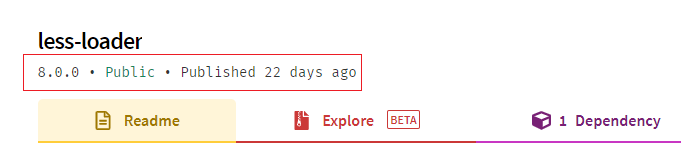
Then I checked the npm official website again, and it turned out that less-loader released a new version of 8.0.0 22 days ago, which is likely to be a compatibility issue caused by the new version.


Solution: Uninstall less-loader and download a lower version again so that it can be packaged normally.

cnpm uninstall less-loader
cnpm i -D less-loader@7 // The latest version is 8.0.0, so re-download the latest version of version 7

The solution to the problem that the custom styles of UI components such as element-ui in the vue project do not take effect

Although the default style has been able to meet many needs when usingelement-ui, there are always some custom needs to be added sometimes. However, sometimes the style is written on it, which should be correct in theory, but it does not take effect.
In fact, when vueusing a third-party framework in a project, this problem may occur. The reason is vuethat it scopedcan be declared that the style is effective within the scope of the component. So as to avoid style pollution of different components, but most people write with scopedthem, so the style scopeddoes not take effect in the domain.
Solution:

1. Remove scoped

Directly <style lang="less" scoped>in scopedto remove it so that style to take effect, although simple and crude but it is not a good method.

2. Use deep action selectors

Used >>>as a deep-action selector in css

<style scoped>
 .box >>> .el-input {
   width: 60px;
 }
 </style>

Used /deep/as a deep-action selector in less

<style lang= "less" scoped>
 .avatar-uploader /deep/ .el-upload {
   border: 1px dashed #
   d9d9d9; border-radius: 6px;
   cursor: pointer;
 }
 </style>


3. Use global styles

Define a global style, such as global.css, and then main.jsimport it in, so that this style is globally mounted, and the custom styles written in it will also take effect.

IDEA Compile Project Error: GC overhead limit exceeded solution

1. Brief description of the problem
. Compile the Java project under Intellij IDEA and report an error: java.lang.OutOfMemoryError: … (ignore here) GC overhead limit exceeded

2. Problem analysis The
error occurs in the compilation phase, not the runtime phase. 
1. The virtual machine used by idea to compile the Java project is separate from the virtual machine used by the idea software itself (that is, a separate process)
2. It can be solved by adding memory to the virtual machine used by the compiler. problem

Install the mxnet-gpu version to solve the problem of “OSError: libnccl.so.2” when importing

https://developer.nvidia.com/nccl/nccl-download Download deb file

Install the repository
For the local NCCL repository:sudo dpkg -i nccl-repo-<version>.deb

Update the APT database:sudo apt update

Use APT to install libnccl2. In addition, if you need to use NCCL to compile the application, install the libnccl-dev package at the same time.
sudo apt install libnccl2=2.9.6-1+cuda10.2 libnccl-dev=2.9.6-1+cuda10.2

Cube.js TimeoutError: ResourceRequest timed out problem

Recently, I encountered this problem when optimizing cube.js. In fact, after checking the official documents later, the official also explained the problem.

main cause

Redis concurrent connection configuration (but it’s not simple. After testing, if the connection pool is not available and the connection is not enough, there will be a problem that the entire service is unavailable)

The official solution

Combine your actual user query request to configure the connection pool

  • Reference configuration
CUBEJS_REDIS_POOL_MAX = 2000
CUBEJS_REDIS_POOL_MIN = 50
REDIS_URL = redis: //127.0.0.1:6379 // Reference connection, which can be combined with ioredis and redis client
  • A reference to optimize the allocation of
    reasonable or try not to trigger the maximum number of connections, pressure tested, prone to extreme in some cases after being connected with a full, do not have the entire service (even after a connection release)
    specifically cube.js based generic- the connection pool to pool resources to check each release number, the number may be recommended through the configuration can be released as soon as possible, to avoid causing unavailable services can not
    use
    packages / cubejs-query-orchestrator / src / orchestrator / RedisPool.ts
const opts = {
            min,
            max,
            acquireTimeoutMillis: 5000,
            idleTimeoutMillis: 3000,
            numTestsPerEvictionRun: 300, // can be solved by configuration
            evictionRunIntervalMillis: 5000
};

Description

In the short term, the solution is to use a larger number of connection pools, and perform more pressure tests later, and see if the configuration can be added to the official code.

Error: Computed property “menuList” was assigned to but it has no setter.

Here is a simple method on how to solve error: Computed property “menuList” was assigned to but it has no setter.

1
2
3
4
5
6
7
8
9
10
11
12
// How to Solve
computed: {
  heandletState: {
    get() {
      return this.$store.getters.heandletState;
    },
    // Write it out not to achieve
    set(val) {
      console.log("vid", val);
    }
  }
},

The java springboot websocket service server actively closes the connection and causes java.io.EOFException to be thrown

Don’t panic when you encounter this problem, go check the opinions. Let me summarize here

There are several situations where this problem exists

1. The ws connection is unstable and often disconnected;

answer:

1) It may be a network problem between the client and the server

2) The thread may be cleaned up abnormally due to insufficient memory on the server side

2. After the ws connection is successful, it will automatically disconnect after a while

answer:

1) In general, nginx forwarding or tomcat connection timeout causes the container layer to actively close the connection

(1) Modify the container layer tomcat or nginx [proxy_read_timeout 5000s ; keepalive_timeout 5000s ; ] configuration is enough , but it is not recommended to treat the symptoms rather than the root cause

(2) The server actively sends a heartbeat message to the client. It is not recommended because it will cause the server to load

(3) The client takes the initiative to send a heartbeat message to the server. I personally recommend this solution

3. After the ws connection, the server actively closes the connection due to various reasons such as authentication failure, which causes the exception to be thrown

Answer: The solution code is below [The key point is the CloseReason.CloseCodes.TLS_HANDSHAKE_FAILURE error code. When you use this error code, it will cause an io error, which means handshake failure]


1
2
3
4
5
6
7
8
9
10
11
12
13
14
15
16
/**
     * Operation for downline
     * @param session
     */
    public void optClose(Session session){
        // Determine if the current connection is still online
        if (session.isOpen()){
            try {
                // Closed
                CloseReason closeReason = new CloseReason(CloseReason.CloseCodes.NORMAL_CLOSURE,"Error!");
                session.close(closeReason);
            catch (IOException e) {
                e.printStackTrace();
            }
        }
    }

Note: When an abnormal error occurs, the connection should be closed in time and the related users’ online and offline operations should be handled!

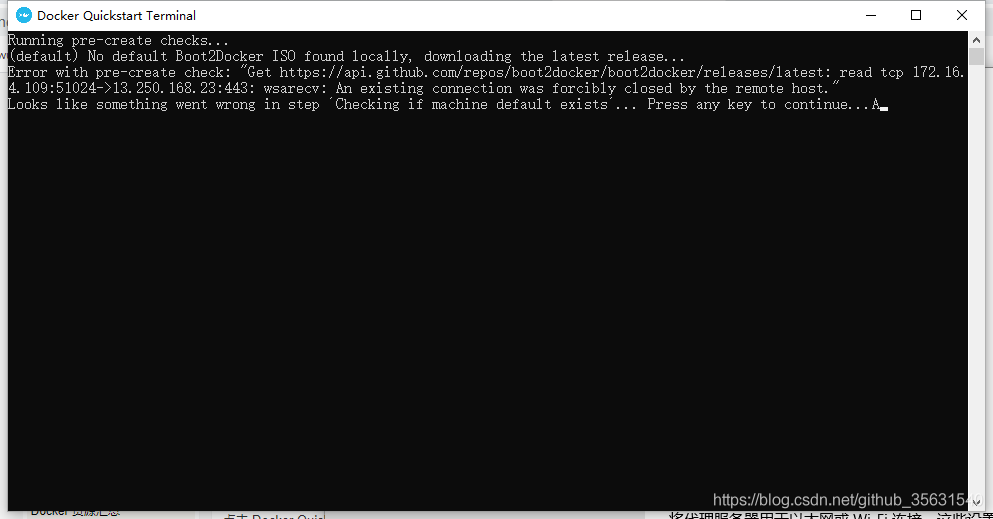
Docker Quickstart Terminal Error: No default Boot2Docker ISO found locally

(default) No default Boot2Docker ISO found locally, downloading the latest release…
Error with pre-create check: “Get https://api.github.com/repos/boot2docker/boot2docker/releases/latest: read tcp 172.16. 4.109:51024->13.250.168.23:443: wsarecv: An existing connection was forcibly closed by the remote host.”
Looks like something went wrong in step ´Checking if machine default exists´… Press any key to continue… A


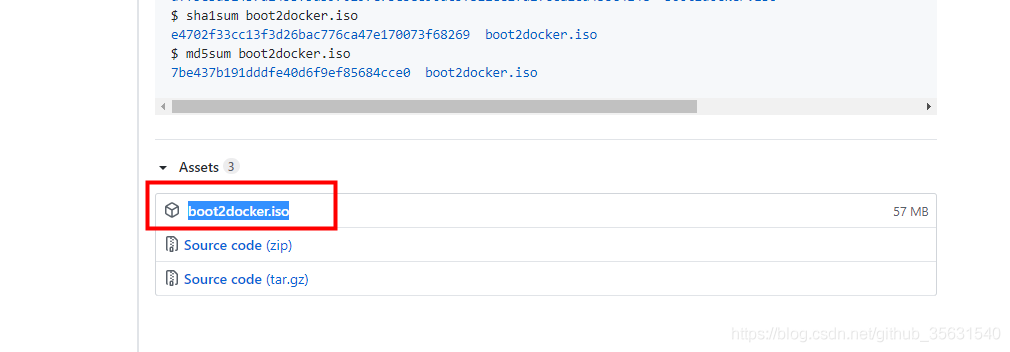
You can go to GitHub to find  boot2docker.iso    under Thunder, put it under C:\Users\xxxxx\.docker\machine\cache\ and reopen Docker Quickstart Terminal

Start Docker Quickstart Terminal error This computer is running Hyper-V. VirtualBox won’t boot a 64bits VM when Hyper-V is activated

Windows10 Home Edition
DockerToolbox-18.03.0-ce

Problem Description:

I found out that the home version cannot install Docker Desktop. Since mine is a genuine activation, I won’t be tossing for the professional version;

Then there is still a choice, which is to install DockerToolbox, but after the installation, there is an error when running Docker Quickstart Terminal:

Running pre- create checks...
Error  with pre- create  check : "This computer is running Hyper-V. VirtualBox won't boot a 64bits VM when Hyper-V is activated. Either use Hyper-V as a driver, or disable the Hyper-V hypervisor. (To skip this check, use --virtualbox-no-vtx-check)"

Solution:

File (according to the location you installed): C:\Program Files\Docker Toolbox\start.sh

Add –virtualbox-no-vtx-check part

STEP= "Checking if machine $VM exists"
if [ $VM_EXISTS_CODE -eq 1 ]; then
  " ${DOCKER_MACHINE} " rm -f " ${VM} " &> /dev/null ||:
  rm -rf ~/.docker/machine/machines/ " ${VM} "
  #set proxy variables if they exists
  if [ " ${HTTP_PROXY} " ]; then
    PROXY_ENV = " $PROXY_ENV --engine-env HTTP_PROXY = $HTTP_PROXY "
  fi
  if [ " ${HTTPS_PROXY} " ]; then
    PROXY_ENV = " $PROXY_ENV --engine-env HTTPS_PROXY = $HTTPS_PROXY "
  fi
  if [ " ${NO_PROXY} " ]; then
    PROXY_ENV = " $PROXY_ENV --engine-env NO_PROXY = $NO_PROXY "
  fi
  " ${DOCKER_MACHINE} " create -d virtualbox --virtualbox-no-vtx-check   $PROXY_ENV  " ${VM} "
fi