Two reasons:
-
- PIP needs to be upgraded
-
- solution = & gt; Command line input:
python -m pip install --upgrade
Maybe it’s really stuck. Then wait slowly ~ or try more times, and you can always solve
Two reasons:
python -m pip install --upgrade
Maybe it’s really stuck. Then wait slowly ~ or try more times, and you can always solve
Docker failed to start the container after installing mysql. Check the MySQL container log and find:
[ERROR] [FATAL] InnoDB: Table flags are 0 in the data dictionary but the flags in file ./ibdata1 are 0x4800!
Query all containers
docker ps -a
Delete container
docker rm CONTAINER ID; #CONTAINER ID is the actual container number
If so, be sure to delete the external mount directory.
Restart mysql. I installed version 5.7 of MySQL
docker run -p 3306:3306 --name mysql \
-v /mydata/mysql/log:/var/log/mysql \
-v /mydata/mysql/data:/var/lib/mysql \
-v /mydata/mysql/conf:/etc/mysql \
-e MYSQL_ROOT_PASSWORD=root \
-d mysql:5.7
Enter the container external mount profile
vim /mydata/mysql/conf/my.conf
Insert the following. Copy the following contents. After entering the file through the previous operation, press keyboard I to enter the insertion state, shift + insert to paste the contents, ESC to exit the insertion mode,: WQ save and exit
[client]
default-character-set=utf8
[mysql]
default-character-set=utf8
[mysqld]
init_connect='SET collation_connection = utf8_unicode_ci'
init_connect='SET NAMES utf8'
character-set-server=utf8
collation-server=utf8_unicode_ci
skip-character-set-client-handshake
skip-name-resolve
Restart MySQL
docker restart mysql
1. Read FASTA file:
(1) Method 1: Bio Library
from Bio import SeqIO

fa_seq = SeqIO.read("res/sequence1.fasta", "fasta")

seq = str(fa_seq.seq)

seqs = [fa.seq for fa in SeqIO.parse("res/multi.fasta", "fasta")]
(2) Method 2: pysam Library
fa = pysam.FastaFile(‘filename’)

fa.references

fa.lengths

seq = fa.fetch(reference=’chr21’, start=a, end=b)

seq = fa.fetch(reference=’chr21’)
2. Convert sequence to string: str (FA. SEQ)
print("G Counts: ", fa.count("G"))

print("reverse: ", fa[::-1])

print("Reverse complement: ", fa.complement())
3、pysam read bam file error:
File “pysam/libcalignmentfile.pyx”, line 742, in pysam.libcalignmentfile.AlignmentFile.__cinit__
File “pysam/libcalignmentfile.pyx”, line 952, in pysam.libcalignmentfile.AlignmentFile._open
File “pysam/libchtslib.pyx”, line 365, in pysam.libchtslib.HTSFile.check_truncation
OSError: no BGZF EOF marker; file may be truncated
The file can be read this way, i.e. by adding ignore_truncation=True:
bam = pysam.AlignmentFile(‘**.bam’, "rb", ignore_truncation=True)4. Cram format file: it has the characteristics of high compression and has a higher compression rate than BAM. Most files in cram format may be used in the future
5. Comparison data (BAM/cram/SAM), variation data: (VCF/BCF)
6. Get each read
for read in bam:
    read.reference_name # The name of the chromosome to which the reference sequence is compared.

    read.pos # the position of the read alignment

    read.mapq # the quality value of the read comparison

    read.query_qualities # read sequence base qualities

    read.query_sequence # read sequence bases

    read.reference_length # 在reference genome上read比对的长度
7. Read cram file
cf = pysam.AlignmentFile(‘*.cram’, ‘rc’)
8. Read SAM file
samfile = pysam.AlignmentFile(‘**.sam’, ‘r’)
9. Get a region in Bam file
for r in pysam.AlignmentFile(‘*.bam’, ‘rb’).fetch(‘chr21’, 300, 310):
pass # This is done provided that the *.bam file is indexedUncaught TypeError: Cannot read property ‘getters’ of undefined
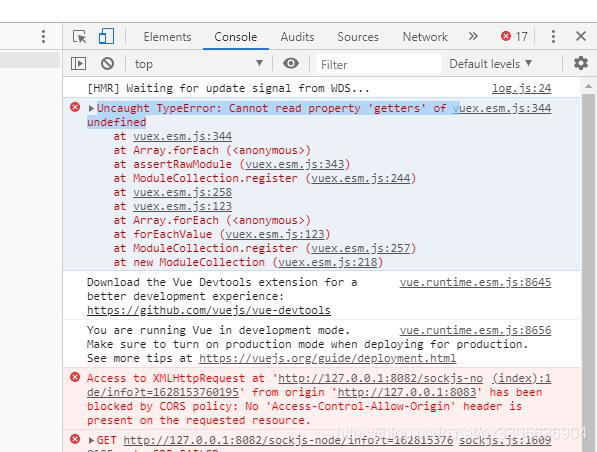
When migrating vuex-related code, the startup reports: Uncaught TypeError: Cannot read property 'getters' of undefined
store/index.js File:
import Vue from 'vue'
import Vuex from 'vuex'

import getters from './getters.js'

Vue.use(Vuex)

// https://webpack.js.org/guides/dependency-management/#requirecontext
const modulesFiles = require.context('./modules', true, /\.js$/)

// you do not need `import app from './modules/app'`
// it will auto require all vuex module from modules file
const modules = modulesFiles.keys().reduce((modules, modulePath) => {
  // set './app.js' => 'app'
  const moduleName = modulePath.replace(/^\.\/(.*)\.\w+$/, '$1')
  const value = modulesFiles(modulePath)
  modules[moduleName] = value.default
  return modules
}, {})

const store = new Vuex.Store({
	modules,
	getters
})
export default store
All. JS files in the modules directory obtained at this time are saved as vuex of named attributes.
Solution: the reason is that a file under my modules has not been written empty. Just delete it temporarily.
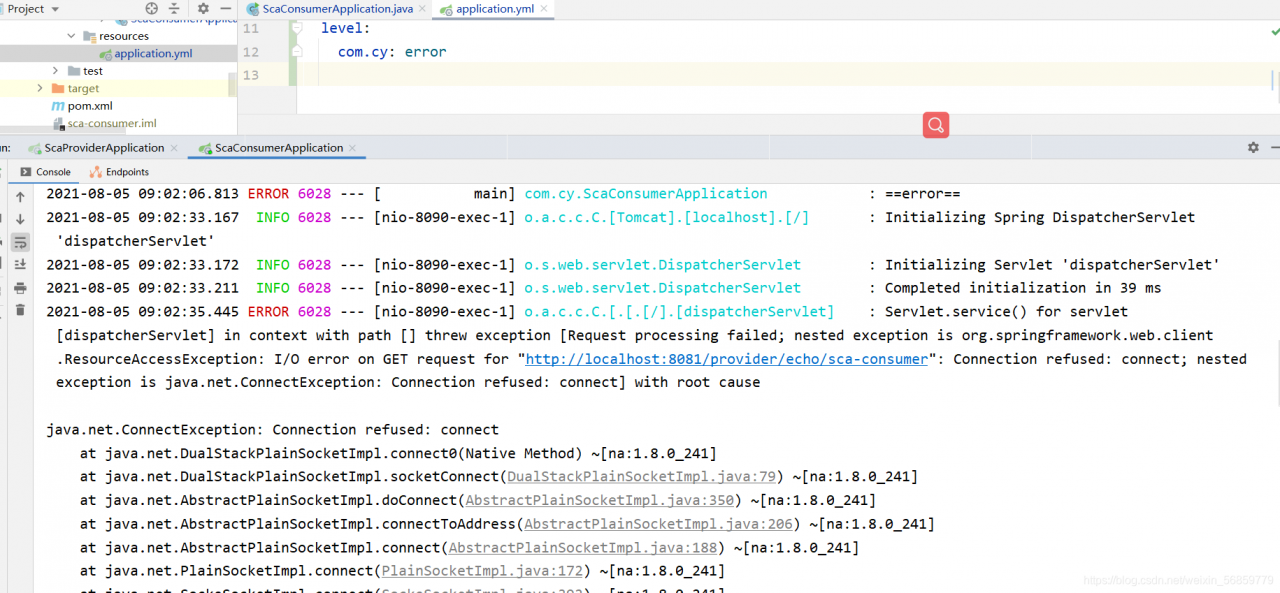
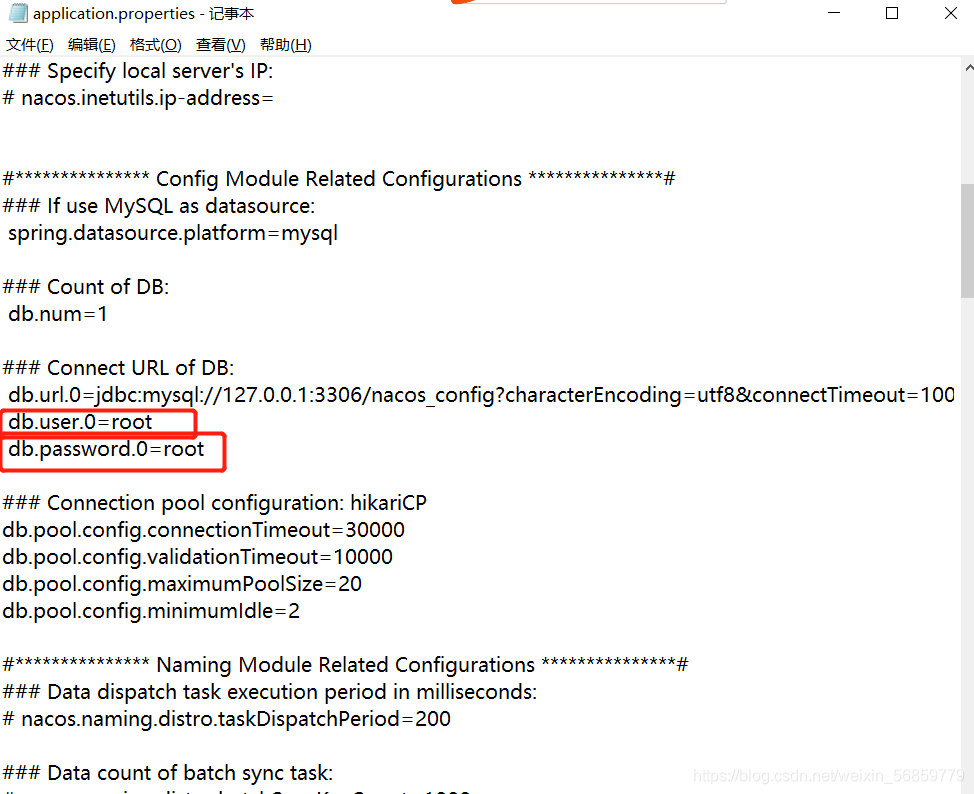
1. Cause of error: the password of the database connection is wrong, so it can be modified
I use the Nacos registry to check whether the password is correct in the configuration file application.properties
2. Reasons for error reporting : The access port is occupied. Please refer to this document to release the port
https://blog.csdn.net/weixin_ 56859779/article/details/119204459?spm=1001.2014.3001.5502
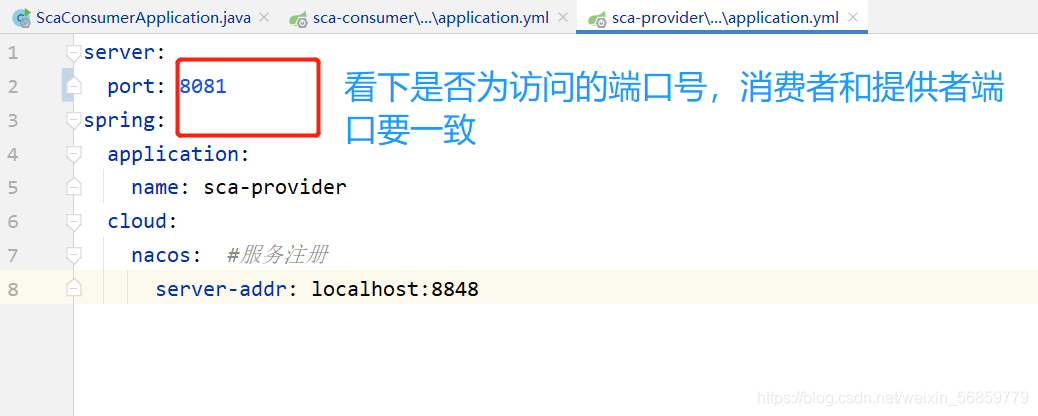
3. Cause of error: the provider of remote call, the port of application.yml in the configuration file is wrong, and it is changed to the access port
According to the online method (VSCODE debug Javascript), after installing the debugger for Chrome extension, debug JavaScript, the result is not able to display the web page in the browser correctly, the wrong report: “crbug/1173575, non-JS module files deprecated”, as shown in the following figure:
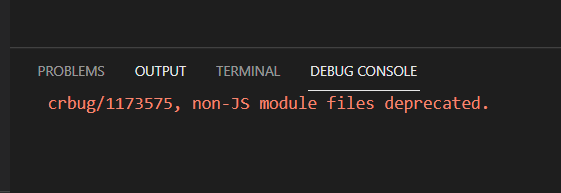
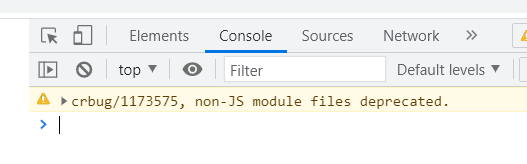
resolvent:
Open launch.json and change the port number in “URL” in “configurations” to the port number of live server
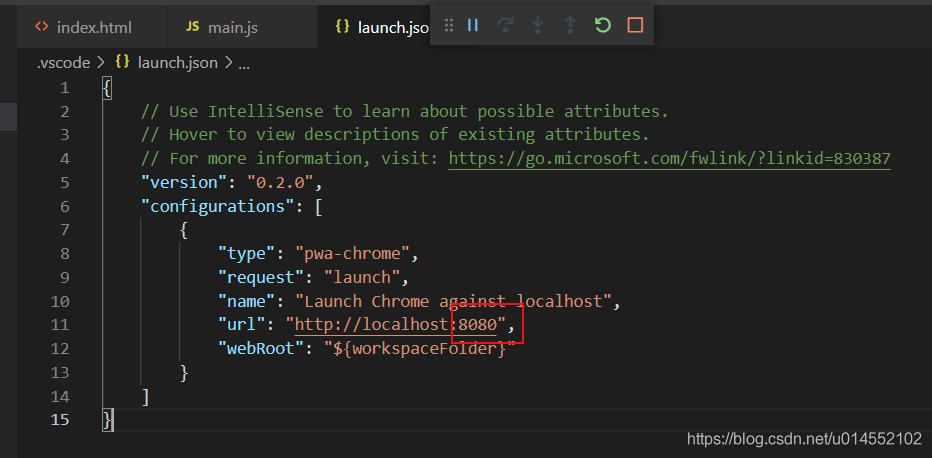
Save, and then press F5 again to debug normally
RuntimeError: each element in list of batch should be of equal size
1. Example code 2. Running result 3. Error reason 4. Batch_ Size = 25. Analyze reason 6. Complete code
1. Example code
"""
Complete the preparation of the dataset
"""
from torch.utils.data import DataLoader, Dataset
import os
import re

def tokenlize(content):
    content = re.sub('<.*?>', ' ', content, flags=re.S)
    filters = ['!', '"', '#', '$', '%', '&', '\(', '\)', '\*', '\+', ',', '-', '\.', '/', ':', ';', '<', '=', '>', '\?',
               '@', '\[', '\\', '\]', '^', '_', '`', '\{', '\|', '\}', '~', '\t', '\n', '\x97', '\x96', '”', '“', ]

    content = re.sub('|'.join(filters), ' ', content)
    tokens = [i.strip().lower() for i in content.split()]

    return tokens


class ImdbDataset(Dataset):
    def __init__(self, train=True):
        self.train_data_path = r'E:\Python资料\视频\Py5.0\00.8-12课件资料V5.0\阶段9-人工智能NLP项目\第四天\代码\data\aclImdb_v1\aclImdb\train'
        self.test_data_path = r'E:\Python资料\视频\Py5.0\00.8-12课件资料V5.0\阶段9-人工智能NLP项目\第四天\代码\data\aclImdb_v1\aclImdb\test'
        data_path = self.train_data_path if train else self.test_data_path

        temp_data_path = [os.path.join(data_path, 'pos'), os.path.join(data_path, 'neg')]
        self.total_file_path = []
        for path in temp_data_path:
            file_name_list = os.listdir(path)
            file_path_list = [os.path.join(path, i) for i in file_name_list if i.endswith('.txt')]
            self.total_file_path.extend(file_path_list)

    def __getitem__(self, idx):
        file_path = self.total_file_path[idx]
        # 获取了label
        label_str = file_path.split('\\')[-2]
        label = 0 if label_str == 'neg' else 1
        # 获取内容
        # 分词
        tokens = tokenlize(open(file_path).read())
        return tokens, label

    def __len__(self):
        return len(self.total_file_path)


def get_dataloader(train=True):
    imdb_dataset = ImdbDataset(train)
    print(imdb_dataset[1])
    data_loader = DataLoader(imdb_dataset, batch_size=2, shuffle=True)
    return data_loader


if __name__ == '__main__':
    for idx, (input, target) in enumerate(get_dataloader()):
        print('idx', idx)
        print('input', input)
        print('target', target)
        break
2. Operation results

3. Reasons for error reporting
dataloader = DataLoader(dataset=dataset, batch_size=2, shuffle=True)
If batch_ Size = 2 changed to batch_ When size = 1 , no more errors will be reported. The operation results are as follows:

4. batch_ size=2
However, if you want batch_ When size = 2 , how to solve it?
resolvent:
The reason for the problem is the parameter collate in the dataloader_ fn
collate_ The default value of FN is Default customized by torch_ collate, collate_ FN is used to process each batch, and the default default_ Collate processing error.
Solution:
Here, use method 2 to customize a collate_ FN , and then observe the results:
def collate_fn(batch):
    """
    Processing of batch data
    :param batch: [the result of a getitem, the result of getitem, the result of getitem]
    :return: tuple
    """
    reviews,labels = zip(*batch)
    reviews = torch.LongTensor([config.ws.transform(i,max_len=config.max_len) for i in reviews])
    labels = torch.LongTensor(labels)

    return reviews, labels
collate_fn第二种定义方式:
import config

def collate_fn(batch):
    """
    Processing of batch data
    :param batch: [the result of a getitem, the result of getitem, the result of getitem]
    :return: tuple
    """
    reviews,labels = zip(*batch)
    reviews = torch.LongTensor([config.ws.transform(i,max_len=config.max_len) for i in reviews])
    labels = torch.LongTensor(labels)

    return reviews,labels
5. Analyze the causes
According to the error information, you can find the source of the error in the collate. Py source code, and the error appears in default_ Collate() function. Baidu found the defaul of this source code_ The collate function is the default batch processing method of the dataloader class. If collate is not used when defining the dataloader_ FN parameter specifies the function, and the method in the following source code will be called by default. If you have the above error, it should be the error in the penultimate line of this function
Source code:
def default_collate(batch):
    r"""Puts each data field into a tensor with outer dimension batch size"""

    elem = batch[0]
    elem_type = type(elem)
    if isinstance(elem, torch.Tensor):
        out = None
        if torch.utils.data.get_worker_info() is not None:
            # If we're in a background process, concatenate directly into a
            # shared memory tensor to avoid an extra copy
            numel = sum([x.numel() for x in batch])
            storage = elem.storage()._new_shared(numel)
            out = elem.new(storage)
        return torch.stack(batch, 0, out=out)
    elif elem_type.__module__ == 'numpy' and elem_type.__name__ != 'str_' \
            and elem_type.__name__ != 'string_':
        if elem_type.__name__ == 'ndarray' or elem_type.__name__ == 'memmap':
            # array of string classes and object
            if np_str_obj_array_pattern.search(elem.dtype.str) is not None:
                raise TypeError(default_collate_err_msg_format.format(elem.dtype))

            return default_collate([torch.as_tensor(b) for b in batch])
        elif elem.shape == ():  # scalars
            return torch.as_tensor(batch)
    elif isinstance(elem, float):
        return torch.tensor(batch, dtype=torch.float64)
    elif isinstance(elem, int_classes):
        return torch.tensor(batch)
    elif isinstance(elem, string_classes):
        return batch
    elif isinstance(elem, container_abcs.Mapping):
        return {key: default_collate([d[key] for d in batch]) for key in elem}
    elif isinstance(elem, tuple) and hasattr(elem, '_fields'):  # namedtuple
        return elem_type(*(default_collate(samples) for samples in zip(*batch)))
    elif isinstance(elem, container_abcs.Sequence):
        # check to make sure that the elements in batch have consistent size
        it = iter(batch)
        elem_size = len(next(it))
        if not all(len(elem) == elem_size for elem in it):
            raise RuntimeError('each element in list of batch should be of equal size')
        transposed = zip(*batch)
        return [default_collate(samples) for samples in transposed]

    raise TypeError(default_collate_err_msg_format.format(elem_type))
The function of this function is to pass in a batch data tuple. Each data in the tuple is in the dataset class you define__ getitem__() method. The tuple length is your batch_ Size sets the size of the. However, one field of the iteratable object finally returned in the dataloader class is batch_ The corresponding fields of the size sample are spliced together.
Therefore, when this method is called by default, the penultimate line of the statement return [default] will be entered for the first time_ Collate (samples) for samples in translated] generate iteratable objects from batch tuples through zip function. Then, the same field is extracted through iteration and recursively re passed in default_ In the collate() function, take out the first field and judge that the data type is among the types listed above, then the dateset content can be returned correctly.
If batch data is processed in the above order, the above error will not occur. If the data of the element is not in the listed data type after the second recursion, it will still enter the next recursion, that is, the third recursion. At this time, even if the data can be returned normally, it does not meet our requirements, and the error usually appears after the third recursion. Therefore, to solve this error, you need to carefully check the data type of the returned field of the dataset class you define. It can also be found in defaule_ The collate() method outputs the batch content before and after processing. View the specific processing flow of the function to help you find the error of the returned field data type.
Friendly tip: do not change the
defaule in the source file_ The collate()method can copy this code and define its owncollate_ Fn()function and specify its own definedcollate when instantiating the dataloader class_ FNfunction.
6. Complete code
"""
Complete the preparation of the dataset
"""
from torch.utils.data import DataLoader, Dataset
import os
import re
import torch

def tokenlize(content):
    content = re.sub('<.*?>', ' ', content, flags=re.S)
    # filters = ['!', '"', '#', '$', '%', '&', '\(', '\)', '\*', '\+', ',', '-', '\.', '/', ':', ';', '<', '=', '>', '\?',
    #            '@', '\[', '\\', '\]', '^', '_', '`', '\{', '\|', '\}', '~', '\t', '\n', '\x97', '\x96', '”', '“', ]
    filters = ['\.', '\t', '\n', '\x97', '\x96', '#', '$', '%', '&']
    content = re.sub('|'.join(filters), ' ', content)
    tokens = [i.strip().lower() for i in content.split()]
    return tokens


class ImdbDataset(Dataset):
    def __init__(self, train=True):
        self.train_data_path = r'.\aclImdb\train'
        self.test_data_path = r'.\aclImdb\test'
        data_path = self.train_data_path if train else self.test_data_path

        temp_data_path = [os.path.join(data_path, 'pos'), os.path.join(data_path, 'neg')]
        self.total_file_path = []
        for path in temp_data_path:
            file_name_list = os.listdir(path)
            file_path_list = [os.path.join(path, i) for i in file_name_list if i.endswith('.txt')]
            self.total_file_path.extend(file_path_list)

    def __getitem__(self, idx):
        file_path = self.total_file_path[idx]
        label_str = file_path.split('\\')[-2]
        label = 0 if label_str == 'neg' else 1
        tokens = tokenlize(open(file_path).read().strip())
        return label, tokens

    def __len__(self):
        return len(self.total_file_path)

def collate_fn(batch):
    batch = list(zip(*batch))
    labels = torch.tensor(batch[0], dtype=torch.int32)
    texts = batch[1]
    del batch
    return labels, texts


def get_dataloader(train=True):
    imdb_dataset = ImdbDataset(train)
    data_loader = DataLoader(imdb_dataset, batch_size=2, shuffle=True, collate_fn=collate_fn)
    return data_loader

if __name__ == '__main__':
    for idx, (input, target) in enumerate(get_dataloader()):
        print('idx', idx)
        print('input', input)
        print('target', target)
        break
I wish you solve the bug and run through the model as soon as possible!
Solve the problem that hmaster hangs up due to namenode switching in Ha mode
Question:
When we build our own big data cluster for learning, the virtual machine often gets stuck and the nodes hang up inexplicably because the machine configuration is not high enough.
In Hadoop’s highly available cluster, the machine configuration is not enough, and the two namenodes always switch state automatically, resulting in the hang up of the hmaster node of the HBase cluster.
Causes of problems:
Let’s check the master log of HBase:
# Go to the log file directory
[root@hadoop001 ~]# cd /opt/module/hbase-1.3.1/logs/
[root@hadoop001 logs]# vim hbase-root-master-hadoop001.log
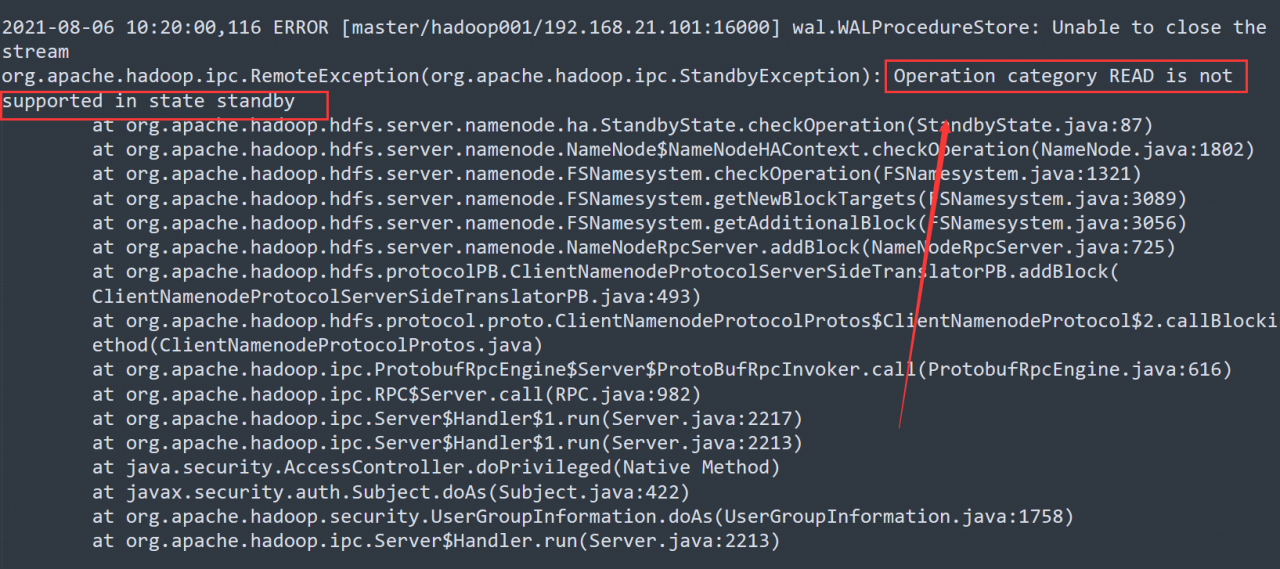
From the log, it is easy to find that the error is caused by the active/standby switching of namenode.
resolvent:
1. Modify the hbase-site.xml configuration file
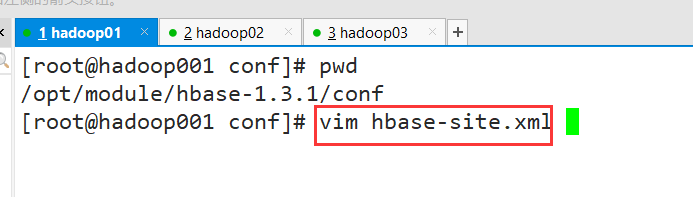
Modify the configuration of base.roodir
<property>
     <name>hbase.roodir</name>
     <value>hdfs://hadoop001:9000/hbase</value>
</property>

# change to
<property>
     <name>hbase.roodir</name>
     <value>hdfs://ns/hbase</value>
</property>

# Note that the ns here is the value of hadoop's dfs.nameservices (configured in hdfs-site-xml, fill in according to your own configuration)
2. Establish soft connection
[root@hadoop001 ~]# ln -s /opt/module/hadoop-2.7.6/etc/hadoop/hdfs-site.xml /opt/module/hbase-1.3.1/conf/hdfs-site.xml
[root@hadoop001 ~]# ln -s /opt/module/hadoop-2.7.6/etc/hadoop/core-site.xml /opt/module/hbase-1.3.1/conf/core-site.xml
3. Synchronize HBase profiles for all clusters
Use SCP instruction to distribute to other nodes
Then restart the cluster to solve the hang up problem of the hmaster node
Git pull reports an error
error: cannot pull with rebase: your index contains uncommitted changes.
error: Please commit or stage them
Solution:
1. Execute
git stash first
2. Then execute
git pull – rebase
3. Finally, execute
git stash pop
Remember to git stash pop after git stash, otherwise the code will be lost
Git stash: # can be used to temporarily store work in progress
git stash Pop: # read the last saved content from git stack
When using the table of ant component library today, I encountered a problem: warning.js?2149:7 Warning: [antdv: Each record in table should have a unique `key` prop,or set `rowKey` to an unique primary key.] 。 Record it
This is because the default key value defined in columns does not have the current field in the returned data. One is to use rowkey to specify a corresponding key value pair by default, or use a subscript index similar to that in the V-for loop
Therefore, the following fields can be introduced into the table component:
:rowKey="(record,index)=>{return index}"After introduction, it is as follows:
<a-table :columns="columns" :data-source="data" :rowKey="(record,index)=>{return index}" />So you won’t report an error
The solution is:
1. Install sass loader and node sass
npm install sass-loader node-sass --save-dev2.Change package.json inside node-sass and sass-loader versions to: "node-sass": "^4.11.1", "sass-loader": "^7.3.0"
3. Remove node_modules, and re-executenpm install
import Vue from 'vue'
import VueRouter from 'vue-router'

const Home = () => import('../views/home/Home')
const Category = () => import('../views/category/Category')
const Cart = () => import('../views/cart/Cart')
const Profile = () => import('../views/profile/Profile')

Vue.use(VueRouter)

const routes = [
    {
        Path: '',
        redirect: '/home'
    },
    {
        path: '/home',
        component: Home
    },
    {
        path: '/category',
        component: Category
    },
    {
        path: '/cart',
        component: Cart
    },
    {
        path: '/profile',
        component: Profile
    }
]

const router = new VueRouter({
    routes,
    mode: 'history'
})

export default router
There is no problem with using vue2 and vue3 in this code, but we are now vue4, and many things have changed. For example, for this routing problem, the error reported in the vscode terminal is: “export ‘default’ (imported as’ vuerouter ‘) was not found in’ Vue router ‘
The result of Baidu translation is that the default value of “export” cannot be found in “Vue router” (imported as “vuerouter”)

The errors reported in the browser are: Uncaught TypeError: Cannot read property ‘use’ of undefined
The result of Baidu translation is: uncapped typeerror: the undefined attribute “use” cannot be read
Let’s go to the terminal first. The main keys are “vuerouter” and “Vue router”, which we have imported and installed here
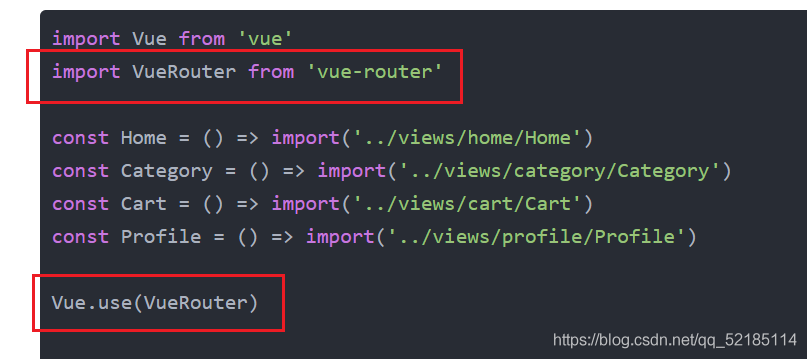
Then the problem may not be here. Next, let’s look at the problem on the browser. Its key is “use”. According to our understanding, “use” should be a function defined in Vue. Then we press and hold Ctrl and left click in vscode to find its definition. The result is no response, so the problem may appear here, We can also go to the folder and look for it. Here I provide vue2 and the folder where we have problems
This is vue2’s
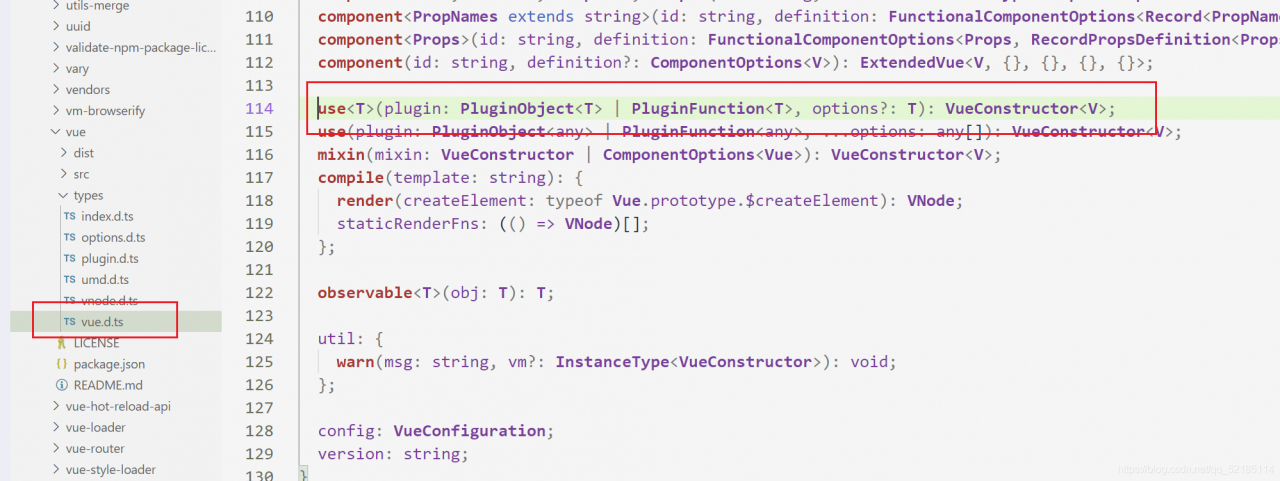
This is a problem
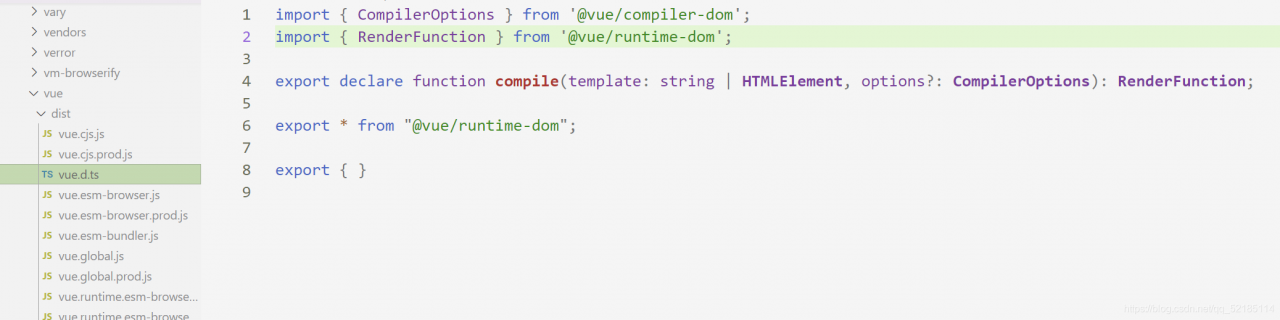
If you have an idea, you can also look in the two imported files. There is no definition, which is the reason for the error. The solution is to use another method to use routing.
import {createRouter, createWebHistory} from "vue-router";

const Home = () => import('../views/home/Home')
const Category = () => import('../views/category/Category')
const Cart = () => import('../views/cart/Cart')
const Profile = () => import('../views/profile/Profile')

const routes = [
    {
        Path: '',
        redirect: '/home'
    },
    {
        path: '/home',
        component: Home
    },
    {
        path: '/category',
        component: Category
    },
    {
        path: '/cart',
        component: Cart
    },
    {
        path: '/profile',
        component: Profile
    }
]

const router = createRouter({
    history: createWebHistory(),
    routes
})

export default router
This level is solved.