Author Archives: Robins

[Elasticsearch] es 7.12 Root mapping definition has unsupported parameters: _all

1. Scenario 1

1.1 general

An environment was upgraded from ES 6.8 to es 7.12, and then I executed a rollover API and found that an error could not be reported successfully.

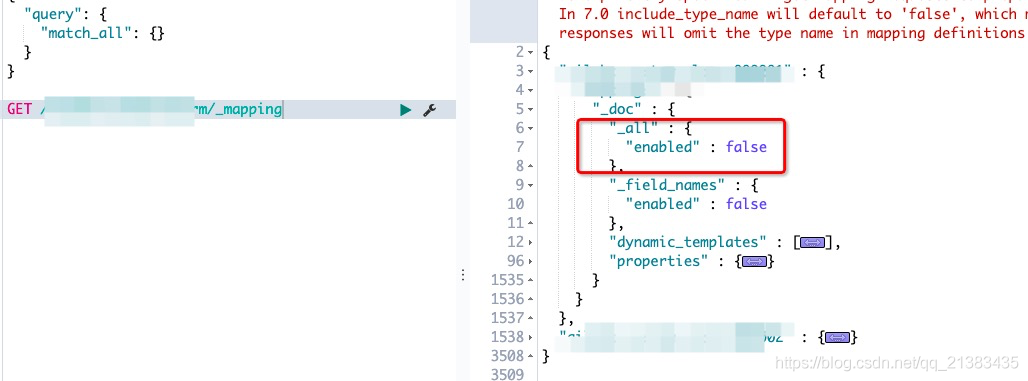
Root mapping definition has unsupported parameters: _ all

Finally, I checked the template and found that the old template has_ All field, just remove this. This is not supported in the new version

Caused by: java.lang.IllegalStateException: Ambiguou There is already ‘XXXXXXController‘ bean method

**

Errors are reported as follows:

**
Caused by: java.lang.IllegalStateException: Ambiguous mapping. Cannot map ‘com.offcn.seckill.feign.SeckillGoodsFeignn’ method
com.offcn.seckill.feign.SeckillGoodsFeignn#findPage(SeckillGoods, int, Int)
to {post/seckillgoods/search/{page}/{size}}: there is already ‘seckillgoodscontroller’ bean method
reason : there are two or more requestmapping or getmapping with the same name
solution:
1. Check whether there are the same requestmapping URLs in all other classes, If you modify different URLs, you can
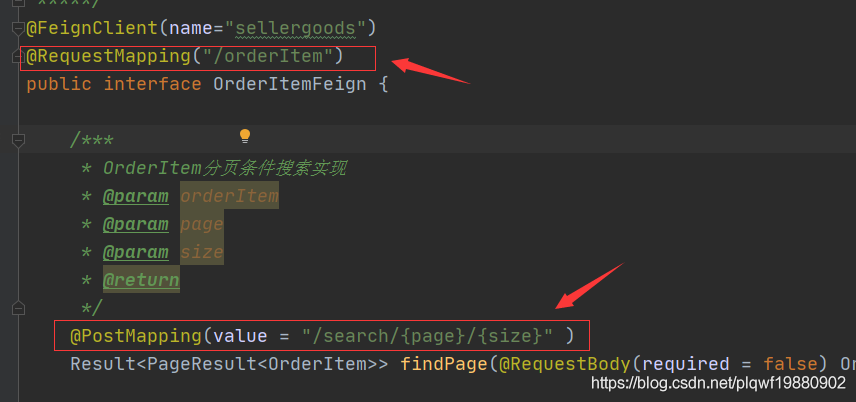
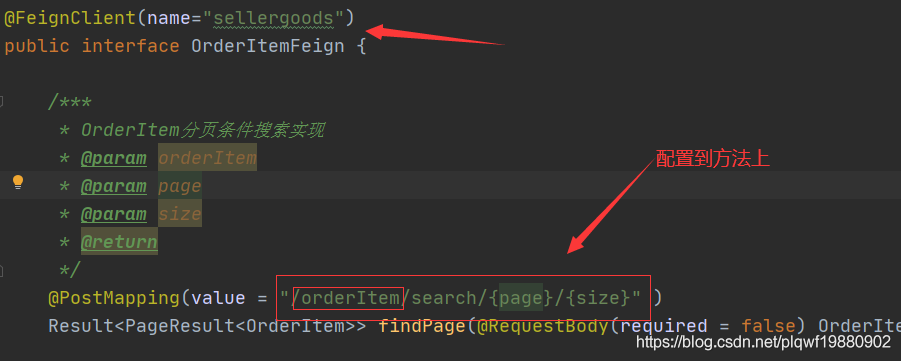
2. In the remote calling interface using feign, the requestmapping on the interface is the same as the requestmapping URL of the called class. For problems, you can configure the requestmpping URL of the interface into the method of this interface, Remove the URL configuration of interface requestmapping
for example:
and replace it with the following:
if your problem is solved, please click praise and comment to support the blogger’s hard work =

ModuleNotFoundError: No module named ‘tensorflow_core.estimator‘

Question

When using tensorflow, an error is reported: modulenotfounderror: no module named ‘tensorflow_ core.estimator’

Possible causes and corresponding solutions

1、

Problem: the Matplotlib library was not imported
solution: Import matplotlib.pyplot as plot
if the Matplotlib library is not installed, use the command CONDA install Matplotlib in the command client to install the Matplotlib library.

2、

Problem: the version of tensorflow is inconsistent with that of tensorflow estimator,
solution: check whether the current tensorflow version is consistent with that of tensorflow estimator by using the command CONDA list in the command client. If not, reduce or increase the version of one party.

[Solved] Synchronous operations are disallowed. Call ReadAsync or set AllowSynchronousIO to true instead.


#Accident scene

In the asp.net core web API project, when reading the stream stream of request.body, the following error is reported:

Synchronous operations are disallowed. Call ReadAsync or set AllowSynchronousIO to true instead.

The code is as follows:

var request = context.HttpContext.Request;
if (request.Method == "POST")
{
    request.Body.Seek(0, SeekOrigin.Begin);
    using (var reader = new StreamReader(request.Body, Encoding.UTF8))
    {
        var data = reader.ReadToEnd();
    }
}

#Solution

The synchronous reading method of the body needs to be configured in configureservices to allow synchronous reading of IO streams. Otherwise, an exception may be thrown. Call readasync or set allowsynchronous IO to true instead.
configure according to the managed service used or directly use the asynchronous reading method.

public void ConfigureServices(IServiceCollection services)
{
	//other
	
	services.Configure<KestrelServerOptions>(x => x.AllowSynchronousIO = true)
                .Configure<IISServerOptions>(x=>x.AllowSynchronousIO = true);
}

The URL is timestamped to avoid caching problems when requesting the current path again

The URL is timestamped to avoid caching problems when requesting the current path again

1. Explanation: adding a timestamp to the URL will ensure that every request initiated is different from the previous request, so as to avoid the browser caching the URL.

2. Introduce the following code in HTML head:

<script type="text/javascript">
var timeTag = sessionStorage.getItem("time") || null;  
if(!timeTag) {  //Determine if there is a timestamp in sessionStorage, if not, add a timestamp to the url and save it
var arr = location.href.split('#/');
var timestamp = new Date().getTime(); //get the timestamp of the entry item
if( location.href.indexOf('?time=') ! = -1 ){ //judge sessionStorage did not save the timestamp, but the url has a timestamp case, you need to convert the url's timestamp to the latest, to avoid the cache of the current path again request
var arr2 = location.href.split('?time=');
window.location.href = arr2[0] + '?time=' + timestamp + '#/' +arr[1];
}else { //judge sessionStorage did not save the timestamp, and the url does not have a timestamp case, timestamp added to the url
window.location.href = arr[0] + '?time=' + timestamp + '#/' +arr[1];
}
sessionStorage.setItem("time",timestamp) // store the timestamp of the current entry item
}
</script>

[Solved] GVM Error: rsync: connection unexpectedly closed & rsync: read error: Connection reset by peer (104)

Kali 2021.2 installation of GVM (original OpenVAS) stepping pit record post

In another post, I encountered many Rsync errors during the installation of GVM

rsync: read error: Connection reset by peer (104)
rsync error: error in socket IO (code 10) at io.c(794) [receiver=3.1.3]
rsync: connection unexpectedly closed (1047 bytes received so far) [generator]
rsync error: error in rsync protocol data stream (code 12) at io.c(235) [generator=3.1.3]

At the beginning, I didn’t pay attention. When this error occurs, I repeat the command again, try it several times, and finally install it. Finally, I can see the comforting it sees like your gvm-21.. 1 installation is OK.

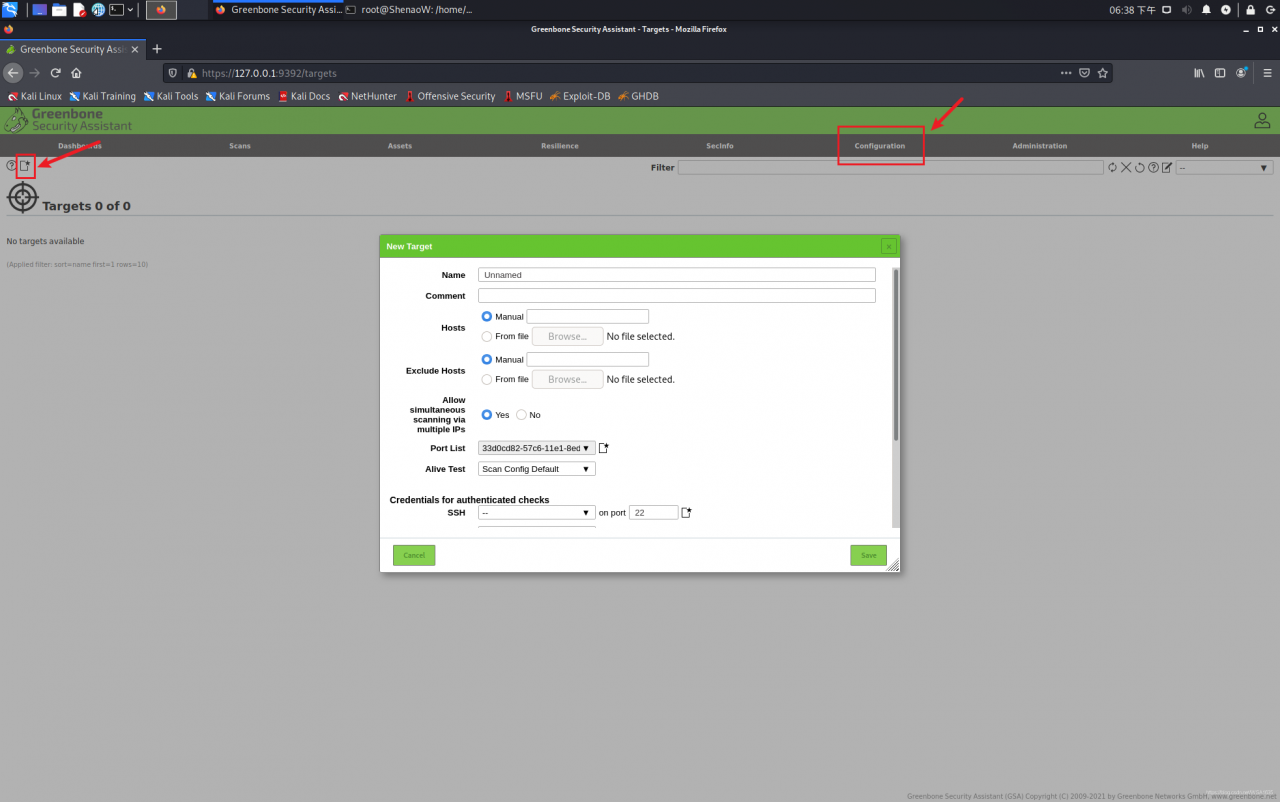
As a result, it is not expected that there will still be many bugs when using. For example, when creating new targets, the port list will not be selected, and the built-in default scanning policy will not be empty.

the reason should be that some built-in policy files are not downloaded completely, that is, the above errors occur halfway through the download, resulting in the interruption of the download

However, during the GVM check setup check, the integrity check is probably not performed, which leads to that although it sees like your gvm-21.. 1 installation is OK. , our installation is not complete

terms of settlement:

    1. on the one hand, the volume of files that need to be synchronized is too large, so too slow download speed may lead to timeout, so it is best to let the terminal shell download through an agent. For details, please refer to my another article: implement the terminal agent with proxychains, and add

proxychains

    1. before the command to let the terminal download through an agent. On the other hand, in order to avoid Rsync errors, We add

-- Rsync

    1.  after each command

In this way, our installation command becomes:
sudo proxychains GVM setup -- Rsync
sudo GVM check setup
the same is true if fix is required during check. For example, when synchronizing SCAP:
sudo proxychains runuser - U_ gvm -- greenbone-feed-sync --type SCAP --rsync

Tips: if there are any inexplicable errors in the runtime, it is mostly because the synchronization is incomplete (even if the check passes). At this time, you can sudo proxychains GVM setup -- Rsync carefully see which files are not downloaded completely in the process, and then find a way to finish it

C# Error: Import “google/protobuf/timestamp.proto“ was not found or had errors. [How to Solve]

When using c# as the development language to convert Pb files into CS files, I believe many people will encounter a very difficult problem

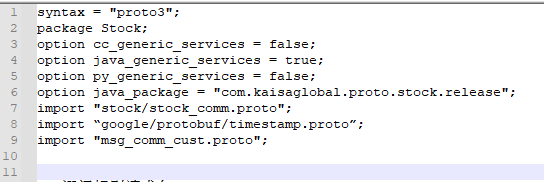
The first question: in the protoc3 environment, import timestamp. In the header, import “Google/protobuf/timestamp. Proto”; Exceptions will be thrown when: Google/protobuf/timestamp. Proto “was not found or had errors;

Solution [sharing of original articles by blogger “pamxy”:

(Note: it was found later that it is not necessary to add this directory, because the timestamp.pb.cc file generated by timestamp.proto has been compiled as the source code when compiling libprotobuf.lib file, and libprotobuf.lib is also used in compiling protoc.exe, so it is natural to default that there is already a source code, so there is no need to import it again!)
Just delete the import “Google/protobuf/timestamp. Proto”.

Second question:  ” google.protobuf.Timestamp” is not defined.

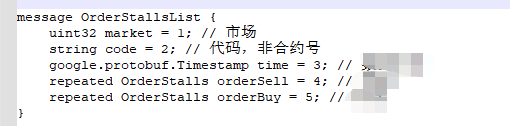
Under normal circumstances, there is no need to import google.protobuf.timestamp directly in the protoc3 environment, because in the compilation process, the problem will be read in the Lib file, but if timestamp is called in the file, it is as follows:

It is necessary to call the timestamp file in the header, but bloggers are always prompted during the call  ” google.protobuf.Timestamp” is not defined.

There is really no way, so I have to find the path of this file: timestamp.proto file in protobuf master \ SRC \ Google \ protobuf folder, directly copy the file to the same level directory of the file you want to compile, and then modify the timestamp file in the header. The call path: Import “timestamp. Proto”;

Finally, the file was finally solved…….

The third question: how to call after converting the protocol file into a CS file?

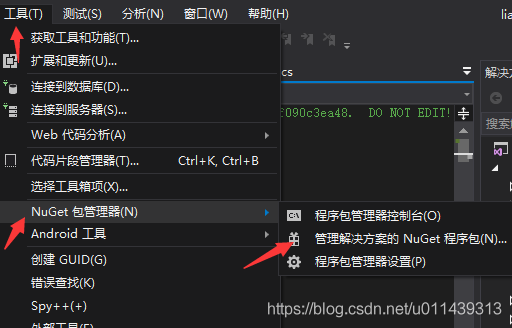
a. Found in referenced project: Tools & gt& gt; Nuget package manager & gt& gt; Nuget package for management solution & gt& gt; Search for “Google. Protocolbuffers” and install

B, directly convert the protoc file into the CS file, and call it in the project.

This small problem is recorded, which is also convenient for you to use as a reference when you encounter this problem.

[Solved] panic: runtime error: invalid memory address or nil pointer dereference

Error code:

type MongoConn struct {
	clientOptions *options.ClientOptions
	client        *mongo.Client
	collections   *mongo.Collection
}

var mongoConn *MongoConn

func InitMongoConn() error{

	ctx, cancelFunc := context.WithTimeout(context.Background(), 10*time.Second)
	defer cancelFunc()

	mongoUrl := "mongodb://" + user + ":" + password + "@" + url + "/" + dbname
	mongoConn.clientOptions = options.Client().ApplyURI(mongoUrl)
	
	//......
}

To solve the problem caused by pointer assignment:

var mongoConn MongoConn

How to Use Truffle to Deploy contracts on moonbeam

Error: Error: Expected parameter 'from' not passed to function.

EVM/moonbeam_doc/Using with Truffle/TruffleTest/MetaCoin$ truffle migrate

Compiling your contracts...
===========================
> Everything is up to date, there is nothing to compile.

Error: Expected parameter 'from' not passed to function.
    at has (/usr/local/lib/node_modules/truffle/build/webpack:/packages/expect/dist/src/index.js:10:1)
    at Object.options (/usr/local/lib/node_modules/truffle/build/webpack:/packages/expect/dist/src/index.js:19:1)
    at Object.run (/usr/local/lib/node_modules/truffle/build/webpack:/packages/migrate/index.js:65:1)
    at runMigrations (/usr/local/lib/node_modules/truffle/build/webpack:/packages/core/lib/commands/migrate.js:258:1)
    at processTicksAndRejections (internal/process/task_queues.js:93:5)
    at Object.run (/usr/local/lib/node_modules/truffle/build/webpack:/packages/core/lib/commands/migrate.js:223:1)
    at Command.run (/usr/local/lib/node_modules/truffle/build/webpack:/packages/core/lib/command.js:172:1)
Truffle v5.4.3 (core: 5.4.3)
Node v14.15.5

Solution:
add the: from parameter in trufle-config.js to indicate which account is in the deployment contract
before adding:

module.exports = {
  networks: {
    development: {
      host: "127.0.0.1",
      port: 9933,
      network_id: "*",     

    }
  }        

};

After adding:

module.exports = {
  networks: {
    development: {
      host: "127.0.0.1",
      port: 9933,
      network_id: "*",
      from: "0x6Be02d1d3665660d22FF9624b7BE0551ee1Ac91b",

    }
  }        

};

0x6Be02d1d3665660d22FF9624b7BE0551ee1Ac91b It’s the node’s built-in ethereum account.
Deploy again: truffle migrate, error reported:no signer available.

EVM/moonbeam_doc/Using with Truffle/TruffleTest/MetaCoin$ truffle migrate

Compiling your contracts...
===========================
> Everything is up to date, there is nothing to compile.


Starting migrations...
======================
> Network name:    'development'
> Network id:      1281
> Block gas limit: 15000000 (0xe4e1c0)


1_initial_migration.js
======================

   Deploying 'Migrations'
   ----------------------

Error:  *** Deployment Failed ***

"Migrations" -- Returned error: no signer available.

    at /usr/local/lib/node_modules/truffle/build/webpack:/packages/deployer/src/deployment.js:365:1
    at processTicksAndRejections (internal/process/task_queues.js:93:5)
    at Migration._deploy (/usr/local/lib/node_modules/truffle/build/webpack:/packages/migrate/Migration.js:70:1)
    at Migration._load (/usr/local/lib/node_modules/truffle/build/webpack:/packages/migrate/Migration.js:56:1)
    at Migration.run (/usr/local/lib/node_modules/truffle/build/webpack:/packages/migrate/Migration.js:217:1)
    at Object.runMigrations (/usr/local/lib/node_modules/truffle/build/webpack:/packages/migrate/index.js:150:1)
    at Object.runFrom (/usr/local/lib/node_modules/truffle/build/webpack:/packages/migrate/index.js:110:1)
    at Object.run (/usr/local/lib/node_modules/truffle/build/webpack:/packages/migrate/index.js:87:1)
    at runMigrations (/usr/local/lib/node_modules/truffle/build/webpack:/packages/core/lib/commands/migrate.js:258:1)
    at Object.run (/usr/local/lib/node_modules/truffle/build/webpack:/packages/core/lib/commands/migrate.js:223:1)
    at Command.run (/usr/local/lib/node_modules/truffle/build/webpack:/packages/core/lib/command.js:172:1)
Truffle v5.4.3 (core: 5.4.3)
Node v14.15.5

View account
enter the truss console first:

truffle console

Default account:

The truss migrate command runs the migration footprint deployment contract.

Which account is used when executing truss migrate
web3.eth.defaultaccount – default account

The web3.eth.defaultaccount attribute records the default address. If the from attribute is not specified in the following method, the value of the web3.eth.defaultaccount attribute will be used as the default from attribute value.

web3.eth.sendTransaction()web3.eth.call()new web3.eth.Contract() -> myContract.methods.myMethod().call()new web3.eth.Contract() -> myContract.methods.myMethod().send()

Call:

web3.eth.defaultAccount

Attribute:
string – 20 bytes: Ethereum address. You should save the private key of the address in the node or keystore. The default value is undefined

Example code:

web3.eth.defaultAccount;
> undefined

// set the default account
web3.eth.defaultAccount = '0x11f4d0A3c12e86B4b5F39B213F7E19D048276DAe';

Ganache cli has 10 preset accounts, and truss migrate uses the first preset account for deployment contracts by default.

truss migrate What did you do

///truffle/packages/core/lib/commands/deploy.js

const migrate = require("./migrate");

const command = {
  command: "deploy",
  description: "(alias for migrate)",
  builder: migrate.builder,
  help: {
    usage:
      "truffle deploy [--reset] [-f <number>] [--compile-all] [--verbose-rpc]",
    options: migrate.help.options,
    allowedGlobalOptions: ["network", "config"]
  },
  run: migrate.run
};

module.exports = command;

Call the deploy() function:

//truffle/packages/contract/lib/execute.js

  /**
   * Deploys an instance
   * @param  {Object} constructorABI  Constructor ABI segment w/ inputs & outputs keys
   * @return {PromiEvent}             Resolves a TruffleContract instance
   */
  deploy: function (constructorABI) {
    const constructor = this;
    const web3 = constructor.web3;

    return function () {
      let deferred;
      const promiEvent = new PromiEvent(false, constructor.debugger, true);

      execute
        .prepareCall(constructor, constructorABI, arguments)
        .then(async ({ args, params, network }) => {
          const { blockLimit } = network;

          utils.checkLibraries.apply(constructor);

          // Promievent and flag that allows instance to resolve (rather than just receipt)
          const context = {
            contract: constructor,
            promiEvent,
            onlyEmitReceipt: true
          };

          const options = {
            data: constructor.binary,
            arguments: args
          };

          const contract = new web3.eth.Contract(constructor.abi);
          params.data = contract.deploy(options).encodeABI();

          params.gas = await execute.getGasEstimate.call(
            constructor,
            params,
            blockLimit
          );

          context.params = params;

          promiEvent.eventEmitter.emit("execute:deploy:method", {
            args,
            abi: constructorABI,
            contract: constructor
          });
		  
          deferred = execute.sendTransaction(web3, params, promiEvent, context); //the crazy things we do for stacktracing...

          try {
            const receipt = await deferred;
            if (receipt.status !== undefined && !receipt.status) {
              const reason = await Reason.get(params, web3);

              const error = new StatusError(
                params,
                context.transactionHash,
                receipt,
                reason
              );

              return context.promiEvent.reject(error);
            }

            const web3Instance = new web3.eth.Contract(
              constructor.abi,
              receipt.contractAddress
            );
            web3Instance.transactionHash = context.transactionHash;

            context.promiEvent.resolve(new constructor(web3Instance));
          } catch (web3Error) {
            // Manage web3's 50 blocks' timeout error.
            // Web3's own subscriptions go dead here.
            await override.start.call(constructor, context, web3Error);
          }
        })
        .catch(promiEvent.reject);

      return promiEvent.eventEmitter;
    };
  },

Preparecall() function:

  /**
   * Prepares simple wrapped calls by checking network and organizing the method inputs into
   * objects web3 can consume.
   * @param  {Object} constructor   TruffleContract constructor
   * @param  {Object} methodABI     Function ABI segment w/ inputs & outputs keys.
   * @param  {Array}  _arguments    Arguments passed to method invocation
   * @return {Promise}              Resolves object w/ tx params disambiguated from arguments
   */
  prepareCall: async function (constructor, methodABI, _arguments) {
    let args = Array.prototype.slice.call(_arguments);
    let params = utils.getTxParams.call(constructor, methodABI, args);

    args = utils.convertToEthersBN(args);

    if (constructor.ens && constructor.ens.enabled) {
      const { web3 } = constructor;
      const processedValues = await utils.ens.convertENSNames({
        networkId: constructor.network_id,
        ensSettings: constructor.ens,
        inputArgs: args,
        inputParams: params,
        methodABI,
        web3
      });
      args = processedValues.args;
      params = processedValues.params;
    }

    const network = await constructor.detectNetwork();
    return { args, params, network };
  },

Sendtransaction() function

  //our own custom sendTransaction function, made to mimic web3's,
  //while also being able to do things, like, say, store the transaction
  //hash even in case of failure.  it's not as powerful in some ways,
  //as it just returns an ordinary Promise rather than web3's PromiEvent,
  //but it's more suited to our purposes (we're not using that PromiEvent
  //functionality here anyway)
  //input works the same as input to web3.sendTransaction
  //(well, OK, it's lacking some things there too, but again, good enough
  //for our purposes)
  sendTransaction: async function (web3, params, promiEvent, context) {
    //if we don't need the debugger, let's not risk any errors on our part,
    //and just have web3 do everything
    if (!promiEvent || !promiEvent.debug) {
      const deferred = web3.eth.sendTransaction(params);
      handlers.setup(deferred, context);
      return deferred;
    }
    //otherwise, do things manually!
    //(and skip the PromiEvent stuff :-/ )
    return sendTransactionManual(web3, params, promiEvent);
  }

Compare and analyze how the deployment script deploy.js calls the web3.js interface to deploy a contract:

//filename: deploy.js

const Web3 = require('web3');
const contractFile = require('./compile');

/*
   -- Define Provider & Variables --
*/
// Provider
const providerRPC = {
   development: 'http://localhost:8545',
};
const web3 = new Web3(providerRPC.development); //Change to correct network

// Variables
const account_from = {
   privateKey: 'YOUR-PRIVATE-KEY-HERE',
   address: 'PUBLIC-ADDRESS-OF-PK-HERE',
};
const bytecode = contractFile.evm.bytecode.object;
const abi = contractFile.abi;

/*
   -- Deploy Contract --
*/
const deploy = async () => {
   console.log(`Attempting to deploy from account ${account_from.address}`);

   // Create Contract Instance
   const incrementer = new web3.eth.Contract(abi);

   // Create Constructor Tx
   const incrementerTx = incrementer.deploy({
      data: bytecode,
      arguments: [5],
   });

   // Sign Transacation and Send
   const createTransaction = await web3.eth.accounts.signTransaction(
      {
         data: incrementerTx.encodeABI(),
         gas: await incrementerTx.estimateGas(),
      },
      account_from.privateKey
   );

   // Send Tx and Wait for Receipt
   const createReceipt = await web3.eth.sendSignedTransaction(
      createTransaction.rawTransaction
   );
   console.log(
      `Contract deployed at address: ${createReceipt.contractAddress}`
   );
};

deploy();

Will the slave account be involved in calling the RPC interface of Ethereum to initiate a deployment contract

What does moonbeam’s truss box do to make it compatible with truss migrate

Related contents:
https://www.trufflesuite.com/docs/truffle/getting-started/interacting-with-your-contracts

Truffle/NPM error “expected parameter ‘from’ not passed to function”
truffle practice
Default truffle project gives’ expected parameter ‘from’ not passed to function. ‘error after’ truffle migrate ‘command #548

Explain truffle migrations in detail – contract deployment is no longer confused
Ethereum development learning notes – truffle migrate

[Solved] Android Studio Compile error: Cannot use connection to Gradle distribution . as it has been stopped.

Article catalog

1、 Error message II. Solution


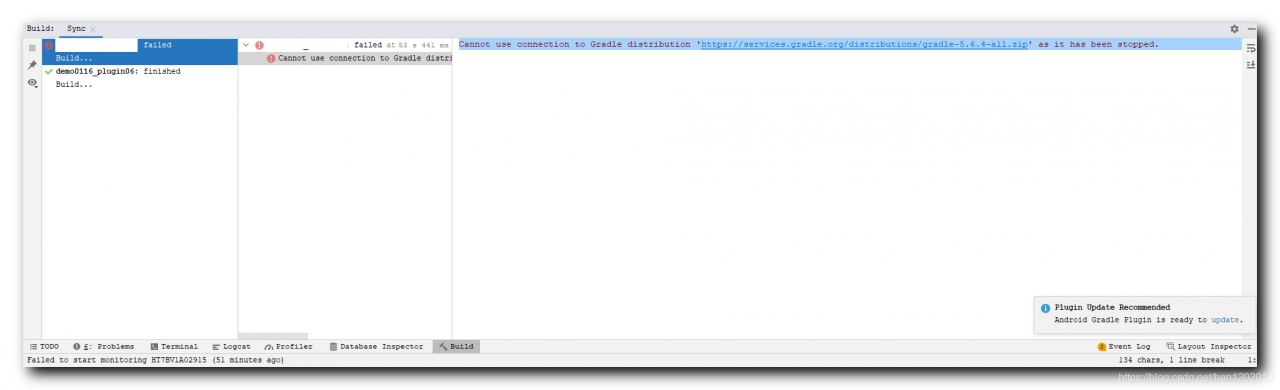
1、 Error message


Cannot use connection to Gradle distribution 'https://services.gradle.org/distributions/gradle-5.6.4-all.zip' as it has been stopped.


2、 Solution


Occasional errors disappear after recompilation. This problem is encountered only once, and a record is made here;

Nginx Startup Error: Job for nginx.service failed because the control process exited with error code

When we use systemctl     restart   When the nginx command restarts the service, an error is found as follows:

Job for nginx.service failed because the control process exited with error code. See "systemctl status nginx.service" and "journalctl -xe" for details.

First, we can use systemctl     status   nginx   View current nginx status

systemctl status nginx
● nginx.service - nginx - high performance web server
   Loaded: loaded (/usr/lib/systemd/system/nginx.service; disabled; vendor preset: disabled)
   Active: failed (Result: exit-code) since Fri 2021-08-06 15:04:33 CST; 4min 10s ago
     Docs: http://nginx.org/en/docs/
  Process: 2099 ExecStop=/bin/sh -c /bin/kill -s TERM $(/bin/cat /var/run/nginx.pid) (code=exited, status=0/SUCCESS)
  Process: 2131 ExecStart=/usr/sbin/nginx -c /etc/nginx/nginx.conf (code=exited, status=1/FAILURE)
 Main PID: 1498 (code=exited, status=0/SUCCESS)

Aug 06 15:04:33 localhost.localdomain systemd[1]: Starting nginx - high performance web s.....
Aug 06 15:04:33 localhost.localdomain nginx[2131]: nginx: [warn] the "ssl" directive is d...:5
Aug 06 15:04:33 localhost.localdomain nginx[2131]: nginx: [emerg] cannot load certificate...e)
Aug 06 15:04:33 localhost.localdomain systemd[1]: nginx.service: control process exited, ...=1
Aug 06 15:04:33 localhost.localdomain systemd[1]: Failed to start nginx - high performanc...r.
Aug 06 15:04:33 localhost.localdomain systemd[1]: Unit nginx.service entered failed state.
Aug 06 15:04:33 localhost.localdomain systemd[1]: nginx.service failed.
Hint: Some lines were ellipsized, use -l to show in full.

The first method: we find that the port is occupied, and use the command to view the process of the occupied port: netstat – anltp |  grep   eighty

View the occupied process number   Then kill   – nine   Process number   Restart after killing the process

The second method: we may have configuration errors when modifying the/etc/nginx/conf.d/default.conf or/etc/nginx/nginx.conf file. Recheck the editing. If we really can’t find the error, we can enter the error log of nginx to check: Tail – F/var/log/nginx/error.log     Specific modifications can be made according to the error file of nginx