Author Archives: Robins

Mac Error: sh: vue-cli-service: command not found

# Clear buffer NPM cache clean — force

#Reinstall NPM/cnpm install

Another online article, roughly said three solutions

1. Reinstall the
Folder node_ Modules are deleted and reinstalled by executing NPM/cnpm install

2. Specify path

./node_ modules/.bin/vue-cli-service build

3. Global installation

npm install @vue/cli-service -g

4. Environment variable node_ ENV=production

Try a few more times. You can refer to it for other reasons https://stackoverflow.com/questions/51172064/command-not-found-with-vue-cli

[Solved] Vue Error: Uncaught TypeError: Cannot read property ‘getters‘ of undefined

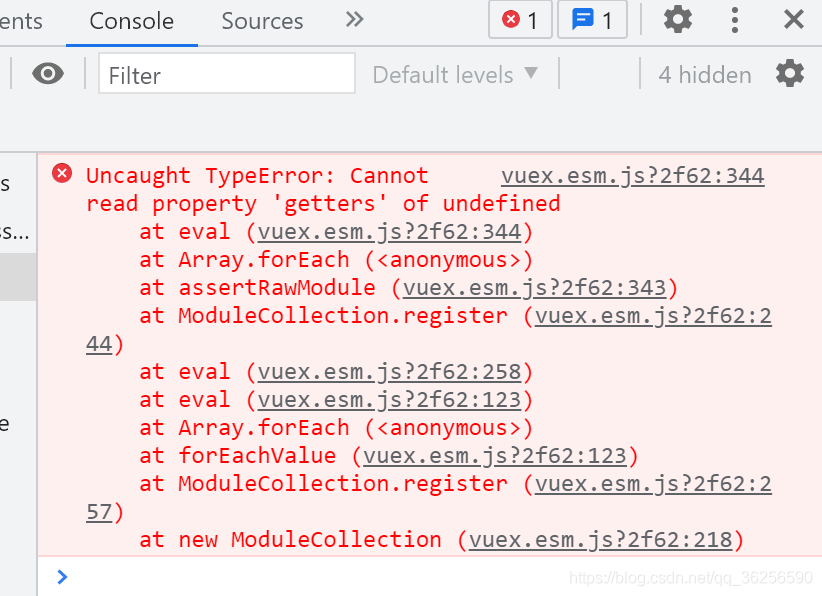
The error is as follows:

Cause analysis

I wanted to add a public data source in the modules folder under the store directory to cache data for sharing by multiple components, but I haven’t finished writing it yet. Therefore, this error is reported.

Solution:

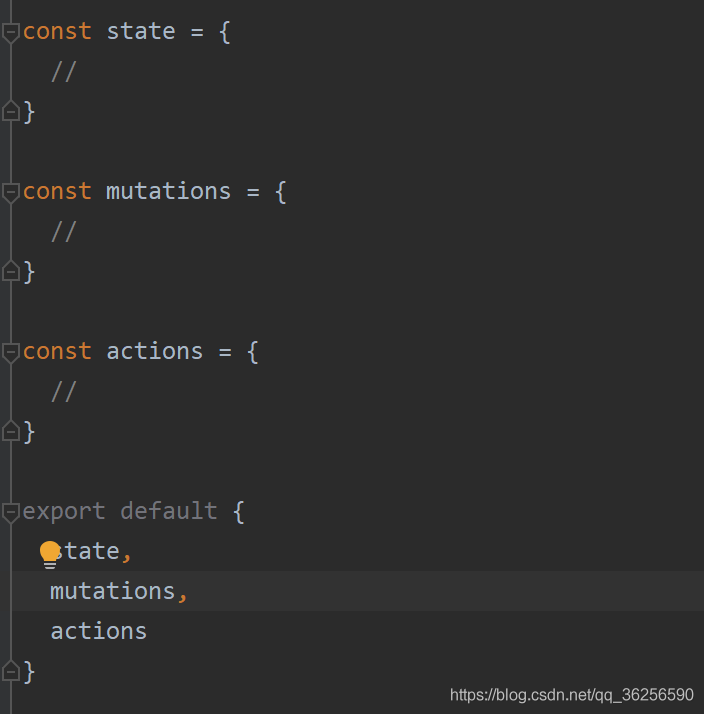
Write the basic structure completely. As follows:
the directory is: store/modules/xxx. JS

Novices continue to grope for themselves

[Solved] Error during installation of nginx: Make: * * * [build] error 2

Run command:
sudo ./configure –prefix=/etc/ngin –with-http_ssl_module –with-openssl=/usr/bin/openssl –with-openssl=/usr/local/openssl-1.0.1t/

executable

root@ubuntuserver4:/usr/local/nginx-1.11.3# sudo make
make -f objs/Makefile
make[1]: Entering directory `/usr/local/nginx-1.11.3'
cd /usr/local/openssl-1.0.1t/ \
        && if [ -f Makefile ]; then make clean; fi \
        && ./config --prefix=/usr/local/openssl-1.0.1t//.openssl no-shared  \
        && make \
        && make install_sw LIBDIR=lib
/bin/sh: 1: cd: can't cd to /usr/local/openssl-1.0.1t/
make[1]: *** [/usr/local/openssl-1.0.1t//.openssl/include/openssl/ssl.h] Error 2
make[1]: Leaving directory `/usr/local/nginx-1.11.3'
make: *** [build] Error 2

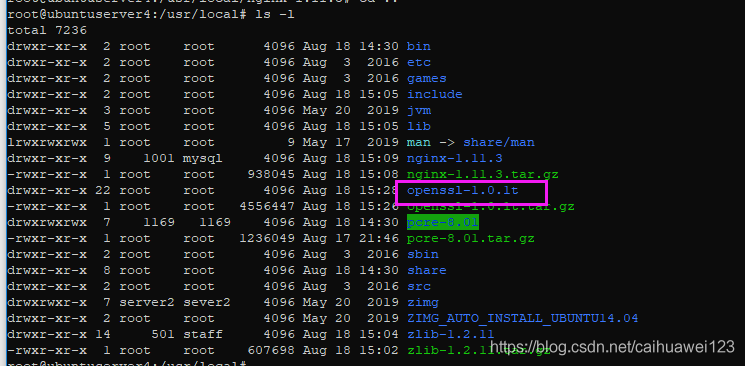
Found a missing openssl-1.0.1t
Get it and re-run sudo . /configure –prefix=/etc/nginx –with-http_ssl_module –with-openssl=/usr/bin/openssl –with-openssl=/usr/local/openssl-1.0.1t/ and you’re done!

Vue el-table Error: Duplicated keys detected This may casuse an update error

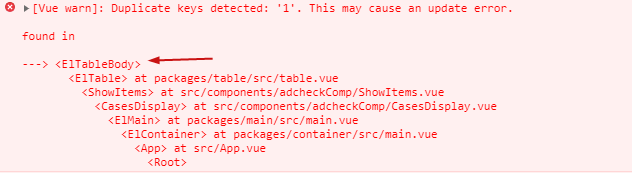
Errors are similar to

The component used is El table. Combined with the prompt in the figure, the key should be repeated when TL table renders the row node again.

El table has an EL key attribute. My assignment is: row key = “step”_ id”

Combined with data, step_ ID does have a duplicate. Replace with:

row-key=”id”

A key value that will not be repeated will solve the problem.

[Solved] SpringMVC Run Error: SEVERE-Servlet.service() for servlet jsp threw exception

Today, I was learning spring MVC. Everything was difficult at the beginning. I didn’t expect it to be so difficult. The most basic Hello World was trapped for half an hour. The main problem was that Tomcat 10 version didn’t adapt to and Maven relied on. The error was: servlet. Service () for servlet JSP thread exception Java. Lang. NullPointerException , and the following is the specific solution

Read the original text

At the beginning of writing dependency, I found that groupid in the book was javax , and I had suffered such a loss before. In order to adapt it to my Tomcat 10, I changed it to Jakarta . As a result, when writing controller , the method can only recognize javax , and I can’t change the source code again, There is no way to replace dependence with this

<dependency>
    <groupId>javax.servlet</groupId>
    <artifactId>javax.servlet-api</artifactId>
    <version>4.0.1</version>
</dependency>
<dependency>
    <groupId>javax.servlet.jsp</groupId>
    <artifactId>javax.servlet.jsp-api</artifactId>
    <version>2.3.3</version>
</dependency>

Not surprisingly, when the Tomcat server is executed, it always reports an error saying that org.springframework.web.servlet.dispatcherservlet in the configuration file is not a servlet, so there is no way but to change the method

I thought Maven could play Tomcat plug-in and paste the dependent code immediately

<build>
    <plugins>
        <plugin>
            <groupId>org.apache.tomcat.maven</groupId>
            <artifactId>tomcat7-maven-plugin</artifactId>
            <version>2.2</version>
        </plugin>
    </plugins>
</build>

Continue to run and report an error: servlet. Service () for servlet JSP thread exception Java. Lang. NullPointerException , go to stackoverflow and say that the range must be set to provided , and then run to display it. Later, switch back to normal tomcat operation with a try state, but the result is still not good

PS: finally switched back to Tomcat version 9.052
[Solved] CentOS build a docker error: job for docker.service failed….

Build docker in centos.
At first everything went well, but after configuring the image, I restarted docker and got an error
Restarting docker reports the following error message:
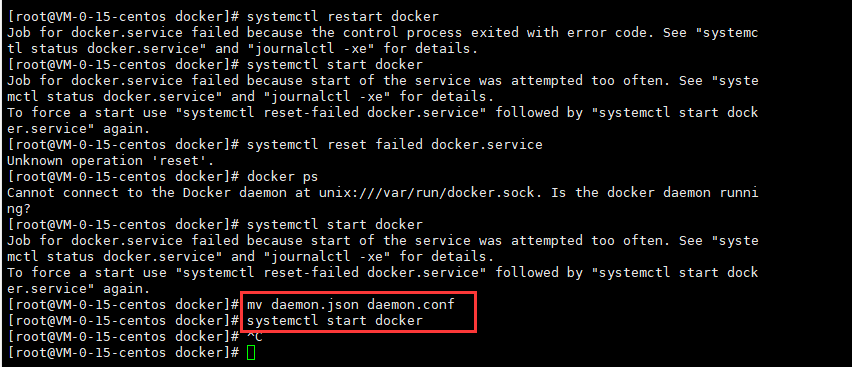
Job for docker.service failed because the control process exited with error code. See “systemctl status docker.service” and “journalctl -xe” for details.
The start docker error message reads:
Job for docker.service failed because start of the service was attempted too often. See “systemctl status docker.service” and “journalctl -xe” for details.
To force a start use “systemctl reset-failed docker.service” followed by “systemctl start docker.service” again.

Reason for the problem: daemon file suffix format causes reboot/boot failure
The solution is
1、Enter the docker directory: cd /etc/docker
2、Modify the suffix of daemon file: mv daemon.json daemon.conf
3, restart/start docker: systemctl start docker

image852×367 12.3 KB

[Solved] Invalid Gradle JDK configuration found. Open Gradle Settings Change JDK location

The project was fine before it was opened for a period of time, and then an error was suddenly reported after it was opened. After understanding it, it is found that deleting the gradle.xml file in the. Idea file and then rebuilding it can be generated automatically;

After comparing the previous documents, it is found that a label is missing in the document:

<option name="gradleJvm" value="11" />

The value values of different JDK versions are different, so to be on the safe side, do not modify or add the values inside. Just delete the file and regenerate it;

Cli Write Error: This is related to npm not being able to find a file. [Solved]

npm ERR! path C:\Users\admin\AppData\Roaming\npm\node_modules\lcli\bin\l
npm ERR! code ENOENT
npm ERR! errno -4058
npm ERR! syscall chmod
npm ERR! enoent ENOENT: no such file or directory, chmod ‘C:\Users\admin\AppData\Roaming\npm\node_modules\lcli\bin\l’
npm ERR! enoent This is related to npm not being able to find a file.
npm ERR! enoent
npm ERR! A complete log of this run can be found in:
npm ERR!     C:\Users\admin\AppData\Roaming\npm-cache\_logs\2021-08-15T05_05_12_841Z-debug.log

Write the cli by hand and report an error, it won’t work.

Solution:
You need to open the first line of the path, and then delete the package, re-run the npm link can be

[Solved] SpringBoot integration with Redis error: java.net.ConnectException: Connection refused: no further information

Error message

springboot integrated redis error reason:
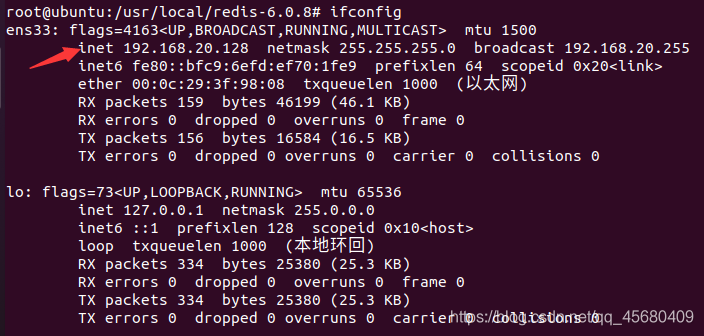
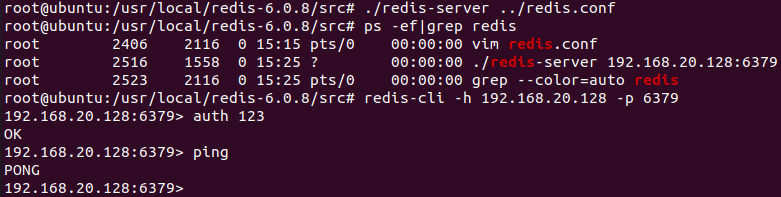
you need to modify the bind in the redis.conf configuration file to your own IP address in Linux

redis.conf configuration file

start the service (123 is the password set by myself, set in redis.conf)

Finally, don’t forget to modify the redis configuration file

# Redis database index (default is 0)
spring.redis.database=0
# Redis server address
spring.redis.host=192.168.20.128
# Redis server connection port
spring.redis.port=6379
# Redis server connection password (default is empty)
spring.redis.password=123
# Maximum number of connections to the connection pool (use negative values to indicate no limit)
spring.redis.pool.max-active=8
# Maximum connection pool blocking wait time (use negative values to indicate no limit)
spring.redis.pool.max-wait=-1
# The maximum idle connections in the connection pool
spring.redis.pool.max-idle=8
# The minimum idle connections in the connection pool
spring.redis.pool.min-idle=0
# Connection timeout (milliseconds)
spring.redis.timeout=5000

Linux rhel7/centos7 source code compilation and installation Emacs Error NO x toolkit could be found

Specific error reporting:

checking for libXaw… configure: error: No X toolkit could be found. If you are sure you want Emacs compiled without an X toolkit, pass –with-x-toolkit=no to configure. Otherwise, install the development libraries for the toolkit that you want to use (e.g. Gtk+) and re-run configure.

After repeatedly confirming that GTK and corresponding GTK devel files have been installed,

yum install gtk3-devel.x86_ 64 gtk3.x86_ sixty-four

yum install gtk2-devel.x86_ 64 gtk2.x86_ sixty-four

Still report the same error,

Locate libxaw found existing library files (Yum install libxaw.x86)_ 64 (or installed by default)

Finally, it was found that the corresponding devel package, libxaw-devel.x86, was not installed_ sixty-four

yum install libXaw-devel.x86_ 64 installation,

Execute./configure again. The error will disappear. If there are other errors,

Similarly, install the corresponding devel library

Qttssessionbegin failed, error code: 25000 solution for Ubuntu development of iFLYTEK voice wake-up function

        The official error code is described as “the engine is not initialized”, so please first check whether it has been initialized, and then confirm that the link to libmsc.os and libw is entered at compile time_ ivw.os。 At this time, if 25000 is still reported as initialization error, you can set variables   LD_ LIBRARY_ Path solution:

1 open the. Bashrc file

sudo ./bashrc

2 add at the end of the file

export LD_LIBRARY_PATH=$LD_LIBRARY_PATH:/PATH

Replace/path with libmsc.os and libw_ Ivw.os is the directory of two dynamic libraries. Save the changes.

Then close the command line window and reopen it to run.